

Milfy Phone Clock
- ダウンロード商品¥ 300
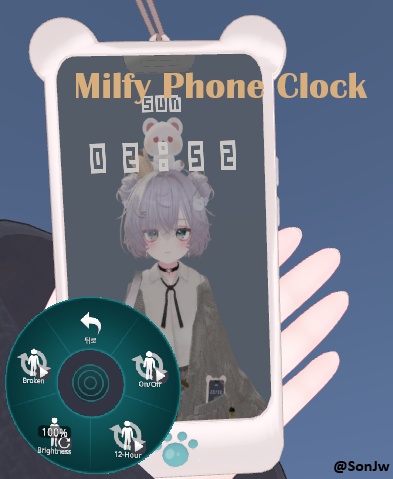
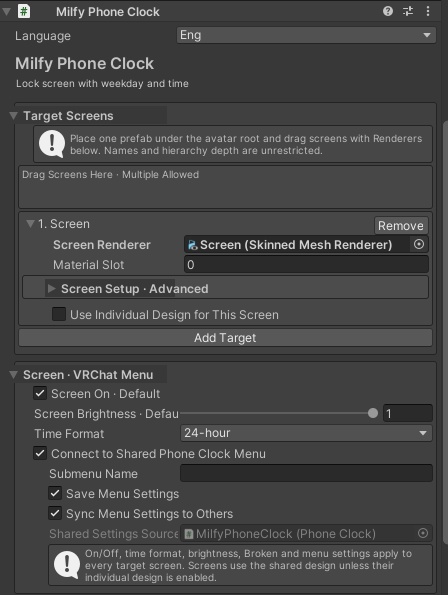
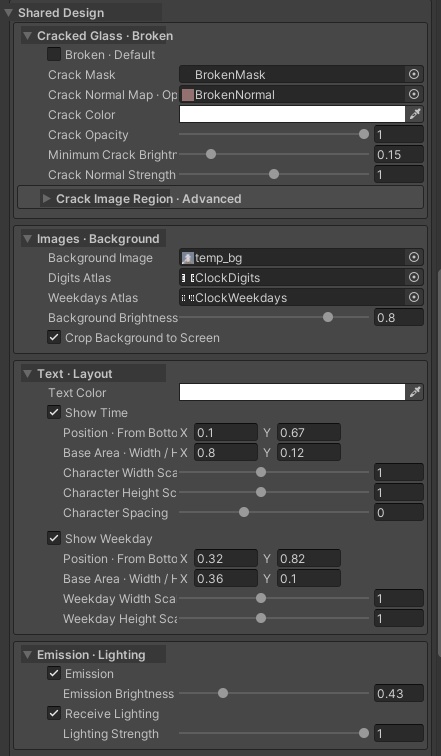


Overview / 개요 / 概要 English A real-time clock gimmick for VRChat avatar screens. Supports 12/24-hour time, weekday display, custom wallpapers and fonts, and multiple screens controlled by one menu. Tested with Milfy’s smartphone. Other avatar screens may also work, but have not been tested. PC only. Requires VRChat SDK Avatars, Modular Avatar and NDMF. No external clock application or OSC setup is needed. Avatar and smartphone models are not included. Each viewer sees the time in their own VRChat preferred time zone. 한국어 VRChat 아바타의 화면에 실시간 시계를 표시하는 기믹입니다. 12/24시간제, 요일 표시, 배경·폰트 교체를 지원하며 하나의 메뉴로 여러 화면을 제어할 수 있습니다. 밀피의 스마트폰에서 테스트했습니다. 다른 아바타의 화면에도 적용될 수 있으나, 테스트하지 않았습니다. PC 전용입니다. VRChat SDK Avatars, Modular Avatar, NDMF가 필요합니다. 외부 시계 프로그램이나 OSC 설정은 필요하지 않습니다. 아바타·스마트폰 모델은 포함하지 않습니다. 보는 사람의 VRChat 선호 시간대를 표시합니다. 日本語 VRChatアバターの画面にリアルタイムの時計を表示するギミックです。12/24時間制、曜日表示、壁紙・フォントの変更に対応し、一つのメニューで複数の画面を操作できます。 ミルフィのスマートフォンで動作確認しています。他のアバターの画面にも適用できる可能性がありますが、動作確認は行っていません。 PC専用です。VRChat SDK Avatars、Modular Avatar、NDMFが必要です。外部時計アプリやOSC設定は不要です。アバター・スマートフォンモデルは含まれません。見る人のVRChatの優先タイムゾーンで表示します。 Setup / 적용방법 / 適用方法 English 1. Import the package and place one prefab directly under your avatar root. 2. Drag your smartphone’s screen GameObject or Renderer into Target Screens in the prefab’s Inspector. 3. Setup is complete with the included wallpaper and font. Adjust the screen settings if needed, then upload your avatar. To change the wallpaper, assign your preferred image to Background Image. 한국어 1. 패키지를 임포트하고 프리팹 하나를 아바타 루트 바로 아래에 배치합니다. 2. 프리팹 Inspector의 목적지 화면에 스마트폰의 화면 오브젝트 또는 Renderer를 드래그합니다. 3. 기본 배경·폰트로 설치가 완료됩니다. 필요하면 화면 설정을 조절한 뒤 아바타를 업로드합니다. 배경을 바꾸려면 배경 이미지에 원하는 이미지를 지정하세요. 日本語 1. パッケージをインポートし、プレハブをアバタールート直下に一つ配置します。 2. プレハブのInspectorの対象画面に、スマートフォンの画面GameObjectまたはRendererをドラッグします。 3. 付属の標準壁紙・フォントで導入は完了です。必要に応じて画面設定を調整し、アバターをアップロードします。 壁紙を変更する場合は、背景画像に好きな画像を指定してください。 Custom Font / 폰트 변경 / フォント変更 English 1. Import your preferred TTF/OTF font into Unity and set Character → Dynamic. 2. Open SonJw → Milfy Phone Clock → Font Atlas Generator. Select Font and Font Style, then click Generate Two PNG Atlases. 3. Assign the generated ClockDigits.png and ClockWeekdays.png to Digits Atlas / Weekdays Atlas in the prefab’s Inspector. Generation overwrites the existing atlas PNGs. Back them up first. You can skip these steps when using the included default font. See FontAtlasGuide for details. 한국어 1. 원하는 TTF/OTF 폰트를 Unity에 넣고 Character → Dynamic으로 설정합니다. 2. SonJw → Milfy Phone Clock → Font Atlas Generator를 엽니다. Font와 Font Style을 선택하고 Generate Two PNG Atlases를 누릅니다. 3. 생성된 ClockDigits.png와 ClockWeekdays.png를 프리팹 Inspector의 숫자 아틀라스 / 요일 아틀라스에 지정합니다. 생성 시 기존 아틀라스 PNG를 덮어쓰므로 먼저 백업하세요. 기본 폰트를 사용하면 이 과정은 생략할 수 있습니다. 자세한 내용은 FontAtlasGuide를 참고하세요. 日本語 1. 好きなTTF/OTFフォントをUnityにインポートし、Character → Dynamicに設定します。 2. SonJw → Milfy Phone Clock → Font Atlas Generatorを開きます。FontとFont Styleを選び、Generate Two PNG Atlasesを押します。 3. 生成されたClockDigits.pngとClockWeekdays.pngを、プレハブのInspectorの数字アトラス / 曜日アトラスに指定します。 生成すると既存のアトラスPNGが上書きされるため、先にバックアップしてください。付属の標準フォントを使う場合、この手順は不要です。詳しくはFontAtlasGuideをご覧ください。