

# 【VRChat / Modular Avatar対応】焚き火の魔法箒 v1.0.0 (Synapse Campfire Broom) # 【VRChat / MA 지원】캠프파이어 마법 빗자루 v1.0.0 (Synapse Campfire Broom)
- ダウンロード商品¥ 0
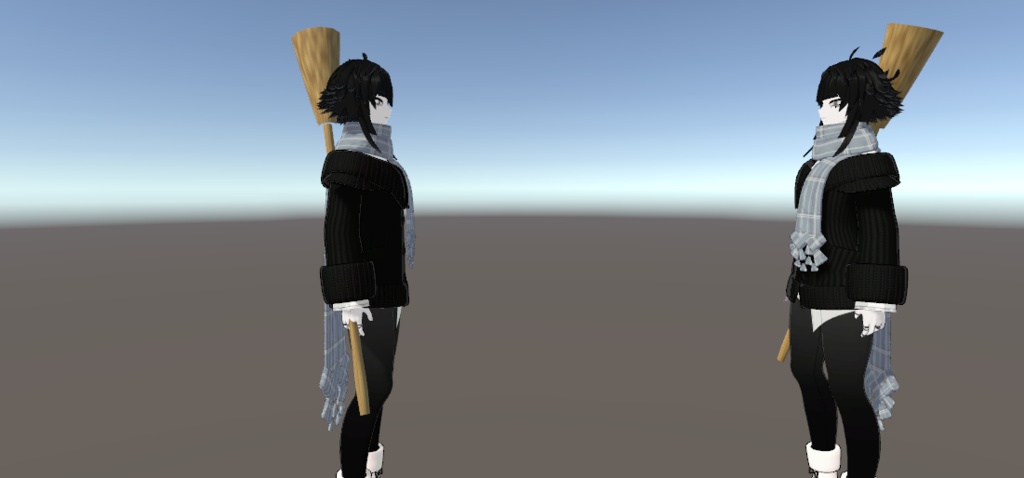

Synapse Campfire Broom 🧹 [Halloween Free Gift 🎃] 手には魔法の箒。ひと休みには、小さな焚き火。 ハロウィン記念の無料プレゼントギミックです! 魔法使いのような記念撮影にも、フレンドと囲む休憩時間にも。手持ちの箒(ほうき)と焚き火の演出を組み合わせた小物ギミックをお楽しみください。 ✨ 特徴 - 右手に箒を装着: Synapse > Broom > Equip でON/OFF。 - 掃く演出と効果音: ハンドジェスチャーに連動した、箒の掃き演出と効果音を収録。 - 焚き火エフェクト: 点火・燃焼・消火までの一連の演出を収録。 ※画像はUnity上の適用イメージです。 🎛️ かんたん位置調整 専用の Unityエディター用調整ツール(リモコン) で、位置・角度を微調整できます。日本語・English・한국어 に対応しています。 ボタンによる移動・回転はカメラ基準、数値入力はローカル座標です。 📦 内容・仕様 価格:無料・0円(ハロウィン記念配布 🎃) - 同期パラメータ使用量: 3 bits(箒のON/OFF:1 bit+焚き火の状態:2 bits) - 必要環境: Unity 2022.3.22f1 / VRChat Avatars SDK / Modular Avatar - 同梱物: 完成Prefab、モデル、マテリアル、テクスチャ、アニメーション、効果音、専用Unityリモコン、導入説明書 配布ファイル: Synapse_Campfire_Broom_v1.0.0.unitypackage 🛠️ 導入手順 1. 必要環境を導入済みのプロジェクトへ、パッケージをインポートします。 2. Synapse_Campfire_Broom.prefab をアバター直下へ配置します。 3. Unity上部の Synapse メニューから専用リモコンを開き、位置・角度を調整します。 4. シーンを保存し、VRChatへアップロードします。 ⚠️ ご利用前の注意点 - 動作について: 「掃く」演出はハンドジェスチャーで動作します。飛行・移動機能(乗り物機能)はありません。 - 調整・保存について: 専用リモコンはUnity編集用ツールです。必ず Edit Mode で調整し、シーンを保存してください。Play Mode中の変更は、終了時に元に戻ります。 - 非同梱: 画像内のアバター・衣装・背景等は付属しません。 📜 利用規約 - 著作権: 本ギミックの著作権は制作者(Synapse)に帰属します。 - 商用利用・改変: 許可します。配信・動画収益化・イベント利用・フィッティング等にご利用いただけます。 - アセットデータの再配布・転売: 禁止します。改変の有無を問わず、本ギミックのデータを第三者へ配布・販売することは禁止します。 - Publicアバターへの使用: 本ギミックの使用は許可します。ただし、アバター本体や併用する他のアセットについても、各制作者の規約でPublic化が許可されていることを確認し、それぞれの規約を厳守してください。 Synapse Campfire Broom 🧹 [Halloween Free Gift 🎃] A magical broom in hand. A cozy campfire when it’s time for a break. A free avatar gimmick to celebrate Halloween! Pose with a magical broom, or gather around a little campfire with friends. Enjoy a handheld prop that brings both moments to your avatar. ✨ Features - Equip a broom in your right hand: Toggle it through Synapse > Broom > Equip. - Sweeping effects and sound: Includes broom sweeping effects and sound effects triggered by hand gestures. - Campfire effects: Includes ignition, burning, and extinguishing effects. Images show an example setup in Unity. 🎛️ Easy Position Adjustment Fine-tune the position and rotation with the dedicated Unity Editor adjustment tool (remote). Supports 日本語・English・한국어. Movement and rotation buttons follow the camera’s orientation. Numeric fields use local coordinates. 📦 Contents & Specifications Price: FREE · ¥0 — Halloween Gift 🎃 - Synced parameter cost: 3 bits — 1 bit for the broom toggle + 2 bits for the campfire state - Requirements: Unity 2022.3.22f1 / VRChat Avatars SDK / Modular Avatar - Included: Ready-to-use prefab, models, materials, textures, animations, sound effects, dedicated Unity remote, and installation instructions Download file: Synapse_Campfire_Broom_v1.0.0.unitypackage 🛠️ Installation 1. Import the package into a project with the required dependencies installed. 2. Place Synapse_Campfire_Broom.prefab directly under your avatar’s root object. 3. Open the dedicated remote from Unity’s top-bar Synapse menu and adjust the position and rotation. 4. Save the scene and upload your avatar to VRChat. ⚠️ Before Use - Behavior: Sweeping effects are triggered by hand gestures. Flight, transportation, and rideable movement are not included. - Adjusting and saving: The remote is a Unity Editor tool. Make adjustments in Edit Mode, then save the scene. Changes made in Play Mode revert when Play Mode ends. - Not included: Avatars, outfits, backgrounds, and other items shown in the images. 📜 Terms of Use - Copyright: Copyright to this gimmick belongs to its creator, Synapse. - Commercial use and modification: Permitted, including streaming, monetized videos, events, and fitting adjustments. - Redistribution and resale of asset files: Prohibited, whether modified or unmodified. Do not distribute or sell this gimmick’s asset files to third parties. - Use on public avatars: Permitted for this gimmick. You must also confirm that the avatar and every other asset used allow public avatar use, and follow each creator’s terms. Synapse Campfire Broom 🧹 [Halloween Free Gift 🎃] 손에는 마법 빗자루. 잠깐 쉬어갈 땐 작은 모닥불. 할로윈을 기념해 무료로 나누는 아바타 기믹입니다! 마법사처럼 빗자루를 들고 사진을 찍거나, 친구들과 작은 모닥불을 둘러싸고 쉬어보세요. 손에 드는 빗자루와 모닥불 연출을 함께 즐길 수 있습니다. ✨ 주요 기능 - 오른손에 빗자루 장착: Synapse > Broom > Equip에서 켜고 끌 수 있습니다. - 쓸기 연출과 효과음: 손 제스처에 연동되는 빗자루 쓸기 연출과 효과음이 포함되어 있습니다. - 모닥불 효과: 점화부터 타오르는 불, 소화까지 이어지는 연출이 포함되어 있습니다. 이미지는 Unity에서 적용한 예시입니다. 🎛️ 간편한 위치 조절 전용 **Unity 에디터용 조절 도구(리모콘)**로 위치와 각도를 미세 조정할 수 있습니다. 日本語・English・한국어를 지원합니다. 이동·회전 버튼은 카메라 방향을 기준으로 작동하며, 숫자 입력은 로컬 좌표를 사용합니다. 📦 구성 및 사양 가격: 무료 · 0엔 — 할로윈 기념 배포 🎃 - 동기화 파라미터 사용량: 3비트 — 빗자루 켜기·끄기 1비트+불 상태 2비트 - 필수 환경: Unity 2022.3.22f1 / VRChat Avatars SDK / Modular Avatar - 포함 파일: 완성 프리팹, 모델, 머티리얼, 텍스처, 애니메이션, 효과음, 전용 Unity 리모콘, 설치 설명서 배포 파일: Synapse_Campfire_Broom_v1.0.0.unitypackage 🛠️ 설치 방법 1. 필수 환경이 설치된 프로젝트에 패키지를 임포트합니다. 2. Synapse_Campfire_Broom.prefab을 아바타 루트 바로 아래에 넣습니다. 3. Unity 상단의 Synapse 메뉴에서 전용 리모콘을 열어 위치와 각도를 조정합니다. 4. 씬을 저장하고 VRChat에 업로드합니다. ⚠️ 사용 전 확인 - 동작 안내: 쓸기 연출은 손 제스처로 작동합니다. 비행·이동·탑승 기능은 포함되어 있지 않습니다. - 조정 및 저장: 리모콘은 Unity 편집용 도구입니다. 반드시 Edit Mode에서 조정한 뒤 씬을 저장해주세요. Play Mode에서 변경한 내용은 Play Mode를 종료하면 원래대로 돌아갑니다. - 미포함 항목: 이미지에 등장하는 아바타·의상·배경 및 기타 소품은 포함되어 있지 않습니다. 📜 이용약관 - 저작권: 본 기믹의 저작권은 제작자 Synapse에 있습니다. - 상업적 이용 및 수정: 허용합니다. 방송·영상 수익화·이벤트 이용·피팅 등에 사용할 수 있습니다. - 에셋 데이터 재배포 및 재판매: 수정 여부와 관계없이 금지합니다. 본 기믹의 에셋 파일을 제삼자에게 배포하거나 판매할 수 없습니다. - Public 아바타 사용: 본 기믹은 Public 아바타에 사용할 수 있습니다. 함께 사용하는 아바타와 다른 모든 에셋도 Public 사용이 허용되는지 확인하고, 각 제작자의 이용약관을 준수해주세요.