

【VRChat / Modular Avatar】Synapse Magic Crystal Wings 🪽 クリスタルの翼 v1.0.0
- ダウンロード商品¥ 400
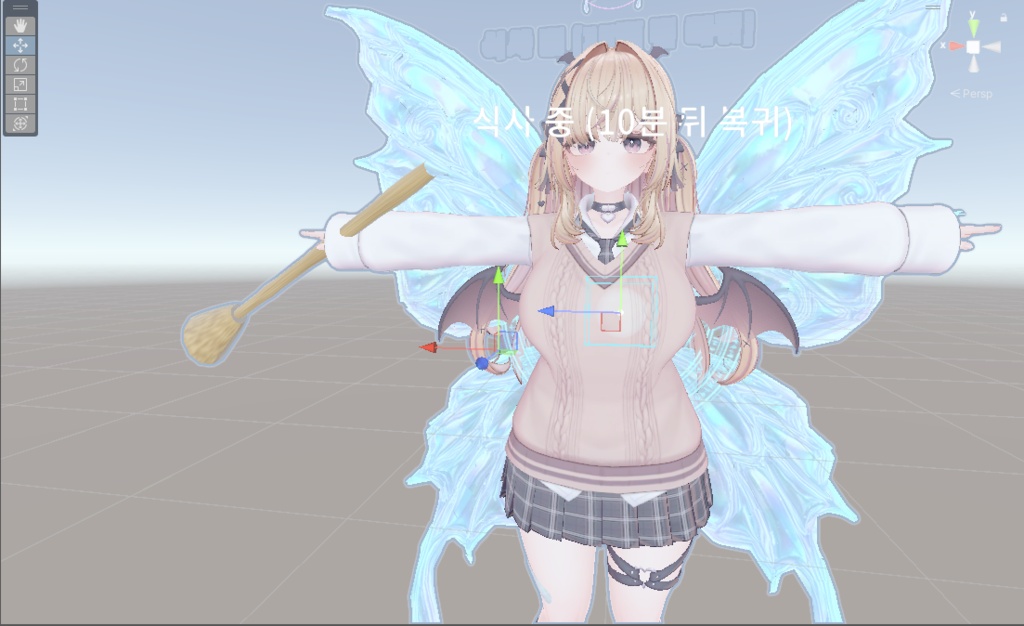

日本語 Synapse Magic Crystal Wings 🪽 背中に広がるクリスタルの翼と魔法陣で、ファンタジーの雰囲気を。 大型の翼の表示切替、Aqua / Rose / Mint / Goldの4色、魔法陣と共鳴演出を収録しています。 翼の単品です。蝶は付属しません。現在の設定ではホバリングは無効です。飛行・空中浮遊機能は含まれません。 翼 単品:400円 同梱内容 完成ギミックのプレハブ、モデル・マテリアル・テクスチャ・アニメーション、メニュー導入用プレハブ、専用Unityエディター用リモコンと共通補助コード、導入説明書を同梱しています。 必要環境 Unity 2022.3.22f1 / VRChat Avatars SDK / Modular Avatar / lilToonをご用意ください。特定アバター専用ではない汎用ギミックです。体型やボーン構成に合わせて位置・角度の調整が必要です。 導入手順 1. 必要なSDK・アセットを導入したプロジェクトにパッケージをインポートします。 2. 以下の本体プレハブと対応するメニュー導入用プレハブを、アバター直下に配置します。 - Assets/Synapse_Suite/Prefabs/Synapse_Magic_Wings_Gimmick.prefab - Assets/ProjectSynapse/CoreLego/CommonResonance/Synapse_CommonResonance_Module.prefab - Assets/Synapse_Distribution/Fairy_Current/Wings_MenuInstaller.prefab 同じアバターにSynapse_CommonResonance_Moduleがある場合、その補助プレハブを重複して追加しないでください。 3. 専用リモコンで位置・角度を調整し、シーンを保存してアバターをアップロードします。Synapse > Big Wings Remoteから翼のリモコンを開きます。 ご購入前に 標準プレハブの同期設定は4 bitsです。最終アバター全体の使用量ではありません。蝶と翼はカラーおよび手/頭の切替パラメーターを共有します。共鳴用の補助パラメーターはローカル設定です。 リモコンはUnity編集用です。Edit Modeで調整して保存してください。色の調整は共有マテリアルにも反映される場合があります。個別の色を維持する場合はマテリアルを複製してください。 アバター・衣装・背景・他の商品は付属しません。 利用規約 商用利用・改変は可能です。元データおよび改変データの再配布・再販売、パブリックアバターやペデスタルへのアップロードは禁止します。本データの利用によって生じた損害・トラブルについて、制作者は責任を負いません。 ────────── 한국어 Synapse Magic Crystal Wings 🪽 등 뒤로 펼쳐지는 크리스탈 날개와 마법진으로 판타지 분위기를 더해보세요. 큰 날개 표시 켜기·끄기, Aqua / Rose / Mint / Gold의 네 가지 색상, 마법진과 공명 연출을 포함합니다. 날개 단품입니다. 나비는 포함되지 않습니다. 현재 설정에서 호버링은 꺼져 있으며, 비행이나 공중 부유 기능은 제공하지 않습니다. 날개 400엔 구성품 완성 기믹 프리팹, 모델·머티리얼·텍스처·애니메이션, 메뉴 설치 프리팹, 전용 Unity 편집 리모콘과 공용 보조 코드, 설치 설명서를 포함합니다. 필요 환경 Unity 2022.3.22f1 / VRChat Avatars SDK / Modular Avatar / lilToon을 준비해 주세요. 아바타 전용 상품이 아닌 범용 기믹이며, 체형과 본 구성에 따라 위치·각도 조절이 필요합니다. 설치 1. 필요한 SDK와 에셋을 준비한 프로젝트에 패키지를 임포트합니다. 2. 아래 본체 프리팹과 해당 메뉴 설치 프리팹을 아바타 루트 바로 아래에 넣습니다. - Assets/Synapse_Suite/Prefabs/Synapse_Magic_Wings_Gimmick.prefab - Assets/ProjectSynapse/CoreLego/CommonResonance/Synapse_CommonResonance_Module.prefab - Assets/Synapse_Distribution/Fairy_Current/Wings_MenuInstaller.prefab 이미 같은 아바타에 Synapse_CommonResonance_Module이 있으면 해당 보조 프리팹은 중복으로 추가하지 마세요. 3. 전용 리모콘으로 위치와 각도를 조절한 뒤 씬을 저장하고 아바타를 업로드합니다. Synapse > 큰 날개 전용 리모콘에서 날개 리모콘을 엽니다. 구매 전 확인 기본 프리팹 설정의 동기화 메모리는 4 bits입니다. 최종 아바타 전체의 사용량을 뜻하지 않습니다. 나비와 날개는 색상 및 손/머리 전환 파라미터를 공유합니다. 공명용 보조 파라미터는 로컬 설정입니다. 리모콘은 Unity 편집용 도구입니다. Edit Mode에서 조절하고 저장해 주세요. 색상 조절은 공유 머티리얼에도 반영될 수 있으므로 개별 색상을 유지하려면 머티리얼을 복제해 사용하세요. 아바타·의상·배경과 다른 상품은 포함되지 않습니다. 이용 약관 상업적 이용과 수정이 가능합니다. 원본 및 수정 데이터의 재배포·재판매, 퍼블릭 아바타 및 페데스탈 업로드는 금지합니다. 본 에셋 이용으로 발생한 손해와 분쟁에 대해 제작자는 책임을 지지 않습니다. ────────── English Synapse Magic Crystal Wings 🪽 Add a fantasy silhouette with crystal wings and magic circles behind your avatar. Includes a visibility toggle for the large wings, four colors—Aqua, Rose, Mint, and Gold—and magic-circle and resonance effects. This is the wings on their own. The butterfly is not included. Hovering is disabled in the supplied configuration; flying and hovering are not included features. Wings: ¥400 Contents Includes complete gimmick prefabs, models, materials, textures, animations, menu installer prefabs, dedicated Unity editor remotes and shared helper code, and setup instructions. Requirements Unity 2022.3.22f1 / VRChat Avatars SDK / Modular Avatar / lilToon. This is a general-purpose gimmick, not an avatar-exclusive product. Adjust position and rotation to suit your avatar's proportions and bones. Setup 1. Import the package into a project with the required SDK and assets installed. 2. Place the following main prefabs and the matching menu installer directly under your avatar root. - Assets/Synapse_Suite/Prefabs/Synapse_Magic_Wings_Gimmick.prefab - Assets/ProjectSynapse/CoreLego/CommonResonance/Synapse_CommonResonance_Module.prefab - Assets/Synapse_Distribution/Fairy_Current/Wings_MenuInstaller.prefab If the avatar already has Synapse_CommonResonance_Module, do not add a second copy of that helper prefab. 3. Adjust position and rotation with the dedicated remote, save the scene, and upload your avatar. Open the wing remote from Synapse > Big Wings Remote. Before you buy The default prefabs use 4 bits of synced parameter memory. This is not the total usage of your final avatar. The butterfly and wings share color and hand/head parameters. Auxiliary resonance parameters are local. The remotes are Unity editing tools. Adjust and save in Edit Mode. Color changes may affect other instances sharing the same materials; duplicate the materials for independent colors. Avatars, outfits, backgrounds, and other products are not included. Terms of use Commercial use and modification are permitted. Redistribution or resale of the original or modified data, and uploads as public avatars or avatar pedestals, are prohibited. The creator accepts no liability for losses or disputes arising from use of this asset.