

くもいろ喫茶 ぷっくりステッカー Kumoiro Cafe Puffy Stickers ― 肌・服・持ち物に貼れる雲と喫茶の13種【VRChat・MA対応】
- ダウンロード商品¥ 300
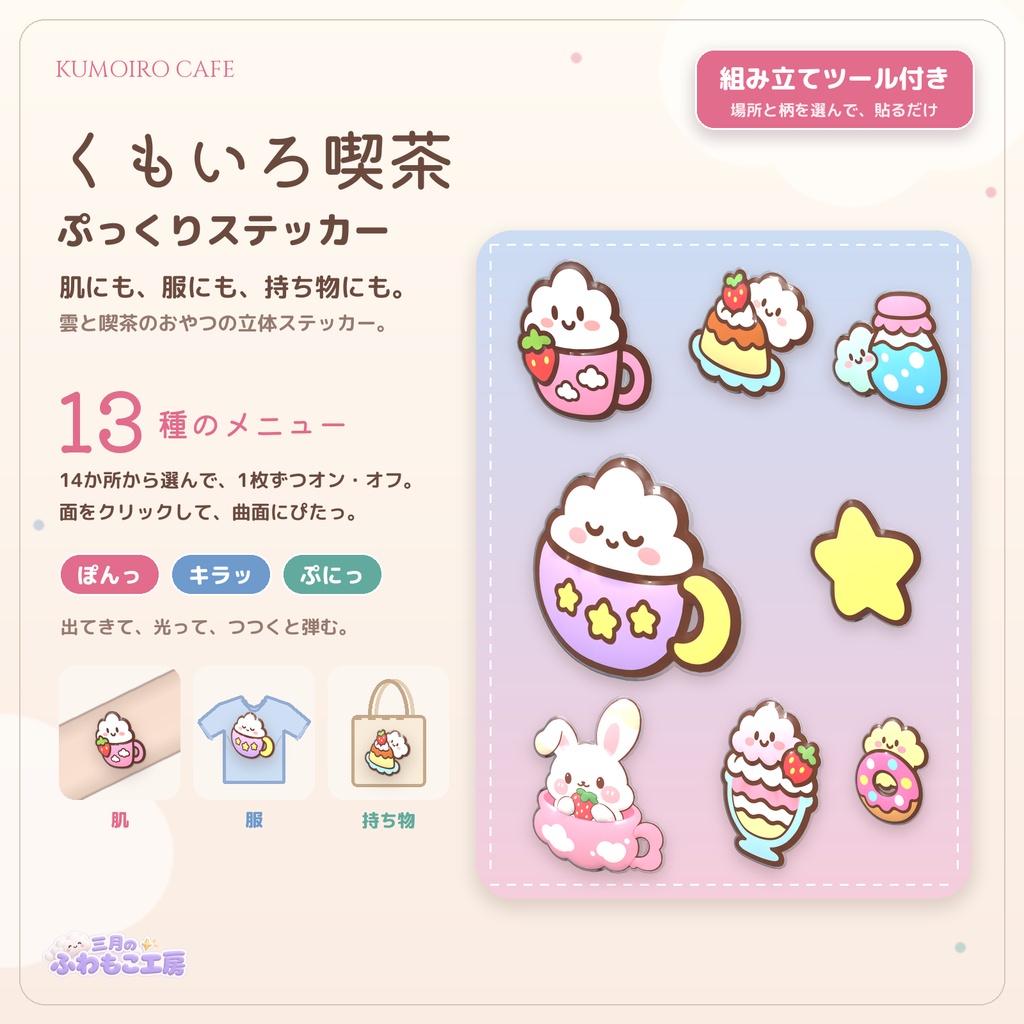
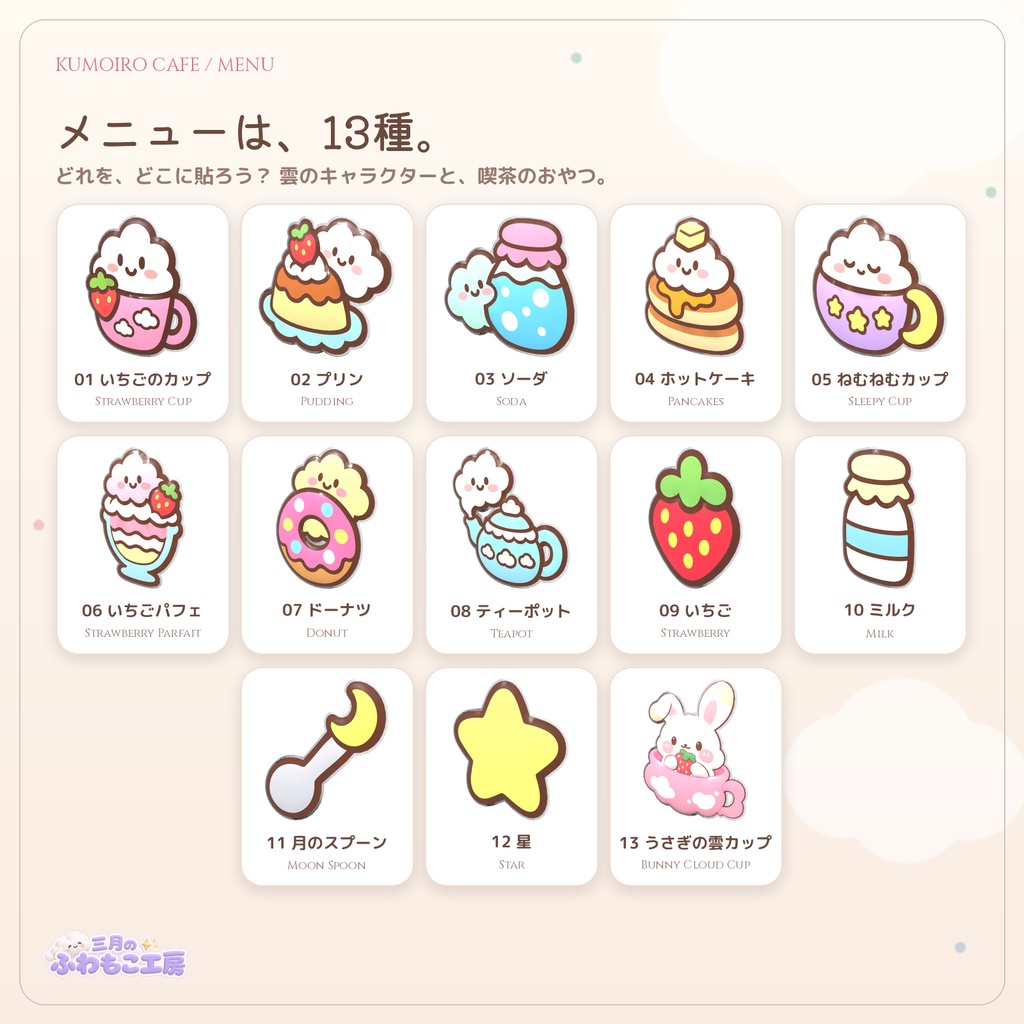
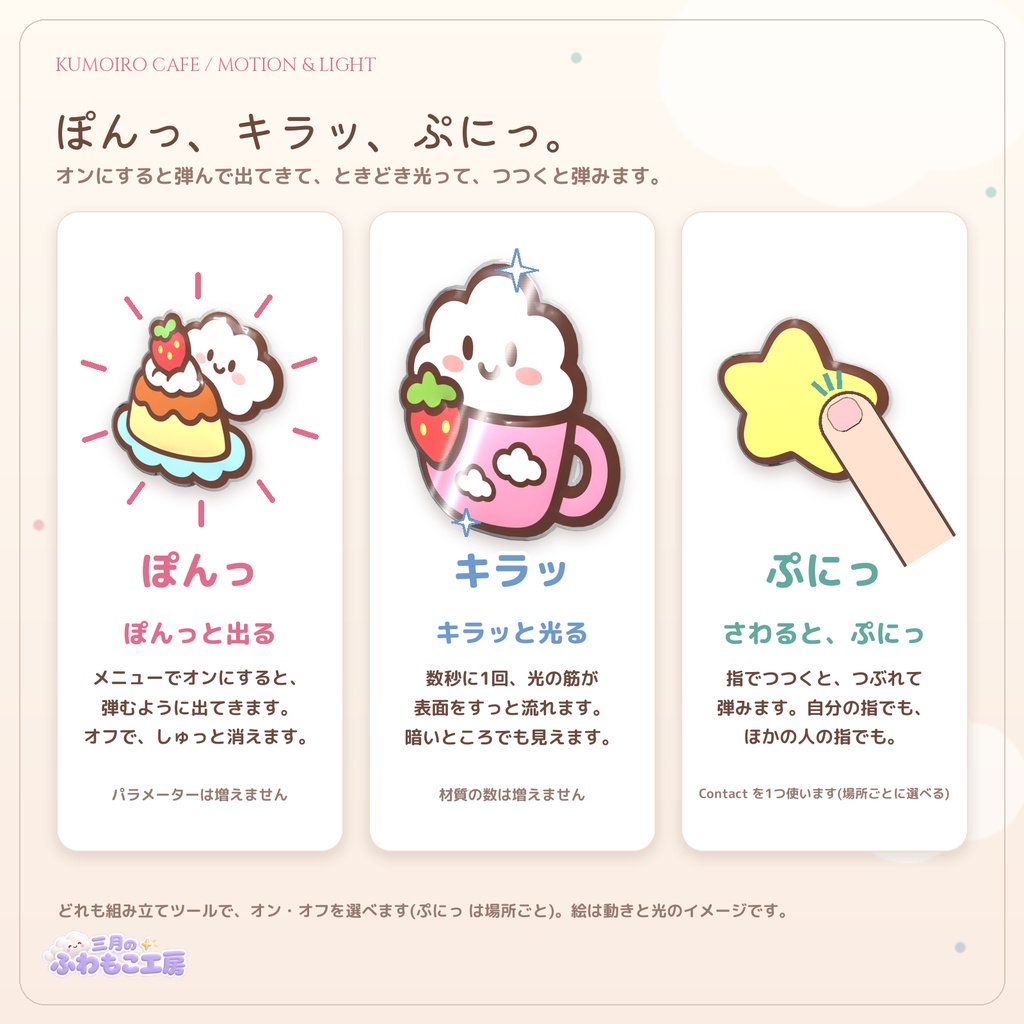
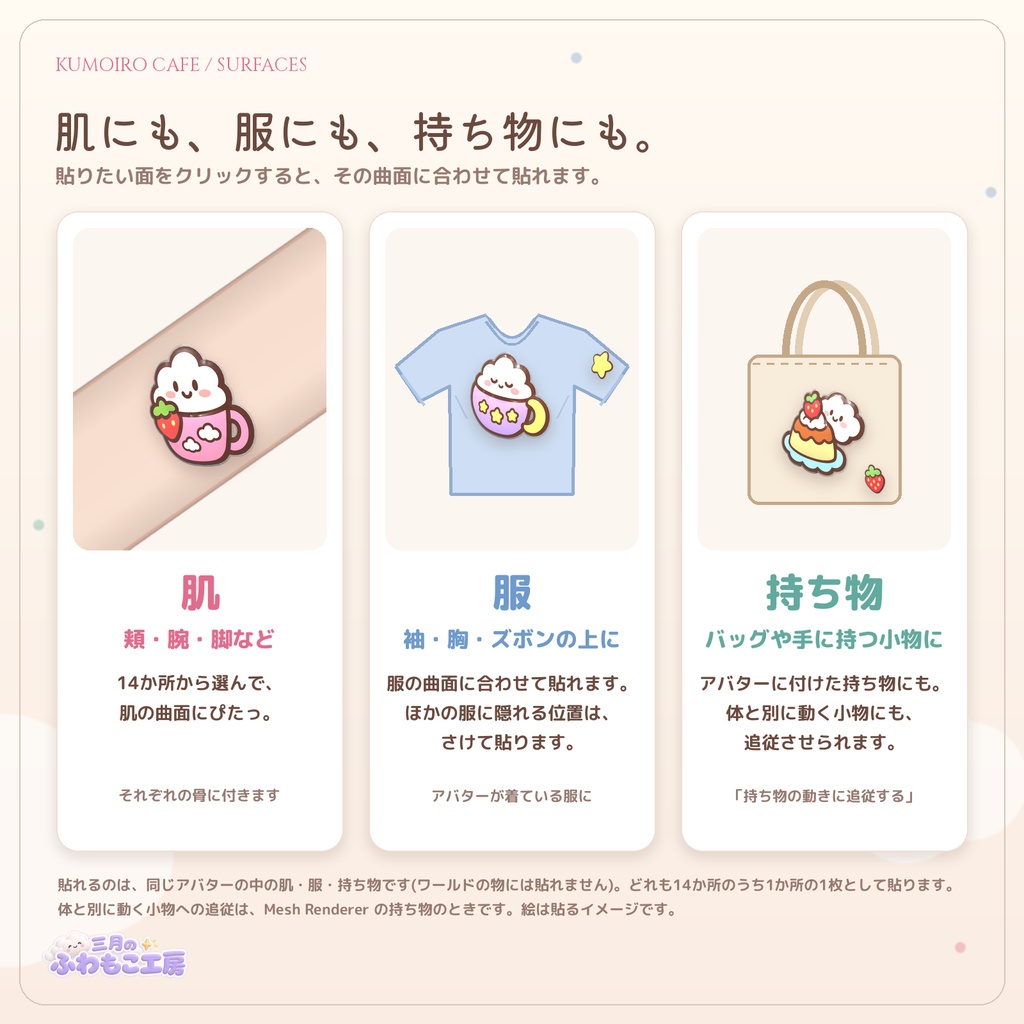
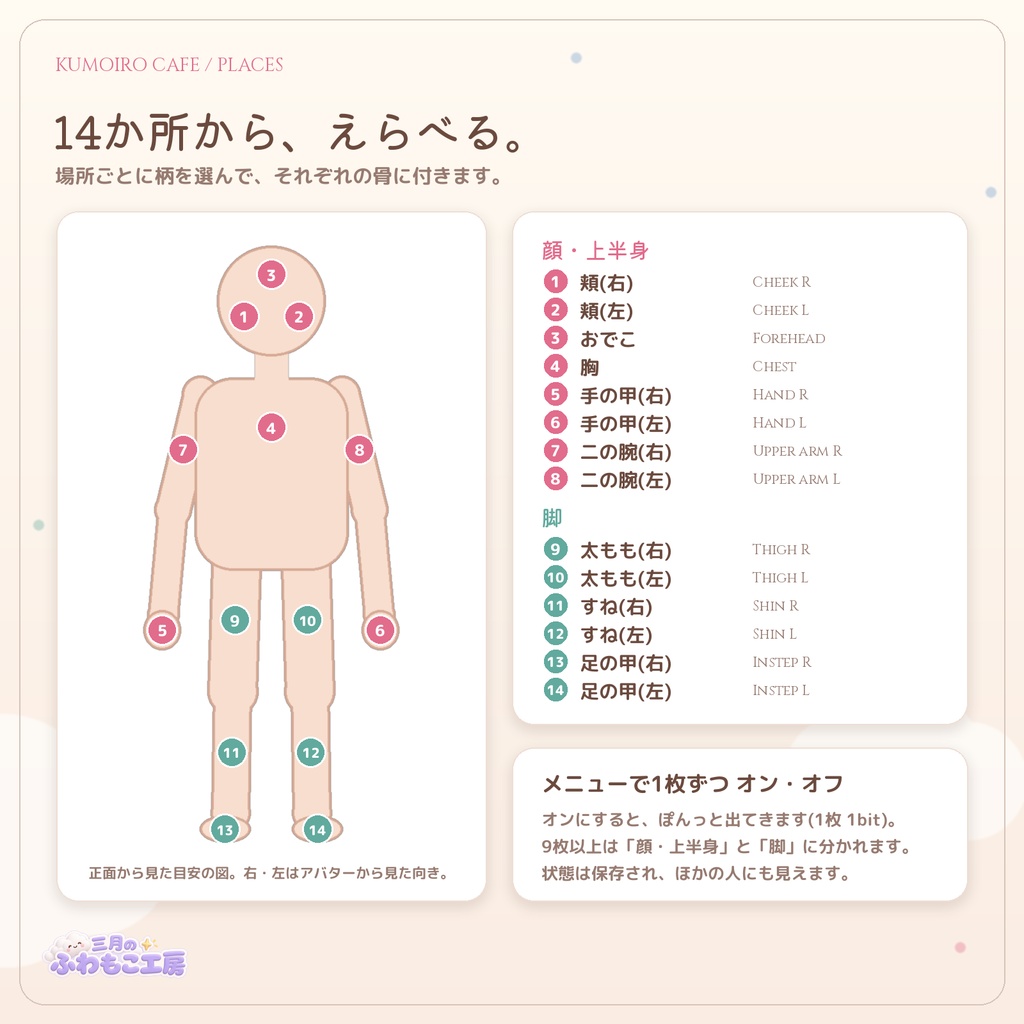
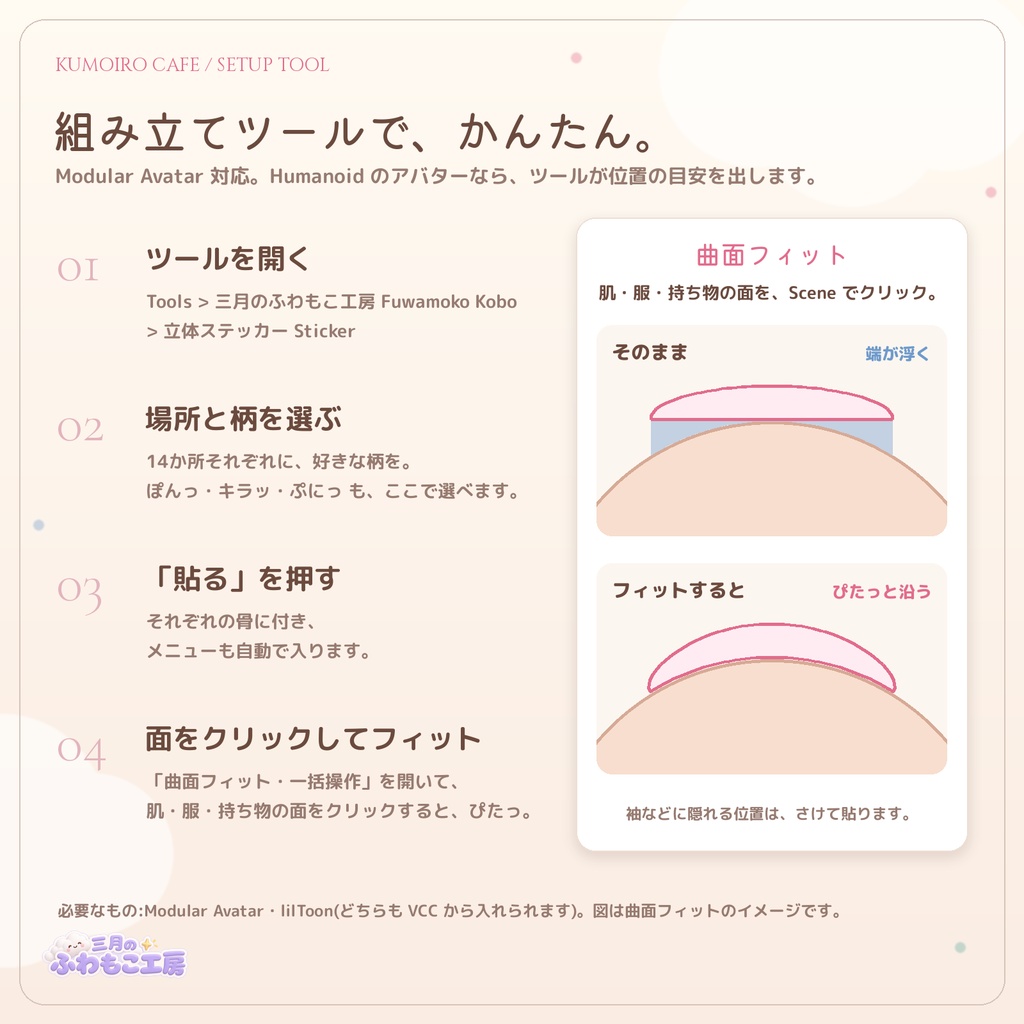
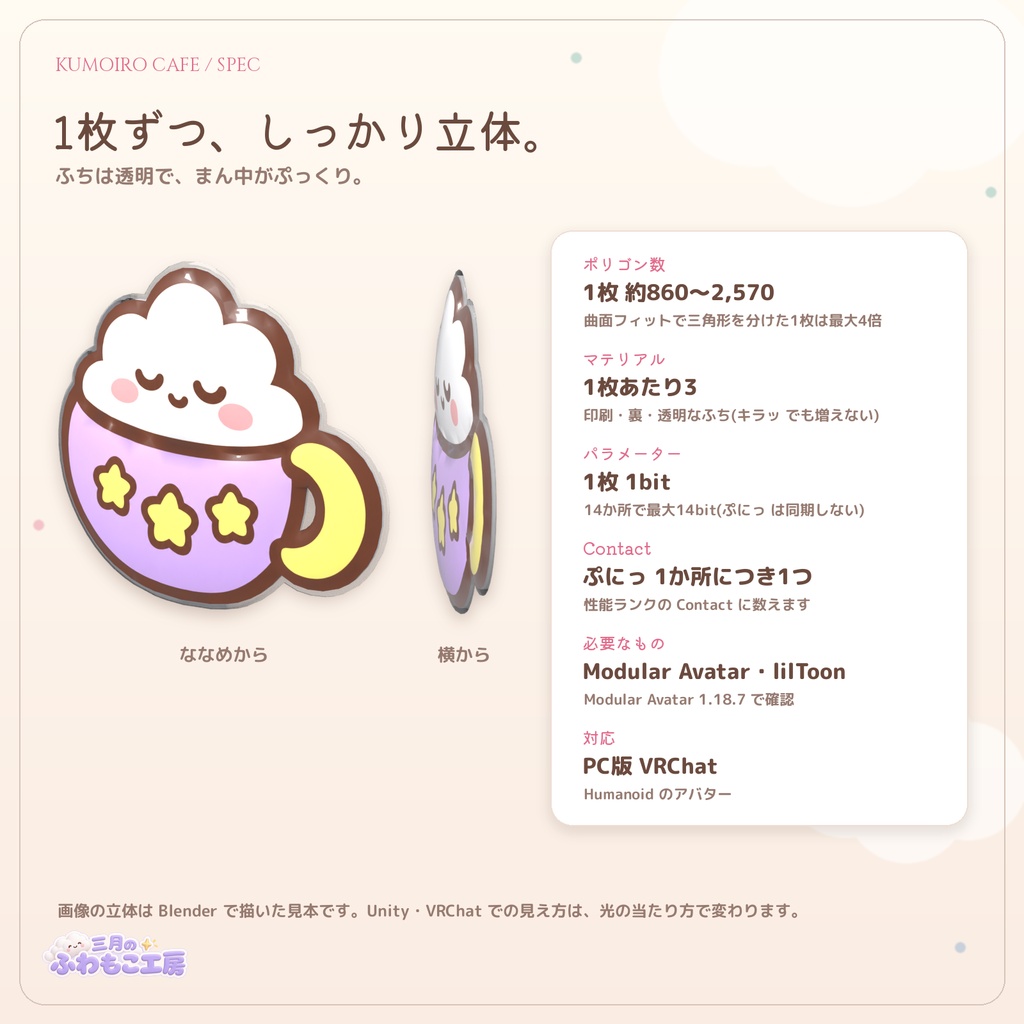


雲のキャラクターと喫茶のおやつの、ぷっくりした立体ステッカーです(雲の12種+うさぎの雲カップ=13種)。 頬・おでこ・胸・手の甲・二の腕・太もも・すね・足の甲の14か所から選んで貼れます。 肌だけでなく、服や持ち物(バッグや手に持つ小物など)の上にも、その曲面に合わせて貼れます。 メニューでオンにすると ぽんっ と出てきて、ときどき キラッ と光り、指でつつくと ぷにっ と弾みます。 ■ 13種の柄 いちごのカップ/プリン/ソーダ/ホットケーキ/ねむねむカップ/いちごパフェ/ドーナツ/ティーポット/いちご/ミルク/月のスプーン/星/うさぎの雲カップ ■ 貼れる場所(14か所) 頬(左右)・おでこ・胸・手の甲(左右)・二の腕(左右)・太もも(左右)・すね(左右)・足の甲(左右) 場所ごとに好きな柄を選べます。同じ柄を何枚使ってもかまいません。 ■ 服や持ち物にも ・服の上:袖・胸・ズボンなど、アバターが着ている服の上に、服の曲面に合わせて貼れます。袖などほかの服に隠れる位置はさけて貼ります ・持ち物:アバターに付けたバッグや、手に持つ小物などにも貼れます。体と別に動く小物(Mesh Renderer の持ち物)は「持ち物の動きに追従する」で、小物と一緒に動きます ・貼れるのは、同じアバターの中の肌・服・持ち物です(ワールドの物には貼れません)。どれも14か所のうち1か所の1枚として貼ります ■ ギミック ・ぽんっ:メニューでオンにすると、ぽんっと弾んで出てきます。オフにすると、しゅっと消えます ・キラッ:数秒に1回、光の筋がステッカーの表面を流れます ・ぷにっ:指でつつくと、ぷにっとつぶれて弾みます(自分の指でも、ほかの人の指でも。VRChat の Avatar Interactions の設定によります) ・1枚ずつオン・オフでき、状態はほかの人にも同期されます ・動きと光、場所ごとの ぷにっ は、組み立てツールで選べます ■ 特長 ・組み立てツール付き:場所にチェックを入れて柄を選び、「貼る」を押すだけ。Modular Avatar でその場所の骨に付き、メニューも自動で追加されます ・曲面フィット:「Sceneで貼る面をクリックしてフィット」を押して、貼りたい肌・服・持ち物の面をクリックするだけで、その曲面に合わせて貼れます。袖などに隠れる位置はさけて貼ります(Unity で編集したときの形に合わせます。表情や関節の動きに合わせて曲がり続けるものではありません) ・Humanoid のアバターで使えます。位置・向き・大きさは Unity で自由に直せます。確認アバターはフェリスです ・メニューは日本語と英語(例:頬(右) Cheek R) ・英語の説明書(README_EN.txt)と英語の利用規約 PDF 付き ■ ご注意 ・貼る位置は目安です。アバターに合わせて Unity で直してください(同梱の説明書に手順があります) ・たくさん貼るほど、三角形・マテリアル・Contact が増えます。VRChat SDK の窓で性能ランクを確かめてください ・相手がアニメーションを止めている(Safety)ときは、オン・オフや動きが反映されないことがあります ■ 内容物 ・KumoiroCafe_PuffyStickers_v1.0.0.unitypackage ・導入説明_README.txt ・README_EN.txt(英語の説明) ・利用規約(VN3ライセンス 日本語・英語・韓国語・中国語) ■ 仕様 ・ポリゴン数:1枚あたり約860〜2,570(三角形。曲面フィットで三角形を分けた1枚は最大4倍) ・マテリアル数:1枚あたり3 ・Expression Parameters:1枚あたり1bit(最大14bit) ・Contact:ぷにっ を付けた1枚につき1つ ・シェーダー:lilToon ・対応環境:PC版VRChatのみ(Quest/Android/iPhoneは非対応) ■ 必要なもの(別途ご用意ください) ・lilToon(VCCから追加、または https://booth.pm/ja/items/3087170 ) ・Modular Avatar(VCCから追加。1.18.7 で動作確認しています) ■ ショップのほかの商品 ・ぽんっと漫符(頭のまわりに気持ちが出る15種の立体漫符) https://booth.pm/ja/items/9065750 ・てんきぐも(天気で表情が変わる雲の髪飾り) https://booth.pm/ja/items/9031398 ・てんきぐも mini(無料) https://booth.pm/ja/items/8974305 ・ぴょこみみヘッドホン(なでると耳がぺたん♪ 猫耳ヘッドホン) https://booth.pm/ja/items/8977810 ■ 動作確認 Unity 2022.3.22f1 / Modular Avatar 1.18.7 / lilToon 2.3.4 確認アバター:フェリス(リュクらぼ 様) https://booth.pm/ja/items/5385176
English
Kumoiro Cafe Puffy Stickers - 13 puffy 3D stickers of a cloud character and cafe sweets for skin, clothes and props Puffy 3D stickers of a little cloud character and cafe sweets (12 cloud designs + the Bunny Cloud Cup = 13 designs). Put them on any of 14 places: cheeks, forehead, chest, backs of the hands, upper arms, thighs, shins and insteps. Not just skin: they also fit onto clothes and props (such as a bag or a small item in the hand), following the curve. Turn one on in the menu and it pops in, shines now and then, and squishes when you poke it with a finger. ■ 13 designs Strawberry Cup / Pudding / Soda / Pancakes / Sleepy Cup / Strawberry Parfait / Donut / Teapot / Strawberry / Milk / Moon Spoon / Star / Bunny Cloud Cup ■ 14 places Cheeks (L/R), forehead, chest, backs of the hands (L/R), upper arms (L/R), thighs (L/R), shins (L/R), insteps (L/R) Choose any design for each place. You can use the same design more than once. ■ On clothes and props too - Clothes: put them on sleeves, the chest, trousers and other clothes the avatar is wearing. They follow the curve of the clothes and avoid spots hidden behind other clothes such as sleeves - Props: also on a bag or a small item held in the hand. For an item that moves separately from the body (a Mesh Renderer prop), "持ち物の動きに追従する" (follow the prop) makes the sticker move with it - They go on the skin, clothes and props of the same avatar (not on world objects). Each sticker uses one of the 14 places ■ Gimmicks - Pop: turn it on in the menu and it pops in with a bounce; turn it off and it shrinks away - Shine: every few seconds a streak of light runs across the surface - Squish: poke it with a finger and it squishes and bounces back (your fingers and other players' fingers; depends on VRChat's Avatar Interactions settings) - Each sticker can be turned on and off, and the state is synced to other players - Motion, light and squish (per place) can be chosen in the setup tool ■ Features - Setup tool included: tick the places, pick the designs and press Apply. Modular Avatar attaches each sticker to its bone, and the menu is added automatically - Surface fitting: press "Sceneで貼る面をクリックしてフィット" (click a surface in the Scene to fit) and click the skin, clothes or prop, and the sticker follows that curve. It avoids spots hidden behind sleeves (it fits the shape while you edit in Unity; it does not keep bending with expressions or joints) - Works with Humanoid avatars. Adjust the position, rotation and size freely in Unity. Reference avatar: Felis - Menu labels in Japanese and English (e.g. 頬(右) Cheek R) - English setup guide (README_EN.txt) and English license PDF included ■ Notes - The positions are a first guess. Adjust them in Unity to fit your avatar (the steps are in the included guide) - More stickers mean more triangles, materials and contacts. Check the performance rank in the VRChat SDK window - If other players block animations (Safety), the on/off state and motion may not show for them ■ Specifications - Polygons: about 860 to 2,570 triangles per sticker (up to 4 times for a sticker whose triangles were split by surface fitting) / Materials: 3 per sticker - Expression Parameters: 1 bit per sticker (up to 14 bits) - Contacts: 1 per sticker with squish - Shader: lilToon - VRChat PC only (Quest / Android / iOS not supported) ■ Requirements - lilToon (from VCC, or https://booth.pm/en/items/3087170 ) - Modular Avatar (from VCC; tested with 1.18.7) ■ Terms of use (VN3 License, English PDF included) OK: using it on your own avatar in VRChat etc., photos / videos / streaming, recoloring NG: redistribution (including modified data), use on public avatars ■ Other items in our shop - Pon! Manpu (15 puffy 3D manga marks that pop up around your head) https://booth.pm/en/items/9065750 - Tenkigumo (a cloud hair clip whose face changes with the weather) https://booth.pm/en/items/9031398 - Tenkigumo mini (free) https://booth.pm/en/items/8974305 - Pyokomimi Headphones (cat-ear headphones that react when patted) https://booth.pm/en/items/8977810 Questions in English are welcome via BOOTH messages. Tested with: フェリス / Felis (リュクらぼ) https://booth.pm/ja/items/5385176
中文
云朵角色和咖啡馆点心的鼓鼓立体贴纸(12种云朵+兔子云朵杯=共13种)。可以贴在脸颊、额头、胸口、手背、上臂、大腿、小腿、脚背共14个位置。不只是皮肤,也可以贴在衣服和随身物品(包、手持小物等)上,贴合那里的曲面。在菜单中打开后会「砰」地弹出来,不时「闪」地发光,用手指一戳就「噗叽」地弹一下。 ・13种图案:草莓杯/布丁/苏打/松饼/困困杯/草莓芭菲/甜甜圈/茶壶/草莓/牛奶/月亮勺子/星星/兔子云朵杯 ・14个位置:脸颊(左右)、额头、胸口、手背(左右)、上臂(左右)、大腿(左右)、小腿(左右)、脚背(左右)。每个位置都可以选择喜欢的图案,同一图案也可以用多张 ・衣服和随身物品:可以贴在模型穿着的衣服(袖子、胸口、裤子等)上,贴合衣服的曲面,并避开被其他衣服遮住的位置;也可以贴在模型上的包或手持小物等随身物品上。与身体分开移动的小物(Mesh Renderer)可以用「持ち物の動きに追従する」让贴纸跟着一起移动。可以贴的是同一个模型中的皮肤、衣服和随身物品(不能贴在世界中的物体上),每张贴纸都作为14个位置之一来贴 ・每张贴纸都可以单独开关,状态会同步给其他人。弹出、发光和每个位置的「噗叽」可以在组装工具中选择(「噗叽」对自己和其他人的手指都会反应,取决于 VRChat 的 Avatar Interactions 设置) ・附带组装工具:勾选位置、选择图案后按「貼る Apply」即可。通过 Modular Avatar 固定在对应位置的骨骼上,菜单也会自动添加 ・曲面贴合:按下「Sceneで貼る面をクリックしてフィット」后点击想贴的皮肤、衣服或随身物品,贴纸就会贴合那里的曲面,并避开被袖子等遮住的位置(按在 Unity 中编辑时的形状贴合,不会随表情或关节持续弯曲) ・支持 Humanoid 模型,可以在 Unity 中自由调整位置、角度和大小;制作时使用 Felis 确认 ・贴得越多,三角形、材质和 Contact 越多,请在 VRChat SDK 窗口确认性能等级 ・每张约860~2,570多边形(三角形。经曲面贴合细分三角形的贴纸最多为4倍)・每张材质3个・Expression Parameters 每张1bit(最多14bit)・开启「噗叽」的每张1个 Contact ・需要:lilToon、Modular Avatar(已在 1.18.7 中确认运行) ・仅支持 VRChat PC 版 ・使用条款:VN3 许可(附中文 PDF)。禁止二次分发(包括修改后的数据)。
한국어
구름 캐릭터와 카페 간식의 볼록한 입체 스티커입니다(구름 12종+토끼 구름 컵=13종). 볼・이마・가슴・손등・위팔・허벅지・정강이・발등의 14곳 중에서 골라 붙일 수 있습니다. 피부뿐 아니라 옷이나 소지품(가방, 손에 든 소품 등) 위에도 그 곡면에 맞춰 붙일 수 있습니다. 메뉴에서 켜면 「뽕」 하고 나타나고, 가끔 「반짝」 빛나며, 손가락으로 찌르면 「말랑」 하고 튕깁니다. ・13종 도안: 딸기 컵/푸딩/소다/핫케이크/졸린 컵/딸기 파르페/도넛/티포트/딸기/우유/달 숟가락/별/토끼 구름 컵 ・14곳: 볼(좌우), 이마, 가슴, 손등(좌우), 위팔(좌우), 허벅지(좌우), 정강이(좌우), 발등(좌우). 곳마다 원하는 도안을 고를 수 있고, 같은 도안을 여러 장 써도 됩니다 ・옷과 소지품: 아바타가 입은 옷(소매・가슴・바지 등) 위에 옷의 곡면에 맞춰 붙일 수 있고, 다른 옷에 가려지는 위치는 피합니다. 아바타에 단 가방이나 손에 든 소품 등에도 붙일 수 있습니다. 몸과 따로 움직이는 소품(Mesh Renderer)은 「持ち物の動きに追従する」로 함께 움직이게 할 수 있습니다. 붙일 수 있는 것은 같은 아바타 안의 피부・옷・소지품입니다(월드의 물체에는 붙일 수 없습니다). 한 장씩 14곳 중 하나로 붙입니다 ・한 장씩 켜고 끌 수 있으며, 상태는 다른 사람에게도 동기화됩니다. 등장・반짝임・곳별 「말랑」은 조립 도구에서 고를 수 있습니다(「말랑」은 자신과 다른 사람의 손가락에 반응합니다. VRChat의 Avatar Interactions 설정에 따릅니다) ・조립 도구 포함: 붙일 곳에 체크하고 도안을 고른 뒤 「貼る Apply」를 누르면 됩니다. Modular Avatar로 그곳의 본에 붙고, 메뉴도 자동으로 추가됩니다 ・곡면 피팅: 「Sceneで貼る面をクリックしてフィット」를 누르고 붙이고 싶은 피부・옷・소지품을 클릭하면, 그곳의 곡면에 맞춰 붙습니다. 소매 등에 가려지는 위치는 피합니다(Unity에서 편집할 때의 모양에 맞춥니다. 표정이나 관절에 맞춰 계속 휘어지지는 않습니다) ・Humanoid 아바타에서 쓸 수 있습니다. Unity에서 위치・방향・크기를 자유롭게 조정할 수 있습니다. 제작 당시 확인 아바타: Felis ・많이 붙일수록 삼각형・머티리얼・Contact가 늘어납니다. VRChat SDK 창에서 퍼포먼스 랭크를 확인해 주세요 ・한 장당 약 860~2,570폴리곤(삼각형. 곡면 피팅으로 삼각형을 나눈 스티커는 최대 4배)・한 장당 머티리얼 3개・Expression Parameters 한 장당 1bit(최대 14bit)・「말랑」을 켠 한 장당 Contact 1개 ・필요: lilToon, Modular Avatar(1.18.7에서 동작 확인) ・VRChat PC 전용 ・이용 약관: VN3 라이선스(한국어 PDF 동봉). 재배포 금지(수정 데이터 포함).
利用規約
---------------------------------------- VN3ライセンスに準拠します(規約全文は同梱のPDFをご確認ください)。 ・自分のアバターに着けてVRChat等で使う/写真・動画・配信で使う:OK ・色を変えるなどの改変:OK ・再配布(改変したものを含む)/Publicアバターとしての公開:NG
更新履歴
2026/11/07 v1.0.0 販売開始