

MagicalTransform
- ダウンロード商品¥ 0
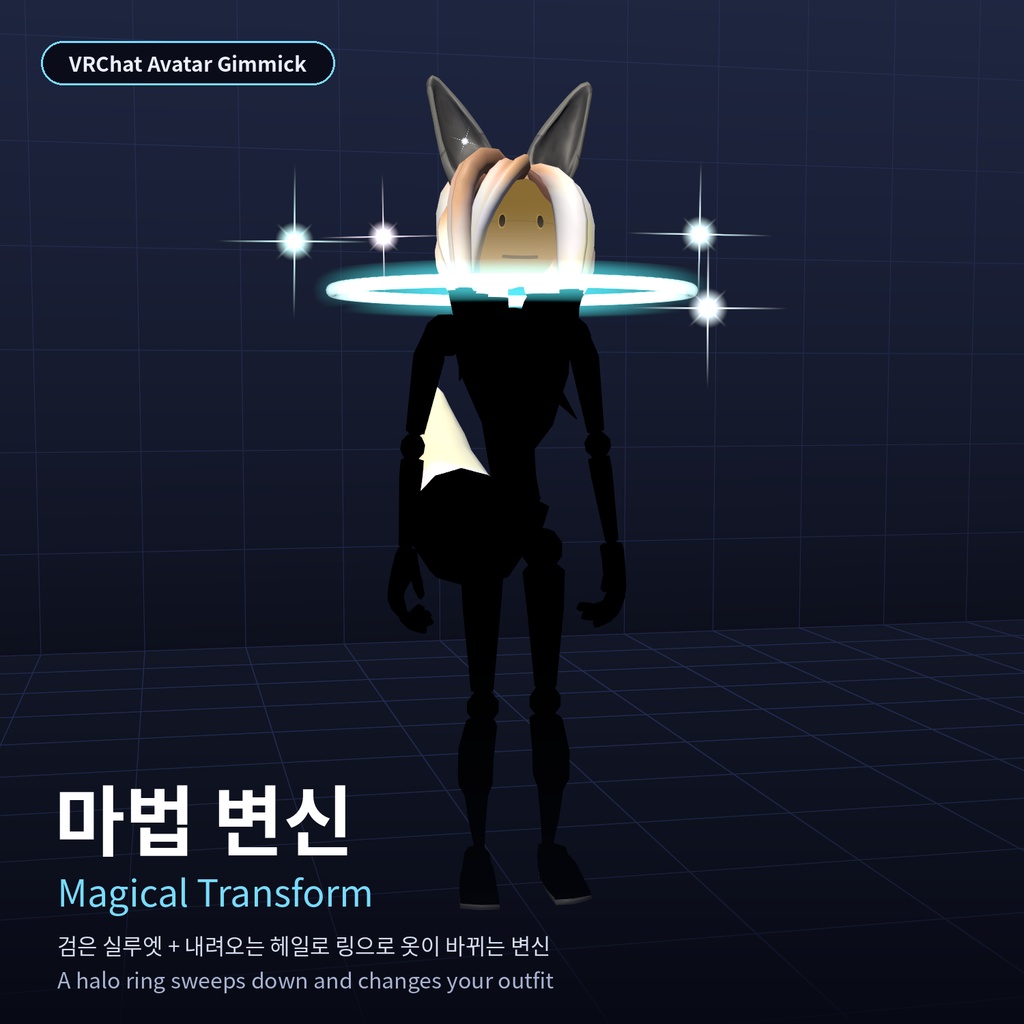


【상품명 / Title】 [VRChat] 마법 변신 / Magical Transform ━━━━━━━━━━ 한국어 ━━━━━━━━━━ 토글을 켜면 몸 전체가 검은 실루엣이 되고, 머리 위에서 빛나는 헤일로 링이 몸을 타고 내려가며 지나간 부분부터 새 옷으로 바뀝니다. 링이 발밑에 닿으면 빛나며 변신이 끝납니다. 모든 플레이어에게 보입니다. ■ 주요 기능 ・옷A(지금 옷) → 옷B(변신 후 옷)를 인스펙터에서 직접 지정 ・옷을 조각별로 나눠 링 높이에 맞춰 위에서부터 차례로 교체 ・링 주변 십자 반짝이, 착지 플래시 ・끄면 즉시 옷A로 복귀, 도중 취소도 안전 ・원하는 음원을 넣어 BGM으로 재생 가능 (20m 공간 음향) ■ 사용 방법 1. unitypackage를 가져오고 MagicalTransform.prefab 을 아바타 루트 아래로 끌어다 놓습니다. 2. 인스펙터에서 옷A/옷B를 넣고 '시작 상태 맞추기'를 누릅니다. 3. (선택) MT_Audio 의 Audio Source 에 직접 권리가 있는 음원을 넣습니다. 4. 업로드하고 메뉴 '변신' 토글로 사용합니다. ※ 자세한 내용은 함께 들어 있는 사용설명서 PDF를 확인해 주세요. ■ 필요 환경 ・Unity 2022.3 (VRChat 권장 버전) ・VRChat SDK3 Avatars 3.10.5 이상 ・Modular Avatar 1.19 이상 ・NDMF 1.14.8 이상 ■ 포함 내용 ・설정 컴포넌트, NDMF 플러그인, 인스펙터 ・실루엣·링·반짝이 셰이더와 머티리얼, 메쉬, 프리팹 ・사용설명서 PDF (한국어/영어) ■ 사양·참고 ・동기화 파라미터 1 bit ・PC 전용 (커스텀 셰이더) ・음원은 포함되지 않습니다. 넣는 음원의 저작권은 사용자 책임입니다 ・변신 중 바로 옆에 붙어 있는 사람·물체도 검게 보일 수 있습니다 ■ 이용 약관 ・이 에셋은 AI 도구의 도움을 받아 제작했으며, 제작자는 저작권을 주장하지 않습니다. ・단, 재배포와 판매·재판매는 금지합니다. 원본·수정본·일부 파일(스크립트, 셰이더, 모델, 텍스처, 소리) 모두 해당하며, 무료 배포나 다른 상품·패키지에 포함하는 것도 금지합니다. ・구매(다운로드)한 본인의 VRChat 아바타에 넣어 사용하는 것은 자유이며, 개인 사용 범위에서 수정해도 됩니다. ・이 조건을 어기고 재배포·재판매해서 생기는 모든 문제(저작권·상표 분쟁, 금전 손해, 계정 제재, 구매자와의 분쟁 등)는 재배포·재판매한 사람에게 책임이 있으며, 제작자는 어떠한 책임도 지지 않습니다. ・이 에셋을 넣은 아바타를 퍼블릭으로 올리거나 클론을 허용하면 다른 사람이 에셋까지 쓸 수 있으니, 공개 설정은 본인 책임으로 판단해 주세요. ■ 면책 조항 ・있는 그대로(as-is) 제공되며 동작·호환성·지속적인 업데이트를 보증하지 않습니다. ・사용 중 생기는 오류, 데이터 손실, 다른 에셋과의 충돌, VRChat 계정 제재를 포함한 어떠한 손해에 대해서도 제작자는 책임지지 않습니다. ・설치 전에 반드시 프로젝트를 백업해 주세요. Unity·VRChat SDK·Modular Avatar 등이 업데이트되면 동작하지 않을 수 있습니다. ・VRChat 이용약관·커뮤니티 가이드라인과 각 월드의 규칙을 지켜 사용해 주세요. 다른 사람을 방해하는 사용으로 생긴 문제는 사용자 책임입니다. ・빛이 번쩍이는 연출이 있을 수 있으니 광과민성이 있는 분 주변에서는 주의해 주세요. ・상대방의 Safety 설정(셰이더·파티클·애니메이션 차단 등)에 따라 다른 사람에게는 일부 연출이 보이지 않을 수 있습니다. ・Unity 에디터에서 실행되는 스크립트가 포함되어 있습니다. 반드시 이 판매 페이지에서 받은 원본 파일만 사용해 주세요. (포함된 스크립트는 인터넷 접속이나 외부 프로그램 실행을 하지 않습니다.) ・이미지·영상 속 아바타는 VRChat SDK에 들어 있는 기본 샘플 아바타이며 상품에 포함되지 않습니다. ・구매·다운로드하면 위 이용 약관과 면책 조항에 동의한 것으로 봅니다. ━━━━━━━━━━ English ━━━━━━━━━━ Turn on the toggle and your whole body becomes a black silhouette. A glowing halo ring descends from above your head, and everything it passes changes into the new outfit. The transformation ends with a flash when the ring reaches your feet. Visible to everyone. ■ Features - Set Outfit A (current) and Outfit B (after) in the inspector - Pieces swap from top to bottom as the ring passes their height - Cross sparkles around the ring and a landing flash - Turning it off returns to Outfit A instantly; cancelling midway is safe - Add your own audio to play as BGM (20 m spatial audio) ■ How to use 1. Import the unitypackage and drag MagicalTransform.prefab under your avatar root. 2. Set Outfit A/B in the inspector and press 'Match start state'. 3. (Optional) Put audio you have the rights to into the Audio Source on MT_Audio. 4. Upload and use the '변신' (Transform) toggle in the menu. * See the included user manual PDF for details. ■ Requirements - Unity 2022.3 (VRChat recommended version) - VRChat SDK3 Avatars 3.10.5 or later - Modular Avatar 1.19 or later - NDMF 1.14.8 or later ■ Contents - Settings component, NDMF plugin, inspector - Silhouette, ring and sparkle shaders and materials, meshes, prefab - User manual PDF (Korean/English) ■ Specs & notes - 1 synced parameter bit - PC only (custom shaders) - No audio is included; you are responsible for the rights to any audio you add - People or objects right next to you may also appear black during the transformation ■ Terms of use - This asset was made with the help of AI tools, and the author does not claim copyright over it. - However, redistribution, sale and resale are prohibited. This covers the original, modified versions and any part (scripts, shaders, models, textures, sounds), including free distribution or bundling into other products or packages. - You may freely use it on your own VRChat avatars and modify it for personal use. - Any problem arising from redistribution or resale in breach of these terms (copyright or trademark disputes, financial loss, account actions, disputes with buyers, etc.) is solely the responsibility of the person who redistributed or resold it; the author bears no responsibility whatsoever. - If you upload an avatar containing this asset as Public or allow cloning, others can use the asset through it. Decide your visibility settings at your own responsibility. ■ Disclaimer - Provided as-is, with no guarantee of function, compatibility or future updates. - The author is not liable for any damage arising from use, including errors, data loss, conflicts with other assets or VRChat account actions. - Always back up your project before installing. Updates to Unity, VRChat SDK, Modular Avatar, etc. may break functionality. - Please follow the VRChat Terms of Service, Community Guidelines and each world's rules. Problems caused by using it to disturb others are your responsibility. - Some effects may flash; please take care around people sensitive to flashing light. - Depending on other players' Safety settings (blocked shaders, particles, animations, etc.), they may not see some effects. - Contains scripts that run in the Unity Editor. Only use the original file downloaded from this page. (The included scripts do not access the internet or launch external programs.) - The avatar shown in the images and video is the sample avatar included in the VRChat SDK and is not included in this product. - Purchasing or downloading means you agree to the terms of use and disclaimer above.