

Luna | 月と人魚のヘアピン・ネックレス【VRChat / Modular Avatar】
- ダウンロード商品¥ 500


Luna|月と人魚のヘアピン&ネックレス · VRChat / Modular Avatar対応 ■ 期間限定セール 2026年11月11日(水)0:00 〜 11月13日(金)23:59(日本時間) 通常価格 800円 → セール価格 500円
日本語
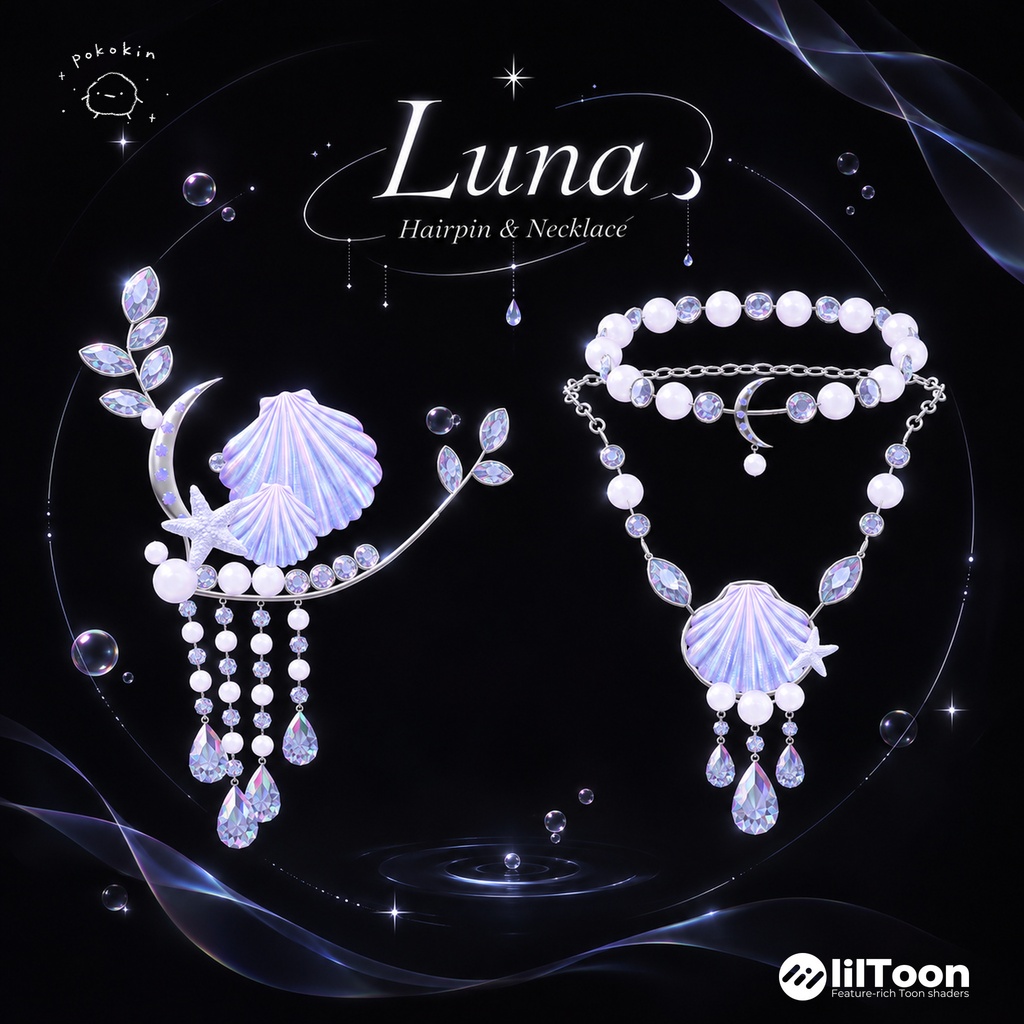
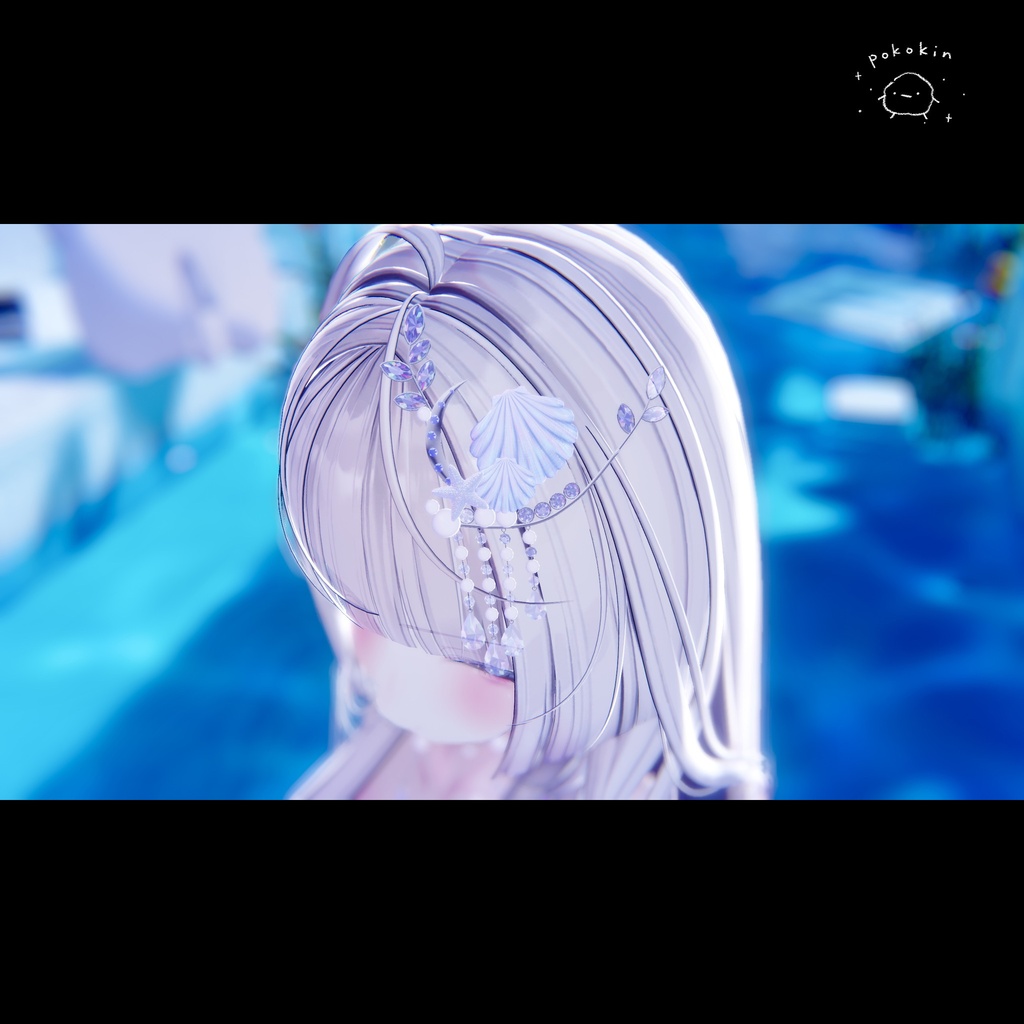
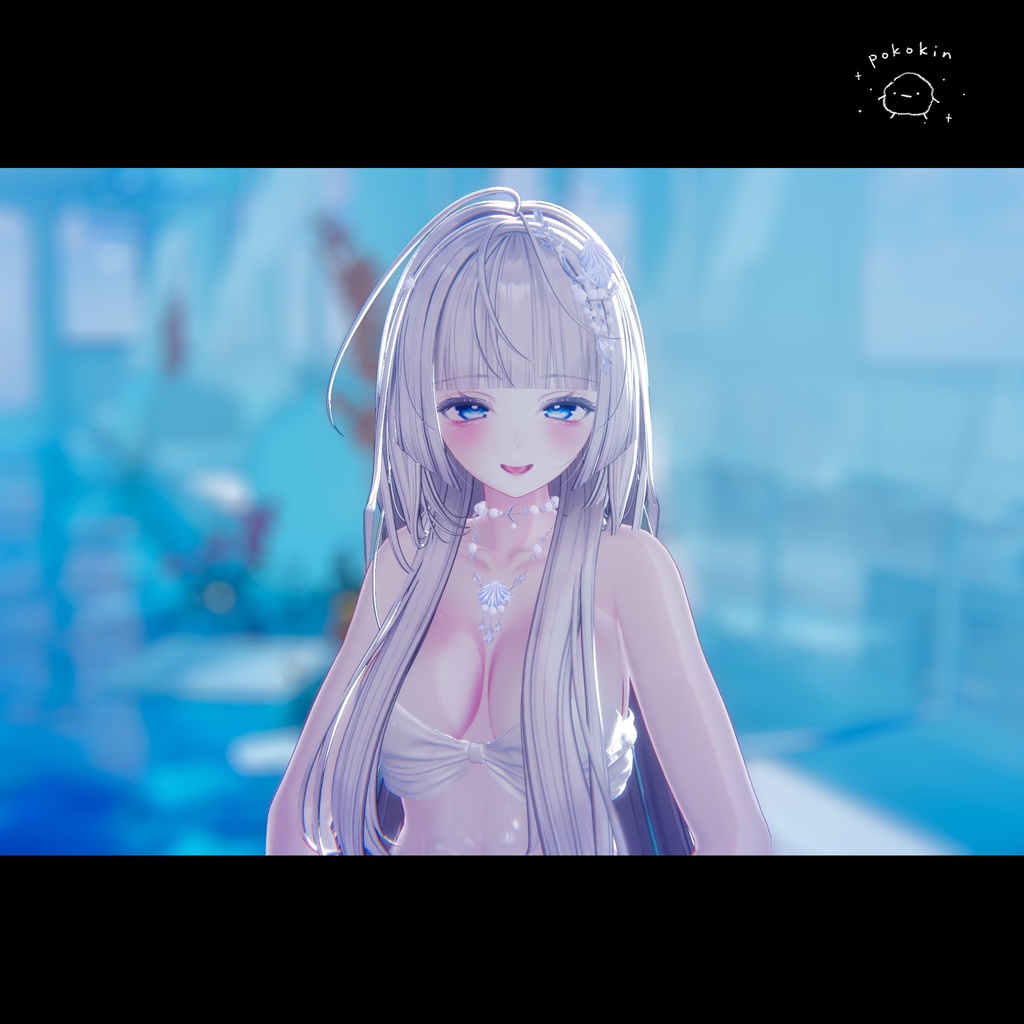
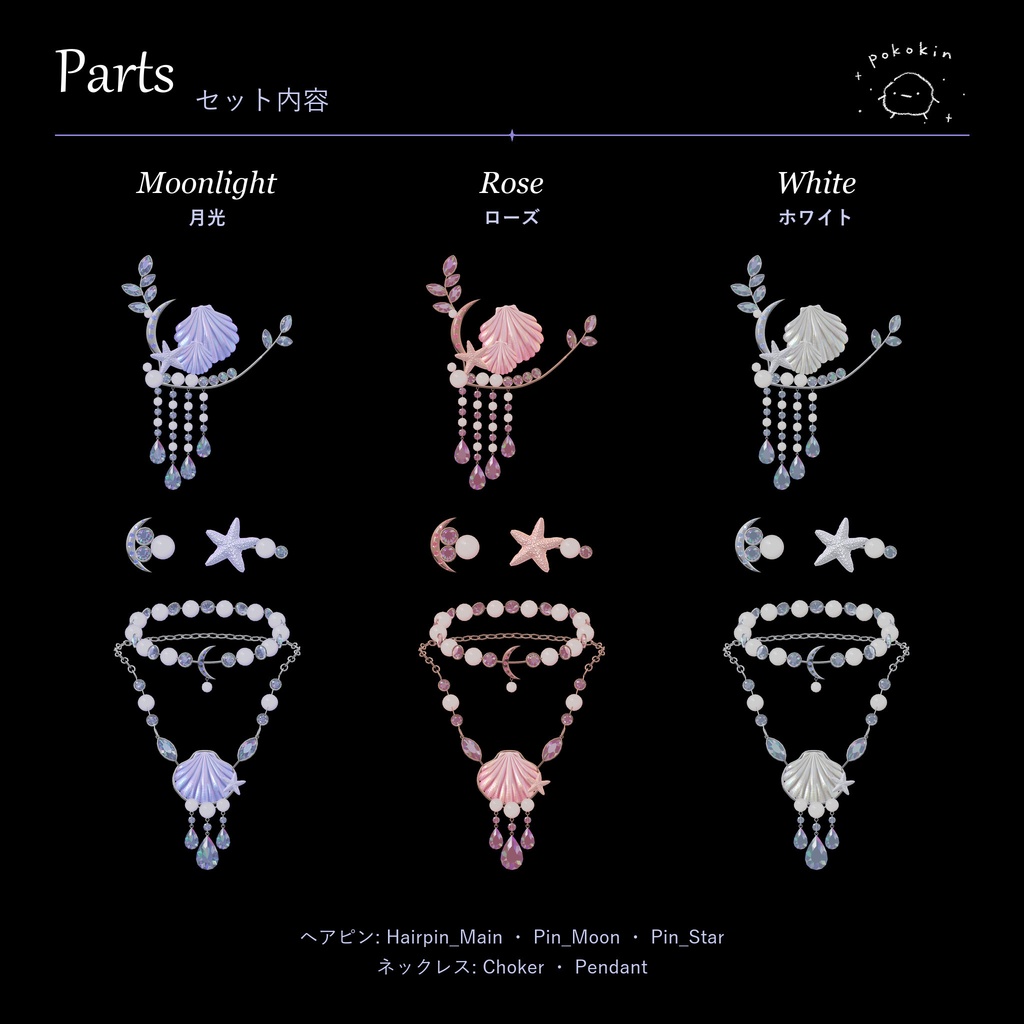
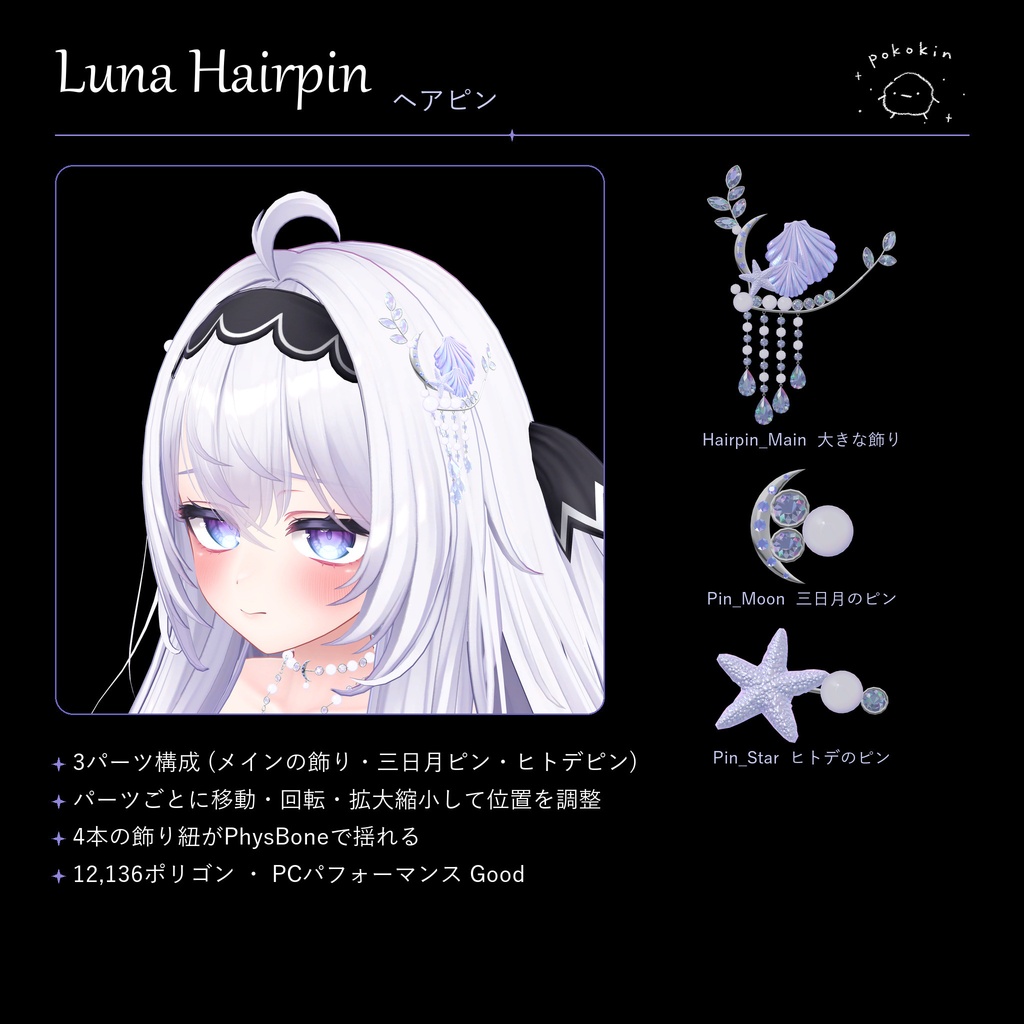
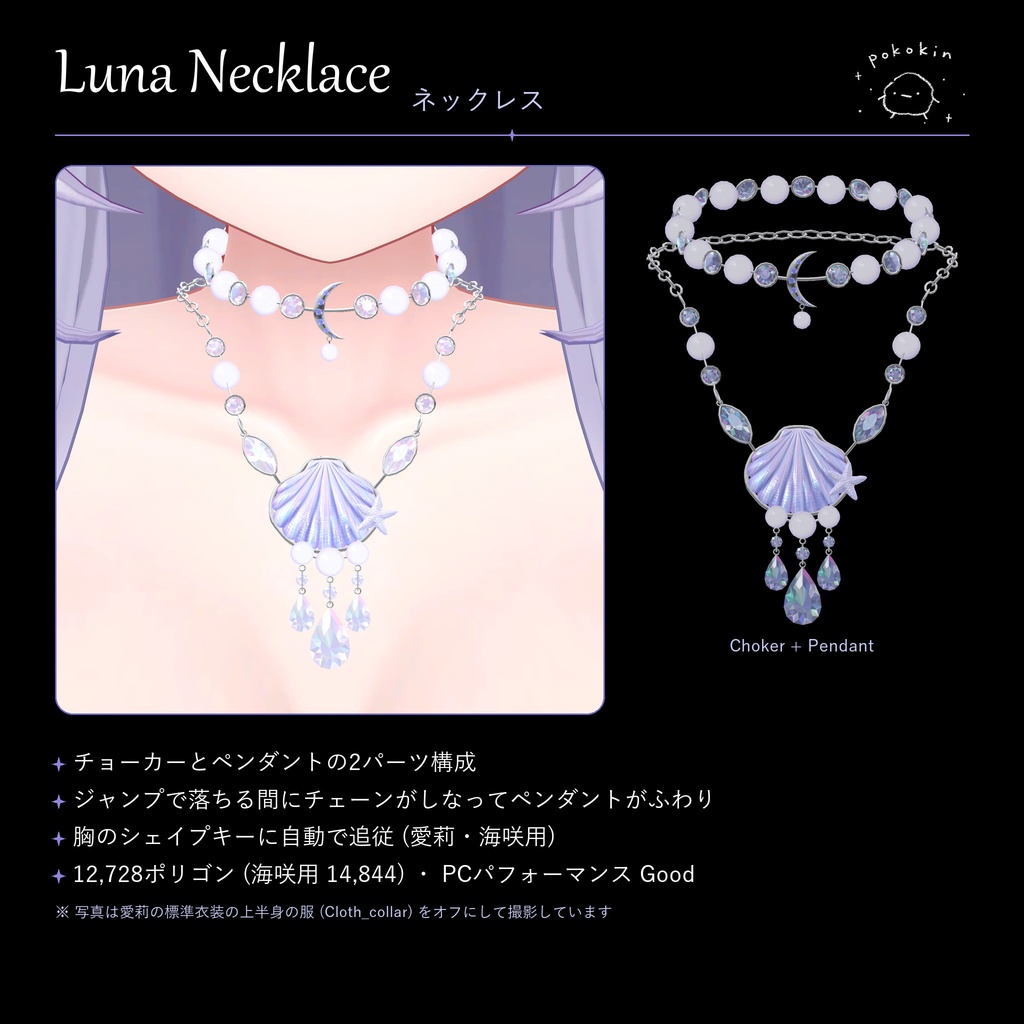
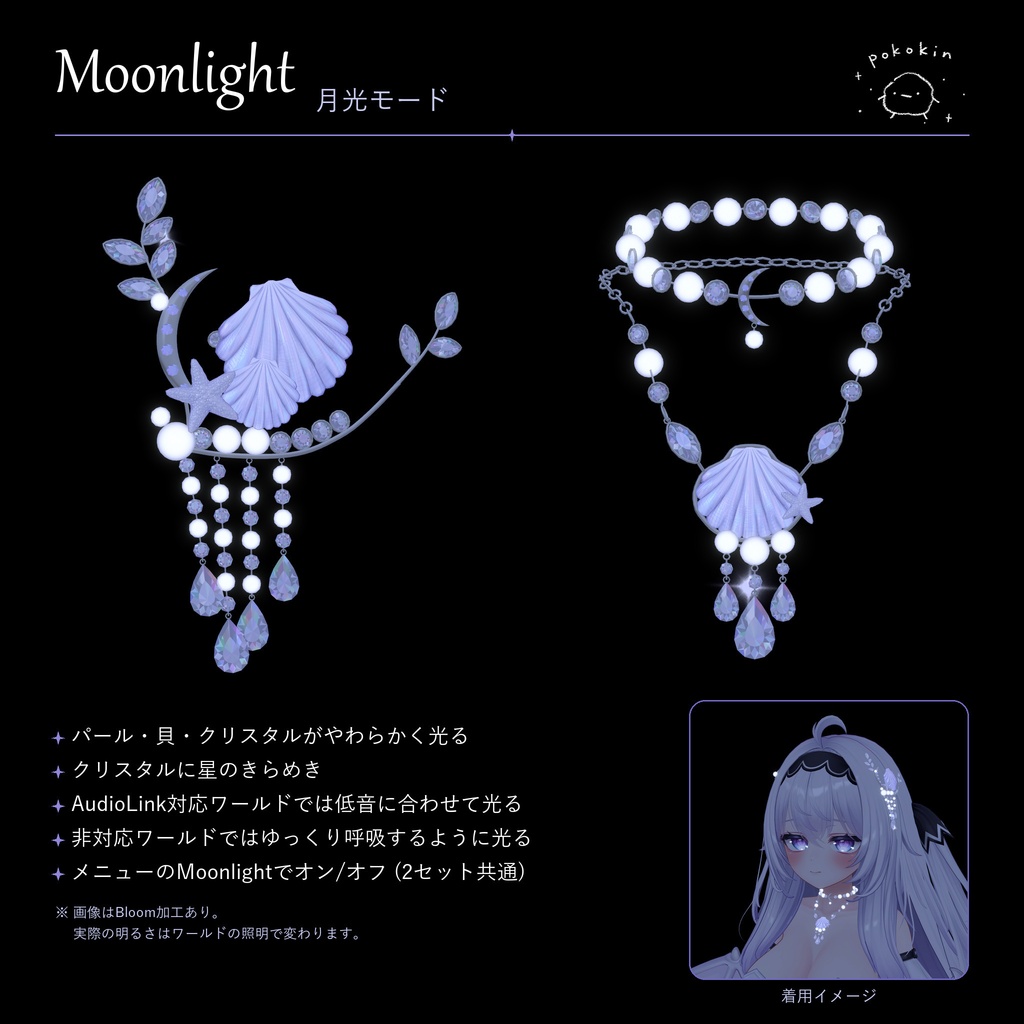
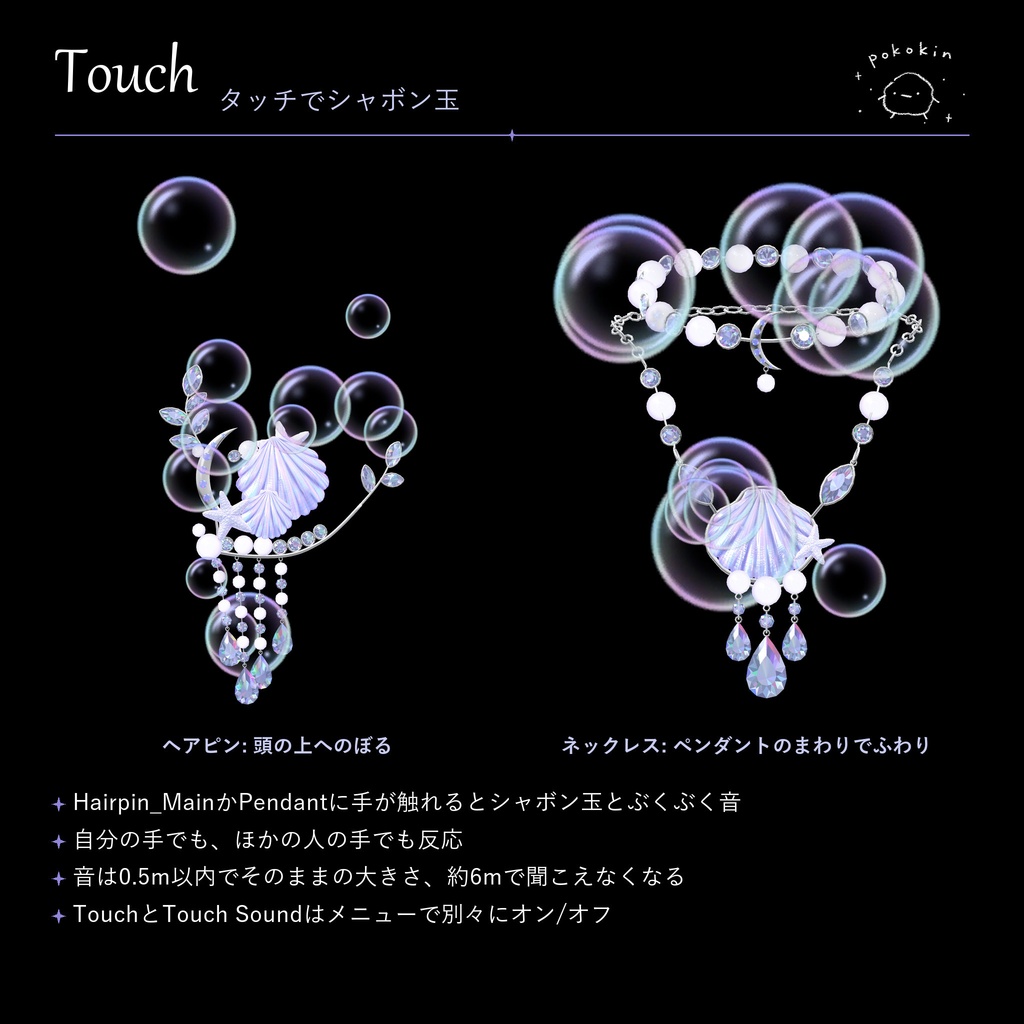
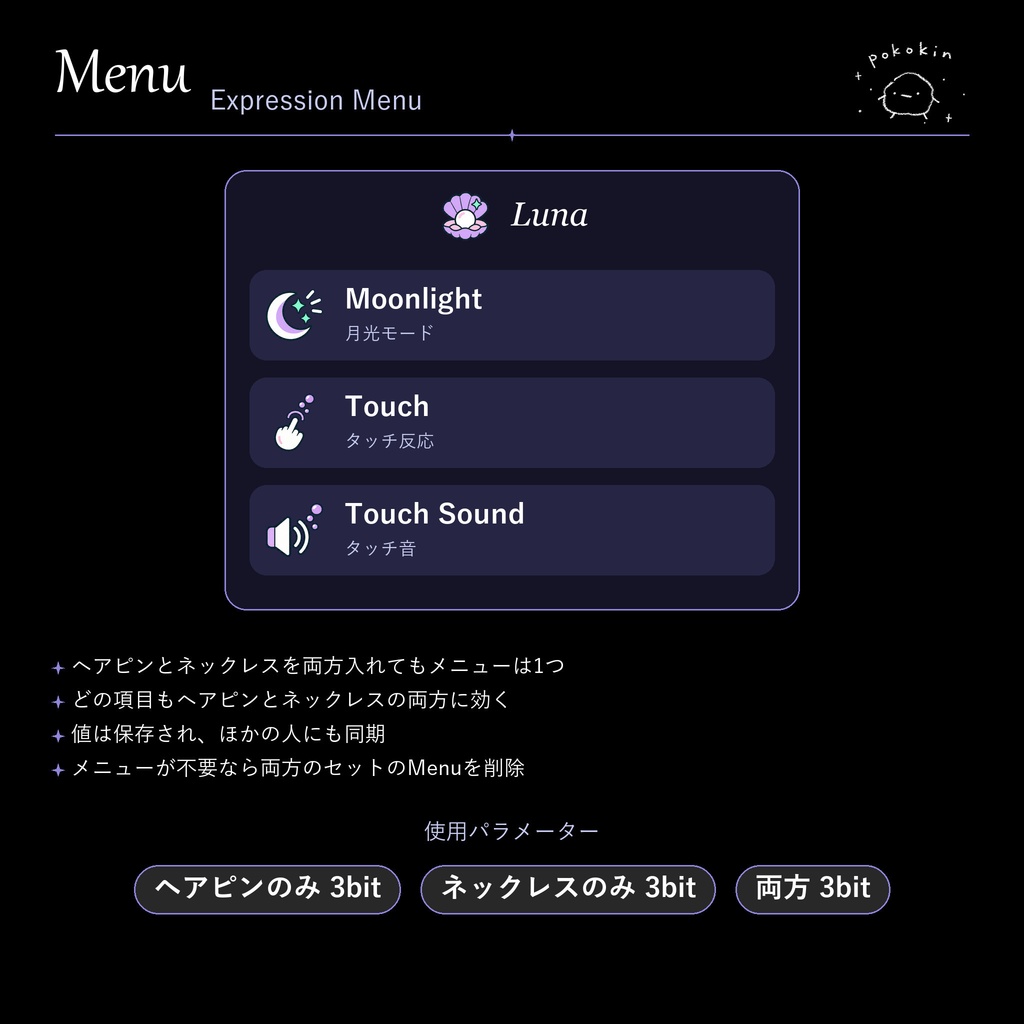
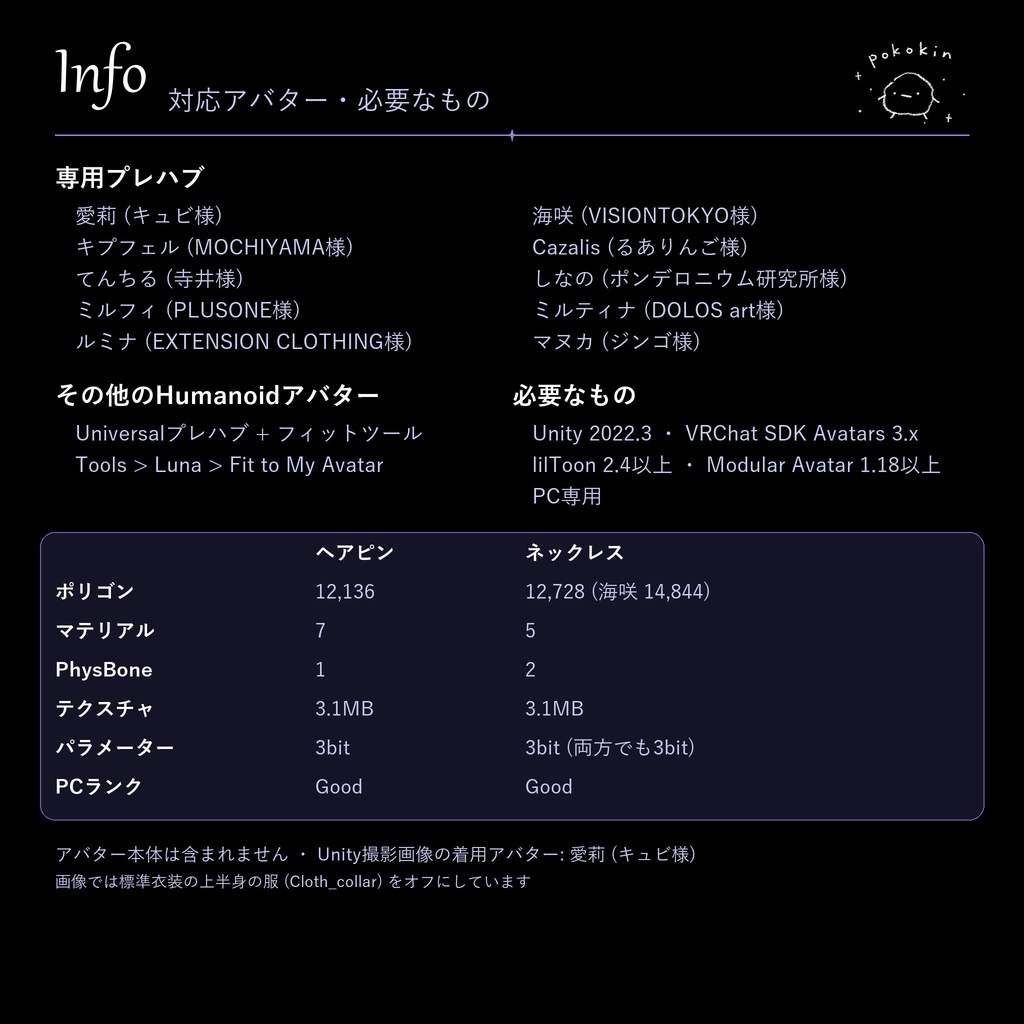
月の光をまとう、人魚のアクセサリー。 VRChat向けヘアピン&ネックレス「Luna」 貝殻とパール、クリスタルを月の光でまとめた、ヘアピンとネックレスのセットです。 月光モードでやわらかく光り、触れるとシャボン玉がふわりと浮かびます。 バージョン:v1.0.0 同期Expression Parameters使用量:3ビット(ヘアピンのみ・ネックレスのみ・両方とも同じ) ※アバターの同期パラメーター容量に対する使用量です。ダウンロードサイズやFPSを表す数値ではありません。 ■ 月と人魚のヘアピン&ネックレス ヘアピンは大きな飾り(Hairpin_Main)、三日月のピン、ヒトデのピンの3パーツ構成です。 ネックレスはチョーカーとペンダントの2パーツ構成です。 ヘアピンとネックレスは独立しているので、片方だけでも使えます。 パーツごとに移動・回転・拡大縮小して、位置を調整できます。 ■ 月光モード Moonlightをオンにすると、パール・貝・クリスタルがやわらかく光り、クリスタルに星のきらめきがときどき現れます。 AudioLink対応ワールドでは音楽の低音に合わせて光り、非対応ワールドではゆっくり呼吸するように光ります。 暗い場所でよく見え、明るい場所では控えめになります。 ■ タッチでシャボン玉 手や指がHairpin_MainまたはPendantに触れると、一瞬光ってシャボン玉が浮かび、ぶくぶくと音が鳴ります。 ヘアピンのシャボン玉は頭の上へのぼり、ネックレスのシャボン玉は顔を隠さないようペンダントのまわりでふわりと浮かびます。 自分の手でも、ほかの人の手でも反応します。 ■ 揺れもの ヘアピンの飾り紐とチョーカーの小さなパールが、PhysBoneで揺れます。 ネックレスのチェーンとペンダントは重力を受け、ジャンプして落ちる間にペンダントがふわりと浮き上がります。 ■ カラー 月光:ラベンダーの貝・シルバー ローズ:ピンクの貝・ローズゴールド ホワイト:パール色の貝・シルバー 色はプレハブで選びます。ヘアピンとネックレスで違う色を組み合わせても構いません。 形とパフォーマンスは全色共通です。 ■ 対応アバター 専用プレハブ: 愛莉(キュビ様)、海咲(VISIONTOKYO様)、キプフェル(MOCHIYAMA様)、Cazalis(るありんご様)、てんちる(寺井様)、しなの(ポンデロニウム研究所様)、ミルフィ(PLUSONE様)、ミルティナ(DOLOS art様)、ルミナ(EXTENSION CLOTHING様)、マヌカ(ジンゴ様) その他のHumanoidアバターは、UniversalプレハブとフィットツールのTools > Luna > Fit to My Avatarで合わせられます。 帽子・角・リボンなど名前で分かる頭の小物は自動で除いて髪に合わせ、シーン内の複数のアバターにまとめて合わせることもできます。 ※すべてのアバターで完全な密着を保証するものではありません。必要に応じてパーツオブジェクトで調整してください。 ■ ゲーム内メニュー Expression MenuにLunaが追加されます。ヘアピンとネックレスを両方入れても1つのメニューにまとまり、どの項目も両方に効きます。 Moonlight:月光モードのオン/オフ Touch:タッチ反応のオン/オフ Touch Sound:タッチ音のオン/オフ ※値は保存され、ほかの人にも同期されます。 ※メニューが不要な場合は、両方のセットのMenuオブジェクトを削除してください。 ■ 対応環境 PC/Windows版VRChatのアバター向けです。 Quest/Android単体には対応していません。 導入にはUnity、VRChat SDK Avatars、Modular Avatar、NDMF、lilToonが必要です。 外部パッケージは別途ご用意ください。 確認環境: Unity 2022.3.22f1 VRChat SDK 3.10.5 Modular Avatar 1.18.7 NDMF 1.14.8 lilToon 2.4.1 上記は確認した環境であり、最低対応バージョンを示すものではありません。 ■ 内容物・導入 ・ヘアピンとネックレスのunitypackage(両方のセットを同梱) ・10アバター分の専用プレハブとUniversalプレハブ(各3色) ・モデル、マテリアル、テクスチャ、エフェクト、メニューアイコン ・フィットツール(Editorスクリプト) ・日本語・英語・韓国語の説明書 unitypackageをインポートし、Assets/pokokin/Luna/Prefabs内のアバターフォルダから好きな色のプレハブを選びます。 アバターの一番上のオブジェクト(Avatar Descriptorがある場所)の直下に置き、そのままアップロードしてください。 頭・首・胸のボーンへは、アップロード時にModular Avatarが自動で取り付けます。 撮影に使用したアバター、および外部必須パッケージは付属しません。 ■ パフォーマンス ヘアピン:12,136ポリゴン、マテリアルスロット7、PhysBone 1、PCパフォーマンス Good ネックレス:12,728ポリゴン(海咲用 14,844)、マテリアルスロット5、PhysBone 2、PCパフォーマンス Good テクスチャメモリ:3.1MB(2つのセットを同じ色で入れても増えません) ■ 購入前にご確認ください ・服が首や胸を覆うアバターでは、ネックレスが服に隠れます。 ・帽子や角などの頭の小物をつけると、ヘアピンの一部が隠れることがあります。 ・月光モードの星とタッチのシャボン玉はパーティクルです。見る人のセーフティ設定によっては表示されません。 ・ほかの人の手への反応は、Avatar Interactionの設定に影響されます。 ・体のシェイプキーや大きさを変えた場合は、フィットツールでもう一度合わせてください。 ・顔を大きく傾けたときなど、動きによってパーツ同士が少し触れることがあります。 ・照明やワールド環境によって、色や光の見え方が変わります。 ■ 利用条件 ・購入者本人の複数のアバターでの使用、個人利用のための改変を許可します。 ・写真、動画、SNSへの公開、収益化した配信・動画での使用を許可します。 ・公開ワールドでの着用や、友人との撮影・ふれあいを許可します。 ・元データおよび改変データの無断共有、無料再配布、再販売は禁止します。 ・誰でも複製できるパブリック/クローン可能なアバターに含めて提供することは禁止します。 ・導入・改変の依頼は、依頼者と作業者の双方が正規購入している場合に許可します。作業に必要な範囲で、両者間のファイル受け渡しが可能です。 ・企業広告、ゲームへの同梱配布、グッズ制作は事前にお問い合わせください。 ・クレジット表記は任意です。 詳細は同梱の説明書をご確認ください。 外部パッケージには各制作者の利用条件が適用されます。 ■ 商品画像について 1枚目はイメージ画像です。 2・3枚目はVRChat内で撮影したスクリーンショット、4〜8枚目はUnityで撮影した画像です。月光モードの画像には、光のにじみ(Bloom)の加工をしています。 Unityで撮影した着用画像のアバターは愛莉(キュビ様)で、標準衣装の上半身の服(Cloth_collar)をオフにして撮影しています。 ■ お問い合わせ pokokinショップのBOOTHメッセージよりご連絡ください。 不具合については、使用バージョン、発生状況、エラー画面などを添えていただくと確認がスムーズです。
English
Mermaid accessories that wear the moonlight. Luna — a hairpin and necklace set for VRChat A hairpin and necklace set of seashells, pearls and crystals gathered by the light of the moon. It glows softly in Moonlight Mode, and bubbles float up when you touch it. Version: v1.0.0 Synced expression parameters: 3 bits (the same for the hairpin alone, the necklace alone, or both) This is Luna's use of the avatar's synchronized parameter budget, not its download size or frame rate. ■ A mermaid hairpin and necklace The hairpin has three parts: the main ornament (Hairpin_Main), a crescent moon pin and a starfish pin. The necklace has two parts: the choker and the pendant. The hairpin and the necklace are independent, so you can use either one on its own. Each part can be moved, rotated and scaled on its own. ■ Moonlight Mode Turn on Moonlight and the pearls, shells and crystals glow softly, with stars twinkling in the crystals now and then. In AudioLink worlds the glow follows the bass of the music; in other worlds it breathes slowly. It shows best in dark places and stays subtle in bright ones. ■ Touch for bubbles When a hand or finger touches Hairpin_Main or the Pendant, it flashes, bubbles float up, and a bubbling sound plays. The hairpin's bubbles rise above the head; the necklace's bubbles float around the pendant so they don't cover the face. It reacts to your own hands and to other people's hands. ■ Physics The hairpin's strands and the choker's small pearls sway with PhysBones. The necklace chain and pendant follow gravity, and the pendant floats up while you fall after a jump. ■ Colors Moonlight: lavender shell, silver Rose: pink shell, rose gold White: pearl shell, silver Choose the color by prefab. You can mix colors between the hairpin and the necklace. Shape and performance are the same in every color. ■ Supported avatars Dedicated prefabs: Airi (by Kyubi), Misaki (by VISIONTOKYO), Kipfel (by MOCHIYAMA), Cazalis (by るありんご), Tenchill (てんちる, by 寺井), Shinano (しなの, by ポンデロニウム研究所), Milfy (ミルフィ, by PLUSONE), Milltina (ミルティナ, by DOLOS art), LUMINA (ルミナ, by EXTENSION CLOTHING), MANUKA (マヌカ, by ジンゴ) Other Humanoid avatars can use the Universal prefabs with the fit tool at Tools > Luna > Fit to My Avatar. It leaves out head items that can be told by name, such as hats, horns and ribbons, fits the hairpin to the hair, and can fit every avatar in the scene at once. A perfect fit on every avatar is not guaranteed. Fine-tune with the part objects if needed. ■ In-game menu One Luna menu is added to the Expression Menu. Even with both the hairpin and the necklace there is only one menu, and each item controls both. Moonlight: Moonlight Mode on/off Touch: touch reaction on/off Touch Sound: touch sound on/off Values are saved and synced to other players. If you don't need the menu, delete the Menu object in both sets. ■ Requirements For VRChat avatars on PC / Windows. Standalone Quest / Android is not supported. Unity, VRChat SDK Avatars, Modular Avatar, NDMF, and lilToon are required. Please install the required external packages separately. Verified environment: Unity 2022.3.22f1 VRChat SDK 3.10.5 Modular Avatar 1.18.7 NDMF 1.14.8 lilToon 2.4.1 These are the versions used for verification, not confirmed minimum supported versions. ■ Included Files & Installation • The hairpin and necklace unitypackage (both sets in one) • Dedicated prefabs for 10 avatars and Universal prefabs (3 colors each) • Models, materials, textures, effects and menu icons • The fit tool (Editor script) • Manuals in Japanese, English and Korean Import the unitypackage and pick a prefab in the color you like from the avatar folder in Assets/pokokin/Luna/Prefabs. Place it directly under the top object of your avatar (where the Avatar Descriptor is) and upload as is. Modular Avatar attaches it to the head, neck and chest bones at upload. The avatars used in the images and the required external packages are not included. ■ Performance Hairpin: 12,136 polygons, 7 material slots, 1 PhysBone, PC performance Good Necklace: 12,728 polygons (14,844 for Misaki), 5 material slots, 2 PhysBones, PC performance Good Texture memory: 3.1 MB (no increase when both sets use the same color) ■ Before Purchasing • On avatars whose clothes cover the neck or chest, the necklace is hidden under the clothes. • Hats, horns and other head items can cover part of the hairpin. • The stars in Moonlight Mode and the touch bubbles are particles. They may not show depending on the viewer's safety settings. • Reactions to other people's hands depend on Avatar Interaction settings. • If you change body shape keys or the avatar's size, fit it again with the fit tool. • With large movements, such as tilting the head far, parts may touch each other slightly. • Colors and glow look different depending on lighting and the world. ■ Usage Terms • You may use Luna on multiple avatars you own and modify it for personal use. • You may share photos and videos on social media and use Luna in monetized streams and videos. • Wearing it in public worlds and taking photos or interacting with friends are permitted. • Unauthorized sharing, free redistribution, or resale of the original or modified files is prohibited. • You may not distribute it as part of a public or cloneable avatar that others can copy. • Installation and modification commissions are permitted when both the client and the person carrying out the work have purchased legitimate copies. Files may be exchanged between them only as needed for that work. • Please contact us in advance regarding corporate advertising, distribution within a game, or merchandise production. • Credit is optional. Please read the included manual for details. External packages are subject to their respective creators' terms. ■ Product Images The first image is for illustration purposes. Images 2 and 3 are screenshots taken in VRChat, and images 4 to 8 were taken in Unity. The Moonlight Mode images have a bloom (light glow) effect added. In the worn images taken in Unity, the avatar is Airi (by Kyubi), with the top of her default outfit (Cloth_collar) turned off. ■ Contact Please contact the pokokin shop through BOOTH messages. For technical issues, include your version, a description of what happened, and screenshots of any errors when possible.
한국어
달빛을 두른 인어의 장신구. VRChat 머리핀 & 목걸이, Luna 조개껍데기와 진주, 크리스털을 달빛으로 엮은 머리핀과 목걸이 세트입니다. 달빛 모드에서 은은하게 빛나고, 손을 대면 비눗방울이 둥실 떠오릅니다. 버전: v1.0.0 동기화 Expression Parameters 사용량: 3비트(머리핀만·목걸이만·둘 다 모두 같음) ※ 아바타 동기화 파라미터 예산에서 차지하는 양이며, 다운로드 크기나 FPS를 뜻하지 않습니다. ■ 인어의 머리핀 & 목걸이 머리핀은 큰 장식(Hairpin_Main), 초승달 핀, 불가사리 핀의 3개 파츠로 되어 있습니다. 목걸이는 초커와 펜던트의 2개 파츠로 되어 있습니다. 머리핀과 목걸이는 따로 되어 있어 하나만 써도 됩니다. 파츠마다 옮기기·회전·크기 조절로 위치를 맞출 수 있습니다. ■ 달빛 모드 Moonlight를 켜면 진주·조개·크리스털이 은은하게 빛나고, 크리스털에 별빛이 가끔 반짝입니다. AudioLink 월드에서는 음악의 저음에 맞춰 빛나고, 그 밖의 월드에서는 천천히 숨 쉬듯 빛납니다. 어두운 곳에서 잘 보이고, 밝은 곳에서는 은은해집니다. ■ 터치하면 비눗방울 손이나 손가락이 Hairpin_Main 또는 Pendant에 닿으면 한순간 빛나며 비눗방울이 떠오르고, 보글보글 소리가 납니다. 머리핀의 비눗방울은 머리 위로 올라가고, 목걸이의 비눗방울은 얼굴을 가리지 않게 펜던트 주변에서 둥실 떠오릅니다. 내 손에도, 다른 사람 손에도 반응합니다. ■ 흔들림 머리핀 장식 줄과 초커의 작은 진주가 PhysBone으로 흔들립니다. 목걸이 체인과 펜던트는 중력을 받아, 점프해서 떨어지는 동안 펜던트가 살짝 떠오릅니다. ■ 색상 달빛: 라벤더 조개 · 실버 로즈: 분홍 조개 · 로즈골드 화이트: 진주색 조개 · 실버 색은 프리팹으로 고릅니다. 머리핀과 목걸이를 다른 색으로 조합해도 됩니다. 모양과 성능은 모든 색이 같습니다. ■ 대응 아바타 전용 프리팹: 아이리(キュビ 제작), 미사키(VISIONTOKYO 제작), Kipfel(MOCHIYAMA 제작), Cazalis(るありんご 제작), 텐칠(てんちる, 寺井 제작), 시나노(しなの, ポンデロニウム研究所 제작), 밀피(ミルフィ, PLUSONE 제작), 밀티나(ミルティナ, DOLOS art 제작), 루미나(ルミナ, EXTENSION CLOTHING 제작), 마누카(マヌカ, 진권/ジンゴ 제작) 그 밖의 휴머노이드 아바타는 Universal 프리팹과 맞추기 도구 Tools > Luna > Fit to My Avatar로 맞출 수 있습니다. 모자·뿔·리본처럼 이름으로 알 수 있는 머리 소품은 자동으로 빼고 머리카락에 맞추며, 씬에 있는 여러 아바타를 한 번에 맞출 수도 있습니다. ※ 모든 아바타에서 완벽하게 밀착되는 것을 보장하지는 않습니다. 필요하면 파츠 오브젝트로 다듬어 주세요. ■ 게임 내 메뉴 Expression Menu에 Luna가 추가됩니다. 머리핀과 목걸이를 둘 다 넣어도 메뉴는 하나로 합쳐지고, 모든 항목이 둘 다에 적용됩니다. Moonlight: 달빛 모드 켜기/끄기 Touch: 터치 반응 켜기/끄기 Touch Sound: 터치 소리 켜기/끄기 ※ 값은 저장되고 다른 사람에게도 동기화됩니다. ※ 메뉴가 필요 없으면 두 세트 모두의 Menu 오브젝트를 지워 주세요. ■ 사용 환경 PC/Windows용 VRChat 아바타를 대상으로 합니다. Quest/Android 단독 환경은 지원하지 않습니다. Unity, VRChat SDK Avatars, Modular Avatar, NDMF, lilToon이 필요합니다. 필수 외부 패키지는 별도로 설치해 주세요. 확인한 환경: Unity 2022.3.22f1 VRChat SDK 3.10.5 Modular Avatar 1.18.7 NDMF 1.14.8 lilToon 2.4.1 위 버전은 확인에 사용한 환경이며, 최소 지원 버전을 의미하지 않습니다. ■ 구성품 및 설치 • 머리핀과 목걸이 unitypackage(두 세트 모두 포함) • 아바타 10종 전용 프리팹과 Universal 프리팹(각 3색) • 모델, 머티리얼, 텍스처, 이펙트, 메뉴 아이콘 • 맞추기 도구(Editor 스크립트) • 일본어·영어·한국어 설명서 unitypackage를 가져온 뒤, Assets/pokokin/Luna/Prefabs 안의 아바타 폴더에서 원하는 색의 프리팹을 고릅니다. 아바타의 맨 위 오브젝트(Avatar Descriptor가 있는 곳) 바로 아래에 넣고 그대로 업로드하세요. 머리·목·가슴 뼈에는 업로드할 때 Modular Avatar가 자동으로 붙입니다. 촬영에 사용한 아바타와 필수 외부 패키지는 포함되지 않습니다. ■ 성능 머리핀: 폴리곤 12,136, 머티리얼 슬롯 7, PhysBone 1, PC 성능 Good 목걸이: 폴리곤 12,728(미사키용 14,844), 머티리얼 슬롯 5, PhysBone 2, PC 성능 Good 텍스처 메모리: 3.1MB(두 세트를 같은 색으로 넣어도 늘지 않음) ■ 구매 전 확인 • 옷이 목이나 가슴을 덮는 아바타에서는 목걸이가 옷에 가려집니다. • 모자나 뿔 같은 머리 소품을 켜면 머리핀 일부가 가려질 수 있습니다. • 달빛 모드의 별빛과 터치 비눗방울은 파티클입니다. 보는 사람의 세이프티 설정에 따라 보이지 않을 수 있습니다. • 다른 사람 손에 대한 반응은 Avatar Interaction 설정의 영향을 받습니다. • 몸 쉐이프키나 크기를 바꿨다면 맞추기 도구로 다시 맞춰 주세요. • 고개를 크게 기울이는 등 움직임에 따라 파츠끼리 살짝 닿을 수 있습니다. • 조명과 월드 환경에 따라 색과 빛이 다르게 보일 수 있습니다. ■ 이용 조건 • 구매자 본인의 여러 아바타에서 사용하거나 개인 용도로 수정할 수 있습니다. • 사진·영상·SNS 공개와 수익화 방송·영상에서 사용할 수 있습니다. • 공개 월드에서 착용하거나 친구와 촬영·상호작용하는 것은 허용합니다. • 원본 및 수정 파일의 무단 공유, 무료 재배포, 재판매는 금지합니다. • 다른 사람이 복제할 수 있는 퍼블릭/클론 가능한 아바타에 포함해 제공할 수 없습니다. • 설치·수정 커미션은 의뢰자와 작업자 모두 정식 구매한 경우 허용합니다. 작업에 필요한 범위에서 두 사람 사이에 파일을 전달할 수 있습니다. • 기업 광고, 게임에 포함한 배포, 굿즈 제작은 사전에 문의해 주세요. • 크레딧 표기는 선택 사항입니다. 자세한 내용은 동봉된 설명서를 확인해 주세요. 외부 패키지에는 각 제작자의 이용 조건이 적용됩니다. ■ 상품 이미지 안내 첫 번째 이미지는 연출 이미지입니다. 2·3번째 이미지는 VRChat에서 찍은 스크린샷이고, 4~8번째 이미지는 Unity에서 촬영했습니다. 달빛 모드 이미지에는 빛 번짐(Bloom) 효과를 더했습니다. Unity에서 촬영한 착용 이미지의 아바타는 아이리(キュビ 제작)이며, 기본 의상의 상의(Cloth_collar)를 끄고 촬영했습니다. ■ 문의 BOOTH의 pokokin 샵 메시지로 문의해 주세요. 문제 발생 시 사용 버전, 발생 상황, 오류 화면 등을 함께 보내주시면 확인에 도움이 됩니다.