

【VRChat】【MA対応】ぐりぐりクレヨン - lilToon用 クレヨン風アウトラインギミック
- 通常版 / Standardダウンロード商品¥ 500
- 支援版 / Support(中身は同じです)ダウンロード商品¥ 1,000
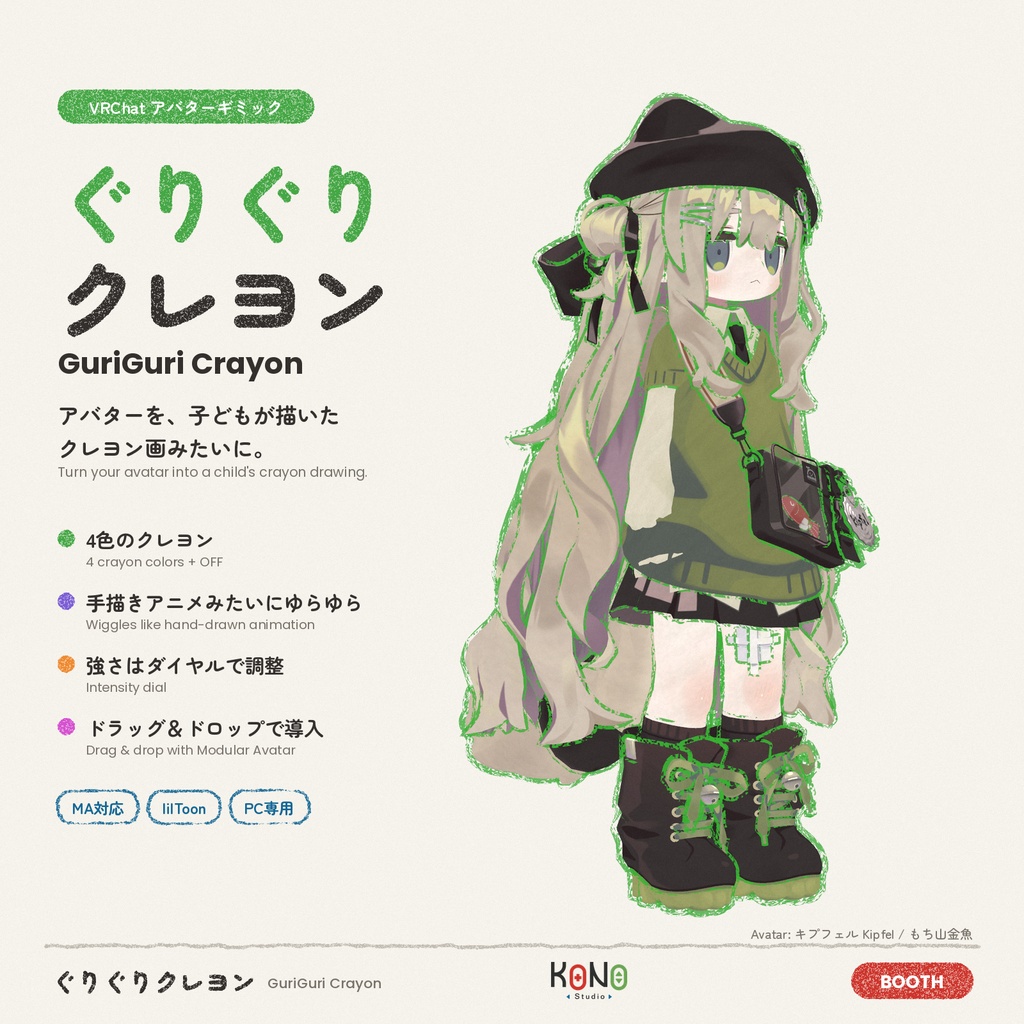
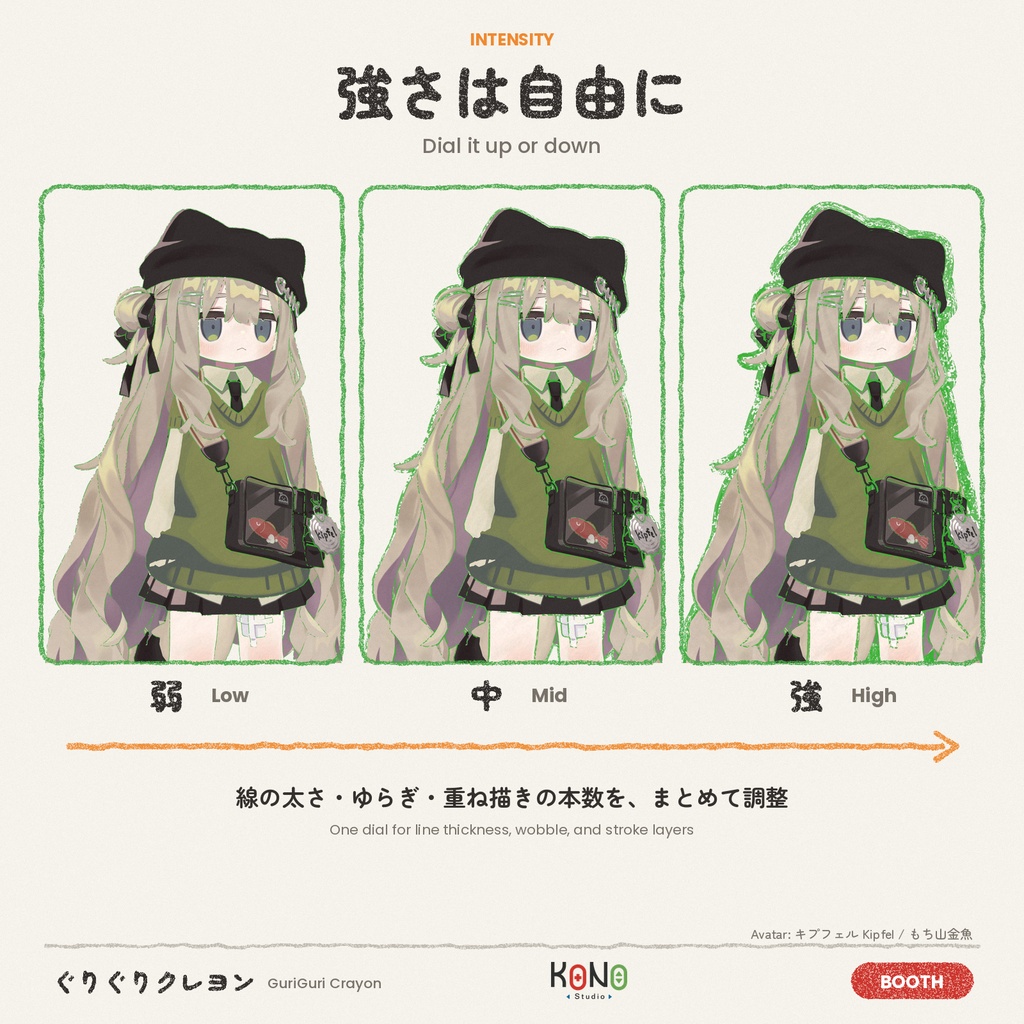
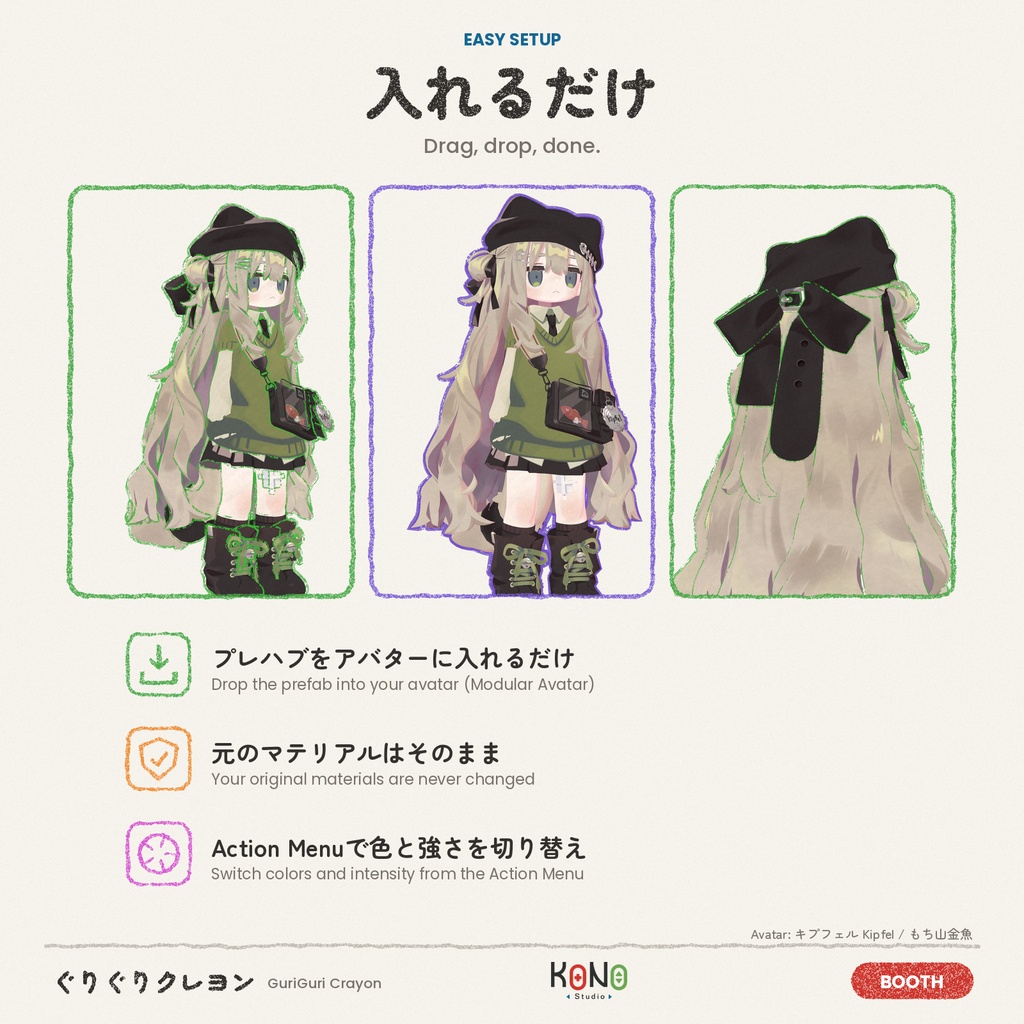


※▼ 必須環境 ・Unity 2022.3.22f1 ・VRChat SDK - Avatars 3.10.6 以降 ・lilToon 2.4 以降の 2.x(2.4.1 で動作確認) ・Modular Avatar 1.18.7 以降(NDMF 1.14.8 で動作確認) ・PC 版のみ(Quest / Android 非対応) ・プレハブをアバターの中に置くだけ(NDMF / Modular Avatar) ・元のマテリアルは変更しません。アップロード時と Play モード時に、コピーを作って変換します ・ゲーム内の Action Menu で、4 色のクレヨンと OFF を切り替え ・Intensity ダイヤルで、線の太さ・ゆらぎ・重ね描きの本数を調整 ・線は毎秒描き直され、手描きアニメのように動きます ・服や肌は元の色のまま、うっすらクレヨンの質感だけを追加 ────────── ※▼ 必要環境 ・Unity 2022.3.22f1 ・VRChat SDK - Avatars 3.10.6 以上 ・lilToon 2.4 以上的 2.x(已在 2.4.1 測試) ・Modular Avatar 1.18.7 以上(已搭配 NDMF 1.14.8 測試) ・僅限 PC 版(不支援 Quest / Android) ・只要把 prefab 放進 avatar(NDMF / Modular Avatar) ・不會修改原本的材質。上傳和 Play 模式時才複製一份來轉換 ・遊戲內 Action Menu 可以切換 4 種顏色的蠟筆和關閉 ・Intensity 轉盤可以調整線條粗細、晃動程度和重疊的筆數 ・線條每秒重畫好幾次,像手繪動畫一樣會動 ・衣服和皮膚保留原本的顏色,只加上淡淡的蠟筆質感 ────────── ※▼ Requirements ・Unity 2022.3.22f1 ・VRChat SDK - Avatars 3.10.6 or later ・lilToon 2.x, version 2.4 or later (tested with 2.4.1) ・Modular Avatar 1.18.7 or later (tested with NDMF 1.14.8) ・PC only (Quest / Android not supported) - Just drop the prefab into your avatar (NDMF / Modular Avatar) - Your original materials are never changed. Copies are converted when you upload or enter Play mode - Switch between 4 crayon colors or off from the in-game Action Menu - Intensity dial: line thickness, wobble, and how many strokes are layered - The line is redrawn several times a second, like hand-drawn animation - Clothes and skin keep their own colors, with a faint crayon texture on top
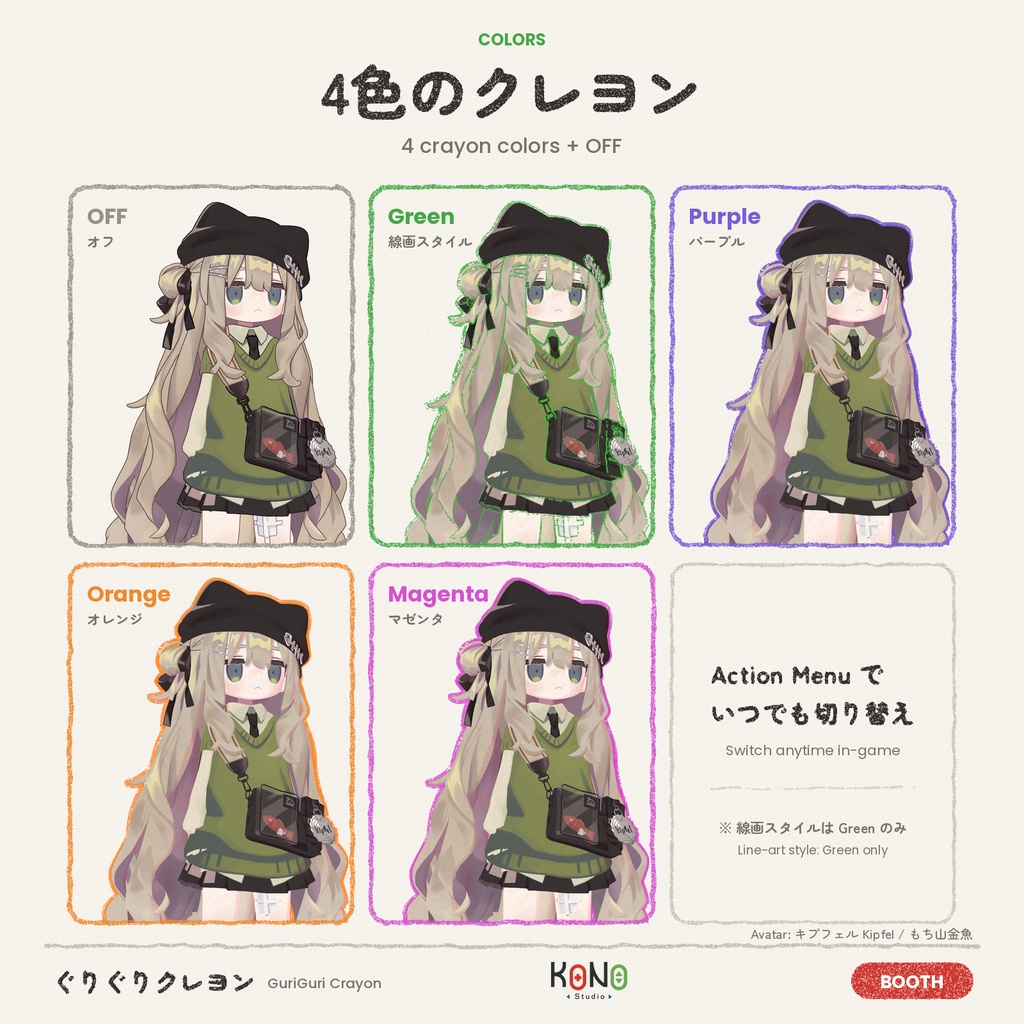
4 つのクレヨン / 4 種蠟筆 / 4 crayons
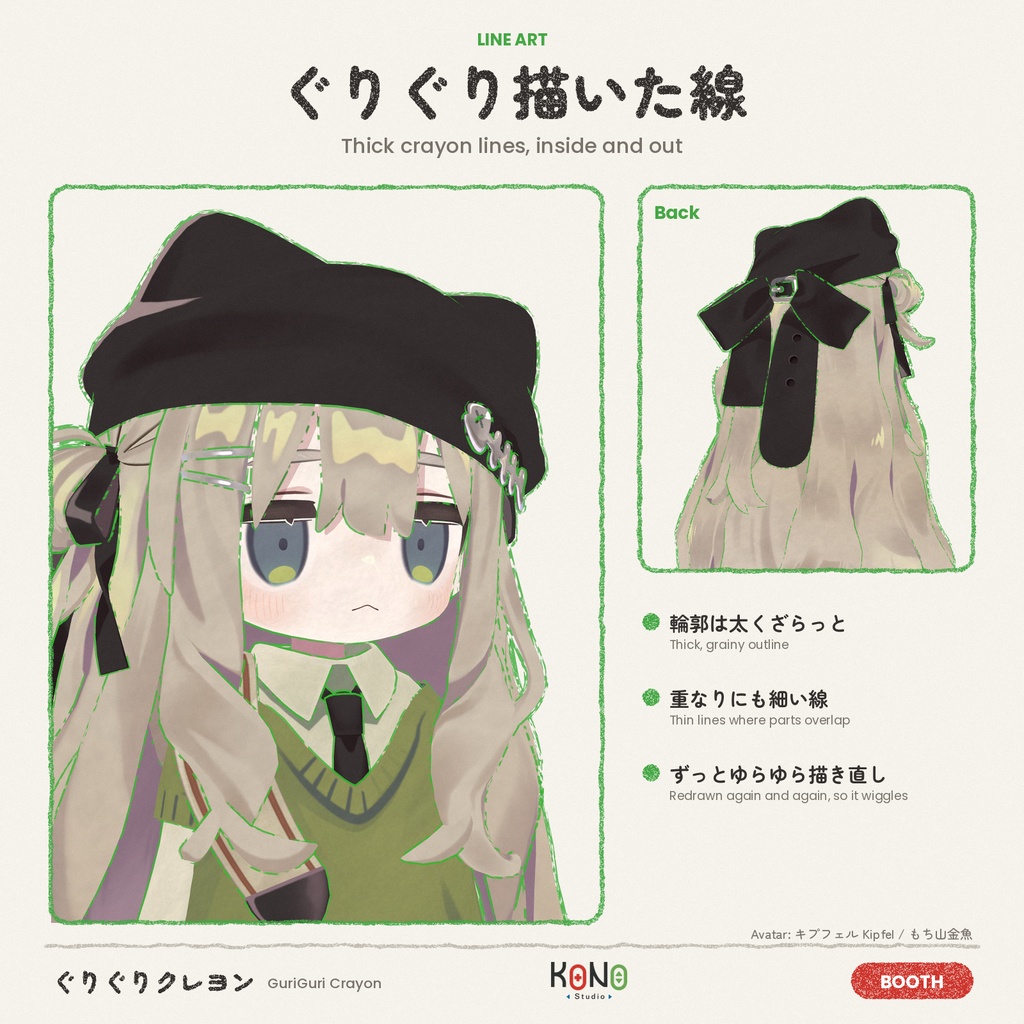
・Green(線画) 太くてざらっとした緑のクレヨンで輪郭を描き、体の内側の重なりにも細い緑の線が入ります。 ・Purple / Orange / Magenta その色のクレヨンで輪郭を描き、トゥーン調のくっきりした影が入ります。 ※ 現在、線画スタイルは Green のみです。Purple / Orange / Magenta は同じスタイルの色違いです。 ────────── ・Green(線稿) 用粗、有顆粒感的綠色蠟筆畫外輪廓,身體內部重疊的地方也會畫上細的綠線。 ・Purple / Orange / Magenta 用該顏色的蠟筆畫外輪廓,身體加上卡通風格的清楚陰影。 ※ 目前只有 Green 是線稿風格。Purple / Orange / Magenta 是同一種風格的不同顏色。 ────────── - Green (line drawing) A thick, grainy green crayon around the silhouette, plus thin green lines where parts of the body overlap. - Purple / Orange / Magenta A crayon outline in that color, with crisp cartoon shadows on the body. Note: only Green has the line-drawing style for now. Purple, Orange, and Magenta are color variants of the same style.
動作環境 / 使用環境 / Requirements
・Unity 2022.3.22f1 ・VRChat SDK - Avatars ・lilToon 2.4 以降の 2.x(2.4.1 で動作確認) ・Modular Avatar(1.18.7 で動作確認) ・NDMF(1.14.8 で動作確認) ・PC 版のみ(Quest / Android 版では使えません) ────────── ・Unity 2022.3.22f1 ・VRChat SDK - Avatars ・lilToon 2.4 以上的 2.x(已在 2.4.1 測試) ・Modular Avatar(已在 1.18.7 測試) ・NDMF(已在 1.14.8 測試) ・僅限 PC 版(無法在 Quest / Android 版使用) ────────── - Unity 2022.3.22f1 - VRChat SDK - Avatars - lilToon 2.x, 2.4 or later (tested with 2.4.1) - Modular Avatar (tested with 1.18.7) - NDMF (tested with 1.14.8) - PC only (does not work on Quest / Android)
使い方 / 使用方式 / How to use
1. VCC で lilToon と Modular Avatar を導入します 2. unitypackage をインポートします 3. 「Sketch lilToon Effect」プレハブを、アバターの中にドラッグします 4. そのままアップロードします(Play モードでも確認できます) ────────── 1. 用 VCC 安裝 lilToon 和 Modular Avatar 2. 匯入 unitypackage 3. 把「Sketch lilToon Effect」prefab 拖到 avatar 裡 4. 直接上傳(也可以先用 Play 模式確認) ────────── 1. Add lilToon and Modular Avatar with VCC 2. Import the unitypackage 3. Drag the "Sketch lilToon Effect" prefab into your avatar 4. Upload (you can also check it in Play mode first)
メニュー / 選單 / Menu
Crayon ├ Purple ├ Orange ├ Magenta ├ Green └ Intensity 同期パラメーター / 同步參數 / Synced parameters:16 bit
ご注意 / 注意事項 / Notes
・lilToon 以外のシェーダー(Poiyomi など)のマテリアルは、メインテクスチャと色だけを引き継ぎます。半透明の非 lilToon マテリアルは、初期設定では元の見た目のまま残します。 ・lilToon の FakeShadow / Fur / Gem / Refraction / Overlay / アウトラインのみ のマテリアルは変換しません。 ・変換したマテリアルでは、元のアウトラインと影の設定が置き換わります。 ・Stencil の 128 番のビットを使います。Stencil を使う他のギミックと干渉することがあります。 ・マテリアルは色ごとにコピーされます(テクスチャは共有)。表示されるのは常に 1 色だけです。 ・アウトラインの描画が増えるため、少し負荷が上がります。 ・詳しくは同梱の説明書をご覧ください。 ────────── ・不是 lilToon 的材質(例如 Poiyomi)只會保留主貼圖和顏色。半透明的非 lilToon 材質,預設會保持原本的樣子不轉換。 ・lilToon 的 FakeShadow / Fur / Gem / Refraction / Overlay / 只有描邊 的材質不會轉換。 ・轉換後的材質,原本的描邊和陰影設定會被取代。 ・會用到 Stencil 的第 128 位元,可能和其他使用 Stencil 的機關衝突。 ・每種顏色各複製一份材質(貼圖共用),同時只會顯示一種顏色。 ・描邊會多畫幾層,效能負擔會稍微增加。 ・詳細內容請看附上的說明書。 ────────── - Materials that don't use lilToon (Poiyomi, etc.) keep only their main texture and color. Transparent non-lilToon materials keep their original look by default. - lilToon FakeShadow / Fur / Gem / Refraction / Overlay / Outline Only materials are not converted. - On converted materials, the original outline and shadow settings are replaced. - Uses stencil bit 128. It may conflict with other gimmicks that use the stencil. - Materials are copied once per color (textures are shared). Only one color is shown at a time. - The extra outline layers add a little rendering cost. - See the included manual for details.
利用規約 / 使用條款 / Terms of use
・本商品を使ったアバターの VRChat などへのアップロード:OK ・個人で使う範囲での改変:OK ・本商品の再配布・転売(改変したものを含む):禁止 ・本商品を組み込んだアバター・衣装の販売:(未定) ・本商品の使用によって生じたトラブルについて、作者は責任を負いません。 ────────── ・使用本商品的 avatar 上傳到 VRChat 等平台:可以 ・個人使用範圍內的修改:可以 ・再發布、轉賣本商品(包含修改後的版本):禁止 ・販售含有本商品的 avatar 或衣裝:(未定) ・因使用本商品造成的問題,作者不負任何責任。 ────────── - Uploading avatars that use this product to VRChat and similar platforms: OK - Modifying it for your own use: OK - Redistributing or reselling this product, modified or not: not allowed - Selling avatars or outfits that include this product: (to be decided) - The author is not responsible for any problems caused by using this product.
内容物 / 內容物 / Contents
・GuriGuriCrayon_v1.0.1.unitypackage ・説明書 / 說明書 / Manual(日本語・中文・English)PDF
更新履歴 / 更新紀錄 / Update history
※注意事項 パッケージ内のファイルを直接改変している場合、 更新すると上書きされます。 更新する際はバックアップを推奨します。 2026/11/14: v1.0.0 ・初回アップロード 2026/11/14: v1.0.1 ・Purple / Orange / Magenta にも、パーツの重なりに細い線が入るように変更(Green と同じ線画スタイルに統一) ・説明書(日本語・中文・English)を更新 ────────── ※注意事項 如果直接修改過套件裡的檔案,更新時會被覆蓋。 更新前建議先備份。 2026/11/14: v1.0.0 ・首次上傳 2026/11/14: v1.0.1 ・Purple / Orange / Magenta 也會在零件重疊的地方畫細線(和 Green 一樣的線稿風格) ・更新說明書(日文・中文・英文) ────────── * Note If you edited files inside the package, updating will overwrite them. Back up your project before updating. 2026/11/14: v1.0.0 - First release 2026/11/14: v1.0.1 - Purple / Orange / Magenta now also draw thin lines where parts overlap (same line-drawing style as Green) - Updated the manuals (Japanese / Chinese / English)