
フリーランス確定申告・経費ボード|システム手帳風 Notionテンプレート
- ダウンロード商品¥ 2,980
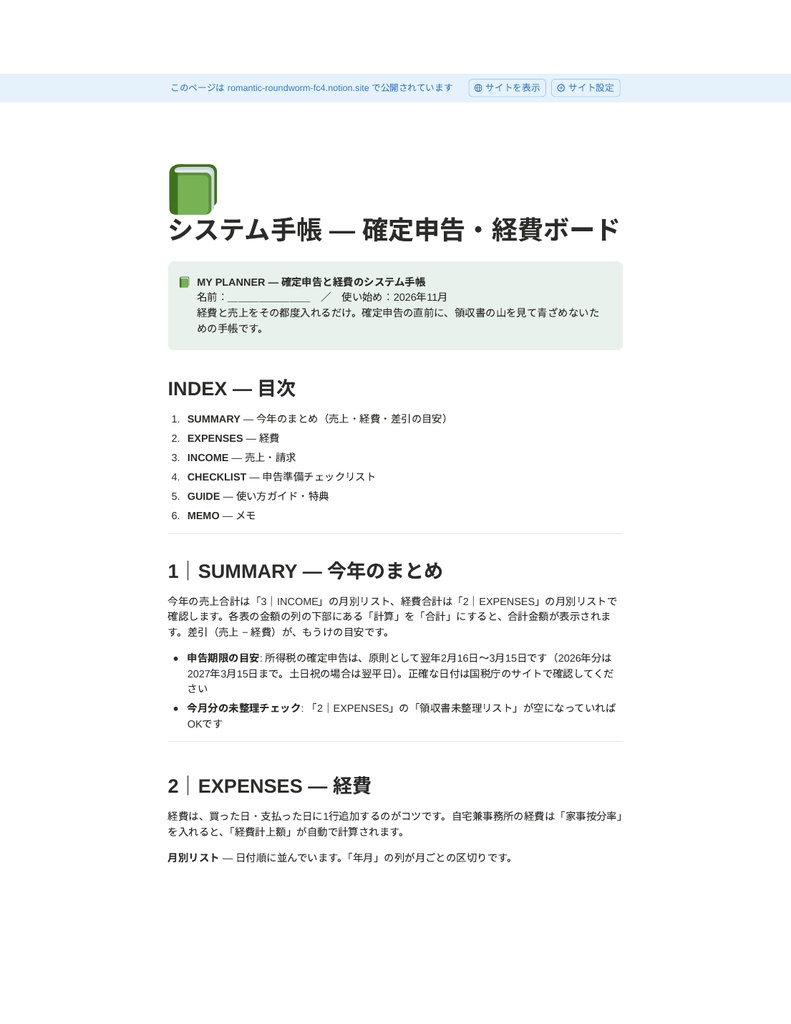
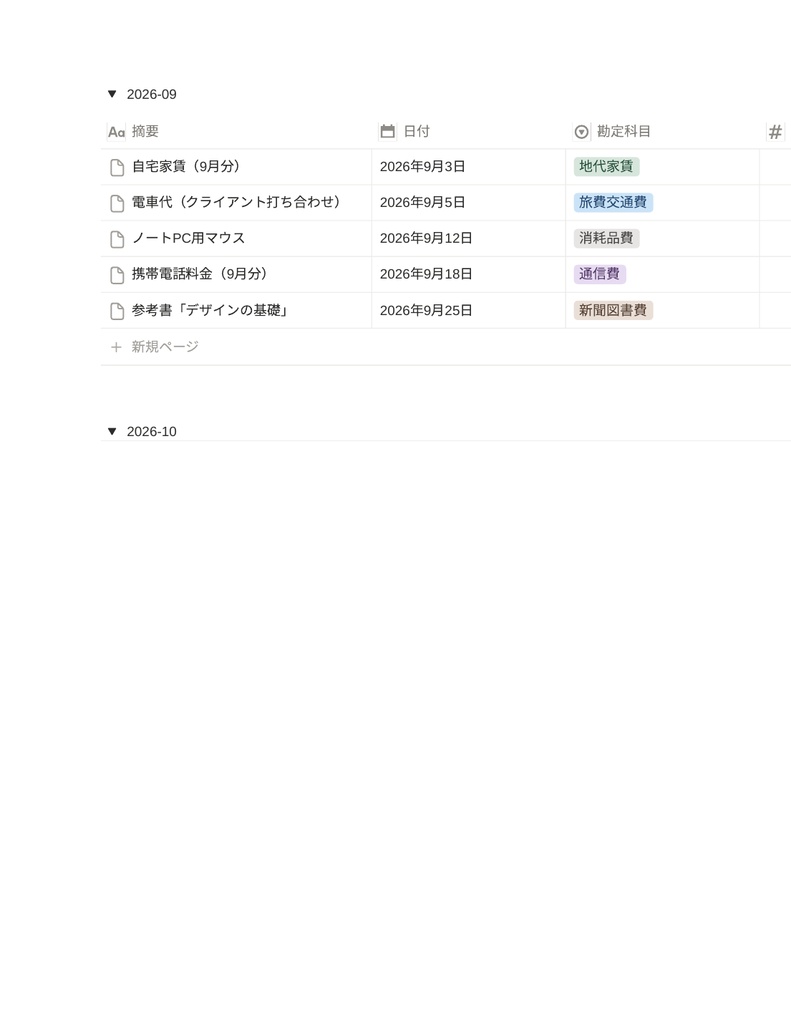
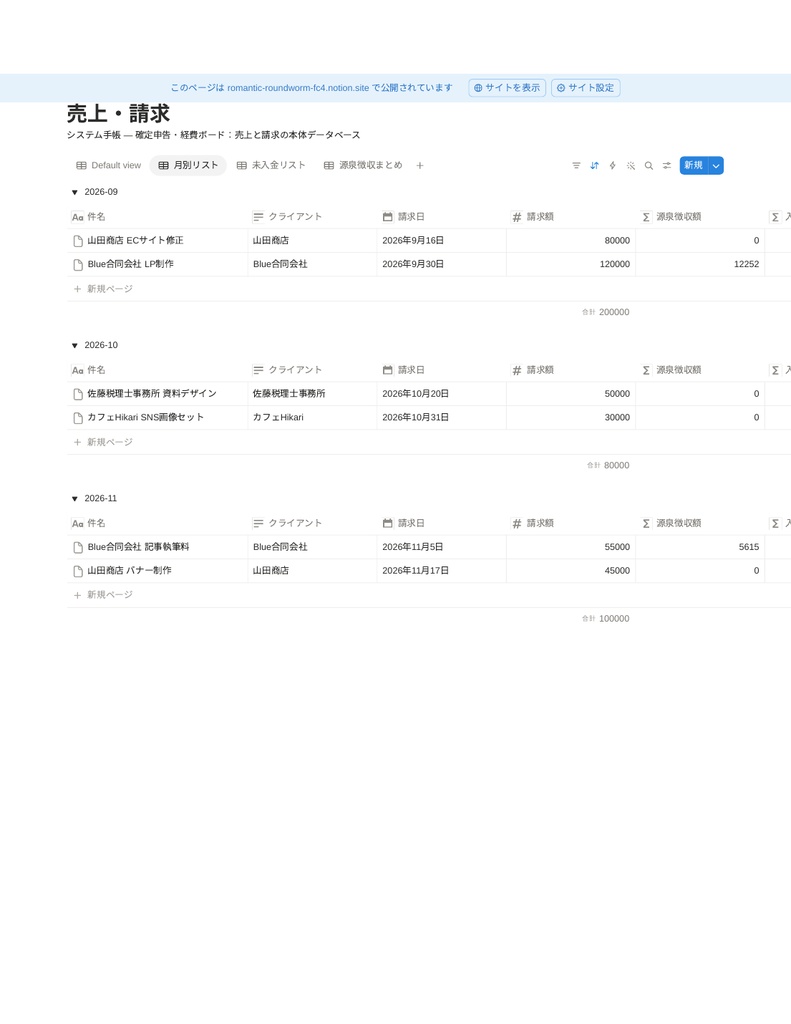
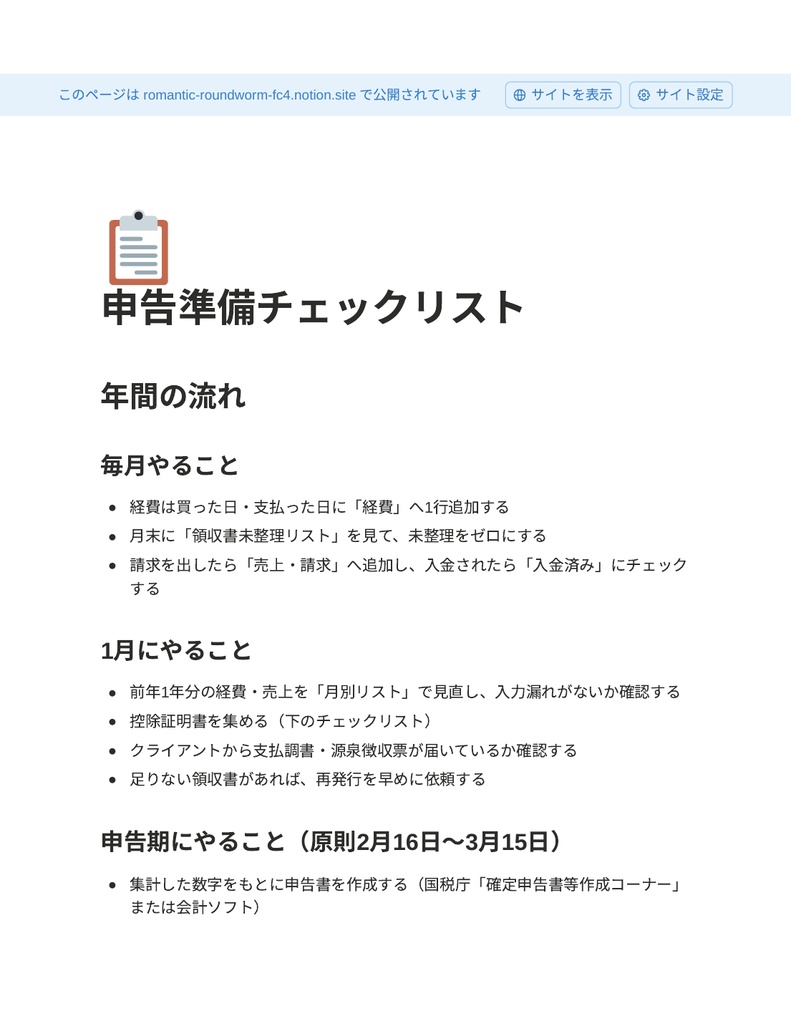


「確定申告の直前に、領収書の山を見て青ざめる」をなくす。 経費と売上をその都度入れるだけで、月別の集計と申告の準備が進むNotionテンプレートです。 経費のメモはスマホの中、領収書は引き出しの中、売上は請求書フォルダの中。 毎年、集めるだけで疲れていませんか? このテンプレートは、フリーランスの経費・売上・申告準備だけに絞った、システム手帳風のNotionボードです。 ### こんな悩みありませんか - 確定申告の時期になって、1年分の領収書を集めるのが憂うつ - 経費になるか分からず、とりあえず全部取ってある(そして埋もれる) - 家賃や電気代の「家事按分」を毎回手計算している - 源泉徴収された金額と、実際の入金額が合わずに混乱する - 未入金の請求を忘れていたことがある ### このテンプレートでできること - 経費を1行入れるだけ。科目ごとに自動で整理されます - 家事按分率を入れれば、経費計上額を自動計算(例: 家賃86,000円×30%=25,800円) - 領収書の保管チェックができ、「未整理」の経費だけ絞り込めます - 売上は源泉徴収(10.21%)を自動計算。入金予定額がすぐ分かります - 未入金の請求だけをリスト表示。請求漏れ・入金漏れに気づけます - 月別の集計で「今月いくら使って、いくら入ったか」が見えます ### 手帳のリフィル構成 1. SUMMARY ― 今年の売上・経費のまとめ 2. EXPENSES ― 経費 3. INCOME ― 売上・請求 4. CHECKLIST ― 申告準備チェックリスト 5. GUIDE ― 使い方ガイド 6. MEMO ― 控除メモ・税理士への質問リスト ### 内容物 - 「システム手帳 ― 確定申告・経費ボード」一式 - ダッシュボード+経費/売上・請求の2データベース、サンプルデータ(経費12件・売上6件) - 使い方ガイド(複製手順〜日々の運用、年末〜申告期の進め方、カスタマイズ方法) - 特典: 経費科目チートシート(何がどの科目か迷うとき用)、年間スケジュール早見表 ### 使い方(3ステップ) 1. 購入後に届くファイルのリンクから、テンプレートを自分のNotionに複製する 2. サンプルデータを参考に、直近の経費と売上を入れてみる 3. あとは「買ったら1行追加」「月末に未整理チェック」だけ ### 向いている人/向いていない人 向いている人: 確定申告を自分でやっているフリーランス・副業ワーカー。会計ソフトは重い・高いと感じる人。 向いていない人: すでに会計ソフトで仕訳まで完璧に回せている人。法人の経理(これは個人事業主向けです)。 ### よくある質問 Q. Notion初心者でも使えますか? A. 複製して経費と売上を入力するだけです。データベースを触ったことがない人向けに、使い方ガイドを用意しています。 Q. Notionの無料プランで使えますか? A. 使えます。無料プランのアカウントで複製テスト済みです。 Q. 会計ソフトの代わりになりますか? A. 本格的な帳簿付けや申告書の作成は会計ソフト/税理士の領域です。このテンプレートは「日々の記録と申告準備の整理」に特化しています。 Q. 税金の計算は正確ですか? A. 源泉徴収(10.21%)や家事按分の計算は一般的な方法で自動計算しますが、個別の税務判断は税理士にご確認ください。税制は年度で変わるため、最新情報は国税庁のサイトでご確認ください。 Q. 返金はできますか? A. デジタル商品の性質上、原則として購入後の返金はできません。動作しない等の不具合があれば対応します。 ### 注意書き - 本商品はデジタルコンテンツです。購入後にNotionテンプレートの複製リンクをお渡しします。 - Notionアカウント(無料で可)が別途必要です。 - 本テンプレートは記録・整理のためのもので、税務相談や申告の代行は行いません。 - 画面や仕様は改善のため予告なく更新する場合があります。 --- ## English Stop dreading the pile of receipts at tax time. A system-planner-style Notion template for freelancers to track expenses and income as you go, so monthly totals and tax-season prep are already done. ### What it does - Add one line per expense; everything is sorted by category automatically - Enter a business-use ratio and the deductible amount is calculated for you (e.g. rent ¥86,000 × 30% = ¥25,800) - Receipt tracking with a filter that shows only unfiled expenses - Withholding tax (10.21%, Japan) is calculated automatically, so you always know the expected payment amount - An unpaid-invoices list helps you catch missing payments - Monthly views show what you spent and what you earned ### Planner sections 1. SUMMARY — this year's income and expenses 2. EXPENSES — expense database 3. INCOME — invoices and payments 4. CHECKLIST — tax filing preparation checklist 5. GUIDE — user guide 6. MEMO — deduction notes and questions for your tax accountant ### What's included - "System Planner — Tax & Expense Board" full set (the template itself is in Japanese; categories and withholding follow the Japanese tax system) - Dashboard + 2 databases (Expenses / Income & Invoices) with sample data (12 expenses, 6 income entries) - User guide (duplication, daily use, year-end to filing workflow, customization) - Bonus: expense category cheat sheet and an annual schedule at a glance ### How to use (3 steps) 1. Duplicate the template into your own Notion using the link in the delivered file 2. Try entering your recent expenses and income using the sample data as a reference 3. Then just add one line per purchase and check unfiled items at month-end ### FAQ Q. I'm new to Notion. Can I use it? A. Yes. You just duplicate it and enter your expenses and income. The guide is written for people who have never touched a Notion database. Q. Does it work on the free Notion plan? A. Yes. We verified duplication on a free-plan account. Q. Does it replace accounting software? A. Full bookkeeping and filing are the job of accounting software or a tax accountant. This template focuses on daily records and staying organized for tax season. Note: categories and withholding follow the Japanese tax system. Q. Can I customize it? A. Yes, freely for your own work. Redistribution and resale are not allowed. Q. Do you offer refunds? A. As this is a digital product, refunds are generally not available after purchase. If something does not work, please contact us and we will help. ### Notes - This is a digital product. After purchase, you will receive a file with the Notion template duplication link. - A Notion account (free plan is fine) is required. - This template is for record-keeping and organization; it is not tax advice. - The layout and specifications may be updated without notice to improve the product.