

Hez Home Mini Base V2.0 | LEDが灯る小さなメゾネット
- Digital350 JPY


♡ HEZ STUDIO | WORLD ASSET ♡
JP
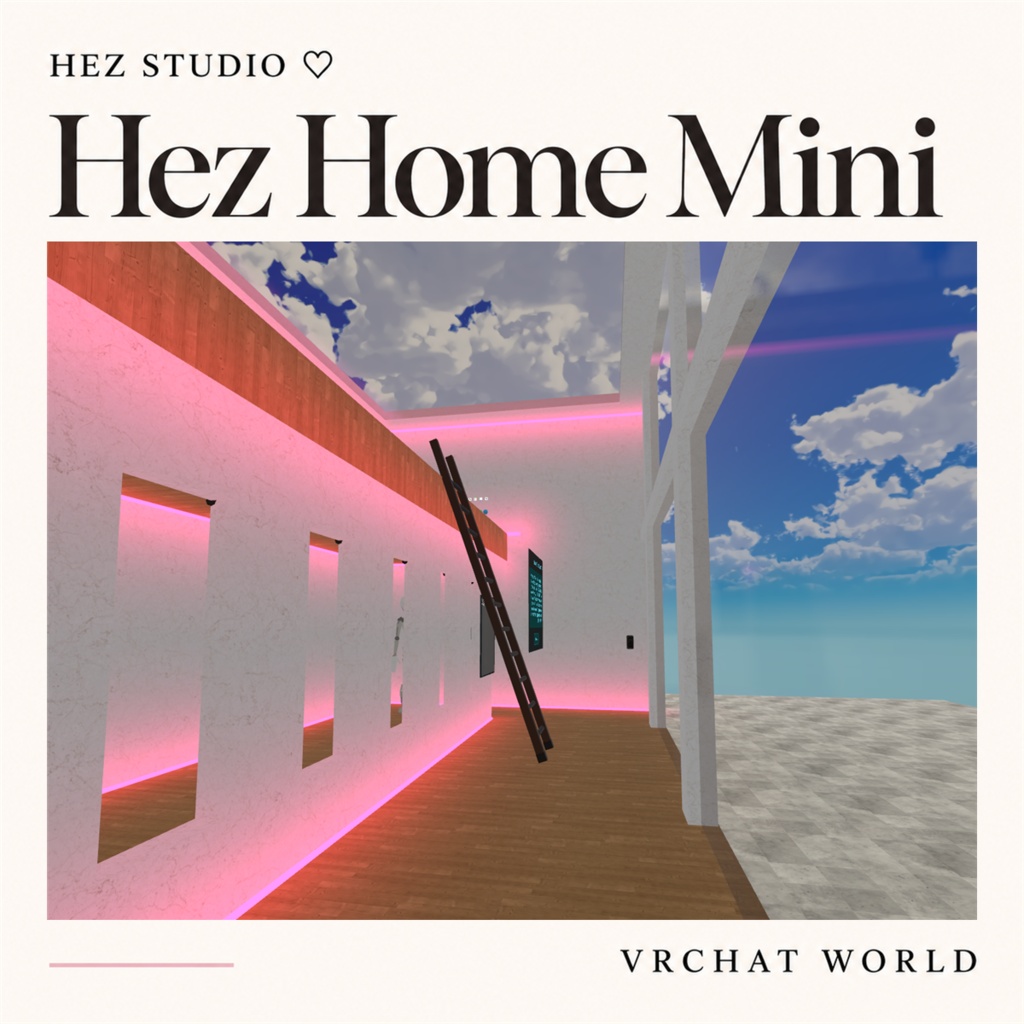
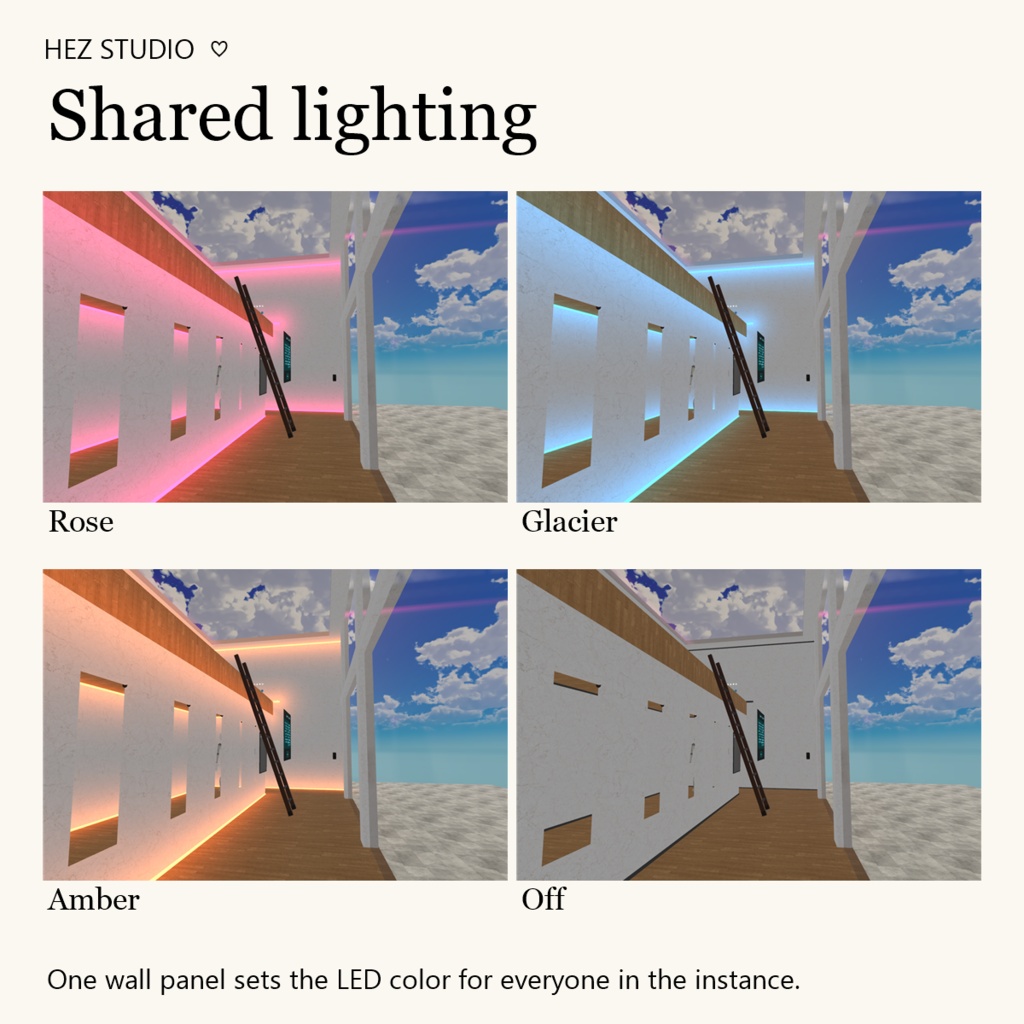
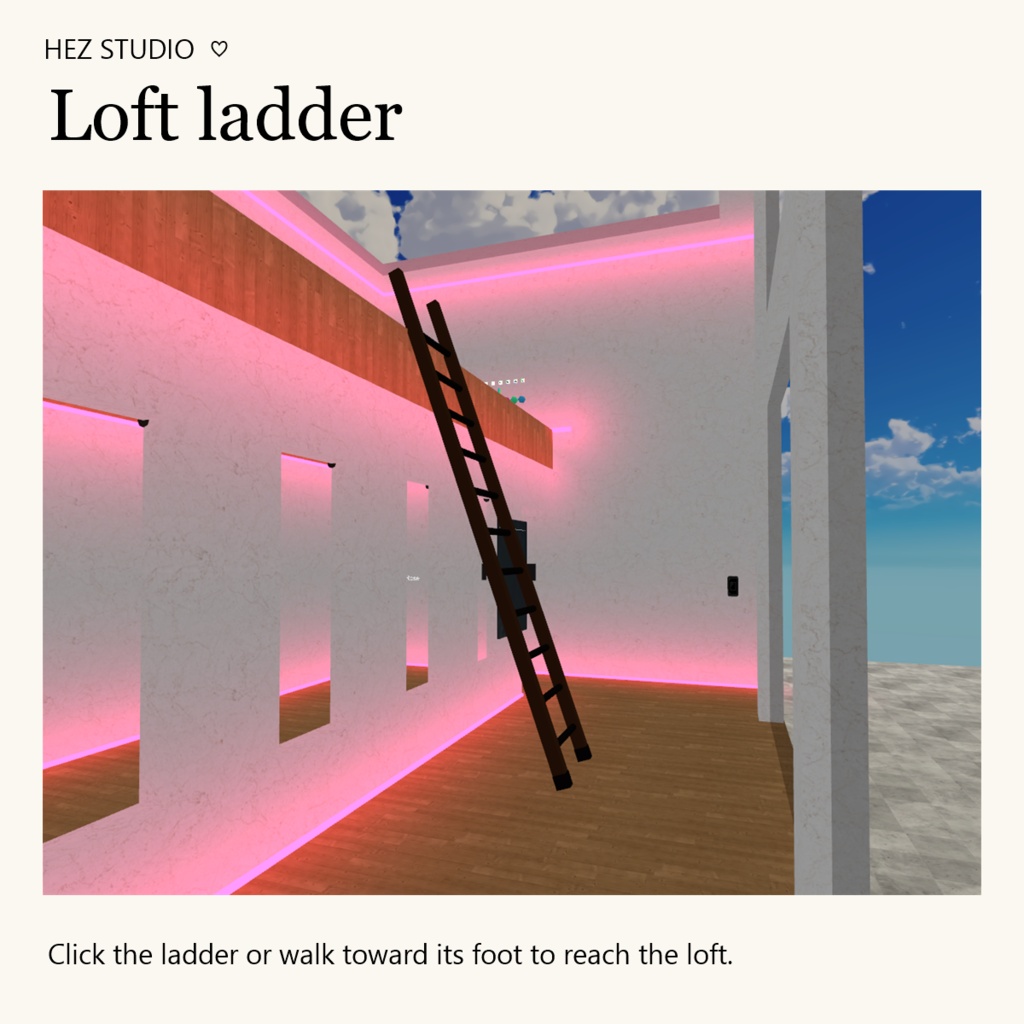
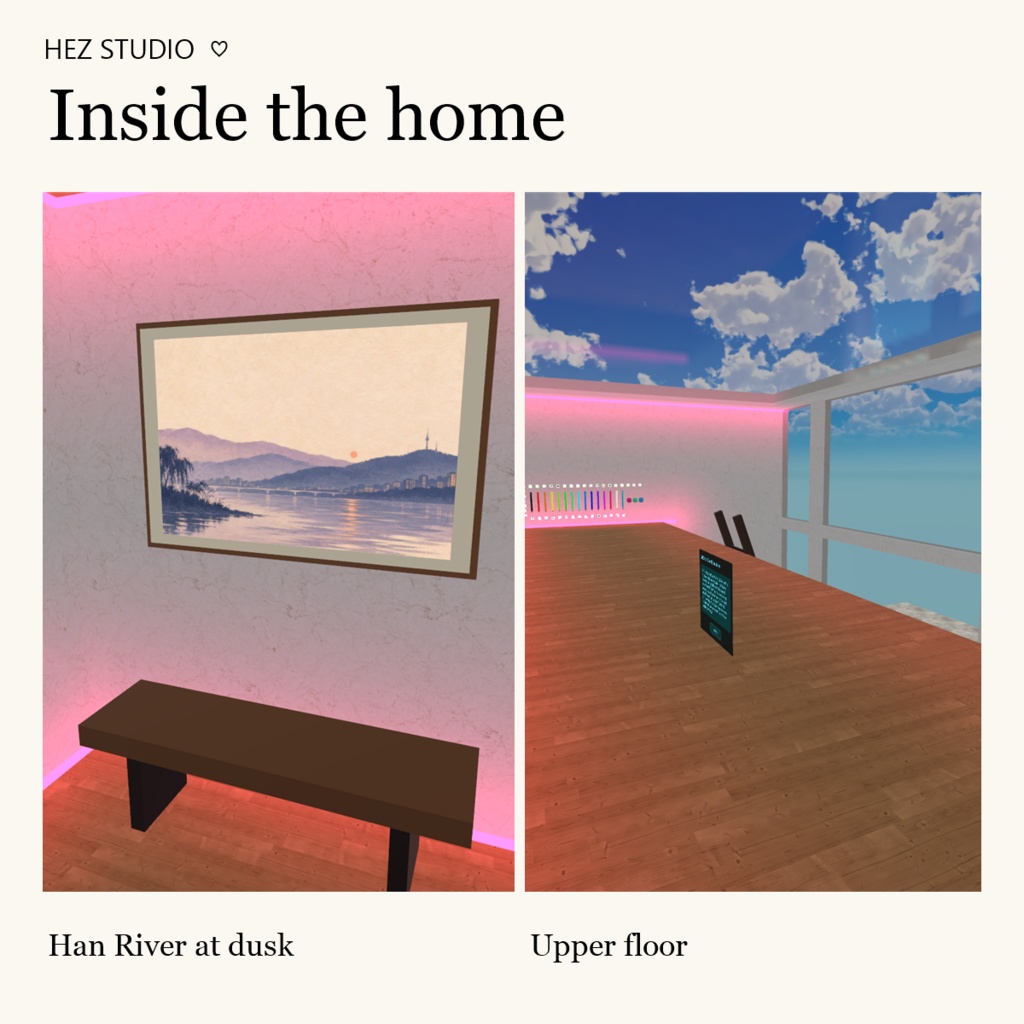
Hez Home Mini Base V2.0 | LEDが灯る小さなメゾネット HEZ STUDIO ♡ 木の床と大理石の壁に沿って、細い光が走る二層のホームワールドです。階下には夕暮れの漢江を描いた額と小さなベンチを置きました。フレンドと過ごす場所にも、自分の家具を持ち込んで改変するためのベースにもどうぞ。 ワールドの機能 ・斜めに掛けたはしごをクリックするか、はしごの足元に正面から歩いて近づくと上階へ移動します。 ・階下のLEDパネルを押すと、ローズ → グレイシャーブルー → アンバー → 消灯の順に切り替わります。誰でも色を変更でき、後から入室した人を含め、同じインスタンスの全員に反映されます。入口の床のLEDと壁を照らす光も連動します。白色LED 7本は白のままです。 ・スイッチ式ミラーとQvPenを利用できます。 訪問先 公開サンプル「hez home mini (sample)」 https://vrchat.com/home/world/wrld_0bcddfab-78d4-4ec2-8ccb-054f6e2391cd 別途カスタマイズした作例「헤즈 홈 미니」 https://vrchat.com/home/world/wrld_5c93d2e3-928d-49bd-94ca-0fbfce90df66 制作環境 Unity 2022.3.22f1 / VRChat Creator Companion の Worlds プロジェクト VRChat SDK – Base・Worlds 3.10.6(UdonSharpを含む)/ ProBuilder 5.2.2 スカイボックス:Free Stylized Skybox https://assetstore.unity.com/packages/2d/textures-materials/sky/free-stylized-skybox-212257 導入手順(Windows PC) 1. VCCで新しいWorldsプロジェクトを作成し、上記のSDKとProBuilderを用意します。既存ワールドを更新する場合は、先にプロジェクトを複製してください。 2. Free Stylized SkyboxをUnityにインポートします。QvPen作者のリポジトリをVCCに追加し、Manage ProjectでQvPen 3.3.15をインストールします。 https://vpm.ureishi.net/install 3. ZIPを展開し、Assets > Import Package > Custom Package から HomeMini-V2.0.unitypackage をすべてインポートします。 4. コンパイル後、Assets/hez_home_mini.unity を開き、VRChat SDK BuilderのBuild & Testで確認します。配布シーンのBlueprint IDは空です。ご自身のアカウントでワールド名とサムネイルを設定してアップロードしてください。 更新履歴 V2.0 照明をインスタンス全体で同期する仕様に変更し、階段をはしごに交換。壁・窓の重複面を整理。入口まで連動するLEDの色切り替えと壁面への光の広がり、額装アートとベンチを追加。 V1.0 2022年12月14日 初版公開
EN
Hez Home Mini Base V2.0 | A Two-Level VRChat Home with Color-Changing LEDs HEZ STUDIO ♡ A leaning ladder leads up to the loft. LED strips trace the marble walls, and a framed print of the Han River at dusk hangs above a low bench. Use it as a home to visit with friends or as a base for your own interior. Inside the world • Click the ladder or walk straight toward its foot to reach the upper landing. • Press the downstairs LED panel to cycle through Rose, Glacier Blue, Amber and Off. Anyone can change the color for the whole instance. Late joiners see the current selection. The entrance floor strips and wall glow follow the panel, while the seven white LEDs stay white. • A switchable mirror and QvPen are available in the scene. Visit Public sample · hez home mini (sample) https://vrchat.com/home/world/wrld_0bcddfab-78d4-4ec2-8ccb-054f6e2391cd Separately customized example · 헤즈 홈 미니 https://vrchat.com/home/world/wrld_5c93d2e3-928d-49bd-94ca-0fbfce90df66 Project environment Unity 2022.3.22f1 / Worlds project in VRChat Creator Companion VRChat SDK – Base and Worlds 3.10.6, including UdonSharp / ProBuilder 5.2.2 Skybox · Free Stylized Skybox https://assetstore.unity.com/packages/2d/textures-materials/sky/free-stylized-skybox-212257 Installation for Windows PC 1. Create a new Worlds project in VCC and install the SDK and ProBuilder versions above. To update an existing world, work on a copy of your project first. 2. Import Free Stylized Skybox into Unity. Add the QvPen author's repository to VCC and install QvPen 3.3.15 in Manage Project. https://vpm.ureishi.net/install 3. Extract the ZIP. In Unity, select Assets > Import Package > Custom Package and import all of HomeMini-V2.0.unitypackage. 4. Once compilation finishes, open Assets/hez_home_mini.unity and select Build & Test in the VRChat SDK Builder. The release scene has a blank Blueprint ID. Set the world name and thumbnail when uploading to your account. Version history V2.0 · Synchronized the lighting across the instance and replaced the staircase with a ladder. Removed overlapping wall and window faces, extended the selectable LED colors and glow to the entrance, and added a framed print and bench. V1.0 · First released December 14, 2022.
KR
Hez Home Mini Base V2.0 | LED 조명이 흐르는 복층 홈 월드 HEZ STUDIO ♡ 목재 바닥과 대리석 벽을 따라 LED가 이어지는 작은 복층 공간입니다. 아래층에는 한강의 저녁을 담은 액자와 낮은 벤치가 있고, 비스듬히 걸친 사다리가 위층으로 이어집니다. 친구와 머물거나 내 취향에 맞게 꾸밀 VRChat 홈 월드로 사용해 보세요. 월드에서 할 수 있는 것 • 사다리를 클릭하거나 아래쪽 정면으로 걸어가면 위층 발판으로 이동합니다. • 아래층 LED 패널을 누를 때마다 로즈 → 글레이셔 블루 → 앰버 → 꺼짐 순으로 바뀝니다. 누구나 색을 바꿀 수 있고, 나중에 입장한 사람도 같은 색을 봅니다. 입구 바닥 LED와 벽면 간접광도 함께 바뀝니다. 흰색 LED 7개는 흰색으로 유지됩니다. • 거울 스위치와 QvPen을 사용할 수 있습니다. 먼저 둘러보기 공개 샘플 · hez home mini (sample) https://vrchat.com/home/world/wrld_0bcddfab-78d4-4ec2-8ccb-054f6e2391cd 별도 꾸미기 예시 · 헤즈 홈 미니 https://vrchat.com/home/world/wrld_5c93d2e3-928d-49bd-94ca-0fbfce90df66 제작 환경 Unity 2022.3.22f1 / VRChat Creator Companion의 Worlds 프로젝트 VRChat SDK – Base 및 Worlds 3.10.6 (UdonSharp 포함) / ProBuilder 5.2.2 스카이박스 · Free Stylized Skybox https://assetstore.unity.com/packages/2d/textures-materials/sky/free-stylized-skybox-212257 설치 및 사용 · Windows PC 1. VCC에서 새 Worlds 프로젝트를 만들고 위 SDK와 ProBuilder를 설치합니다. 기존 월드를 갱신할 때는 복사본에서 먼저 작업하세요. 2. Free Stylized Skybox를 Unity에 임포트합니다. QvPen 제작자의 저장소를 VCC에 추가하고 Manage Project에서 QvPen 3.3.15를 설치합니다. https://vpm.ureishi.net/install 3. ZIP을 풀고 HomeMini-V2.0.unitypackage를 Assets > Import Package > Custom Package에서 전체 임포트합니다. 4. 컴파일이 끝나면 Assets/hez_home_mini.unity를 열고 VRChat SDK Builder의 Build & Test로 확인합니다. 배포 씬의 Blueprint ID는 비어 있습니다. 본인 계정에서 월드 이름과 썸네일을 지정해 업로드하세요. 업데이트 V2.0 · 조명 동기화, 계단을 사다리로 교체, 벽과 창의 겹침 정리, 입구까지 이어지는 LED 색 선택과 벽면 간접광, 액자와 벤치 추가 V1.0 · 2022년 12월 14일 최초 출시
credit
Lura's Switch【SDK2/SDK3】 https://booth.pm/ko/items/1969082 QvPen https://booth.pm/ko/items/1555789 CC0 texture::https://cc0textures.com/