

【VRChat】Magical Pendant【MA対応・同期エフェクト】
- Fox PendantDigital1,100 JPY
- Moon PendantDigital1,100 JPY
- Sun PendantDigital1,100 JPY


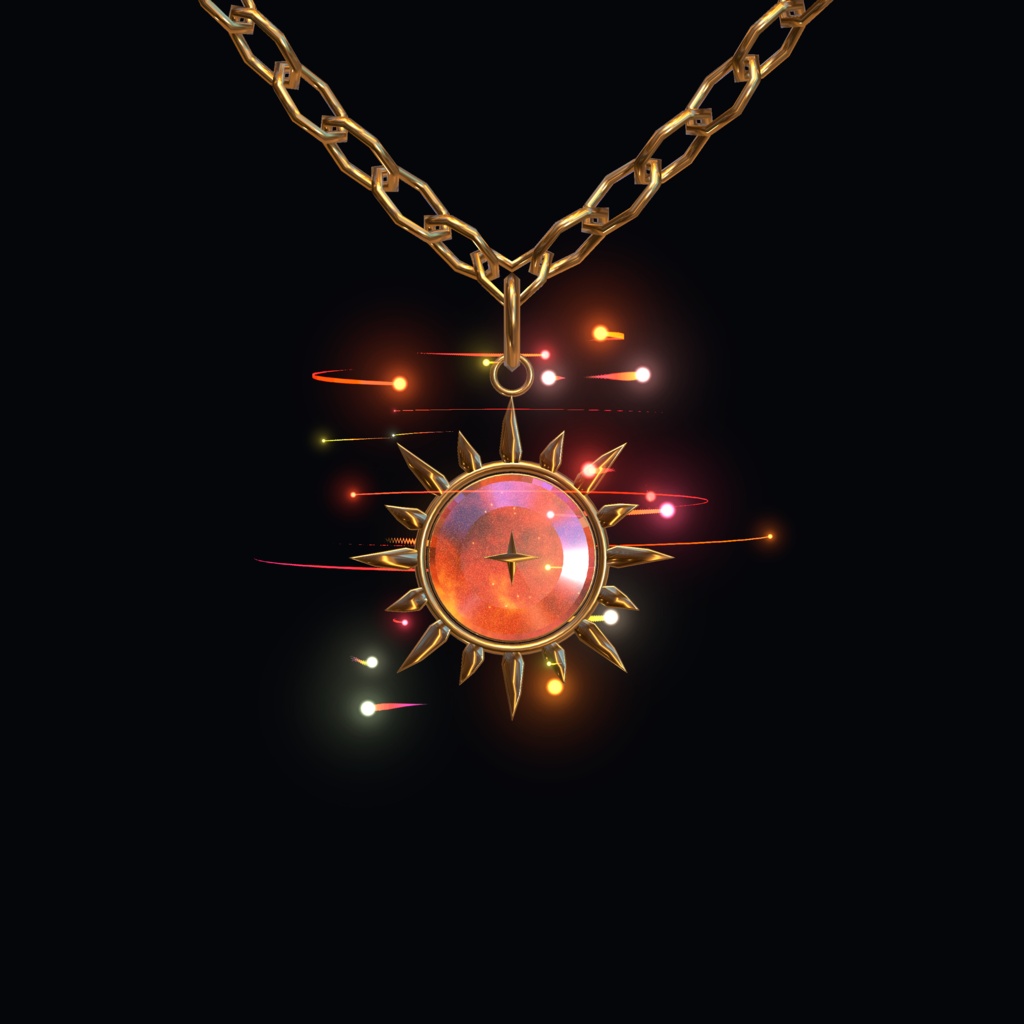


VRChatアバター向けの、魔法と天体をモチーフにしたチャームネックレスです。 銀色のチェーンに可愛い狐を合わせた「Fox」、銀河柄の三日月が揺れる「Moon」、金色のチェーンに琥珀色の太陽が輝く「Sun」の3デザインをご用意しました。 光の粒・星のきらめき・軌道を描く光のトレイルが、チャームの周りを彩ります。 Modular Avatar用の設定を組み込んだPrefabを同梱。アバター直下に配置し、必要に応じて位置・回転・スケールを調整して導入できます。 同じシリーズのペンダントを着けた別のプレイヤーに近づくと、VRC Contactによる近接連動でエフェクトが反応します。異なるデザイン同士の組み合わせにも対応しています。 Fox/Moon/Sunの単品3種をご用意しています。各1,100円です。 ※商品画像内のアバター・衣装・背景は付属しません。
商品概要
【Fox — 狐のチャーム】 雲を抱えた、オレンジと白の小さな狐。 銀色のチェーン、星の飾り、ピンク系の光の軌道が、可愛らしい雰囲気を演出します。 【Moon — 三日月のチャーム】 紫から藍色へと広がる銀河柄の三日月。 銀色のチェーンと周囲の星、青紫のきらめきが、幻想的な天体モチーフに合います。 【Sun — 太陽のチャーム】 金色のチェーンに、16本の光線を持つ太陽を合わせたデザイン。 琥珀色の星雲を思わせる中心部には四芒星を配し、暖かな光の粒とトレイルが輝きます。 Moonと並べて、太陽と月のペアとしてもお楽しみいただけます。 【近接連動エフェクト】 VRC ContactのSender/Receiverを使用しています。 同じシリーズを装着した別のプレイヤーとの近接に反応し、光の粒とトレイルが発生・変化します。 Fox・Moon・Sunは共通のContactタグを使用するため、SunとMoonなど異なるデザイン同士でも反応します。 【メニュー操作】 ・Toggle On:ネックレス本体とエフェクトの表示をON/OFF。 ・Toggle Force Active:表示ONの状態で、近接判定に関係なくエフェクトを継続表示。
内容物
【Fox】 ・Prefab(Fox Pendant/Modular Avatar設定済み) ・FBX(Fox Pendant) ・Material/Texture ・Animator(Fox Pendant.controller) 【Moon】 ・Prefab(Moon Pendant/Modular Avatar設定済み) ・FBX(Moon Pendant Base New) ・Material/Texture ・Animator(Moon Pendant.controller) 【Sun】 ・Prefab(Sun Pendant/Modular Avatar設定済み) ・FBX(Sun Pendant) ・Material/Texture(太陽用の金色・琥珀色マテリアルを含む) ・Animator(Sun Pendant.controller) 【共通データ】 ・メニュー/パラメーター(Pendant Menu、Pendant Params) ・パーティクル用シェーダー(PendantParticle/同梱) ・各デザインに必要なテクスチャ・パーティクル設定
仕様
・パーティクルエフェクト(星のきらめき・光の粒・軌道状のトレイル) ・VRC Contactによる近接連動 ・Contact初期設定:Sender/Receiverの半径はそれぞれ0.3m ※発動距離はContactの重なりとアバターのスケールにより変わります。 ・Modular Avatar設定済み ∟Menu Installer/Merge Animator/Parameters ∟Armatureの自動統合 ・PhysBone設定済み(チェーンとチャームの揺れ) ・Animator制御(表示ON/OFF、近接に応じたエフェクトの変化、常時発動) 【今回のUnity確認環境】 ・Unity 2022.3.22f1 ・VRChat SDK 3.10.6(Avatars 3.0) ・Modular Avatar 1.18.7 ・lilToon 2.4.1 ※上記は今回使用した確認環境です。 【使用シェーダー】 ・lilToon(別途導入が必要) https://booth.pm/ja/items/3087170 ・PendantParticle(パーティクル用/本商品に同梱) 【デザイン構成】 Fox:チェーン/狐/雲/周囲の星 Moon:チェーン/三日月/周囲の星 Sun:金色のチェーン/16本の光線を持つ太陽/中央の四芒星
導入方法
【事前準備】 VRChat用のアバタープロジェクトを用意し、VRChat SDKに加えて以下を導入してください。 ・lilToon https://booth.pm/ja/items/3087170 ・Modular Avatar https://modular-avatar.nadena.dev/ 【装着手順】 1. 本商品のUnityPackageをインポートします。 2. 使用するPrefab(Fox Pendant/Moon Pendant/Sun Pendant)を、アバターのHierarchy直下にドラッグ&ドロップします。 3. 首や胸の位置に合わせて、位置・回転・スケールを必要に応じて調整します。 4. VRChat SDKからビルド・アップロードします。Modular Avatarの統合設定はビルド時に適用されます。 5. メニューの「Toggle On」で、ネックレスの表示切り替えを確認します。 6. 「Toggle Force Active」をONにすると、他のプレイヤーが近くにいなくてもエフェクトを確認できます。 7. 近接連動を使う場合はForce ActiveをOFFにし、同じシリーズを装着した別のプレイヤーと近づいて動作を確認します。 Prefabにメニュー・Animator・Armature統合・PhysBoneの設定を組み込んでいます。
注意事項
・VRChat(PC / Avatars 3.0)向けアクセサリーです ・Modular Avatar が必須です ・lilToon の事前インストールが必要です ・Quest版アバターは非対応です(パーティクル・PhysBoneの都合) ・髪型・衣装と干渉する場合は位置調整してください ・ダウンロード商品のため返金には応じかねます
クレジット
制作者:HeavenlyFoxy https://x.com/HeavenlyFoxy ※画像内の本商品以外(アバター・衣装・他アクセサリー等)は付属しません。
English
A magical, celestial charm necklace for VRChat avatars. Choose Fox, a cute fox on a silver chain; Moon, a galaxy crescent on a silver chain; or Sun, an amber sun on a golden chain. Includes glowing particles, star-like sparkles, and orbital light trails. The included prefabs are configured for Modular Avatar. Place a prefab under your avatar, then adjust its position, rotation, and scale to fit. Contact-based proximity effects react when another player wearing a pendant from this series comes nearby. Different designs can be paired together. Choose Fox, Moon, or Sun individually — ¥1,100 each. Avatars, outfits, and backgrounds shown in product images are not included.
Overview
【Fox — Fox Charm】 A small orange-and-white fox hugging a cloud. A silver chain, surrounding star decorations, and pink-toned orbital trails create a cute, magical look. 【Moon — Crescent Charm】 A crescent moon with a purple-to-indigo galaxy design. A silver chain, surrounding stars, and blue-violet sparkles suit celestial and fantasy avatars. 【Sun — Sun Charm】 An amber celestial charm with 16 golden rays, hanging from a golden chain. A four-pointed star sits in its nebula-like center, complemented by warm glowing particles and light trails. Pair it with Moon for coordinating sun-and-moon looks. 【Proximity-Linked Effects】 Uses VRC Contact Sender / Receiver. When another player wearing a pendant from this series comes nearby, the particle effects react and intensify. Fox, Moon, and Sun share the same Contact tag, so different designs — including Sun and Moon — can react to each other. 【Menu Controls】 ・Toggle On — show or hide the necklace and its effects. ・Toggle Force Active — while the necklace is shown, keep the effects active without a nearby player.
Contents
【Fox】 ・Prefab (Fox Pendant / Modular Avatar pre-configured) ・FBX (Fox Pendant) ・Materials / Textures ・Animator (Fox Pendant.controller) 【Moon】 ・Prefab (Moon Pendant / Modular Avatar pre-configured) ・FBX (Moon Pendant Base New) ・Materials / Textures ・Animator (Moon Pendant.controller) 【Sun】 ・Prefab (Sun Pendant / Modular Avatar pre-configured) ・FBX (Sun Pendant) ・Materials / Textures, including golden and amber Sun materials ・Animator (Sun Pendant.controller) 【Shared Data】 ・Menu / Parameters (Pendant Menu, Pendant Params) ・Particle shader (PendantParticle / included) ・Textures and particle settings required by each design
Specifications
・Particle effects: star-like sparkles, glowing particles, and orbital light trails ・VRC Contact-based proximity effects ・Default Contact settings: Sender and Receiver radii are each 0.3m Activation distance depends on Contact volume overlap and avatar scale. ・Modular Avatar configuration included ∟Menu Installer / Merge Animator / Parameters ∟Automatic Armature merge ・PhysBone settings for chain and charm movement ・Animator controls for visibility, proximity blending, and always-active effects 【Current Unity Project Environment】 ・Unity 2022.3.22f1 ・VRChat SDK 3.10.6 (Avatars 3.0) ・Modular Avatar 1.18.7 ・lilToon 2.4.1 These are the versions used for the current Unity checks. 【Shaders】 ・lilToon — install separately https://booth.pm/ja/items/3087170 ・PendantParticle — particle shader included with this product 【Design Breakdown】 Fox: silver chain / fox / cloud / surrounding stars Moon: silver chain / crescent moon / surrounding stars Sun: golden chain / sun with 16 rays / central four-pointed star
Installation
【Before You Start】 Prepare a VRChat avatar project with the VRChat SDK, then install: ・lilToon https://booth.pm/ja/items/3087170 ・Modular Avatar https://modular-avatar.nadena.dev/ 【Installation】 1. Import the product's UnityPackage. 2. Drag your chosen prefab (Fox Pendant / Moon Pendant / Sun Pendant) directly under your avatar in the Hierarchy. 3. Adjust its position, rotation, and scale as needed to fit the neck and chest. 4. Build and upload using the VRChat SDK. Modular Avatar applies its merge configuration during the build. 5. Use “Toggle On” in the menu to check necklace visibility. 6. Enable “Toggle Force Active” to preview the effects without another player nearby. 7. To use proximity activation, switch Force Active off and approach another player wearing a pendant from this series. The prefabs include menu, Animator, Armature merge, and PhysBone configuration.
Important Notes
・For VRChat PC avatars (Avatars 3.0) only ・Modular Avatar is required ・lilToon must be installed beforehand ・Not supported on Quest avatars (particles and PhysBones) ・May clip with hair or other accessories — adjust position as needed ・No refunds on digital downloads
Credits
Creator: HeavenlyFoxy https://x.com/HeavenlyFoxy ※Avatars, outfits, and accessories shown in images (other than this product) are not included.
Terms of Service
・By purchasing, you agree to these terms ・Redistribution, resale, and transfer are prohibited ・Modifications are allowed for personal avatar use only ・Credit is appreciated but not required ・The creator is not liable for any damage arising from use of this product ・No refunds on digital downloads
Update information
2026.11.15 — ミラー表示の不具合修正 ・一部のミラーやカメラでパーティクルエフェクトが表示されなくなる問題を修正しました。 ・Fox・Moon・Sunに同梱しているPendantParticleシェーダーを更新しました。 2026.11.14 — アップデート ・VRChatメニューに「Size」を追加しました。チェーン・チャーム・装飾の星・エフェクト全体を70%〜130%の範囲で調整できます。調整値50%が標準サイズです。 ・従来のScaleシェイプキーを削除しました。 ・Write Defaults Offのアバターで「Toggle Force Active」が動作しない問題を修正しました。 ・Fox・Moon・SunのPrefabと導入ガイドを更新しました。 【更新方法】 PendantParticleシェーダーを含む更新版UnityPackageをインポートしてください。 アバター内の旧Prefabを新しいPrefabに置き換え、位置と基準サイズを調整してから、アバターを再アップロードしてください。 修正はアバターの再アップロード後に反映されます。 2026.11.15 — Mirror Visibility Fix • Fixed an issue that could make particle effects invisible in certain mirrors and camera views. • Updated the included PendantParticle shader for Fox, Moon, and Sun. 2026.11.14 — Update • Added Size to the VRChat menu. Resize the entire necklace—including the chain, charm, decorative stars, and effects—from 70% to 130%. Set the control to 50% for normal size. • Removed the old Scale blendshapes. • Fixed Toggle Force Active on avatars using Write Defaults Off. • Updated the Fox, Moon, and Sun prefabs and setup guides. Updating: Import the updated UnityPackage, including the PendantParticle shader. Replace the old prefab on your avatar with the new prefab, adjust its position and base size, then upload your avatar again. The fixes take effect after re-uploading your avatar.