

VRC DeltaLens - NDMFビルド前後のアバター設定差を見える化するアップロード前診断ツール【VRChat】【JA,EN,KO】
- Digital900 JPY
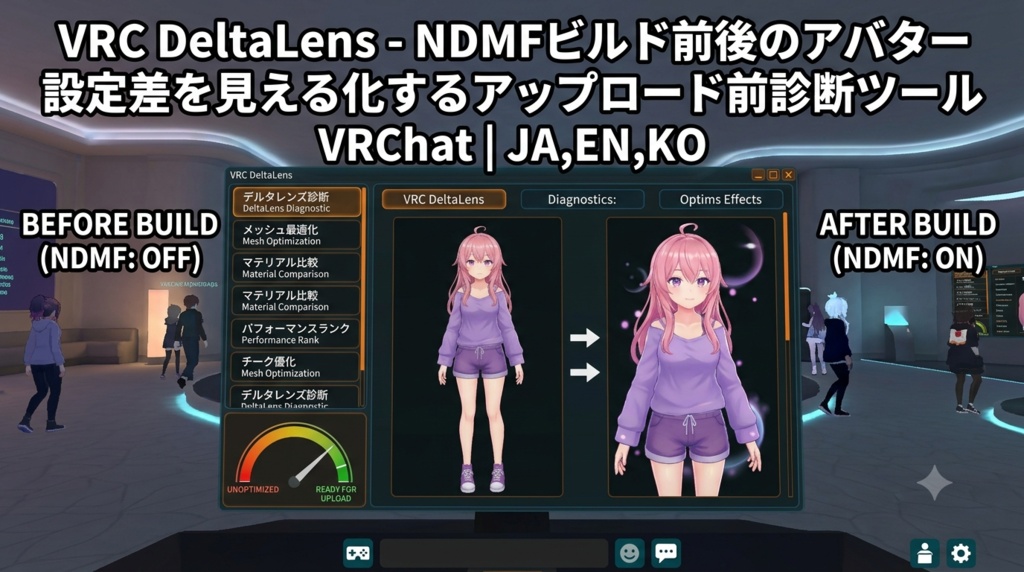


Unityでは正しく見えていたのに、Build & Test後だけ表情、衣装、揺れものの状態が違う。 そんな時に必要なのは、当てずっぽうの修正より先に「ビルド処理で何が変わったか」を知ることです。 VRC DeltaLensは、シーン上のアバターとNDMF処理後の一時複製を比較し、設定差を一覧にするUnity Editor拡張です。元アバターには触れず、調査用の複製だけを処理します。 ■ ビルド前後で確認できるもの ・追加/削除されたGameObject、Active状態、Transform ・Componentの追加/削除と主要な設定値 ・Mesh、Material、Shader、Material内容の変化 ・BlendShape名とウェイトの変化 ・Animator系Component、PhysBone、Collider、Contact、Constraintの差 ・Avatar Descriptor、Expression Menu/Parameters周辺の差 ・EditorOnlyなど、ビルド処理で消える要素 結果は重要度別に整理され、「場所を表示」から元アバター側の該当箇所へ移動できます。検索と重要度フィルターも備えています。 ■ アップロード前の現状点検 Missing Script、空のMaterial枠、Missing Shader、EditorOnly、Write Defaultsの混在、Expression Menu/Parameters未設定をまとめて確認します。NDMFがない環境でも、この点検と2オブジェクトの手動比較は使用できます。 ■ レポートとBuild & Test 調査結果はHTMLとJSONで保存できます。外部送信やテレメトリーはありません。VRChat Avatars SDK導入時は、同じ画面から公式Build & Testを開始できます。 ■ 導入と使い方 1. ZIPを解凍し、VRC_DeltaLens_v1.00.unitypackageをImport 2. Tools > VRC DeltaLens > Open Window 3. Hierarchyのアバタールートを指定 4.「NDMF変換後と比較」または「現状点検」を実行 5. 結果を確認してから、公式Build & Testで最終確認 ■ 動作環境/検証 Unity 2022.3.x、Windows 10/11。NDMF差分にはNDMF 1.x、Descriptor点検とBuild & TestにはVRChat Avatars SDK 3.xを使用します。 Unity 2022.3.22f1/2022.3.54f1、VRChat Avatars SDK 3.10.4、NDMF 1.12.0でコンパイル、差分検出、レポート出力、クリーンImportを確認済み。日本語/English/한국어 UI・READMEを同梱しています。 ※ 本ツールは問題箇所を見つけるための診断・比較ツールです。自動修復、VRChatクライアント画面の撮影・画像比較、すべての第三者プラグインへの対応を保証するものではありません。最終的な見た目と動作は公式Build & Testまたは限定公開アップロードで確認してください。VRChatクライアント上での自動実機試験は実施していません。 --- English --- Everything looked correct in Unity, but expressions, clothing, or PhysBones behave differently after Build & Test. Before changing random settings, first find out what the build process changed. VRC DeltaLens compares the avatar in your scene with a temporary clone after NDMF processing. It leaves the source avatar untouched and presents the differences in one searchable Unity Editor window. What it compares - Added or removed GameObjects, active state, and Transform values - Added or removed components and selected serialized settings - Meshes, materials, shaders, and material fingerprints - BlendShape names and weights - Animator-related components, PhysBones, colliders, contacts, and constraints - Avatar Descriptor and Expression Menu/Parameters-related settings - Elements removed by the build, including EditorOnly objects Findings are grouped by severity. Show Object takes you back to the matching location on the source avatar. Search and severity filters are included. Pre-upload health scan Checks Missing Scripts, empty material slots, missing shaders, EditorOnly objects, mixed Write Defaults, and missing Expression Menu or Parameters assignments. Health Scan and manual comparison work even when NDMF is not installed. Reports and Build & Test Save the result as both HTML and JSON. DeltaLens has no telemetry or automatic upload. When the VRChat Avatars SDK is installed, the same window can start the official Build & Test flow. Quick start 1. Extract the ZIP and import VRC_DeltaLens_v1.00.unitypackage. 2. Open Tools > VRC DeltaLens > Open Window. 3. Assign the avatar root. 4. Run Compare after NDMF or Health Scan. 5. Review the findings, then perform the final check with official Build & Test. Requirements and verification Unity 2022.3.x and Windows 10/11. NDMF 1.x is required for the NDMF comparison. VRChat Avatars SDK 3.x is used for Descriptor checks and Build & Test. Verified with Unity 2022.3.22f1 and 2022.3.54f1, VRChat Avatars SDK 3.10.4, and NDMF 1.12.0, including compilation, diff detection, report generation, and clean package import. Japanese, English, and Korean UI and README files are included. This is a diagnostic and comparison tool, not an automatic repair tool. It does not capture or pixel-compare the VRChat client and cannot guarantee support for every third-party build plugin. Confirm final appearance and behavior with official Build & Test or a private upload. Automated testing inside the VRChat client was not performed. --- 한국어 --- Unity에서는 정상인데 Build & Test 후 표정, 의상, PhysBone 상태가 달라질 때가 있습니다. 설정을 무작정 바꾸기 전에 빌드 과정에서 무엇이 달라졌는지 먼저 확인해 보세요. VRC DeltaLens는 Scene의 아바타와 NDMF 처리 후 임시 복제본을 비교하는 Unity Editor 확장 도구입니다. 원본 아바타는 변경하지 않고, 차이를 검색 가능한 한 화면에 정리합니다. 비교 항목 - 추가/제거된 GameObject, Active 상태, Transform - Component 추가/제거와 주요 직렬화 설정 - Mesh, Material, Shader와 Material 내용 - BlendShape 이름과 Weight - Animator 관련 Component, PhysBone, Collider, Contact, Constraint - Avatar Descriptor와 Expression Menu/Parameters 관련 설정 - EditorOnly처럼 빌드 과정에서 제거되는 요소 결과는 중요도별로 표시됩니다. 오브젝트 표시 버튼으로 원본 아바타의 해당 위치를 바로 찾을 수 있으며 검색과 중요도 필터를 제공합니다. 업로드 전 상태 점검 Missing Script, 빈 Material 슬롯, Missing Shader, EditorOnly, Write Defaults 혼재, Expression Menu/Parameters 미지정을 확인합니다. NDMF가 없어도 상태 점검과 두 GameObject의 수동 비교를 사용할 수 있습니다. 보고서와 Build & Test 결과를 HTML과 JSON으로 저장합니다. 외부 자동 전송과 텔레메트리는 없습니다. VRChat Avatars SDK가 설치되어 있으면 같은 화면에서 공식 Build & Test를 시작할 수 있습니다. 사용법 1. ZIP 압축을 풀고 VRC_DeltaLens_v1.00.unitypackage를 Import합니다. 2. Tools > VRC DeltaLens > Open Window를 엽니다. 3. Hierarchy의 아바타 Root를 지정합니다. 4. NDMF 변환 비교 또는 상태 점검을 실행합니다. 5. 결과를 확인한 뒤 공식 Build & Test로 최종 확인합니다. 환경 및 검증 Unity 2022.3.x, Windows 10/11. NDMF 비교에는 NDMF 1.x가 필요하며 Descriptor 점검과 Build & Test에는 VRChat Avatars SDK 3.x를 사용합니다. Unity 2022.3.22f1/2022.3.54f1, VRChat Avatars SDK 3.10.4, NDMF 1.12.0에서 컴파일, 차이 검출, 보고서 생성, 새 프로젝트 Import를 확인했습니다. 日本語/English/한국어 UI와 README를 포함합니다. 이 제품은 자동 수정 도구가 아니라 진단·비교 도구입니다. VRChat 클라이언트 화면 촬영·이미지 비교 기능은 없으며 모든 타사 빌드 플러그인 지원을 보장하지 않습니다. 최종 외형과 동작은 공식 Build & Test 또는 비공개 업로드로 확인해 주세요. VRChat 클라이언트 내부 자동 테스트는 진행하지 않았습니다.