

V-PerfectSync VRMのパーフェクトシンクをもっと身近に
- Digital1,480 JPY


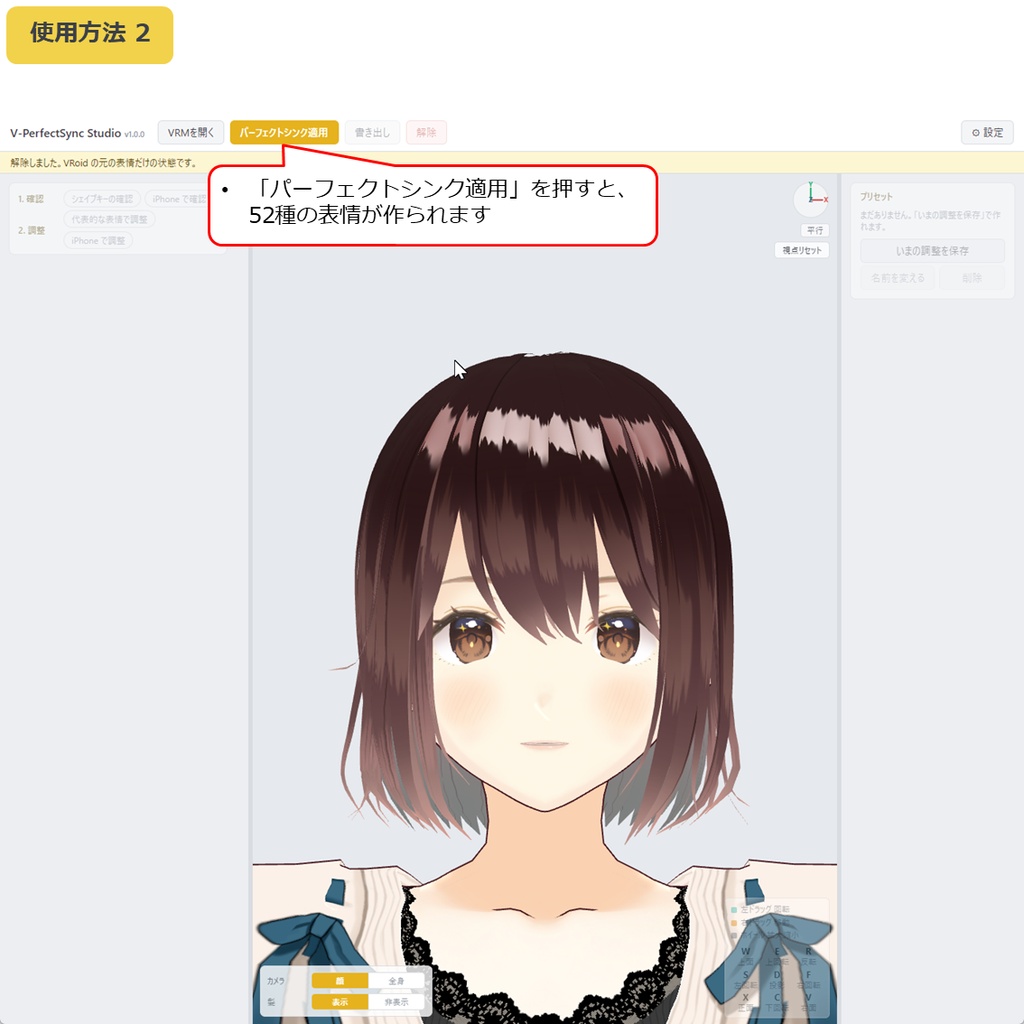


◆商品概要 VRoidで作ったVRMを、iPhoneの顔でそのまま動かしたい。 でも「パーフェクトシンク対応」にするには Unity を入れて52本の表情を用意しないといけない。 VRM 0.x にも 1.0 にも対応したい。透明メッシュを削除したVRMにも入れたい。 V-PerfectSync Studio は、VRMにパーフェクトシンクの表情を入れて、VRMのまま書き出すWindows用ツールです。 VRMを開いて、ボタンを1つ押すだけで、Unity も Blender も要りません。 52種の表情は同梱の固定データではなく、開いたモデルの顔からそのつど作ります。だから、あなたのVRMの顔に合います。 17の代表的な顔を眺め、iPhoneで自分の顔で動かし、強すぎる・弱すぎる所をつまみで直し、シェイプキーを混ぜて自分の作りたい表情にできます。直した結果はそのまま書き出しに入ります。 書き出したVRMは VSeeFace・VMagicMirror・Warudo・3tene でそのまま顔が動きます。 ☆ あなたのVRMの顔から作る、オリジナルのパーフェクトシンク52種。ボタン1つ。 ☆ VRoidの元の表情(まばたき・喜怒哀楽・あいうえお)はそのまま残ります。 ☆ 自分の顔で動かして強さを直し、シェイプキーを混ぜて、作りたい表情に。 ◆使用方法動画 https://x.com/H3Atelier/status/2102389139236962362 ◆できることは3つです 【入れる】 「パーフェクトシンク適用」を押すと、ARKit の52種すべてがそのモデルの顔に合わせて作られます。名前の札も付くので配信アプリ側の設定は要りません。 【自分の顔で確かめる】 52本を1本ずつ動かして形を見る。17の顔を3D画面に並べて眺める。iPhone(iFacialMocap/Facemotion3D)をつなげば、画面のVRMが自分の顔と一緒に動きます。 【直す】 表情ごとに何%で動かすかを一覧のつまみで決めます。一時停止して、止めた顔のまま直せます。 表情に、モデルがもともと持つシェイプキーを混ぜることもできます。 直した内容はプリセットとして保存でき、別のVRMにも当てられます。 ◆内容 V-PerfectSync Studio 本体 取扱説明書(日本語・英語) 利用規約 ◆使用方法 かんたんです! 1. ZIPを展開 2. V-PerfectSync Studio.exe を起動 3. 「VRMを開く」から VRMファイルを読み込み 4. 「パーフェクトシンク適用」を押す 5. 代表的な表情を見ながら気になる所の強さを直し、シェイプキーを混ぜて作りたい表情に 6. 「書き出し」から保存 ◆ご注意 ・VRoid Studio 製のVRM(0.x/1.0)が対象です。他のツールで作ったモデルには対応していません。 ・表情はモデルの顔から自動で作るため、顔立ちによっては口や頬の形が気になることがあります。その場合は「強さ」や「混ぜる」で直してください。 ・iPhoneでの確認には Face ID 対応の iPhone と iFacialMocap/Facemotion3D が必要です。無くても、入れる・眺める・直す・書き出すはできます。 ・書き出したVRMの動作は VSeeFace(VRM 0.x)と Warudo で確認しています。 ・書き出したVRMは、アバターとして使う・配る・売るのは自由です(元のアバターの利用条件に従ってください)。52種の表情だけを抜き出して配布・販売することはできません。 ・動作環境:Windows 10 / 11(64bit)。インストール不要・日本語/英語。 ◆クレジット表記について クレジットの記載は不要です。 ◆更新履歴 2026年09月23日 v1.0.2 VMagicMirror・3teneでのパーフェクトシンク対応 2026年09月23日 v1.0.1 不具合の修正・診断情報のコピーを追加 2026年09月22日 v1.0.0 公開 --- ◆Overview You want your VRoid character to move with your iPhone face. But "perfect sync" means installing Unity and preparing 52 expressions. You want it on VRM 0.x and 1.0 alike, and on a character whose transparent meshes were deleted. V-PerfectSync Studio is a Windows tool that adds perfect-sync expressions to a VRM and exports it as a VRM. Open the VRM, press one button. No Unity, no Blender. The 52 expressions are not bundled data. They are generated from the face of the model you open, so they fit your character. Then the real point: look at 17 sample faces, move them with your own face via iPhone, fix anything too strong or too weak with the sliders, and mix shape keys to make the expressions you want. The exported VRM moves as is in VSeeFace, VMagicMirror and Warudo・3tene. ☆ Your own perfect sync: 52 expressions built from your character's face, with one button. ☆ The original VRoid expressions (blink, emotions, A-I-U-E-O) stay as they are. ☆ Move them with your own face, adjust the strength, mix shape keys, and make the expressions you want. ◆How-to video https://x.com/H3Atelier/status/2102389139236962362 ◆Three things it does [Add] Press "Apply PerfectSync" and all 52 ARKit expressions are built to match the model's face. Name tags are attached, so nothing to set up in the streaming app. [Check with your own face] Move the 52 one at a time. See 17 sample faces side by side in 3D. Connect an iPhone (iFacialMocap / Facemotion3D) and the character moves with your face. [Adjust] Set how many percent each expression moves, from the list. Pause and adjust on the frozen face. Mix the model's own shape keys into an expression. Save your adjustments as a preset and apply them to another character. ◆Contents V-PerfectSync Studio (application) Manual (Japanese / English) Terms of use ◆How to use Easy! 1. Unzip 2. Run V-PerfectSync Studio.exe 3. "Open VRM" and load your VRM file 4. Press "Apply PerfectSync" 5. Look at the sample faces, adjust the strength, and mix shape keys to make the expressions you want 6. "Export" to save ◆Notes ・For VRM files made with VRoid Studio (0.x / 1.0). Models from other tools are not supported. ・Expressions are generated from the model's face, so on some faces the mouth or cheeks may look off. Use "Strength" or "Mix" to fix them. ・iPhone checking needs a Face ID iPhone with iFacialMocap / Facemotion3D. Without one you can still add, view, adjust and export. ・The exported VRM has been tested in VSeeFace (VRM 0.x) and Warudo. ・You are free to use, share and sell the exported VRM as an avatar (subject to the original avatar's terms). Extracting the 52 expressions on their own to distribute or sell them is not allowed. ・Requirements: Windows 10 / 11 (64-bit). No installation. Japanese / English. ◆Credits No credit is required. ◆Update history September 23, 2026 v1.0.2 Perfect sync now works in VMagicMirror・3tene September 23, 2026 v1.0.1 Bug fixes, added "Copy diagnostic info" September 22, 2026 v1.0.0 Released