

HeightStickVR ─ コントローラーだけで位置と高さを動かす
- Digital500 JPY
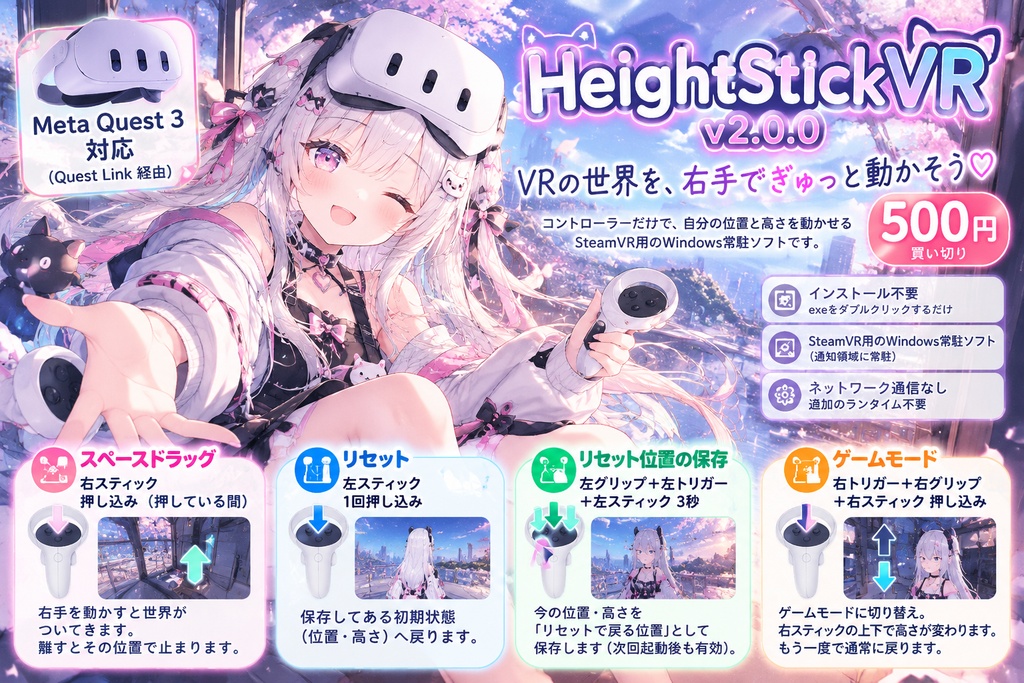


Please use this software at your own discretion and risk. The developer shall not be held liable for any damages arising from the use of, or inability to use, this software. 本ソフトウェアは、ご自身の判断と責任においてご利用ください。 本ソフトウェアの使用、または使用できなかったことによって生じたいかなる損害についても、開発者は一切の責任を負いません。 ──────────────── キャッチ ──────────────── 右スティックを押し込んでいる間だけ世界を引きずる「スペースドラッグ」と、 スティックで高さを変える「ゲームモード」。 VRの中から、コントローラーだけで操作できます。 ───────── 商品説明 ───────── Windows 用の小さな常駐ソフトです。 ■ 操作 右スティックを押し込む(押している間) … スペースドラッグ。右手を動かすと世界がついてくる 左スティックを押し込む(普通に1回) … 保存してある初期状態(位置・高さ)へリセット 左グリップ+左トリガーを握ったまま、左スティックを3秒押し込み続ける … 今の位置・高さを、リセットで戻る位置として保存 右トリガー+右グリップを握ったまま、右スティックを押し込む … ゲームモードに切り替え(もう一度で通常へ) ■ ゲームモード中 右スティックを上下に倒す … 高さが変わる 左スティックを押し込む … 初期状態へリセット 切り替え・リセット・保存は、コントローラーの振動で分かります。 保存した位置はファイルに残るので、次に起動したときも使えます。 ■ OVR Advanced Settings でスペースドラッグや高さ調整をしている方へ OVR Advanced Settingsでスペースドラッグや高さ調整だけ使っている方へ。 HeightStickVR はその2つに絞った、買い切り・アカウント不要の小さなソフトです。 ・ダッシュボードや設定画面を開かずに、コントローラーだけで切り替えられます ・切り替え・リセット・保存はコントローラーの振動で分かります ・Steam アカウントに紐づきません。exe をダブルクリックするだけです ・その代わり、できるのは位置と高さを動かすことだけです (向きを変える回転・そのほかの便利機能はありません) ※OVR Advanced Settings とは別の、独立したソフトです。 ※OVR Advanced Settings と同時には使えません。使うときは OVR Advanced Settings を 終了してください(起動している間は、本ソフトが自動で止まります)。 ■ exe をダブルクリックするだけ インストールも、SteamVR へのアプリ登録もありません。 起動すると画面右下の通知領域に常駐します。 SteamVR より先に起動しても、自動で待ってつながります。 ■ 終わったら元どおり ソフトを終了すると、位置と高さは起動したときの状態に戻ります。 SteamVR の設定ファイルへの保存はしません。 万一途中で落ちても、次に起動したときに自動で元の位置へ戻します。 ■ 行きすぎない 起動したときの位置から、前後左右 5m・上へ 5m・下へ 3m で止まります(設定で変更できます)。 処理が詰まっても、遅れを一気に取り返して急に飛ぶことはありません。 ──────────────────────────────────────────────────────── 動作環境 ──────────────────────────────────────────────────────── ・Windows 11(64ビット) ※Windows 10 は未確認 ・SteamVR ・Meta Quest / Oculus Touch コントローラー 【動作確認環境】 ・Windows 11 Home 25H2(26200.9457) ・SteamVR 2.17.10 ・Meta Quest(Quest Link 経由) ・VRChat と同時に使用して確認 追加のランタイム(Visual C++ 再頒布可能パッケージ、.NET 等)は不要です。 ネットワーク通信は行いません。 Valve Index、HTC Vive、Windows Mixed Reality、Pico 等のコントローラーは 動作確認の対象外です。 ──────────────────────────────────────────────────────── ご購入前にご確認ください ──────────────────────────────────────────────────────── ・Windows のコード署名をしていないため、初回起動時に 「WindowsによってPCが保護されました」が出る場合があります。 「詳細情報」→「実行」で起動できます。 ・SteamVR の仕組み上、ほかのアプリ(VRChat など)のボタンやスティックの 入力は止められません。スティックの押し込みやグリップなどを使っている間、 ほかのアプリ側の動作も一緒に起きることがあります。 ・OVR Advanced Settings とは同時に使えません。 OVR Advanced Settings が起動している間は、本ソフトは自動で止まり、警告音でお知らせします。 ・左スティックを押し込むと、保存してある位置・高さへリセットされます (保存していなければ、起動したときの位置・高さ)。 ・位置や高さを変えたとき、ほかの人からの見え方は、使うアプリやアバターに よって異なります。 ・向きを変える(回転)、上下を向く・傾ける機能はありません。 ・位置や高さを変えると見え方と体の位置がずれます。VR酔いを感じたら すぐに使用を中止してください。 ──────────────────────────────────────────────────────── 利用条件(要約) ──────────────────────────────────────────────────────── ・購入者本人のPCで使用できます。 ・配信や動画で、使っている様子を公開するのは自由です。クレジット不要です。 ・本ソフトの再配布・転載・転売・同梱配布は禁止です。 配布元はこのページに限ります。共有する場合はこのページのURLを教えてください。 ・同梱の openvr_api.dll は Valve の OpenVR(BSD 3-Clause)です。 ライセンス全文を同梱しています。 詳しくは同梱の「01_利用規約.txt」をご確認ください。 ──────────────────────────────────────────────────────── 同梱物 ──────────────────────────────────────────────────────── HeightStickVR.exe openvr_api.dll 00_はじめにお読みください.txt 01_利用規約.txt 02_導入手順と操作方法.txt 03_既知の制限と免責事項.txt 04_サポートとご意見.txt 05_ライセンス表記_第三者ソフトウェア.txt 06_更新履歴.txt LICENSE-OPENVR.txt ───────────────────── 免責 ───────────────────── 本ソフトは現状有姿で提供されます。 利用または利用不能により生じた損害について、 法令上認められる範囲で責任を負いません。 本ソフトは非公式のユーザー作成ソフトウェアです。 Valve Corporation、Meta Platforms, Inc.、VRChat Inc.、BOOTHまたは ピクシブ株式会社との提携、後援、承認を示すものではありません。 A small Windows tray app for SteamVR. - Controls Hold the right stick down (click and keep holding) ... Space Drag. Move your right hand and the world follows it Click the left stick (a normal click) ... Reset to your saved starting position and height Hold the left grip and left trigger, and keep the left stick clicked for 3 seconds ... Save your current position and height as the reset point Hold the right trigger and right grip, then click the right stick ... Switch to Game mode (do it again to go back) - In Game mode Tilt the right stick up / down ... Change your height Click the left stick ... Reset to your saved starting point The controller vibrates when you switch modes, reset, or save. The saved reset point is kept in a file, so it is still there next time. - For people who use OVR Advanced Settings only for Space Drag or height If you use OVR Advanced Settings (paid on Steam) only for space drag or height, HeightStickVR is a small tool focused on just those two: one-time purchase, no account needed. - Switch with your controllers only - no dashboard or settings screen - The controller vibrates when you switch modes, reset, or save - Not tied to a Steam account. Just double-click the exe - On the other hand, it only moves your position and height (no rotation, no other utility features) * HeightStickVR is a separate, independent program. It is not affiliated with OVR Advanced Settings. * It cannot run at the same time as OVR Advanced Settings. Please quit OVR Advanced Settings first (HeightStickVR pauses itself while it is running). - Just double-click the exe No installer, and nothing is registered in SteamVR. It runs in the Windows notification area (system tray). You can start it before SteamVR - it waits and connects automatically. - Back to normal when you quit When you quit the app, your position and height go back to where they were when it started. Nothing is saved to SteamVR's settings files. If the app ever closes unexpectedly, it restores your original position the next time you start it. - Safe limits It stops at 5 m horizontally, 5 m up, and 3 m down from where the app started (adjustable). If your PC stutters, it never "catches up" all at once, so you will not suddenly jump.