
【レイド通知】レイドレーダー|レイド襲来バナー OBS・わんコメ・Twitch対応 / Raid Radar raid alert 全4スタイル
- 全4スタイルセット / All 4 StylesDigital1,000 JPY
- 到着チケット / Arrival TicketDigital400 JPY
- リボンロゼット / Ribbon RosetteDigital400 JPY
- バルーン便 / Balloon DeliveryDigital400 JPY
- マステメモ / Washi NoteDigital400 JPY
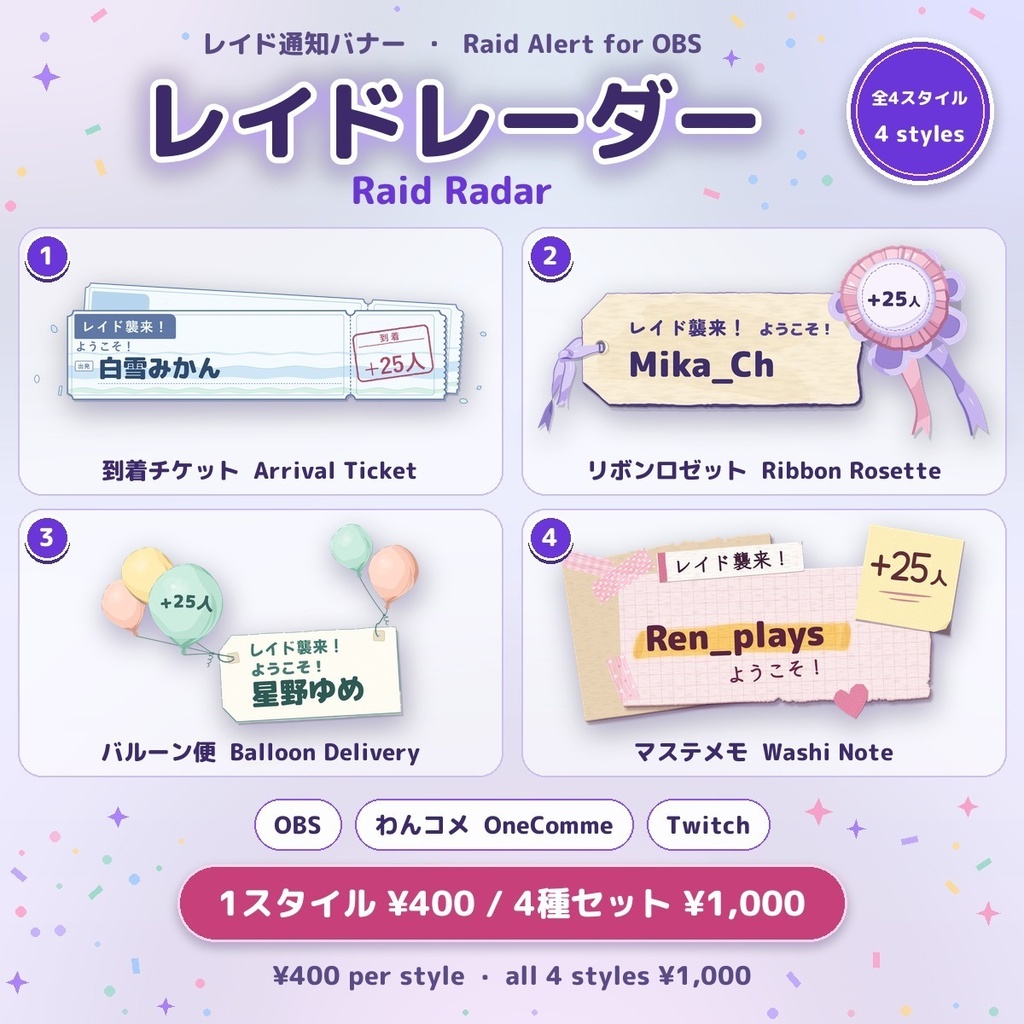
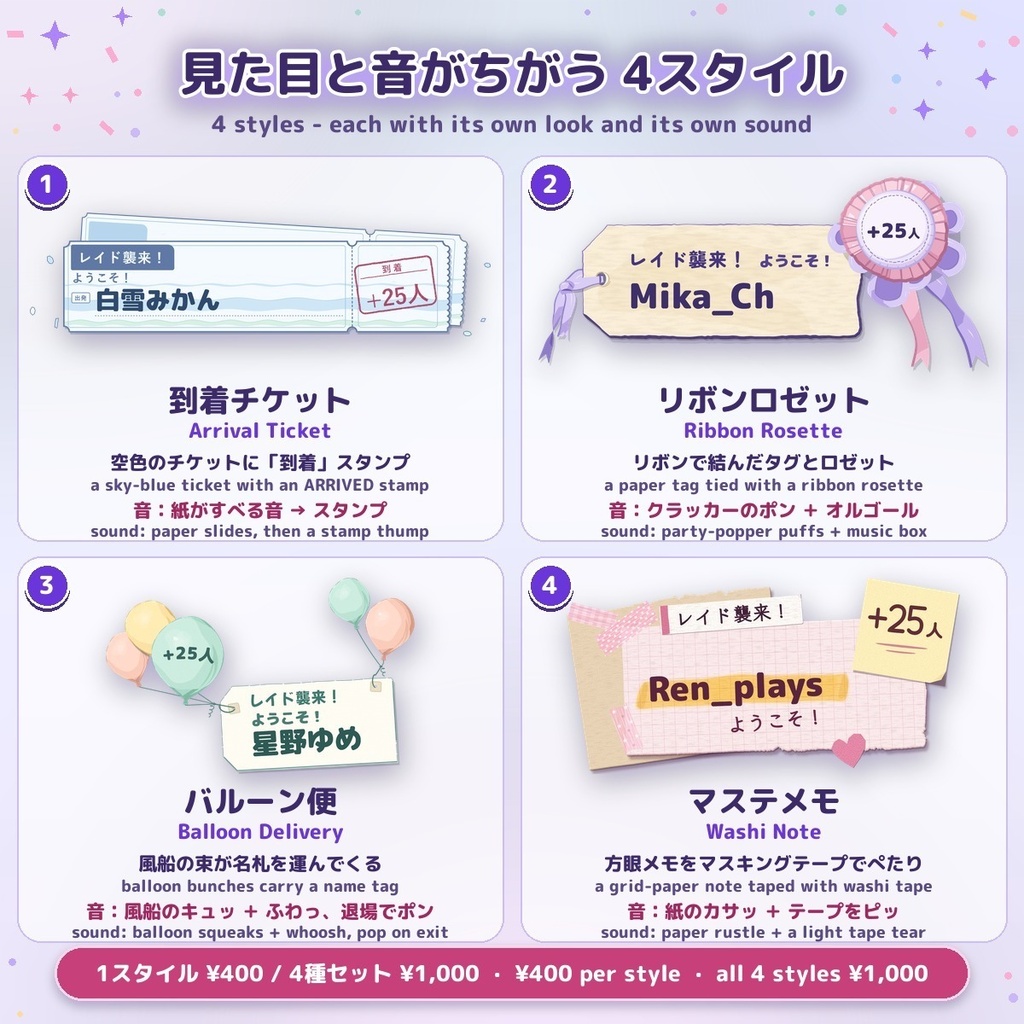
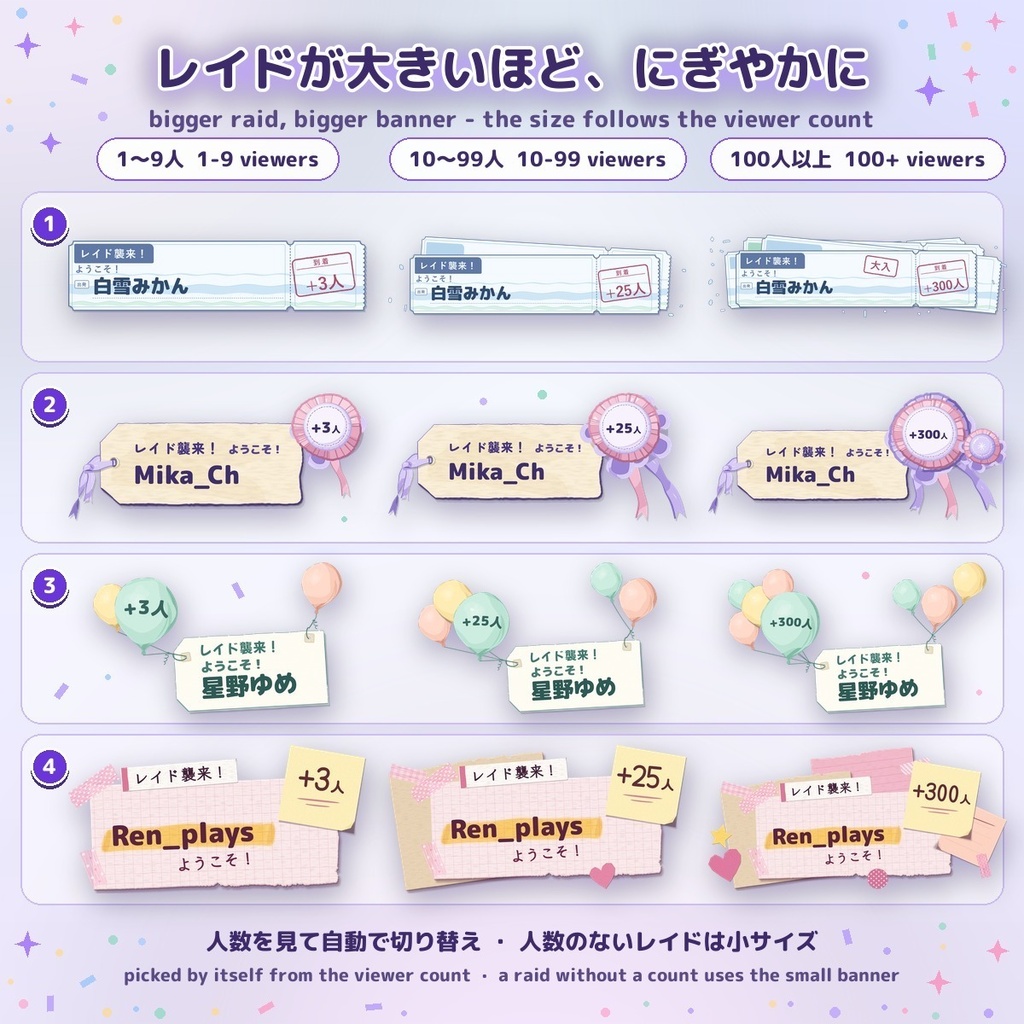
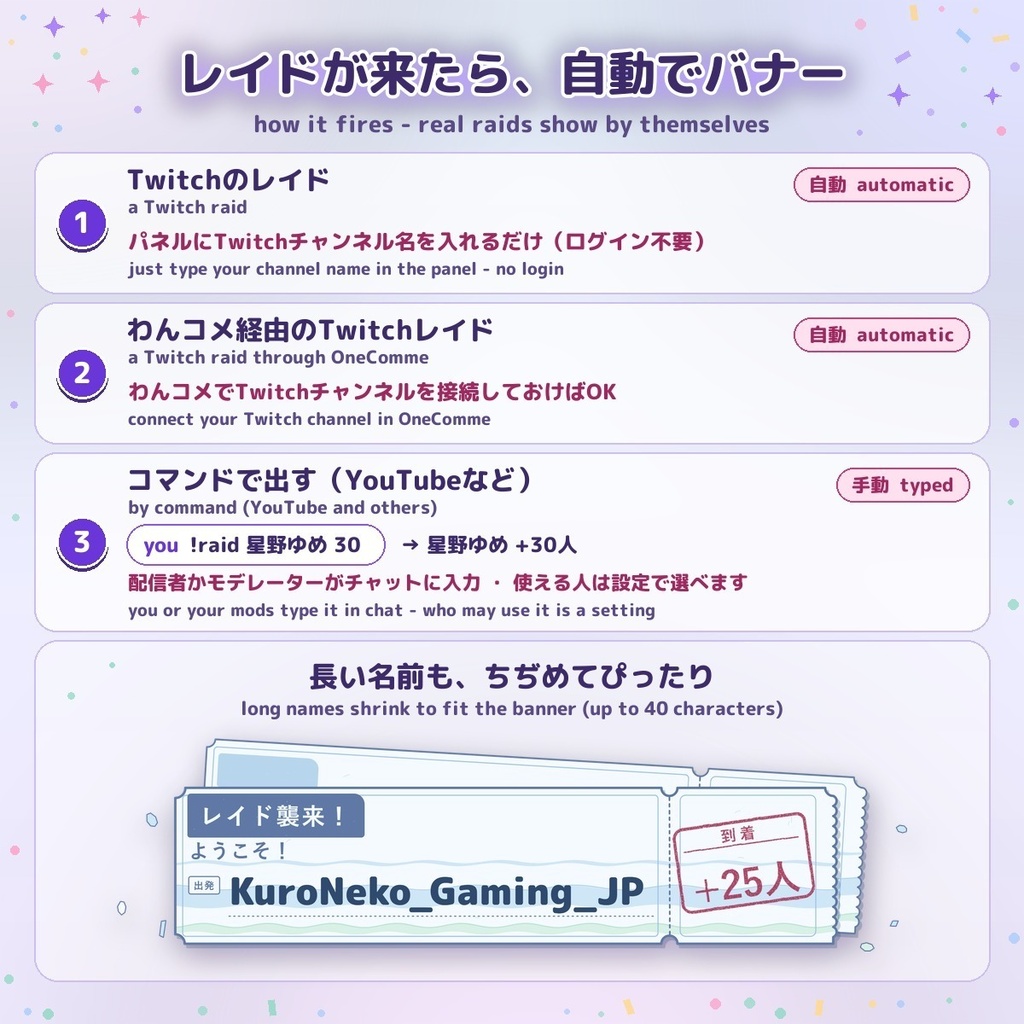
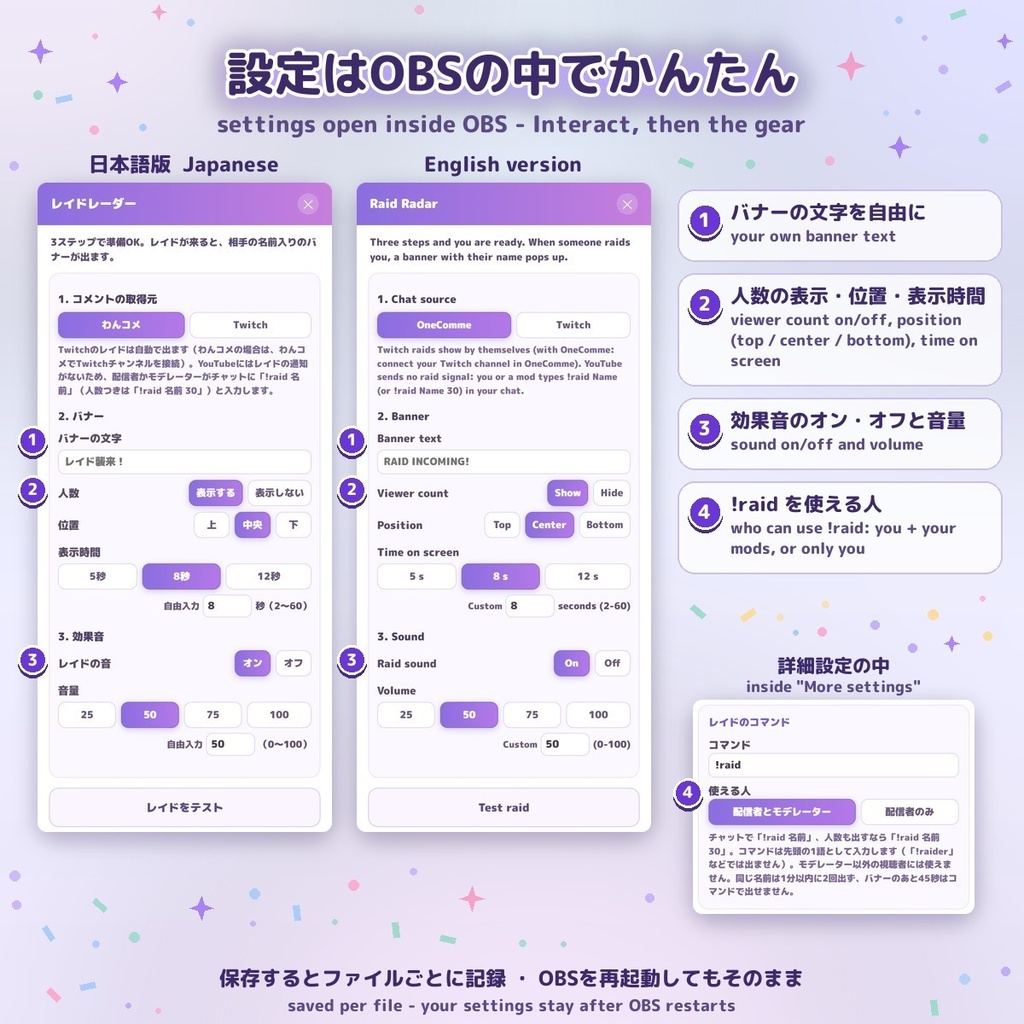
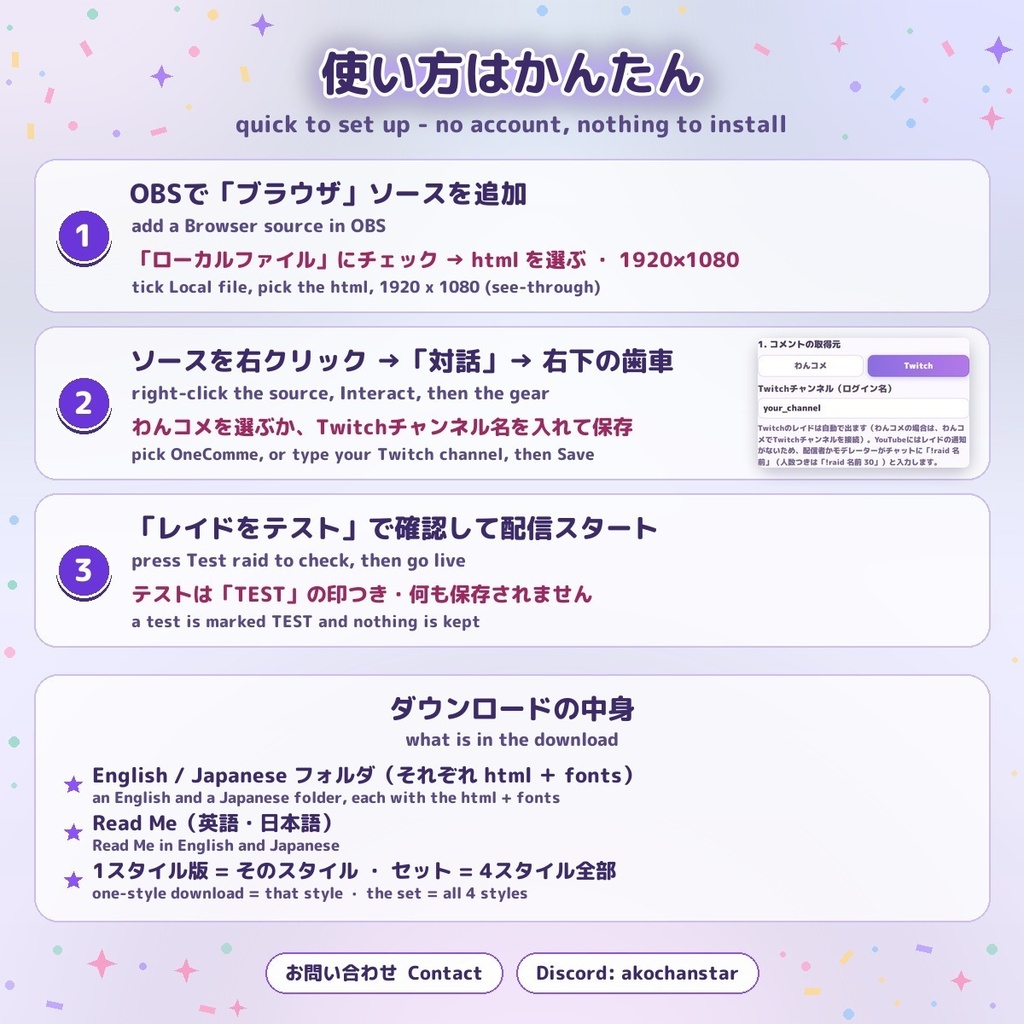


📺 動画はこちら / Watch the video → https://vimeo.com/1249367648 レイドで来てくれた配信者と視聴者を、名前つきのバナーでお出迎え。 レイドが来ると画面の中央に「レイド襲来! ようこそ!」のバナーが出て、レイドしてくれた配信者の名前と人数(+42人)を表示。スタイルごとの効果音が鳴って、数秒後に自動で片付きます。 人数が多いほどバナーがにぎやかになり、長い名前は自動で縮んで収まります。アカウント登録も API キーも不要、HTML ファイルひとつで動きます。 ━━━━━━━━━━━━━━ ◆ 選べる4スタイル(1スタイル ¥400・全4スタイルセット ¥1,000) 1 到着チケット(Arrival Ticket) 旅のチケットに「到着」スタンプ。紙がすべる音とスタンプの音 2 リボンロゼット(Ribbon Rosette) リボンで結んだタグとロゼット。クラッカーの音とオルゴール 3 バルーン便(Balloon Delivery) 風船が名札を運んでくる。風船のキュッという音、帰りはポンッ 4 マステメモ(Washi Note) 方眼メモをマスキングテープでぺたり。紙の音とテープの音 どのスタイルにも日本語版と英語版が入っています。配色はスタイルの一部です(設定で色は変わりません)。 ◆ レイドの大きさで3段階 1〜9人/10〜99人/100人以上で、飾りが増えて大きくなります(チケットが重なる・ロゼットが増える・風船が増える・メモが増える)。 ◆ レイドを自動で受け取る Twitch:チャンネル名を入れるだけ(わんコメ不要・ログイン不要)。レイドが来ると自動で表示します。 わんコメ(OneComme):わんコメが受け取った Twitch のレイドを自動で表示します。 YouTube などレイドの通知がない場所では、あなたかモデレーターがチャットに「!raid 名前 30」と打つと表示できます。 一般の視聴者やチャットボットはコマンドを使えません(「使える人」を「配信者のみ」にも設定可)。同じ名前は60秒以内に2回出ません。 ◆ 設定は OBS の中の歯車パネルから コメントの取得元(わんコメ/Twitch)/バナーの文字(自分の言葉に変更可)/人数の表示・非表示/位置(上・中央・下)/表示秒数/効果音のオン・オフと音量/コマンドと使える人 設定は保存されるので最初に一度だけで OK。「レイドをテスト」ボタンで本番前に見た目と音を確認できます。 ◆ 背景は透明 1920×1080 のブラウザソースでそのまま重ねられます(1280×720 など同じ 16:9 なら縮小して表示)。 ━━━━━━━━━━━━━━ 【設置】 1. zip を展開し、使いたいスタイルの Japanese フォルダの RaidRadar_スタイル名.html(英語版は English)を、OBS の「ブラウザ」ソースに追加(ローカルファイル、1920×1080) 2. ソースを右クリック →「対話」→ 右下の歯車で、コメントの取得元を「わんコメ」または「Twitch」に → 保存 3. 「レイドをテスト」で確認して、配信スタート 詳しい手順とすべての設定の説明は、同梱の「お読みください (日本語).txt」に書いてあります。 【ご購入の前に】 ダウンロード商品のため、購入後の返金が難しくなっています。紹介画像と動画で、4スタイルの見た目と動きをご確認ください。 【ライセンス】 配信・動画・録画でのご利用(個人・収益化を問わず)、ご自身のチャンネル用の編集は自由です。 ファイルの再配布・再販売・共有(編集の有無を問わず)、他の商品や素材集への同梱は禁止します。 フォントは SIL Open Font License 1.1(同梱の fonts/OFL.txt)。 【動作環境】OBS Studio / Streamlabs のブラウザソース(Chromium ベース)。わんコメ(OneComme)または Twitch。API キー不要。 お問い合わせ: Discord: akochanstar その他の Lukami ウィジェット: https://lukami.booth.pm/ ──────────── Welcome every raid with a banner that shows who came. When a raid arrives, a "RAID INCOMING! Welcome in!" banner appears in the centre of your screen with the raider's name and how many viewers came along (+42), plays the style's own short sound, then tidies itself away. Bigger raids get more art, and long names shrink to fit. No account, no API key - one HTML file. ◆ 4 styles (¥400 each, all 4 for ¥1,000): Arrival Ticket (a travel ticket with an ARRIVED stamp) / Ribbon Rosette (a ribbon-tied tag with a rosette) / Balloon Delivery (balloons carry the name tag in) / Washi Note (a grid-paper note taped down with washi tape) - each with its own sound, in English and Japanese; the colours are part of each style ◆ 3 raid sizes: 1-9 / 10-99 / 100+ viewers - more tickets, rosettes, balloons or notes as the raid grows ◆ Raids arrive by themselves: Twitch (just type your channel - no OneComme, no login) or OneComme (Twitch raids it receives). For YouTube or any time, you or a mod type "!raid Name 30" in chat; viewers and chat bots cannot fire it, and the same name never shows twice within 60 seconds ◆ Settings inside OBS (Interact -> gear): chat source, your own banner text, show or hide the count, position (top / centre / bottom), time on screen, sound on/off and volume, command word and who can use it, a Test raid button - saved, so you set it once ◆ Transparent background, 1920 x 1080 browser source (any 16:9 size scales down) Setup: unzip, add English/RaidRadar_<Style>.html (or Japanese/) as an OBS Browser Source (Local file, 1920 x 1080), open Interact -> gear, choose OneComme or Twitch, press Test raid. Every step and setting is in "Read Me (English).txt". Use it in your streams and videos, personal or monetised. Do not resell, redistribute or share the files. Fonts: SIL Open Font License 1.1 (fonts/OFL.txt). Contact - Discord: akochanstar More Lukami widgets: https://lukami.booth.pm/