

ついてくキー!Unity版|素体のシェイプキー(胸・体型)を衣装にも付けて、めり込みを減らす【VRChat・NDMF・Modular Avatar・非破壊】
- 製品版Digital1,200 JPY
- 無料お試し版Digital0 JPY
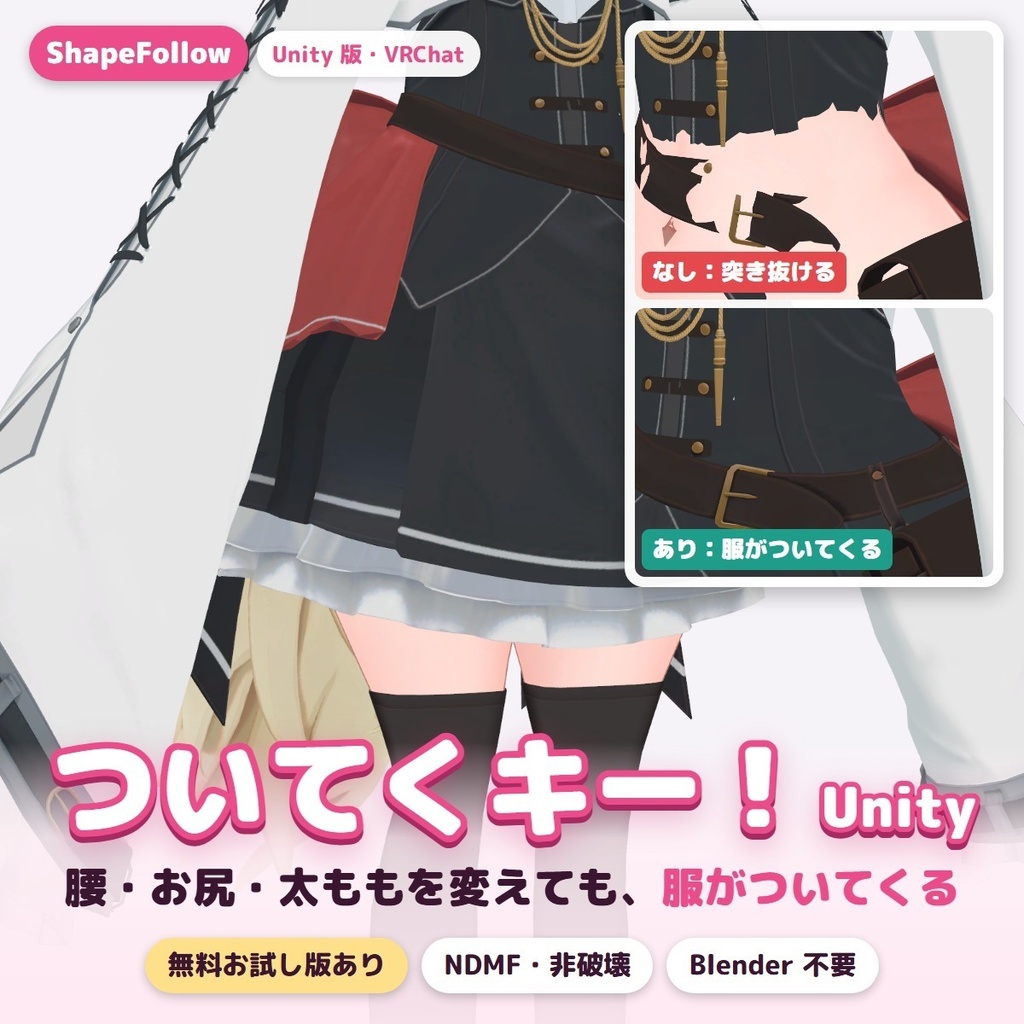
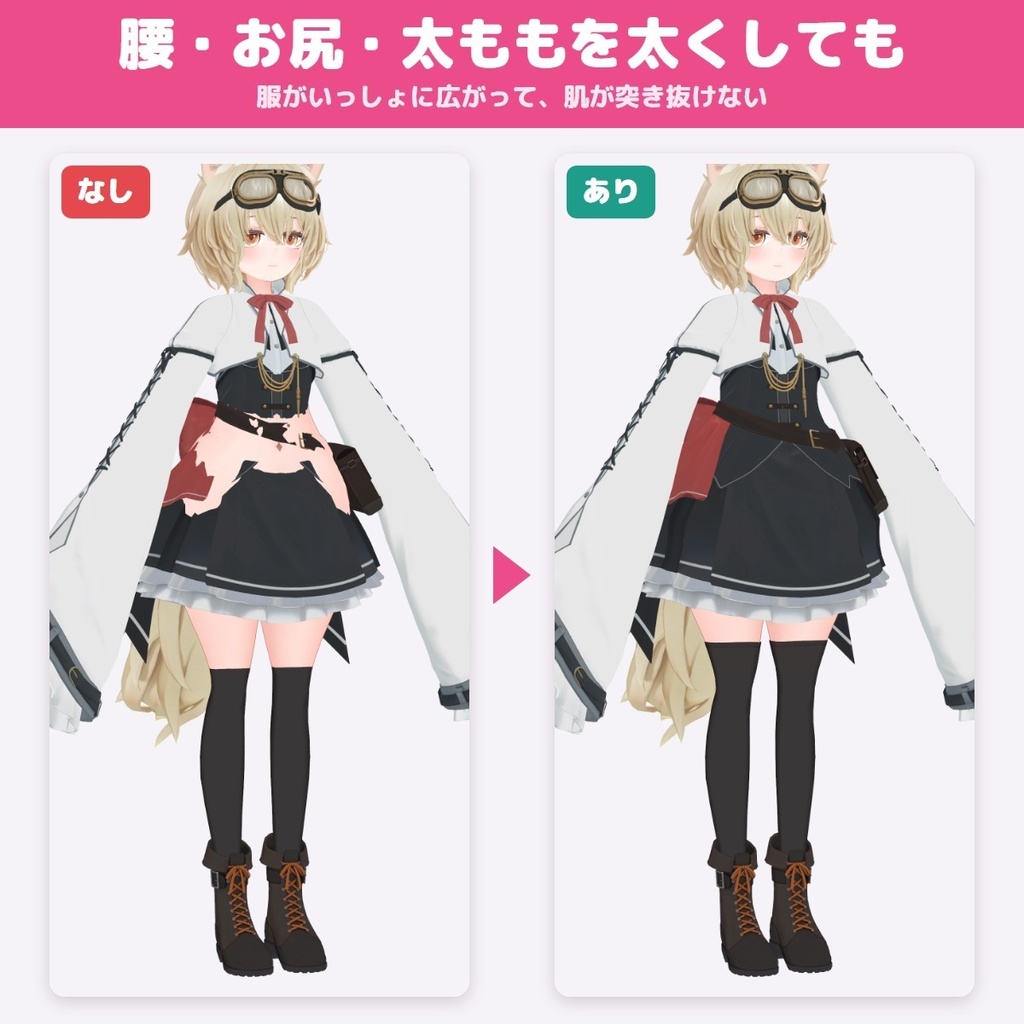
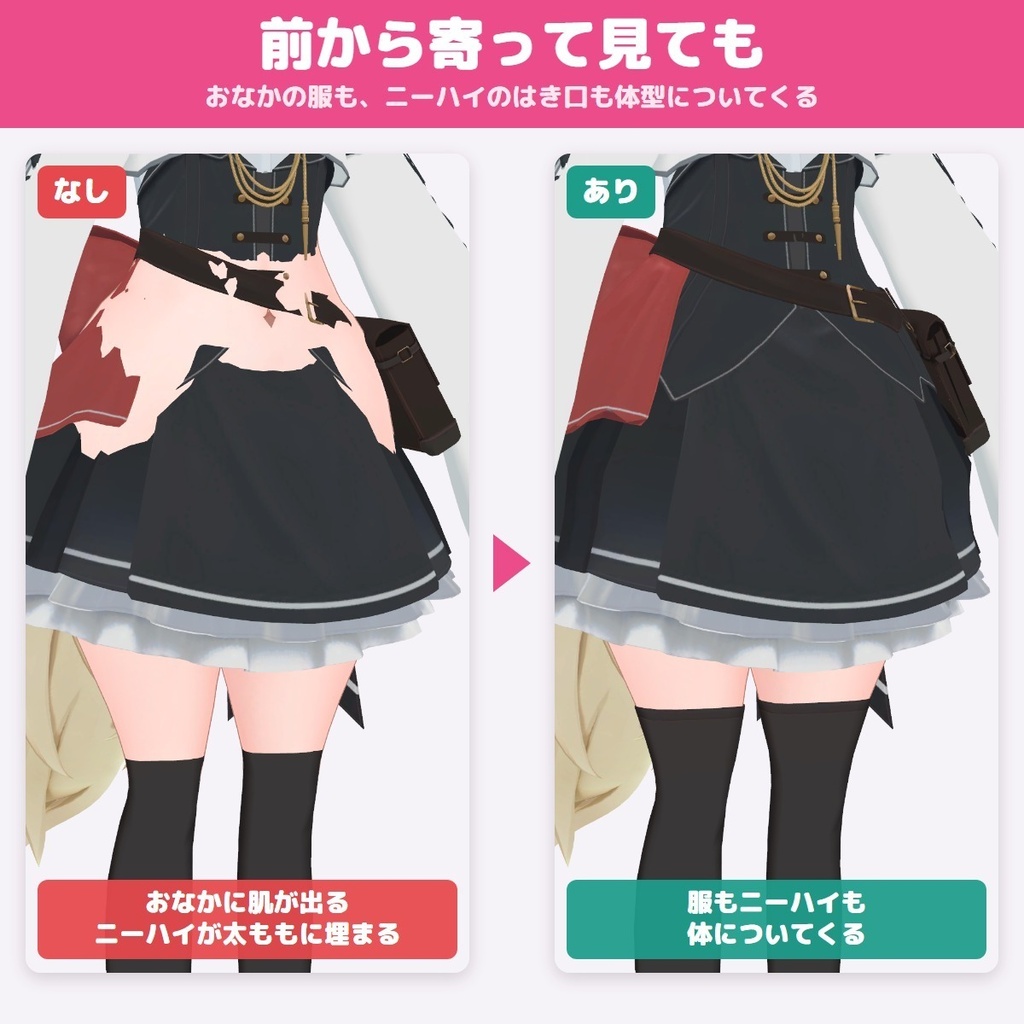
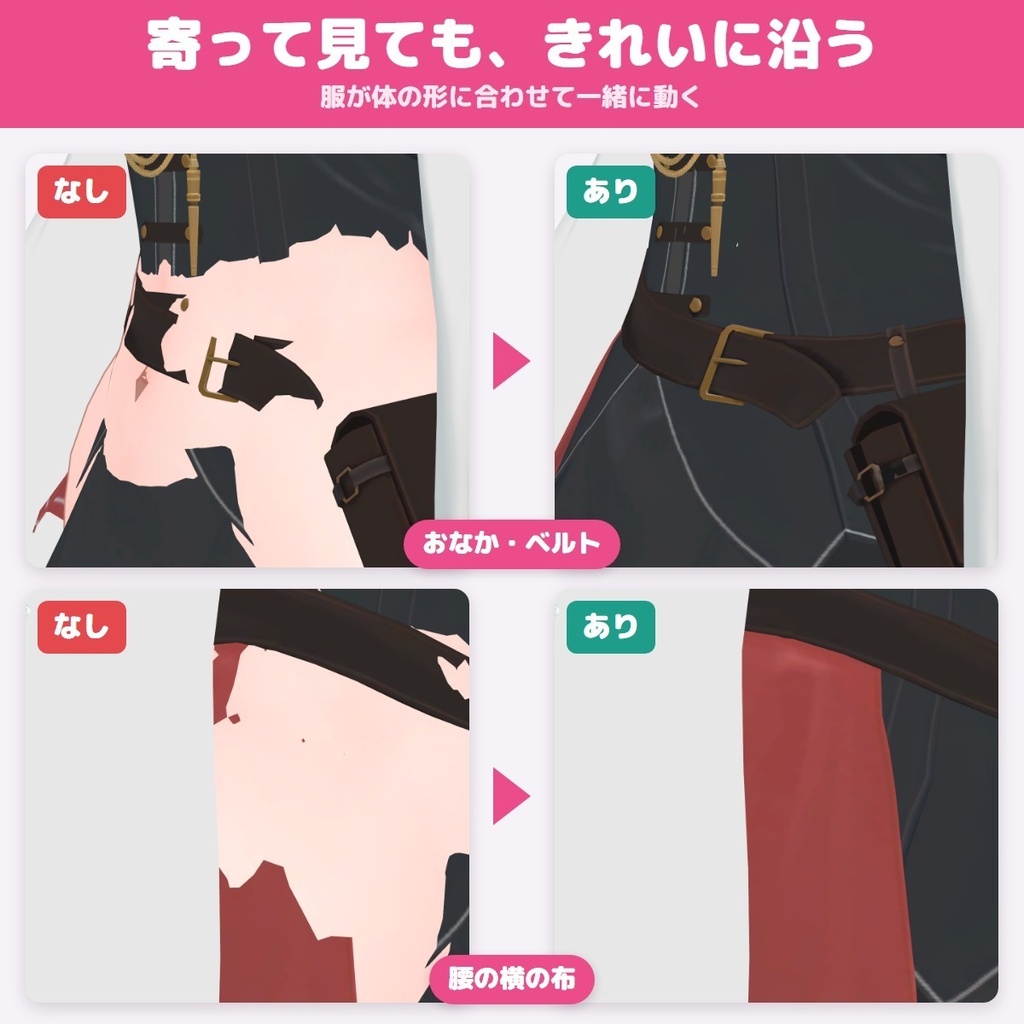
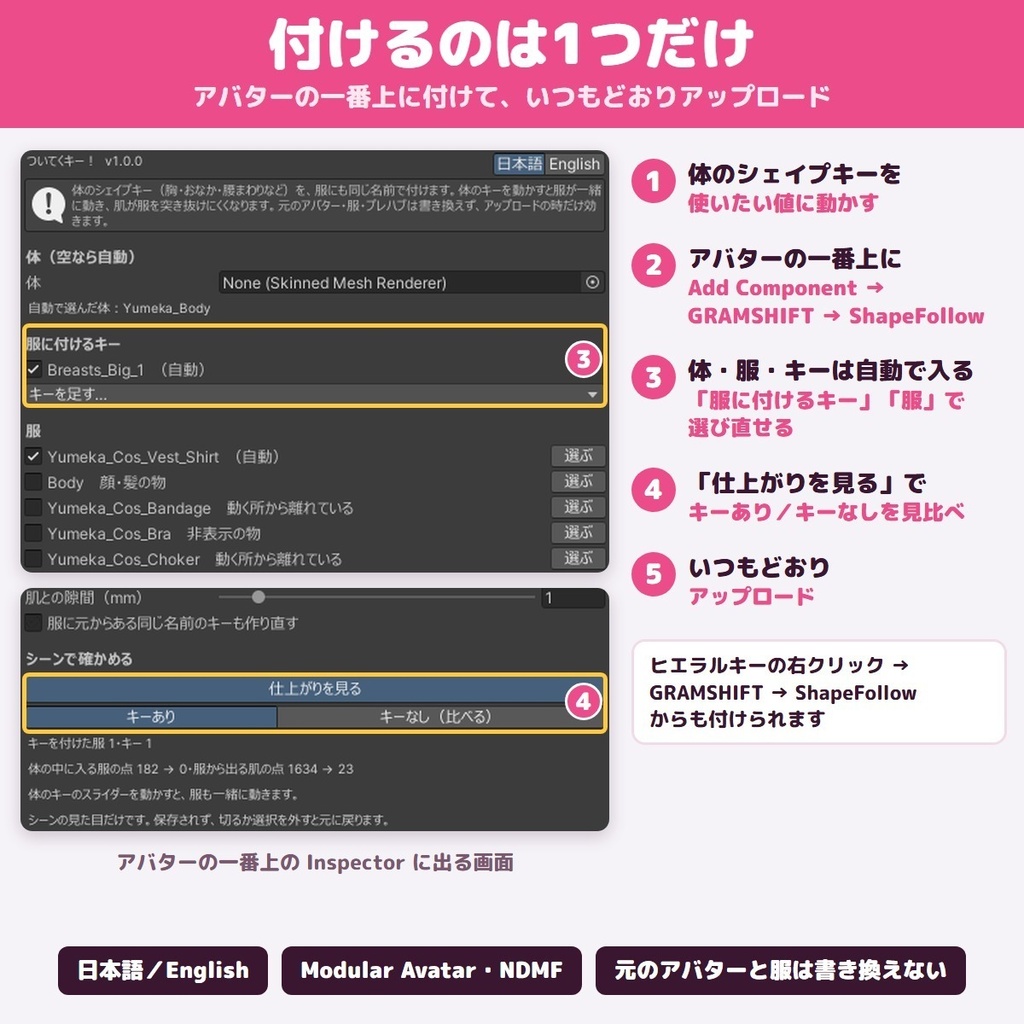
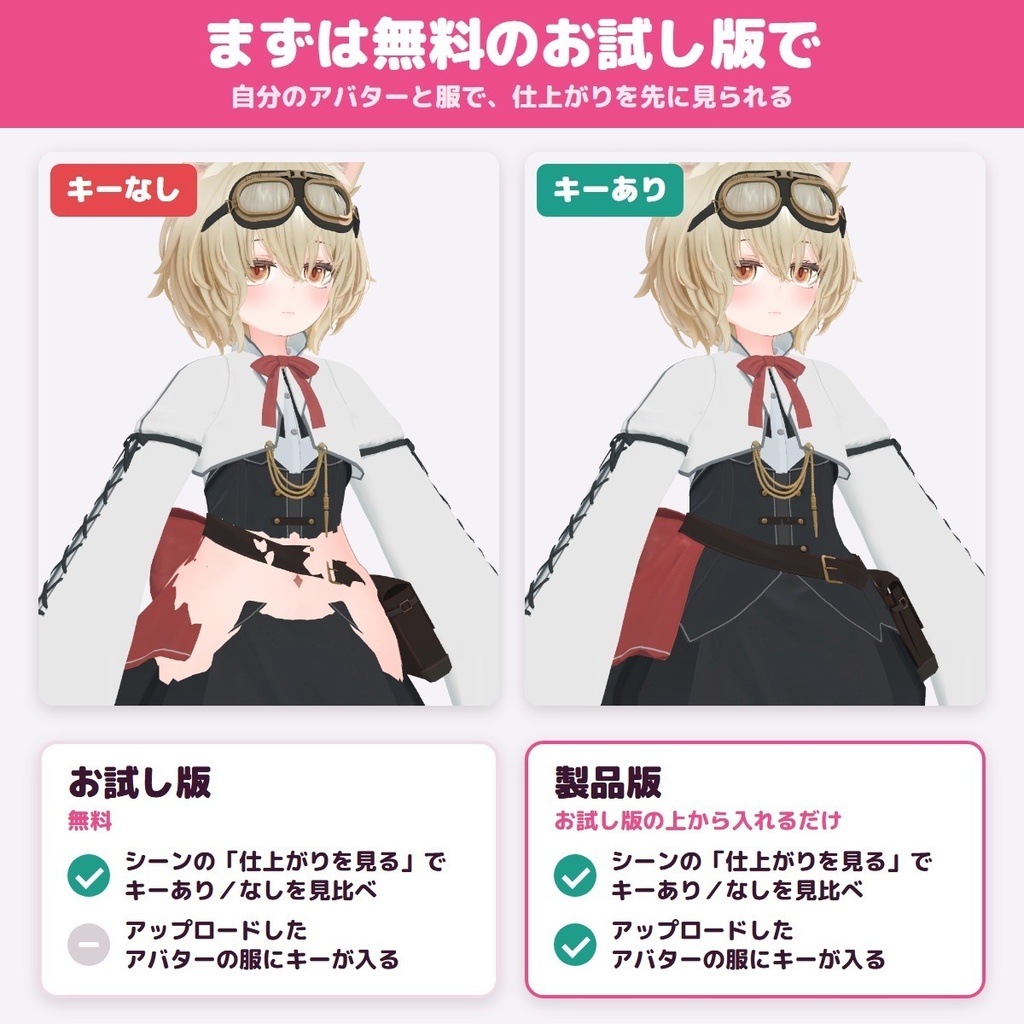


体型のシェイプキー(胸・おなか・腰・お尻・太もも)を変えると、そのキーが入っていない服から肌が突き抜ける・めり込む時に、同じ名前のキーを衣装に付けて、服を体と一緒に動かす VRChat 向けの Unity ツールです。アバターの一番上に部品を1つ付けてアップロードするだけで、体型変更しても服の貫通を大きく減らせます(Blender 不要・NDMF・Modular Avatar・非破壊)。 English / 简体中文 / 한국어:下の段落に説明があります(descriptions below) ■ まずは無料お試し版で、自分のアバターと服を確かめる ・お試し版(無料):シーンの「仕上がりを見る」まで製品版と同じように使えます。キーあり/キーなしを切り替えて、自分のアバターと服で見比べられます ・製品版:上に加えて、アップロードしたアバターの服にもキーが入ります。お試し版の上から入れるだけで切り替わります ■ こんな時に ・胸を大きくする・腰やお尻・太ももを太くするキーを動かすと、服から肌が出てしまう ・買った衣装に、素体と同じ体型のキーが入っていない ・Blender で服にキーを作る手間をかけたくない ・表情メニューで体型を変えた時も、服を一緒に動かしたい ■ できること ・アバターの一番上に1つ付けるだけ。服を何着重ねていても、キーを何本動かしていても、まとめて付けます ・重ね着の順番(インナー → シャツ → スカート → 上着)をくずさず、外の服は外のまま一緒に広がります ・体・服・キーは自動で選び、チェックで入れる・外すを選べます。自動で見つからない時は知らせが出て、その場で手で選べます ・肌との隙間(mm)を決められます ・表情メニュー・アニメーションで体のキーを動かした時も、服が一緒に動きます ・衣装の作者が入れた同じ名前のキーは、最初はそのまま使います(作り直すこともできます) ・「仕上がりを見る」で、キーあり/キーなしを切り替えて見比べられます。服から出る肌の点の数(前 → 後)も出ます ・元のアバター・服・プレハブ・メッシュは書き換えません。部品を外せば元どおり ・画面は日本語/English ■ 使い方 1. Modular Avatar(1.18 以上 2.0 未満)を入れてから、unitypackage をプロジェクトに入れる 2. 体のシェイプキーを使いたい値に動かす 3. アバターの一番上に「Add Component → GRAMSHIFT → ShapeFollow」を付ける(ヒエラルキーの右クリック → GRAMSHIFT → ShapeFollow でも付きます) 4. 「仕上がりを見る」で見た目を確かめて、いつもどおりアップロードする ■ よくある質問 Q. 体型のシェイプキーを変えると服が突き抜けます。どうすれば? A. アバターの一番上に ShapeFollow を付けてアップロードしてください。服に体と同じ名前のキーが付き、体のキーと一緒に服が動くので、めり込みが大きく減ります。 Q. Blender 版とどちらを買えばいいですか? A. Unity の中だけで済ませたい・アップロードの時だけ効かせたい時は Unity 版、服の FBX そのものにキーを書き込みたい時は Blender 版です。 Q. 表情メニューで体型を変えても服はついてきますか? A. ついてきます。アニメーションで体のキーを動かした時も、服が一緒に動きます。 Q. 元の服のデータは変わりますか? A. 変わりません。元のアバターと服はそのままで、アップロードしたアバターにだけ効きます。 ■ 対応と範囲 ・Unity 2022.3 / VRChat SDK3 Avatars / Modular Avatar 1.18 以上 2.0 未満(NDMF が一緒に入ります) ・体のメッシュに体型のシェイプキーが入っている人型のアバター向けです。ゆめか・RadDollV3 と付属の衣装で使えます ・1つのアバターに部品を1つ付けると、服が何着あってもまとめて付けます ・体が複数のメッシュに分かれているアバターは、シェイプキーの入った体を「体」の欄で1つ選んで使います ・キーの値をとても大きくした時や、体から大きく離れた服の飾りは、「仕上がりを見る」で見た目を確かめてからアップロードしてください ・Modular Avatar が入っていない時は Console に案内が出て、アバターの組み立てはそのまま進みます ■ ついてくキー! Blender 版 服の FBX にキーを書き込みたい時は Blender アドオン版:https://booth.pm/ja/items/9132683 要望の多いものから次の版に入れていきます。BOOTH のメッセージからお寄せください。 うまく動かない時は BOOTH のメッセージから気軽にどうぞ。アバター・服の名前と、出た知らせを書いていただけると早く直せます。
利用規約
・VRChat などで使うアバターの改変に、個人・法人・商用を問わず使えます ・このツールを使って作ったアバターの公開・販売に、このツール側の制限はありません(服とアバターのそれぞれの規約に従ってください) ・ツールのファイル(製品版・お試し版とも)の改変・逆コンパイル・解析・再配布はできません。お試し版の制限を外す事も含みます ・ツールのファイルの転売・共有もできません ・同梱の「利用規約_Terms.txt」が正です Terms (summary): you may use it to modify avatars for VRChat etc., for personal, corporate or commercial use; this tool puts no limit on publishing or selling avatars made with it (follow the terms of the outfit and the avatar); you may not modify, decompile, analyze or redistribute the tool files (full version and trial), including removing the trial's limits; the tool files may not be resold or shared. The included "利用規約_Terms.txt" is authoritative.
更新履歴
1.0.0(2026-11)公開 1.0.0 (2026-11) released
English
When you change a body shape key (chest, belly, waist, hips, thighs) and the skin pokes through or sinks into an outfit that does not have that key, ShapeFollow adds the key to the outfit under the same name, so the outfit moves with the body. Add one component to the top of your avatar and upload as usual: poke-through after body-shape changes is greatly reduced (no Blender needed, NDMF, Modular Avatar, non-destructive). A Unity tool for VRChat. Try it free first - Free trial: Preview result in the Scene view works like the full version. Switch With keys / Without to compare on your own avatar and outfits. - Full version: on top of that, the keys are added to the outfits of the avatar you upload. Import it on top of the trial to switch. What it does - One component at the top of the avatar handles the outfit layers under the avatar and the keys you choose - Keeps the layering order (inner, shirt, skirt, jacket): outer outfits stay outside and widen together - Body, outfits and keys are picked automatically; tick or untick each one. If nothing is found, a message says so and you can pick by hand right there - Set the gap to the skin (mm) - Outfits also follow when the body keys are moved by the Expressions menu or animations - Keys with the same name made by the outfit's creator are kept by default (or can be rebuilt) - Preview result switches With keys / Without, and shows how many skin points come through the outfit (before -> after) - The original avatar, outfits, prefabs and meshes are never changed. Remove the component to go back - Inspector in Japanese / English How to use 1. Install Modular Avatar (1.18 or later, below 2.0), then import the unitypackage 2. Move the body's shape keys to the values you want 3. Add Component > GRAMSHIFT > ShapeFollow on the top of the avatar (or right-click in the Hierarchy > GRAMSHIFT > ShapeFollow) 4. Check the look with Preview result, then upload as usual FAQ Q. My skin pokes through the outfit when I change a body shape key. What can I do? A. Add ShapeFollow to the top of the avatar and upload. The outfit gets keys with the same names as the body and moves with them, so poke-through is greatly reduced. Q. Unity version or Blender version? A. The Unity version if you want to stay in Unity and apply it only at upload; the Blender version if you want the keys written into the outfit FBX itself. Q. Do outfits follow when the body shape is changed from the Expressions menu? A. Yes. They also follow when animations move the body keys. Q. Does it change my original outfit data? A. No. The original avatar and outfits stay as they are; it applies only to the uploaded avatar. Supported and scope - Unity 2022.3 / VRChat SDK3 Avatars / Modular Avatar 1.18 or later, below 2.0 (brings NDMF) - Humanoid avatars whose body mesh has body-shape keys. Works with Yumeka and RadDollV3 and their included outfits - One component per avatar handles all of its outfits - If the body is split into several meshes, pick the one with the shape keys in the Body field - For very large key values or decorations far from the body, check the look with Preview result before uploading - Without Modular Avatar, the Console shows a notice and the avatar build continues ShapeFollow for Blender (writes the keys into the outfit FBX): https://booth.pm/ja/items/9132683 We add the most requested features in the next version. Send requests via BOOTH messages. If something does not work, feel free to message us on BOOTH. Include the avatar and outfit names and any message shown.
中文
在 Unity 中把 VRChat 模型身体的体型形态键(胸部・腹部・腰・臀部・大腿等)以相同名称加到服装上的工具。 移动身体的形态键时服装会一起变化,皮肤更不容易穿出服装。无需 Blender,只在上传时生效(NDMF・非破坏)。 ■ 先用免费试用版确认 试用版可使用到场景中的「预览结果」,与正式版相同。在其上导入正式版即可反映到上传的模型。 ■ 功能 ・在模型最上层添加1个组件,所有服装、所有形态键一起处理 ・自动选择身体、服装和形态键,可用勾选修改;找不到时会提示,可当场手动选择 ・皮肤可能穿出的地方,把服装推到离皮肤指定距离(mm)的外侧 ・用表情菜单・动画移动身体形态键时,服装也会跟随(添加 Modular Avatar 的 Blendshape Sync) ・不改写原模型、服装、预制件和网格;移除组件即可还原 ・日语/English ■ 使用方法 1. 先安装 Modular Avatar(1.18 以上、低于 2.0),再导入 unitypackage 2. 把身体形态键调到想用的值 3. 在模型最上层 Add Component → GRAMSHIFT → ShapeFollow 4. 用「预览结果」确认后照常上传 ■ 运行环境 Unity 2022.3 / VRChat SDK3 Avatars / Modular Avatar 1.18 以上低于 2.0(含 NDMF) 无法正常使用时,欢迎通过 BOOTH 消息联系我们(请写上模型和服装名称及显示的提示)。 ■ 限制 ・穿模会大幅减少,但不一定为0(形态键值非常大时、远离身体的装饰等) ・每个模型只能添加1个
한국어
Unity 안에서 VRChat 아바타 몸의 체형 셰이프 키(가슴・배・허리・엉덩이・허벅지 등)를 같은 이름으로 의상에도 붙이는 도구입니다. 몸의 키를 움직이면 옷이 함께 움직여 피부가 옷을 뚫고 나오는 일이 줄어듭니다. Blender 없이, 업로드할 때만 적용됩니다(NDMF・비파괴). ■ 먼저 무료 체험판으로 확인 체험판은 씬의 「결과 미리보기」까지 제품판과 똑같이 쓸 수 있습니다. 제품판을 위에 넣으면 업로드한 아바타에도 반영됩니다. ■ 기능 ・아바타 맨 위에 1개만 붙이면 모든 의상・모든 키를 한꺼번에 처리 ・몸・의상・키를 자동으로 고르고 체크로 바꿀 수 있습니다. 못 찾으면 알림이 나오고 그 자리에서 직접 고를 수 있습니다 ・피부가 나올 것 같은 곳은 피부에서 정한 거리(mm)만큼 옷을 바깥으로 밀어냅니다 ・표정 메뉴・애니메이션으로 몸의 키를 움직여도 옷이 따라옵니다(Modular Avatar 의 Blendshape Sync 추가) ・원본 아바타・의상・프리팹・메시는 바꾸지 않습니다. 컴포넌트를 떼면 원래대로 ・일본어/English ■ 사용법 1. Modular Avatar(1.18 이상 2.0 미만)를 넣은 뒤 unitypackage 를 가져오기 2. 몸의 셰이프 키를 쓰고 싶은 값으로 움직이기 3. 아바타 맨 위에 Add Component → GRAMSHIFT → ShapeFollow 4. 「결과 미리보기」로 확인하고 평소처럼 업로드 ■ 동작 환경 Unity 2022.3 / VRChat SDK3 Avatars / Modular Avatar 1.18 이상 2.0 미만(NDMF 포함) 잘 안 될 때는 BOOTH 메시지로 편하게 연락 주세요(아바타・의상 이름과 표시된 알림을 적어 주세요). ■ 제한 ・뚫림은 크게 줄지만 0 이 된다고는 할 수 없습니다(키 값을 아주 크게 했을 때・몸에서 멀리 떨어진 장식 등) ・아바타 하나에 1개만 붙일 수 있습니다