

乗れるスノーモービル【ModularAvatar対応】
- Digital500 JPY
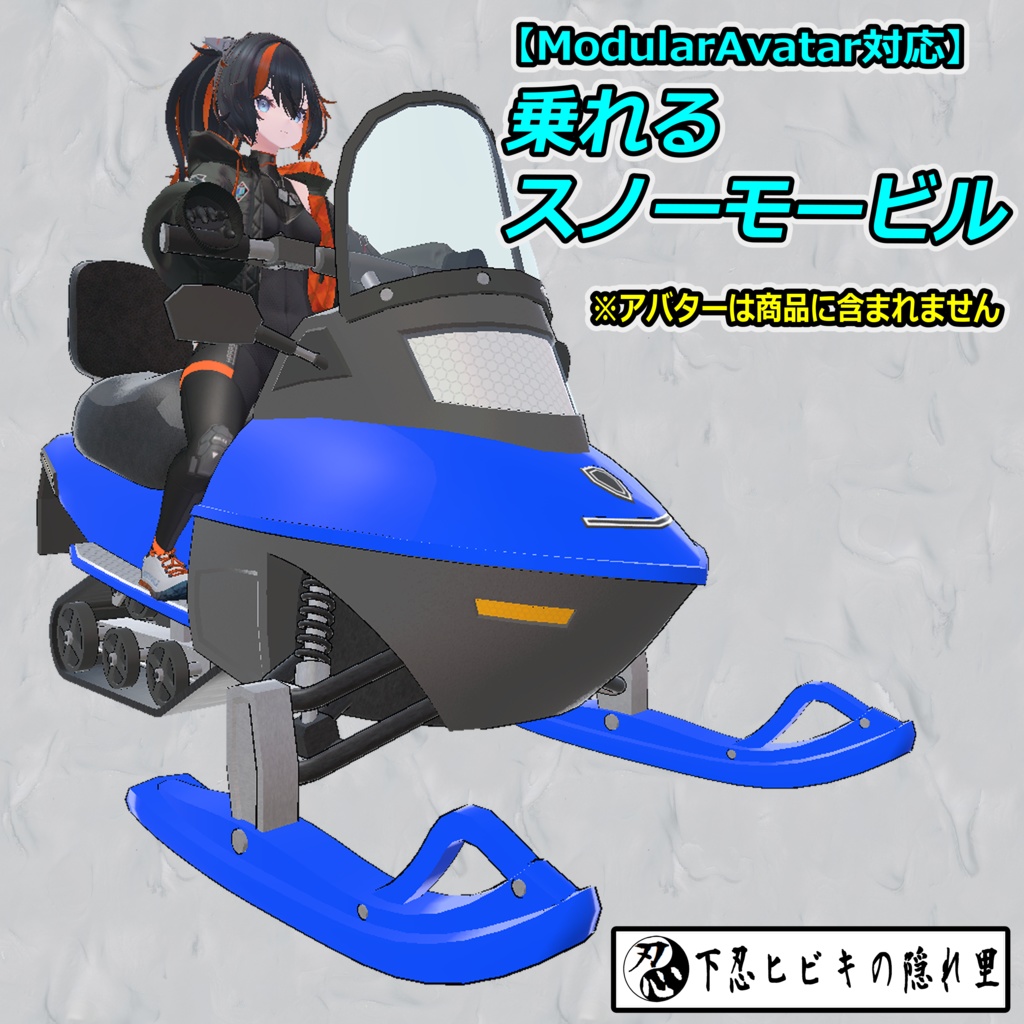
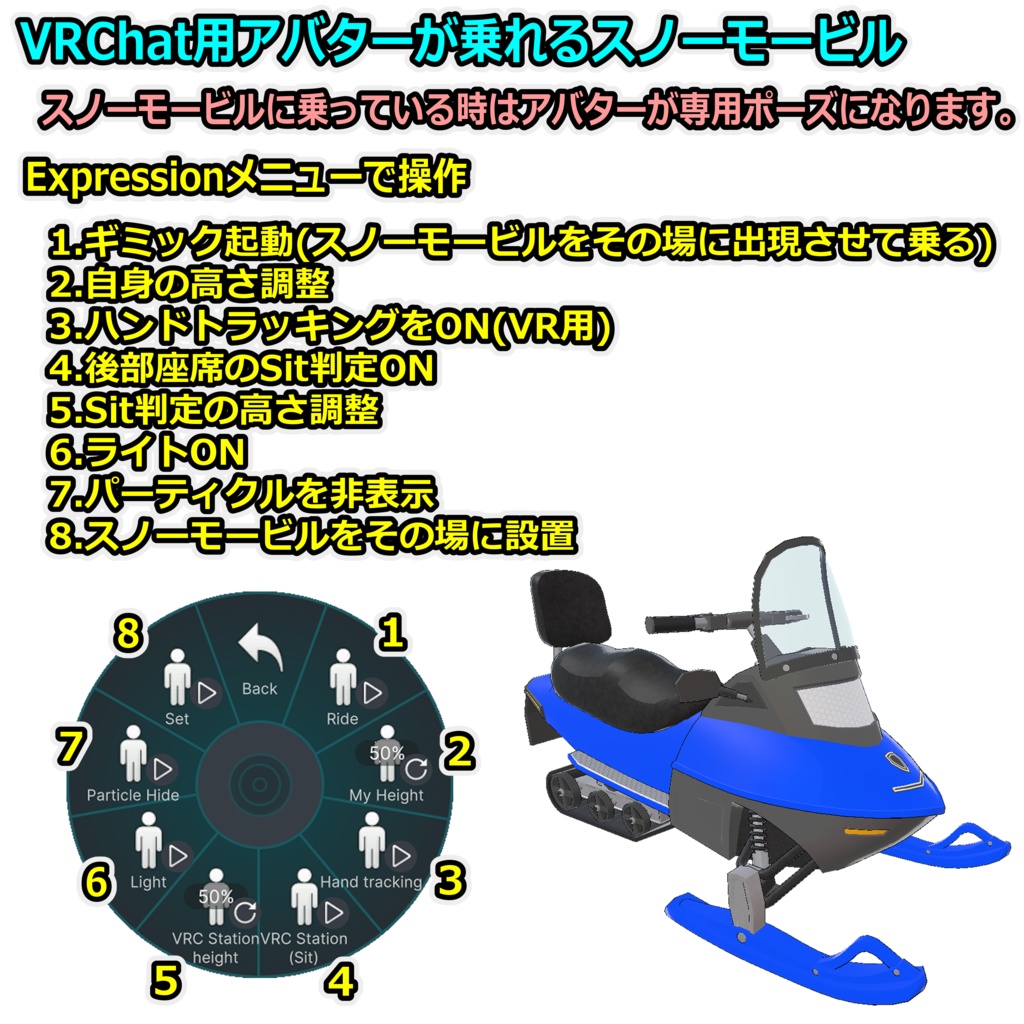
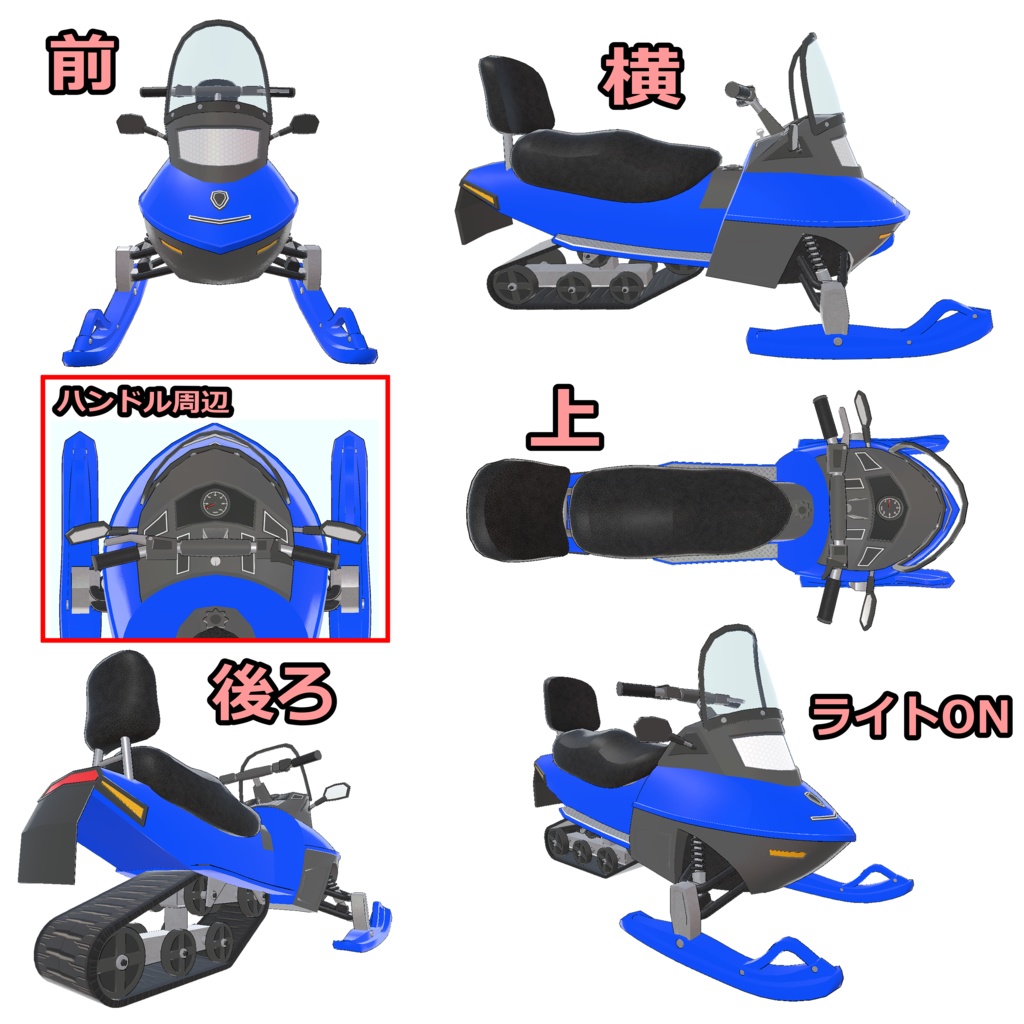
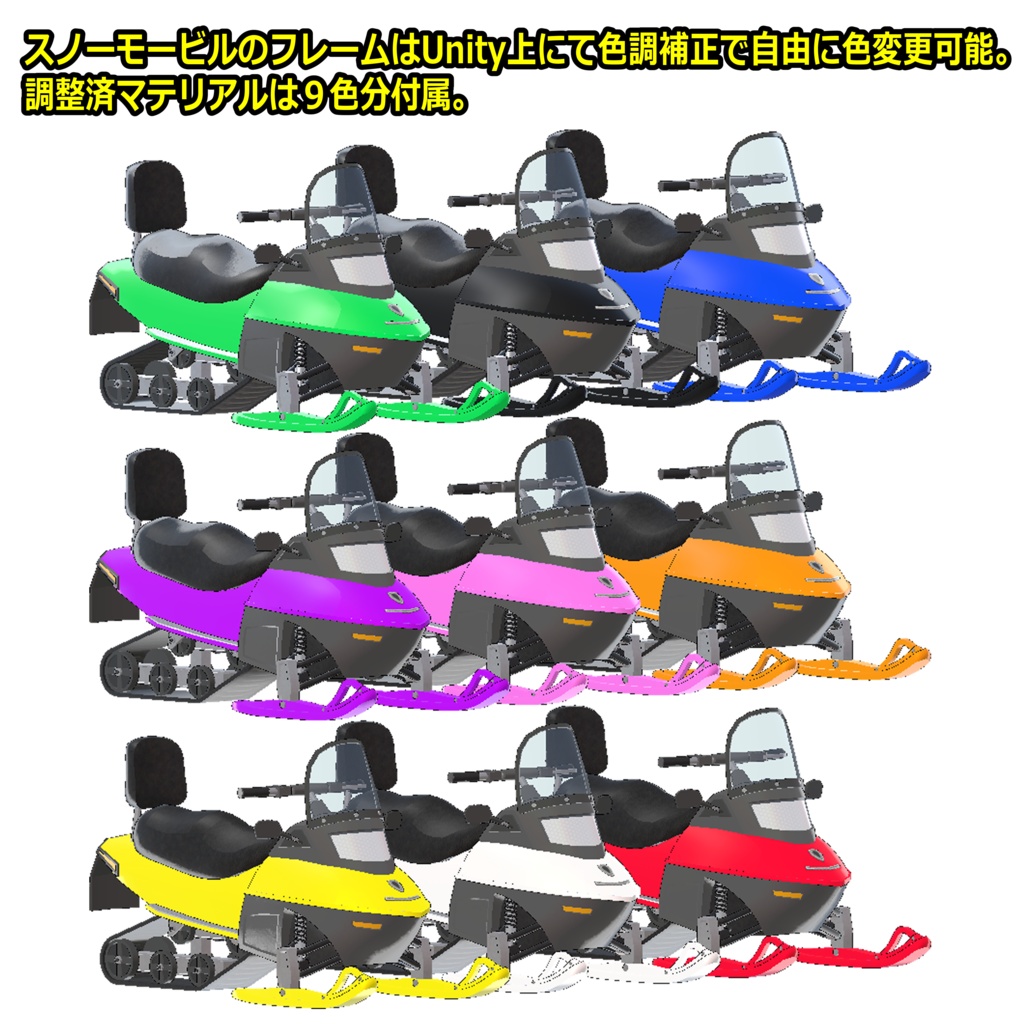
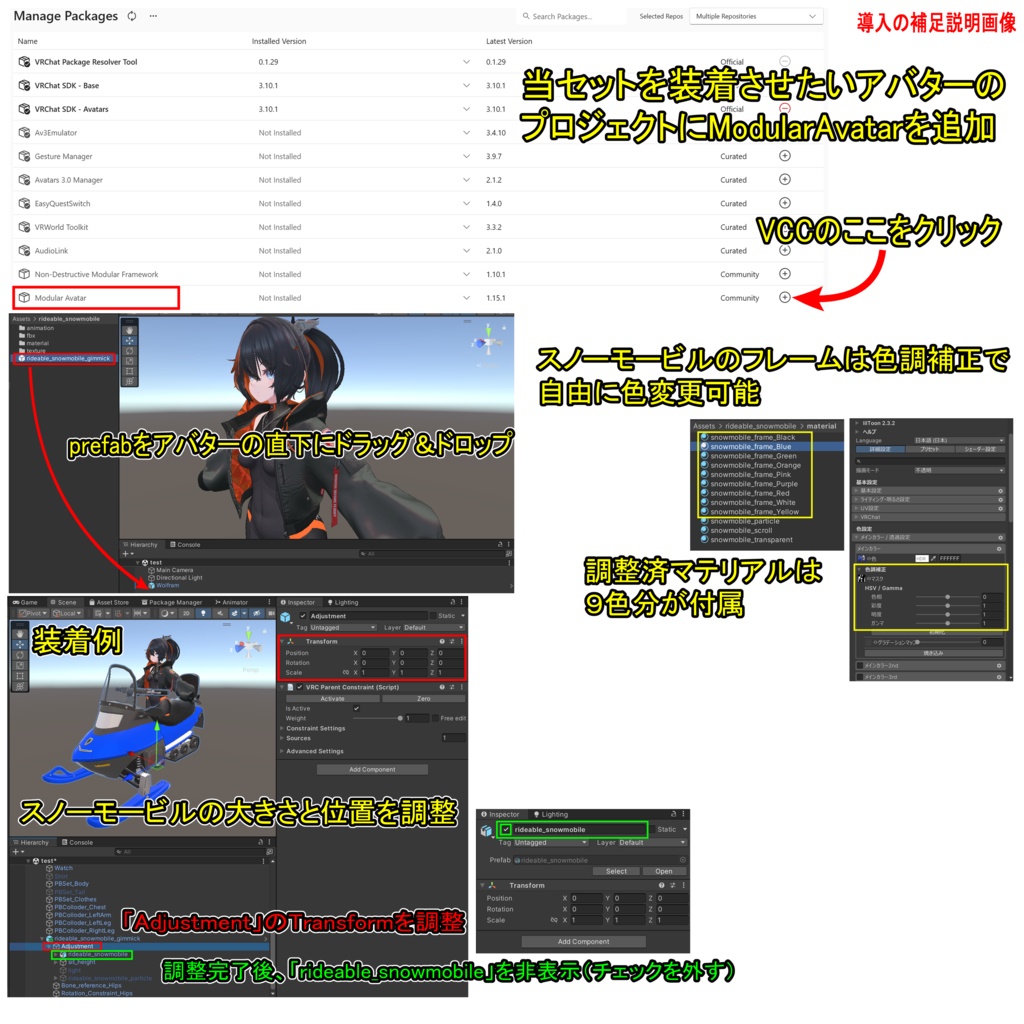


【商品名】 乗れるスノーモービル【ModularAvatar対応】 【商品説明】 VRChat用アバターが乗れるスノーモービルです。 VRChat内にてExpressionメニューでスノーモービルをその場に出現させて乗ることができます。 スノーモービルに乗っている時はアバターが専用ポーズになりますが、ハンドトラッキングをONにすることもできます(VR用)。 ※アバターのポーズアニメーションは、一般的なボーン構造のヒューマノイドアバターなら使えると思います。なお、段差やジャンプでアニメーションが解除される場合があります。 また、自身の高さ調整、後部座席のSit判定ON、Sit判定の高さ調整、ライトON、パーティクルを非表示、スノーモービルをその場に設置する機能もあります。 スノーモービルのフレームのテクスチャは1種類(青色)ですが、Unity上にてliltoonの色調補正で自由に変更できます。なお、調整済マテリアルは9色分付属します。 ※装着例のアバター「Wolfram( https://flastore.booth.pm/items/5769373 )」は商品に含まれません。 【VRChatへの導入方法】※詳しくは導入の補足説明画像を参照 1.ModularAvatarをVCCにダウンロード。 https://modular-avatar.nadena.dev/ja/ 2.当セットを装備させたいアバターのプロジェクトにModularAvatarを追加 3.シェーダー(liltoon)をインポート https://booth.pm/ja/items/3087170 4.本商品(rideable_snowmobile_1.0.unitypackage)をインポート 5.プロジェクト内(Assets/rideable_snowmobile)にあるrideable_snowmobile_gimmick.prefabをアバターの直下にドラッグ&ドロップ 6.スノーモービルの大きさと位置を調整 ・Hierarchy上のオブジェクト「Adjustment」のTransformを調整 ・調整完了後、Hierarchy上のオブジェクト「rideable_snowmobile」を非表示にする 7.通常の手順でVRChatにアップロード(必ずPrivate 設定で) 【ポリゴン数】 スノーモービル:△28300 【内容物】 Unitypackage readme FBX テクスチャ(PNG) 導入の補足説明画像 【利用規約】 改変可 商用利用可 再配布不可 再販売不可 公序良俗に反する使用を禁止 【免責事項】 制作者は本データを利用したことにより発生した損害、損失、その他の不利益に対して一切の責任を負いません。 【Quest対応する方法】 ・マテリアル「snowmobile_frame_Blue」と「snowmobile_scroll」と「snowmobile_transparent」のシェーダーを「VRChat/Mobile/Toon Lit」に変更 ※フレームの色は青になります。ベルトが動かなくなります。透明部分が不透明になります。全体的に見た目は大きく劣化します。 ・マテリアル「snowmobile_particle」のシェーダーを「VRChat/Mobile/Particles/Additive」に変更 ・Hierarchy上のオブジェクト「light」を削除 ※ライトON機能は無くなります。 【更新履歴】 2026/1/5 リリース 【追記】 ギミックが正常に機能しない場合 →VCC、VRChat SDK、Modular Avatarのバージョンを最新にしてから【VRChatへの導入方法】の5.からやり直してください。 乗っている時にアバターの動きが大きく崩れたり移動速度が遅くなる場合 →VRで頭の位置が低いと起きる場合があります。姿勢を高くしてみて下さい。 フルトラで正常にアニメーションが動かない場合 →当ギミックを使用する場合は一時的に3点トラッキングに切り替えてください。なお、VRChatのメニューの「設定(歯車アイコン)」の「トラッキングとIK」の「フルボディトラッキングを許可」をOFFにすると切り替えできます。 他のツールやギミックなどと干渉して当ギミックが正常に機能しない場合 →それらを削除してお使い下さい。
English
[Product Name] Rideable Snowmobile [Compatible with Modular Avatar] [Product Description] This is a snowmobile that VRChat avatars can ride. You can make the snowmobile appear on the spot and ride it using the Expression menu in VRChat. While riding the snowmobile, your avatar will assume a special pose, but you can also enable hand tracking (for VR). Avatar pose animations should work with any humanoid avatar with a standard bone structure. Note that animations may be canceled when crossing steps or jumping. Additionally, you can adjust your own height, enable sit detection for the backseat, adjust the sit detection height, turn on lights, hide particles, and place the snowmobile on the spot. The snowmobile frame comes with one texture (blue), but you can freely change it using Liltoon's color correction in Unity. Nine pre-adjusted materials are included. The avatar shown in the installation example, "Wolfram ( https://flastore.booth.pm/items/5769373 )," is not included with the product. [How to Install in VRChat] *For details, see the supplementary installation instructions. 1. Download ModularAvatar to VCC. https://modular-avatar.nadena.dev/ja/ 2. Add ModularAvatar to the project of the avatar you want to equip with this set. 3. Import the shader (liltoon). https://booth.pm/en/items/3087170 4. Import this product (rideable_snowmobile_1.0.unitypackage). 5. Drag and drop rideable_snowmobile_gimmick.prefab from your project (Assets/rideable_snowmobile) directly below the avatar. 6. Adjusted the size and position of the snowmobile. - Adjust the Transform of the "Adjustment" object in the Hierarchy. - After completing the adjustments, hide the "rideable_snowmobile" object in the Hierarchy. 7. Upload to VRChat using the standard procedure (make sure to use the Private setting). [Polygon Count] Snowmobile: △28,300 [Contents] Unity package Readme FBX Texture (PNG) Supplementary installation instructions [Terms of Use] Modifications permitted Commercial use permitted No redistribution No resale Prohibition of use that violates public order and morals [Disclaimer] The creator assumes no responsibility for any damage, loss, or other inconvenience caused by the use of this data. [Quest Compatibility] - Change the shaders for the materials "snowmobile_frame_Blue," "snowmobile_scroll," and "snowmobile_transparent" to "VRChat/Mobile/Toon Lit." *The frame color will change to blue. The belt will no longer move. Transparent parts will become opaque. Overall appearance will be significantly degraded. - Change the shader for the "snowmobile_particle" material to "VRChat/Mobile/Particles/Additive." - Delete the "light" object in the Hierarchy. *The light ON function will no longer be available. [Update History] 2026/1/5 release [Additional Note] If the gimmick isn't working properly → Update your VCC, VRChat SDK, and Modular Avatar to the latest versions, then start again from step 5 of the [How to install in VRChat]. If your avatar's movement becomes significantly disrupted or its movement speed slows while riding → This may occur if your head is positioned too low in VR. Try raising your posture. If it doesn't work properly with full tracking →When using this gimmick, temporarily switch to 3-point tracking. You can also switch to this mode by turning off "Allow FullBody Tracking FBT" under "Tracking & IK" in "Settings (gear icon)" in the VRChat menu. If this gimmick is interfering with other tools or gimmicks and isn't functioning properly →Delete them before using.