

Angel Lighting Tools 【VRChat 照明器具】 ワールド向け統合ライティングワークスペース
- Digital2,001 JPY


照明作業は、ワールド制作の中でも最後まで残りやすく、しかも完成度を大きく左右する工程です。 Reflection Probe は見えづらい。Bakery 変換は怖い。MLP や VRCLV の範囲は勘で置かれやすい。気づけば階層も散らかり、あとから見直すのも重い。 ALT は、そうした「面倒だけど逃げられない照明作業」を、ひとつの落ち着いた作業面にまとめるために作られました。 Lighting is usually one of the last heavy tasks in a world project, and one of the biggest factors in final quality. Reflection Probes are hard to read. Bakery conversion can feel risky. MLP and VRCLV bounds often end up being guessed. The hierarchy gets messy, and reviewing everything later becomes painful. ALT was built to turn that unavoidable lighting mess into one calm, readable workspace.
このツールが解決したい痛み
ALT は、ライティングを「ワンクリックで全部自動化する魔法」に見せかけるツールではありません。 その代わり、散らかりやすい手順、確認しづらい範囲、事故が起きやすい変換、後回しにされがちな監査を、現実的に扱いやすくします。 派手な誇張よりも、毎回確実に効く作業短縮と、壊しにくさを優先しています。 ALT is not pretending that lighting can be solved by a fake one-click miracle. Instead, it makes the painful parts practical: scattered steps, hard-to-read bounds, risky conversions, and scene checks that usually get postponed until too late. It focuses on repeatable speed and safer workflow, not empty hype.
ALTとは
ALT は 2dAngel ツールラインの有料ライティングワークスペースです。 単体ウィンドウとして使えるだけでなく、AP Core が導入されている環境では、その中へ統合して開くこともできます。 Unity 標準の照明作業を軸にしつつ、Bakery / Magic Light Probes / VRCLightVolumes などの任意導入ツールを、必要なときだけ自然に扱える構成になっています。 ALT is the paid lighting workspace in the 2dAngel tool line. It runs as a standalone editor window, and it can also register into AP Core when AP Core is installed. It keeps native Unity lighting work at the center, while letting optional tools like Bakery, Magic Light Probes, and VRCLightVolumes plug in naturally when they are present.
主な機能 1:Reflection Workflow
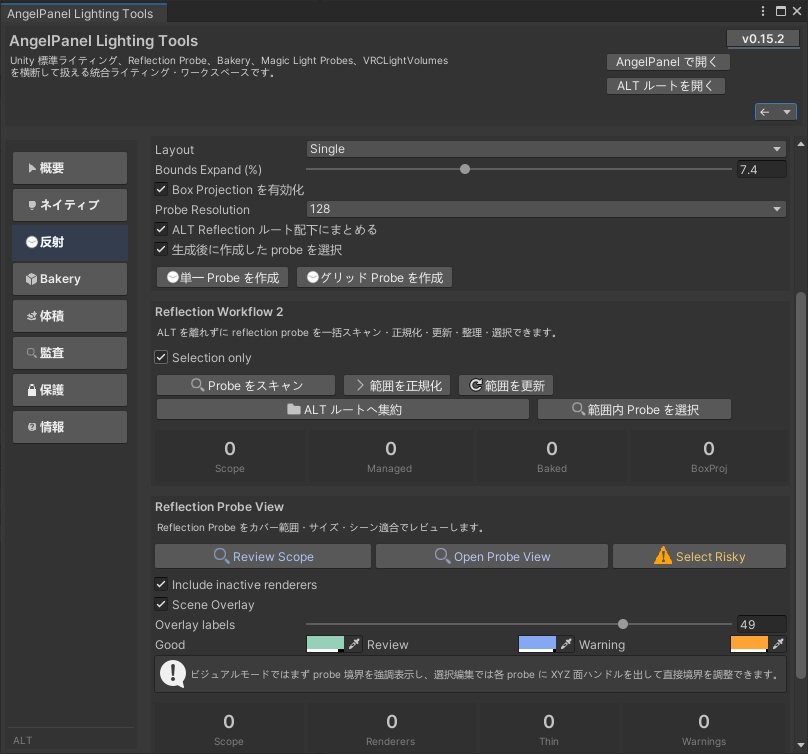
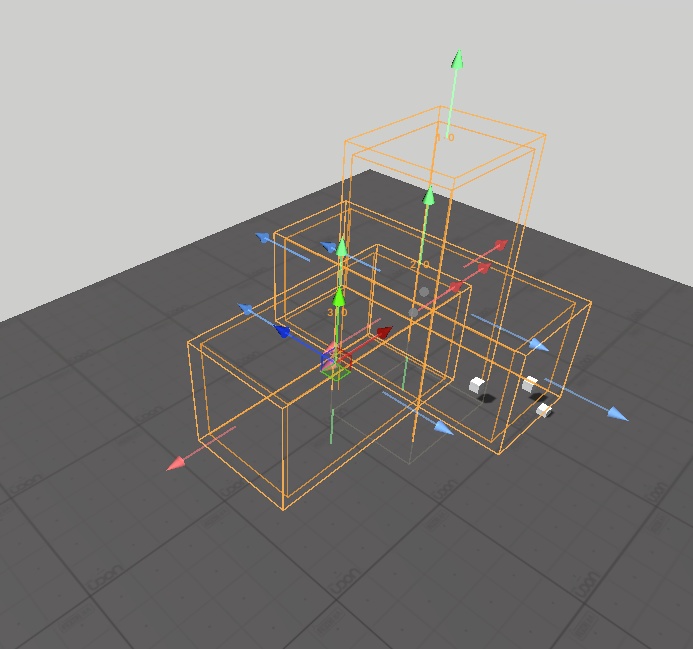
現在の選択範囲を基準に、Reflection Probe の作成・整理・レビュー・更新をまとめて扱えます。 ただ置くだけではなく、どこを拾っていて、どこが薄く、どこが広すぎるのかを見ながら調整できるのが ALT の強みです。 シーン上での可視化や直接編集にも対応しているため、「Probe を置いたけど実際どう効いているのか分からない」という状態から抜けやすくなります。 ALT gives you a full reflection workflow around the current selection: create, organize, review, and refresh probes in one place. Its strength is not just placing probes, but helping you see what they actually cover, what looks too thin, and what looks oversized. With scene visualization and direct editing support, it becomes much easier to escape the usual “I placed it, but I still can’t really read it” problem.
主な機能 2:Bakery Workflow
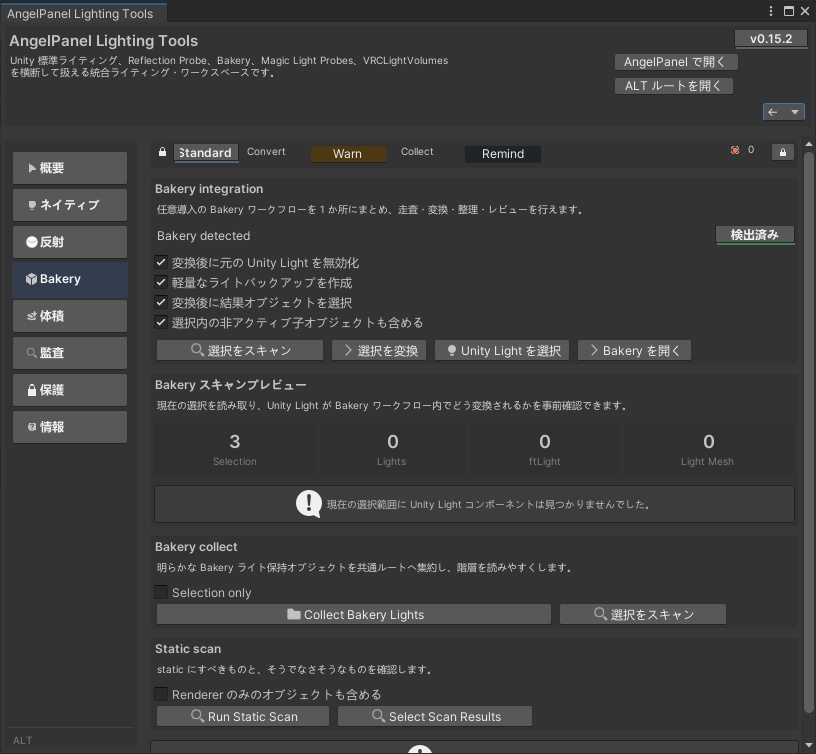
Bakery が導入されている環境では、選択範囲のスキャン、変換プレビュー、Unity Light から Bakery 用コンポーネントへの変換、関連オブジェクトの整理まで、ALT からまとめて扱えます。 特に、変換前に中身を確認できること、Area Light を雑に処理せず Bakery Light Mesh 側へ正しく寄せる設計になっていることは、実運用でかなり効きます。 さらに、Bakery 関連オブジェクトの収集や Static チェックも用意してあり、シーンを読める状態に戻しやすくしています。 When Bakery is installed, ALT centralizes scan previews, conversion previews, Unity-to-Bakery conversion, and cleanup for related light objects. Two things matter a lot here in real production: you can review the selection before touching it, and area lights are treated with the proper Bakery Light Mesh path instead of sloppy generic handling. It also includes Bakery object collection and static scanning so the scene stays readable instead of turning into lighting chaos.
主な機能 3:Volumes / MLP / VRCLV
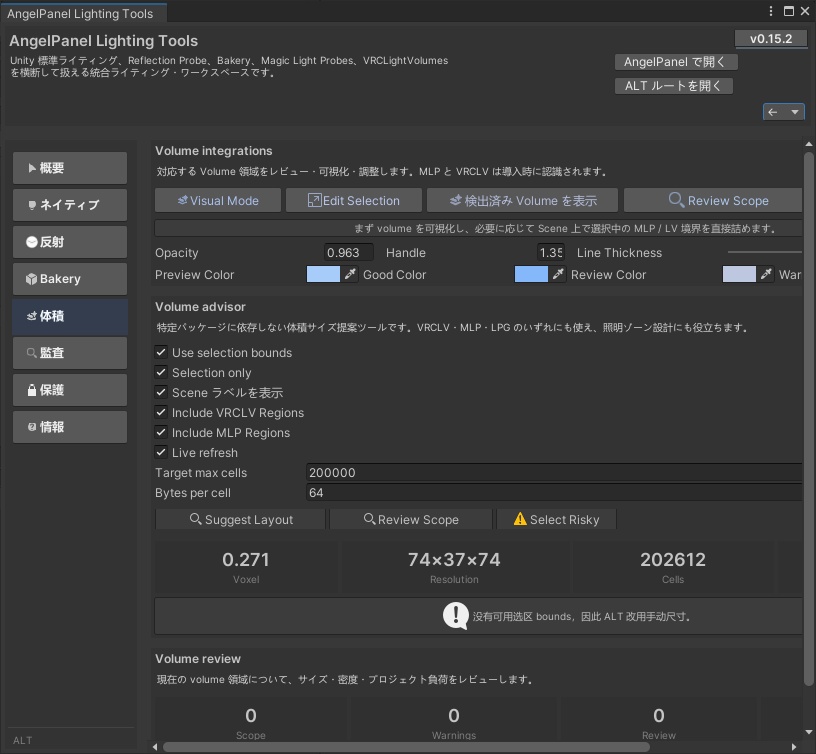
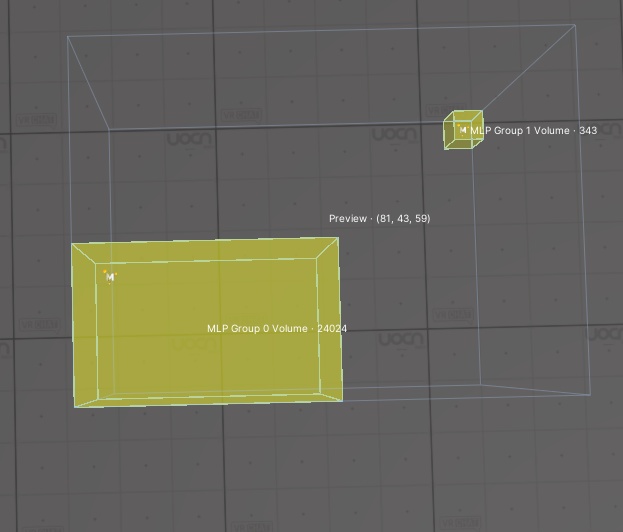
Volume 作業は、あとで重さに跳ね返りやすいのに、最初は勘で置かれがちな領域です。 ALT には、パッケージ依存なしで使えるサイズ提案、セル数やメモリ感を踏まえたレビュー、シーン上での可視化と再調整が入っています。 MLP や VRCLV が入っている場合はその領域も検出対象になり、必要なときだけ一段深くレビューできます。 Volume work is one of those areas that often gets guessed early and paid for later in performance. ALT includes package-agnostic size suggestions, review helpers that consider density and project footprint, plus scene-side visualization and adjustment. If MLP or VRCLV is installed, their regions are also recognized so you can review them properly instead of managing them blind.
主な機能 4:Native Prep / Audit
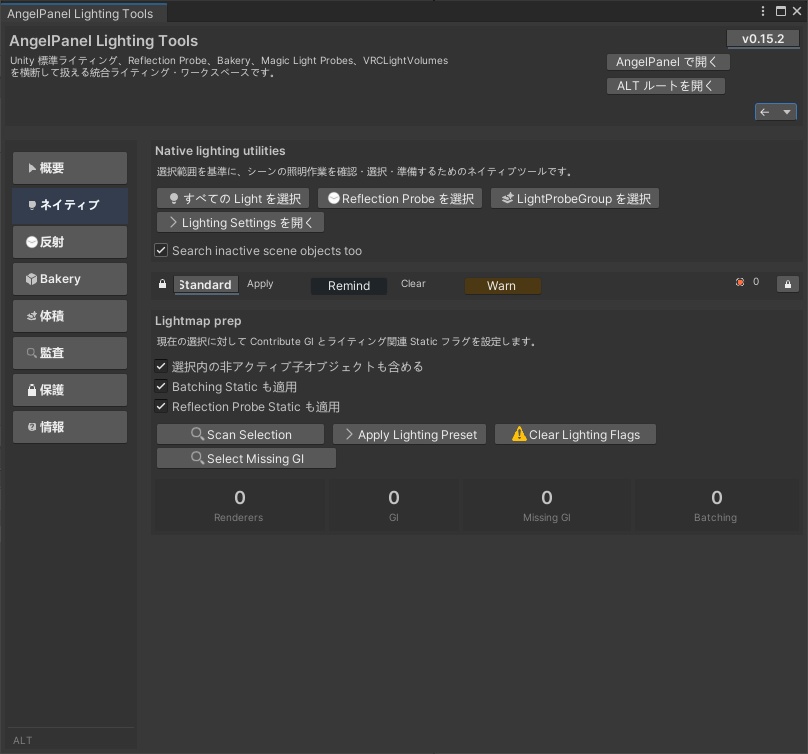
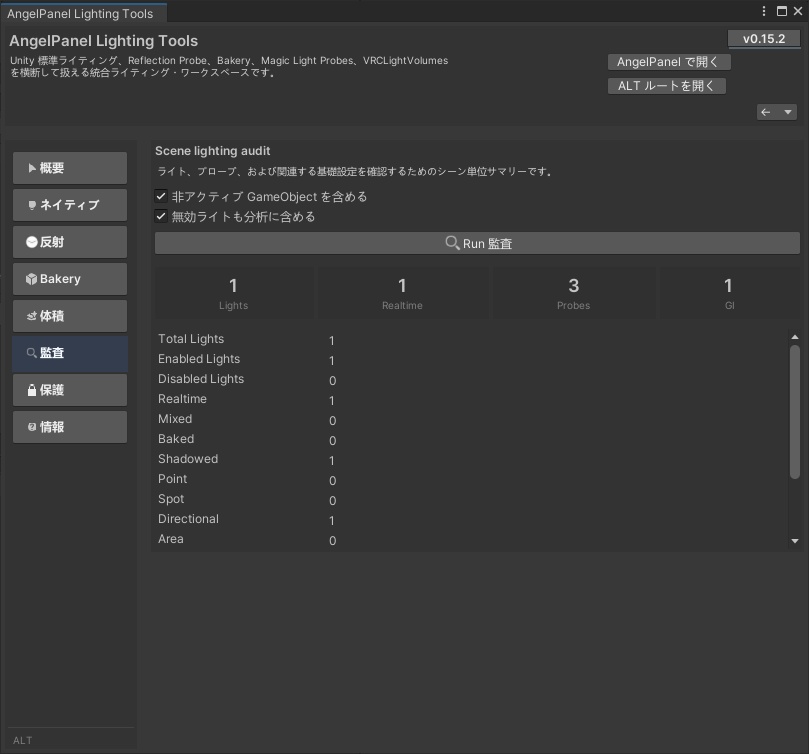
Unity 標準の照明作業も、ALT 側からまとめて扱えます。 Light / Reflection Probe / LightProbeGroup の選択、Lighting Settings への導線、GI 不足オブジェクトの確認、Lightmap 用フラグの準備、そしてシーン全体のライティング監査まで、日常作業に必要な部分をきちんと押さえています。 ただの補助ボタン集ではなく、「今のシーンに何が足りていないか」を見つけやすい構成です。 ALT also covers native Unity lighting work in a more organized way. You can quickly locate lights, probes, and LightProbeGroups, jump into Lighting Settings, find objects missing GI-related prep, apply lightmap-related flags, and run a scene-wide audit. It is not just a pile of shortcut buttons. It is built to help you see what the scene is missing before that omission turns into cleanup work later.
主な機能 5:ALT Safety
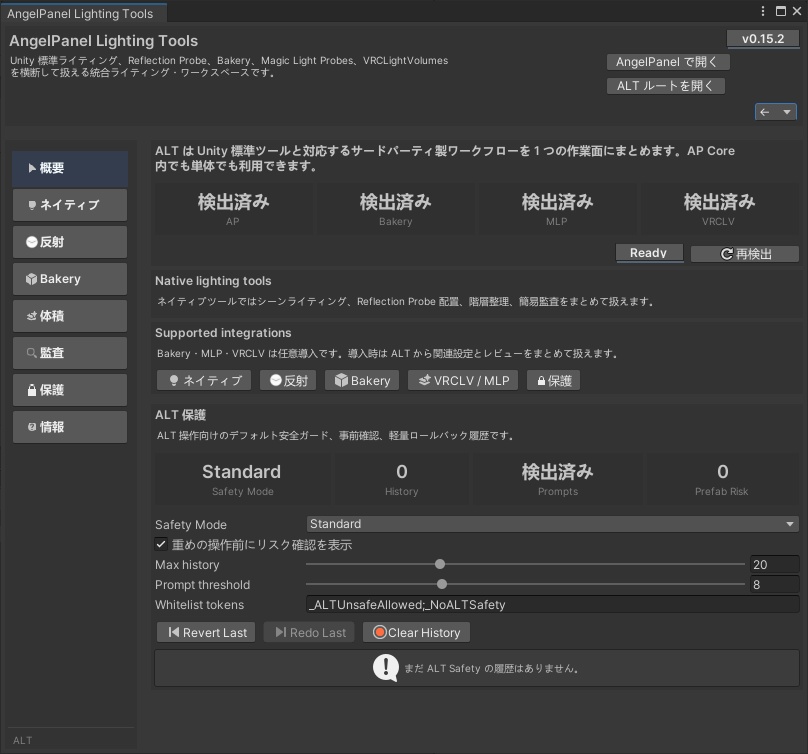
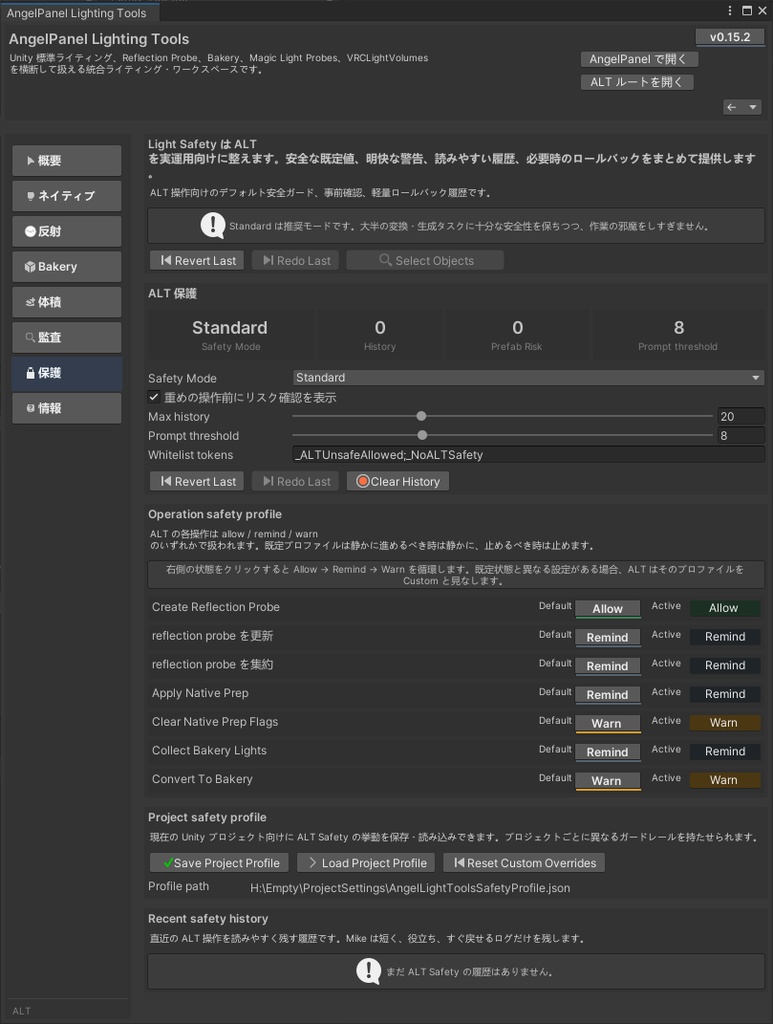
ALT には Safety ページがあり、重めの操作に対する事前確認、Prefab-aware な保護、軽量な履歴とロールバックが用意されています。 照明ツールは便利なほど、雑に触ると事故も起きやすくなります。 だから ALT は、速さだけでなく「戻せること」「触る前に分かること」も最初から設計に含めています。 Standard / Strict / Fast の考え方があり、プロジェクトごとに安全プロファイルを持たせることもできます。 ALT includes a dedicated Safety page with preflight prompts for heavier actions, prefab-aware protection, and lightweight history with rollback. Lighting tools become dangerous the moment they get convenient enough to touch too much at once. So ALT is designed not only around speed, but around reversibility and visibility before a change happens. It supports different safety attitudes such as Standard, Strict, and Fast, and can keep project-specific safety profiles.
導入のしやすさ
ALT は単体でも使えます。 AP Core は必須ではありません。Bakery / MLP / VRCLV も必須ではありません。 必要なものだけが入っている環境で、そのぶんだけ機能が自然に広がる設計です。 すでに ALCOM / VCC での導入確認も取れているため、VPM ベースの運用にも載せやすくしています。 ALT works perfectly as a standalone tool. AP Core is optional. Bakery, MLP, and VRCLV are optional too. The design is simple: install only what you need, and ALT expands naturally around that environment. It is also already verified for ALCOM / VCC style installation, making it easy to fit into a VPM-based workflow.
軽いのに、ちゃんと深い
この商品は Editor 向けに整理されており、ランタイムに余計なものを抱え込ませない構成です。 つまり、ワールドに無関係な常駐系の負担を増やすための道具ではなく、制作中の判断と整理を速くするための道具です。 見た目は静かでも、中身はかなり現場向けです。 This package is organized as an editor-focused toolset, not a runtime burden. That means it is not here to stuff unrelated overhead into your world. It is here to speed up decisions, cleanup, and lighting workflow while you build. The surface looks calm, but the internals are made for real production work.
対応環境
推奨 Unity バージョン:2022.3 系 対応 VRChat SDK:Worlds SDK 3.7.6 以上 導入形態:VPM / ALCOM / VCC 想定 AP Core:任意 Bakery / Magic Light Probes / VRCLightVolumes:任意 対応言語:日本語 / English / 简体中文 / 繁體中文 Recommended Unity version: 2022.3 Supported VRChat SDK: Worlds SDK 3.7.6 or newer Install style: VPM / ALCOM / VCC AP Core: optional Bakery / Magic Light Probes / VRCLightVolumes: optional Languages: Japanese / English / Simplified Chinese / Traditional Chinese
価格について
価格は 2001 JPY です。 これは単なる端数ではなく、自分の生年そのままの数字です。 安売りの記号ではなく、「長く使える道具として、ちゃんと責任を持って出す」という気持ちをこの価格に置いています。 プレビューを見て、機能を見て、それでも欲しいと思えた人に、気持ちよく選んでもらえる値段として決めました。 The price is 2001 JPY. That number is my birth year. It is meant as a statement, not a simple gimmick: this is not a throwaway upload, but a tool I want to stand behind as something stable and worth keeping in real use. The goal was to make it a price that feels easy to say yes to after you see the previews and understand what the tool actually does.
同梱内容
AngelPanel Lighting Tools 本体 動作に必要な Shared Editor モジュール一式 AngelPanel Lighting Tools package Required shared editor modules
利用規約
本商品は有料・クローズドソース製品です。 購入者本人の制作プロジェクトで使用できます。個人利用・商用利用を問わず、完成したワールドや作品への利用は可能です。 ただし、本商品の再配布、再販売、転載、再アップロード、改変版の配布、パッケージ内容の一部のみを抜き出しての再公開は禁止します。 購入者以外へ、そのまま、または形を変えて配る行為も禁止です。 法令違反、公序良俗に反する用途、または作者・ブランドへの重大な不利益を生む用途での使用は認められません。 仕様は今後のアップデートで変わる場合があります。 This product is a paid closed-source tool. It may be used in the purchaser’s own projects, including personal and commercial world creation. Finished worlds and works made with it are allowed. However, redistribution, resale, re-uploading, reposting, distributing modified versions, or republishing any part of the package is prohibited. Sharing the package with non-purchasers, whether unchanged or altered, is also prohibited. Use in ways that violate law, public order, or seriously harm the author or brand is not allowed. Specifications may change in future updates.
最後に
照明は、ワールドの空気そのものを決める工程です。 だからこそ、雑に終わらせるための道具ではなく、気持ちよく詰めるための道具として ALT を作りました。 Reflection、Bakery、Volumes、Audit、Safety。 それぞれ別々に苦しんでいた作業を、ひとつの作業面で落ち着いて扱いたい人へ。 このツールが、あなたの制作の最後の重さを少しでも軽くできたらうれしいです。 Lighting defines the atmosphere of a world at the deepest level. That is why ALT was built not to rush lighting carelessly, but to make it easier to refine properly. Reflection, Bakery, Volumes, Audit, Safety. If you want those painful pieces to feel like one focused workflow instead of scattered struggle, ALT was made for exactly that. I hope it makes the final heavy part of your world creation feel lighter.