
VRoid Real-time Multi-Angle Preview
- Digital0 JPY
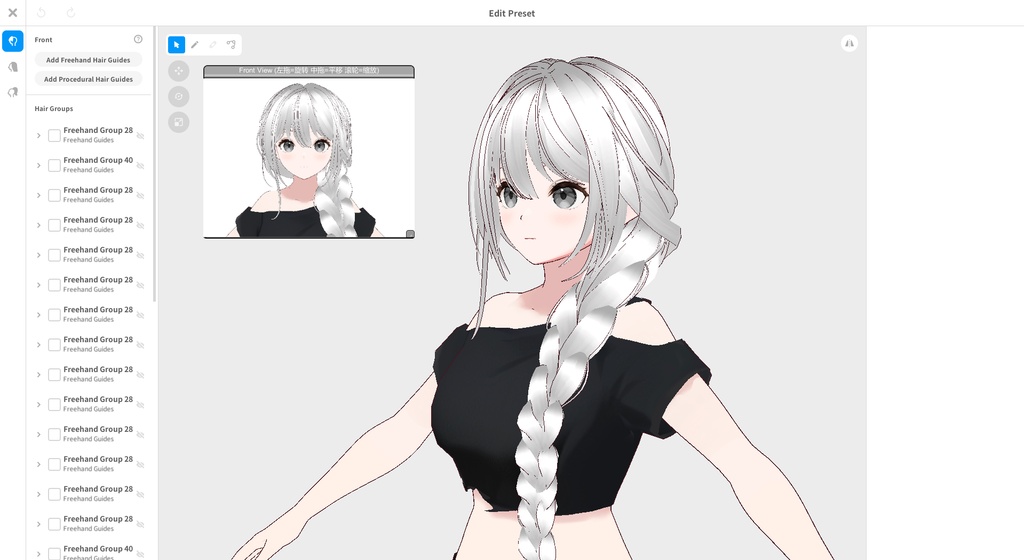
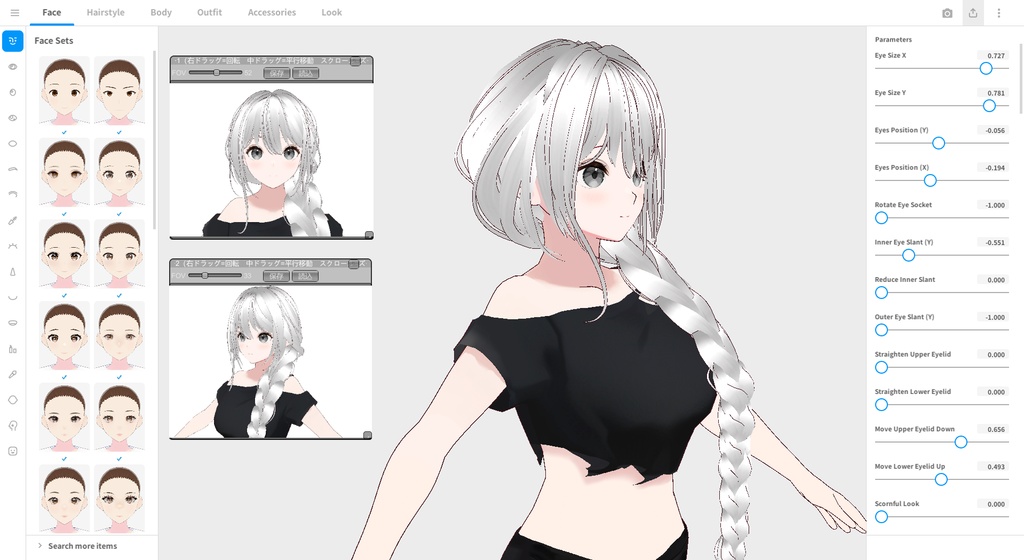


VRoid リアルタイム多視点プレビュー 👀 編集しながら、アバターを複数の角度からリアルタイムで確認。 VRoid Real-time Multi-Angle Preview 👀 Preview your avatar from multiple angles in real time while editing. VRoid 实时多角度预览 👀 编辑过程中即可实时从多个角度查看你的角色。
JP
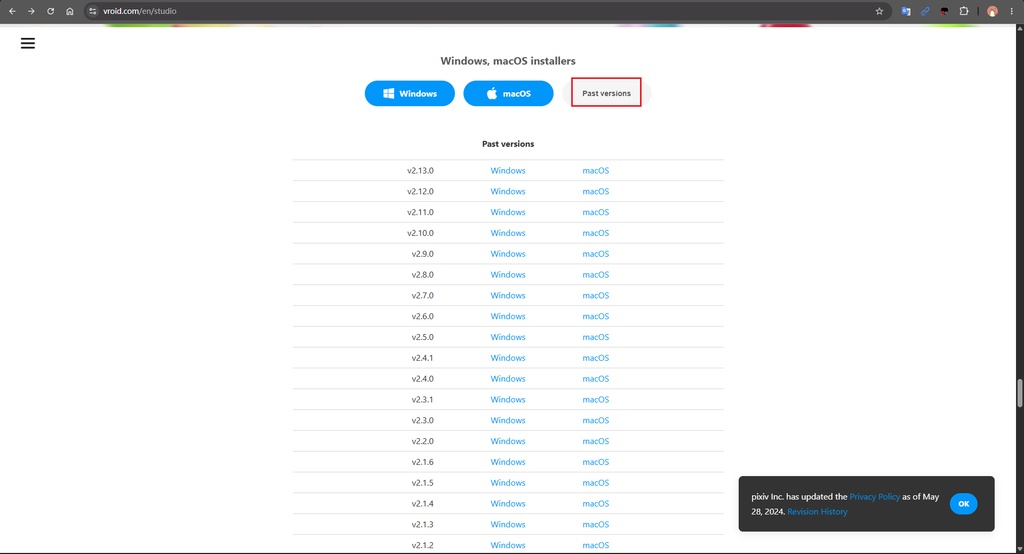
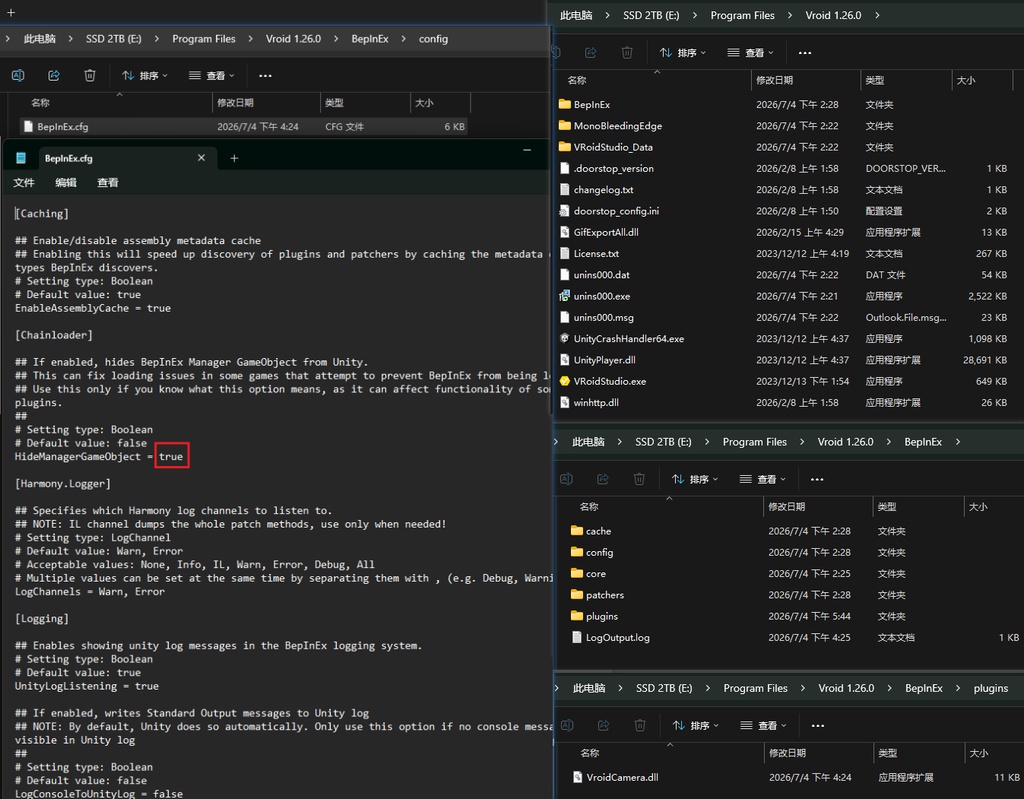
## 日本語版 ## ⚠️ インストール前に必ずお読みください **本プラグインは VRoid Studio 1.26.0(Windows版)専用です。** VRoid Studio は 1.26.1 以降のバージョンで、内部の実行環境が Mono から IL2CPP に変更されました。この変更により、本プラグインを含む Mono ベースのサードパーティ製プラグインはすべて動作しなくなります。これは本プラグインの不具合ではなく、VRoid Studio 側の仕様変更によるものであり、現時点で回避する方法はありません。 すでに 1.26.0 より新しいバージョンに更新している場合は、VRoid の公式配布ページから過去バージョンの 1.26.0 を再インストールしてください。 本プラグインは [BepInEx](https://github.com/BepInEx/BepInEx)(Unity向けの汎用プラグインローダー)を利用した、非公式のサードパーティ改造ツールです。VRoid/pixiv による公式サポート対象ではありません。ご利用にあたっては、この点をご理解ください。 --- ## インストール手順 **手順1:バージョンを確認する** VRoid Studio のバージョンが 1.26.0 であることを確認してください(メニュー → バージョン情報)。 **手順2:BepInEx をインストールする** 1. [BepInEx公式リリースページ](https://github.com/BepInEx/BepInEx/releases) から `BepInEx_x64_5.4.23.5`(または互換性のある 5.4.x の x64 版)をダウンロードします。 2. 解凍し、中身(`BepInEx` フォルダ、`winhttp.dll`、`doorstop_config.ini` など)を **すべて VRoid Studio のインストール先フォルダに直接配置**してください。`VRoidStudio.exe` と同じ階層になるようにしてください。 - ⚠️ よくある失敗:解凍したフォルダをそのままコピーしてしまい、`winhttp.dll` が `VRoidStudio.exe` と同じ階層に置かれていないケースがあります。これでは動作しませんので、必ずファイルが exe と同じ階層にあるか確認してください。 3. `BepInEx\config\BepInEx.cfg` を開き、`HideManagerGameObject` の項目を `false` から `true` に変更して保存してください。この設定は必須です。これを行わないと、プラグインが読み込まれても正常に動作しません。 4. VRoid Studio を一度起動し、完全に立ち上がったのを確認してから終了してください。`BepInEx\LogOutput.log` を開き、以下のような内容が記録されていることを確認してください。 ``` [Message: BepInEx] BepInEx 5.4.23.5 - VRoidStudio [Message: BepInEx] Chainloader startup complete ``` これが表示されていれば、BepInEx は正常に動作しています。 **手順3:本プラグインをインストールする** 1. ダウンロードした `XXX.dll`(本プラグイン)を `BepInEx\plugins` フォルダに配置します。 2. VRoid Studio を再起動します。 3. モデルが読み込まれたプロジェクトを開いてください。数秒後、画面左上にドラッグ可能なウィンドウが表示され、モデルのリアルタイム映像が表示されます。 --- ## 操作方法 - **ウィンドウの移動**:タイトルバーをドラッグ - **ウィンドウのサイズ変更**:右下の小さなハンドルをドラッグ - **視点の回転**:ウィンドウ内で左クリックしたままドラッグ - **視点の平行移動**:ウィンドウ内で中クリックしたままドラッグ - **ズーム**:ウィンドウ上にマウスを乗せた状態でスクロール --- ## よくある質問 **Q:インストールしたのに何も表示されません。** A:以下を順番に確認してください:BepInEx が exe と同じ階層に正しく配置されているか(サブフォルダの中に入ってしまっていないか)。`HideManagerGameObject` が `true` に設定されているか。`LogOutput.log` にプラグインの読み込み成功のログが表示されているか。 **Q:1.26.1 以降のバージョンでは使えますか?** A:使えません。詳細は冒頭の説明をご確認ください。 **Q:安全に使用できますか?** A:本プラグインは、表示用にモデルをローカルで読み込み・描画するだけで、インターネットへの接続やモデルデータのアップロード・改変は行いません。ただし、ソフトウェアの動作を改造する(modding)仕組みを利用しているため、本 Booth ページ以外からの入手(無断転載など)はお控えください。
EN
## English Version ## ⚠️ Please Read Before Installing **This plugin only works with VRoid Studio 1.26.0 (Windows).** Starting from version 1.26.1, VRoid Studio switched its underlying runtime from Mono to IL2CPP. This change breaks all Mono-based third-party plugins, including this one — it's not a bug in this plugin, it's a limitation of the newer VRoid Studio builds, and there is currently no way around it. If you've already updated past 1.26.0, you'll need to reinstall 1.26.0 from VRoid's official archive of past releases before this plugin will work. This plugin is built on [BepInEx](https://github.com/BepInEx/BepInEx) (a general-purpose Unity plugin loader) and is an unofficial third-party modification. It is not supported by VRoid/pixiv. By using it, you acknowledge this. --- ## Installation **Step 1: Confirm your version** Check that your VRoid Studio is version 1.26.0 (Menu → About). **Step 2: Install BepInEx** 1. Download `BepInEx_x64_5.4.23.5` (or a compatible 5.4.x, x64 build) from the [official BepInEx releases page](https://github.com/BepInEx/BepInEx/releases). 2. Extract it and place all its contents (the `BepInEx` folder, `winhttp.dll`, `doorstop_config.ini`, etc.) **directly into your VRoid Studio install folder**, at the same level as `VRoidStudio.exe`. - ⚠️ Common mistake: don't leave everything inside the extracted subfolder — the files need to sit directly next to `VRoidStudio.exe`, not nested one level deeper. If `winhttp.dll` isn't at the same level as the .exe, this won't work. 3. Open `BepInEx\config\BepInEx.cfg`, find `HideManagerGameObject`, and change it from `false` to `true`. Save the file. This step is required — without it, the plugin loads but won't actually function. 4. Launch VRoid Studio once, let it fully load, then close it. Open `BepInEx\LogOutput.log` and confirm you see something like: ``` [Message: BepInEx] BepInEx 5.4.23.5 - VRoidStudio [Message: BepInEx] Chainloader startup complete ``` This confirms BepInEx is working. **Step 3: Install the plugin** 1. Place the downloaded `XXX.dll` (this plugin) into `BepInEx\plugins`. 2. Restart VRoid Studio. 3. Open a project with a model loaded. After a few seconds, a draggable window should appear in the top-left corner showing a live view of your model. --- ## How to Use - **Move the window**: drag the title bar. - **Resize the window**: drag the small handle in the bottom-right corner. - **Rotate the view**: left-click and drag inside the window. - **Pan the view**: middle-click and drag inside the window. - **Zoom**: scroll the mouse wheel while hovering over the window. --- ## FAQ **Q: I installed it but nothing shows up. What's wrong?** A: Double-check each step in order: is BepInEx placed at the same level as the .exe (not in a nested subfolder)? Did you set `HideManagerGameObject = true`? Does `LogOutput.log` show the plugin loading successfully? **Q: Does this work on 1.26.1 or newer?** A: No — see the note at the top. **Q: Is this safe to use?** A: The plugin only reads and renders your model locally for display purposes — it doesn't connect to the internet or upload/modify your model data. That said, since this works by modifying how the software runs (modding), please only download it from this Booth page and avoid unofficial reposts.
CN
## 使用前必读 ⚠️ **本插件仅支持 VRoid Studio 1.26.0(Windows 版)** VRoid Studio 从 1.26.1 版本开始,底层运行环境从 Mono 切换到了 IL2CPP,导致所有基于 Mono 的第三方插件(包括本插件)无法正常工作。这不是本插件的 bug,而是软件底层架构变化导致的限制,**目前没有办法在新版本上使用**。 如果你已经更新到 1.26.1 或更高版本,去 VRoid 官方历史版本下载页面找回 **1.26.0** 版本重新安装,才能使用本插件。 本插件基于 [BepInEx](https://github.com/BepInEx/BepInEx)(一个通用的 Unity 游戏插件加载框架)实现,属于非官方的第三方修改,不受 VRoid 官方支持。使用即代表你了解这一点。 --- ## 安装步骤 **第一步:确认版本** 确认你的 VRoid Studio 是 1.26.0 版本。可以在软件里 菜单 → 关于 中查看版本号。 **第二步:安装 BepInEx** 1. 去 [BepInEx 官方 Release 页面](https://github.com/BepInEx/BepInEx/releases) 下载 `BepInEx_x64_5.4.23.5`(或兼容的 5.4.x 版本,x64)。 2. 解压后,把里面所有内容(`BepInEx` 文件夹、`winhttp.dll`、`doorstop_config.ini` 等)**直接放到 VRoid Studio 的安装根目录**,即和 `VRoidStudio.exe` 同一层。 - ⚠️ 常见错误:很多人会把整个解压出来的文件夹直接拖进去,导致多了一层子文件夹,`winhttp.dll` 没能跟 `VRoidStudio.exe` 放在同一级——这样是不会生效的,请确保文件是直接铺在根目录,不是嵌套在子文件夹里。 3. 打开 `BepInEx\config\BepInEx.cfg`,找到 `HideManagerGameObject`,把它的值改成 `true`(默认是 `false`),保存。这一步是必须的,否则插件加载了也不会正常工作。 4. 启动一次 VRoid Studio,进入主界面后关闭。打开 `BepInEx\LogOutput.log`,确认里面出现类似: ``` [Message: BepInEx] BepInEx 5.4.23.5 - VRoidStudio [Message: BepInEx] Chainloader startup complete ``` 看到这个说明 BepInEx 安装成功。 **第三步:安装本插件** 1. 把本次下载的 `VroidCamera.dll`(插件文件)放进 `BepInEx\plugins` 文件夹里。 2. 重新启动 VRoid Studio。 3. 打开一个有模型的项目,等待几秒,左上角应该会出现一个可拖动的小窗口,显示模型的实时画面。 --- ## 使用方法 - **拖动窗口**:拖标题栏。 - **调整窗口大小**:拖窗口右下角的小把手。 - **旋转视角**:在窗口画面区域内按住鼠标左键拖拽。 - **平移视角**:按住鼠标中键拖拽。 - **缩放**:鼠标悬停在窗口画面上滚动滚轮。 --- ## 常见问题 **Q:装了之后没反应,也没出现窗口?** A:请确认严格按照上面的顺序检查:BepInEx 有没有装到正确位置(和 exe 同级)、`HideManagerGameObject` 有没有改成 `true`、日志里有没有看到插件加载成功的记录。 **Q:可以在 1.26.1 或更高版本上用吗?** A:不行,原因见开头说明。 **Q:这个插件安全吗,会不会有毒?** A:本插件只是在本地读取模型渲染画面用于显示,不会联网、不会修改或上传你的模型数据。但因为是通过修改软件运行方式实现的(modding),请只从本 Booth 页面下载,不要使用来源不明的转载版本。 ( 另外,如果你们以前安装过宵夜tool,就不用再重新安装BepInEx了,把这边给的dll文件放到BepInEx\plugins )
更新のお知らせ / Update Notes / 更新通知 V2
今回のアップデートで、以下の機能が追加されました。 - 2ウィンドウ対応:独立した2つのプレビューウィンドウを同時に表示できるようになりました。たとえば片方を正面、もう片方を側面用にするなど、それぞれ個別に回転・平行移動・ズームが可能で、お互いに影響しません。 - FOV調整機能:各ウィンドウに視野角(FOV)スライダーを追加。お好みのレンズ感を自由に調整できます。 - 視点の保存/読み込み:気に入った角度を「保存」ボタンで記録し、後から「読込」ボタンでいつでも呼び出せます。毎回調整し直す必要がありません。 - 前回の状態を自動復元:VRoid Studio 終了時に現在の視点を自動保存し、次回起動時に自動で復元されるようになりました。手動操作は不要です。 - ウィンドウの最小化:ウィンドウ右上のボタンでタイトルバーのみの状態に折りたたむことができ、必要なときに再度展開できます。省スペースで使えます。 言語バージョンについて 本バージョンは日本語/英語/中国語の3言語で提供しています。いずれか1つをダウンロード・インストールしていただければ十分です。機能はすべて同一で、インターフェースの言語のみが異なります。お好みの言語版をお選びください。 —— This update adds the following features: - Dual-window support: You can now open two independent preview windows at the same time — for example, one for the front view and one for the side view. Each window rotates, pans, and zooms independently without affecting the other. - Adjustable FOV: Each window now has a field-of-view slider, so you can dial in the look you want. - Save/Load view presets: Once you've set up an angle you like, click "Save" to store it, then click "Load" anytime to instantly restore it — no need to readjust every time. - Auto-restore last session: The plugin now automatically saves your current view when you close VRoid Studio, and restores it automatically the next time you open it — no manual steps needed. - Minimize windows: Click the button in the top-right corner of a window to collapse it down to just the title bar, then expand it again when needed, saving screen space. About language versions This release comes in three language versions (Japanese / English / Chinese). You only need to download and install one of them — they're functionally identical, differing only in the interface language. Please choose whichever matches your preference. —— 本次更新新增以下功能: - 双窗口支持:现在可以同时打开两个独立的预览窗口,比如一个看正面、一个看侧面,两个窗口互不干扰,都能自由旋转、平移、缩放。 - FOV 可调:每个窗口内新增视野角度滑条,可以自己调整想要的镜头感。 - 保存/加载视角:调好满意的角度后,点"保存"记录下来,之后随时点"加载"一键还原,不用每次重新调整。 自动记住上次画面:现在关闭 VRoid 时会自动保存当前视角,下次打开会自动恢复到上次退出前的状态,不需要手动操作。 - 窗口最小化:点窗口右上角的按钮可以把窗口收起来,只留标题栏,需要时再展开,不占地方。 关于语言版本 本次提供三个语言版本(日语/英文/中文),只需要下载并安装其中一个语言版本即可,功能完全相同,只是界面文字语言不同。请根据自己需要的语言选择对应的文件。
Video
https://x.com/SurcenVtuber/status/2073329425194889477
