

Latex Matcap Pack - 32 Matcaps
- Digital235 JPY
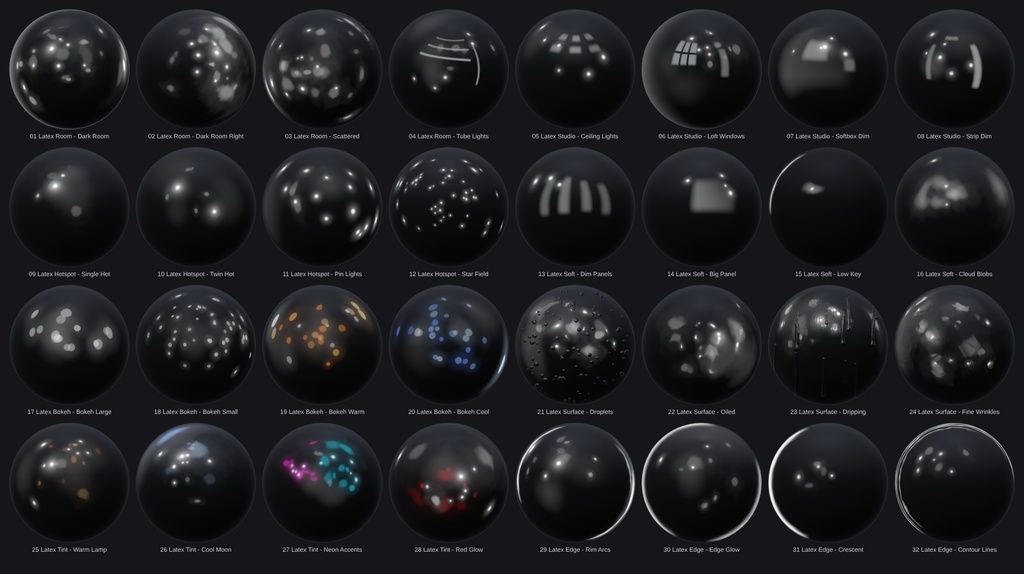

Black Latex Matcap Pack – 32 Matcaps 32 high-quality matcap textures for glossy black latex and rubber looks. Each matcap shows a dark, realistic room reflected in a near-black material: soft grey reflection blobs, tiny glints, hot spots and thin rim lines. The latex itself always stays black, so your avatar looks like real latex instead of a flat shiny colour. ■ Features - 32 unique matcaps in 8 categories (4 each) - 1024 x 1024 px PNG, sphere fills the whole texture (standard matcap layout) - Works with any shader that supports matcaps (lilToon, Poiyomi, etc.) - Overview image included, so you can pick the right one quickly - Clean English file and folder names ■ Categories - Room: Dark Room, Dark Room Right, Scattered, Tube Lights - Studio: Ceiling Lights, Loft Windows, Softbox Dim, Strip Dim - Hotspot: Single Hot, Twin Hot, Pin Lights, Star Field - Soft: Dim Panels, Big Panel, Low Key, Cloud Blobs - Bokeh: Large, Small, Warm, Cool - Surface: Droplets, Oiled, Dripping, Fine Wrinkles - Tint: Warm Lamp, Cool Moon, Neon Accents, Red Glow - Edge: Rim Arcs, Edge Glow, Crescent, Contour Lines ■ Included - all matcaps.png (overview of all 32) - Matcaps/ folder with 8 category folders, 32 PNG files in total ■ Requirements - Unity (for VRChat: the Unity version required by the VRChat SDK) - A shader with matcap support, e.g. lilToon or Poiyomi ■ How to use 1. Import the PNG files into your Unity project. 2. Open your avatar material and enable the MatCap slot of your shader. 3. Drag the matcap texture into the MatCap texture field. 4. Choose the blend mode: - Replace / Normal: full latex look on a black base - Add: layers the reflections on top of your own material 5. Adjust the matcap strength to taste. For the best latex look, use a black or very dark base colour. ■ Please note - The matcaps are intentionally dark and low-contrast. This is what makes them look like real black latex. - Coloured matcaps (Bokeh Warm/Cool, Tint) only colour the reflections. The material stays black. - Previews are rendered on a sphere. The result depends on your shader, lighting and mesh normals.
Terms of Service
You MAY: - Use the matcaps on your own avatars, worlds and 3D models in VRChat and on other platforms, for personal and commercial projects (images, videos, streams, commissioned work). - Edit, recolor and resize the textures for your own projects. - Use them as part of a finished product (e.g. an avatar or world you sell), as long as the matcaps are not offered as standalone or reusable files. You MAY NOT: - Redistribute, resell, share or upload the original or modified matcap files (single files or as a pack), free or paid, on any platform (Discord, BOOTH, Gumroad, cloud links, ...). - Include the textures in a package, prefab or avatar base that you sell or give away where the buyer can extract and reuse them. - Claim the textures as your own work or sell them as your own matcap pack. - Use them for illegal, hateful or discriminatory content. Credit is not required, but appreciated. One purchase = one license for the buyer. Please do not share your copy with others. The textures are provided "as is". Because this is a digital product, refunds are not possible after purchase.aa
Update information
v1.0.0 (2026-10-09) - Initial release