

萌え袖ギミック MoeSode|VRChat の長袖をメニューで萌え袖・袖まくりに【NDMF・非破壊】【無料お試し版あり】
- 製品版Digital600 JPY
- 無料お試し版Digital0 JPY
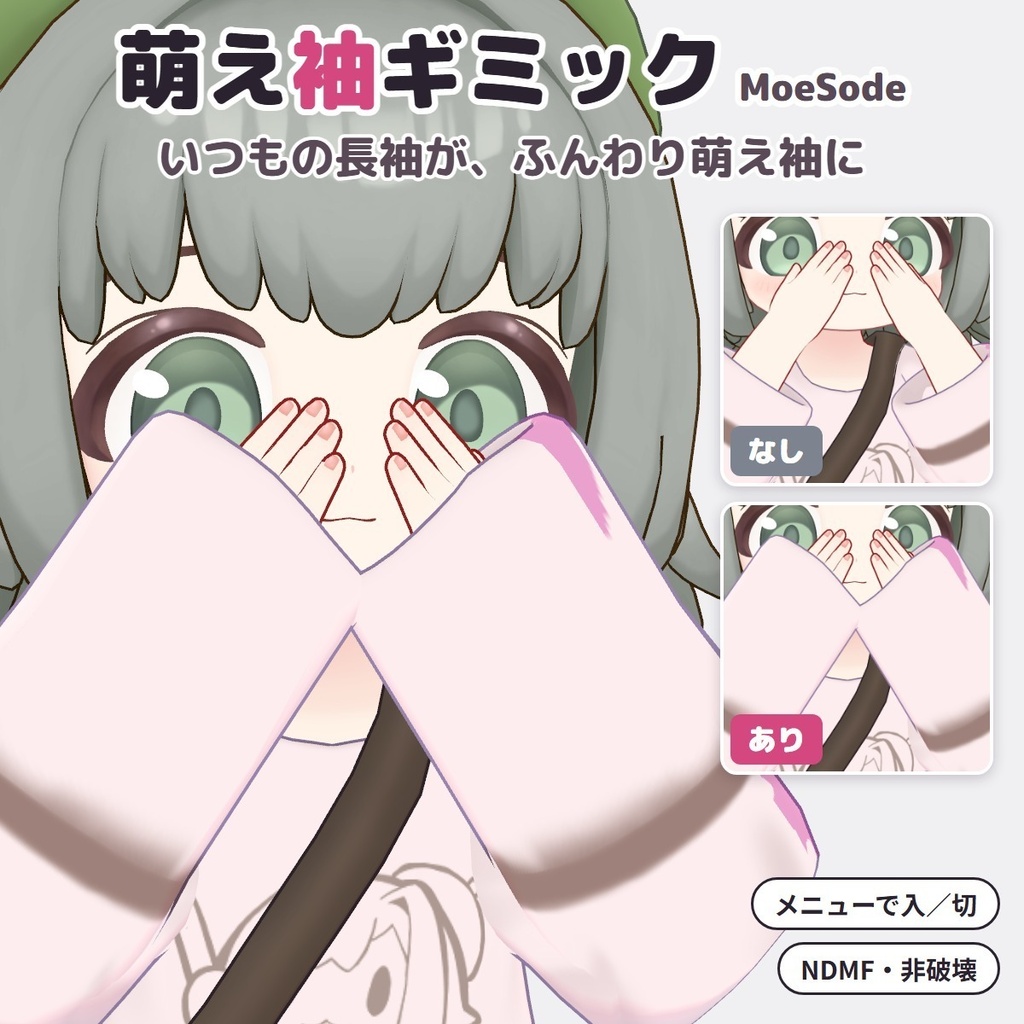
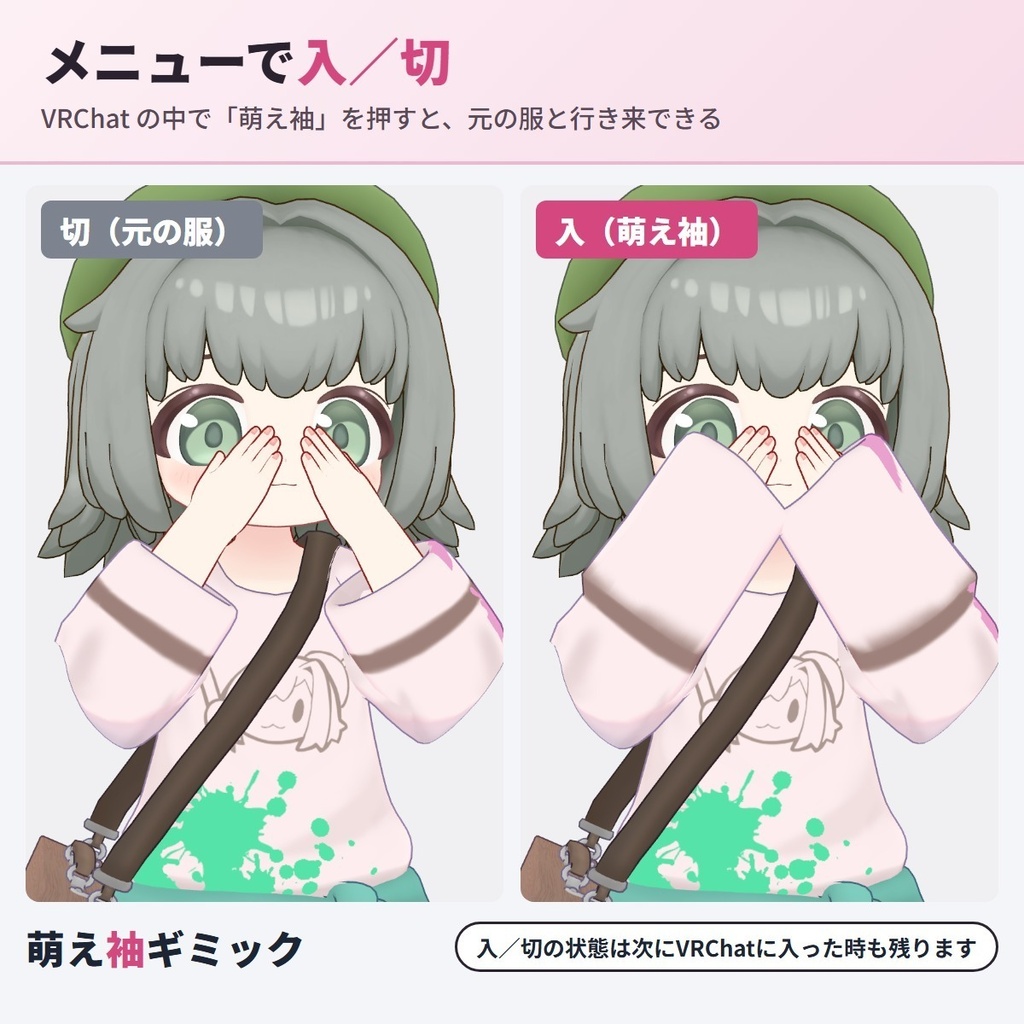
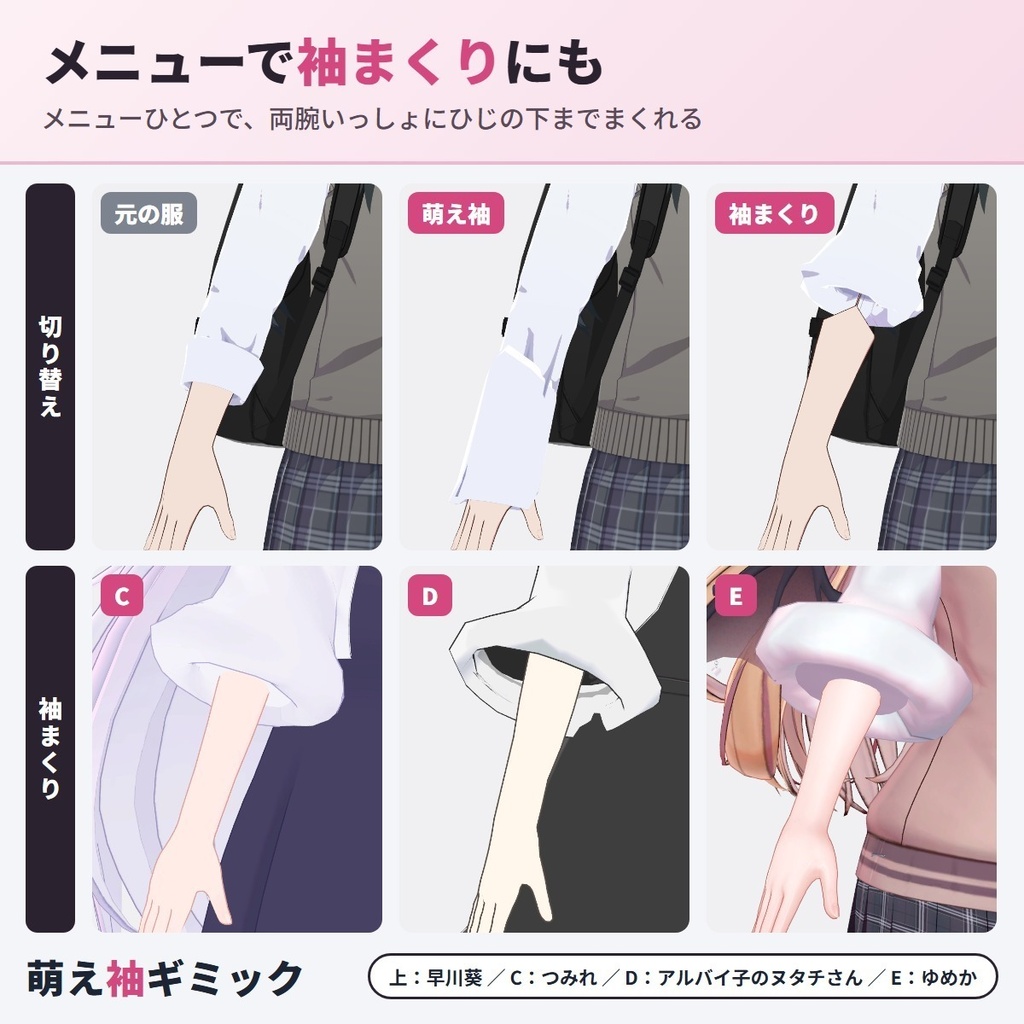
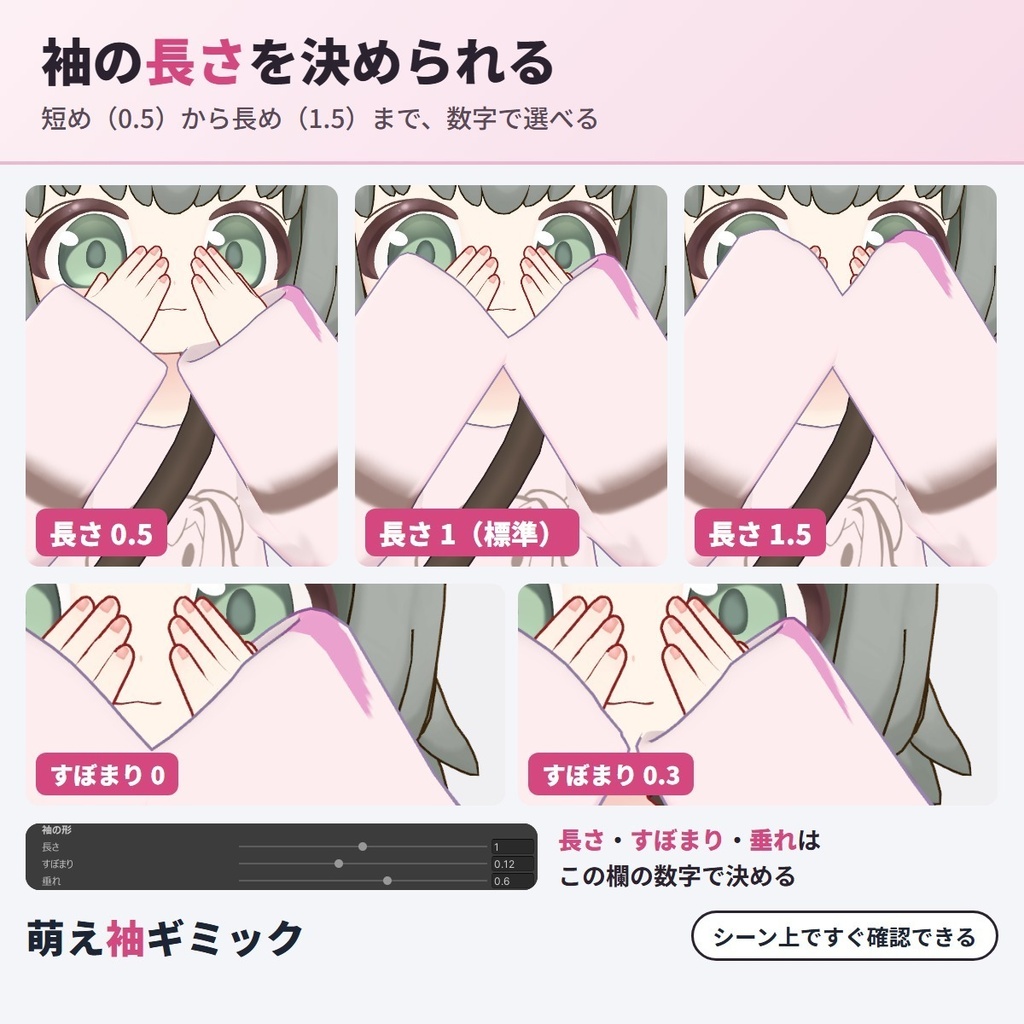
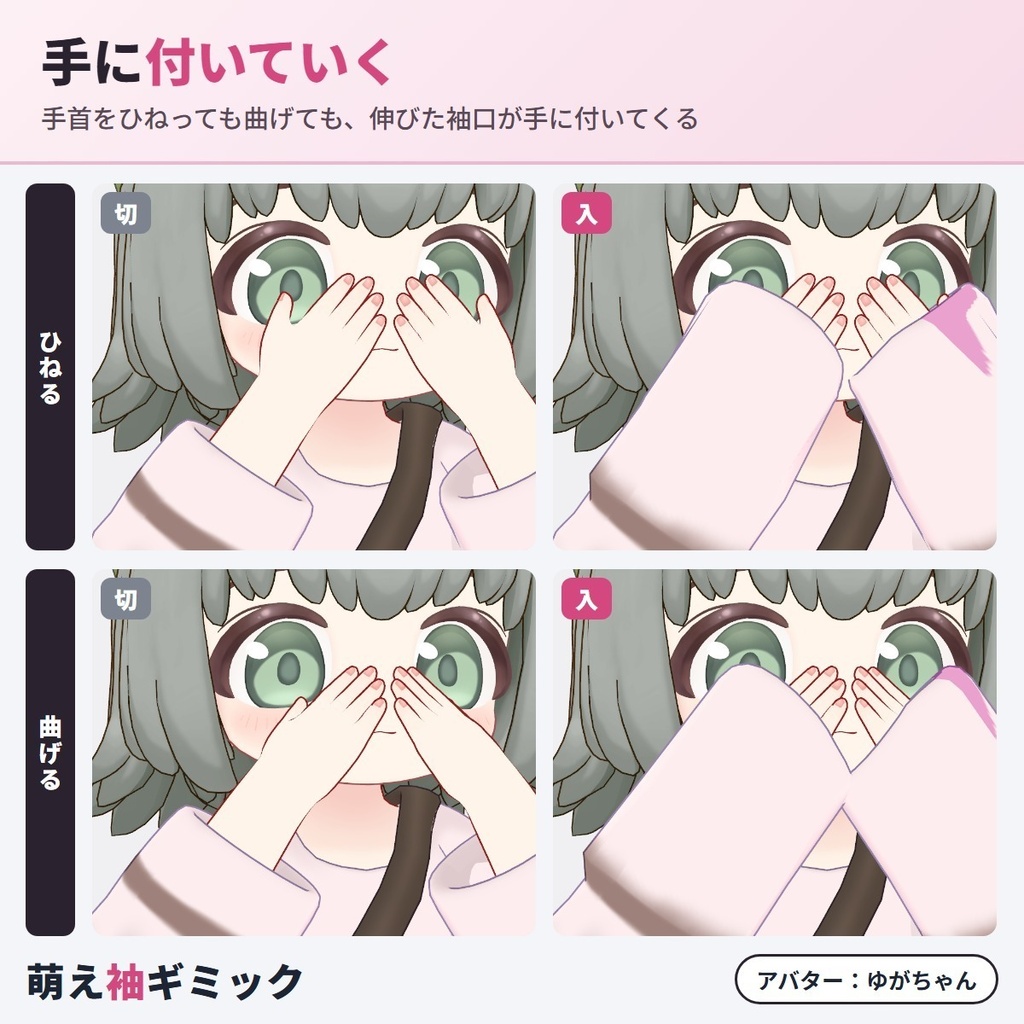
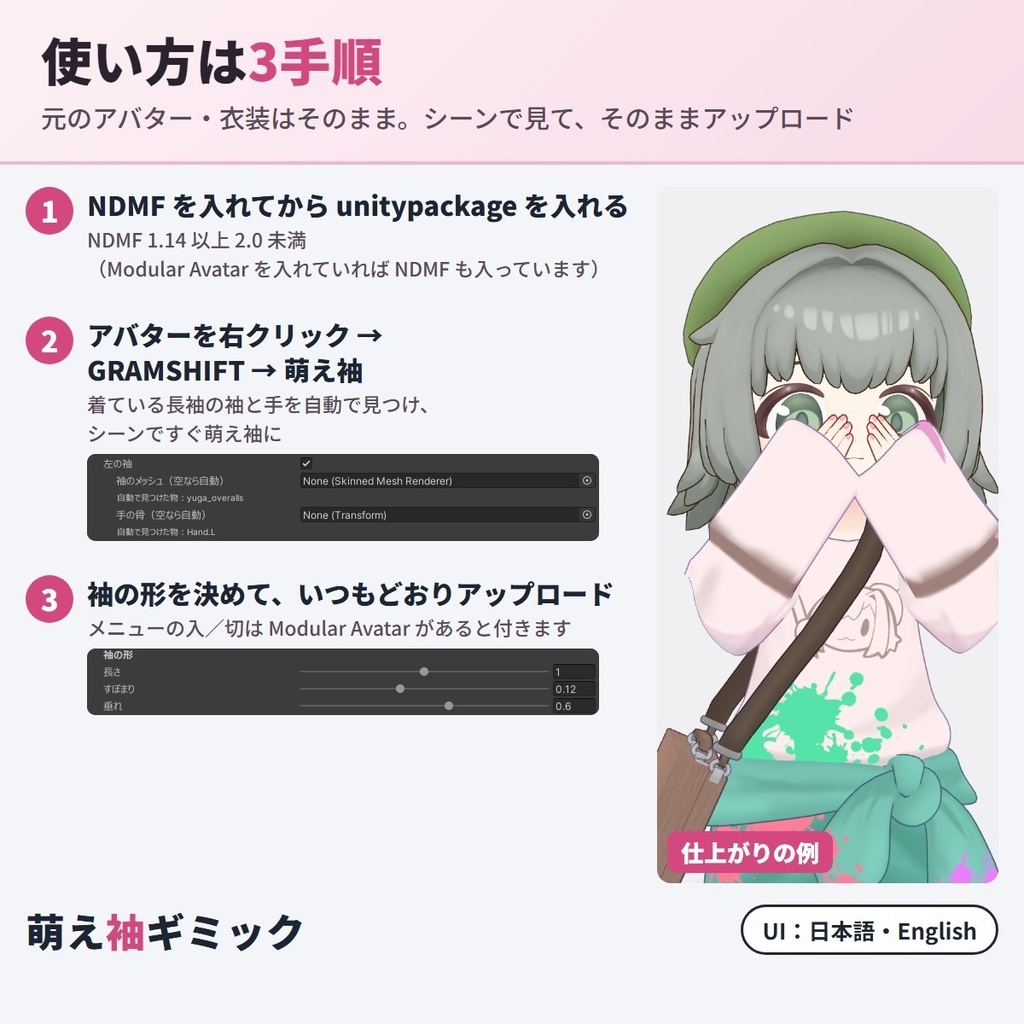
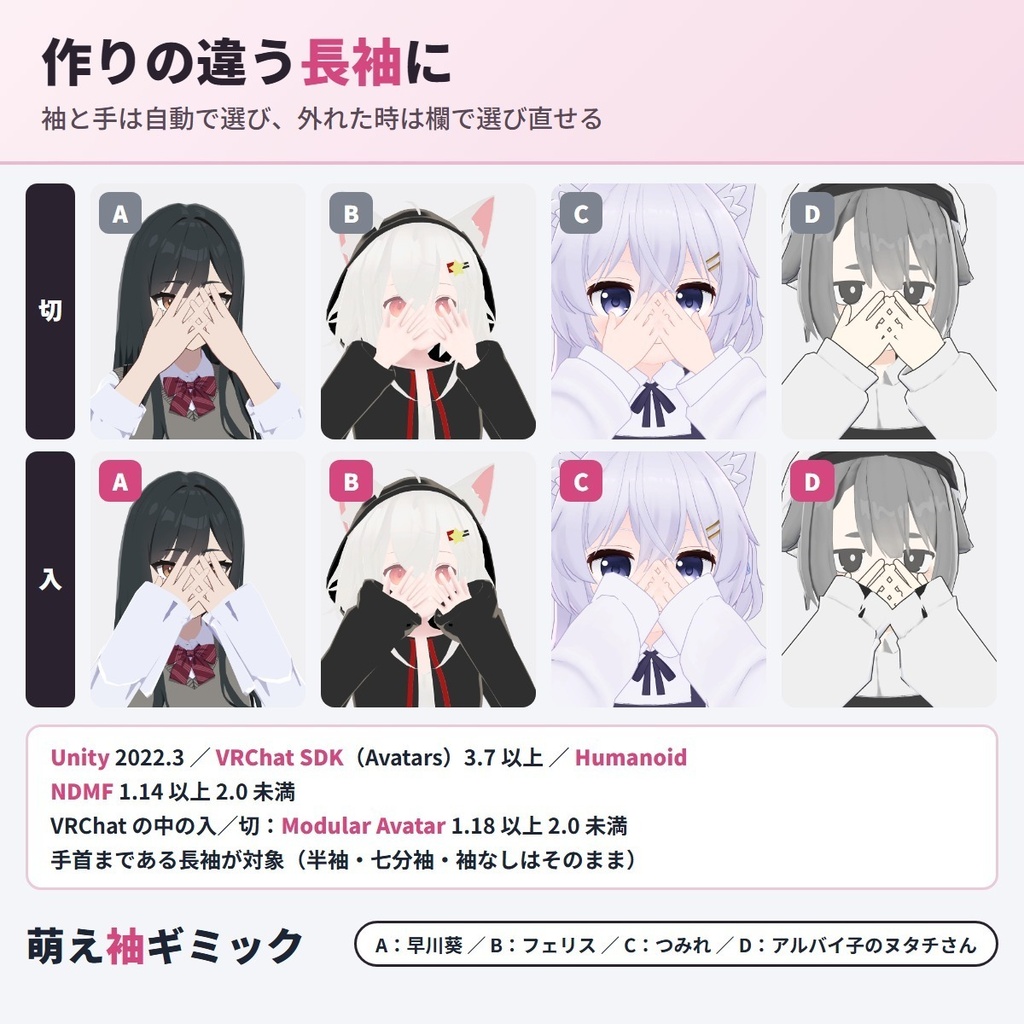


VRChat アバターの長袖を、Expression Menu で「萌え袖」にも「袖まくり」にも切り替えられる Unity エディタ拡張です(NDMF 対応・非破壊)。 手首まである長袖なら、服の作者が用意していなくても、袖口が手の甲から指の付け根までふんわりかぶる「萌え袖」になります。袖まくりはメニューのボタンひとつで、両腕いっしょにひじの下までまくれます。 アバターに付けるだけで、着ている長袖の袖と手を自動で見つけ、シーンのアバターがその場で変わります。切にすれば元の服に戻り、元のアバター・衣装は書き換えません。 お試し版(0円)はシーンでの確認用で、アップロードして使うには製品版が必要です。 English / 简体中文 / 한국어:下の段落に説明があります(description below) ■ できること ・萌え袖と袖まくりをメニューで切り替え:両方入れると、Expression Menu の「萌え袖・袖まくり」の中に「萌え袖」と「袖まくり」が入ります。片方を入れると、もう片方は切れます。状態は保存され、次に入った時も同じです ・袖まくり:袖をひじの下までまくり上げ、まくった布を帯にします。「まくる位置」と「帯の太さ」を決められます。七分袖や、手の甲より長い袖もまくれます ・萌え袖:手首まである長袖なら、パーカー・制服のシャツ・ゆるい袖・ぴったりの袖・袖口にフリルのある服まで、袖口をのばします。「長さ」(手の甲から指の付け根まで・0.5〜1.5)・「すぼまり」・「垂れ」を決められます ・手に付いていく:萌え袖の時は、手首を曲げても・ひねっても、伸びた袖口が手の向きに付いていきます ・飾りも重ね着も一緒に:フリル・カフスなど袖口の飾りは袖口と一緒にのび、袖まくりでは重ね着の袖も一緒にまくります ・切の時は元の服のまま:切にすると、元の服と同じ形・同じ動きに戻ります ・左右に合わせて:左右で形の違う袖でもそれぞれに合わせます。片方の袖だけにもできます ・自動で選び、欄で選び直せる:自動で選んだ袖のメッシュを欄に出します。欄に服のメッシュを入れれば、その服で作ります ・Play を押さずに見られる:シーンで「元の服/萌え袖/袖まくり」を切り替えて比べられます ・パラメーターは少なく:片方だけなら同期するパラメーターは 1 bit、両方を切り替える時は 8 bit ・非破壊:アップロードの時だけ形を足します。元のアバター・衣装は変わりません ・日本語/English 切り替え ■ 使い方 1. NDMF 1.14 以上 2.0 未満(Modular Avatar 1.18 以上 2.0 未満に入っています)を入れてから、unitypackage をプロジェクトに入れる 2. ヒエラルキーでアバターを右クリック →「GRAMSHIFT → 萌え袖」(Add Component → GRAMSHIFT → MoeSode でも付きます) 3. 「作る形」で萌え袖・袖まくりを選び、シーンで形を確かめ、いつもどおりアップロードする(VRChat の中の切り替えには Modular Avatar が要ります。「初めは袖まくり」で入の時の初めの形を決められます) ■ お試し版(0円) シーンの仮表示で、自分のアバターと衣装が萌え袖・袖まくりになるか・形を確かめるところまで使えます(お試し版の仮表示には、袖の上に「TRIAL」の文字が出ます)。アップロードしたアバターに入れるのは製品版です。製品版はお試し版の上からそのまま入れられます。 ■ 動作環境 ・Unity 2022.3 / VRChat SDK(Avatars)3.7 以上 / NDMF 1.14 以上 2.0 未満(Modular Avatar 1.18 以上 2.0 未満に含まれます) ・Humanoid のアバター(Humanoid でない時は手の骨を欄で選びます) ・VRChat の中の切り替えには Modular Avatar 1.18 以上 2.0 未満が要ります ・試したアバター:ゆがちゃん(vrcreative-pr 様)・フェリス(リュクらぼ 様)・早川葵(WARPSTORE 様)・つみれ(てぐらるしょっぷ 様)・アルバイ子のヌタチさん(inotushop 様)・ゆめか(Arka_X 様) ・アバター・衣装の規約で改変が許されているか、先にご確認ください ■ よくある質問 Q. VRChat で萌え袖にできますか? A. できます。手首まである長袖なら、袖口が手の甲から指の付け根までかぶる萌え袖になり、Expression Menu の「萌え袖」で入/切できます。 Q. 袖まくりにもできますか? A. できます。前腕の半分より先まである袖なら、ひじの下までまくった袖まくりになります。萌え袖と両方入れると、メニューの「萌え袖・袖まくり」で切り替えられます。 Q. 袖まくりはどうやって切り替えますか? A. Expression Menu の「袖まくり」を押すと、両腕いっしょにまくれます。袖口を手で持つ操作はいりません。 Q. 衣装に萌え袖・袖まくりのシェイプキーが無いのですが、使えますか? A. 使えます。シェイプキーや袖の差分が無い衣装でも、萌え袖・袖まくりの形を作ります。 Q. 切にすると元の服に戻りますか? A. 戻ります。切の時は、元の服と同じ形・同じ動きです。 Q. 手首を曲げると袖口はどうなりますか? A. 萌え袖の時は、手首を曲げても・ひねっても、伸びた袖口が手の向きに付いていきます。 Q. 試したアバターに無いアバターでも使えますか? A. Humanoid のアバターなら、萌え袖は手首まである長袖、袖まくりは前腕の半分より先まである袖で使えます。袖と手は自動で見つけ、違う時や見つからない時は欄で選べます。お試し版(0円)で、自分のアバターと服の形を買う前に確かめられます。 Q. 左右で袖の形が違う服でも使えますか? A. 使えます。左右それぞれの袖に合わせて作ります。片方の袖だけにすることもできます。 Q. 手は全部隠れますか? A. 萌え袖の袖口は手の甲から指の付け根までかぶります。指は出たままなので、ハンドサインや物をつかむ手はそのまま見えます。 Q. Quest(Android)でも使えますか? A. 使えます。足すのは袖のシェイプキー・骨・VRChat の Constraint・メニュー(切り替えのアニメーター)だけで、どれも Quest のアバターで使える部品です。 Q. パフォーマンスランクは下がりますか? A. メッシュ・マテリアル・PhysBone は増えず、ポリゴン数も変わりません。メニューを付けた時は、袖口を手に付いていかせる骨(萌え袖)と、まくった所を前腕に留める骨(袖まくり・袖が手の骨でも動く服の時)と Constraint が、左右の袖に少し足されます。 Q. パラメーターはいくつ使いますか? A. 萌え袖か袖まくりの片方だけなら同期するパラメーターを 1 bit、両方をメニューで切り替える時は 8 bit 使います。Modular Avatar が無い時は、メニューは足さず、いつも同じ形でアップロードされます(両方入れた時は「袖まくりにする」で形を選びます)。 Q. 元のアバターや衣装は変わりますか? A. 変わりません。アップロードの時だけ形を足します。コンポーネントを外せば元のままアップロードできます。 ■ 制限 ・萌え袖にするのは、手首まである長袖です。半袖・七分袖・袖なしはそのままです(インスペクターに出ます) ・萌え袖は、袖口がもう手の甲より先まである服はそのままにします(袖まくりは作れます) ・袖まくりにするのは、前腕の半分より先まである袖です。半袖・袖なしはそのままです。まくった袖の下に見える腕の肌(体のメッシュ)が要ります ・萌え袖はアバター1体に1つだけ付けてください ・萌え袖でのばすのは袖口のすぐ手前です。そこにある柄は、のばした分だけ長くなります(ひじ側の柄はそのままです)。袖まくりでは、まくった所の柄が帯に寄ります ■ 次の版について 要望の多いものから次の版に入れていきます。ほかの袖の形・服の要望も、下のお問い合わせからどうぞ。 ■ 困った時は お困りの時は、このページの「ショップへのお問い合わせ」から気軽にどうぞ(アバター名・服の名前と、表示された文があると早く調べられます)。 Made by GRAMSHIFT with the help of AI tools.
利用規約
・VRChat などで使うアバターの改変に、個人・法人・商用を問わず使えます ・このツールで萌え袖・袖まくりにしたアバター・改変データの公開や販売に、このツール側の制限はありません(元のアバター・衣装の規約に従ってください) ・このツールで作った見た目を、スクリーンショット・動画・配信に使えます。クレジット表記は不要です ・ツールのファイル(改変した物を含む)の再配布・転売・共有、購入した人以外への譲渡はできません ・公序良俗に反する用途、VRChat などの利用規約・コミュニティガイドラインに反する用途には使えません ・同梱の「利用規約_Terms.txt」が正です Terms (summary): you may use it to modify avatars for VRChat etc., for personal, corporate or commercial use; this tool puts no limit on publishing or selling avatars and edit data changed with it (follow the original avatar's and clothing's terms); the look made with this tool may appear in screenshots, videos and streams, and no credit is required; the tool files (including modified versions) may not be redistributed, resold, shared or transferred to anyone other than the buyer; it may not be used against public order and morals or against the terms and community guidelines of VRChat and other platforms. The included "利用規約_Terms.txt" is authoritative.
更新履歴
1.1.0(2026-11)袖まくりを追加・萌え袖と袖まくりをメニューで切り替え・袖のメッシュを欄で選び直せるように 1.0.0(2026-11)公開 1.1.0 (2026-11) added Roll up, a menu switch between MoeSode and Roll up, and a field to pick the sleeve mesh again 1.0.0 (2026-11) released
English
A Unity editor extension that switches your VRChat avatar's long sleeves to moe sleeves (sweater paws) or rolled-up sleeves from the Expression Menu (NDMF, non-destructive). On long sleeves that reach the wrist, even when the outfit's creator did not make a version for it, the cuffs grow softly over the back of the hand up to the knuckles. Roll up is one menu button: both arms roll up below the elbow together. Just add it to your avatar: it finds the long sleeves and hands automatically and the avatar in the Scene changes right away. Turning it off brings back the original outfit, and your avatar and outfits are not changed. The free trial is for checking in the Scene; uploading with it needs the full version. Features: menu switch between MoeSode and Roll up (with both on, a "萌え袖・袖まくり / Sleeves" submenu with "萌え袖 / MoeSode" and "袖まくり / Roll up" is added to the Expression Menu; turning one on turns the other off; the state is saved for next time); Roll up (rolls the sleeves up below the elbow into a band; set the Roll-up point and Band thickness; three-quarter sleeves and sleeves longer than the hand can be rolled too); MoeSode (on long sleeves that reach the wrist, from hoodies, school shirts, loose and tight sleeves to frilled cuffs, the cuff is extended; set Length from the back of the hand to the knuckles, 0.5-1.5, Narrowing and Droop); follows the hand (with MoeSode, the extended cuff follows the hand when you bend or twist the wrist); trim and layers come along (frills and cuffs extend with the cuff, and Roll up also rolls layered sleeves together); off means the original outfit (same shape and movement as before); fitted left and right (sleeves with different left and right shapes are each fitted; you can also do only one sleeve); picked automatically, and you can pick again (the sleeve mesh picked automatically is shown in the field; drop another outfit mesh into the field to use that outfit); see it without Play mode (switch the Scene view between Original, MoeSode and Roll up); few parameters (1 bit of synced parameters for one look, 8 bits to switch between both); non-destructive (the looks are added only at upload; your avatar and outfits are not changed); JA/EN UI. How to use: install NDMF 1.14 or later and below 2.0 (included in Modular Avatar 1.18 to below 2.0) → import the unitypackage → right-click the avatar in the Hierarchy → GRAMSHIFT → 萌え袖 (or Add Component → GRAMSHIFT → MoeSode) → pick MoeSode and Roll up in "Looks to make" and check them in the Scene → upload as usual (the switch in VRChat needs Modular Avatar; "Start with Roll up" sets the first look when it is on). Free trial: see in the Scene whether your avatar and outfit get moe sleeves and rolled-up sleeves and check the shape (the trial preview shows "TRIAL" letters on the sleeve). Adding them to an uploaded avatar is in the full version, which installs right over the trial. Requirements: Unity 2022.3, VRChat SDK (Avatars) 3.7 or later, NDMF 1.14 or later and below 2.0, a Humanoid avatar (for other rigs, pick the hand bone in the field). The switch in VRChat needs Modular Avatar 1.18 or later and below 2.0. Tested avatars: Yuga-chan ゆがちゃん (vrcreative-pr), Felis (リュクらぼ), Hayakawa Aoi 早川葵 (WARPSTORE), Tsumire つみれ (てぐらるしょっぷ), Nutachisan アルバイ子のヌタチさん (inotushop), Yumeka ゆめか (Arka_X). Check that your avatar's and clothing's terms allow modification. FAQ Q. Can I make moe sleeves in VRChat? A. Yes. Long sleeves that reach the wrist get cuffs that cover the back of the hand up to the knuckles, switched on and off with "萌え袖 / MoeSode" in the Expression Menu. Q. Can it roll up sleeves too? A. Yes. Sleeves that reach past half the forearm are rolled up below the elbow. With MoeSode on too, you switch between them in the "萌え袖・袖まくり / Sleeves" menu. Q. How do I roll the sleeves up in VRChat? A. Press "袖まくり / Roll up" in the Expression Menu and both arms roll up together. You do not need to hold the cuff with your hand. Q. My outfit has no shape key for moe sleeves or rolled-up sleeves. Can I use it? A. Yes. It makes both looks even on outfits without such shape keys or sleeve variants. Q. Does turning it off bring back the original outfit? A. Yes. When it is off, the outfit has its original shape and movement. Q. What happens to the cuff when I bend my wrist? A. With MoeSode, the extended cuff follows the direction of the hand when you bend or twist the wrist. Q. My avatar is not in the tested list. Can I use it? A. Yes, if it is a Humanoid avatar: MoeSode works on long sleeves that reach the wrist and Roll up on sleeves that reach past half the forearm. The sleeves and hands are found automatically, and you can pick them in the fields if they are wrong or not found. The free trial lets you check your own avatar and outfit before you buy. Q. Does it work on outfits with different left and right sleeves? A. Yes. Each sleeve is fitted on its own, and you can also do only one sleeve. Q. Does it hide the whole hand? A. The moe-sleeve cuff covers the back of the hand up to the knuckles. The fingers stay out, so hand signs and grabbing hands still show. Q. Does it work on Quest (Android)? A. Yes. It only adds shape keys on the sleeves, bones, VRChat Constraints and a menu (with its switching animator), all of which Quest avatars can use. Q. Does it lower my performance rank? A. It adds no meshes, materials or PhysBones, and the polygon count stays the same. With the menu, a few bones and Constraints are added on the left and right sleeves: for MoeSode so the cuffs follow the hands, and for Roll up to keep the rolled part on the forearm (on outfits whose sleeves also move with the hand bones). Q. How many parameters does it use? A. 1 bit of synced parameters for MoeSode or Roll up alone, 8 bits to switch between both in the menu. Without Modular Avatar, no menu is added and the avatar is always uploaded with one look ("Use Roll up" picks it when both are on). Q. Are my avatar and outfits changed? A. No. The looks are added only at upload. Remove the component to upload the original. Limitations: MoeSode changes long sleeves that reach the wrist; short, three-quarter and sleeveless tops are left as they are (shown in the Inspector), and sleeves that already reach past the back of the hand are left as they are (Roll up still works on them). Roll up works on sleeves that reach past half the forearm (short and sleeveless tops are left as they are) and needs the arm skin (body mesh) under the rolled sleeve. One MoeSode per avatar. MoeSode adds length just before the cuff, so a pattern there gets longer by that amount (patterns toward the elbow stay as they are); with Roll up, the pattern of the rolled part gathers into the band. Requests: the most requested features go into the next versions; tell us the sleeve shapes and outfits you want with "Contact this Shop" on this page. Need help? Feel free to contact us with "Contact this Shop" on this page (your avatar name, outfit name and any message shown). Made by GRAMSHIFT with the help of AI tools.
简体中文
这是一款 Unity 编辑器扩展,可在 Expression Menu 中把 VRChat 头像的长袖切换为萌袖或卷袖(NDMF,非破坏)。只要是到手腕的长袖,即使衣服作者没有准备对应版本,袖口也会柔软地盖住手背,直到指根。卷袖只需菜单里的一个按钮:双臂一起卷到肘部以下。只要添加到头像上,它就会自动找到长袖和手,场景中的头像立刻变化。关闭后会恢复原来的衣服,原来的头像和衣服不会被改动。免费试用版用于在场景中确认;要带着效果上传,需要正式版。 功能:在菜单中切换萌袖和卷袖(两者都启用时,Expression Menu 中会添加 "萌え袖・袖まくり / Sleeves" 子菜单,里面有 "萌え袖 / MoeSode" 和 "袖まくり / Roll up";开启一个会关闭另一个;状态会保存,下次进入时保持不变);卷袖(把袖子卷到肘部以下,形成一条卷边;可设置卷起位置和卷边粗细;七分袖和比手更长的袖子也能卷);萌袖(到手腕的长袖,从连帽衫、校服衬衫、宽松袖和紧身袖到带荷叶边的袖口,都会加长袖口;可设置长度(从手背到指根,0.5-1.5)、收口和下垂);跟随手部(萌袖时,弯曲或扭转手腕,加长的袖口会跟着手的方向移动);装饰和叠穿一起处理(荷叶边和袖头会随袖口一起加长,卷袖时叠穿的袖子也会一起卷起);关闭即原来的衣服(形状和动作与之前相同);左右分别适配(左右袖形状不同时分别适配,也可以只做一只袖子);自动选择,也可重新选择(自动选中的袖子网格会显示在栏中;把其他衣服的网格拖进该栏,即可用那件衣服制作);无需进入 Play 模式即可查看(在场景视图中切换原来的衣服/萌袖/卷袖);参数很少(单一形状同步参数 1 bit,两者切换 8 bit);非破坏(仅在上传时添加形状,原来的头像和衣服不会改变);日文/英文界面。 使用方法:安装 NDMF 1.14 及以上、2.0 以下(包含在 Modular Avatar 1.18 及以上、2.0 以下中)→ 导入 unitypackage → 在 Hierarchy 中右键点击头像 → GRAMSHIFT → 萌え袖(或 Add Component → GRAMSHIFT → MoeSode)→ 在“要做的形状”中选择萌袖和卷袖,并在场景中确认 → 照常上传(在 VRChat 中切换需要 Modular Avatar;“初始为卷袖”可在开启时决定最初的形状)。 免费试用版:在场景中查看你的头像和衣服能否做成萌袖和卷袖,并确认形状(试用版的预览会在袖子上显示“TRIAL”字样)。要用在上传后的头像上,需要正式版,正式版可直接覆盖安装在试用版之上。 运行环境:Unity 2022.3,VRChat SDK (Avatars) 3.7 及以上,NDMF 1.14 及以上、2.0 以下,Humanoid 头像(其他骨骼请在栏中选择手部骨骼)。在 VRChat 中切换需要 Modular Avatar 1.18 及以上、2.0 以下。已测试的头像:Yuga-chan ゆがちゃん(vrcreative-pr)、Felis(リュクらぼ)、Hayakawa Aoi 早川葵(WARPSTORE)、Tsumire つみれ(てぐらるしょっぷ)、Nutachisan アルバイ子のヌタチさん(inotushop)、Yumeka ゆめか(Arka_X)。请确认头像和服装的条款允许修改。 FAQ Q. 能在 VRChat 里做出萌袖吗? A. 可以。到手腕的长袖,袖口会盖住手背直到指根,并可通过 Expression Menu 中的 "萌え袖 / MoeSode" 开启和关闭。 Q. 也能卷袖吗? A. 可以。超过前臂一半的袖子会被卷到肘部以下。同时启用萌袖时,可在 "萌え袖・袖まくり / Sleeves" 菜单中切换。 Q. 在 VRChat 里怎么卷袖? A. 按下 Expression Menu 中的 "袖まくり / Roll up",双臂会一起卷起。不需要用手去抓袖口。 Q. 我的衣服没有萌袖或卷袖的 shape key,可以用吗? A. 可以。即使是没有这类 shape key 或袖子差分的衣服,也能做出这两种形状。 Q. 关闭后会恢复原来的衣服吗? A. 会。关闭时,衣服保持原来的形状和动作。 Q. 弯曲手腕时袖口会怎样? A. 萌袖时,弯曲或扭转手腕,加长的袖口会跟着手的方向移动。 Q. 我的头像不在已测试列表里,可以用吗? A. 可以,只要是 Humanoid 头像:萌袖适用于到手腕的长袖,卷袖适用于超过前臂一半的袖子。袖子和手会被自动找到,不对或找不到时可在栏中选择。你可以在购买前用免费试用版确认自己的头像和衣服。 Q. 左右袖不同的衣服能用吗? A. 可以。每只袖子分别适配,也可以只做一只袖子。 Q. 会把整只手都遮住吗? A. 萌袖的袖口盖住手背直到指根。手指仍然露在外面,所以手势和抓握动作依然可见。 Q. 能在 Quest (Android) 上用吗? A. 可以。它只添加袖子上的 shape key、骨骼、VRChat Constraint 和菜单(含切换用的 Animator),这些 Quest 头像都可以使用。 Q. 会降低性能等级吗? A. 不会增加网格、材质或 PhysBone,多边形数量也不变。使用菜单时,会在左右袖上添加少量骨骼和 Constraint:萌袖用于让袖口跟随手部,卷袖用于把卷起的部分固定在前臂上(针对袖子也会随手部骨骼移动的衣服)。 Q. 会用多少参数? A. 单独使用萌袖或卷袖时同步参数为 1 bit,在菜单中切换两者时为 8 bit。没有 Modular Avatar 时,不会添加菜单,头像始终以一种形状上传(两者都启用时,由“使用卷袖”选择)。 Q. 我的头像和衣服会被改动吗? A. 不会。仅在上传时添加形状。移除组件即可上传原样的头像。 限制:萌袖只改变到手腕的长袖;短袖、七分袖和无袖上衣保持原样(会在 Inspector 中显示),已经超过手背的袖子也保持原样(这类袖子仍可使用卷袖)。卷袖适用于超过前臂一半的袖子(短袖和无袖上衣保持原样),并且卷起的袖子下面需要有手臂皮肤(身体网格)。每个头像只能添加一个 MoeSode。萌袖会在袖口正前方增加长度,因此那里的图案会相应变长(靠近肘部的图案保持不变);卷袖时,卷起部分的图案会收拢到卷边中。 需求:呼声最高的功能会加入后续版本;想要的袖子形状和衣服,请通过本页的 "ショップへのお問い合わせ"(联系店铺)告诉我们。 需要帮助时,欢迎通过本页的 "ショップへのお問い合わせ" 联系我们(请附上头像名、衣服名和显示的提示文字)。 Made by GRAMSHIFT with the help of AI tools.
한국어
VRChat 아바타의 긴 소매를 Expression Menu에서 모에소매(헐렁한 소맷부리) 또는 걷어 올린 소매로 바꿔 주는 Unity 에디터 확장입니다(NDMF 대응, 비파괴). 손목까지 오는 긴 소매라면 옷 제작자가 따로 만들어 두지 않았어도, 소맷부리가 손등에서 손가락 마디까지 부드럽게 덮입니다. 소매 걷기는 메뉴 버튼 하나로, 두 팔이 함께 팔꿈치 아래까지 걷힙니다. 아바타에 붙이기만 하면 긴 소매와 손을 자동으로 찾아 주고, 씬의 아바타가 바로 바뀝니다. 끄면 원래 옷으로 돌아가고, 원본 아바타와 의상은 바뀌지 않습니다. 무료 체험판은 씬에서 확인하는 용도이며, 업로드해서 쓰려면 정식판이 필요합니다. 기능: 모에소매와 소매 걷기를 메뉴로 전환(둘 다 넣으면 Expression Menu에 "萌え袖・袖まくり / Sleeves" 서브메뉴가 추가되고 그 안에 "萌え袖 / MoeSode"와 "袖まくり / Roll up"이 들어갑니다. 한쪽을 켜면 다른 쪽은 꺼지며, 상태는 저장되어 다음에 접속해도 그대로입니다); 소매 걷기(소매를 팔꿈치 아래까지 걷어 올려 띠 모양으로 만듭니다. 걷는 위치와 띠 굵기를 정할 수 있고, 칠부소매나 손보다 긴 소매도 걷을 수 있습니다); 모에소매(손목까지 오는 긴 소매라면 후드티, 교복 셔츠, 헐렁한 소매, 꼭 맞는 소매, 프릴 소맷부리까지 소맷부리를 늘립니다. 길이는 손등에서 손가락 마디까지 0.5~1.5, 오므림, 처짐을 정할 수 있습니다); 손을 따라감(모에소매일 때 손목을 꺾거나 비틀어도 늘어난 소맷부리가 손의 방향을 따라갑니다); 장식과 겹쳐 입은 옷도 함께(프릴이나 커프스는 소맷부리와 함께 늘어나고, 소매 걷기에서는 겹쳐 입은 소매도 함께 걷힙니다); 끄면 원래 옷 그대로(이전과 같은 모양, 같은 움직임); 좌우에 맞춤(좌우 모양이 다른 소매도 각각 맞추며, 한쪽 소매만 적용할 수도 있습니다); 자동 선택 후 다시 선택 가능(자동으로 고른 소매 메시가 입력란에 표시됩니다. 다른 의상 메시를 입력란에 넣으면 그 의상으로 만듭니다); Play 모드 없이 확인(씬 뷰에서 원래 옷/모에소매/소매 걷기를 전환해 비교); 적은 파라미터(한 가지 모양이면 동기화 파라미터 1 bit, 둘을 전환하면 8 bit); 비파괴(업로드할 때만 모양을 추가하며 원본 아바타와 의상은 바뀌지 않습니다); 일본어/영어 UI. 사용 방법: NDMF 1.14 이상 2.0 미만 설치(Modular Avatar 1.18 이상 2.0 미만에 포함) → unitypackage 가져오기 → Hierarchy에서 아바타 우클릭 → GRAMSHIFT → 萌え袖(또는 Add Component → GRAMSHIFT → MoeSode) → "만들 모양"에서 모에소매와 소매 걷기를 고르고 씬에서 확인 → 평소처럼 업로드(VRChat 안에서 전환하려면 Modular Avatar가 필요합니다. "처음은 소매 걷기"는 켰을 때의 첫 모양을 정합니다). 무료 체험판: 내 아바타와 의상이 모에소매와 걷어 올린 소매가 되는지, 모양은 어떤지를 씬에서 확인할 수 있습니다(체험판 미리보기에는 소매 위에 "TRIAL" 글자가 표시됩니다). 업로드한 아바타에 적용하는 것은 정식판이며, 정식판은 체험판 위에 그대로 설치할 수 있습니다. 동작 환경: Unity 2022.3, VRChat SDK (Avatars) 3.7 이상, NDMF 1.14 이상 2.0 미만, Humanoid 아바타(다른 리그라면 입력란에서 손 본을 고르세요). VRChat 안에서 전환하려면 Modular Avatar 1.18 이상 2.0 미만이 필요합니다. 테스트한 아바타: 유가짱 ゆがちゃん(vrcreative-pr), Felis(リュクらぼ), 하야카와 아오이 早川葵(WARPSTORE), 츠미레 つみれ(てぐらるしょっぷ), 아르바이코의 누타치 씨 アルバイ子のヌタチさん(inotushop), 유메카 ゆめか(Arka_X). 아바타와 의상의 약관에서 개변이 허용되는지 먼저 확인해 주세요. FAQ Q. VRChat에서 모에소매를 만들 수 있나요? A. 네. 손목까지 오는 긴 소매라면 소맷부리가 손등에서 손가락 마디까지 덮이며, Expression Menu의 "萌え袖 / MoeSode"로 켜고 끌 수 있습니다. Q. 소매 걷기도 할 수 있나요? A. 네. 팔뚝의 절반보다 더 내려오는 소매라면 팔꿈치 아래까지 걷어 올립니다. 모에소매도 함께 넣으면 "萌え袖・袖まくり / Sleeves" 메뉴에서 전환합니다. Q. VRChat에서 소매는 어떻게 걷나요? A. Expression Menu에서 "袖まくり / Roll up"을 누르면 두 팔이 함께 걷힙니다. 손으로 소맷부리를 잡는 동작은 필요 없습니다. Q. 제 의상에는 모에소매나 소매 걷기용 셰이프 키가 없는데 사용할 수 있나요? A. 네. 셰이프 키나 소매 변형 버전이 없는 의상에서도 두 가지 모양을 만듭니다. Q. 끄면 원래 옷으로 돌아가나요? A. 네. 끄면 원래 옷과 같은 모양, 같은 움직임입니다. Q. 손목을 꺾으면 소맷부리는 어떻게 되나요? A. 모에소매일 때는 손목을 꺾거나 비틀어도 늘어난 소맷부리가 손의 방향을 따라갑니다. Q. 테스트한 아바타 목록에 없는 아바타도 사용할 수 있나요? A. Humanoid 아바타라면 사용할 수 있습니다. 모에소매는 손목까지 오는 긴 소매, 소매 걷기는 팔뚝 절반보다 더 내려오는 소매에서 동작합니다. 소매와 손은 자동으로 찾으며, 잘못되었거나 찾지 못하면 입력란에서 고를 수 있습니다. 무료 체험판으로 구매 전에 내 아바타와 의상을 확인할 수 있습니다. Q. 좌우 소매가 다른 의상에서도 사용할 수 있나요? A. 네. 좌우 소매에 각각 맞춰 만들며, 한쪽 소매만 적용할 수도 있습니다. Q. 손 전체가 가려지나요? A. 모에소매의 소맷부리는 손등에서 손가락 마디까지 덮습니다. 손가락은 나와 있으므로 핸드 사인이나 물건을 잡는 손은 그대로 보입니다. Q. Quest (Android)에서도 사용할 수 있나요? A. 네. 추가되는 것은 소매의 셰이프 키, 본, VRChat Constraint, 메뉴(전환용 애니메이터 포함)뿐이며, 모두 Quest 아바타에서 쓸 수 있는 요소입니다. Q. 퍼포먼스 랭크가 내려가나요? A. 메시, 머티리얼, PhysBone은 늘지 않고 폴리곤 수도 그대로입니다. 메뉴를 붙이면 좌우 소매에 본과 Constraint가 몇 개 추가됩니다. 모에소매에서는 소맷부리가 손을 따라가게 하기 위해, 소매 걷기에서는 걷은 부분을 팔뚝에 고정하기 위해 쓰입니다(소매가 손 본으로도 움직이는 의상의 경우). Q. 파라미터는 몇 개 사용하나요? A. 모에소매 또는 소매 걷기 한쪽만 쓰면 동기화 파라미터 1 bit, 메뉴에서 둘을 전환하면 8 bit를 사용합니다. Modular Avatar가 없으면 메뉴는 추가되지 않고 항상 한 가지 모양으로 업로드됩니다(둘 다 켠 경우 "소매 걷기로 하기"로 모양을 고릅니다). Q. 원본 아바타나 의상이 바뀌나요? A. 아니요. 업로드할 때만 모양을 추가합니다. 컴포넌트를 제거하면 원본 그대로 업로드할 수 있습니다. 제한 사항: 모에소매는 손목까지 오는 긴 소매를 바꿉니다. 반소매, 칠부소매, 민소매는 그대로이며(Inspector에 표시됩니다), 소맷부리가 이미 손등보다 더 내려오는 소매도 그대로 둡니다(소매 걷기는 가능합니다). 소매 걷기는 팔뚝 절반보다 더 내려오는 소매에서 동작하며(반소매와 민소매는 그대로), 걷은 소매 아래에 보이는 팔의 피부(몸 메시)가 필요합니다. MoeSode는 아바타 하나에 하나만 붙여 주세요. 모에소매는 소맷부리 바로 앞을 늘리기 때문에 그곳의 무늬는 늘어난 만큼 길어지고(팔꿈치 쪽 무늬는 그대로), 소매 걷기에서는 걷은 부분의 무늬가 띠로 모입니다. 요청 사항: 요청이 많은 기능부터 다음 버전에 넣겠습니다. 원하시는 소매 모양과 의상은 이 페이지의 "ショップへのお問い合わせ"(상점에 문의)로 알려 주세요. 도움이 필요하시면 이 페이지의 "ショップへのお問い合わせ"로 편하게 문의해 주세요(아바타 이름, 의상 이름, 표시된 메시지를 함께 알려 주시면 도움이 됩니다). Made by GRAMSHIFT with the help of AI tools.