

無料配布:どこでもVRC専用時計(VRCアバター想定)VRC Avatar-Ready Clock for Anywhere
- 無料配布(中身は同じ)ダウンロード商品¥ 0
- コーヒー代ダウンロード商品¥ 100
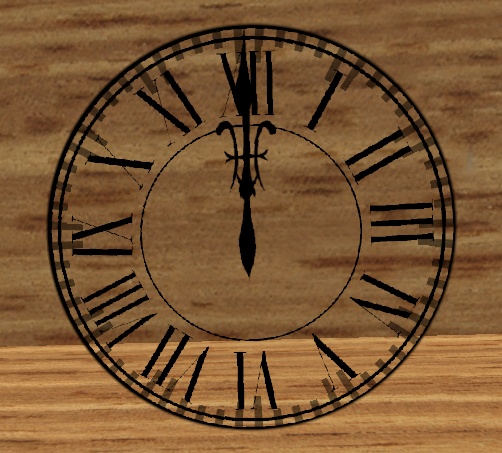
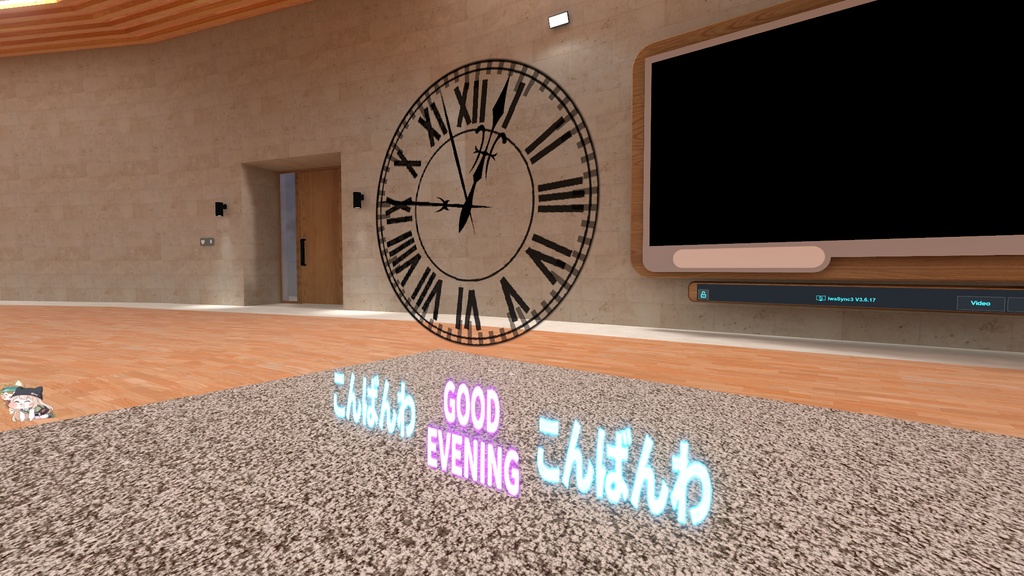
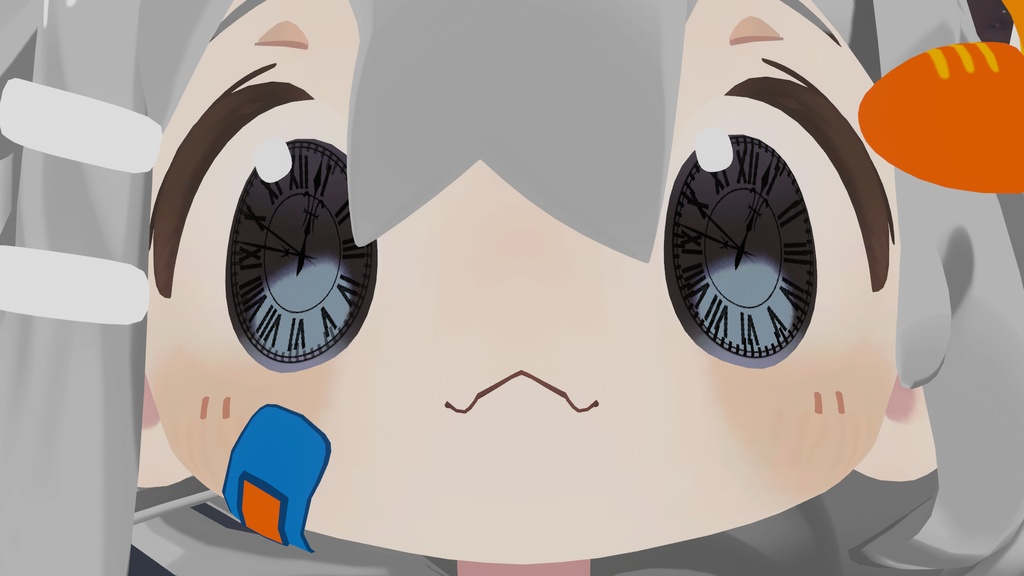
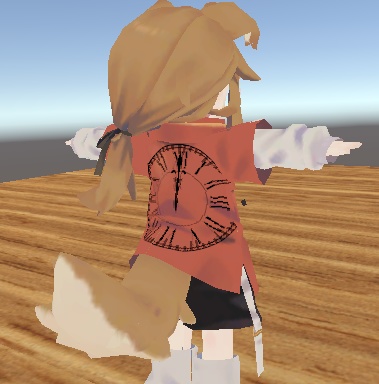


【VRChat対応】挨拶&時計用シェーダー 無料配布 Time_Shader / GreetingBoard Shader & UVClockOverlay Shader VRChat向けに作られた2種類の便利なシェーダーを無料配布中! GreetingBoard Shader:朝・昼・夜の挨拶テクスチャを自動切替 UVClockOverlay Shader:既存メッシュ上にアナログ時計をオーバーレイ 看板やウェルカムボード、アバター小物、顔や腕メッシュまで、空間演出をぐっとリッチにできます。 🌅 GreetingBoard Shader の特徴 朝・昼・夜の自動切替(30分かけてブレンドで自然に変化) 開始時刻をInspectorで自由に調整可能 近接フェードイン(近づいた人だけに表示) 浮遊・スクロール・回転アニメーション(個別ON/OFF可能) 両面描画対応、Emission・Tintカラー調整可能 ⏱ UVClockOverlay Shader の特徴 任意UV位置にアナログ時計を重ね描き(時計エリア以外は透過) 最大2個まで同時表示可能 楕円形対応(縦横比独立調整可能) 針描画:SDF生成 or テクスチャ画像 文字盤・目盛・縁取り・グローはSDF生成(テクスチャ不要) 秒針動作:ステップ(カチカチ)/滑らか切替可能 Emissionカラー・強度個別調整 VRChat Stereo Instancing対応 📦 配布ZIP内容 カテゴリ ファイル名 説明 Prefab Quad時計.prefab 指定UV座標に時計表示のサンプル Prefab まめひ時計瞳.prefab 顔Mesh(まめひ)に時計表示のポン置きサンプル Prefab 時間で挨拶プレート.prefab QuadにGreetingBoard Shaderを設定したサンプル Shader Shader\#指定座標時計.shader UVClockOverlay Shader Shader Shader\#挨拶用時間Shader.shader GreetingBoard Shader マテリアル まめひ用時計瞳.mat 設定済みマテリアル マテリアル 挨拶用.mat GreetingBoard Shader用 マテリアル 時計マテリアル.mat UVClockOverlay用 テクスチャ おはよう.png / こんにちは.png / こんばんわ.png GreetingBoard Shader用 テクスチャ 文字盤.png / 時針.png / 分針.png / 秒針.png UVClockOverlay Shader用サンプル画像 説明書 説明書.txt 本説明書ファイル 🛠 必要環境 VRChat SDK(Udon / Creator Companion どちらでも可) Unity 2022.3.x 推奨 VRChat上でのみ現地時刻が反映(_VRChatTimeEncoded1 使用) ⚡ 使い方 GreetingBoard Shader .shader をUnityプロジェクトにインポート マテリアル作成 → Time_Shader/3time_Change を設定 朝・昼・夜テクスチャを設定 時間帯の境界を調整 Contact Proximityで近接演出可能 UVClockOverlay Shader .shader をUnityプロジェクトにインポート 時計表示したいメッシュにマテリアル追加 シェーダーを Time_Shader/UVClockOverlay に設定 Center U / V で表示位置、Radius U / V でサイズ調整 必要に応じ文字盤・針テクスチャを設定 2個目の時計使用時は Clock 2 Enable をオン 🎨 使用例 GreetingBoard Shader:ウェルカムボード・アバター小物の挨拶演出 UVClockOverlay Shader:アバターの顔・腕・アクセサリーメッシュに時計を重ね描き ⚠ 注意事項 Unityエディタ上では時刻は反映されません(VRChat上のみ) 顔メッシュUVのミラーリングにより意図しない位置に表示される場合あり 改変・再配布自由(クレジット任意) 📜 規約 改変・アバターへの組み込みOK。禁止:そのままの形での配布(改変した場合はOK)・販売・転売はご遠慮ください。再配布時はクレジット表記を出来ればお願いします。 💡 GreetingBoard で空間に動きを、UVClockOverlay でアバターにアクセントを。 サンプルPrefab付きで、ダウンロードしてすぐ試せます。VRChatの世界をもっと生き生きと演出してみましょう! ★まめひなたは付属しておりません! 画像:https://booth.pm/ja/items/4340548:まめひなた Mamehinata もち山金魚さん
Readme
[VRChat-Compatible] Free Shader Distribution for Greetings & Clock Time_Shader / GreetingBoard Shader & UVClockOverlay Shader We are offering two useful shaders for VRChat, available for free! GreetingBoard Shader: Automatically switches greeting textures for morning, afternoon, and night UVClockOverlay Shader: Overlays an analog clock on existing meshes Enhance your signs, welcome boards, avatar accessories, and even face or arm meshes for a richer spatial experience. 🌅 Features of GreetingBoard Shader Automatic switching between morning, afternoon, and night (smooth blending over 30 minutes) Start time adjustable freely in the Inspector Proximity fade-in (visible only to nearby users) Floating, scrolling, and rotation animations (individually toggleable) Double-sided rendering, adjustable emission and tint colors ⏱ Features of UVClockOverlay Shader Overlay analog clock on any UV position (transparent outside clock area) Up to 2 clocks displayed simultaneously Supports elliptical shapes (independently adjustable width and height) Clock hands: SDF-generated or texture-based Dial, markers, outlines, and glow are SDF-generated (no textures needed) Second-hand motion: step (tick) or smooth transition Individual emission color and intensity adjustments VRChat Stereo Instancing compatible 📦 Contents of Distribution ZIP Category File Name Description Prefab QuadClock.prefab Sample showing clock at specified UV coordinates Prefab MamehiClockEyes.prefab Sample showing clock on avatar face mesh (Mamehi) Prefab TimeBasedGreetingBoard.prefab Sample with GreetingBoard Shader applied to Quad Shader Shader#UVClockOverlay.shader UVClockOverlay Shader Shader Shader#GreetingTime.shader GreetingBoard Shader Material MamehiClockEyes.mat Pre-configured material Material GreetingBoard.mat For GreetingBoard Shader Material ClockMaterial.mat For UVClockOverlay Shader Texture GoodMorning.png / Hello.png / GoodEvening.png For GreetingBoard Shader Texture Dial.png / HourHand.png / MinuteHand.png / SecondHand.png Sample images for UVClockOverlay Shader Manual Manual.txt This instruction file 🛠 Required Environment VRChat SDK (Udon or Creator Companion) Unity 2022.3.x recommended Local time reflected only in VRChat (_VRChatTimeEncoded1 used) ⚡ How to Use GreetingBoard Shader Import the .shader into your Unity project Create a material → assign Time_Shader/3time_Change Set morning, afternoon, and night textures Adjust time boundaries Enable proximity effects with Contact Proximity UVClockOverlay Shader Import the .shader into your Unity project Add a material to the mesh you want the clock displayed on Set the shader to Time_Shader/UVClockOverlay Adjust display position with Center U / V and size with Radius U / V Optionally set dial and hands textures If using a second clock, enable Clock 2 🎨 Usage Examples GreetingBoard Shader: Welcome boards, avatar accessories for greeting effects UVClockOverlay Shader: Overlay clocks on avatar faces, arms, or accessory meshes ⚠ Notes Time does not update in the Unity Editor (VRChat only) Clock may display incorrectly on mirrored face UVs Modification and redistribution are allowed (credit optional) 📜 Terms Modification and integration into avatars are allowed. Prohibited: direct redistribution without changes, commercial sale, or resale. Please credit if possible when redistributing. 💡 Add dynamic greetings to spaces with GreetingBoard and accent avatars with UVClockOverlay. Sample prefabs included—download and try immediately to make your VRChat worlds more lively!