

Object Bundle On-Off Manager / オブジェクトON・OFFマネージャ
- 通常版_StandardEditionダウンロード商品¥ 500
- 愛情多め版_Love-FilledEditionダウンロード商品¥ 1,000


🛠️ Object Bundle On-Off Manager v1.0.0 Unity Editor tool for VRChat avatar creation — toggle groups of scene objects with one click. ❤ Made with Love ❤ ━━━━━━━━━━━━━━━━━━━━━━ 🛠️ Object Bundle On-Off Manager v1.0.0 VRChatアバター制作のためのUnityエディタ拡張 — シーン内のオブジェクト群を、ワンクリックで定義した状態に。 ❤ 愛を込めて ❤
JP:
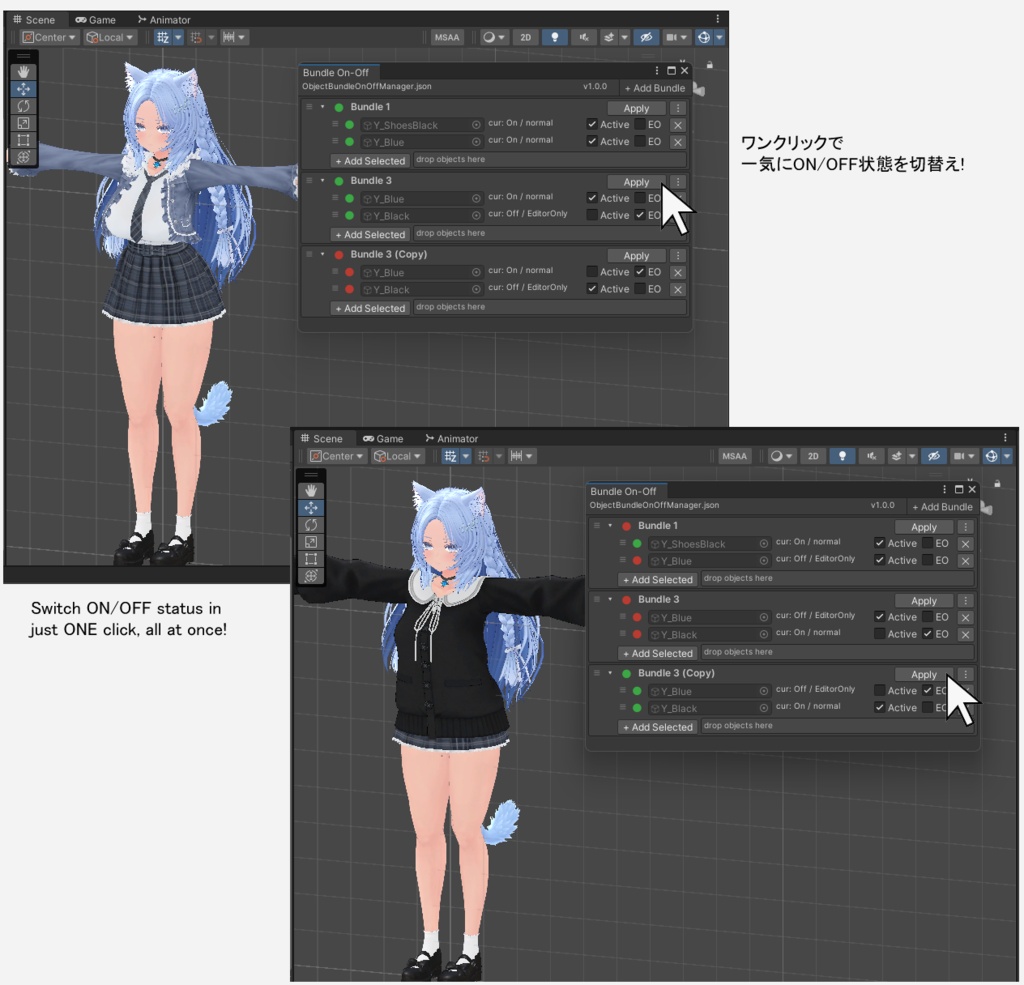
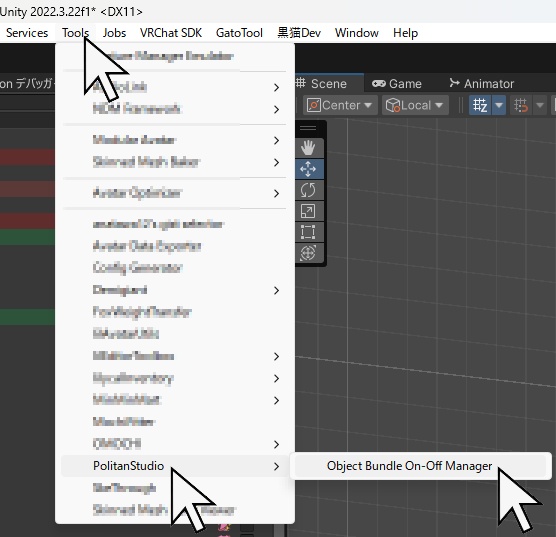
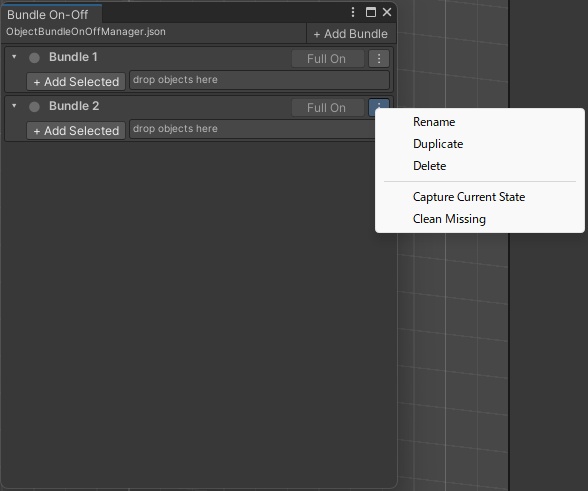
💡 「撮影セットON、作業用小物OFF」 シーン内のオブジェクトのグループを、ボタン1つで定義した状態に。 ✨ こんな場面で • 撮影の時だけ必要なオブジェクト • テスト用のダミーや補助ギミック • 衣装バリエーションの切り替え Hierarchy で1つずつ切り替えるのは【遅くて忘れやすい】。 バンドルにまとめて、ボタン1つで完結。 ━━━━━━━━━━━━━━━━━━━━━━ 🎯 主な機能 【Active と EditorOnly の両方を管理】 Active = GameObject の ON/OFF、EditorOnly = アップロード/ビルドから除外。 補助オブジェクトをシーンに残しつつ、アバターには含めない。 【信号機ステータス】 🟢 定義通り / 🔴 不一致 / 🟡 一部参照切れ 現在の状態が一目で分かります。 【堅牢なオブジェクト追跡】 GlobalObjectId で追跡するので、リネームしても参照が維持されます。 【Undo対応】 シーンへの変更は1つのグループとして Undo 可能。 EditorOnly を解除するときは元のタグを復元します。 【ドラッグで並べ替え】 バンドルもオブジェクトも、ハンドルをドラッグして並べ替え・移動できます。 ━━━━━━━━━━━━━━━━━━━━━━ 📥 導入 .unitypackage をプロジェクトにドラッグ&ドロップ → Import するだけ。 📝 使い方 1. Tools/PolitanStudio/Object Bundle On-Off Manager を開く 2.【+ Add Bundle】でバンドルを追加し、名前を付ける 3.【+ Add Selected】または Hierarchy からドラッグ&ドロップでオブジェクトを追加 4. 各エントリの【Active】【EO】で「あるべき状態」を設定 5.【Apply】ボタンで一括適用(何度押しても結果は同じ状態になります) ⚙️ 動作環境 Unity 2022.3 LTS 以上 ━━━━━━━━━━━━━━━━━━━━━━ 💝 通常版 ¥500 / 愛情多め版 ¥1,000 中身はまったく同じで、機能に差はありません。 「役に立った」「応援したい」と思っていただけたら、愛情多め版をご検討ください。 心から感謝します。 ━━━━━━━━━━━━━━━━━━━━━━ ⚖️ 免責事項 • 開発には一部 AI を使用しています。十分なテストを実施していますが、予期しない動作の可能性はゼロではありません。必ずバックアップを取り、自己責任でご利用ください。 • VRChat の利用規約、およびご使用のアバター・衣装の利用規約に沿った範囲でご利用ください。 • データ破損その他の損害について、当方は責任を負いかねます。 • Unity のバージョン更新に伴い動作しなくなる可能性があります。 ❤ 愛を込めて。快適なアバターライフの一助となれば幸いです。
EN:
💡 "Photo setup ON, work props OFF" Set a group of scene objects to their defined state with a single button. ✨ Perfect For • Objects needed only for photo shoots • Test dummies and helper gimmicks • Costume variant switching Switching them one by one in the Hierarchy is slow and easy to forget. Bundle them, and it's one button. ━━━━━━━━━━━━━━━━━━━━━━ 🎯 Features 【Manage Both Active and EditorOnly】 Active = GameObject ON/OFF, EditorOnly = excluded from uploads/builds. Keep helper objects in your scene while leaving them out of your avatar. 【Traffic Light Status】 🟢 Matches / 🔴 Mismatch / 🟡 Partially missing See the current state at a glance. 【Robust Object Tracking】 Tracked by GlobalObjectId, so references survive renaming. 【Undo Support】 All scene changes are undoable as one grouped operation. When EditorOnly is turned off, the original tag is restored. 【Drag to Reorder】 Drag the handle to reorder bundles, and to reorder or move objects between them. ━━━━━━━━━━━━━━━━━━━━━━ 📥 Install Drag & drop the .unitypackage into your project → Import. 📝 How to Use 1. Open Tools/PolitanStudio/Object Bundle On-Off Manager 2. Press 【+ Add Bundle】and name it 3. Add objects via 【+ Add Selected】or drag & drop from the Hierarchy 4. Set each entry's 【Active】【EO】to its desired state 5. Press 【Apply】— pressing it repeatedly always gives the same result ⚙️ Requirements Unity 2022.3 LTS or later ━━━━━━━━━━━━━━━━━━━━━━ 💝 Standard ¥500 / Love-Filled ¥1,000 The contents are exactly the same — there is no difference in functionality. If this tool helped you and you'd like to support it, please consider the Love-Filled Edition. Thank you, truly. ━━━━━━━━━━━━━━━━━━━━━━ ⚖️ Disclaimer • AI was used in part during development. It has been thoroughly tested, but unexpected behavior is not impossible. Please back up your data and use at your own risk. • Please use within the terms of service of VRChat and of your avatar/costume. • I am not responsible for data corruption or any other damage. • This tool may stop working with future Unity version updates. ❤ With love. I hope this tool helps you enjoy a comfortable avatar life.
アップデート履歴
[2026-07-20: v1.0] Published.