

Scene Pose Snapshot / シーン ポーズ スナップショット
- 通常版 Standard versionダウンロード商品¥ 500
- 愛情多め版 Love-Filled versionダウンロード商品¥ 1,000


🛠️ Scene Pose Snapshot v1.0.0 Unity Editor tool for VRChat avatar creation — pose bones to fix mesh problems or check a fit, then get the exact original pose back. VRChatアバター制作のためのUnityエディタ拡張 — メッシュ貫通の修正や衣装確認のためにボーンを一時的に動かし、元の姿勢へ確実に戻す。 ❤ Made with Love ❤ ━━━━━━━━━━━━━━━━━━━━━━
💡 「脚を開いてニーソ・ストッキングの貫通を直す、直したらワンクリックで元の姿勢に」
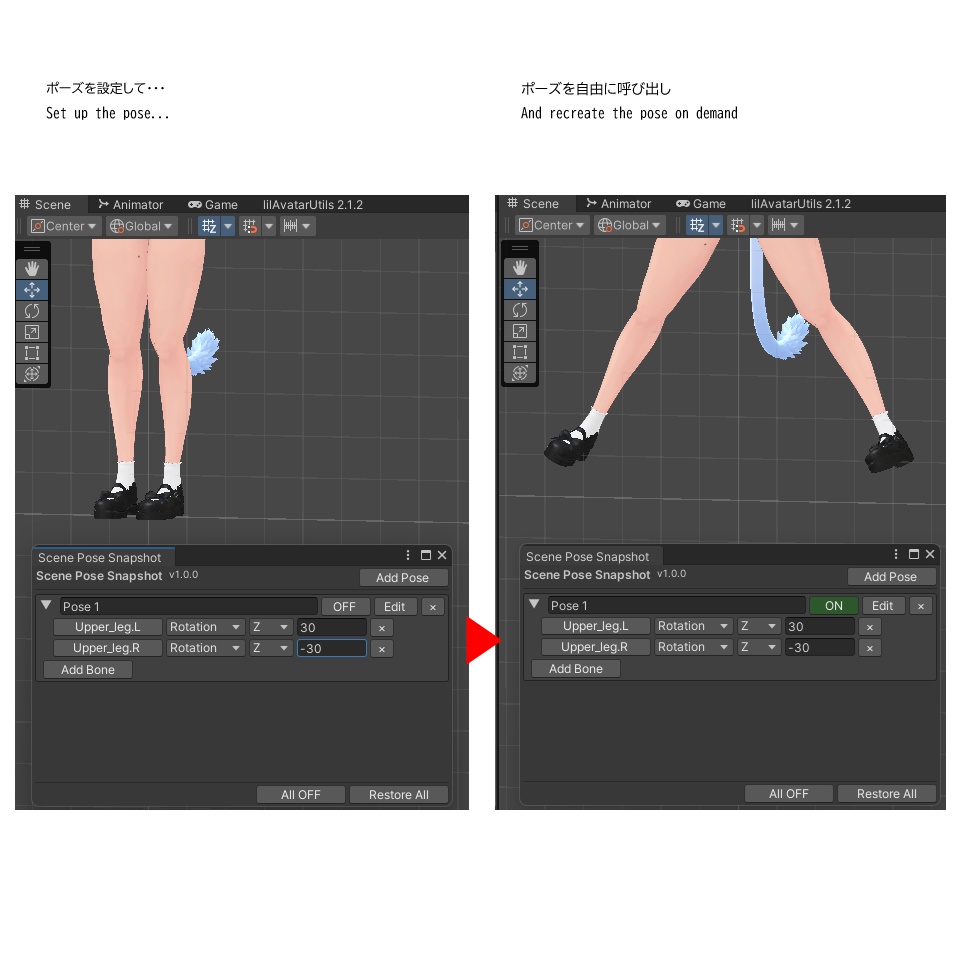
ニーソやストッキングのようなタイトな衣装パーツ、太もも〜股関節まわりのメッシュ貫通を直すために脚を大きく開いた状態で作業したいのに、戻すのを忘れて変な姿勢のままアップロード…という事故を防ぎます。 ✨ こんな場面で • ニーソ・ストッキングなどタイトな脚パーツの、太もも〜股関節付近のメッシュ貫通を、Blender等のお気に入りのツールで直したい • スカートやワンピースの脚まわりのメッシュ貫通を直したい • 衣装のフィッティング確認で腕や首を軽く曲げたい • 撮影用にちょっとだけポーズを付けたい • アクセサリーの当たり判定を見るために一時的に動かしたい 📌 貫通修正の流れ(一番よくある使い方) 1. 太もも(Upper Leg)のボーンを【Add Bone】で追加 → 元の角度が保存されます 2. 貫通が直る角度を Rotation で指定 3.【ON】で脚を開いた状態にして、Blenderなど好きなツールでメッシュを修正 4. 修正が終わったら【OFF】— 脚は保存しておいた元の角度へ、確実に戻ります 手で動かして手で戻すのは【戻し漏れのリスク】がつきまとう。 Scene Pose Snapshot は、ボタン1つでスナップショットを保存し、いつでも確実に復元します。 ━━━━━━━━━━━━━━━━━━━━━━
🎯 主な機能
【ポーズプリセットをON/OFFで管理】 好きな数のボーン単軸オーバーライド(位置・回転・スケール、各1軸)を名前付きのプリセットにまとめて管理。ONで適用、OFFで復元。複数プリセットを並行して扱えます。 【ボタン1つでスナップショット】 【Add Bone】でボーンを追加すると、その完全な姿勢(位置・回転・スケール全軸)をその場で保存。オーバーライドの有無に関わらず、復元は常に完全・正確です。 【4段階の自動セーフティ】 Playモード開始時・スクリプト再コンパイル時・ウィンドウを閉じた時・Unity終了時、この4つのタイミングで自動的に元の姿勢へ復元します。 【シーン保存フック】 シーン保存の瞬間だけ元の姿勢に戻してから書き込み、保存後に再適用。ポーズを付けたままウィンドウを閉じ忘れても、.unity ファイルにポーズ後の値が紛れ込むことは一切ありません。 【インスペクタ準拠の回転】 Inspector に表示される回転値をそのまま読み書きするので、軸が勝手に入れ替わるような不意打ちがありません。 【壊れたボーン参照も安全に処理】 ボーンのリネーム・削除があっても ⚠ 表示で静かにスキップ。エラーで作業が止まりません。 ━━━━━━━━━━━━━━━━━━━━━━
📥 導入
.unitypackage をプロジェクトにドラッグ&ドロップ → Import するだけ。 📝 使い方(3ステップ) STEP1|ボーンの組を用意 Tools/PolitanStudio/Scene Pose Snapshot を開き、【Add Pose】でプリセットを追加。【Add Bone】で動かしたいボーンを追加します。追加した瞬間、そのボーンの元の値が保存されます。 STEP2|変形の内容を指定 各ボーンについて Position/Rotation/Scale と軸を選び、動かしたい先の値を入力します。 STEP3|ONで適用、OFFで元通り 【ON】を押すとSTEP2で指定した変形が適用されます。【OFF】(または【Restore All】)を押せば、STEP1で保存した元の値へいつでも確実に戻せます。 ⚙️ 動作環境 Unity 2022.3 LTS 以上 ━━━━━━━━━━━━━━━━━━━━━━
💝 通常版 ¥500 / 愛情多め版 ¥1,000
中身はまったく同じで、機能に差はありません。 「役に立った」「応援したい」と思っていただけたら、愛情多め版をご検討ください。 心から感謝します。 ━━━━━━━━━━━━━━━━━━━━━━
⚖️ 免責事項
• 開発には一部 AI を使用しています。十分なテストを実施していますが、予期しない動作の可能性はゼロではありません。必ずバックアップを取り、自己責任でご利用ください。 • VRChat の利用規約、およびご使用のアバター・衣装の利用規約に沿った範囲でご利用ください。 • データ破損その他の損害について、当方は責任を負いかねます。 • Unity のバージョン更新に伴い動作しなくなる可能性があります。 ❤ 愛を込めて。快適なアバターライフの一助となれば幸いです。 ━━━━━━━━━━━━━━━━━━━━━━
English
━━━━━━━━━━━━━━━━━━━━━━ 💡 "Spread the legs to fix thigh-high or stocking mesh penetration — snap back to normal with one click" Fixing mesh penetration on tight-fitting legwear like thigh-highs or stockings around the thigh/hip area means working with the legs spread wide — and forgetting to put them back before uploading is an easy, embarrassing mistake. This tool prevents that. ✨ Perfect For • Fixing thigh/hip-area mesh penetration on tight legwear (thigh-highs, stockings) in Blender or your favorite tool • Fixing leg-area mesh penetration on a skirt or dress • Bending an arm or tilting the head while checking a costume fit • Adjusting a pose briefly for a screenshot • Temporarily moving a bone to check an accessory's placement 📌 The Mesh Penetration Fix Workflow (the most common use case) 1. Press 【Add Bone】to add the upper leg bones — their original angles are saved 2. Set the Rotation to an angle that clears the penetration 3. Toggle 【ON】to spread the legs, then fix the mesh in Blender or any tool you like 4. When you're done, toggle 【OFF】— the legs snap back to their saved original angles, reliably Posing by hand and restoring by hand always carries the risk of [forgetting the original values]. Scene Pose Snapshot saves a snapshot with one button press, and restores it reliably, every time. ━━━━━━━━━━━━━━━━━━━━━━ 🎯 Features 【Pose Presets with ON/OFF Toggle】 Group any number of single-axis bone overrides (position / rotation / scale, one axis each) into a named preset. Flip it ON to apply, OFF to restore. Manage multiple presets side by side. 【Snapshot with One Click】 Press 【Add Bone】and its full original pose (position, rotation, scale — all axes) is captured on the spot. Restore is always complete and correct, regardless of which axes were overridden. 【4-Stage Automatic Safety】 Original poses are restored automatically before: entering Play Mode, a script recompile, closing the window, and quitting Unity. 【Scene Save Hook】 Right before a scene save, everything is restored to its original pose for the write, then re-applied afterward. Even if you forget to close the window with a pose still ON, posed values never make it into the .unity file on disk. 【Inspector-accurate Rotation】 Rotation values are read/written exactly as the Inspector shows them, so no surprise axis flips. 【Safe Handling of Broken Bone References】 A renamed or deleted bone shows a ⚠ mark and is skipped silently — it never stops your work with an error. ━━━━━━━━━━━━━━━━━━━━━━ 📥 Install Drag & drop the .unitypackage into your project → Import. 📝 How to Use (3 Steps) STEP 1 | Set up the bundle of bones Open Tools/PolitanStudio/Scene Pose Snapshot, press 【Add Pose】to create a preset, then press 【Add Bone】for each bone you want to move. The moment a bone is added, its original values are saved. STEP 2 | Set up the transformation For each bone, choose Position/Rotation/Scale and an axis, then type the target value. STEP 3 | Activate to apply, deactivate to revert Toggle 【ON】to apply the transformation from STEP 2. Toggle 【OFF】(or press 【Restore All】) to go back to the original values saved in STEP 1, any time. ⚙️ Requirements Unity 2022.3 LTS or later ━━━━━━━━━━━━━━━━━━━━━━ 💝 Standard ¥500 / Love-Filled ¥1,000 The contents are exactly the same — there is no difference in functionality. If this tool helped you and you'd like to support it, please consider the Love-Filled Edition. Thank you, truly. ━━━━━━━━━━━━━━━━━━━━━━ ⚖️ Disclaimer • AI was used in part during development. It has been thoroughly tested, but unexpected behavior is not impossible. Please back up your data and use at your own risk. • Please use within the terms of service of VRChat and of your avatar/costume. • I am not responsible for data corruption or any other damage. • This tool may stop working with future Unity version updates. ❤ With love. I hope this tool helps you enjoy a comfortable avatar life.