

BID Switcher - VRChatアバターのBlueprint ID切り替えツール
- 通常版ダウンロード商品¥ 500
- 愛情多め版ダウンロード商品¥ 1,000
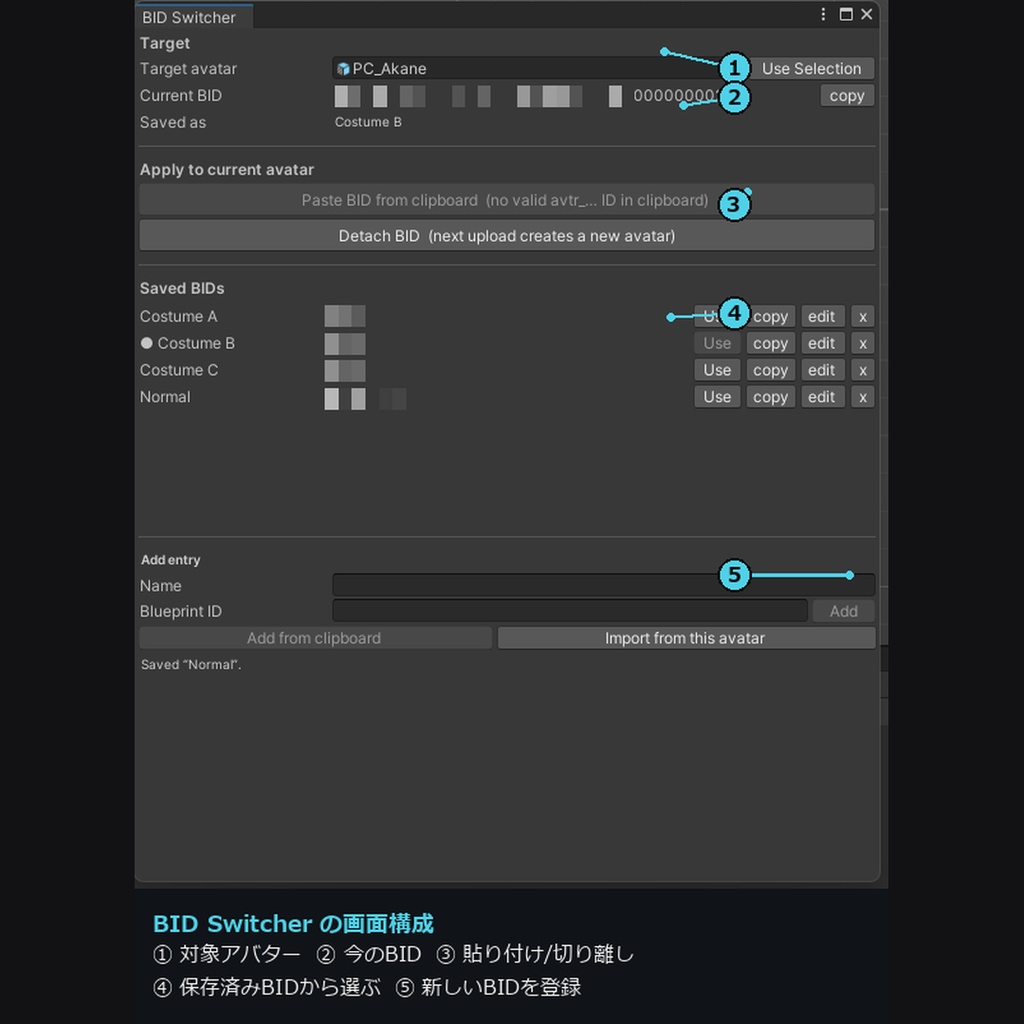
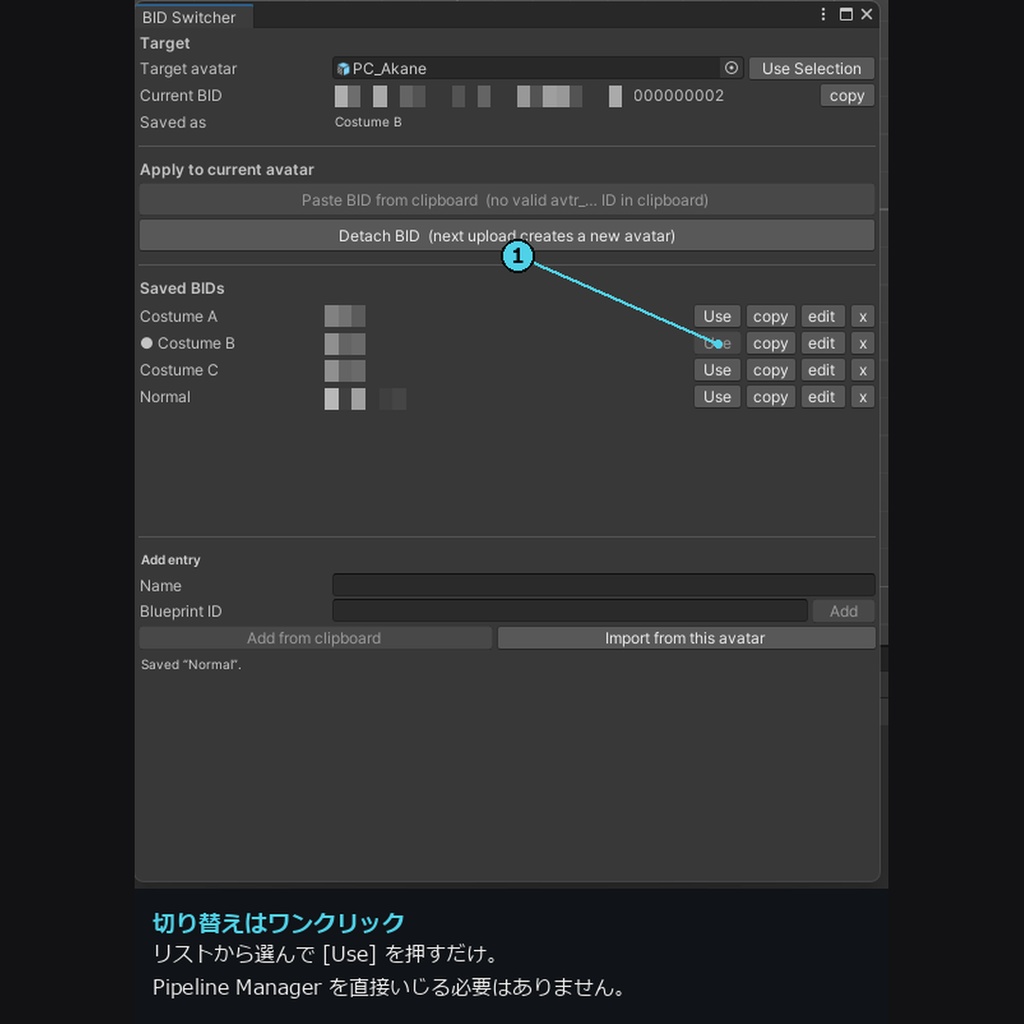
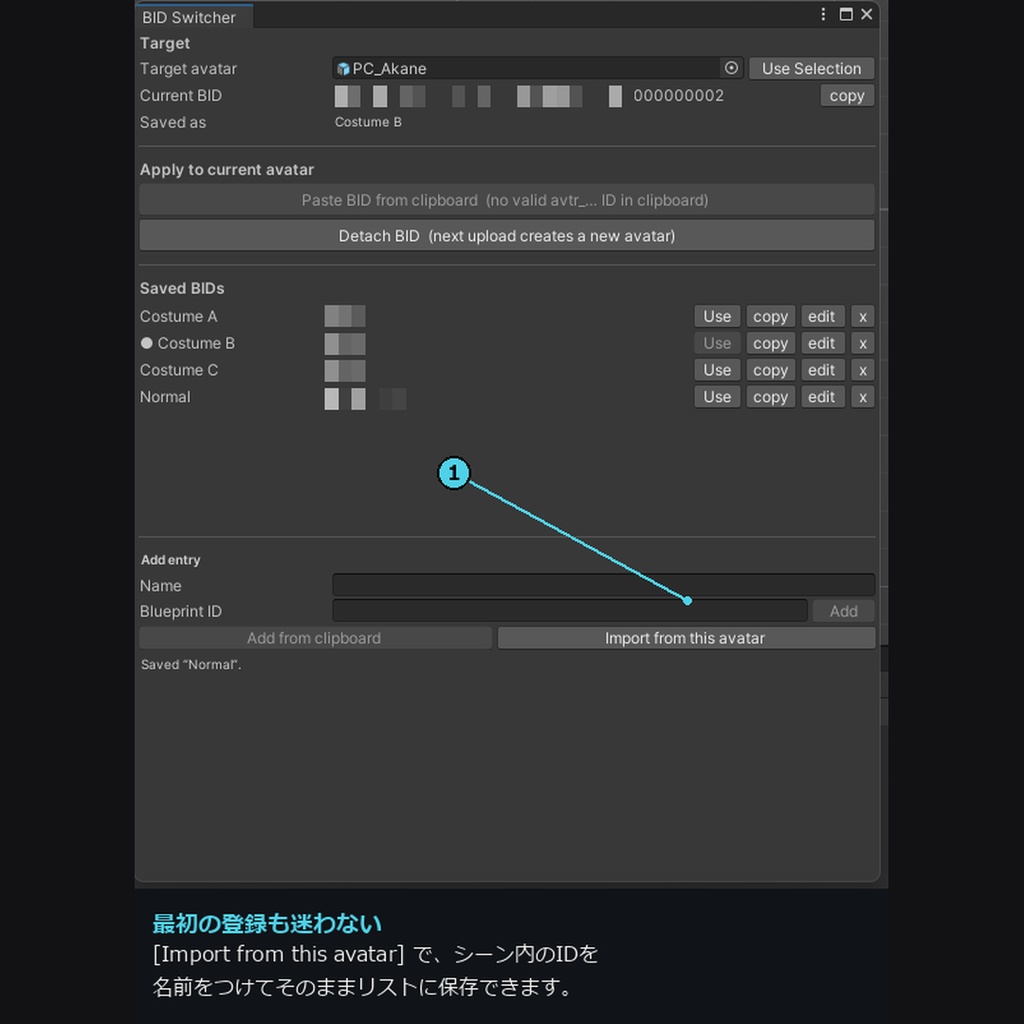
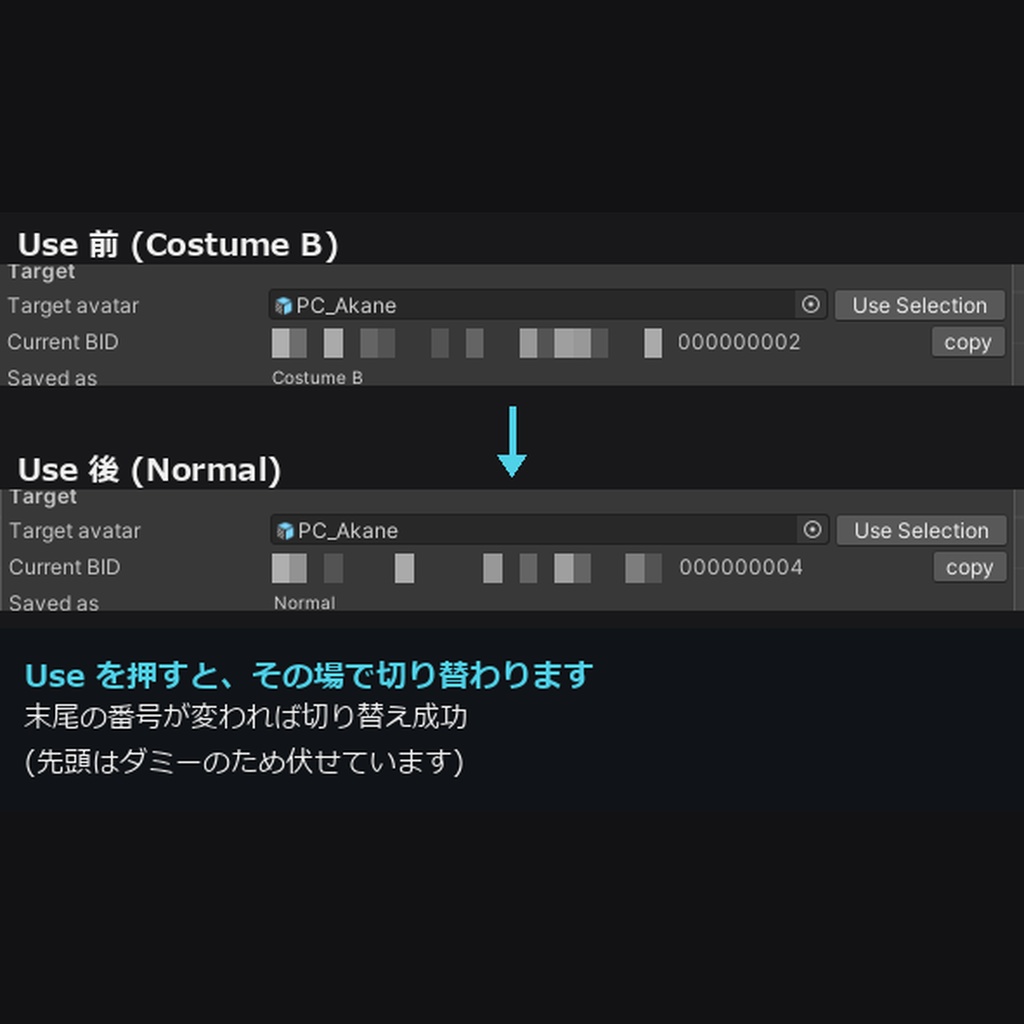
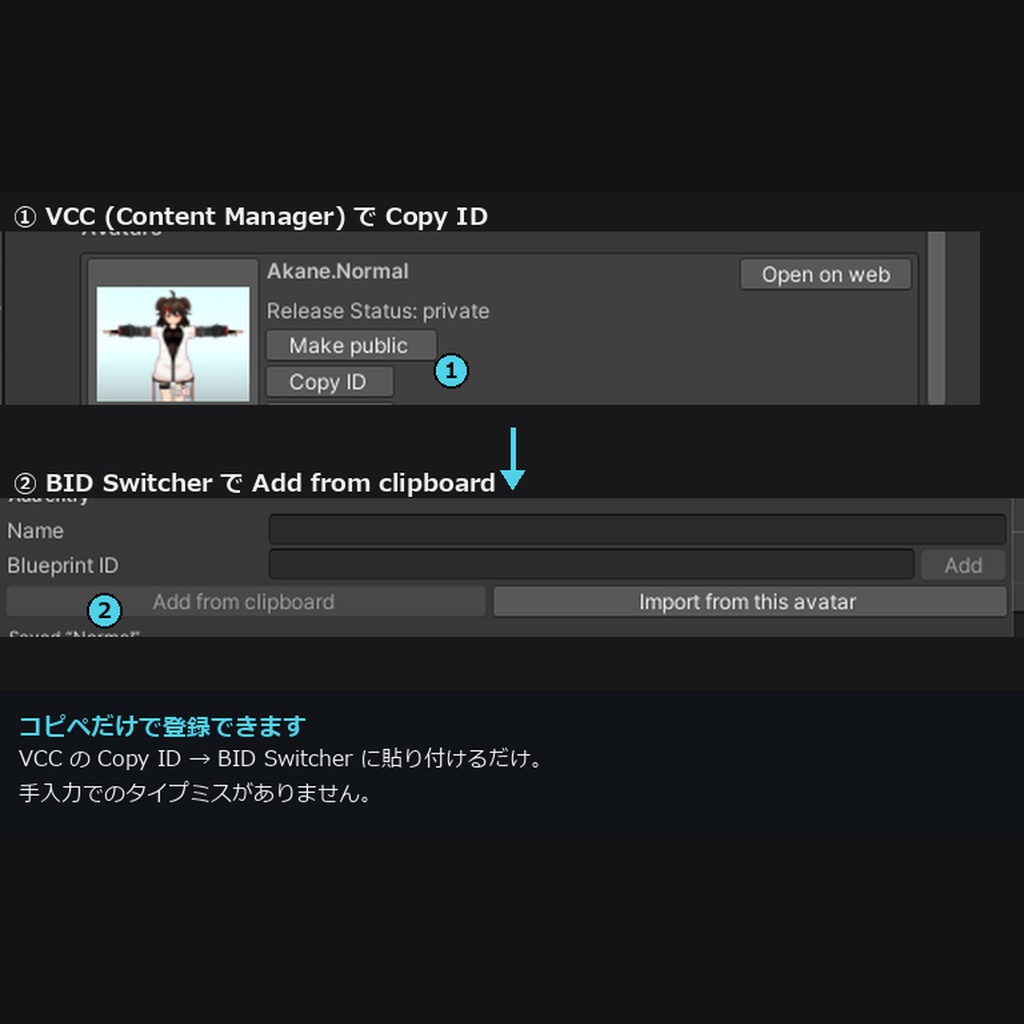


🛠️ BID Switcher v1.0.0 衣装ごとに別アバターでアップする運用の「アップロード先 (Blueprint ID)」を、名前つきリストで安全に切り替えるUnityツールです。 A Unity tool that safely switches the upload target (Blueprint ID) from a named list, for anyone uploading each outfit as its own avatar. ❤ Made with Love ❤ ━━━━━━━━━━━━━━━━━━━━━━ 💡 「新規アバター? それとも上書き更新?」— 次のアップロード先を、Pipeline Managerを掘らずに確実にコントロールできます。 ✨ こんな方に ・軽量なアバターを保つため、衣装ごとに別のアバターとしてアップしている方 ・テスト版を本命アバターに上書きしてしまった(しそうになった)ことがある方 ・Content Manager で Copy ID して Pipeline Manager に貼る手間を減らしたい方 🎯 主な機能 【Saved BIDs】 アバター名と ID を保存。Use ボタンひとつで切り替え。追加は ID 入力・クリップボード・シーン内アバターから取り込みの3通り。名前・ID・メモの編集、削除も可能(リスト編集はアバターに触れません)。 【Detach BID】 次のアップロードで新規アバターを作成。 【クリップボードから貼り付け】 avtr_… の形式を検証してから書き込みます。 【現在の BID を常に表示】 登録済みなら名前も表示、未登録なら「リストに保存」ボタンを表示。初回アップロード直後の登録に便利です。 【対象アバターを記憶】 ウィンドウを開き直しても、再コンパイル・Play前後・Unity再起動をしても復元されます。 【安全設計】 既存 ID を上書きするときは新旧の値を示す確認ダイアログ。すべて Undo (Ctrl+Z) 対応。Playモード中は操作できません。 【通信なし・ログイン不要】 VRChat API は呼びません。リストは UserSettings/BIDSelector.json に保存され、ビルドや unitypackage には含まれません。 📌 衣装ごとの運用について VRChat では、アバターの容量に上限があります(PC: ダウンロード200MB / 非圧縮500MB。公式「Avatar Size Limits」)。イベントによっては、さらに小さい容量条件が設けられることもあります。 衣装ごとに別アバターとして運用すると、1アバターあたりの容量を抑えやすくなります。本ツールは、その運用で増える「アップロード先の切り替え」を助けます。シーン構成を整える作業そのものは、本ツールの機能ではありません。容量の削減量は、アバターや衣装の内容によって異なります。 📥 導入 .unitypackage を Unity プロジェクトにドラッグ&ドロップ → Import。メニュー Tools/PolitanStudio/BID Switcher から開きます。 ⚙️ 動作環境 Unity 2022.3 LTS (VRChat SDK3 Avatars 環境) で動作確認。VRChat SDK3 Avatars が必要です。 ━━━━━━━━━━━━━━━━━━━━━━ 💝 通常版 ¥500 / 愛情多め版 ¥1,000 中身はまったく同じで、機能に差はありません。 「役に立った」「応援したい」と思っていただけたら、愛情多め版をご検討ください。 心から感謝します。 ━━━━━━━━━━━━━━━━━━━━━━ ⚖️ 免責事項 ・アップロード前に、表示されている BID を必ず確認してください。 ・開発には一部 AI を使用しています。十分なテストを実施していますが、予期しない動作の可能性はゼロではありません。必ずバックアップを取り、自己責任でご利用ください。 ・VRChat の利用規約、およびご使用のアバター・衣装の利用規約に沿った範囲でご利用ください。 ・データ破損その他の損害について、当方は責任を負いかねます。 ・本ツールは非公式ツールで、VRChat Inc. とは関係ありません。 ・Unity / VRChat SDK / NDMF / Modular Avatar の更新に伴い動作しなくなる可能性があります(追従は保証しません)。 ❤ 愛を込めて。快適なアバターライフの一助となれば幸いです。 ━━━━━━━━━━━━━━━━━━━━━━ English ━━━━━━━━━━━━━━━━━━━━━━ 💡 "New avatar or update?" — control exactly which avatar your next upload targets, without digging through the Pipeline Manager. ✨ Who it's for ・Creators who keep avatars light by uploading one outfit per avatar ・Anyone who has overwritten (or almost overwritten) a main avatar with a test build ・Anyone tired of Content Manager → Copy ID → Pipeline Manager 🎯 Features 【Saved BIDs】 A named list of avatars and IDs. One click on Use. Add by typing, from the clipboard, or from the avatar in your scene. Rename, re-point, annotate, or delete entries (list edits never touch your avatar). 【Detach BID】 The next upload creates a new avatar. 【Paste from clipboard】 Validates the avtr_… format first. 【Always shows the current BID】 With the saved name if it is in your list, or a one-click "Save current BID to list" if it is not. 【Remembers the target avatar】 Across window reopen, recompile, Play Mode, and Unity restarts. 【Safe by design】 Confirmation dialog with old and new values before any overwrite, full Undo (Ctrl+Z), disabled during Play Mode. 【No network, no login】 No VRChat API calls. The list lives in UserSettings/BIDSelector.json (never included in a build or a unitypackage). 📌 About one-outfit-per-avatar workflows VRChat limits avatar size (PC: 200 MB download / 500 MB uncompressed, per the official "Avatar Size Limits" page), and some events set stricter limits. Uploading each outfit as its own avatar helps keep each one small. This tool helps with the upload-target switching that workflow creates. It does not arrange your scene for you, and how much size you save depends on your avatar and outfits. 📥 Install Drag the .unitypackage into your project and Import. Open from Tools/PolitanStudio/BID Switcher. ⚙️ Requirements Unity 2022.3 LTS with VRChat SDK3 Avatars (required). ━━━━━━━━━━━━━━━━━━━━━━ 💝 Standard ¥500 / Love-Filled ¥1,000 The contents are exactly the same — there is no difference in functionality. If this tool helped you and you'd like to support it, please consider the Love-Filled Edition. Thank you, truly. ━━━━━━━━━━━━━━━━━━━━━━ ⚖️ Disclaimer ・Check the displayed BID before every upload. ・AI was used in part during development. It has been thoroughly tested, but unexpected behavior is not impossible. Please back up your data and use at your own risk. ・Please use within the terms of service of VRChat and of your avatar/costume. ・I am not responsible for data corruption or any other damage. ・Unofficial tool, not affiliated with VRChat Inc. ・This tool may stop working with future Unity / VRChat SDK / NDMF / Modular Avatar updates (compatibility is not guaranteed). ❤ With love. I hope this tool helps you enjoy a comfortable avatar life.