

麺をすするギミック【ModularAvatar対応】
- ダウンロード商品¥ 500
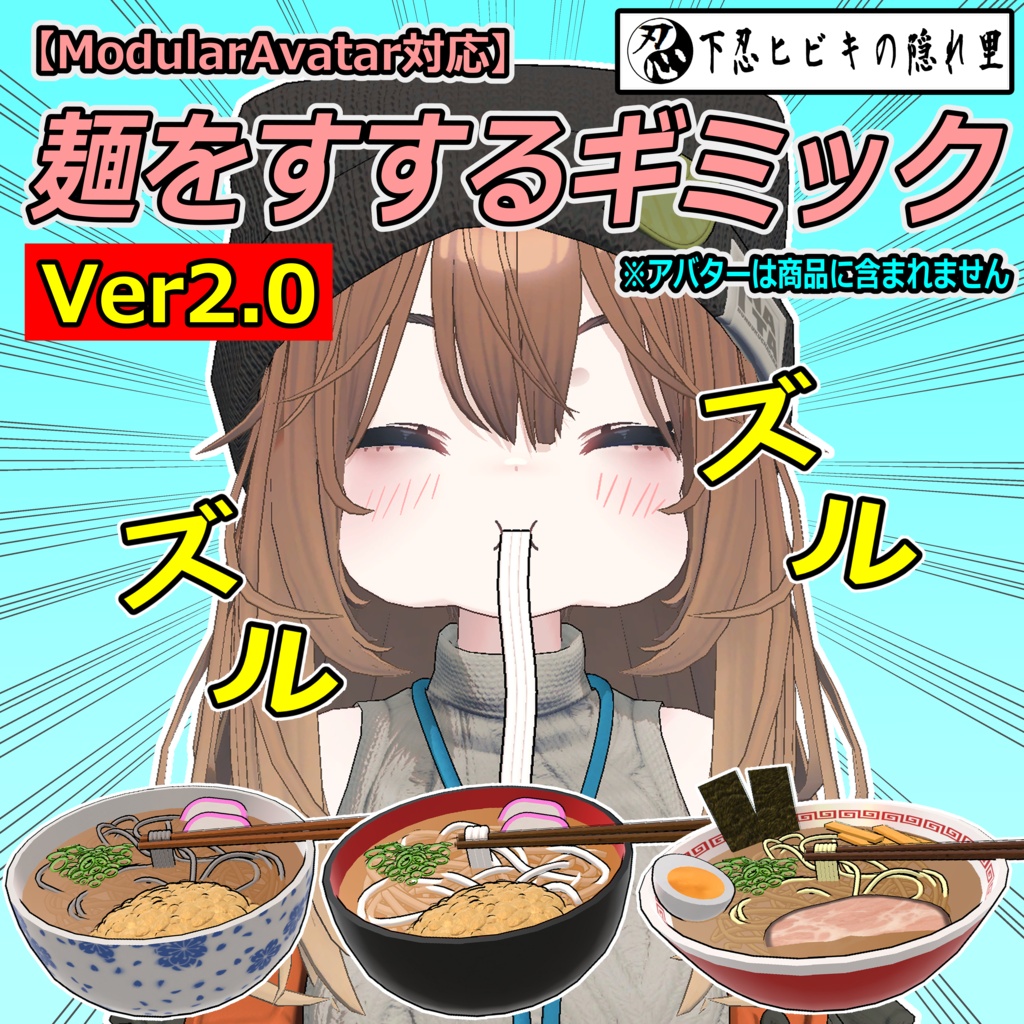
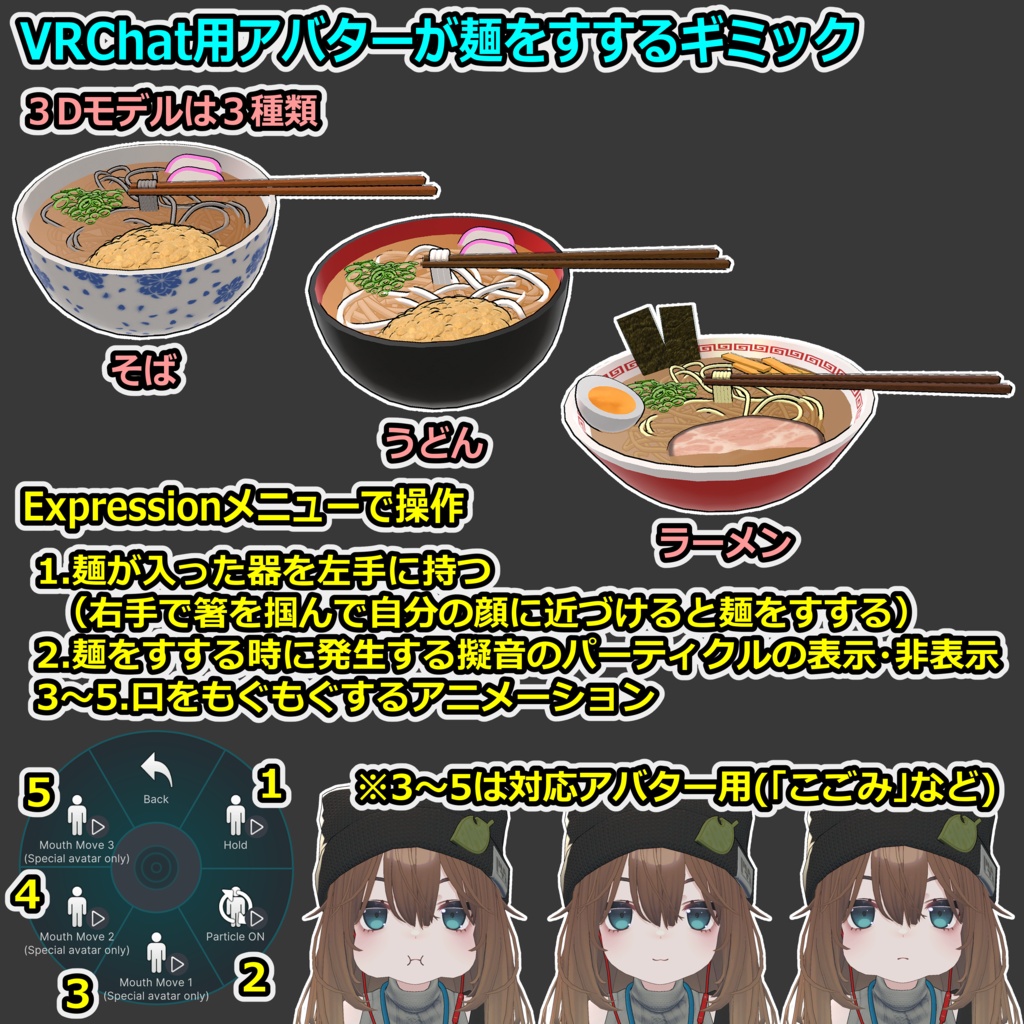
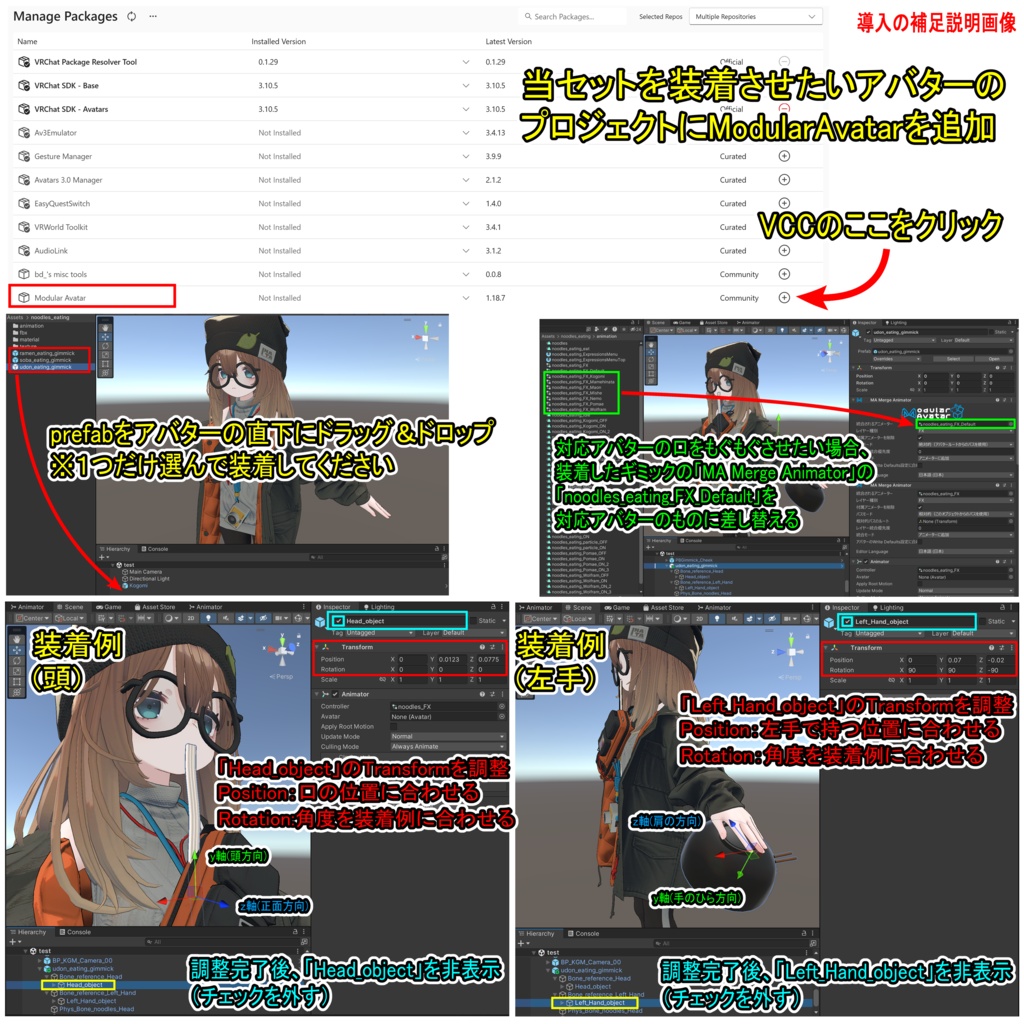


【商品名】 麺をすするギミック【ModularAvatar対応】 【商品説明】 VRChat用アバターが麺をすする事ができるギミックです。3Dモデルは3種類です(うどん、そば、ラーメン)。 Expressionメニューで麺が入った器を左手に持ち、右手で箸を掴んで自分の顔に近づけると麺をすすることができます。麺をすする時に発生する擬音のパーティクルは非表示にする事も可能です。 また、アバター「こごみ( https://booth.pm/ja/items/8779825 )」が装備した場合はExpressionメニューで口をもぐもぐする事も可能です(もぐもぐアニメーションは3種類)。 ※装着例のアバター「こごみ( https://booth.pm/ja/items/8779825 )」は商品に含まれません。 なお、Ver2.0にて以下の6アバターも口をもぐもぐできるようになりました(もぐもぐアニメーションは3種類ずつ)。 Nemo( https://flastore.booth.pm/items/6855392 ) Wolfram( https://flastore.booth.pm/items/5769373 ) Maon( https://flastore.booth.pm/items/7800632 ) インターネットのぽまえ( https://booth.pm/ja/items/6054752 ) まめひなた( https://booth.pm/ja/items/4340548 ) ミーシェ( https://booth.pm/ja/items/1256087 ) 【VRChatへの導入方法】※詳しくは導入の補足説明画像を参照 1.ModularAvatarをVCCにダウンロード。 https://modular-avatar.nadena.dev/ja/ 2.当セットを装備させたいアバターのプロジェクトにModularAvatarを追加 3.シェーダー(liltoon)をインポート https://booth.pm/ja/items/3087170 4.本商品(noodles_eating_2.0.unitypackage)をインポート 5.プロジェクト内(Assets/noodles_eating)にあるprefabをアバターの直下にドラッグ&ドロップ うどん:udon_eating_gimmick そば:soba_eating_gimmick ラーメン:ramen_eating_gimmick ※1つだけ選んで装着してください 6.装着したものの位置を調整 ・Hierarchy上のオブジェクト「Head_object」と「Left_Hand_object」のTransformを調整 ・調整完了後、Hierarchy上のオブジェクト「Head_object」と「Left_Hand_object」を非表示にする 7.対応アバターの口をもぐもぐさせたい場合、装着したギミックの「MA Merge Animator」の「noodles_eating_FX_Default」を以下のものに差し替える こごみ:noodles_eating_FX_Kogomi Nemo:noodles_eating_FX_Nemo Wolfram:noodles_eating_FX_Wolfram Maon:noodles_eating_FX_Maon インターネットのぽまえ:noodles_eating_FX_Pomae まめひなた:noodles_eating_FX_Mamehinata ミーシェ:noodles_eating_FX_Mishe 8.通常の手順でVRChatにアップロード(必ずPrivate 設定で) 【ポリゴン数】 うどん:△21358 そば:△25218 ラーメン:△22566 【内容物】 Unitypackage readme FBX テクスチャ(PNG) 導入の補足説明画像 【利用規約】 改変可 商用利用可 再配布不可 再販売不可 公序良俗に反する使用を禁止 【免責事項】 制作者は本データを利用したことにより発生した損害、損失、その他の不利益に対して一切の責任を負いません。 【Quest対応する方法】 ・マテリアル「ramen」と「soba」と「udon」のシェーダーを「VRChat/Mobile/Toon Lit」に変更 ※全体的に見た目は大きく劣化します。 ・マテリアル「noodles_eat_particle」と「steam_particle」のシェーダーを「VRChat/Mobile/Particles/Additive」に変更 ・Hierarchy上のStandardマテリアルが割り当てられているオブジェクト「ramen_soup」または「soba_soup」または「udon_soup」を削除 ※スープが非表示になります。 【更新履歴】 2026/9/12 リリース 2026/9/28 Ver2.0リリース。口をもぐもぐできるアバターを追加(6アバター)。 【追記】 ギミックが正常に機能しない場合 →VCC、VRChat SDK、Modular Avatarのバージョンを最新にしてから【VRChatへの導入方法】の5.からやり直してください。 他のツールやギミックなどと干渉して当ギミックが正常に機能しない場合 →それらを削除してお使い下さい。 箸を自分の顔に近づけても麺をすすることができない →一度箸を顔から離してから再度顔に近づけてみて下さい 「Head_object」や「Left_Hand_object」の大きさを変更した場合 →うどん、そば、ラーメンの大きさは変わりますが、湯気や擬音のパーティクルの大きさは変わらないです。パーティクルの大きさを変えたい場合はそれぞれのパーティクル毎の大きさを調整して下さい。 対応アバターの口をもぐもぐできない場合 →装着したギミックの「MA Merge Animator」の「noodles_eating_FX_Default」を対応アバターのものに差し替えて下さい。 なお、アバター側のアップデートによって口の動きが変わる可能性があります(以下のバージョンでは問題無い事を確認しています)。 こごみ:1.0.2 Nemo:1.0.4 Wolfram:1.0.6 Maon:1.0.1 インターネットのぽまえ:1.01 まめひなた:1.60 ミーシェ:1.04
English
[Product Name] A gimmick for eating noodles [Compatible with ModularAvatar] 【Product Description】 This is a gimmick that allows a VRChat avatar to slurp noodles. It includes three types of 3D models (udon, soba, and ramen). Using the Expression menu, you can hold the bowl of noodles in your left hand; by grabbing the chopsticks with your right hand and bringing them close to your face, you can slurp the noodles. You can also toggle the visibility of the onomatopoeic particles that appear when slurping. Additionally, if equipped on the "Kogomi" avatar ( https://booth.pm/ja/items/8779825 ), you can use the Expression menu to trigger a chewing animation (three variations available). *The "Kogomi" avatar ( https://booth.pm/ja/items/8779825 ) shown in the example images is not included with this product. Additionally, in Ver 2.0, the following six avatars now support chewing animations (with three variations each) Nemo ( https://flastore.booth.pm/items/6855392 ) Wolfram ( https://flastore.booth.pm/items/5769373 ) Maon ( https://flastore.booth.pm/items/7800632 ) Internet Pomae ( https://booth.pm/ja/items/6054752 ) Mamehinata ( https://booth.pm/ja/items/4340548 ) Mishe ( https://booth.pm/ja/items/1256087 ) [How to Install in VRChat] *Please refer to the supplementary installation images for details. 1. Download ModularAvatar to VCC. https://modular-avatar.nadena.dev/ja/ 2. Add ModularAvatar to the project containing the avatar you wish to equip with this set. 3. Import the shader (liltoon). https://booth.pm/ja/items/3087170 4. Import this product (noodles_eating_2.0.unitypackage). 5. Drag and drop the desired prefab from the project folder (Assets/noodles_eating) directly under your avatar in the Hierarchy. Udon: udon_eating_gimmick Soba: soba_eating_gimmick Ramen: ramen_eating_gimmick *Please select and equip only one type. 6. Adjust the position of the equipped item. ・Adjust the Transform settings for the "Head_object" and "Left_Hand_object" in the Hierarchy. ・Once adjustment is complete, set the "Head_object" and "Left_Hand_object" to hidden in the Hierarchy. 7. If you want to make the compatible avatar's mouth perform a chewing motion, replace "noodles_eating_FX_Default" in the attached gimmick's "MA Merge Animator" with the following item. Kogomi:noodles_eating_FX_Kogomi Nemo:noodles_eating_FX_Nemo Wolfram:noodles_eating_FX_Wolfram Maon:noodles_eating_FX_Maon Internet Pomae:noodles_eating_FX_Pomae Mamehinata:noodles_eating_FX_Mamehinata Mishe:noodles_eating_FX_Mishe 8. Upload to VRChat using the standard procedure (make sure to use the Private setting). [Polygon Count] Udon: △21358 Soba: △25218 Ramen: △22566 [Contents] Unitypackage Readme FBX Textures (PNG) Images with supplementary setup instructions [Terms of Use] Modifications permitted Commercial use permitted No redistribution No resale Prohibition of use that violates public order and morals [Disclaimer] The creator assumes no responsibility for any damages, losses, or other disadvantages arising from the use of this data. [How to make it Quest-compatible] ・Change the shaders for the "ramen," "soba," and "udon" materials to "VRChat/Mobile/Toon Lit." *Note: The overall visual quality will be significantly reduced. ・Change the shaders for the "noodles_eat_particle" and "steam_particle" materials to "VRChat/Mobile/Particles/Additive." ・Delete the object ("ramen_soup," "soba_soup," or "udon_soup") in the Hierarchy that has the Standard material assigned. *Note: The soup will become invisible. [Update History] 2026/9/12 release 2026/9/28 Version 2.0 released. Added avatars capable of chewing movements (6 avatars). [Additional Note] If the gimmick isn't working properly → Update your VCC, VRChat SDK, and Modular Avatar to the latest versions, then start again from step 5 of the [How to install in VRChat]. If this gimmick is interfering with other tools or gimmicks and isn't functioning properly →Delete them before using. If you are unable to slurp the noodles even when bringing the chopsticks close to your face: → Try moving the chopsticks away from your face once, then bring them close again. If you change the scale of "Head_object" or "Left_Hand_object": → The scale of the udon, soba, or ramen will change, but the scale of the steam or onomatopoeia particles will not. If you wish to change the scale of the particles, please adjust the scale of each individual particle. If the compatible avatar's mouth does not perform the chewing motion → Please replace the "noodles_eating_FX_Default" within the installed "MA Merge Animator" component with the corresponding asset for your avatar. Please note that avatar updates may alter mouth movements (compatibility has been confirmed for the following versions) Kogomi: 1.0.2 Nemo: 1.0.4 Wolfram: 1.0.6 Maon: 1.0.1 Internet Pomae: 1.01 Mamehinata: 1.60 Mishe: 1.04