
AW_Color - Color Grading Plugin for After Effects
- Freeダウンロード商品¥ 0
- Support Developmentダウンロード商品¥ 500
- Support Development ++ダウンロード商品¥ 1,500
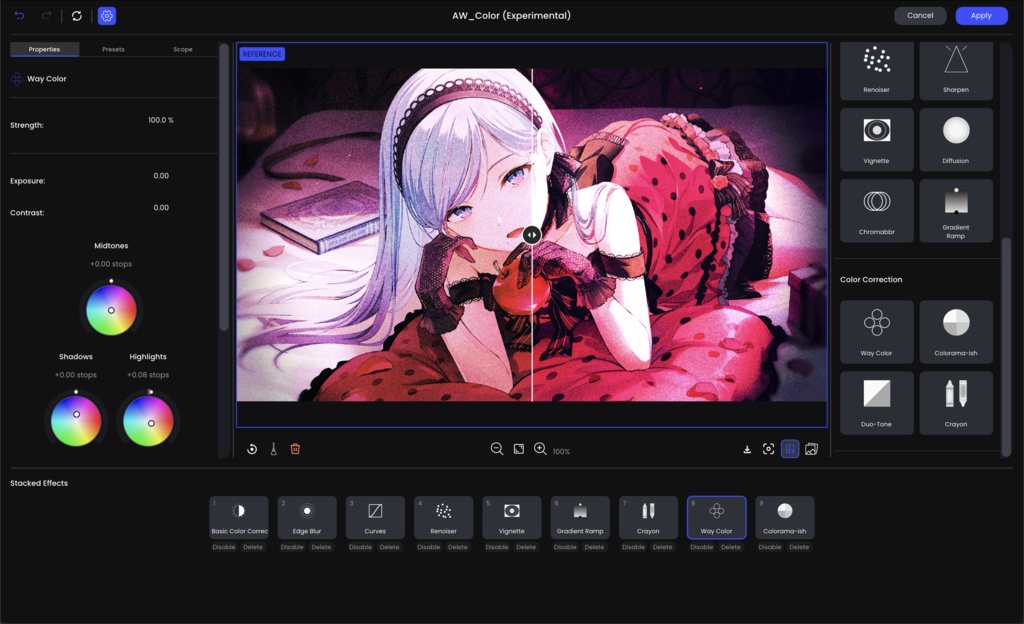

AW_Color color grading suite that works right inside Adobe After Effects. Open the editor on one frame of your footage, build your look by stacking effects, and press Apply. The whole look then lives in one effect on your layer, and you can keyframe it like any other effect.
Key Feature
1. Non-Destructive Look Stack Layer-Based Grading: Stack, reorder, duplicate, hide, or delete individual grading layers just like in Photoshop or dedicated grading suites. Per-Layer Opacity: Dial in the exact intensity of any individual tool or preset. All-in-One Native Effect: Entire grade is stored inside one single effect parameter in one layer. 2. Creative Toolset - Basic Color Correction: Exposure, Contrast, Highlights, Shadows, Whites, Blacks, Temperature, Tint, and Saturation. - Tone Curves & S-Curves: 4-point tone curves with RGB Master plus independent Red, Green, and Blue channels. - 3D LUT Support: Load any standard .cube look-up table with smooth trilinear interpolation. - Way Color (4-Way Wheels): Precise color balance wheels for Shadows, Midtones, Highlights, and Master. - Crayon Color: Custom measured filmic & stylized color tables (Embo, Sorrow, Tint, Evening, Hunger) with per-hue adjustment and shadow/highlight neutral ramps. - Diffusion: Highlight bloom that scatters light. - Spot Exposure: Soft elliptical digital spotlight for directing viewer focus. - Ramp Exposure: Linear gradient exposure falloff (graduated ND filter style). - Gradient Ramp: 2-point gradient overlays with blend modes (ideal for MMV, stylized washes, and fake lighting). - Chromatic Aberration: Subtle or dramatic lens edge fringing. - Renoiser: Organic film grain with per-channel size and intensity control. - Edge Blur & Up/Down Blur: Tilt-shift and focus-directing blur effects. - Sharpen & Vignette: Unsharp mask sharpening and customizable vignettes. - Duo-Tone & Colorama: Stylized dual-color toning and color remapping.
Requirements
After Effects CC 2023 or Above Windows / MacOS M-Chips
Q&A
Q: Is there a difference between the paid and free versions? A: No! With the paid version, you’re essentially buying me a cup of coffee so I can sleep in a little longer (lol) :D Q: Can I use this for commercial purposes? A: Of course you can! You’re free to use it in various projects. Q: If I use this plugin, do I have to give you credit? A: Of course not! No need to worry about it :D
Change log
[1.2.1] - [Fixed] MacOS plugin not contain EditorApp [1.2] - [New] GPU Accelerated - [New] New Effect Hallation, Black and White, Advanced Crayon - [New] Controller Effect. Right click on the parameter and add to Controller. - [New] Keyframe Editor. Now you can keyframe the editor. The changes will blending on it. - [Change] Diffusion Effect - [Change] Renoiser Effect - [Change] User Interface and Color Picker - [Added] Log Folder. Find on Preferences [1.1] - [Fix] After Effects v23, v24 Crash - [Fix] Undo group on Stacked Effects - [Fix] Change default size Editor to 1280x720 on Windows [1.0] Initial Release