

Simple FaceTracking for Melvii(メルヴィ)
- ダウンロード商品¥ 500


Simple FaceTracking for Melvii(メルヴィ) Jerry's FaceTracking Templates을 기반으로 기본 BlendShapes 위주로 사용하여 제작된 Face Tracking Settings입니다. =============================== These Face Tracking Settings are based on Jerry's FaceTracking Templates and were created primarily using the avatar's default BlendShapes =============================== 「Jerry's FaceTracking Templates」をベースに、主にアバターのデフォルトBlendShape(基本ブレンドシェイプ)を使用して制作したFace Tracking Settingsです。
Requirements
- Original 3D Model オリジナル3Dアバター『邪竜メルヴィ』 #メルヴィ3D https://narikirihonpo.booth.pm/items/8727844 - VRCFaceTracking v5.0+ https://docs.vrcft.io/ - Modular Avatar https://modular-avatar.nadena.dev/
How to use
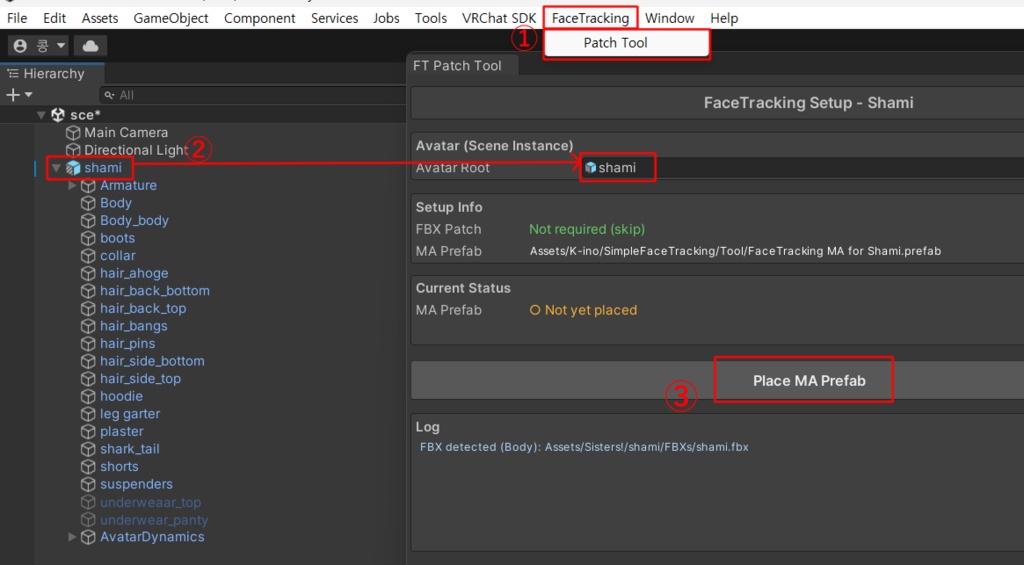
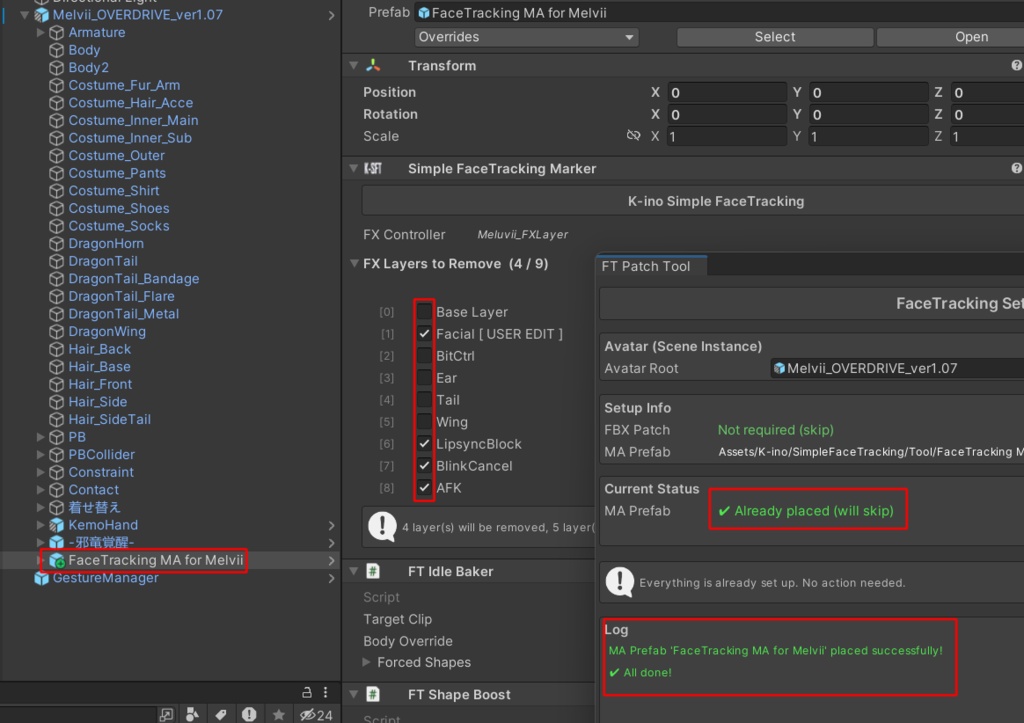
Unity 상단 탭의 FaceTracking-Patch Tool 클릭 및 사용할 Melvii Prefab 이동 후 "Place MA Prefab" 버튼 클릭 (FaceTracking Patch.png 참조) =============================== Click on FaceTracking-Patch Tool from the top menu in Unity. Assign (drag and drop) the Melvii Prefab you want to use, then click the Place MA Prefab button. (See FaceTracking Patch.png) =============================== Unity上部メニューの FaceTracking-Patch Tool をクリックします。使用するMelviiのPrefabをセット(ドラッグ&ドロップ)し、Place MA Prefab ボタンをクリックしてください。 (FaceTracking Patch.png 参照)
About Default(Idle) Expression
아래의 BlendShapes의 경우 FaceTracking에 사용되었기 때문에, 기본 표정에 사용해도 FaceTracking 사용 중엔 적용되지 않을 수 있습니다. =============================== Please note that the BlendShapes listed below are used for FaceTracking. Therefore, even if you include them in your default expression, they may be overridden or not applied while FaceTracking is active: =============================== 以下のBlendShapeはFaceTrackingで使用されているため、デフォルトの表情に設定しても、FaceTrackingの使用中(稼働中)は反映されない場合があります: eyelid_closed_L/R eyelid_smile_L/R eyelid_nagomi_L/R eyelid_jito_L/R eyelid_up_L/R lowereyelid_up_2_L/R eye_small
Precautions
기본 BlendShapes의 조합만으로 표현하기 어려운 표정은 Tracking 되지 않습니다. 예시) - 혀, 입술의 정교한 트래킹 VRChat에서의 이용을 상정하고 제작되었습니다. Meta Quest Pro, GalaxyXR, 나래 페이셜 트래커에서 테스트되었습니다. 비정상적인 동작이 발견될 경우 Booth Message 부탁드립니다. 사용 규약은 Original Avatar Model과 같습니다. =============================== Expressions that are difficult to create using only a combination of the default BlendShapes are not tracked. Example: Precise tracking of the tongue and lips. This asset was created specifically for use in VRChat. Tested with: Meta Quest Pro, GalaxyXR, and Nare Facial Tracker. If you encounter any abnormal behavior or issues, please contact me via Booth Message. The terms of use are the same as those of the original avatar model. =============================== デフォルトのBlendShapeの組み合わせだけでは表現が難しい表情はトラッキングされません。 例)舌や唇の精密なトラッキングなど VRChatでの利用を想定して制作されています。 Meta Quest Pro、GalaxyXR、Nare Facial Trackerにて動作テストを行っております。 不具合や異常な動作を発見された場合は、BOOTHのメッセージにてご連絡をお願いいたします。 利用規約は、元のアバターモデルに準拠します。
Credits
[VRCFaceTracking] https://docs.vrcft.io/ [OSC mooth] https://github.com/regzo2/OSCmooth [Adjerry91] https://github.com/Adjerry91 https://adjerry91.booth.pm/ https://github.com/Adjerry91/VRCFaceTracking-Templates [Modular Avatar] https://github.com/bdunderscore
Update
v1.0.2 [2026.09.21] - 1st Release (for Melvii v1.07)