

Latex Matcap Pack 3 - 32 Matcap Pack
- ダウンロード商品¥ 235
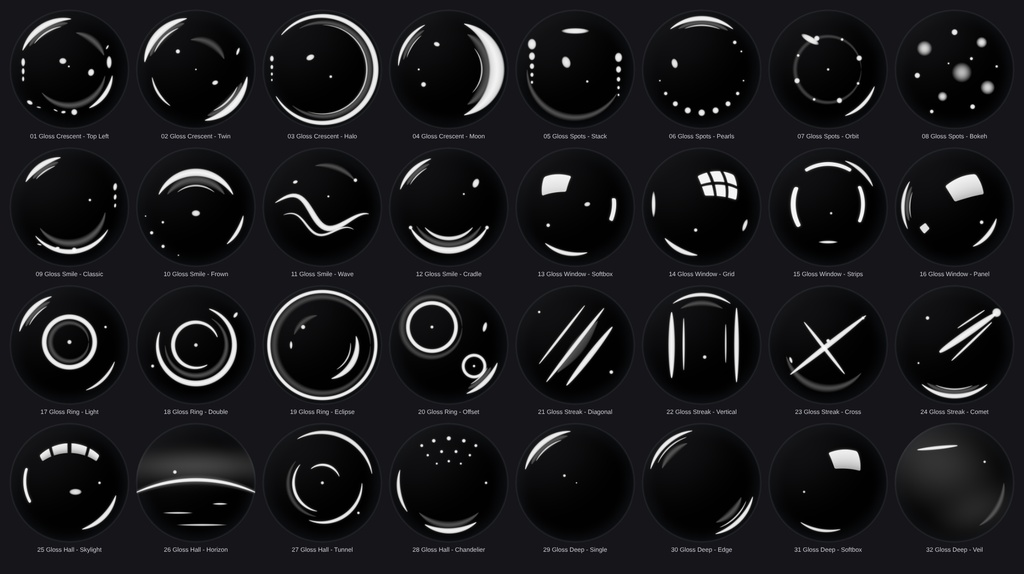

Nyrex Gloss Latex Matcaps – 32 Black High-Gloss Latex Matcap Textures for VRChat Avatars ■ Overview 32 pure black, high-gloss latex matcaps (1024 × 1024 PNG). Deep black body, a dark glossy rim and crisp, glossy highlights: rim crescents, softbox windows, ring lights, streaks, light rows and more. Every matcap is a different light setup, so you can pick the reflection that suits your avatar best. ■ What's included - 32 matcap textures, 1024 × 1024 PNG - 8 categories × 4 matcaps Gloss_Crescent: Top Left, Twin, Halo, Moon Gloss_Spots: Stack, Pearls, Orbit, Bokeh Gloss_Smile: Classic, Frown, Wave, Cradle Gloss_Window: Softbox, Grid, Strips, Panel Gloss_Ring: Light, Double, Eclipse, Offset Gloss_Streak: Diagonal, Vertical, Cross, Comet Gloss_Hall: Skylight, Horizon, Tunnel, Chandelier Gloss_Deep: Single, Edge, Softbox, Veil (minimal, almost pure black) - all matcaps.png (overview of all 32) ■ How to use 1. Import the textures into Unity. 2. Put one into the MatCap slot of your shader (lilToon, Poiyomi or any shader with a matcap slot). 3. Blend mode "Normal" at full strength gives the complete black latex look. "Add" or "Screen" only adds the highlights on top of your existing colours. 4. Use a matcap mask if only parts of the avatar (e.g. clothes) should look like latex. Tip: set the texture compression to High Quality or None for the cleanest highlights. ■ Notes - Textures are generated procedurally by custom scripts (AI-assisted). No image-generation models and no third-party artwork were used. - Shaders and avatars are not included. ―――――――――― Nyrex Gloss Latex Matcaps – VRChatアバター用 黒の高光沢ラテックスMatCap 32種 ■ 概要 純黒の高光沢ラテックスMatCapテクスチャ32種(1024 × 1024 PNG)です。深い黒のボディ、暗く光るリム、くっきりとした光沢のあるハイライトが特徴で、リムの三日月、ソフトボックスの窓、リングライト、ストリーク、光の列など、すべて異なるライティングになっています。アバターに合う反射をお選びいただけます。 ■ 内容 - MatCapテクスチャ 32枚(1024 × 1024 PNG) - 8カテゴリ × 各4種 Gloss_Crescent: Top Left, Twin, Halo, Moon Gloss_Spots: Stack, Pearls, Orbit, Bokeh Gloss_Smile: Classic, Frown, Wave, Cradle Gloss_Window: Softbox, Grid, Strips, Panel Gloss_Ring: Light, Double, Eclipse, Offset Gloss_Streak: Diagonal, Vertical, Cross, Comet Gloss_Hall: Skylight, Horizon, Tunnel, Chandelier Gloss_Deep: Single, Edge, Softbox, Veil(ミニマルでほぼ純黒) - all matcaps.png(全32種の一覧画像) ■ 使い方 1. テクスチャをUnityにインポートします。 2. シェーダー(lilToon、Poiyomi、MatCapスロットのあるシェーダー)のMatCapスロットに設定します。 3. ブレンドモードを「Normal」にして強度を最大にすると、完全な黒ラテックスの質感になります。「Add」または「Screen」にすると、元の色の上にハイライトだけが加わります。 4. 衣装など一部だけをラテックス風にしたい場合は、MatCapマスクを使用してください。 ヒント:テクスチャの圧縮を「High Quality」または「なし」にすると、ハイライトが最もきれいに表示されます。 ■ 注意事項 - テクスチャは独自スクリプトによる手続き型生成です(AI支援)。画像生成AIモデルや第三者の素材は使用していません。 - シェーダーおよびアバターは含まれません。
Terms of Service
You MAY: - Use the matcaps on your own avatars, worlds and 3D models in VRChat and on other platforms, for personal and commercial projects (images, videos, streams, commissioned work). - Edit, recolor and resize the textures for your own projects. - Use them as part of a finished product (e.g. an avatar or world you sell), as long as the matcaps are not offered as standalone or reusable files. You MAY NOT: - Redistribute, resell, share or upload the original or modified matcap files (single files or as a pack), free or paid, on any platform (Discord, BOOTH, Gumroad, cloud links, ...). - Include the textures in a package, prefab or avatar base that you sell or give away where the buyer can extract and reuse them. - Claim the textures as your own work or sell them as your own matcap pack. - Use them for illegal, hateful or discriminatory content. Credit is not required, but appreciated. One purchase = one license for the buyer. Please do not share your copy with others. The textures are provided "as is". Because this is a digital product, refunds are not possible after purchase.aa
Update information
v1.0.0 (2026-10-17) - Initial release