

Nyrex Cambot World System|ワールド用 自動カメラフライト / Camera Flights & Dock
- ダウンロード商品¥ 300
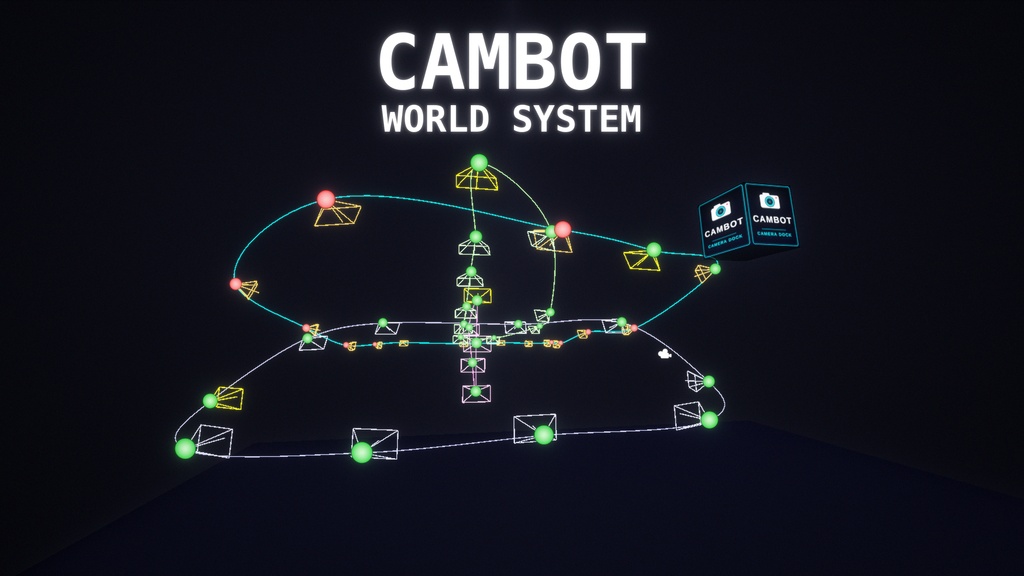

■ Overview Nyrex Cambot World System flies a camera along paths you place in your VRChat world and shows the image inside a box, the "dock". Put your VRChat camera into the box to stream or record the flight, or just step into it with your avatar. No bot account and no whitelist needed. A one-click setup builds the whole rig, and you only move the waypoints to where you want them. ■ Preview video https://youtu.be/9nbWTAoFYSE ■ Features - Closed, seamless loops through your own waypoints: no cut or jump from the last point to the first - One-click setup builds everything: flight camera, 32 waypoints, the dock box, Render Texture and material (menu NyrexFur > CamBot System) - Multiple flights: add more flights with one click, with a fade through black between them and a setting for laps per flight - Constant speed in meters per second, no matter how far apart the waypoints are - The rotation of each waypoint sets the viewing direction. Or let the camera look along the path, or at a target object - Runs only while a camera is inside the box: your VRChat camera (stream / Spout), your own view or your avatar. Outside the box everything is off - Light on performance: nothing is calculated while the world loads or while nobody is in the box, only one camera renders at a time, nothing is synced over the network, plus an optional frame rate limit and a reduced view while you stand inside the box - The flight camera hides nametags, the VRChat menu and controller models - The box label is a texture you can replace with your own - Scene view gizmos show every path and viewing direction ■ Included - CambotDirector (UdonSharp) and the editor setup tool - Shader: Cambot/FeedBox - Label texture (CambotLabel.png) ■ Requirements - Unity 2022.3 (the version supported by the current VRChat SDK), Built-in Render Pipeline - VRChat SDK - Worlds with UdonSharp - Made for PC (Desktop and VR). Not made for Quest / Android ■ How to use 1. Import the package into your world project. 2. Open your world scene and
Terms of Service
■ Terms of Use YOU MAY - Use the files in worlds you create or manage and upload those worlds to VRChat (private or public), including events you host - Edit and adjust the files (scripts, shader, label texture, settings) for your own use - Post and stream screenshots and videos made with this product YOU MAY NOT - Redistribute, resell, share or upload the original or edited files, for free or for money, by any means - Include the files in another asset, pack or tool that you share or sell - Claim this product as your own work or remove the author name - Use it for anything illegal or against the VRChat Terms of Service OTHER - One purchase = one license (one person). If friends or team members want to use it, each person needs their own purchase - Credit to NyrexStore is appreciated but not required - Provided "as is". Compatibility with every setup or future SDK version is not guaranteed, and the creator is not liable for any damage or loss from using it - This is a digital product. Refunds follow BOOTH's rules ―――――――――― ■ 利用規約 【OK】 - ご自身が作成・管理するワールドでの使用、およびVRChatへのアップロード(プライベート・パブリックどちらも可)。主催するイベントでの使用を含みます - 自分用のファイル改変(スクリプト、シェーダー、ラベルテクスチャ、設定の調整) - この商品を使って作成したスクリーンショットや動画の投稿・配信 【NG】 - 元のファイルおよび改変したファイルの再配布・転売・共有・アップロード(無料・有料を問わず、いかなる方法でも) - 他のアセット、パック、ツールに含めて配布・販売すること - 自作と偽ること、制作者名を削除すること - 違法な目的、またはVRChat利用規約に反する使用 【その他】 - 1購入につき1ライセンス(購入者ご本人のみ)です。友人やチームで使う場合は、それぞれが購入してください - NyrexStoreのクレジット表記は歓迎しますが、必須ではありません - 本商品は現状のまま提供されます。すべての環境や将来のSDKバージョンでの動作は保証せず、使用による損害について制作者は責任を負いません - デジタル商品のため、返金はBOOTHのルールに従います
Update information
v1.0.0 (2026-11-16) Initial release