

アセットノート / Asset Notebook
- ダウンロード商品¥ 400
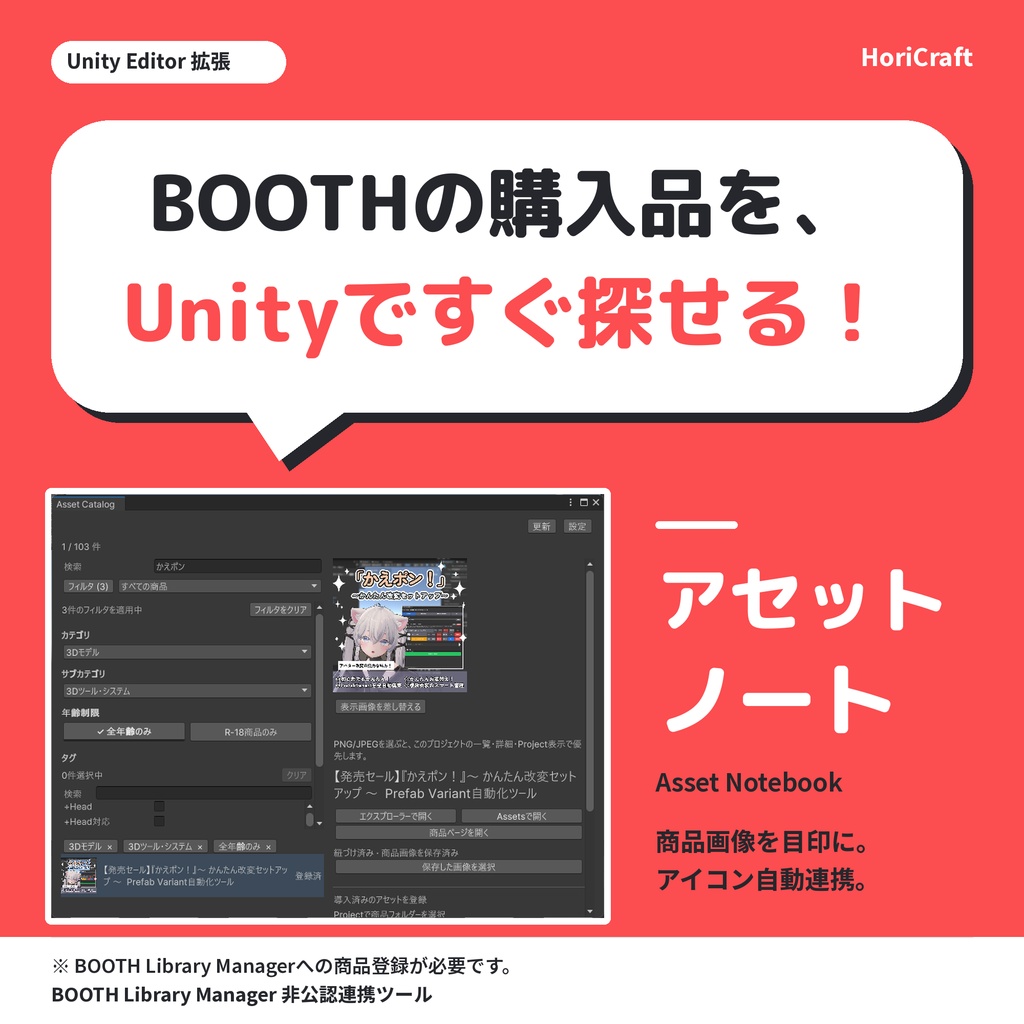
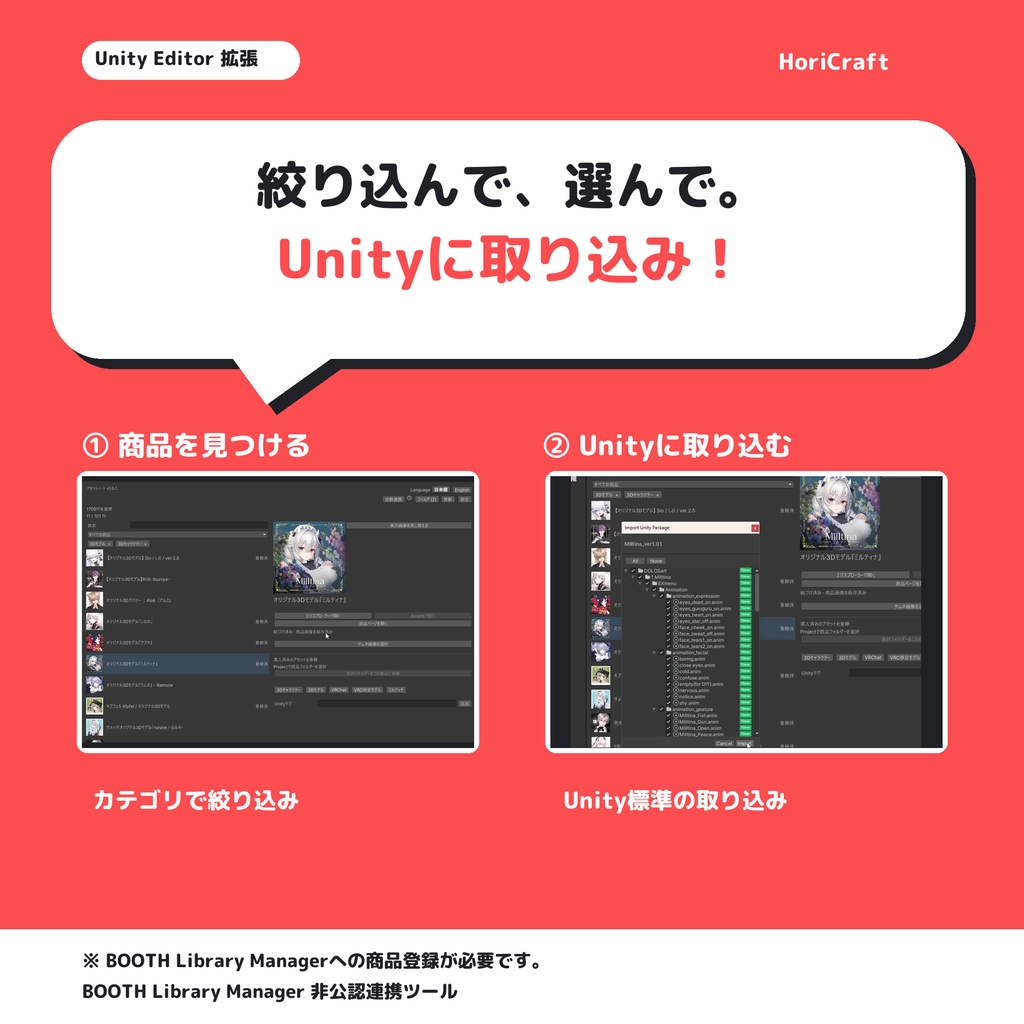
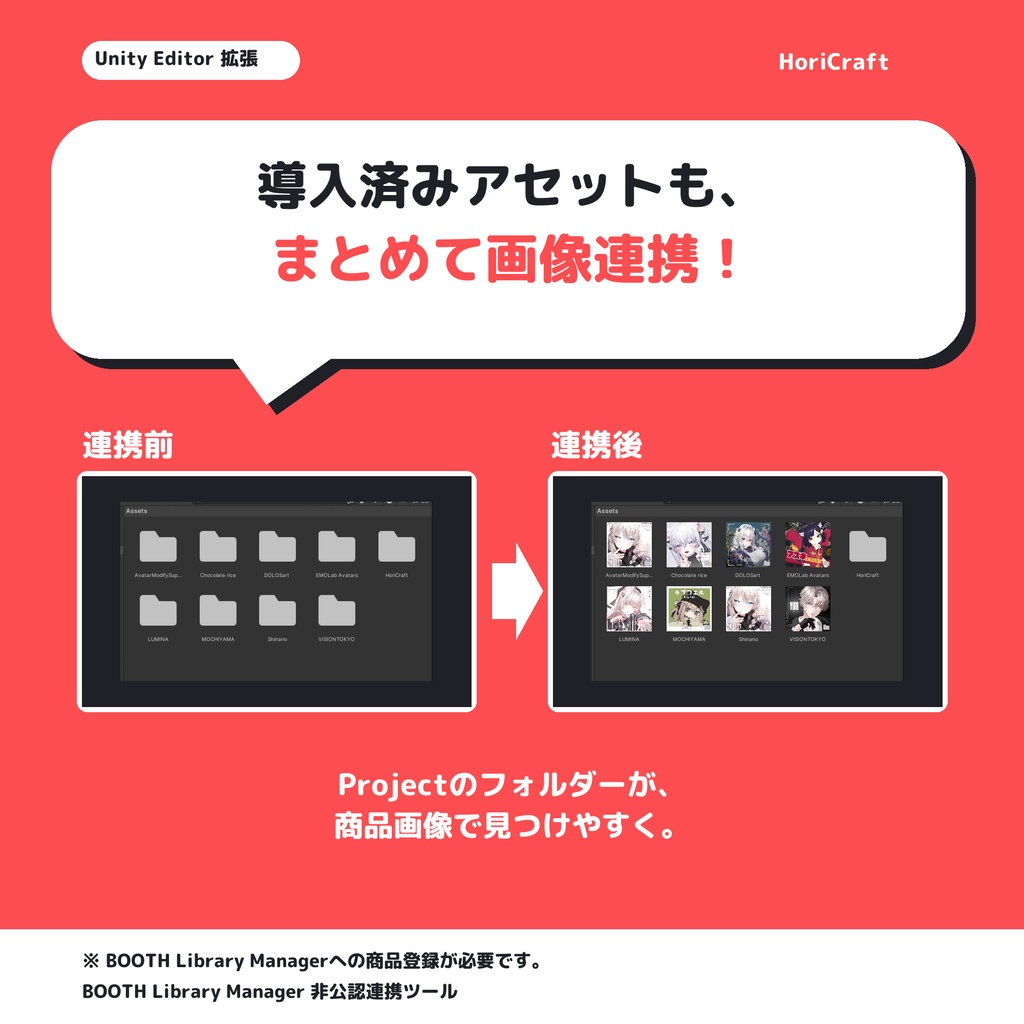


発売記念セール:500円→400円。2026年11月15日23:59(日本時間)まで。11月16日から500円。 ※BOOTH Library Manager 非公認連携ツールです。 BOOTHおよびBOOTH Library Managerの公式製品ではありません。 以下、BOOTH Library Managerを「BLM」と表記します。 BOOTH Library Manager(導入・ダウンロード) https://booth.pm/announcements/893 買ったアセットを、Unityの中で検索🔎 BLMに登録したBOOTH商品を、Unity内で画像を見ながら探せます。商品名・ショップ名・タグで検索でき、カテゴリや年齢制限でも絞り込めます。 紐づけたUnity内のアセット、エクスプローラーの保存先、BOOTHの商品ページも開けます。 あなたのUnityのアセット管理を、もっと便利に! 探した商品の保存先を開き、BLMで設定した標準保存先にある.unitypackageをUnity標準の方法でインポート。 取り込み後に商品を照合し、どの商品か特定できれば、商品情報と自動連携します。Project欄では、紐づいたフォルダーに商品画像のサムネイルを表示。自動で決められない場合は、候補から選べます。 ※探す対象はBLMに登録済みの商品のみです。 ※BOOTHで購入しても、BLMに登録していなければ探せません。 ※BLMに登録していれば、Unityプロジェクトへの導入の有無にかかわらず、アセットノート内で検索できます。 【もう導入済みのAssetsにも】 導入済みAssetsも、ワンボタンで保存済み.unitypackageと照合し、条件を満たすものを自動連携します。判断できないものは「要確認」として表示します。フォルダーの手動登録も可能です。 【表示画像を、自分の分かりやすい1枚に】 商品ごとに、自分で撮ったPNG/JPEGなどを表示画像に設定できます。一覧・商品詳細・Projectのフォルダー表示に反映され、標準画像にも戻せます。 差し替えはUnityプロジェクトごとの設定です。BOOTH Library Managerの商品情報や元の商品画像を上書きしません。 【購入内容・導入方法】 全機能込み(通常500円)。無料版・体験版はありません。 購入ZIPには、導入案内と解除キーをまとめたSTART_HERE.html、利用規約.txtの2ファイルが入っています。本体はVPMから取得します。 1. ZIPを展開してSTART_HERE.htmlを開きます。 2. 案内に沿って、VCC/ALCOMから本体をUnityプロジェクトへ導入します。 3. HTMLの「解除キーをコピー」を押し、Unityの「HoriCraft」メニューから本ツールを開き、「解除キーを貼り付け」を選びます。 有効化情報は同じPC・同じOSユーザーのUnityプロジェクトで共有されます。別PCでは解除キーを再入力してください。 【購入前に確認してください】 Windows向けのUnity Editor拡張です。確認環境はUnity 2022.3.22f1です。Unity 6・別PCでの動作は未確認です。 BOOTH Library Managerの管理データ(data.db)と商品のダウンロード保存先が必要です。BOOTHの商品画像を取得する際はインターネット接続を使います。 元の.unitypackageが保存先にない場合や、取り込む項目を変更した場合、パッケージを読み取れない場合などは、自動照合できないことがあります。照合するデータ量によっては時間がかかります。 BOOTH Library Managerのスマートリストの読み取りと、同アプリのタグ編集には対応していません。Unity内だけで使うタグは追加できます。 紐づけた商品の画像はAssets内にも保存されます。自分で設定した表示画像はプロジェクト内のローカル設定として保存され、既存のAssets画像を置き換えません。 【権利と連携】 BOOTH Library Manager本体、商品ファイル、商品画像、管理データは本商品に含まれません。商品画像や購入アセットには各権利者の利用条件が適用されます。画像を含むUnityプロジェクトを共有・配布する場合も、その条件を確認してください。 購入前に利用規約(1.0.0版・日本語原文)をご確認ください。ZIPにも同梱します。 https://horicraft.github.io/asset-notebook-vpm/terms/1.0.0.html ━━━━━━━━━━━━━━━━ English ━━━━━━━━━━━━━━━━ Launch sale: ¥400 until November 15, 2026, 23:59 JST; ¥500 from November 16. Asset Notebook by HoriCraft is an unofficial integration for BOOTH Library Manager. It is not an official product of BOOTH or BOOTH Library Manager. BOOTH Library Manager is referred to as “BLM” below. BOOTH Library Manager — Setup & download https://booth.pm/announcements/893 Search for assets you have bought, inside Unity 🔎 Browse pictures of BOOTH products registered in BLM inside Unity, even before importing them. Search by product name, shop or tag; filter by category and age rating. Open a product’s download folder and import its .unitypackage from BLM’s standard save location using Unity’s standard workflow. After import, the tool matches the assets to a product. When the product can be identified, its information is linked automatically, and product thumbnails appear on linked folders in the Project window. If a match cannot be confirmed automatically, choose from the candidates. Open linked assets in Unity, saved download folders in File Explorer, or a product’s BOOTH page. From finding products to opening what you need—make Unity asset management easier! [Already imported your assets?] One click matches existing Assets to saved .unitypackage files and links matches that pass the checks. Unconfirmed items need review. Manual folder linking is available. [Use an image that works for you] Choose your own PNG/JPEG for each product, such as a picture you took yourself. It appears in the product list, product details and Project folder display. You can restore the standard image at any time. Custom display images are set per Unity project. They do not overwrite BOOTH Library Manager’s product data or the original product images. [Purchase contents and installation] All features included (regular price ¥500). No free edition or trial. Your purchase ZIP contains two files: START_HERE.html (installation guide and unlock key) and 利用規約.txt (Terms of Use). The Unity package itself is obtained through VPM. START_HERE.html includes Japanese and English instructions and a reference English translation of the terms; 利用規約.txt contains the original Japanese terms. 1. Extract the ZIP and open START_HERE.html. 2. Follow the guide to install the package in your Unity project through VCC / ALCOM. 3. Select “Copy unlock key” in the HTML. In Unity, open the tool from the HoriCraft menu and select “Paste unlock key”. Activation is shared across Unity projects on the same PC under the same OS user account. Enter your unlock key again on another PC. [Before you buy] This is a Unity Editor extension for Windows. Checks have been performed with Unity 2022.3.22f1. Unity 6 and operation on another PC have not yet been verified. You need BOOTH Library Manager’s catalog database (data.db) and the directory where your product downloads are saved. An internet connection is used to fetch BOOTH product images. Automatic matching may not be possible if the original .unitypackage is missing from the saved download location, you changed the items selected during import, or a package cannot be read. Matching may take time depending on the amount of data. Reading BOOTH Library Manager’s smart lists and editing its tags are not supported. You can add separate tags for use in Unity. Images for linked products are also saved inside Assets. Your custom display images are stored in the project’s local settings and do not replace existing image files in Assets. [Rights and integration] BOOTH Library Manager itself, product files, product images and catalog data are not included with this product. Product images and purchased assets remain subject to their respective rights holders’ terms. Check those terms before sharing or distributing a Unity project that contains such images or assets. Read the Terms of Use before purchase (v1.0.0, Japanese original). https://horicraft.github.io/asset-notebook-vpm/terms/1.0.0.html
動作環境 / Requirements
Windows向けのUnity Editor拡張です。確認環境はUnity 2022.3.22f1。Unity 6・別PCでの動作は未確認です。BOOTH Library Managerの管理データ(data.db)と商品保存先、VCC/ALCOMによるVPM導入が必要です。BOOTH商品画像の取得にはインターネット接続を使います。 Unity Editor extension for Windows. Checks have been performed with Unity 2022.3.22f1; Unity 6 and another PC have not yet been verified. Requires BOOTH Library Manager’s data.db, saved product downloads, and installation through VCC / ALCOM. Fetching BOOTH product images uses an internet connection.