
【VRChat向け】Bed With Curtain|ワールドに置けるカーテン付きベッド【VRCFury対応】
- ダウンロード商品¥ 800
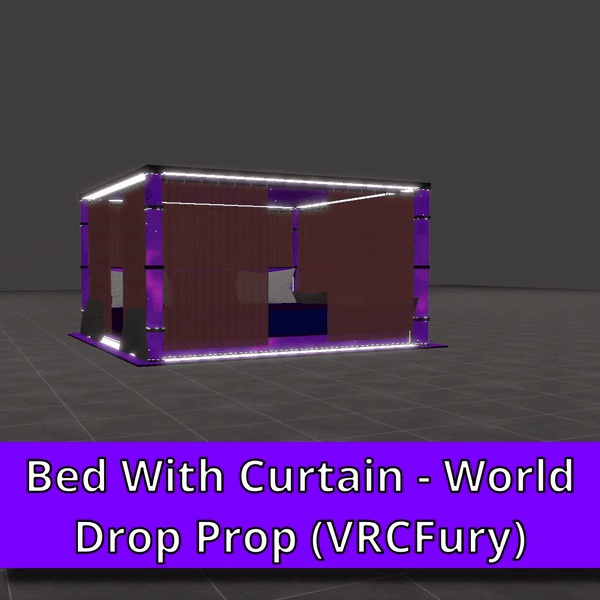
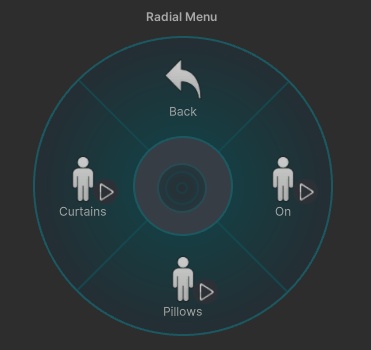


カーテンと枕が付いた、くつろぎ空間にぴったりの天蓋付きベッドです。きらめく星と星雲が広がる、オリジナルの夜空アニメーションも楽しめます。 VRCFuryの「World Drop」に対応。VRChat内で好きな場所にベッドを置くことができ、アバターが移動してもベッドは設置した場所に残ります。フレンドとのんびり過ごすときや、写真撮影、ロールプレイにもおすすめです。 セットアップは、設定済みのPrefabをアバターに追加するだけ。VRChat内ではExpressions Menuからベッドの設置・撤去や、枕とカーテンの表示切り替えができます。 ■ 特徴 - World Drop対応 — ベッドをワールド内の好きな場所に設置できます。 - カーテン付きの天蓋ベッド — カーテンの表示を切り替えて、開放感のある見た目と、カーテンに囲まれた落ち着いた雰囲気を楽しめます。 - 枕の表示切り替え — 枕の表示・非表示を自由に切り替えられます。 - オリジナルの夜空シェーダー — プロシージャルな星雲ときらめく星をシェーダーで表現。AnimationClipは不要です。 - VRCFury設定済み — Prefabをアバターに追加して導入できます。 - 個人利用・商用利用OK ■ 操作方法(Expressions Menu) BedWithCurtain メニューから操作できます。 - On — ベッドをその場に設置します。オフにするとベッドが消えます。 - Pillows — 枕の表示・非表示を切り替えます。初期設定はオンです。 - Curtains — カーテンの表示・非表示を切り替えます。初期設定はオンです。 まず On をオンにしてベッドを設置し、お好みで枕やカーテンの表示を切り替えてください。 ■ 導入方法 1. VRChat用のUnityプロジェクトに本商品をインポートします。 2. BedWithCurtain.prefab をアバターのルート直下にドラッグ&ドロップします。 3. VRCFuryを導入した状態で、アバターをビルドしてアップロードします。 4. VRChat内で BedWithCurtain → On を選ぶと、その場にベッドを設置できます。 アバターのボーンに紐付ける必要はありません。 ■ 同梱内容 - BedWithCurtain.prefab(設定済み) - FBXメッシュ - マテリアル・カーペット用テクスチャ - オリジナル夜空シェーダー(BedWithCurtain/Sky) - ReadMe.txt、`License.txt` ■ 必要環境 - Unity - VRChat SDK(Avatars) - VRCFury - Humanoidアバター(Expressions Menuのアップロードに必要) ■ 利用規約 - 個人利用・商用利用が可能です。 - VRChatへのアップロード、コミッション(有償依頼)での使用、本商品を組み込んだアバターの販売が可能です。 - 改変が可能です。 - 詳細は同梱の License.txt をご確認ください。 ------------ English ----------- Placeable bed with curtains, pillows & animated night sky — VRCFury. A cozy curtained bed you can place anywhere — World Drop ready. VRChat placeable canopy bed with curtains, pillows, and a custom animated night-sky material. VRCFury World Drop — place it anywhere. Toggle On, Pillows, and Curtains. Personal + commercial license. Bed With Curtain — VRChat Placeable Prop Bring a cozy curtained bed into any VRChat world. This is a World Drop prop: turn it on, place it where you want, and walk away — perfect for hangouts, photos, RP, and chill worlds. Built with VRCFury so setup is simple: drag onto your avatar, build, and control everything from the Expressions Menu. Features - Place anywhere — VRCFury World Drop (not stuck to your avatar) - Curtained canopy bed — soft, cozy look with openable curtain style - Toggleable pillows — show or hide for different looks - Toggleable curtains — show or hide for open / closed vibe - Custom animated night sky — procedural nebula + twinkling stars (no AnimationClip needed) - Plug & play — VRCFury ready - Personal + commercial license Controls (Expressions Menu) BedWithCurtain/ - On — Toggle Spawn / despawn the bed + World Drop - Pillows — Toggle Show / hide pillows _(default ON)_ - Curtains — Toggle Show / hide curtains _(default ON)_ Turn On first, then adjust the pillows and curtains as you like. Setup 1. Import into your Unity VRChat project 2. Drag BedWithCurtain.prefab under your avatar root 3. Build with VRCFury and upload 4. In VRChat: `BedWithCurtain/On` to place the bed No bone linking required — this is a world-placeable prop. Included - `BedWithCurtain.prefab` (fully configured) - FBX mesh - Materials & carpet textures - Custom Sky shader (`BedWithCurtain/Sky`) - ReadMe.txt + License.txt Requirements - Unity + VRChat SDK (Avatars) - VRCFury - Humanoid avatar (to upload the menu)
