
HQStream Bridge lite
- Digital0 JPY
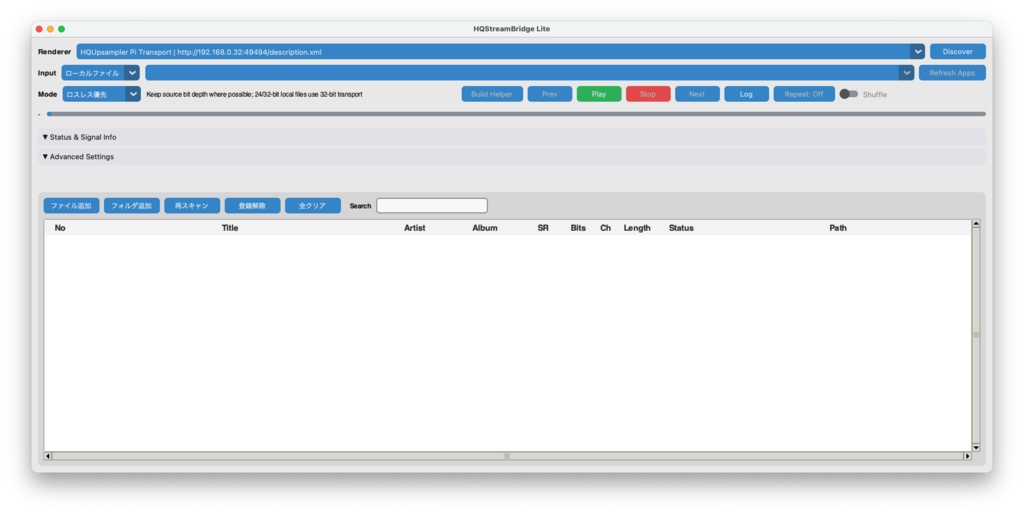

【macOS専用】HQStreamBridge Lite 「引き算」で丁寧に作った、条件が合う経路で Bit-Perfect を目指すオーディオプレーヤー&ストリーマー Macの音楽を、できるだけ余計な処理を加えずに USB DAC やネットワークプレーヤーへ届けたくて作ったアプリです。 標準では EQ もアップサンプリングも使いません。音に何かを足すより、経路から不要な処理を引いていく。そんな考え方で、ローカルファイル再生・Local USB 出力・UPnP/DLNA ストリーミングをまとめました。 Bit-Perfect は、対応フォーマット・出力経路・設定が条件を満たす場合の表示/動作です。すべての DAC・ネットワーク機器・Capture・DSP 設定で保証するものではありません。今どの経路で鳴っているかは、アプリの Signal Path と USB Format で確認できます。 やっていることは「引き算」から 1. 標準では DSP をかけません ローカルファイル再生では WAV / FLAC / AIFF の PCM を扱い、標準の再生経路で自動アップサンプリングは行いません。通常の EQ もありません。 一方、Advanced Settings には XTC / Binaural / Convolution EQ という任意機能があります。これらを有効にした再生は DSP を通るため Not bit-perfect です。音作りの機能は、必要なときだけ明示的に選べるようにしています。 2. 仮想オーディオデバイスを追加しません システム音声やアプリ単位の音は、macOS 標準の Core Audio Tap で取り込みます。ローカルファイル再生なら、Capture を通さずに出力できます。 Capture は便利な経路ですが、入力は float32 です。Mac 側ですでにミックスされたサンプルレートで取り込まれる場合もあるため、ローカルファイルの Bit-Perfect 再生とは別用途として考えてください。Capture した音は、USB DAC へ直接出すことも、DLNA へ送ることもできます。 3. 再生中の作業を控えめにします Memory Play … 曲を事前に RAM へ読み込み、再生中のデコード/I/O 負荷を減らします Pure Playback … 再生中は探索・ライブラリ反映・通常ログ表示などを抑え、終了後に反映します Next Preload … 次の曲を先読みします subprocess Engine … 再生エンジンを GUI と分けて動かす選択肢です これらは再生動作を整えるための機能であり、音質向上や無音化を保証するものではありません。 4. USB DAC は排他取得を試みます Local USB では、USB Hog Mode を ON にすると DAC の排他取得を試み、他アプリとの競合を避けます。取得の成否や実際の client/physical format は、再生中に USB Format で確認できます。 通常推奨の soundcard 経路と、実験的な native_coreaudio / auto 経路は、いずれも float32 client です。 16bit・24bit 整数 PCM は float32 で正確に表現できますが、32bit 整数 PCM は全 bit 完全保持とは表現しません。また、16bit・24bit PCM 値を正確に表現できる場合でも、soundcard / native いずれの Local USB 経路も、Signal Path では Bit-perfect と表示しません。 native_coreaudio は比較・検証用の experimental 機能です。通常は soundcard をおすすめします。 Local USB では、Next / Prev / Seek / 自然な曲送りの際に出力エンジンを開き直します。そのため、曲切替時に短い無音が入ることがあります。 ネットワーク送信も、できるだけ単純に UPnP/DLNA 対応のネットワークプレーヤーには PCM(WAV)を送ります。 ローカルファイルの整数 PCM 経路で、対応フォーマット・出力設定・renderer 側の条件が満たされるときに Bit-Perfect として扱います。renderer 側での処理までを、本アプリだけで保証するものではありません。 送信方式や pacing は Advanced Settings で調整できます。 Measure Profile は、お手持ちの短い曲を使ってネットワーク送信条件を実再生で測定し、renderer ごとの設定候補を保存する機能です。測定結果や設定による音質・安定性は、機器やネットワーク環境によって異なります。Local USB 再生には使いません。 毎日使いやすくするための機能 起動時はローカル出力を先に表示し、macOS のデフォルト出力を初期選択。ネットワーク機器は見つかり次第追加 WAV / FLAC / AIFF をファイルまたはフォルダでプレイリストへ登録(安全な条件でサブフォルダの再帰登録にも対応) Repeat / Shuffle は次回起動後も復元(Shuffle の作成済み順序と Prev 履歴は保存しません) 手動 Stop、または再生中に終了した曲は、条件を満たす場合に次回の最初の Play で停止位置から再開(自動再生はしません) 再生位置の表示と、クリックによる Seek に対応 Advanced Settings の選択値は保存。renderer や USB DAC に応じた実効値は Effective Settings で確認可能 再生中にライブラリのスキャンが完了しても、曲一覧の再構築は再生終了まで待機(現在曲・Shuffle 順・Prev 履歴を崩さないため) 使い方の目安 ローカルファイル再生(おすすめ) WAV / FLAC / AIFF をプレイリストで管理し、USB DAC またはネットワークプレーヤーへ出力します。標準 DSP を通さない経路を使いたいときはこちらです。 Capture → USB / DLNA Mac で鳴っている音を、アプリ単位またはシステム全体で取り込み、USB DAC へ直接出力したり DLNA へ送ったりできます。配信サービスやブラウザの音を扱う用途に向いています。 注意点(大事です) アプリには音量調整機能がありません。再生前に DAC またはアンプの音量を下げ、音量はハードウェア側で調整してください Capture を初めて使う際は、「画面収録とシステムオーディオ録音」(macOS により「画面収録」)の許可を求めます。これは音声取り込みのためであり、画面を録画する機能ではありません。macOS 更新後に Capture が使えなくなった場合は、設定から許可を確認してください ネットワーク機器を探索する際は、別途「ローカルネットワーク」の許可を求めます 取り込んだ音声の利用は、各コンテンツの利用条件の範囲でお願いします Local USB と DLNA は、機器・ネットワークとの組み合わせを広く試している途中です。長時間の連続切替を含む全機器での動作確認は完了していません。まずは短い再生で、お使いの環境との相性をご確認ください 動作環境 macOS 14.2(Sonoma)以降 Apple Silicon Mac 配布の .app だけで動作します。ドライバや仮想オーディオデバイスの追加インストールは不要です。 価格 無料 伝送経路を考えながら作っている実験的なアプリです。 「この DAC ではこうだった」「ここが使いにくい」といった感想が、次の改善の材料になります。 無料で公開していますので、まずはローカルファイル再生から気軽に試してみてください。