

Folder Icon Plugin - Unity Editor Extension|フォルダーアイコン管理ツール
- Digital200 JPY
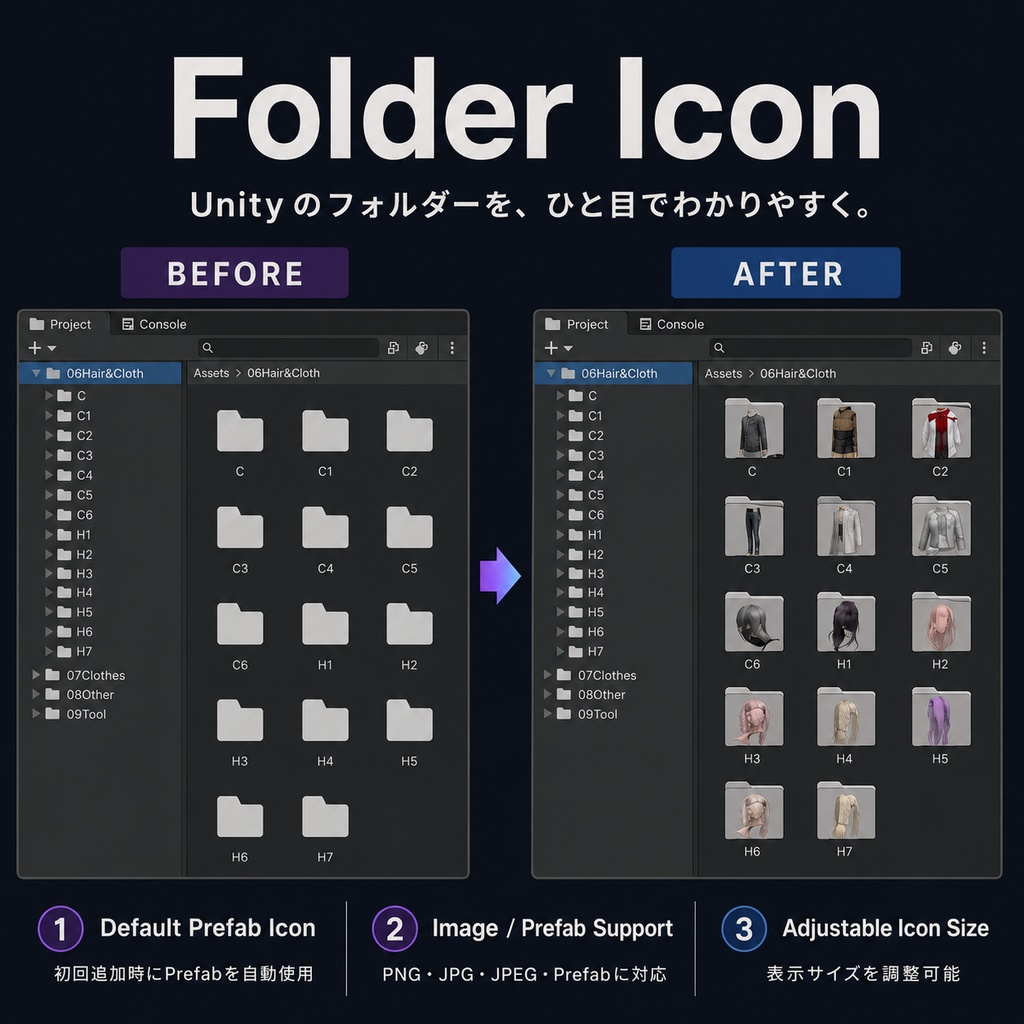

【商品説明】 Unityプロジェクトの内容が増えると、Projectウィンドウ内のフォルダーも多くなります。 モデル、衣装、髪型、マテリアル、テクスチャなどを標準のフォルダーアイコンだけで管理していると、名前だけでは内容を判断しにくく、毎回フォルダーを開いて確認する必要があります。 Folder Icon Pluginは、UnityのProjectウィンドウ内にあるフォルダーへ、画像やPrefabのプレビューアイコンを設定できるエディター拡張です。 フォルダー内の内容をアイコンとして表示することで、フォルダーを開かなくても、衣装や髪型などをひと目で確認しやすくなります。 フォルダーを初めて追加した際は、フォルダー内にある最初のPrefabを自動的に読み込み、デフォルトアイコンとして設定します。 必要に応じて、別のPrefabやPNG・JPG・JPEG画像へ変更できます。 【主な機能】 ・Unityフォルダーにカスタムアイコンを設定 ・Prefabのプレビューをアイコンとして使用可能 ・初回追加時にフォルダー内の最初のPrefabを自動設定 ・PNG・JPG・JPEG画像に対応 ・画像やPrefabをいつでも変更可能 ・複数フォルダーをまとめて追加 ・右クリックメニューから複数フォルダーを追加 ・アイコン、文字、ボタン、行の高さをまとめて調整 ・リストをクリックして対象フォルダーを選択 ・ダブルクリックでフォルダーを開く ・日本語、英語、簡体字中国語、韓国語に対応 ・アイコン設定を削除しても、元のフォルダーやアセットは削除されません 【導入方法】 パッケージ内の「Assets/DaraToolBox」フォルダーを、Unityプロジェクトの「Assets」フォルダーへコピーしてください。 ツールはこちらから開けます。 Tools > Dara Tool Box > Add Icon 管理したいフォルダーをツールウィンドウへドラッグ&ドロップしてください。 Projectウィンドウ内で1つまたは複数のフォルダーを選択し、右クリックメニューから以下を選ぶことでも追加できます。 Add Folder Icon 初回追加時は、フォルダー内の最初のPrefabプレビューが自動的に設定されます。 その後、必要に応じて別のPrefabや画像へ変更できます。 【動作確認環境】 Unity 2022.3.22f1 Windows 上記環境で制作・動作確認を行っています。 その他のUnity 2022.3 LTSバージョンでも使用できる可能性がありますが、すべてのバージョンや環境での動作を保証するものではありません。 【バージョン】 Version 1.0.1 不具合やご要望がありましたら、BOOTHのメッセージからご連絡ください。 ご購入済みの方は、今後のアップデートを無料でご利用いただけます。
Folder Icon Plugin - Unity Editor Extension
【Product Description】 As a Unity project grows, the number of folders in the Project window usually increases as well. When models, outfits, hairstyles, materials, textures, and other assets all use Unity’s default folder icon, it can be difficult to identify their contents from folder names alone. You may need to open each folder repeatedly just to check what is inside. Folder Icon Plugin is a Unity Editor extension that allows you to assign images or Prefab previews to folders in the Project window. By displaying a representative preview directly on each folder, you can identify outfits, hairstyles, and other assets without opening the folder. When a folder is added for the first time, the tool automatically uses the first Prefab found inside the folder as the default icon. You can replace it later with another Prefab or a PNG, JPG, or JPEG image. 【Main Features】 ・Assign custom icons to Unity folders ・Use Prefab previews as folder icons ・Automatically use the first Prefab when a folder is added ・Supports PNG, JPG, and JPEG images ・Replace the image or Prefab at any time ・Add multiple folders at once ・Add multiple folders from the right-click menu ・Adjust icon size, text size, button size, and row height together ・Click an item to select the corresponding folder ・Double-click to open the folder ・Supports English, Japanese, Simplified Chinese, and Korean ・Removing an icon setting does not delete the original folder or assets 【Installation】 Copy the “Assets/DaraToolBox” folder from the package into your Unity project’s “Assets” folder. Open the tool from: Tools > Dara Tool Box > Add Icon Drag and drop the folders you want to manage into the tool window. You can also select one or more folders in the Project window, right-click, and choose: Add Folder Icon When a folder is added for the first time, the first Prefab preview found inside the folder is assigned automatically. You can replace it later with another Prefab or image. 【Tested Environment】 Unity 2022.3.22f1 Windows The tool was developed and tested in the environment listed above. It may also work with other Unity 2022.3 LTS versions, but compatibility with every version and environment is not guaranteed. 【Version】 Version 1.0.1 Please contact me through BOOTH messages if you find a bug or have a feature request. Customers who have already purchased the product will receive future updates for free.