

顔フィッター - 顔7種BlendShape(顔幅/顎/額/頬/鼻/顎長/耳)+5プリセット+帽子貫通対策【VRChat 顔カスタム】
- 日本語Digital700 JPY
- EnglishDigital700 JPY
- 한국어 / KoreanDigital700 JPY
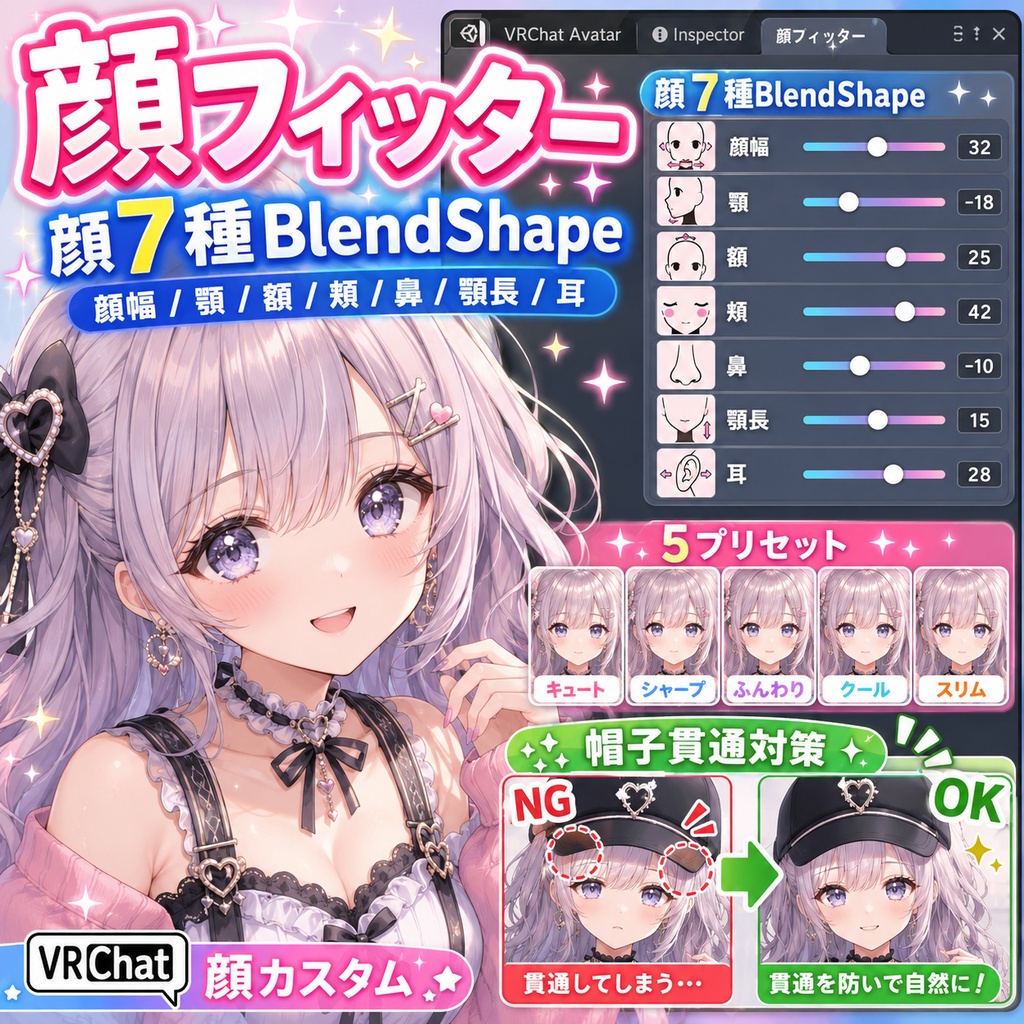
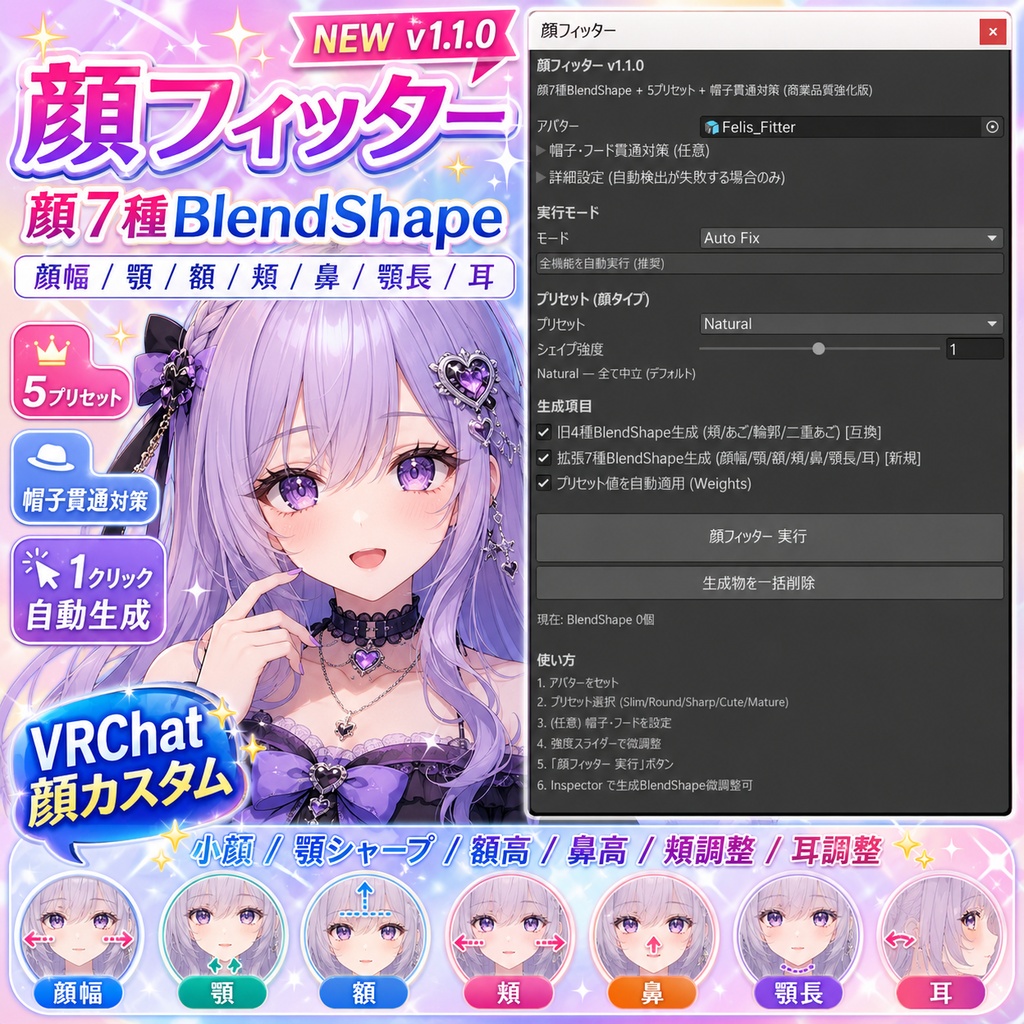


「顔をもう少しだけ小さくしたいけど、Blenderを開くほどじゃない」 「あごをちょっとシャープに、鼻をちょっと高く、耳もちょっと大きく」 「アバター付属のシェイプキーだけだと足りないけど、自分で作るのは無理」 「帽子をかぶると頭にめり込む」 そんな「もう一歩」の顔調整を、Unity上のスライダー操作だけで済ませるツールです。 ━━━ できること ━━━ 顔まわりの7か所、それぞれにシェイプキー(BlendShape)を自動で作ります。 作られたシェイプキーは、アバターの Inspector からいつでも 0~100 で調整できます。 ・顔の幅 (細顔 ⇔ 丸顔) ・あごの鋭さ (シャープ ⇔ 丸み) ・額の高さ ・頬のふくらみ ・鼻の高さ ・あごの長さ ・耳の大きさ つまり「シェイプキーが足りない素体・アバター」に、後から好きな 顔調整スライダーを足せるイメージです。 ━━━ 5つのプリセット ━━━ ゼロからスライダーを動かすのは大変なので、よくある顔タイプを プリセットで用意しています。クリック1回で適用、あとはお好みで微調整。 Slim …… 細顔・シャープあご Round …… 丸顔・頬ふっくら・顔幅広め Sharp …… シャープあご・鼻高・引き締まった印象 Cute …… 童顔・あご短め・額高め・頬丸 Mature …… 大人っぽい・あご鋭い・鼻高い 「Slimの顔幅だけ50%にする」 「Cuteベースで耳だけ少し大きく」 みたいなミックスも自由です。 ━━━ 帽子・フード・メガネがめり込む問題も解決 ━━━ 顔シェイプキーで顔を整えたあとに気づきがちなのが、 被り物がアバターの頭にめり込む問題です。 帽子側に「PG_FaceBoundsExpand」 という外向きシェイプキーを自動で生成して、 頭サイズに合わせて少し外に押し出します。被り物のメッシュをドラッグして オプション欄に渡すだけです。 ━━━ どう使うか ━━━ 1. メニュー: Tools → HatoTools → 顔フィッター 2. アバターをドラッグ (帽子があればここで一緒に) 3. プリセットを選んで「適用」 ボタン これだけです。Blenderは開きません。Photoshopも要りません。 ━━━ 仕組みの話 (興味があれば) ━━━ おしりフィッターで採用した解剖学的アプローチを顔に適用しています。 Headボーンを基準にした局所座標で「顔幅は耳の手前まで」「額は眉から上」 「あご先はジョーから下」 のように領域を分けて、各領域内の頂点を ボーンウェイト × 楕円体距離 × 法線方向 の3つでフィルタしています。 なので「鼻のシェイプキーを動かしたら唇まで動いた」 みたいな 領域はみ出しは起こりにくくなっています(完全ではありませんが)。 ━━━ 正直な限界 ━━━ プロシージャル生成なので、3Dモデラーさんが時間をかけて手作りした シェイプキーの完成度には及びません。変位は 5~15mm 帯が目安です。 「顔を別人にする」 ような大改造には向いていません。 逆に「顔の輪郭をあと10%だけシャープに」 「鼻をほんの少し高く」 のような細かい調整は得意分野です。 ━━━ こんな方に ━━━ ・アバター付属の顔BlendShapeでは物足りない ・撮影前に顔のバランスをもう少し整えたい ・童顔キャラ / 大人顔キャラ など方向性を強めたい ・帽子やフードが頭にめり込んで困っている ・Blenderを開かずに顔を調整したい ━━━ 動作環境 ━━━ ・Unity 2022.3 以降 ・VRChat SDK3 Avatar 推奨 (なくても動作します) ・Humanoid Animator 推奨 (なくても名称ベースで Head を検出) ・Undo (Ctrl+Z) 完全対応 ━━━ 注意 ━━━ ・既存のアバター顔BlendShape (Cheek_Fat 等) は上書きせず、 HatoFace_* というプレフィックスで新規追加します ・元メッシュは触らず、Assets/HatoToolsGenerated/FaceFitter/ 配下に 複製メッシュを置いて差し替える非破壊方式です ・v1.0 ご購入の方は無料アップデート対象です ・デジタルデータの性質上、返品はお受けできません ━━━ シリーズについて ━━━ 「フィッター」 シリーズは部位ごとに作っていて、これで顔まで揃いました。 胸/おしり/太もも/ふくらはぎ/二の腕/上半身/ウエスト/お腹/くつ/脇/顔 で 全11部位。気になる部位があれば BOOTH の HatoTools ショップから 覗いてみてください。 それでは、よい顔調整を! "I want my face just a tiny bit smaller — but not enough to open Blender." "Sharper jaw, a bit taller nose, slightly bigger ears." "My avatar's built-in face BlendShapes aren't enough, but I can't sculpt my own." "My hat clips into the head." That kind of "one more nudge" face tweaking, done with sliders in Unity. ━━━ What it does ━━━ It auto-generates BlendShapes for 7 face regions. Once generated, you control each one with a 0~100 slider in the Inspector. ・Face width (slim / round) ・Jaw sharpness ・Forehead height ・Cheek volume ・Nose height ・Chin length ・Ear size In other words, it gives any avatar a complete set of face-shaping sliders — even ones whose base mesh ships with very few face BlendShapes. ━━━ 5 presets ━━━ Starting from zero sliders is tedious, so common face types are pre-built. One click to apply, then fine-tune to taste. Slim …… narrow face, sharper jaw Round …… rounder face, fuller cheeks, wider Sharp …… sharp jaw, taller nose, tight contour Cute …… babyface — short chin, tall forehead, round cheeks Mature …… grown-up — sharp jaw, taller nose, tight contour Mix and match freely (e.g. "Cute base, but bigger ears"). ━━━ Hats / hoods / glasses no longer clip ━━━ After re-shaping the face, accessories often clip into the head. The tool generates a "PG_FaceBoundsExpand" BlendShape on the accessory that pushes its mesh slightly outward along the face normal. Just drop the hat/hood/glasses mesh into the optional slot. ━━━ How to use ━━━ 1. Menu: Tools → HatoTools → 顔フィッター 2. Drop avatar (and optional hat) 3. Pick a preset → click "Apply" No Blender. No Photoshop. ━━━ About the math (if you're curious) ━━━ Uses the same anatomical approach as HipFitter v1.05 — Head-bone local space, per-region ellipsoid centers/radii (forehead, nose, chin, ears each tuned separately), filtered by bone weight × ellipsoid distance × normal direction. This keeps "nose shape leaking into lips" type bleed-over to a minimum (not zero, but pretty controlled). ━━━ Honest limits ━━━ It is procedural. It will not reach the quality of a BlendShape hand-sculpted by a 3D modeler. Typical displacement is 5~15 mm. Great for small adjustments (10% sharper contour, slightly taller nose). Not great for "turn into a different person." ━━━ Who is it for ━━━ ・Avatars whose default face BlendShapes are not enough ・Photo prep — last-minute face balance touch-ups ・Pushing toward a babyface / mature-face direction ・Anyone with hat/hood clipping issues ・Anyone who would rather not touch Blender ━━━ Environment ━━━ ・Unity 2022.3 or later ・VRChat SDK3 Avatar (recommended, but works without) ・Humanoid Animator recommended (falls back to name detection) ・Full Undo support (Ctrl+Z) ━━━ Notes ━━━ ・Existing face BlendShapes (Cheek_Fat etc.) are kept intact. Generated shapes are added under the HatoFace_* prefix. ・The source mesh is never modified. A clone is placed under Assets/HatoToolsGenerated/FaceFitter/ and swapped in. ・Free update for v1.0 buyers. ・Digital goods — no refunds, sorry. ━━━ About the series ━━━ The "Fitter" series builds out body-shape sliders one body part at a time. With Face, the set is now complete for 11 parts: chest / hip / thigh / calf / upper arm / upper body / waist / belly / shoe / armpit / face. If you find yourself wanting more parts, please peek at the HatoTools shop on BOOTH. Happy face-shaping!