

[無料]感想戦もできる 多機能チェスギミック - Multifunctional Chess Gimmick for VRC
- 通常版Digital0 JPY
- きのこの山代 (スキン切り替え可能!)Digital300 JPY
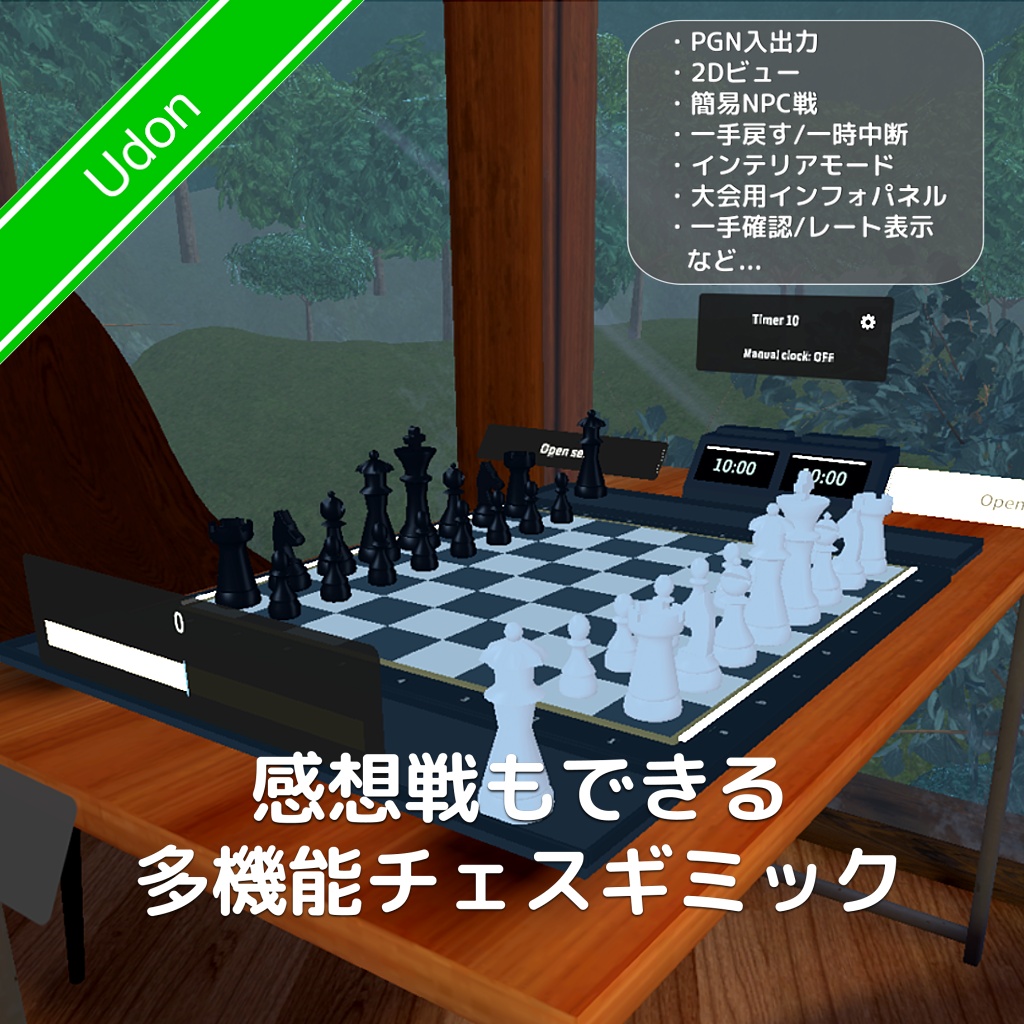


English explanation follows the Japanese text. VRCワールド用の多機能なチェスギミックです。 対局だけでなく、振り返り機能、棋譜出力、2Dビューパネル、 一手戻す申請から簡易NPC対戦など、様々な機能を搭載しています! また、イベントなどでも使えるように、複製するだけでボードを増やせるようになっており、 イベント用パネルに各テーブルの対局履歴などを表示することができます。 チェスプレイヤーの私自身としても(まだまだ駆け出しですが)、 痒い所に手が届く機能を実装しています! ■2026.11.22 Ver1.20アップデート! 大会パネルに現在進行している対局の大型2Dビューを表示できるようにしました。 また、2Dビューの終局時の表示を分かりやすくしました。
導入手順
0. VRChat SDK - Base 3.10.0以上、+ lilToonが必要です。 1. 同梱のUnityPackageをインポートします。 2. Assets/MidnaUdon/Udon/MUChess/ を開き、用途に合うPrefabをシーンに配置します。 1卓だけ置く場合 無料版 MUChess.prefab Premium版 MUChess_Premium.prefab 複数卓をまとめて置く場合(8卓+大会リザルト) 無料版 MUChess_Tournament.prefab Premium版 MUChess_Tournament_Premium.prefab ※位置調整はGimmickの中の各盤とイベント用パネルの位置を調整してください 台数を増やしたい場合は、Gimmickの中のオブジェクトを複製するだけでOKです
使い方
※まずはじめに クロックの「側面」の歯車ボタンから、オプションが開けます Settingsから日本語/英語切り替えができます ■対局前 1.白/黒の正面にある参加ボタンから参加します 2.クロックの上の歯車ボタンから持ち時間を設定できます 3.両方が参加すると、中央に対局開始ボタンが表示されます ■対局中 4.動かしたい駒を手で掴んで配置できます (デスクトップでは駒を一度選択→置きたい場所を選択で移動) 5.対局後は感想戦に移行します 6.終了することで席を空けられます
主な機能
・対人対局とチェスクロック VR / デスクトップどちらでも対局できます。 持ち時間は加算あり・時間無制限を含む13種類。 着手後に自動で切り替える方式と、自分でクロックを押す方式を選べます。 ・対局中の打診 相手の承認で、直前の一手を戻す、対局を一時停止する、引き分けにすることができます。 ・感想戦 終局後は、開始局面から棋譜を振り返ることができます。 駒は自由に動かせるので、気になった局面で別の手やその先の展開を試せます。 対応する局面ではオープニング名も表示します。 PGNのエクスポートも可能。 ・棋譜の入出力と局面指定 対局をPGNで出力できます。手持ちのPGNを読み込んで振り返ったり、 FENで開始局面を指定したりすることもできます。 ・2Dビュー 自由に移動できるパネルで、拡大・縮小や白黒の位置反転ができます。 2Dビューからの着手にも対応! ローカル表示で過去の手を遡って確認もできます。 ・簡易NPC戦 白・黒の好きな色を選んで、ひとりでも対局できます。(弱い) ・自由配置とインテリア 気に入った局面を保存することで、次回ワールドジョイン時にもその盤面が再現された状態になります。 インテリアとして飾りたい場合におススメ! ・大会・イベント用Prefab 8卓と大会リザルトをまとめて設置でき、卓も複製するだけで使用できる状態になります。 同じインスタンス内で、進行中の対局と各卓の直近16局を確認できます。 終局した対局の棋譜は、一覧からPGNで表示できます。 ・プレイ設定とスキン 日本語/英語、SE音量、着手確認、自動クイーン昇格を設定できます。(ローカル) Chess.com/Lichessの自己申告のレートも表示できます。 戻し・ポーズの有効/無効を設定できます。 手動クロックの有効/無効を設定できます。 Premium版では、Classic/Wood/Marbleのスキンを選べます。(ローカル) ・その他 ユーザーがワールドから落ちても、持ち時間内に戻ってくれば再開することができます ユーザーは5分無操作が続くと警告ポップアップが表示されます、放置で退席扱いになります
ヘルプ
・Unity上で日本語が■で文字化けする →容量を削減するため、EmptyFontを使用しています。 Unityでフォールバックフォントを設定していない場合、Editor上では表示されませんのでご注意ください ※ワールドをアップロードすればVRChat上では正常に表示されます ※「VRChat SDK - Base」と「VRChat SDK - Worlds」は3.10.0以上が必要です。 ※「Quest単騎」でも動くとユーザーさんから報告を受けていますが、 私の方では動作テストはしていないので、ご了承ください。
更新履歴
2026/11/09:Ver1.00リリース! 2026/11/10:Ver1.01 - 特定条件でリザインの長押しが途切れてしまう問題を修正 - 感想戦で駒を手動で動かした際、移動アニメーションやSEが再生されない問題を修正 2026/11/14:Ver1.10 - 持ち時間を白と黒で非対称に設定できる機能を追加しました - NPC戦の難易度を追加しました - 取った駒の置く位置が不自然だったのを修正しました - 感想戦の棋譜表示を短くしてコンパクトにしました - 着手時の同期を最適化し負荷を軽減しました 2026/11/14:Ver1.11 - プレイヤーの手前に出るパネルの高さを上げました(テーブルにめり込まないように) - 2Dビューにて、ローカル表示で手を巻き戻していた際、プレイヤーが着手するとリセットする挙動を廃止しました - 代わりにリロードボタンを用意し、最新の手に戻れるようにしました - プレイヤー自身の2Dビューは今まで通り指されたら最新になります - Unity上でInspectorから初期言語/スキンを変更できるようにしました (スキンはPremium版のみ) - 一部テクスチャの解像度がCrunchできない解像度だったのを修正 2026/11/22:Ver1.20 - 2Dビューの終局時の演出を追加 - 2Dビューのプレイヤー名の位置を変更 - 大会パネルに新たに対局中の表示を切り替えて見れる大型2Dビューパネルを追加 - 評価値バーの向きが誤っていたのを修正
ライセンス
・以下のシェーダーを使用しています。 lilLab 【無料】lilToon https://booth.pm/ja/items/3087170 ・以下のフォントが含まれています。 Noto Sans JP Regular(SIL Open Font License 1.1) Copyright 2014-2021 Adobe, with Reserved Font Name 'Source' https://fonts.google.com/noto/specimen/Noto+Sans+JP ライセンス原文:License/OFL.txt ・以下の開局データを使用しています。 Lichess chess-openings(CC0 1.0 Universal) https://github.com/lichess-org/chess-openings ライセンス原文:License/CC0.txt 出典・使用版:License/chess-openings-SOURCE.txt ・駒の配置音・駒取り音・チェック音はAdobe Fireflyで生成しています。 https://www.adobe.com/products/firefly/features/sound-effect-generator.html
利用規約
改変:OK 本アセットを使用して制作・改変したPrefab等の無償配布:OK 本アセットを使用して制作・改変したPrefab等の有償販売・商用目的での二次配布:NG 本アセットそのもの、または内容をほぼそのまま再配布する行為:NG
EN
■MidnaUdonChess_Ver1.20 ●What kind of system is this? ------------------------------ This is a feature-rich chess system. Beyond just playing matches, it includes a game review function, move-list export, a 2D view panel, a "take-back" request feature, and even a basic NPC opponent mode! It is also designed for use in events; you can easily create additional boards simply by duplicating the prefab, and you can display match histories for individual tables on a dedicated event panel. As a chess player myself (albeit still a beginner!), I’ve implemented features that address the specific needs and "pain points" players often encounter! November 22, 2026 – Ver 1.20 Update! We have added the ability to display a large 2D view of ongoing matches on the tournament panel. Additionally, we have improved the clarity of the 2D view when a match concludes. ●Setup Instructions ------------------------------ 0. Requires VRChat SDK - Base 3.10.0 (or higher) and the "lilToon" shader. 1. Import the included UnityPackage. 2. Navigate to `Assets/MidnaUdon/Udon/MUChess/` and place the appropriate prefab into your scene. For a single board setup: Free Version: MUChess.prefab Premium Version: MUChess_Premium.prefab For a multi-board setup (8 boards + tournament results): Free Version: MUChess_Tournament.prefab Premium Version: MUChess_Tournament_Premium.prefab *Note: To adjust the position, please modify the coordinates of the individual boards and event panels located within the "Gimmick" object. If you wish to add more boards, simply duplicate the objects contained within "Gimmick." ● How to Use ------------------------------ *Getting Started You can access the options menu by clicking the gear icon on the "side" of the chess clock. Use the "Settings" menu to toggle between Japanese and English. ■ Before the Game 1. Join the game by clicking the "Join" button located in front of the White or Black side. 2. Set the time control (time limit) using the gear icon on top of the clock. 3. Once both players have joined, a "Start Game" button will appear in the center. ■ During the Game 4. Move pieces by grabbing them with your hand. (In Desktop mode: select a piece, then select the target square to move it.) 5. After the game concludes, the system transitions to a post-game analysis (review) phase. 6. You can vacate your seat by ending the session. ● Key Features ------------------------------ ・Player-vs-Player Matches and Chess Clock Supports both VR and Desktop modes. Includes 13 different time control settings, including increment-based and unlimited-time options. Choose between automatic clock switching after a move or manual clock operation. ・In-Game Requests With the opponent's approval, you can undo the last move, pause the game, or offer a draw. ・Post-Game Analysis (Review) After the game, you can review the moves from the starting position. Pieces can be moved freely, allowing you to explore alternative moves or future variations from any point in the game. Opening names are displayed for recognized positions. PGN export is supported. ・Game Record (PGN) I/O and Position Setup You can export game records in PGN format. You can load existing PGN files to review games, or specify a starting position using FEN notation. ・2D View A flexible, movable panel that supports zooming in/out and flipping the board (swapping White and Black). You can even make moves directly from the 2D view! It also allows you to scroll back through previous moves in the game. ・Basic NPC Match Play against an AI—choose to play as either White or Black. (Note: The AI is not very strong.) ・Custom Board Setup & Interior Decor Save your preferred board positions so they are restored the next time you join the world. Perfect for setting up a chess board as a decorative interior element! ・Tournament/Event Prefab Includes a setup for 8 chess tables and a tournament results display; tables can be easily duplicated for use. Within the same instance, you can view ongoing games as well as the 16 most recent games played at each table. PGN records for completed games can be accessed via a list. ・Gameplay Settings & Skins Configure language (Japanese/English), sound effect volume, move confirmation, and automatic pawn-to-queen promotion. (Settings are local to the user.) Display your self-reported Chess.com or Lichess ratings. Enable or disable the "undo" and "pause" functions. Enable or disable the manual chess clock. The Premium version offers a choice of board skins: Classic, Wood, or Marble. (Local setting.) ・Other Features If a user disconnects from the world, they can resume their game upon returning, provided they are still within their remaining time limit. A warning pop-up appears after 5 minutes of inactivity; if the user remains idle, they will be marked as having left the session. ● Help -------------------- ・Japanese characters appear as "■" (garbled text) in Unity. → To reduce file size, an "EmptyFont" is used. Please note that if a fallback font is not configured in Unity, text will not be visible within the Unity Editor. *Once the world is uploaded, it will display correctly in VRChat. *Requires "VRChat SDK - Base" and "VRChat SDK - Worlds" version 3.10.0 or higher. * Please note that while some users have reported that it works when running solely on a Quest headset, I have not personally tested it in that configuration. ● Update History ------------------------------ 2026/11/09: Ver 1.00 released! 2026/11/10: Ver 1.01 - Fixed an issue where the "long-press to resign" action would be interrupted under certain conditions. - Fixed an issue where move animations and sound effects would not play when pieces were moved manually during post-game analysis. 2026/11/14: Ver 1.10 - Added a feature to set different time limits for White and Black. - Added difficulty levels for matches against NPCs. - Fixed an issue where captured pieces were placed in unnatural positions. - Condensed the game record display during post-game analysis. - Optimized synchronization during moves to reduce system load. 2026/11/14: Ver 1.11 - Increased the height of the panel that appears in front of the player (to prevent it from clipping into the table). - In the 2D view, when rewinding moves in "local" display mode, the behavior that automatically reset the state upon the player making a new move has been removed. - A "Reload" button has been added instead, allowing users to return to the latest move. - The player's own 2D view will continue to update automatically whenever a move is played. - Added the ability to change the initial language and skin via the Inspector in Unity (skins are available in the Premium version only). - Fixed an issue where some textures had resolutions that could not be processed using Crunch compression. November 22, 2026: Ver 1.20 - Added end-of-game animations for the 2D view - Adjusted the positioning of player names in the 2D view - Added a large 2D view panel to the tournament interface, which can be toggled to display ongoing matches - Fixed an issue where the evaluation bar was oriented incorrectly ● Contents ------------------------------ - MUChess_v1.20.unitypackage - Readme.txt - Operation Guide.txt - Licenses (License documents for the Liberation Mono font and Lichess opening data) ● Licenses ------------------------------ ・Uses the following shader: lilLab [Free] lilToon https://booth.pm/ja/items/3087170 ・Includes the following font: Noto Sans JP Regular (SIL Open Font License 1.1) Copyright 2014-2021 Adobe, with Reserved Font Name 'Source' https://fonts.google.com/noto/specimen/Noto+Sans+JP License text: License/OFL.txt ・Uses the following opening data: Lichess chess-openings (CC0 1.0 Universal) https://github.com/lichess-org/chess-openings License text: License/CC0.txt Source/Version used: License/chess-openings-SOURCE.txt ・Sound effects for piece placement, captures, and checks were generated using Adobe Firefly.https://www.adobe.com/products/firefly/features/sound-effect-generator.html ● Terms of Use ------------------------------ Modification: Allowed Free distribution of Prefabs or other assets created or modified using this asset: Allowed Paid sales or commercial secondary distribution of Prefabs or other assets created or modified using this asset: Not allowed Redistribution of this asset itself, or of its contents in a largely unchanged state: Not allowed ● Disclaimer ------------------------------ The creator assumes no responsibility for any issues or damages that may arise from the use of this data. Terms of use and other conditions are subject to change without prior notice. ● Contact Information ------------------------------ X (Twitter): https://x.com/Midna_Alfort Booth: https://midna-alfort.booth.pm/