

BakeMesh【UnityGeneralTools】
- BakeMeshDigital0 JPY
- BakeMesh(コーヒー支援版)Digital150 JPY
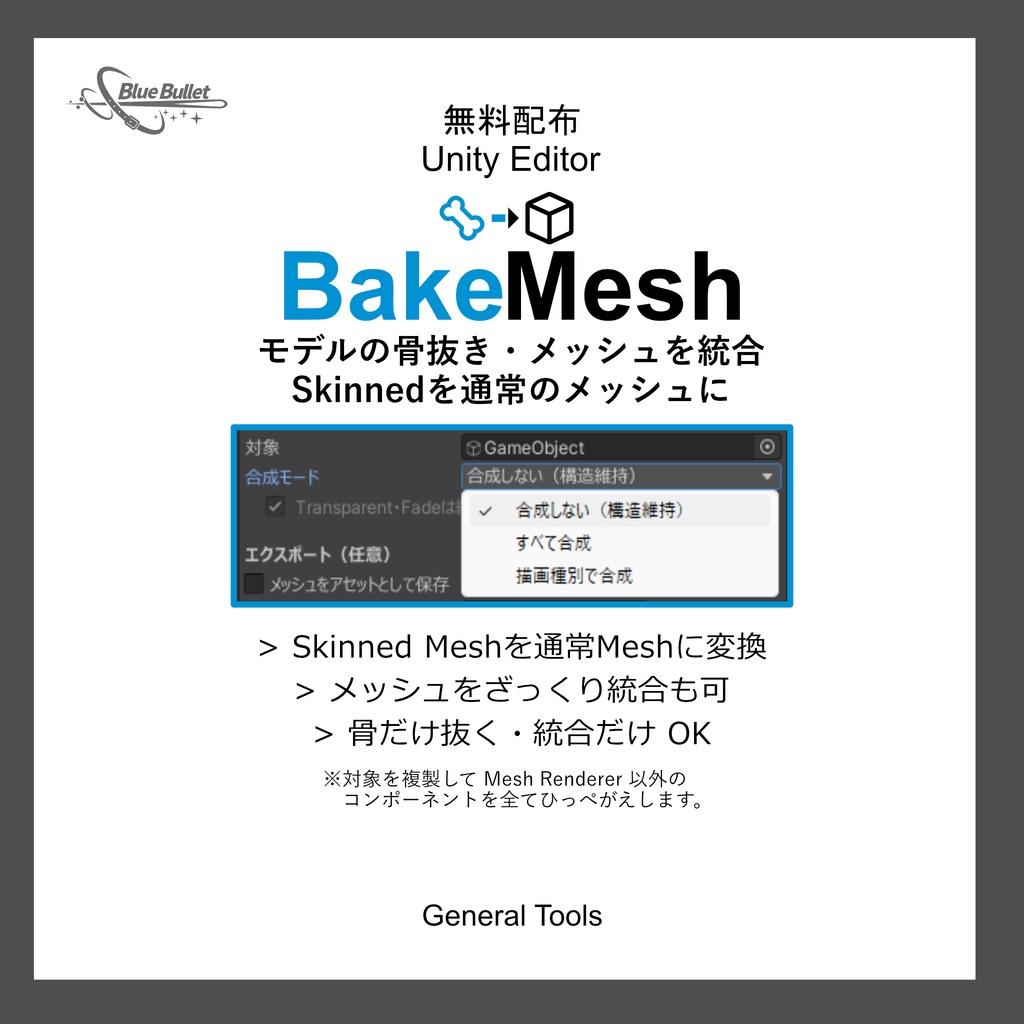

BakeMeshはシーン上のオブジェクトを通常メッシュに変換します。アバターの骨抜きや雑な結合にどうぞ。 マテリアルまでは結合しません。 無料配布版では基本機能が使えます。 支援版ではさらに変換後のメッシュをアセット化します。パッケージにしたい時にはこちらが安定です。 ※変換元のアセットのライセンスを厳守してください。 ちょっとでも助かったらコーヒーを恵んでくれると嬉しいです。 BakeMesh converts objects in the scene into normal meshes. Use this to water down or roughly combine avatars. It does not combine materials. The free version provides basic functionality. The paid version also converts the converted mesh into an asset. This is the most stable option if you want to package it. *Please strictly adhere to the license of the asset you are converting from.
使い方/Manual
1.UnityPackage「BakeMesh_Vx.x.x」をプロジェクトにインポートします。 2.プロジェクトの上のバーから、Gebral(BB) > BakeMesh からエディタを開きます。 3.対象にシーン上の変換したいオブジェクトを設定します。 4.合成モードから任意のモードを選びます。 合成しない:元のヒエラルキーを維持し、ボーンを抜きます。 すべて合成:1つのオブジェクトにまとめます。 描画種別で合成:生成オブジェクトは Opaque AlphaTest(Cutout相当) Transparent でまとめます。オプションで Fade-TransParent だけ元のオブジェクト分離状態をできるだけ維持することもできます。 5.支援版はエクスポート設定で、任意でチェックを入れ、出力先フォルダを設定するとそこにメッシュが出力されます。 6.一番下の「生成」を押すとシーン内の一番下に追加されます。 1. Import the UnityPackage "AnimationPreview_Vx.x.x" into your project. 2. From the bar at the top of the project, open the editor by selecting Gebral (BB) > BakeMesh. 3. Set the object in the scene you want to convert as the target. 4. Select a blending mode. Don't blend: Maintains the original hierarchy and removes bones. Blend all: Combines into a single object. Blend by rendering type: Generated objects are combined using Opaque AlphaTest (equivalent to Cutout) and Transparent. Optionally, you can use Fade-Transparent only to maintain as much of the original object separation as possible. 5. With the Support version, you can optionally check the export settings and set an output folder, and the mesh will be output there. 6. Press "Generate" at the bottom to add it to the bottom of the scene.
詳細/Detail
・変換はシーン上のみを複製。 元のオブジェクトはそのままに、複製してから設定に合わせて変換します。 対象にしたオブジェクト直下の全ての Skinned Mesh Renderer / Mesh Renderer が対象です。 ・マテリアルは結合しない。 オリジナルのマテリアルをそのまま参照します。 ・Skinned Mesh を Mesh に変換。 ボーンやシェイプキーがある Skinned Mesh は、その時のボーンによる変化とシェイプキーの変化を適用して Mesh Renderer に変換します。 ・Mesh Renderer 以外のコンポーネントは全て削除。 生成されるオブジェクトは変換された Mesh Renderer 以外のコンポーネントが外れた状態で出力されます。 ・オプションでメッシュの統合方法が3つあります。 合成しない:元のヒエラルキーを維持し、ボーンを抜きます。 すべて合成:1つのオブジェクトにまとめます。 描画種別で合成:生成オブジェクトは Opaque AlphaTest(Cutout相当) Transparent でまとめます。オプションで Fade-TransParent だけ元のオブジェクト分離状態をできるだけ維持することもできます。 ・支援版のみの機能:メッシュを保存 任意のフォルダにオブジェクトにまとめた変換後メッシュをアセットとして出力します。パッケージ化したい時向け。 ・Undo対応 シーンの状態はUndoで生成する前に戻す事ができます。 ・言語 JP/EN 切替を標準搭載 ・Conversion only duplicates the scene. The original object is left intact, duplicated, and then converted according to the settings. This applies to all Skinned Mesh Renderers / Mesh Renderers directly under the target object. ・Materials are not merged. The original materials are referenced as is. ・Skinned Meshes are converted to Meshes. Skinned Meshes with bones and shape keys are converted to Mesh Renderers, applying any bone and shape key changes at that time. ・Delete all components other than the Mesh Renderer. The generated object will be output with all components removed except for the converted Mesh Renderer. ・There are three optional methods for merging meshes. Don't merge: Maintains the original hierarchy and removes bones. Merge all: Combines into a single object. Merge by render type: Generated objects are combined using Opaque AlphaTest (equivalent to Cutout) and Transparent. Optionally, you can also use Fade-Transparent only to maintain as much of the original object separation as possible. ・Support version only: Save Mesh Exports converted meshes organized into objects to a folder of your choice as assets. Ideal for packaging. ・Undo support You can undo a scene to return it to its original state before creation. ・Language JP/EN switching is standard
動作環境/Operating
Unity 2022.3.22f1
アップデート履歴
[2026 01 05: V1.0.2] 生成物のオフセット位置を指定できるようになりました。 子階層の名前重複を統合する不具合や、スケールが合わない可能性がある不具合など、細かい修正をしました。 [2026 01 05: V1.0.1] フォルダ階層を「_BBTools」にまとめました。 [2026 01 05: V1.0.0] 公開
ライセンス/Lisence
# Universal Tool Asset License (UTAL) (ツール資産汎用ライセンス/日本語・英語併記) Version: v1.1 Effective Date: 2025-12-27 Licensor(ライセンサー/提供者): Oguro Kou (a.k.a. Ryuban) Product(製品名): BakeMesh --- 日本語(JA) 1. 定義 「本資産」: 本製品を構成するエディタ拡張、スクリプト(C#等)、プレハブ、シェーダー、テクスチャ、アイコン、サンプル、ドキュメントその他一切をいいます。 「ユーザー」: 本契約に基づき許諾を受ける個人または法人をいいます。 「埋め込み配布」: 本資産を抽出できない形(ビルド、バンドル、ベイク、アセットバンドル化等)で最終成果物に組み込み配布することをいいます。 「席(Seat)」: エディタ機能を使用する個人ユーザー1名分の利用枠をいいます。 2. 許諾 ライセンサーはユーザーに対し、非独占的・譲渡不可・サブライセンス不可の権利として、以下の範囲で本資産の利用を許諾します。 1. ユーザーのプロジェクトにおける本資産のインストール、複製、改変(内部利用の範囲)。 2. Unityを使用したコンテンツ制作への利用。 3. 最終成果物への埋め込み配布(抽出不可の状態に限る)。 4. 最終成果物のVRChat上での公開(Public化を含む)。 3. 禁止事項(再配布NG/同梱NG) ユーザーは、以下を行ってはなりません。 * 本資産またはその改変物の再配布・再販売・公開(例: unitypackage、.prefab、.cs、.shader、テンプレート、ツール/ライブラリ化、他アセットへの同梱配布)。 * 第三者が抽出可能な形での配布や、ソース形式での配布。 * 席の共有・貸与・共同購入の分配等、実質的に無制限利用を許す行為。 * 本資産の一部を素材集として転用・頒布する行為。 4. 席数とインストール * 本資産のエディタ機能は、3席まで使用できます(1席=1名)。 * 個人ユーザーは同一人物に限り、最大3台までインストール可。 * 法人利用はユーザー数分の席が必要です。継続的なCI/ビルドサーバーでの使用は、担当者数に応じた席または別途合意が必要です。 5. 外部委託 * 制作委託先は、ユーザーの管理下で本資産を利用できます。 * 委託終了時、委託先は本資産の全コピーを消去し、再利用を行ってはなりません。 6. 第三者資産 * 本資産に第三者コンポーネントが含まれる場合、当該コンポーネントのライセンスが適用されます。 * それらの条件が本契約と抵触する場合、当該部分については第三者ライセンスが優先します。 7. 知的財産 * 本資産に関する全ての権利はライセンサーに帰属します。本契約は権利の譲渡を意味しません。 8. 免責 * 本資産は現状有姿(AS IS)で提供され、明示黙示のいかなる保証も行いません。 9. 責任制限 * 法律上許される最大限の範囲で、ライセンサーの責任は、ユーザーが本資産に対して実際に支払った金額を上限とします。間接損害・特別損害等については責任を負いません。 10. 期間・終了 * ユーザーが本契約に違反した場合、許諾は直ちに終了します。終了時、ユーザーは本資産の全コピーを削除しなければなりません。 11. 準拠法・管轄 * 本契約は日本国の法に準拠します。紛争は大阪地方裁判所を専属的合意管轄裁判所とします。 12. その他 * 本契約は本資産に関する当事者間の完全な合意を構成します。ライセンサーは合理的な範囲で本契約を更新することができます。 * クレジット表記は必須ではありません(任意)。 --- English (EN) 1. Definitions “Assets”: All components of the Product, including editor extensions, scripts (e.g., C#), prefabs, shaders, textures, icons, samples, and documentation. “User”: The individual or entity licensed under this Agreement. “Embedded Distribution”: Distribution of the Assets only in a non‑extractable form (e.g., built, bundled, baked, asset‑bundled) within an end product. “Seat”: One named individual’s right to use the editor functionality. 2. Grant of License Licensor grants User a non‑exclusive, non‑transferable, non‑sublicensable license to: 1. Installing, copying, and modifying the Assets in your project (within the scope of internal use). 2. Using them in content creation using Unity. 3. Embedding and distributing them in final works (limited to when they cannot be extracted). 4. Publishing final works on VRChat (including making them public). 3. Restrictions (No Redistribution / No Bundling) User shall not: * redistribute, resell, or publish the Assets or any derivatives as Assets (e.g., unitypackage, .prefab, .cs, .shader), including use as templates, tools, libraries, or bundling within other asset products; * distribute the Assets in a form that is extractable or in source form; * share seats, lend, or pool purchases in a way that enables effectively unlimited use by third parties; * repurpose parts of the Assets as stock materials or collections. 4. Seats & Installation * Editor functionality may be used by up to 3 seat(s) (1 seat = 1 person). * An individual user may install on up to two devices provided both are used by the same person. * Organization use requires one seat per user. Persistent CI/build‑server use requires seats matching the number of maintainers or a separate agreement. 5. Contractors * Contractors may use the Assets under User’s control solely for User’s projects. * Upon completion, contractors must delete all copies and must not reuse the Assets for other clients. 6. Third‑Party Components * If third‑party components are included, their respective licenses apply. In case of conflict, the third‑party license prevails for that component. 7. IP Ownership * All rights in and to the Assets remain with the Licensor. No ownership is transferred under this Agreement. 8. Disclaimer * The Assets are provided “AS IS”, without warranties of any kind, express or implied. 9. Limitation of Liability * To the maximum extent permitted by law, Licensor’s total liability is limited to the amount actually paid for the Assets. Licensor shall not be liable for indirect, special, or consequential damages. 10. Term & Termination * Any breach of this Agreement immediately **terminates** the license. Upon termination, User must delete all copies of the Assets. 11. Governing Law & Venue * This Agreement is governed by the laws of Japan. The Osaka District Court shall have exclusive jurisdiction. 12. Miscellaneous * This Agreement constitutes the entire agreement with respect to the Assets. Licensor may update this Agreement with reasonable notice. * Attribution is not required (optional). ---