

AnimationPreview【UnityAnimTools】
- Digital500 JPY
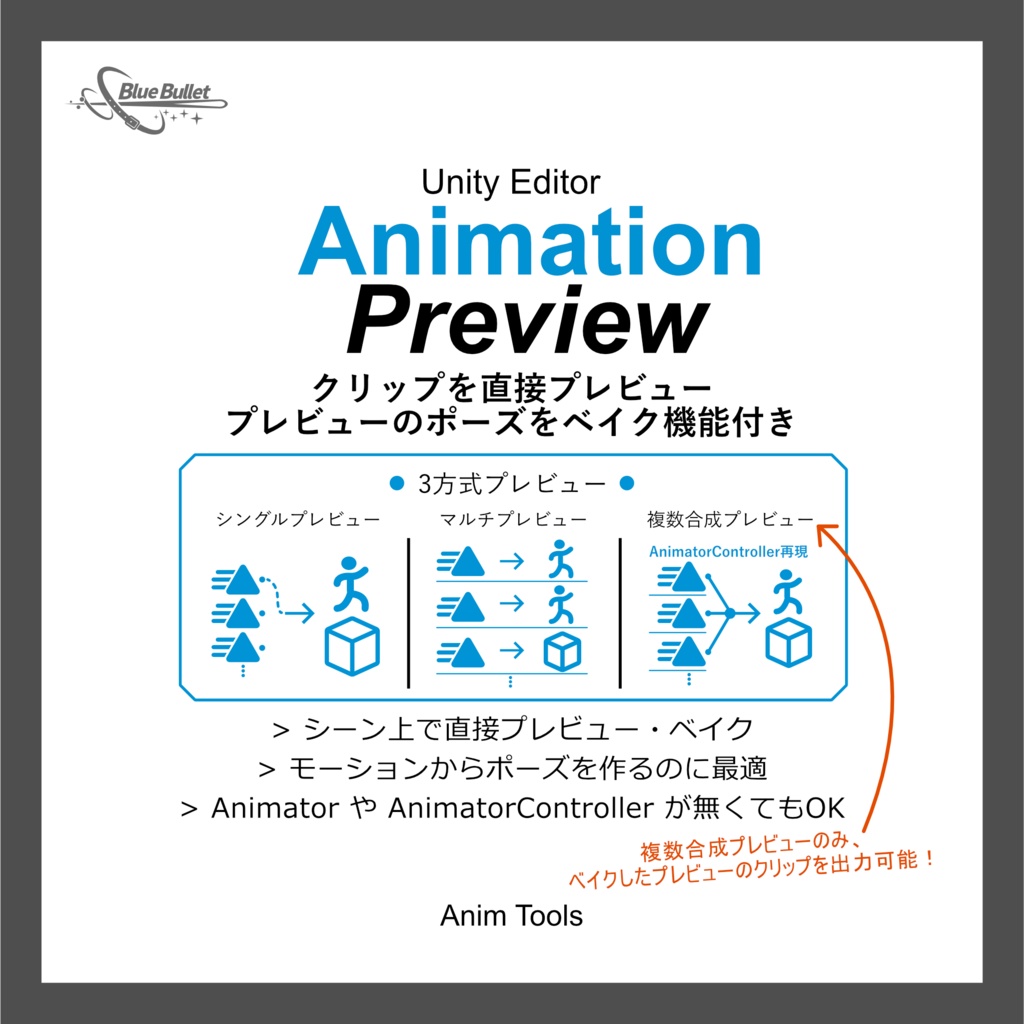


AnimationPreviewは、シーン上のオブジェクトやアバターへ直接 AniamtionClip を流してプレビューしたり、焼き込むツールです。 モーションからポーズだけを抽出したい、複数のモーションをプレビューしたいときにどうぞ。 対象に Animatorコンポーネント や AniamtorController が無くても AnimationClip のパスを参照して再生します。 ただし、HumanoidアニメーションはAniamtorコンポーネントのAvatarにHumanoidリグが設定されている必要があります。 各エディターの右上にある言語切替で、日本語と英語を切り替えることができます。 ※プレビューだけであればプレビューを停止すると元に戻りますが、アバターなど何かしら別の用途が既に設定されているオブジェクトは、念のため複製か変化しても大丈夫なオブジェクトをオススメします。 AnimationPreview is a tool that lets you preview and bake AnimationClips directly onto objects or avatars in a scene. Use it when you want to extract just a pose from a motion or preview multiple motions. Even if the target does not have an Animator component or AnimatorController, it will play by referencing the AnimationClip path. However, Humanoid animation requires that the Humanoid rig is set for the Avatar in the Aniamtor component. You can switch between Japanese and English using the language switch in the top right corner of each editor. *If you are only previewing the object, stopping the preview will return it to its original state, but for objects that have already been set up for other purposes, such as avatars, we recommend duplicating the object or using an object that is okay to change, just to be safe.
使い方/Manual
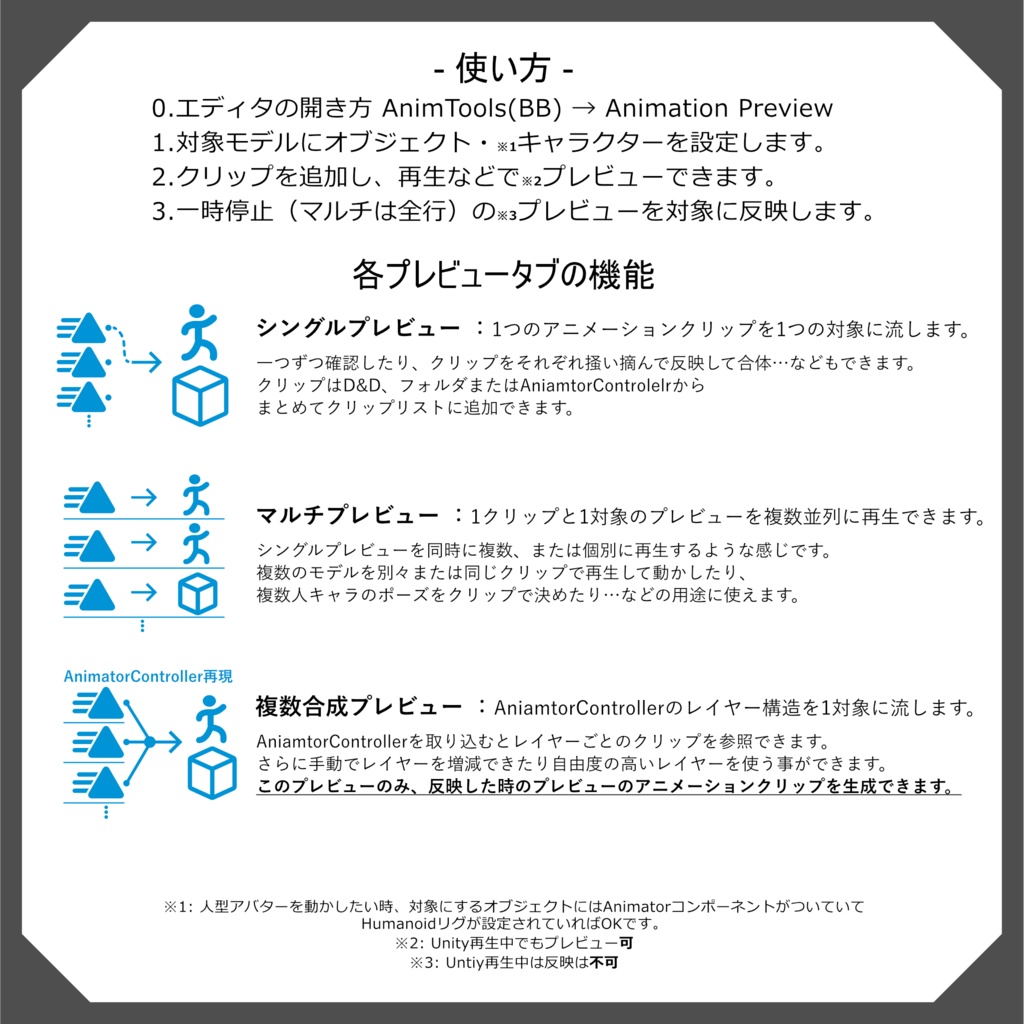
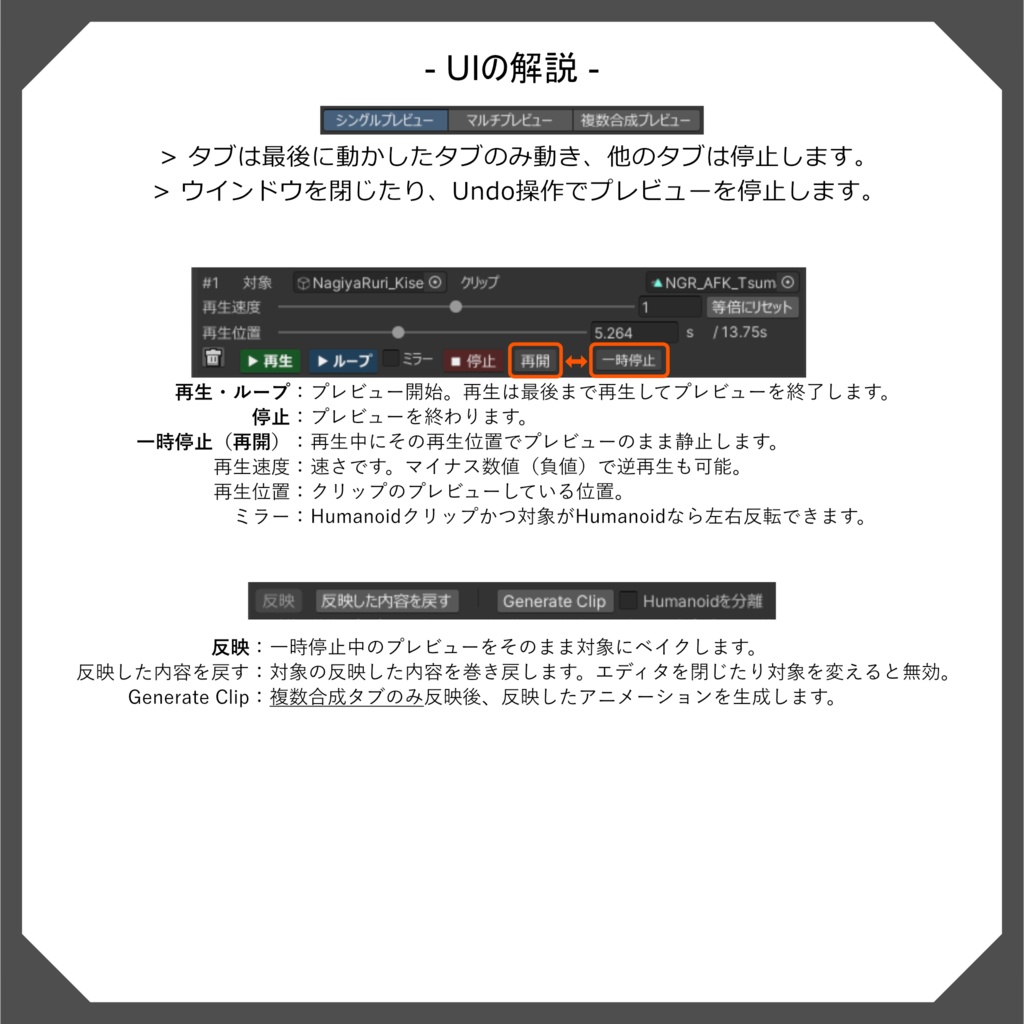
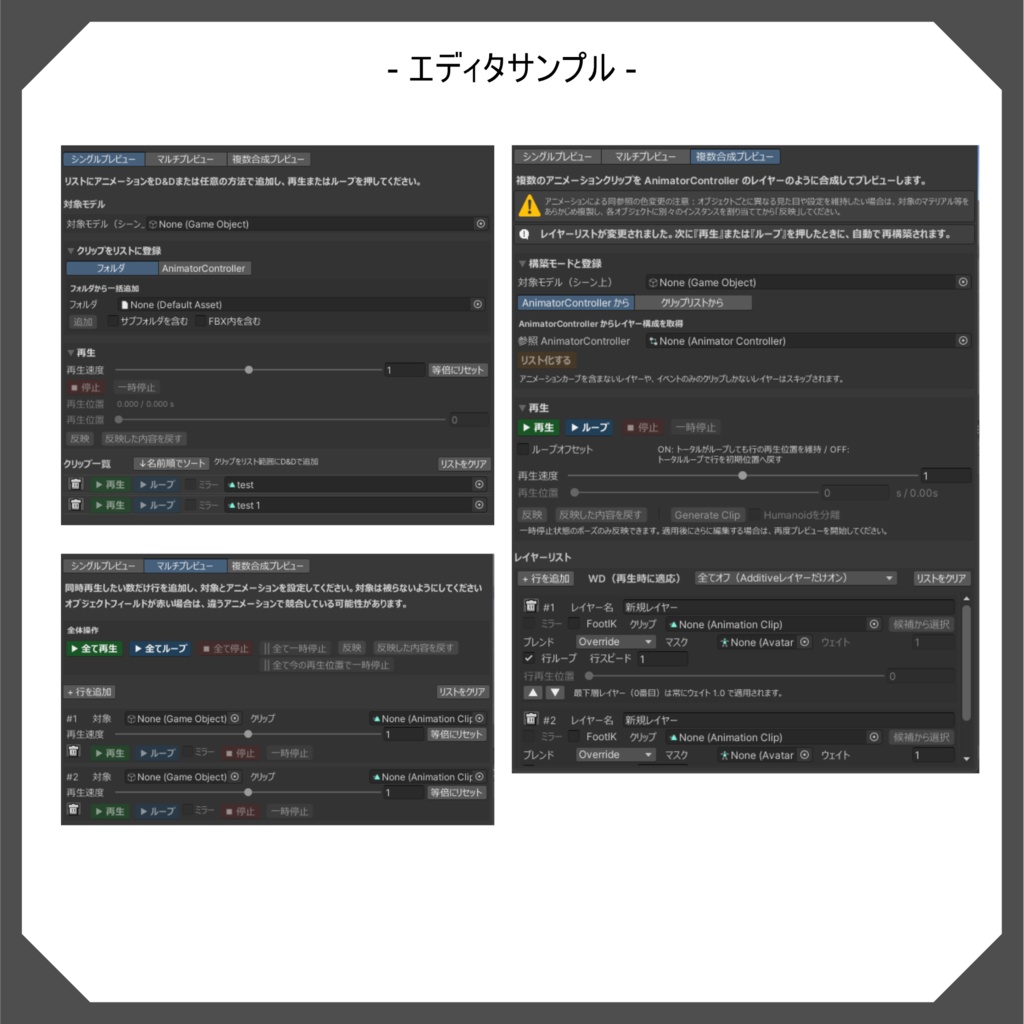
商品画像にも使い方説明があります。 1.UnityPackage「AnimationPreview_Vx.x.x」をプロジェクトにインポートします。 2.プロジェクトの上のバーから、AnimTools(BB) > Animation Preview からエディタを開きます。 3.タブを選びます。 4.対象モデルに、シーン上のオブジェクトまたはキャラクターを設定します。 5.クリップをそれぞれのタブの方法で登録し、再生などの操作でプレビューします。 6.一時停止中であれば反映で焼き込み可能です。 注意:元に戻らない変更ですが、エディタを閉じず、対象を変えなければ「反映した内容を戻す」のボタンから元に戻せます。 Instructions for use are also included in the product images. 1. Import the UnityPackage "AnimationPreview_Vx.x.x" into your project. 2. From the top bar of the project, open the editor from AnimTools (BB) > Animation Preview. 3. Select a tab. 4. Set the target model to an object or character in the scene. 5. Register clips using the methods on each tab, and preview them by playing them. 6. If it is paused, you can burn it in by reflecting it. Note: This is an irreversible change, but if you do not close the editor or change the target, you can revert it using the "Revert reflected content" button.
詳細/Detail
・クリップ単体で再生プレビュー AnimationModeでオブジェクトやキャラクターにアニメーションを再生します。 AnimatorControllerやAnimatorコンポーネントが無くても再生できます。 ※人型アバターにはHumanoidリグ設定したAniamtorコンポーネントを設定する必要があります。 ・ラフにクリップを沢山確認したり、複数同時に再生したい時に 3つのプレビュータブを用意しています。 ・オブジェクトにポーズを焼き込む アニメーションのポーズをそのまま対象へ焼き込む事が出来ます。さらに、複数合成タブではレイヤーで組み合わせたプレビューを1つのクリップに生成することもできます。 ・言語 JP/EN 切替を標準搭載 ・Clip playback preview Play animations on objects and characters in Animation Mode. Playback is possible without an AnimatorController or Animator component. *Humanoid avatars require an Animator component with a Humanoid rig. ・Three preview tabs are available for when you want to roughly check many clips or play multiple clips simultaneously. ・Bake a pose into an object. You can bake an animation pose directly into an object. In addition, the Multiple Composite tab allows you to generate a preview of layers combined into a single clip. ・Language JP/EN switching is standard
動作環境/Operating
Unity 2022.3.22f1
関連エディタ/Related editor
BakeMesh【UnityGeneralTools】(無料) 骨抜き、メッシュ統合ツール https://ryuban.booth.pm/items/7840424 ポーズを作って骨抜き、メッシュ統合でざっくりフィギュア化にどうぞ。 BakeMesh [Unity General Tools] (Free) Bone reduction and mesh merging tool https://ryuban.booth.pm/items/7840424 Create a pose, then use bone reduction and mesh merging to roughly create a figurine.
アップデート履歴
[2026 01 08: V1.0.1] フォルダ構成をツール系でまとめる為、「_BBTools」にまとめました。 [2026 01 08: V1.0.0] 公開
ライセンス/Lisence
# Universal Tool Asset License (UTAL) (ツール資産汎用ライセンス/日本語・英語併記) Version: v1.1 Effective Date: 2025-12-27 Licensor(ライセンサー/提供者): Oguro Kou (a.k.a. Ryuban) Product(製品名): AnimationPreview --- 日本語(JA) 1. 定義 「本資産」: 本製品を構成するエディタ拡張、スクリプト(C#等)、プレハブ、シェーダー、テクスチャ、アイコン、サンプル、ドキュメントその他一切をいいます。 「ユーザー」: 本契約に基づき許諾を受ける個人または法人をいいます。 「埋め込み配布」: 本資産を抽出できない形(ビルド、バンドル、ベイク、アセットバンドル化等)で最終成果物に組み込み配布することをいいます。 「席(Seat)」: エディタ機能を使用する個人ユーザー1名分の利用枠をいいます。 2. 許諾 ライセンサーはユーザーに対し、非独占的・譲渡不可・サブライセンス不可の権利として、以下の範囲で本資産の利用を許諾します。 1. ユーザーのプロジェクトにおける本資産のインストール、複製、改変(内部利用の範囲)。 2. Unityを使用したコンテンツ制作への利用。 3. 最終成果物への埋め込み配布(抽出不可の状態に限る)。 4. 最終成果物のVRChat上での公開(Public化を含む)。 3. 禁止事項(再配布NG/同梱NG) ユーザーは、以下を行ってはなりません。 * 本資産またはその改変物の再配布・再販売・公開(例: unitypackage、.prefab、.cs、.shader、テンプレート、ツール/ライブラリ化、他アセットへの同梱配布)。 * 第三者が抽出可能な形での配布や、ソース形式での配布。 * 席の共有・貸与・共同購入の分配等、実質的に無制限利用を許す行為。 * 本資産の一部を素材集として転用・頒布する行為。 4. 席数とインストール * 本資産のエディタ機能は、3席まで使用できます(1席=1名)。 * 個人ユーザーは同一人物に限り、最大3台までインストール可。 * 法人利用はユーザー数分の席が必要です。継続的なCI/ビルドサーバーでの使用は、担当者数に応じた席または別途合意が必要です。 5. 外部委託 * 制作委託先は、ユーザーの管理下で本資産を利用できます。 * 委託終了時、委託先は本資産の全コピーを消去し、再利用を行ってはなりません。 6. 第三者資産 * 本資産に第三者コンポーネントが含まれる場合、当該コンポーネントのライセンスが適用されます。 * それらの条件が本契約と抵触する場合、当該部分については第三者ライセンスが優先します。 7. 知的財産 * 本資産に関する全ての権利はライセンサーに帰属します。本契約は権利の譲渡を意味しません。 8. 免責 * 本資産は現状有姿(AS IS)で提供され、明示黙示のいかなる保証も行いません。 9. 責任制限 * 法律上許される最大限の範囲で、ライセンサーの責任は、ユーザーが本資産に対して実際に支払った金額を上限とします。間接損害・特別損害等については責任を負いません。 10. 期間・終了 * ユーザーが本契約に違反した場合、許諾は直ちに終了します。終了時、ユーザーは本資産の全コピーを削除しなければなりません。 11. 準拠法・管轄 * 本契約は日本国の法に準拠します。紛争は大阪地方裁判所を専属的合意管轄裁判所とします。 12. その他 * 本契約は本資産に関する当事者間の完全な合意を構成します。ライセンサーは合理的な範囲で本契約を更新することができます。 * クレジット表記は必須ではありません(任意)。 --- English (EN) 1. Definitions “Assets”: All components of the Product, including editor extensions, scripts (e.g., C#), prefabs, shaders, textures, icons, samples, and documentation. “User”: The individual or entity licensed under this Agreement. “Embedded Distribution”: Distribution of the Assets only in a non‑extractable form (e.g., built, bundled, baked, asset‑bundled) within an end product. “Seat”: One named individual’s right to use the editor functionality. 2. Grant of License Licensor grants User a non‑exclusive, non‑transferable, non‑sublicensable license to: 1. Installing, copying, and modifying the Assets in your project (within the scope of internal use). 2. Using them in content creation using Unity. 3. Embedding and distributing them in final works (limited to when they cannot be extracted). 4. Publishing final works on VRChat (including making them public). 3. Restrictions (No Redistribution / No Bundling) User shall not: * redistribute, resell, or publish the Assets or any derivatives as Assets (e.g., unitypackage, .prefab, .cs, .shader), including use as templates, tools, libraries, or bundling within other asset products; * distribute the Assets in a form that is extractable or in source form; * share seats, lend, or pool purchases in a way that enables effectively unlimited use by third parties; * repurpose parts of the Assets as stock materials or collections. 4. Seats & Installation * Editor functionality may be used by up to 3 seat(s) (1 seat = 1 person). * An individual user may install on up to two devices provided both are used by the same person. * Organization use requires one seat per user. Persistent CI/build‑server use requires seats matching the number of maintainers or a separate agreement. 5. Contractors * Contractors may use the Assets under User’s control solely for User’s projects. * Upon completion, contractors must delete all copies and must not reuse the Assets for other clients. 6. Third‑Party Components * If third‑party components are included, their respective licenses apply. In case of conflict, the third‑party license prevails for that component. 7. IP Ownership * All rights in and to the Assets remain with the Licensor. No ownership is transferred under this Agreement. 8. Disclaimer * The Assets are provided “AS IS”, without warranties of any kind, express or implied. 9. Limitation of Liability * To the maximum extent permitted by law, Licensor’s total liability is limited to the amount actually paid for the Assets. Licensor shall not be liable for indirect, special, or consequential damages. 10. Term & Termination * Any breach of this Agreement immediately **terminates** the license. Upon termination, User must delete all copies of the Assets. 11. Governing Law & Venue * This Agreement is governed by the laws of Japan. The Osaka District Court shall have exclusive jurisdiction. 12. Miscellaneous * This Agreement constitutes the entire agreement with respect to the Assets. Licensor may update this Agreement with reasonable notice. * Attribution is not required (optional). ---