
【Warudo Plugin】Image Background - 画像背景レイヤー
- Digital1,600 JPY
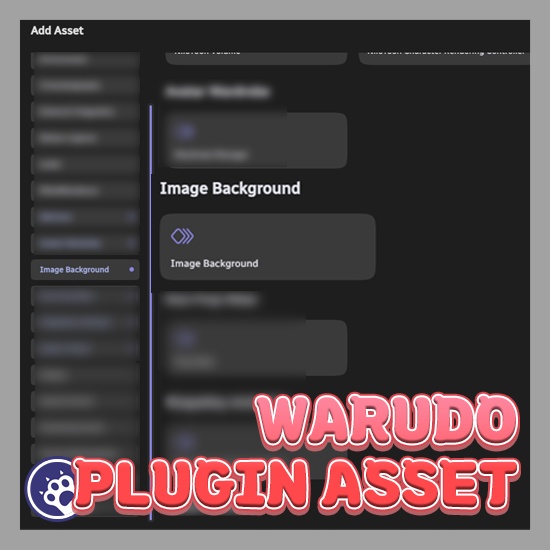
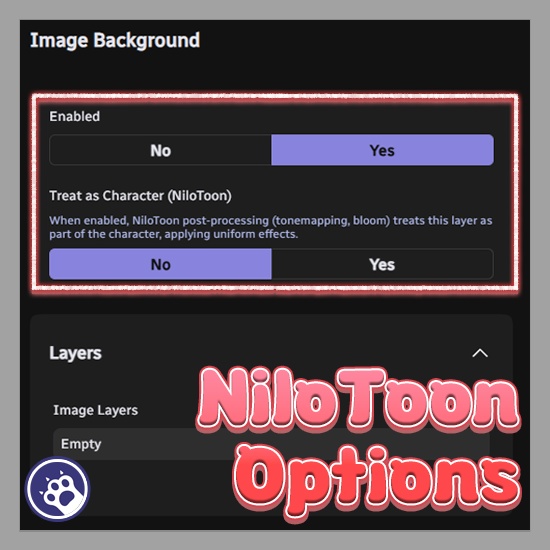
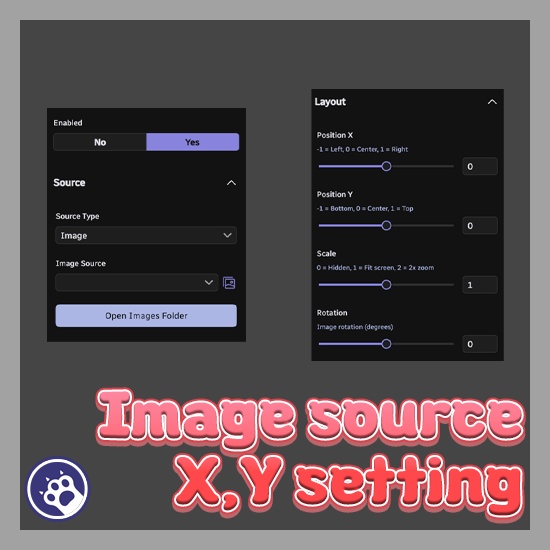
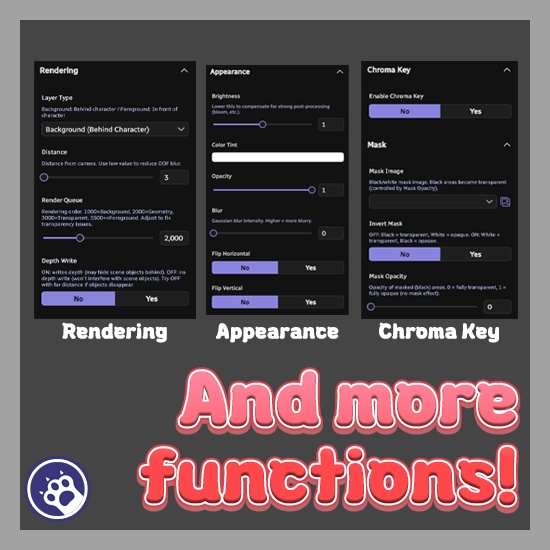


===================================== 한국어 ===================================== Image Background — Warudo 플러그인 「이미지 한 장으로 완성하는 배경 연출.」 씬에 이미지를 배경/전경으로 배치하는 플러그인입니다. 여러 레이어를 겹쳐 크로마키, 마스크, 블러 등 다양한 이펙트를 적용할 수 있습니다. ◆ 주요 기능 ● 다중 레이어: 여러 이미지를 레이어로 쌓아 배경/전경을 구성 ● 다양한 소스: 이미지 파일 또는 Screen 에셋(영상, 브라우저 등) 지원 ● 가우시안 블러: 레이어별 블러 강도 조절 ● 크로마키: 특정 색상 투명 제거 (허용 범위/가장자리 부드러움 조절) ● 마스크: 흑백 마스크로 원하는 부분만 표시 (반전/투명도 조절) ● 외관: 밝기, 틴트, 투명도를 레이어별로 설정 ● 레이아웃: 위치, 크기, 회전, 좌우/상하 반전 ● 렌더링: 렌더 큐, 깊이 쓰기, 카메라 거리 제어 ● NiloToon 연동: 캐릭터로 취급 옵션으로 톤매핑/블룸을 배경에 균일 적용 ● 다국어: 영어, 한국어, 일본어 ◆ 설치 1. .warudo 파일을 Plugins 폴더에 넣고 재시작 2. 에셋 추가에서 「Image Background」가 나타나면 완료 ◆ 라이선스 안내 ● 본 플러그인은 1인 1라이선스입니다. ● 커미션 작업 시, 세팅하는 작가와 실제 사용하는 스트리머 양쪽 모두 각각 라이선스를 구매해야 합니다. ● 하나의 라이선스를 여러 명이 공유하거나 재배포하는 것은 금지됩니다. ● 기업 사용은 별도 문의 부탁드립니다. ===================================== English ===================================== Image Background — Warudo Plugin "Complete your scene with just an image." A plugin for placing images as backgrounds/foregrounds in your scene. Stack multiple layers with chroma key, masking, blur and more. ◆ Key Features ● Multiple Layers: Stack images as background/foreground layers ● Multiple Sources: Image files or Screen assets (videos, browsers, etc.) ● Gaussian Blur: Per-layer blur intensity control ● Chroma Key: Remove specific colors with tolerance and edge softness ● Mask: Black/white mask with inversion and opacity control ● Appearance: Per-layer brightness, tint, and opacity ● Layout: Position, scale, rotation, horizontal/vertical flip ● Rendering: Render queue, depth write, camera distance control ● NiloToon Integration: Uniform tonemapping/bloom across background ● Multilingual: English, Korean, Japanese ◆ Installation 1. Place .warudo file in Plugins folder and restart 2. "Image Background" appears in Add Asset — done ◆ License ● This plugin is licensed per individual user. ● For commission work, both the creator who sets it up and the streamer who uses it must each purchase their own license. ● Sharing a single license between multiple people or redistributing it is prohibited. ● For corporate or business use, please contact us separately. ===================================== 日本語 ===================================== Image Background — Warudo プラグイン 「画像一枚で仕上げる背景演出。」 シーンに画像を背景/前景として配置するプラグインです。 複数レイヤーを重ね、クロマキー・マスク・ブラー等のエフェクトを適用できます。 ◆ 主な機能 ● マルチレイヤー: 複数画像をレイヤーとして背景/前景を構成 ● 多彩なソース: 画像ファイルまたはScreenアセット(動画、ブラウザ等) ● ガウシアンブラー: レイヤーごとのブラー強度調整 ● クロマキー: 許容範囲とエッジの柔らかさで特定色を透明除去 ● マスク: 白黒マスクで表示部分を制御(反転/不透明度対応) ● 外観: 明るさ、ティント、不透明度をレイヤー個別設定 ● レイアウト: 位置、サイズ、回転、左右・上下反転 ● レンダリング: レンダーキュー、デプス書込、カメラ距離制御 ● NiloToon連携: トーンマッピング/ブルームを背景にも均一適用 ● 多言語: 英語、韓国語、日本語 ◆ インストール 1. .warudoファイルをPluginsフォルダに入れて再起動 2. アセット追加に「Image Background」が表示されれば完了 ◆ ライセンス ● 本プラグインは1人1ライセンスです。 ● コミッション作業の場合、セットアップを行う作家と実際に使用するストリーマーの双方がそれぞれライセンスを購入する必要があります。 ● 1つのライセンスを複数人で共有したり、再配布することは禁止されています。 ● 法人・企業でのご利用については、別途お問い合わせください。
Changelog
v1.0.2 - 배경을 Screen 으로 설정한 후 특정 타입으로 지정할 경우 제대로 표시되지 않는 이슈를 해결했습니다. - We have resolved an issue where content did not display properly when the background was set to “Screen” and a specific type was specified. - 背景を「Screen」に設定した後、特定のタイプを指定すると正しく表示されない問題を修正しました。 v1.0.1 - 캐릭터 움직임에 따라 배경 이미지가 밀리면서 화면 하단에 빈 공간이 발생하던 문제를 수정했습니다. - Fixed an issue where the background image would shift with character movement, causing an empty gap at the bottom of the screen. - キャラクターの動きに合わせて背景画像がずれ、画面下部に空白が発生する問題を修正しました。 v1.0.0 씬에 이미지를 배경 또는 전경으로 배치할 수 있는 플러그인입니다. - 다중 레이어: 여러 이미지를 레이어로 겹쳐 배경과 전경을 구성할 수 있습니다 - 다양한 소스: 이미지 파일 또는 Warudo Screen 에셋(영상, 브라우저 등)을 소스로 사용할 수 있습니다 - 배경 & 전경: 캐릭터 뒤(배경) 또는 앞(전경)에 배치할 수 있습니다 - 가우시안 블러: 레이어별 블러 강도를 조절할 수 있습니다 - 크로마키: 특정 색상을 투명하게 제거하며, 허용 범위와 가장자리 부드러움을 조절할 수 있습니다 - 마스크: 흑백 마스크 이미지로 원하는 부분만 표시할 수 있습니다 - 외관 조절: 밝기, 색상 틴트, 투명도를 레이어별로 설정할 수 있습니다 - 레이아웃: 위치, 크기, 회전, 좌우/상하 반전을 지원합니다 - 렌더링 제어: 렌더 큐, 깊이 쓰기, 카메라 거리를 조절할 수 있습니다 - NiloToon 연동: 캐릭터로 취급 옵션으로 NiloToon 포스트 프로세싱을 배경에 균일하게 적용합니다 - 지원 언어: 영어, 한국어, 일본어 A plugin for placing images as backgrounds or foregrounds in the scene. - Multiple Layers: Stack images as layers for background and foreground composition - Multiple Sources: Use image files or Warudo Screen assets (videos, browsers, etc.) as sources - Background & Foreground: Place behind or in front of the character - Gaussian Blur: Per-layer blur intensity control - Chroma Key: Remove specific colors with adjustable tolerance and edge softness - Mask: Apply black/white mask images to show only desired areas - Appearance: Per-layer brightness, color tint, and opacity controls - Layout: Position, scale, rotation, horizontal/vertical flip - Rendering Controls: Render queue, depth write, and camera distance settings - NiloToon Integration: Treat as Character option applies NiloToon post-processing uniformly to backgrounds - Supported languages: English, Korean, Japanese シーンに画像を背景または前景として配置できるプラグインです。 - マルチレイヤー: 複数の画像をレイヤーとして重ね、背景と前景を構成できます - 多彩なソース: 画像ファイルまたはWarudo Screenアセット(動画、ブラウザ等)をソースとして使用できます - 背景&前景: キャラクターの後ろまたは前に配置できます - ガウシアンブラー: レイヤーごとのブラー強度調整が可能です - クロマキー: 許容範囲とエッジの柔らかさを調整して特定色を透明に除去できます - マスク: 白黒マスク画像で表示したい部分だけを見せることができます - 外観調整: レイヤーごとに明るさ、カラーティント、不透明度を設定できます - レイアウト: 位置、サイズ、回転、左右・上下反転に対応しています - レンダリング制御: レンダーキュー、デプス書込、カメラ距離を調整できます - NiloToon連携: キャラクターとして扱うオプションでNiloToonポストプロセッシングを背景にも均一適用します - 対応言語: 英語、韓国語、日本語