
【Warudo Plugin】PostFX Spout - アルファ保持PostProcess送信
- Digital2,650 JPY
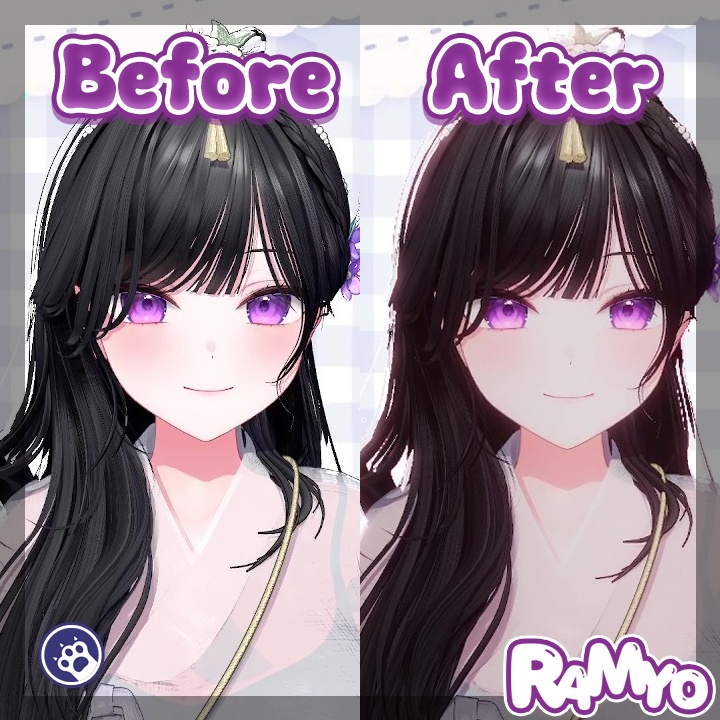
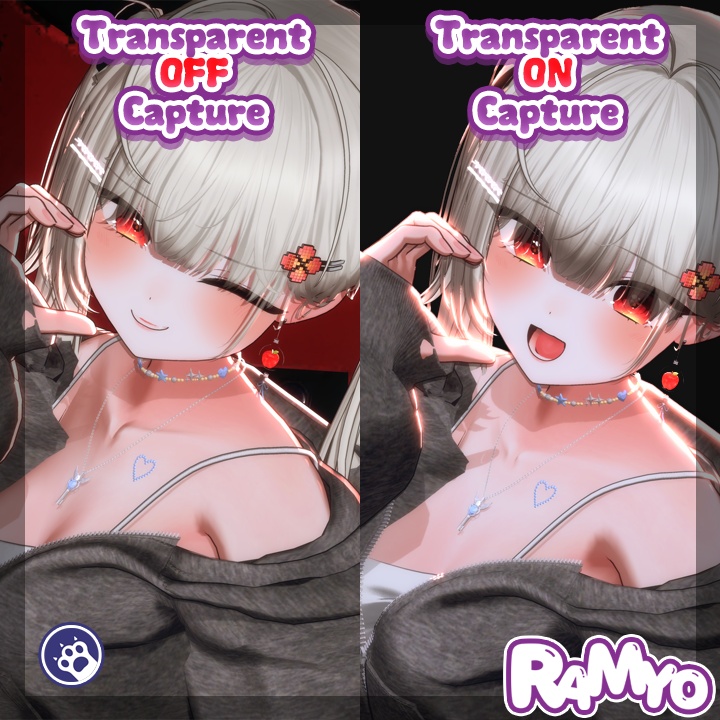
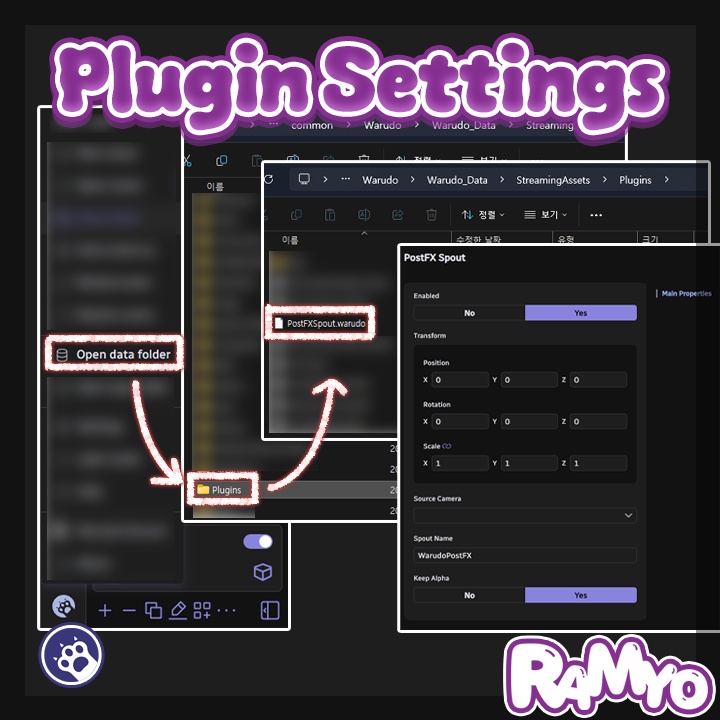
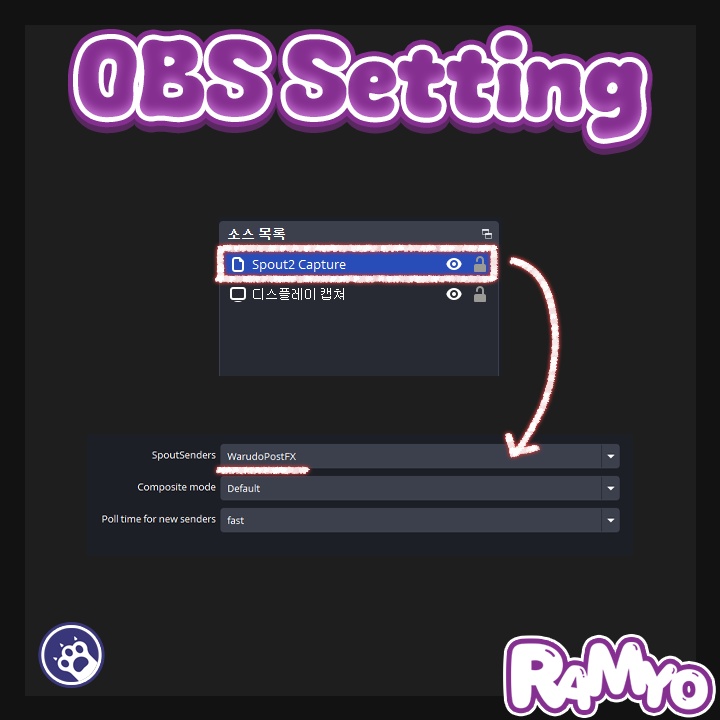
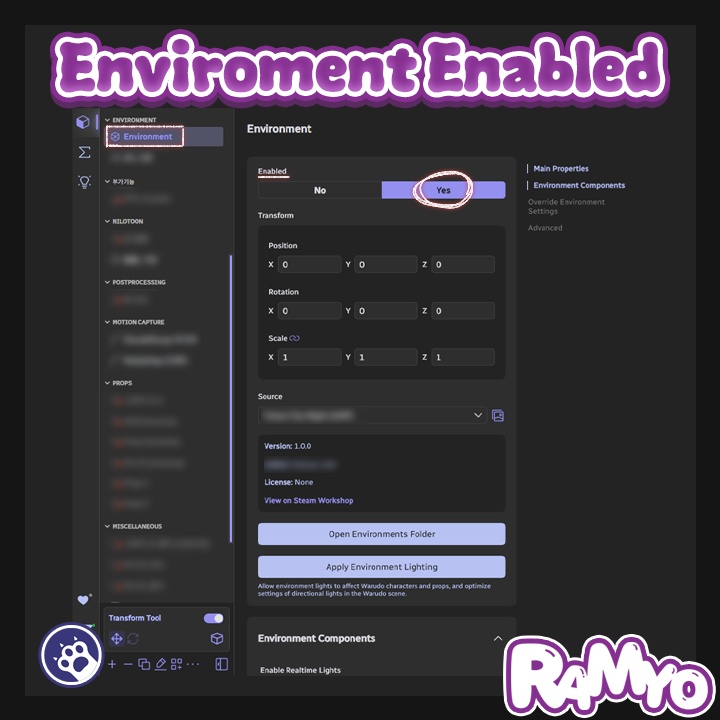
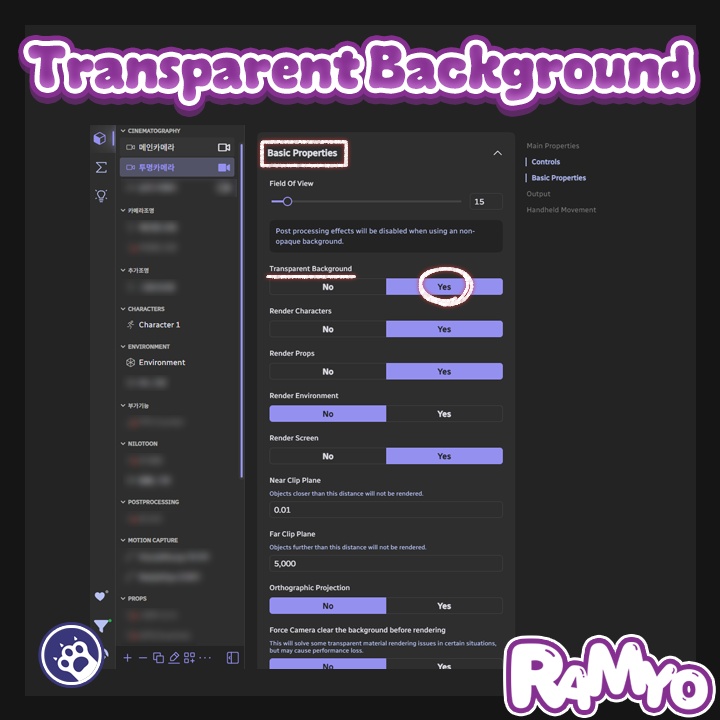


===================================== 한국어 ===================================== PostFX Spout — Warudo 플러그인 「PostProcess 가 그대로 살아 있는 알파 송출.」 Warudo 의 메인 카메라에 적용된 PostProcess 효과를 알파 채널까지 온전히 보존하여 Spout 으로 송출하는 플러그인입니다. 기본 Spout 송출에서는 PostProcess 를 켜면 알파 채널이 사라지고, 알파를 살리려면 TransparentBackground / ChromaKey 모드를 켜야 하지만 그 경우 일부 PostFX 가 영향을 받습니다. PostFX Spout 은 그 제약을 우회하여, TransparentBackground / ChromaKey 설정과 무관하게 PostProcess 가 적용된 결과를 알파까지 보존해 OBS 등 Spout 수신 프로그램으로 바로 보냅니다. ◆ 주요 기능 ● PostProcess + 알파 동시 송출 TransparentBackground / ChromaKey 상태와 무관하게 PostFX 가 적용된 결과를 알파 채널까지 보존하여 Spout 으로 송출합니다. ● URP / BiRP 자동 감지 현재 프로젝트의 렌더 파이프라인을 자동으로 감지하여 URP · BiRP 양쪽을 모두 지원합니다. (1.4.0 버전 기준으로 BiRP의 조명이 출력되지 않는 버그가 있습니다. 관련 해결 중에 있으며 버전 릴리즈 되는 대로 X 통해 공지 드리겠습니다.) ● 소스 카메라 선택 송출할 카메라를 자유롭게 지정할 수 있습니다. 비워두면 메인 카메라를 자동으로 사용합니다. ● Keep Alpha 토글 필요 시 알파 보존을 끄고 RGB 만 송출하는 것도 가능합니다. ● 다국어 지원 영어, 한국어, 일본어, 중국어 간체에 대응합니다. ◆ 설치 방법 1. .warudo 파일을 다운로드합니다. 2. `Warudo\Warudo_Data\StreamingAssets\Plugins` 폴더에 파일을 넣습니다. 3. Warudo 를 재시작합니다. 4. Scene Asset 추가 메뉴에서 PostFX Spout 에셋을 추가할 수 있으면 설치 완료입니다. ◆ 설정 방법 1. Warudo 의 Scene Asset 추가 메뉴에서 `PostFX Spout` 카테고리의 `PostFX Spout` 에셋을 추가합니다. 2. `Source Camera` 에 송출할 카메라를 선택합니다 (비워두면 메인 카메라 자동 사용). 3. `Spout Name` 에 OBS 등에서 수신할 송출 이름을 입력합니다 (기본값: `WarudoPostFX`). 4. `Keep Alpha` 를 켜둔 채로 두면 PostProcess + 알파 채널이 함께 송출됩니다. 5. OBS 등 Spout 수신 가능한 프로그램에서 해당 이름의 송출 소스를 추가합니다. ◆ 라이선스 안내 본 플러그인은 1인 1라이선스입니다. 커미션 작업 시, 세팅하는 작가와 실제 사용하는 스트리머 양쪽 모두 각각 라이선스를 구매해야 합니다. 하나의 라이선스를 여러 명이 공유하거나 재배포하는 것은 금지됩니다. 기업 사용은 별도 문의 부탁드립니다. ===================================== English ===================================== PostFX Spout — Warudo Plugin "PostProcess effects streamed out — alpha intact." A Warudo plugin that captures the main camera's PostProcess result and sends it via Spout with the alpha channel fully preserved. With standard Spout output, enabling PostProcess causes the alpha channel to disappear. Getting alpha back requires TransparentBackground or ChromaKey mode, but those modes affect certain PostFX. PostFX Spout bypasses that limitation entirely — it streams a PostProcess-applied output with alpha preserved regardless of the TransparentBackground / ChromaKey state. ◆ Key Features ● PostProcess + Alpha Simultaneous Output Streams the PostFX-applied result with the alpha channel preserved, independent of TransparentBackground / ChromaKey settings. ● URP / BiRP Auto-Detection Automatically detects the current render pipeline and supports both URP and BiRP. ● Source Camera Selection Freely choose which camera to stream. Leave it empty and the main camera is used automatically. ● Keep Alpha Toggle Disable alpha preservation when needed and stream RGB only. ● Multi-Language Available in English, Korean, Japanese, and Simplified Chinese. ◆ Installation 1. Download the .warudo file. 2. Place the file in the `Warudo\Warudo_Data\StreamingAssets\Plugins` folder. 3. Restart Warudo. 4. When the PostFX Spout asset is available in the Scene Asset add menu, installation is complete. ◆ Setup 1. Open the Scene Asset add menu in Warudo and add the `PostFX Spout` asset from the `PostFX Spout` category. 2. Set `Source Camera` to the camera you want to stream (leave empty to use the main camera automatically). 3. Enter the sender name in `Spout Name` — this is what OBS and other receivers will see (default: `WarudoPostFX`). 4. Leave `Keep Alpha` enabled to stream PostProcess output together with the alpha channel. 5. Add a Spout source in OBS or any other Spout-compatible application using the name you entered. ◆ License This plugin is licensed per individual user. For commission work, both the creator who sets it up and the streamer who uses it must each purchase their own license. Sharing a single license between multiple people or redistributing it is prohibited. For corporate or business use, please contact us separately. ===================================== 日本語 ===================================== PostFX Spout — Warudo プラグイン 「PostProcessを活かしたまま、アルファごと送信。」 Warudoのメインカメラに適用されたPostProcess効果を、アルファチャンネルを損なわずそのままSpoutで送信するプラグインです。 通常のSpout送信ではPostProcessを有効にするとアルファチャンネルが消えてしまい、アルファを復元するにはTransparentBackground / ChromaKeyモードをオンにする必要がありますが、その場合は一部のPostFXに影響が出ます。PostFX Spoutはその制約を回避し、TransparentBackground / ChromaKeyの設定に関わらず、PostProcessが適用された映像をアルファごと保持してOBSなどの受信アプリに直接送信します。 ◆ 主な機能 ● PostProcess + アルファの同時送信 TransparentBackground / ChromaKeyの状態に関係なく、PostFXが適用された映像をアルファチャンネルごと保持してSpoutで送信します。 ● URP / BiRP 自動検出 プロジェクトのレンダリングパイプラインを自動的に検出し、URPとBiRPの両方に対応します。 ● ソースカメラの選択 送信するカメラを自由に指定できます。空欄のままにするとメインカメラが自動的に使用されます。 ● Keep Alpha トグル 必要に応じてアルファ保持をオフにし、RGBのみを送信することもできます。 ● 多言語対応 英語、韓国語、日本語、簡体中国語に対応しています。 ◆ インストール方法 1. .warudoファイルをダウンロードします。 2. `Warudo\Warudo_Data\StreamingAssets\Plugins` フォルダにファイルを配置します。 3. Warudoを再起動します。 4. Scene Asset追加メニューにPostFX Spoutアセットが表示されればインストール完了です。 ◆ 設定方法 1. WarudoのScene Asset追加メニューから `PostFX Spout` カテゴリの `PostFX Spout` アセットを追加します。 2. `Source Camera` に送信したいカメラを設定します(空欄の場合はメインカメラが自動的に使用されます)。 3. `Spout Name` にOBSなどで受信する際の送信名を入力します(デフォルト: `WarudoPostFX`)。 4. `Keep Alpha` をオンのままにしておくと、PostProcessとアルファチャンネルが一緒に送信されます。 5. OBSなどSpout対応アプリで、入力した名前の送信ソースを追加します。 ◆ ライセンスについて 本プラグインは1人1ライセンスです。 コミッション作業の場合、セットアップを行う作家と実際に使用するストリーマーの双方がそれぞれライセンスを購入する必要があります。 1つのライセンスを複数人で共有したり、再配布することは禁止されています。 法人・企業でのご利用については、別途お問い合わせください。
Changelog
v.1.2.2 - 스크린샷 캡처 시 NiloToon 시스루(See-through) 헤어 등이 누락되던 문제를 수정했습니다. - 소스 코드를 최적화했습니다. - UI를 개선했습니다. - Fixed an issue where elements such as NiloToon see-through hair were missing in screenshot captures. - Optimized the source code. - Improved the UI. - スクリーンショット撮影時に NiloToon のシースルーヘアなどが欠落する問題を修正しました。 - ソースコードを最適化しました。 - UI を改善しました。 v1.2.1 투명 배경 송출 시 캐릭터 외곽에 나타나던 헤일로(링) 아티팩트와 테두리 자글거림 문제를 수정합니다. - 송출 섹션 상단에 OBS Studio Composite mode 설정 안내(Markdown) 표시 추가 - 헤일로 아티팩트 수정: 투명 배경 송출 시 캐릭터 외곽에 옅은 헤일로/링이 보이던 문제를 해결합니다 - Premultiplied Alpha 전환: Spout 출력을 Straight Alpha 에서 Premultiplied Alpha 방식으로 전환합니다. Bloom/Glow 로 외곽에 번진 픽셀이 기존 Straight 모드에서는 옅은 회색 링으로 잘못 합성되던 것이, Premultiplied 모드에서는 가산 발광으로 정확하게 표현됩니다 - ⚠️ 사용자 조치 필요: OBS Studio 에서 Spout2 Capture 소스 → Properties → Composite mode 를 "Premultiplied Alpha" 로 변경해 주세요. 기존 Straight Alpha 모드 유지 시 발광 효과가 다소 어둡게 보일 수 있습니다 - 옵션 UI 분리: 에셋 옵션이 "송출"과 "캡처 / 스크린샷" 두 섹션으로 나뉘어 표시됩니다 - 캡처 크래시 방지: D3D11 텍스처 최대 차원(16384) 및 VRAM 예산을 RT 생성 직전에 사전 검증합니다. 초과 시 캡처를 중단하고 에러 토스트를 표시합니다 - 8K + SSAA x2 등 큰 캡처 시 D3D 에러로 Warudo 가 강제 종료되던 문제 수정 (RT 정리 순서 재배치 + PNG 인코딩 백그라운드 처리) Fixes halo/ring artifacts and jagged edge aliasing around character outlines during transparent background output. - Halo Artifact Fix: Resolves faint halo/ring appearing around character edges during transparent background Spout output - Premultiplied Alpha Output: Switches Spout output from Straight Alpha to Premultiplied Alpha. Bloom/Glow pixels spilling beyond character edges were incorrectly composited as a faint grey ring in Straight mode; Premultiplied mode renders them correctly as additive glow - ⚠️ Action Required: In OBS Studio, go to Spout2 Capture source → Properties → Composite mode and set it to "Premultiplied Alpha". Keeping the old Straight Alpha mode may cause glow effects to appear slightly darker - Option UI Sections: Asset options are now grouped into "Streaming" and "Capture / Screenshot" sections - Added OBS Studio Composite mode setup guide (Markdown) at the top of the Streaming section - Capture Crash Guard: Validates D3D11 texture dimension limit (16384) and VRAM budget before RT creation. Aborts capture with an error toast if either limit is exceeded - Fixed Warudo crash with D3D error on large captures like 8K + SSAA x2 (reordered RT cleanup + offloaded PNG encoding to thread pool) 透明背景送出時にキャラクターの輪郭に現れるハロー(リング)アーティファクトと輪郭のギザギザ問題を修正します。 - ハローアーティファクトの修正: 透明背景送出時にキャラクターの輪郭に薄いハロー/リングが見える問題を解決します - Premultiplied Alpha への切り替え: Spout出力をStraight AlphaからPremultiplied Alpha方式に切り替えます。Bloom/Glowで輪郭外に広がったピクセルが、従来のStraightモードでは薄いグレーのリングとして誤合成されていたものが、Premultipliedモードでは加算発光として正確に表現されます - ⚠️ ユーザー操作が必要: OBS Studioで Spout2 Capture ソース → Properties → Composite mode を「Premultiplied Alpha」に変更してください。従来のStraight Alphaモードのままでは発光エフェクトがやや暗く見える場合があります - Streaming セクション上部に OBS Studio Composite mode 設定ガイド(Markdown) を追加 - キャプチャクラッシュ防止: RT生成直前にD3D11テクスチャ最大サイズ(16384)とVRAM予算を事前検証します。上限超過時はキャプチャを中断してエラートーストを表示します - 8K + SSAA x2 等の大きなキャプチャで D3D エラーにより Warudo が強制終了する問題を修正 (RT クリーンアップ順序の再配置 + PNG エンコードのバックグラウンド処理化) v1.2.0 스크린샷 캡처 기능과 PassThrough 모드를 추가하고, 색 정확성과 경로 호환성을 개선합니다. - 스크린샷 캡처: Spout 송출 화면을 PNG 로 저장하는 트리거를 추가합니다 (해상도 프리셋 / 사용자 지정 입력 / 슈퍼샘플링 / LOD 바이어스 지원) - 스크린샷 폴더 열기: 저장된 폴더를 파일 탐색기에서 바로 여는 트리거를 추가합니다 - PassThrough 모드: 소스 카메라의 TransparentBackground 가 꺼져 있을 때 본체의 PostFX 적용 RenderTexture 를 그대로 사용해 이중 렌더 비용을 제거합니다 - Keep Alpha 분기 캡처: 알파 유지 토글에 따라 투명 / 불투명 PNG 가 올바르게 저장되도록 합니다 - 색 정확도 수정: 캡처 결과가 화면보다 진하게 나오던 색공간 (Linear → sRGB) 변환 누락을 수정합니다 - 경로 호환성 수정: Program Files (x86) 등 공백·괄호가 포함된 경로에서도 스크린샷 폴더 열기가 정상 동작하도록 URL 인코딩을 적용합니다 Adds Screenshot Capture and PassThrough mode, with improvements to color accuracy and path compatibility. - Screenshot Capture: Adds a trigger that saves the Spout output as PNG (resolution presets, custom input, super sampling, LOD bias) - Open Screenshots Folder: Adds a trigger that opens the screenshots folder in the OS file explorer - PassThrough Mode: When the source camera's TransparentBackground is OFF, the host's PostFX-applied RenderTexture is used directly, eliminating double rendering - Keep Alpha Capture Branch: Capture honors the Keep Alpha toggle, producing transparent or opaque PNG accordingly - Color Accuracy Fix: Fixes missing Linear → sRGB color space conversion that caused captures to appear darker/oversaturated - Path Compatibility Fix: Open Screenshots Folder now works on install paths with spaces or parentheses (e.g. Program Files (x86)) via URL encoding スクリーンショット撮影機能とPassThroughモードを追加し、色精度とパス互換性を改善しました。 - スクリーンショット撮影: Spout出力をPNGとして保存するトリガーを追加します (解像度プリセット / カスタム入力 / スーパーサンプリング / LODバイアス対応) - スクリーンショットフォルダを開く: 保存先フォルダをファイルエクスプローラーで直接開くトリガーを追加します - PassThroughモード: ソースカメラのTransparentBackgroundがオフのとき、本体のPostFX適用済みRenderTextureを直接使用して二重レンダリングコストを削減します - Keep Alpha 分岐撮影: アルファ維持トグルに応じて透明 / 不透明PNGを正しく保存します - 色精度の修正: 撮影結果が画面より濃く見える色空間 (Linear → sRGB) 変換漏れを修正しました - パス互換性の修正: Program Files (x86) など空白・括弧を含むパスでもスクリーンショットフォルダを正常に開けるようURLエンコーディングを適用しました v1.1.0 림라이트·Bloom 등 발광 영역의 알파 합성이 개선됩니다. - 발광 알파 보강: PostFX로 캐릭터 외곽에 번진 발광 픽셀이 OBS 합성 시 잘려 보이던 문제를 개선합니다 Improved alpha compositing for rim-light and Bloom glow areas. - Glow alpha boost: Fixes glow pixels spilling beyond character edges being clipped during OBS compositing リムライト・Bloomなど発光領域のアルファ合成が改善されます。 - 発光アルファ補強: PostFXでキャラクター外縁に広がった発光ピクセルがOBS合成時に途切れて見える問題を改善しました v1.0.0 PostFX Spout 첫 출시 — PostProcess + 알파 채널 동시 송출을 지원합니다. - PostProcess + 알파 채널 동시 송출: TransparentBackground / ChromaKey 상태와 무관하게 PostFX 가 적용된 결과를 알파까지 보존하여 Spout 으로 송출합니다 - URP / BiRP 자동 감지: 현재 렌더 파이프라인을 자동으로 감지합니다 - Source Camera 선택: 송출할 카메라를 자유롭게 지정, 미지정 시 메인 카메라를 자동으로 사용합니다 - Keep Alpha 토글: 알파 보존 여부를 전환할 수 있습니다 - 지원 언어: 영어, 한국어, 일본어, 중국어 간체 Initial release of PostFX Spout — supports simultaneous PostProcess + alpha channel output. - PostProcess + Alpha Channel Output: Streams the PostFX-applied result with alpha preserved, regardless of TransparentBackground / ChromaKey state - URP / BiRP Auto-Detection: Automatically detects the current render pipeline - Source Camera Selection: Freely choose which camera to stream; falls back to the main camera when unset - Keep Alpha Toggle: Switch alpha preservation on or off as needed - Supported languages: English, Korean, Japanese, Simplified Chinese PostFX Spout 初回リリース — PostProcess + アルファチャンネルの同時送信に対応しました。 - PostProcess + アルファチャンネルの同時送信: TransparentBackground / ChromaKeyの状態に関わらず、PostFXが適用された映像をアルファごと保持してSpoutで送信します - URP / BiRP 自動検出: 現在のレンダリングパイプラインを自動的に検出します - ソースカメラの選択: 送信するカメラを自由に指定でき、未指定時はメインカメラを自動的に使用します - Keep Alpha トグル: アルファ保持のオン / オフを切り替えられます - 対応言語: 英語、韓国語、日本語、簡体中国語