

アクセおでかけ - ほかの子の小物を、うちの子の体に合わせて付け直す【JA,EN,KO】
- 日本語Digital700 JPY
- EnglishDigital700 JPY
- 한국어Digital700 JPY
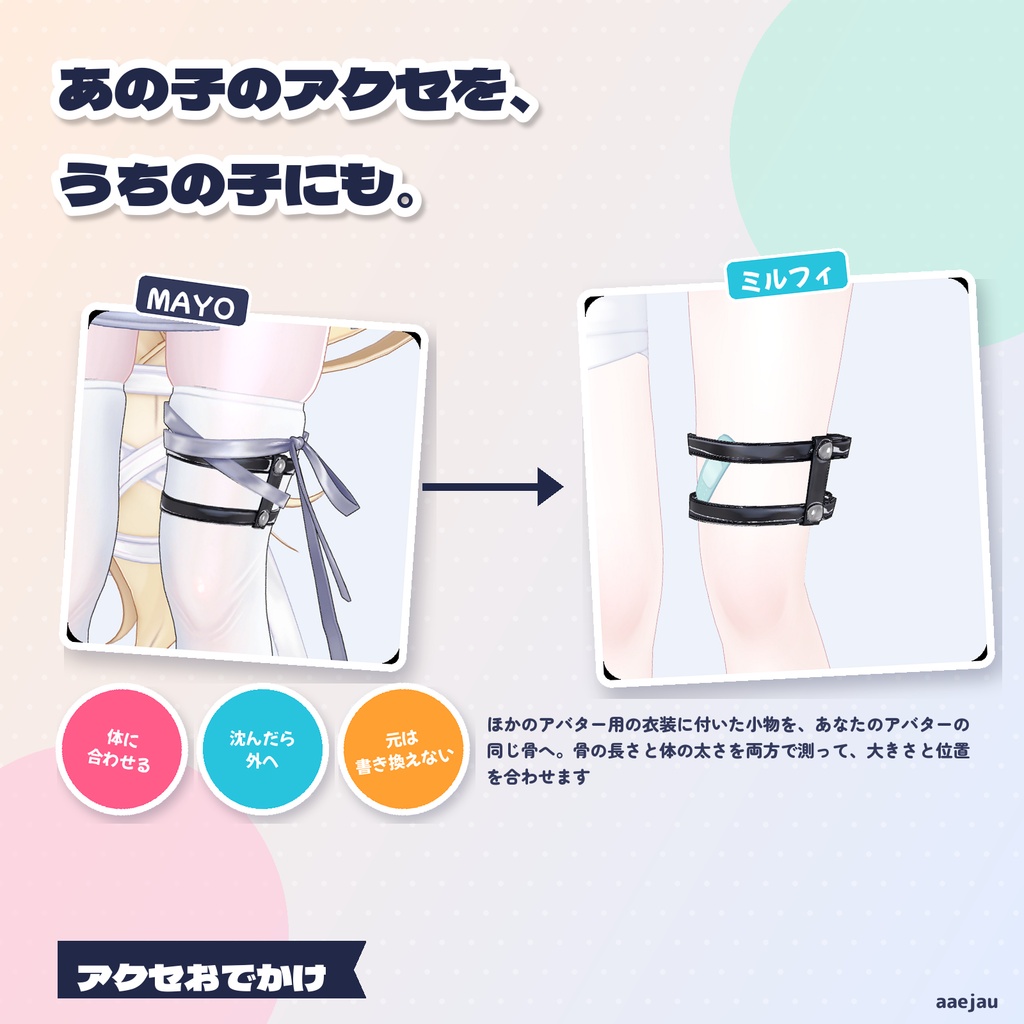
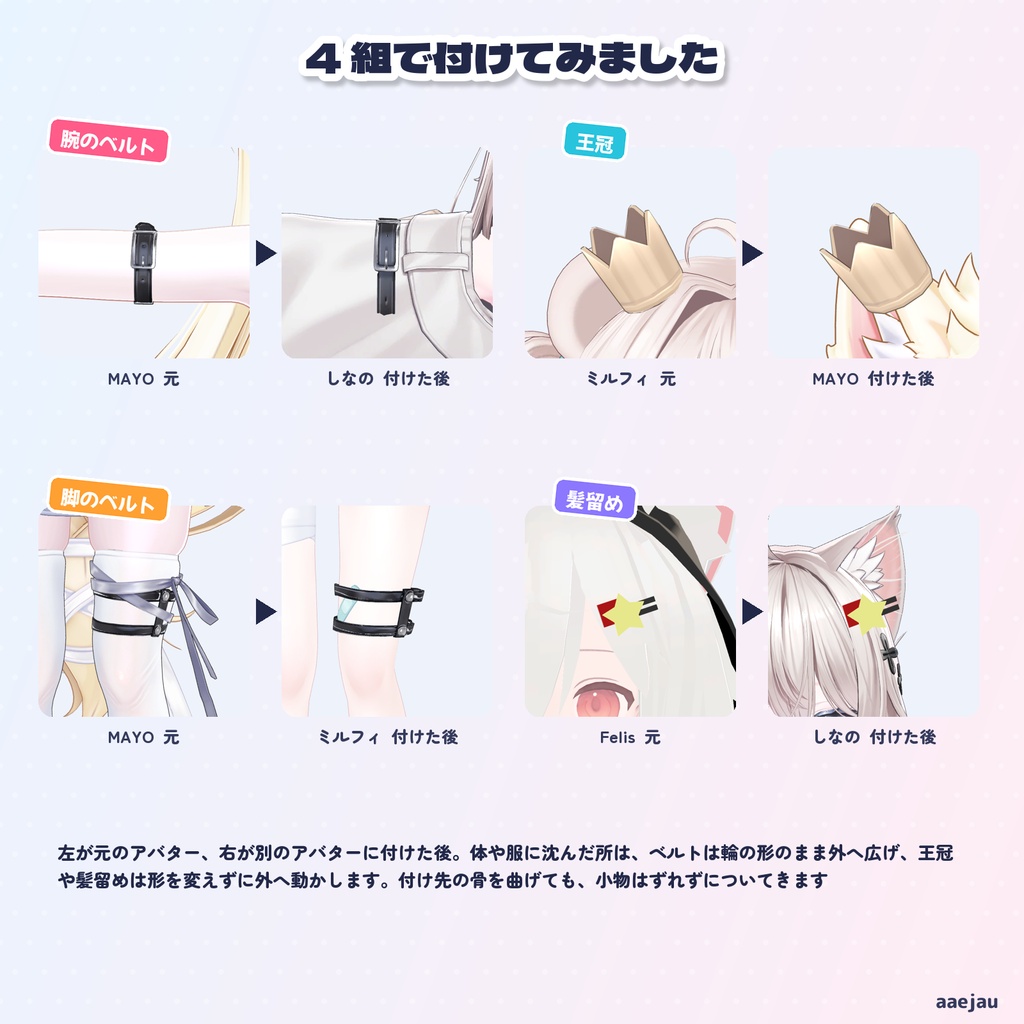
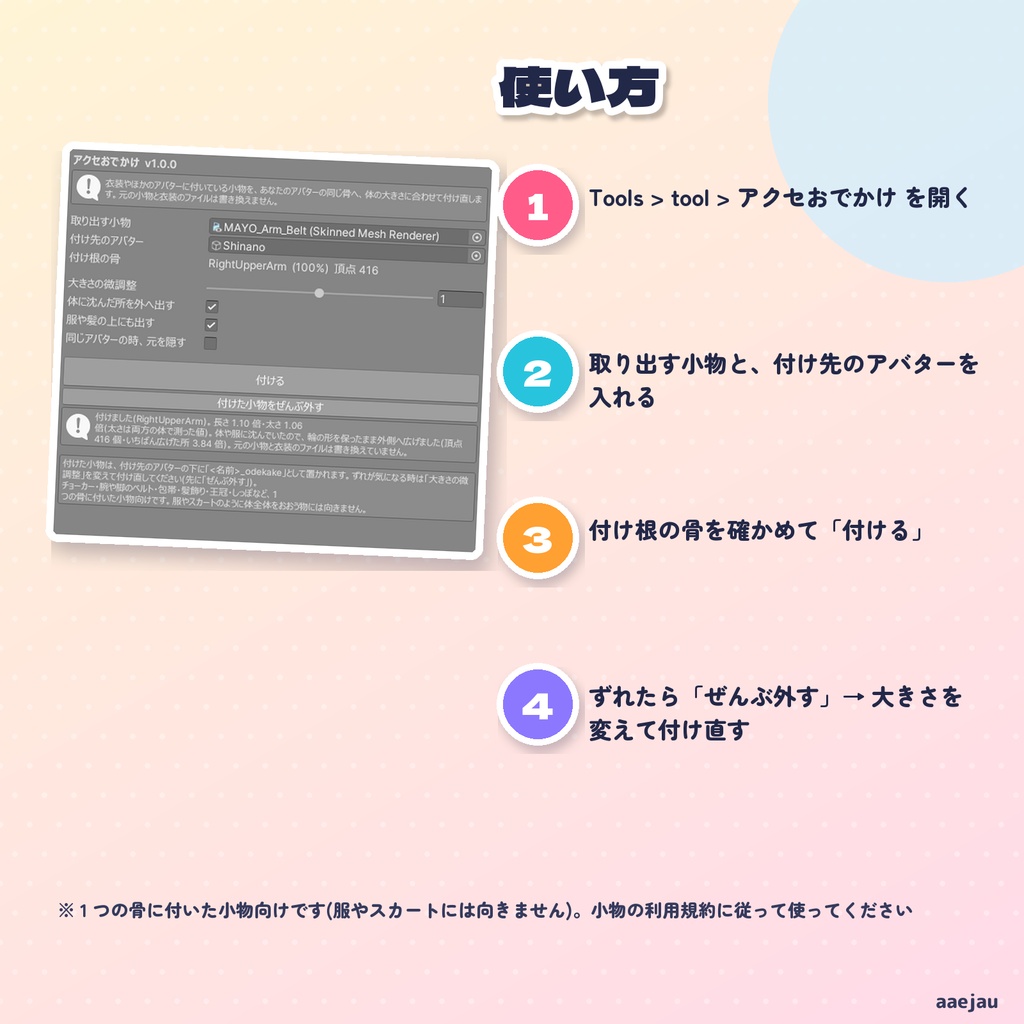
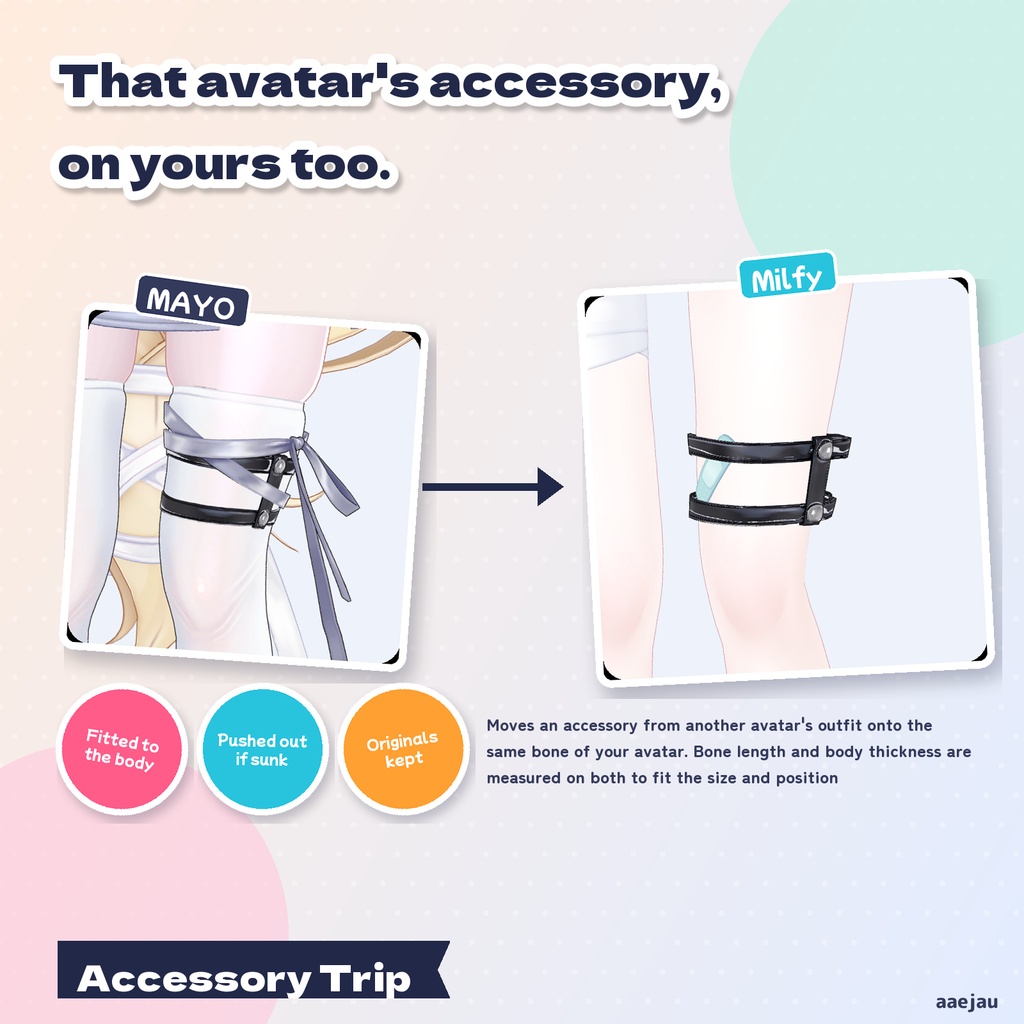
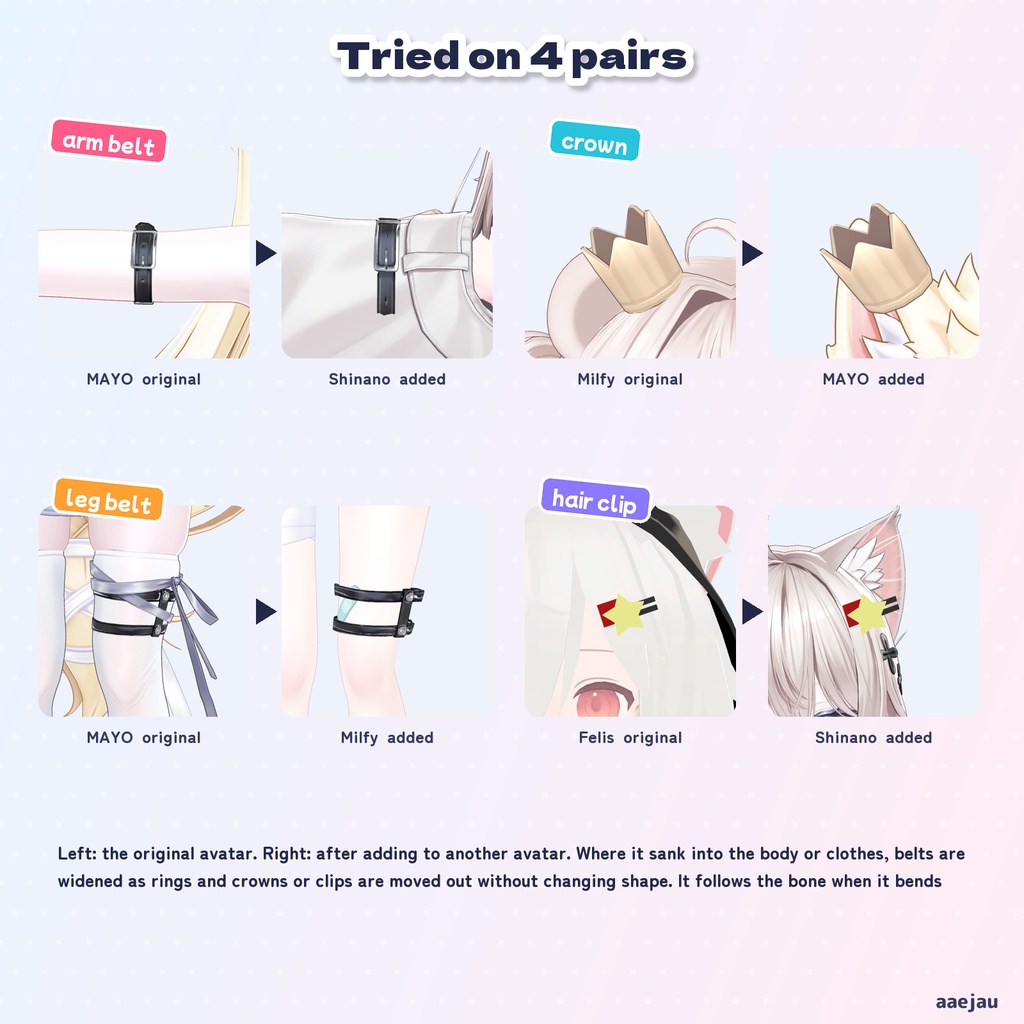
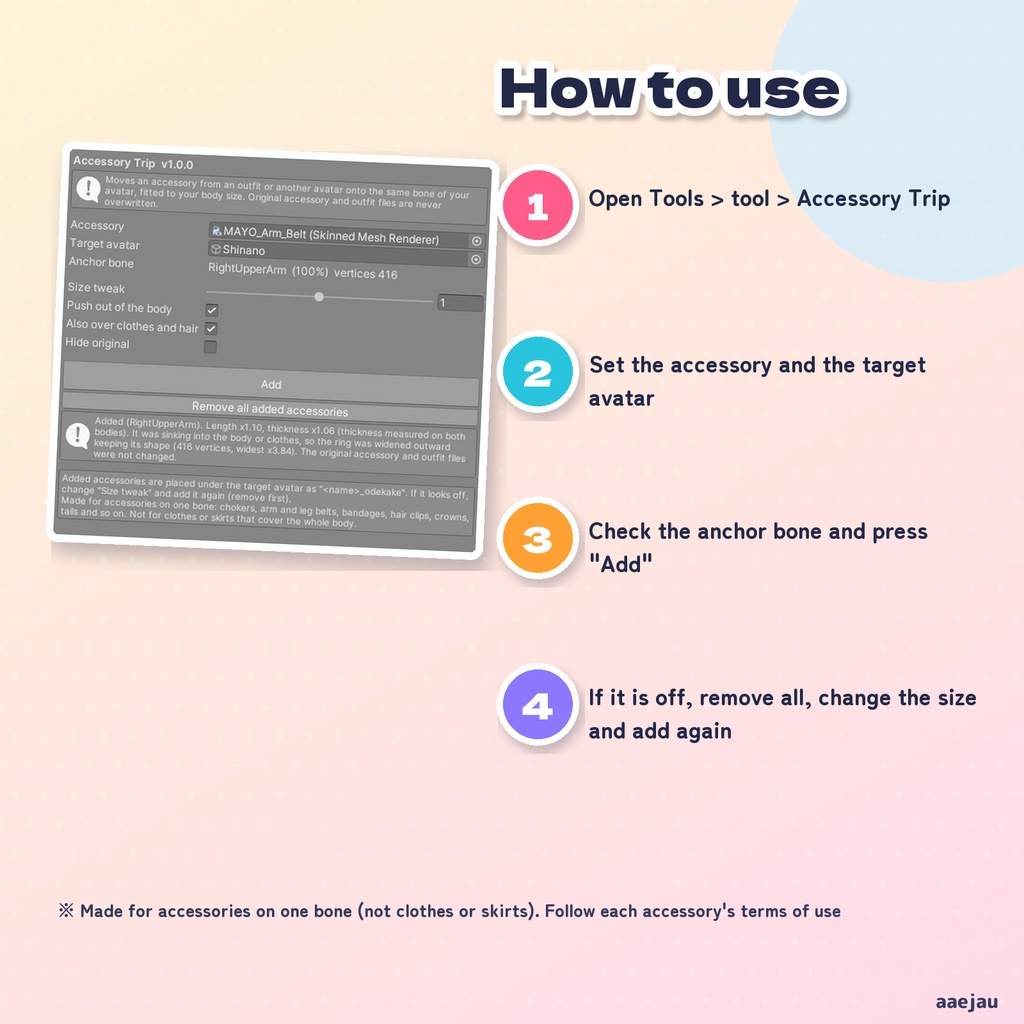
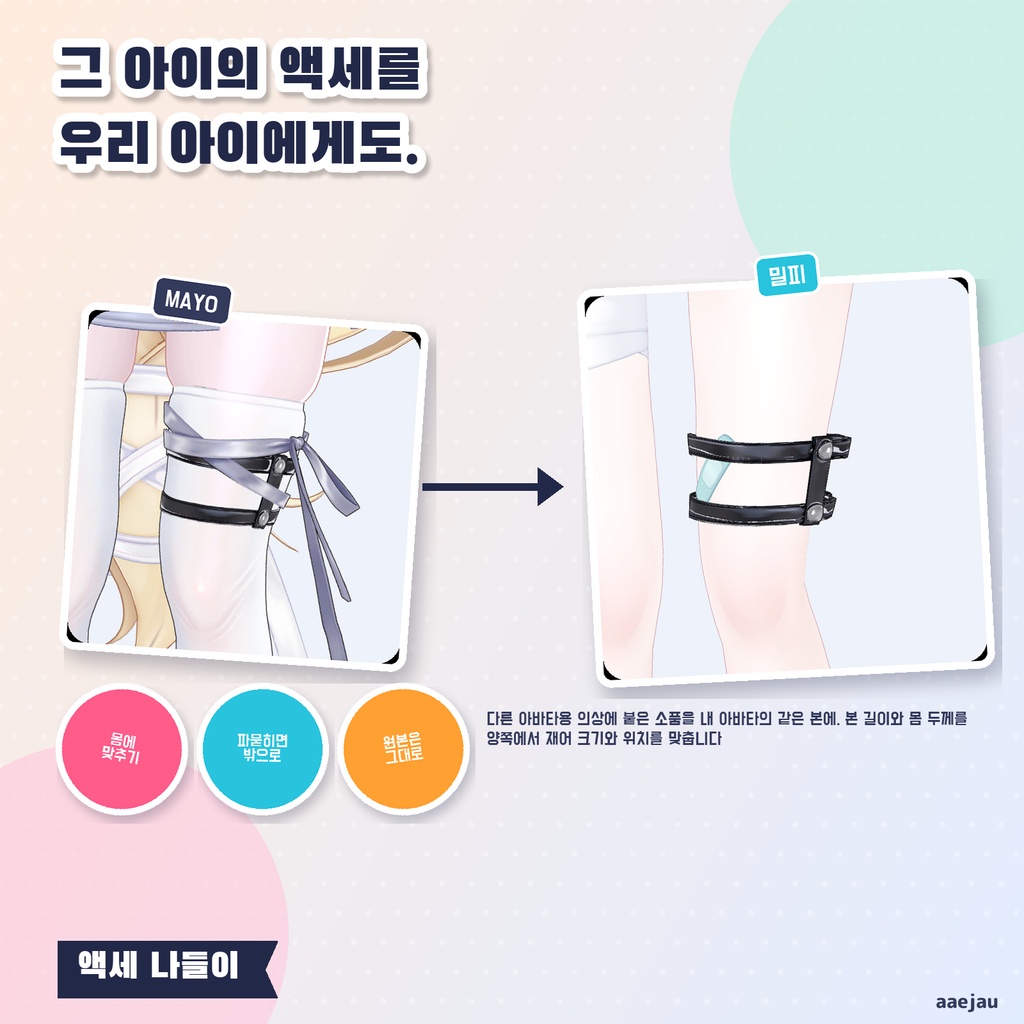
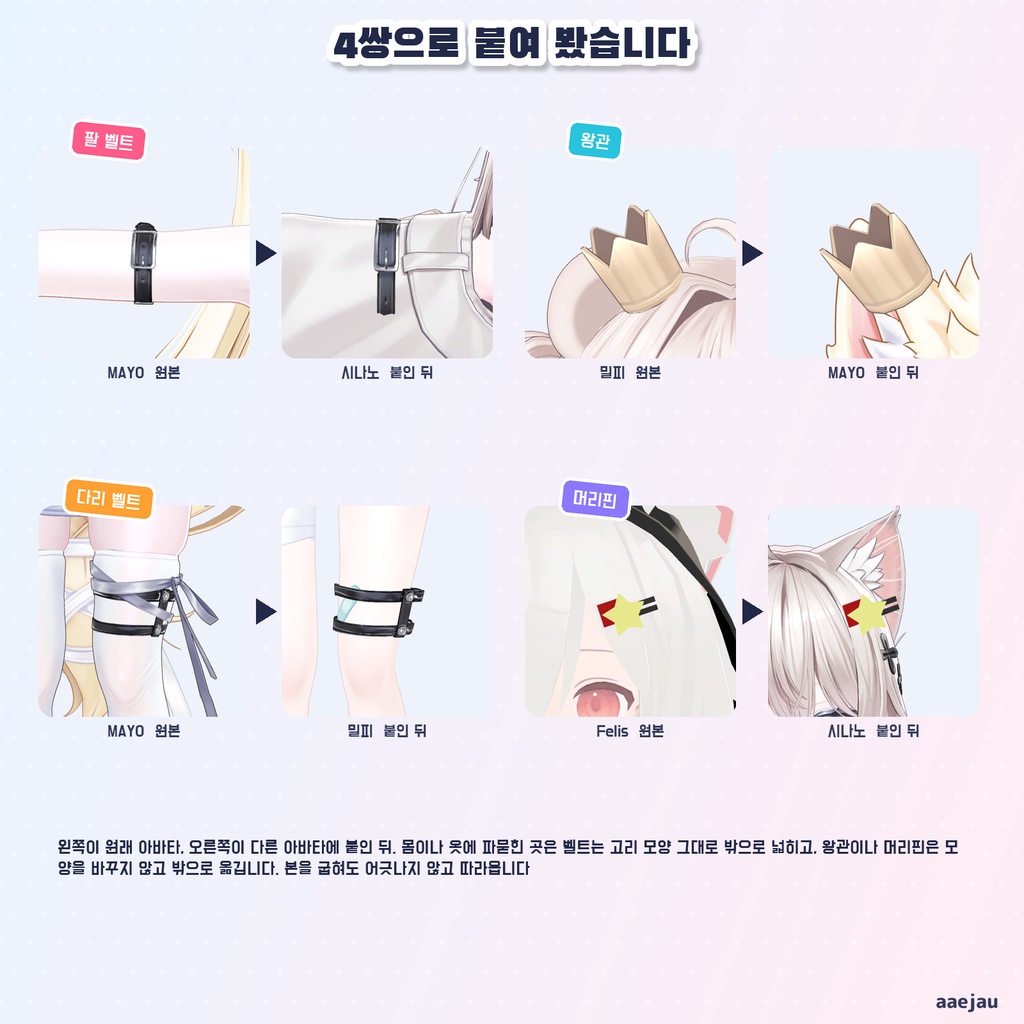
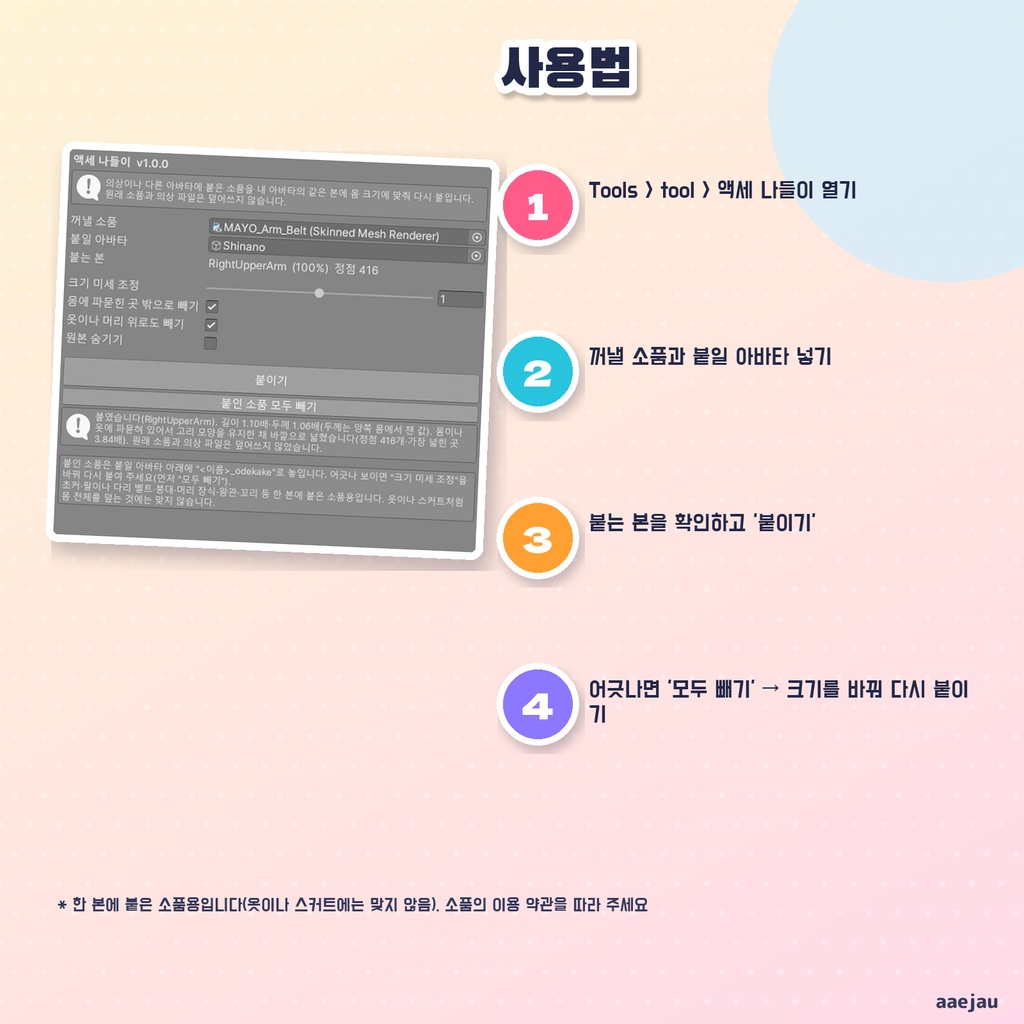


「あの衣装のベルト、うちの子にも付けたいのに大きさが合わない」 アクセおでかけは、衣装やほかのアバターに付いている小物(チョーカー・腕や脚のベルト・包帯・髪飾り・王冠・しっぽなど)を取り出して、あなたのアバターの同じ骨へ、体の大きさに合わせて付け直す Unity Editor ツールです。Blender は使いません。 ◆ 骨の長さと体の太さで合わせます 小物がいちばん多く付いている骨を見つけ、その骨の長さと、そこの体の太さを、元のアバターとあなたのアバターの両方で測ります。長さと太さの比で、小物の位置と大きさを合わせます。 ◆ 体や服に沈んだら外へ出します 付けた後に体・服・髪に沈んだ所があれば外へ出します。ベルトのように腕や脚を一周する物は、輪の形を保ったまま外側へ広げます。王冠や髪留めのような物は、形を変えずに丸ごと外へ動かします。 ◆ 揺れ物も一緒に 小物に付いていた揺れ物(PhysBone)も写します。元のアバターのコライダーへの参照は外すので、必要ならあなたのアバターのコライダーを入れ直してください。 ◆ 元のファイルは書き換えません 新しいメッシュを Assets/aaejau/AcceOdekake/Generated/ に作り、あなたのアバターの下に「<名前>_odekake」として置きます。元の小物・衣装・アバターのファイルは書き換えません。「付けた小物をぜんぶ外す」で元に戻ります。 ◆ 使い方 1. メニューの Tools > tool > アクセおでかけ を開く 2. 「取り出す小物」に小物のメッシュ、「付け先のアバター」にあなたのアバターを入れる 3. 「付け根の骨」を確かめて「付ける」を押す ◆ 6 組で確かめました MAYO の腕ベルト→しなの、ミルフィの王冠→MAYO、ミルフィの包帯→Felis、MAYO の脚ベルト→ミルフィ、Felis の髪留め→しなの、ミルフィのしっぽ→MAYO で付けました。5 組は、体に沈んだ頂点が付けた直後の最大 75% から、外へ出した後は 0〜2.3% になりました。付け先の骨を曲げても、6 組とも小物はずれずについてきます。 ※ 1 つの骨に付いた小物向けです。服・スカート・靴のように体の広い所をおおう物には向きません ※ 袖口が大きく広がった服の上に巻く物は、袖の飾りが小物の上に重なることがあります(包帯→Felis では袖の内側に 31.8% が残りました) ※ 小物に付いていた表示の切り替えなどのアニメーションは写しません ※ 取り出す小物は、ほかの人が作った物です。その小物の利用規約に従って使ってください ※ アップロードの前に Build & Test で見た目を確かめてください 内容物: unitypackage / README / CHANGELOG / TEST_REPORT / LICENSE / 画面のスクリーンショット ━━━━━━━━━━━━━━━━━━━━ English ━━━━━━━━━━━━━━━━━━━━ "I want that outfit's belt on my avatar too, but the size doesn't fit." Accessory Trip is a Unity Editor tool that takes an accessory from an outfit or another avatar (chokers, arm and leg belts, bandages, hair clips, crowns, tails and so on) and puts it on the same bone of your avatar, fitted to your body size. No Blender. ◆ Fitted by bone length and body thickness It finds the bone the accessory is mostly attached to and measures that bone's length and the body thickness there, on both the original avatar and yours. The position and size are fitted by those ratios. ◆ Pushed out if it sinks into the body or clothes Anything that sinks into the body, clothes or hair afterwards is pushed out. Rings around an arm or leg, such as belts, are widened outward keeping their shape. Items such as crowns and hair clips are moved outward as a whole without changing shape. ◆ PhysBones come along PhysBones on the accessory are copied too. References to the original avatar's colliders are removed, so add your avatar's colliders again if needed. ◆ Original files are never overwritten A new mesh is created in Assets/aaejau/AcceOdekake/Generated/ and placed under your avatar as "<name>_odekake". The original accessory, outfit and avatar files are not changed. "Remove all added accessories" puts things back. ◆ How to use 1. Open Tools > tool > Accessory Trip 2. Set the accessory mesh and your avatar as the target 3. Check the anchor bone and press "Add" ◆ Checked on 6 pairs MAYO arm belt -> Shinano, Milfy crown -> MAYO, Milfy bandage -> Felis, MAYO leg belt -> Milfy, Felis hair clip -> Shinano, Milfy tail -> MAYO. On 5 pairs, vertices sinking into the body went from up to 75% right after adding to 0-2.3% after pushing out. On all 6 pairs the accessory follows when the target bone bends. * Made for accessories on one bone. Not for clothes, skirts or shoes that cover a wide area of the body * Over clothes with very wide cuffs, cuff decorations may overlap a wrapped accessory (bandage -> Felis left 31.8% inside the sleeve) * Animations on the accessory such as toggles are not copied * Accessories are made by other creators. Follow each accessory's terms of use * Check the look with Build & Test before uploading Contents: unitypackage / README / CHANGELOG / TEST_REPORT / LICENSE / screenshot ━━━━━━━━━━━━━━━━━━━━ 한국어 ━━━━━━━━━━━━━━━━━━━━ "그 의상의 벨트를 우리 아이에게도 달고 싶은데 크기가 안 맞는다" 액세 나들이는 의상이나 다른 아바타에 붙은 소품(초커·팔이나 다리 벨트·붕대·머리 장식·왕관·꼬리 등)을 꺼내, 내 아바타의 같은 본에 몸 크기에 맞춰 다시 붙이는 Unity Editor 도구입니다. Blender는 쓰지 않습니다. ◆ 본 길이와 몸 두께로 맞춥니다 소품이 가장 많이 붙은 본을 찾아, 그 본의 길이와 그곳의 몸 두께를 원래 아바타와 내 아바타 양쪽에서 잽니다. 길이와 두께의 비로 소품의 위치와 크기를 맞춥니다. ◆ 몸이나 옷에 파묻히면 밖으로 뺍니다 붙인 뒤 몸·옷·머리에 파묻힌 곳이 있으면 밖으로 뺍니다. 벨트처럼 팔이나 다리를 한 바퀴 두르는 것은 고리 모양을 유지한 채 바깥으로 넓힙니다. 왕관이나 머리핀 같은 것은 모양을 바꾸지 않고 통째로 바깥으로 옮깁니다. ◆ 흔들림도 함께 소품에 붙은 흔들림(PhysBone)도 옮깁니다. 원래 아바타의 콜라이더 참조는 빼므로 필요하면 내 아바타의 콜라이더를 다시 넣어 주세요. ◆ 원래 파일은 덮어쓰지 않습니다 새 메시를 Assets/aaejau/AcceOdekake/Generated/ 에 만들고 내 아바타 아래에 <이름>_odekake로 놓습니다. 원래 소품·의상·아바타 파일은 덮어쓰지 않습니다. 붙인 소품 모두 빼기로 되돌립니다. ◆ 사용법 1. Tools > tool > 액세 나들이 열기 2. 꺼낼 소품에 소품 메시, 붙일 아바타에 내 아바타 넣기 3. 붙는 본을 확인하고 붙이기 누르기 ◆ 6쌍으로 확인했습니다 MAYO 팔 벨트→시나노, 밀피 왕관→MAYO, 밀피 붕대→Felis, MAYO 다리 벨트→밀피, Felis 머리핀→시나노, 밀피 꼬리→MAYO로 붙였습니다. 5쌍은 몸에 파묻힌 정점이 붙인 직후 최대 75%에서 밖으로 뺀 뒤 0~2.3%가 되었습니다. 붙일 곳의 본을 굽혀도 6쌍 모두 소품이 어긋나지 않고 따라옵니다. * 한 본에 붙은 소품용입니다. 옷·스커트·신발처럼 몸의 넓은 곳을 덮는 것에는 맞지 않습니다 * 소매 끝이 크게 퍼진 옷 위에 감는 것은 소매 장식이 소품 위에 겹칠 수 있습니다(붕대→Felis는 소매 안쪽에 31.8%가 남았습니다) * 소품에 붙은 표시 전환 등의 애니메이션은 옮기지 않습니다 * 꺼내는 소품은 다른 사람이 만든 것입니다. 그 소품의 이용 약관을 따라 주세요 * 업로드 전에 Build & Test로 모습을 확인해 주세요 내용물: unitypackage / README / CHANGELOG / TEST_REPORT / LICENSE / 스크린샷