

Unity Armature Merger - 衣装のアーマチュアをきれいに統合するツール【VRChat / Unity】
- Digital1,200 JPY
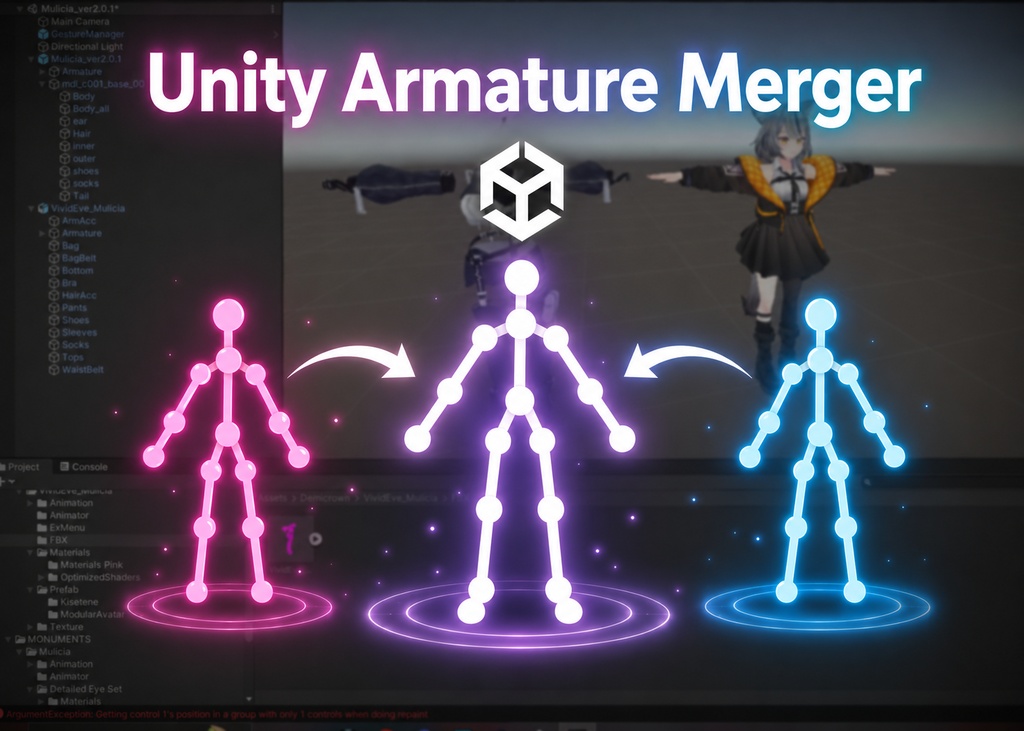
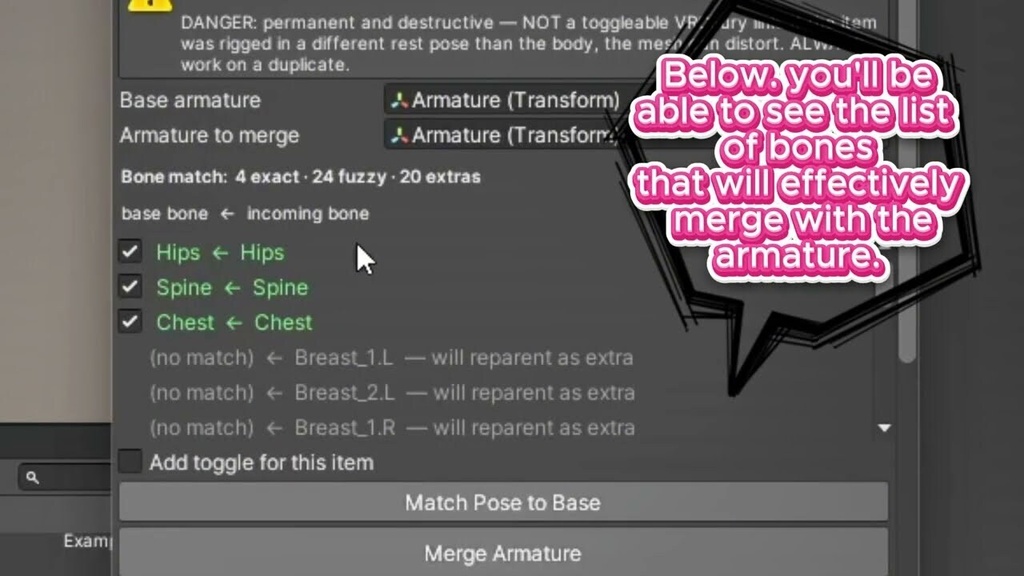
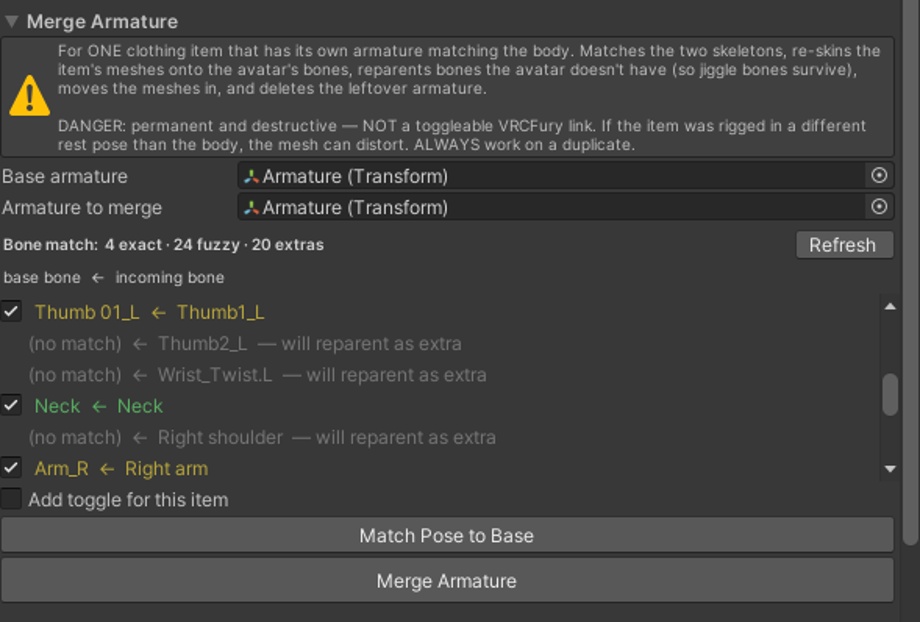
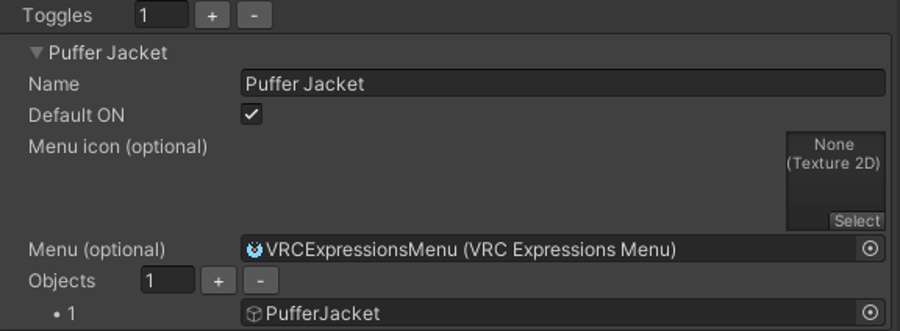



紹介動画 / Video: https://www.youtube.com/watch?v=Y7LqCQcpmho 【概要】 Unity Armature Merger は、衣装のアーマチュアをVRChatアバターに、メッシュがつぶれたりゆがんだりすることなく、数クリックできれいに統合できる Unity エディタ拡張です。 単純に親子付けし直すのではなく、きちんと計算した統合を行います。Blenderでの正しい統合と同じバインドポーズの計算を使っているので、衣装は元の形をそのまま保ったまま、1つのきれいなスケルトンにまとまります。ボーン数が無駄に増えることもありません。 アバターのアーマチュアを「Base」に、衣装のアーマチュアを統合する側に設定し、プレビューリストを確認して「Merge」を押すだけ。余計な準備は必要ありません。 紹介動画(約2分の機能紹介):https://www.youtube.com/watch?v=Y7LqCQcpmho 【こんな方におすすめ】 ・衣装を着せるたびに、メッシュがつぶれたりゆがんだりして困っている方 ・ボーン数を増やさずに、衣装をアバターのスケルトンにまとめたい方 ・衣装ごとのON/OFFトグルを毎回手作りするのが面倒な方 ・帽子や武器などの小物を、手軽にボーンへ付けたい方 【できること・主な機能】 ■ Merge Armature(アーマチュア統合) ・衣装のアーマチュアをアバターのアーマチュアに統合します ・2つのスケルトンを照合し、衣装のメッシュをアバターのボーンにスキニングし直します ・揺れボーンやヒップディップなどの追加ボーンもそのまま保持 ・メッシュの移動と、残ったアーマチュアの片付けまで、ワンクリックで完了 ■ Blender式の計算による統合 ・Blenderでの統合と同じバインドポーズの計算を使用 ・各メッシュのバインドをアバターのボーン基準で再計算するので、メッシュはつぶれたりゆがんだりせず、元の形を保ちます ・1つのスケルトンにロスなく統合。ボーン数が無駄に増えることもありません ■ スマートなボーン照合 ・UpperArm、arm、Bip_Arm、J_Bip_L_UpperArm、Mixamo の名前など、さまざまなボーンの命名規則を自動で認識・照合します ・手動でのリネームは不要です ・統合前に、すべての照合結果をライブプレビューで確認できます 緑:完全一致 黄:命名規則で照合(念のため確認がおすすめ) 灰:一致なし(追加ボーンとして親子付けされます) ・すべての照合にチェックボックスがあり、統合したくないボーンは除外できます ■ トグル自動生成 ・統合と同時に、衣装のON/OFFトグルも作成できます(追加の準備は不要) ・FXレイヤー、パラメーター、アニメーション、Expression Parameter、メニューコントロールを自動で設定 ・複数のトグル、1つのトグルに複数のオブジェクト、デフォルトのON/OFF、メニューアイコン、どのExpressionsサブメニューに入れるかまで設定できます ・衣装を統合するたびに、トグルを手作りする必要はありません ■ Attach To Bone ・フル統合が必要ないものは、1つのボーンに親子付けできます(帽子は頭に、剣は手に など) ・アバターと一緒に動き、個別のトグルも付けられます。ちょっとした小物にぴったりです ■ Fix Clipping ・統合ツールに同梱された、Sceneビュー上で塗って使うツールです ・別素体向け衣装でよく残る、小さな貫通(クリッピング)を修正できます ・メッシュを選び、突き抜けている部分を塗って、「Push」スライダーで頂点を外側へ(または体を服の内側へ収めるように内側へ)押し出します ・「Preview」をONにすると、塗りながらシーン上で結果を確認できます ・仕上がったら「Apply」で、ゲーム内で0〜100で切り替えられるシェイプキー(ブレンドシェイプ)として保存されます 【導入方法】 1. .unitypackage をプロジェクトにインポートします(ダブルクリック、またはProjectウィンドウにドラッグ&ドロップ)。 2. インポート画面で「Import」を押せば導入完了です。 【使い方】 1. アバターと衣装をUnityのシーンに配置します。 2. メニューの Tools > Angel > Unity Armature Merger > Merge Armature を開きます。(Fix Clipping も同じメニュー内にあります) 3. アバターのアーマチュアを「Base armature」に設定します。 4. 衣装のアーマチュアを「Armature to merge」に設定します。 5. プレビューリストを確認し、必要に応じてボーンのチェックを付け外しします。 6. 必要であれば、衣装のトグルを追加します。 7. 「Merge」を押します。 ※約2分の機能紹介を、商品の紹介動画でご覧いただけます。 【動作環境】 ・VRChat Avatar SDK を導入したUnityプロジェクト ・Unity と VRChat アバターセットアップの基本的な知識 【注意事項】 ■ 別素体向け衣装について ・同じ素体向けの衣装(すでに体に合わせてリグが組まれているもの)は、きれいにロスなく統合できます。 ・まったく別の体向けにリグが組まれた衣装は、Blenderと同じように、事前に手動でボーンを合わせる作業が必ず必要です。別素体向けの衣装を自動でフィットさせられるツールはありません。 ・Armature Merger は、その調整を行った状態を尊重し、ゆがみなくきれいに統合します。 ・紹介動画内のアバター(MIAOWZ様の「Loveblight」)は本商品には含まれません。 ・Fix Clipping の画像は Celestial 様にご協力いただきました。 【内容物】 ・Unity Armature Merger 本体(.unitypackage/1MB) ・テキストファイル(TXT/639B) 【利用規約】 本商品(Unity Armature Merger)をご購入・ダウンロードした時点で、以下の規約に同意したものとみなします。 ・本ツールおよびそのUnityパッケージの流出・共有・再配布・再アップロード・転売を禁止します。 ・ご自身で入手していない方へ、パッケージや同梱ファイルを渡すことを禁止します。 ・個人・商用のアバター制作に使用していただけます。 ・Armature Merger を使って改変したアバター・プロジェクトは、使用したアセットのライセンスに従って配布・販売していただけます。 ・Unity Armature Merger 本体やそのファイルを、配布するアバター・アセット・プロジェクト・パッケージに含めることはできません。 ・本ツールやそのコードを自作と偽ることを禁止します。 ・デジタル商品のため、返金はお受けできません。 ・今後のUnity・VRChat SDK・サードパーティ製パッケージのアップデートによって生じた問題について、制作者は責任を負いかねます。ただし、必要に応じて対応アップデートを行う場合があります。 【連絡先】 使い方のサポートや不具合のご報告・ご質問は、BOOTHのメッセージ、または以下までお気軽にどうぞ。 ・サポート用Discord:https://discord.gg/q76Vpkaxd5 ・Instagram:@angelstheatre(https://www.instagram.com/angelstheatre/) ・ウェブサイト:https://angelstheatre.com/ 【更新履歴】 ・BOOTHにて販売開始 ―――――――――――――――――――― English Description 【Overview】 Unity Armature Merger is a tool for merging a clothing item's armature onto your VRChat avatar — cleanly, in a few clicks, without the mesh squishing or distorting. Instead of a rough reparent, it does a real calculated merge. It uses the same bind-pose calculations that a proper Blender merge relies on, so your outfit keeps its exact shape on a single clean skeleton instead of squishing or bloating your bone count. Simply set your avatar's armature as the Base, set the clothing item's armature as the one to merge, check the preview list, and press Merge. No extra setup needed. Preview video (full 2-minute feature overview): https://www.youtube.com/watch?v=Y7LqCQcpmho 【Recommended for】 ・Anyone tired of outfits squishing or distorting when they're added ・Creators who want outfits on one clean skeleton without bloating bone count ・Anyone who's sick of hand-building a toggle for every outfit ・Anyone who wants to stick a quick prop onto a bone 【Features】 ■ Merge Armature ・Merges a clothing item's armature into your avatar's ・Matches the two skeletons, re-skins the item's meshes onto your avatar's bones, keeps extra bones like jiggle bones and hip dips, moves the meshes in, and cleans up the leftover armature, all in one press ■ Blender-style calculated merge ・Uses the same bind-pose math as a Blender merge ・Recomputes each mesh's binding relative to your avatar's bones so the mesh keeps its exact shape instead of squishing or distorting ・A clean, lossless merge onto a single skeleton — no bone-count bloat ■ Smart bone matching ・Recognizes wildly different bone naming conventions automatically: UpperArm, arm, Bip_Arm, J_Bip_L_UpperArm, Mixamo names, and more — no manual renaming needed ・A live preview list shows every match before you commit: Green — exact match Yellow — matched by name convention, worth a quick double-check Grey — no match, will be reparented as an extra bone ・Every match has a checkbox, so you can exclude any bone you don't want merged ■ Automatic toggle generator ・Builds an on/off toggle for the item as you merge — no extra setup ・Wires up the FX layer, parameter, animations, expression parameter, and menu control for you ・Multiple toggles, multiple objects per toggle, default on/off state, menu icons, and your choice of Expressions submenu ■ Attach To Bone ・Not everything needs a full merge. Attach To Bone parents a prop to a single bone — a hat on the head, a sword in the hand — so it rides along with your avatar, with its own optional toggle
English (continued)
■ Fix Clipping ・Bundled alongside the merger: a scene-view painting tool for fixing the small clipping that cross-base outfits often leave behind ・Pick the mesh, paint over the area poking through, and use the Push slider to nudge those verts outward (or inward to tuck the body under clothes) ・Turn on Preview to see the fix live as you paint; Apply saves it as a blendshape you can toggle 0–100 in-game 【Installation】 1. Import the .unitypackage into the project (double-click it, or drag it into the Project window). 2. Click Import. 【How to Use】 1. Place your avatar and the clothing item in your Unity scene. 2. Open Tools > Angel > Unity Armature Merger > Merge Armature (Fix Clipping is in the same menu). 3. Set your avatar's armature as the Base armature. 4. Set the clothing item's armature as the Armature to merge. 5. Check the preview list and tick or untick any bones. 6. Optionally add a toggle for the item. 7. Press Merge. A full 2-minute feature overview is available in the product preview video. 【Requirements】 ・A Unity project with the VRChat Avatar SDK installed ・Basic knowledge of Unity and VRChat avatar setup 【Notes】 ■ A note on cross-base outfits ・Same-base outfits — ones already rigged to fit your body — merge cleanly and losslessly. ・Cross-base outfits, rigged for a completely different body, will always need some manual bone-fitting first, just like they would in Blender. No tool can automatically fit an outfit made for a different base. ・What Armature Merger does is respect that fitting once you've done it, and merge it in cleanly without distortion. ・The avatar in the video (Loveblight by MIAOWZ) is NOT included. ・Fix Clipping photo was done by Celestial. 【Contents】 ・Unity Armature Merger (.unitypackage, 1MB) ・Text file (TXT, 639B) 【Terms of Service】 By purchasing or downloading Unity Armature Merger, you agree to the following terms: ・DO NOT leak, share, redistribute, reupload, or resell this tool or its Unity package. ・Do not send the package or included files to anyone who has not obtained their own copy. ・You are allowed to use Armature Merger for personal and commercial avatar work. ・Avatars and projects modified using Armature Merger may be distributed or sold according to the licenses of the assets used in those projects. ・You may NOT include Unity Armature Merger itself or its files inside an avatar, asset, project, or package that you distribute. ・Do not claim the tool or its code as your own. ・No refunds will be provided for digital purchases. ・I am not responsible for issues caused by future Unity, VRChat SDK, or third-party package updates, though compatibility updates may be provided when necessary. 【Contact】 Need more help using this product? Send a BOOTH message or reach out here: ・Support Discord: https://discord.gg/q76Vpkaxd5 ・Instagram: @angelstheatre (https://www.instagram.com/angelstheatre/) ・Website: https://angelstheatre.com/ 【Changelog】 ・Now available on BOOTH