

Console For Dummies - Unityのエラーをやさしく解説するコンソール【VRChat / Unity】
- Digital0 JPY
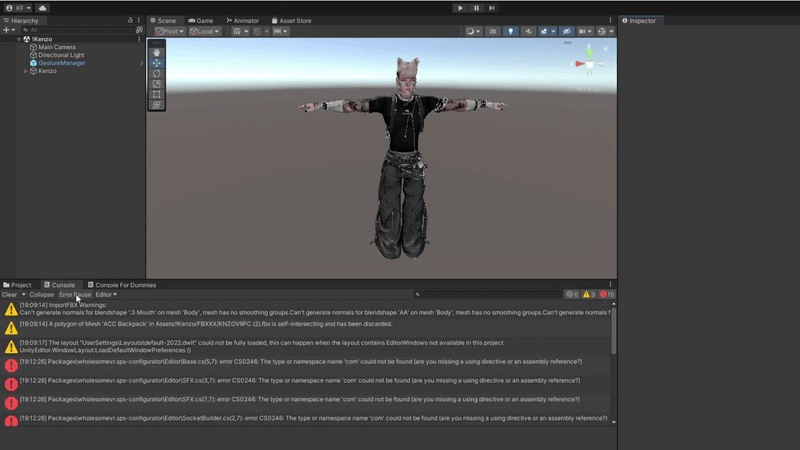
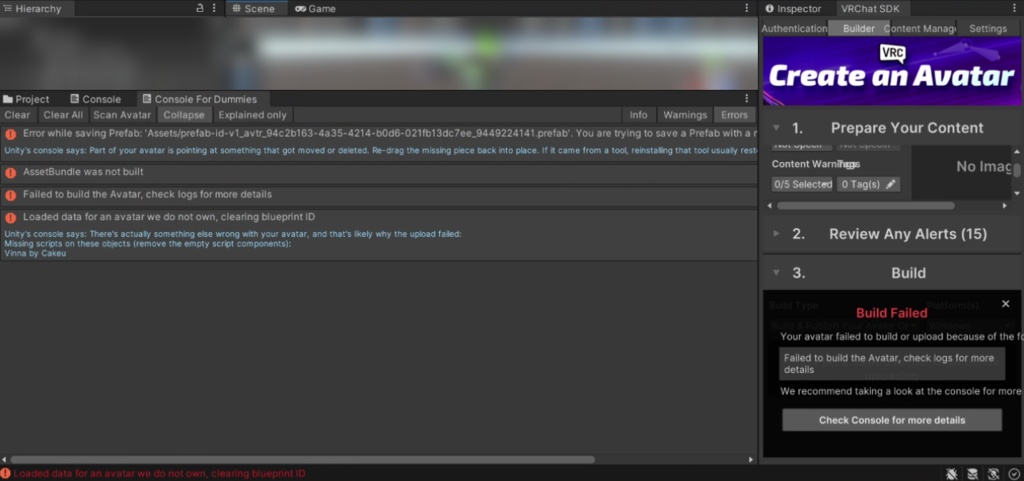

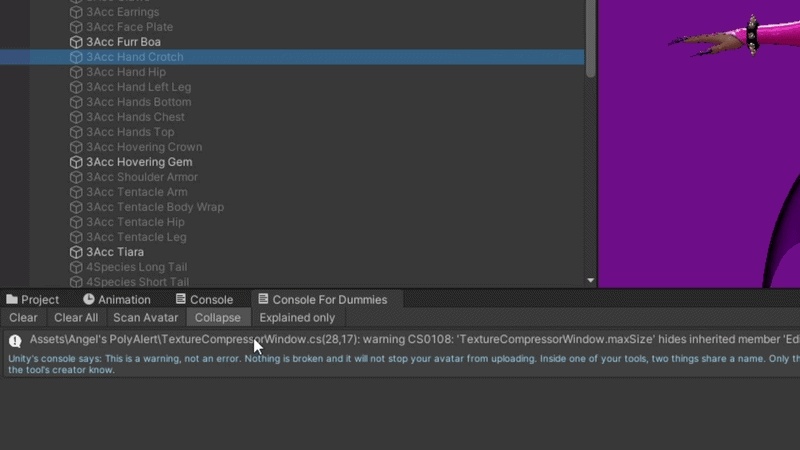
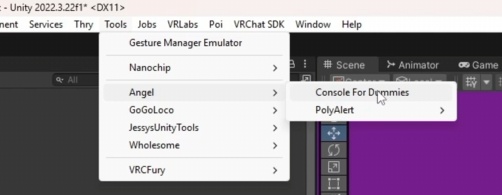


【概要】 「Unityのコンソール、何て言ってるのか誰か説明して…」 大丈夫、おまかせください。 Console For Dummies は、Unityのコンソールに出るエラーや警告を、初心者にもわかる言葉でやさしく解説する Unity エディタ拡張です。 コーディングの知識も、エラーコードの検索も、赤い文字を翻訳サイトに貼り付けて祈る必要もありません。「とにかくアバターをアップロードしたい!」という方のために作りました。作業中のコンソールをリアルタイムで読み取り、アップロードを止めているエラーはどれか、無視して大丈夫なものはどれかを教えてくれます。 日本語・英語の両方に対応しています。 【こんな方におすすめ】 ・Unityのコンソールに出る赤い文字の意味がわからない方 ・VRChatへのアバターアップロードで、エラーに困っている方 ・どのエラーを直せばいいのか、すぐに知りたい方 ・Discordなどで質問するとき、ログを安全に共有したい方 【できること・主な機能】 ■ エラー・警告をやさしく解説 ・すべてのエラー・警告を、友だちが説明してくれるような読みやすい文章で解説 ・そのエラーが本当にアップロードを止めているのか、完全に無視してよいのかを表示 ・わかりにくいVRChat SDKのエラーの裏にある「本当の原因」を解説 ・どのオブジェクト・マテリアルが壊れているかを特定し、ボタン一つでそこへジャンプ ・Unity起動時に大量に出るメッセージを、80行ではなく1行にまとめて表示 ・作業中もリアルタイムで更新されるので、エラーが出た瞬間に解説が表示されます ■ 本当に大事なものだけがわかる ・アップロードを本当に止めているエラーには、目立つ [URGENT] タグが付いてウィンドウの一番上に表示されます ・大量の無害な警告に、大事な1〜2件が埋もれることはありません ・直せない(=何も壊れていない)エラーも含め、それ以外のものは落ち着いて解説します ■ Scan Avatar ・「Scan Avatar」を押すと、選択中のアバターを直接チェックします ・ピンク色になった壊れたマテリアル、Missing Script、SDKに弾かれるセットアップの問題を検出 ・毎回、問題のあるオブジェクト名をはっきり表示するので、アップロードを試す前に問題を見つけられます ■ Show me ボタン ・エラーの原因になっているオブジェクトやマテリアルがわかる場合は「Show me」ボタンが表示されます ・ワンクリックでシーン内のそのオブジェクトを選択・ハイライト ・Hierarchyの中から、40個あるマテリアルのどれが原因かを探し回る必要はありません ■ 質問用に、安全にコピー ・ボタン一つで、エラーとその解説をDiscordにそのまま貼り付けられる形式でコピー ・Windowsのユーザー名とアバターIDは自動で取り除かれるので、個人情報を共有せずにログを見せられます ■ プロジェクトが壊れても動き続けます ・Console For Dummies は、プロジェクトの他の部分とは別に単独でコンパイルされます ・パッケージが削除されてプロジェクト全体がビルドできなくなると、ほとんどのツールはメニューから消えてしまいます。本ツールはそんなときでも開いたまま、何が起きたのか、どのツールが原因なのかを教えてくれます ・完全オフラインで動作します。データはどこにも送信されません。解説はすべてツール内に書き込まれています 【導入方法】 1. .unitypackage をプロジェクトにインポートします(ダブルクリック、またはProjectウィンドウにドラッグ&ドロップ)。 2. インポート画面で「Import」を押します。 3. メニューに「Tools」>「Angel」>「Console For Dummies」が表示されれば導入完了です。 【使い方】 1. メニューから「Tools」>「Angel」>「Console For Dummies」を開きます。 2. いつものConsoleタブの横にドッキングして、作業中は開いたままにしておきます。 3. アップロード前に、アバターを選択して「Scan Avatar」を押します。 4. エラーの下に表示される青い文字の解説を読み、「Show me」が出ていれば押して場所を確認します。 5. [URGENT] が付いているものから先に直しましょう。それがアップロードを止めている原因です。 【動作環境】 ・VRChat SDK を導入したUnityプロジェクト ・Unity と VRChat アバターセットアップの基本的な知識 【注意事項】 ・このツールを使うときは、表示された内容をしっかり読む必要があります。ご自身で手動で解決していただく必要がある問題も表示されます。 【内容物】 ・Console For Dummies 本体(.unitypackage/29KB) ・MDファイル(4KB) 【利用規約】 本商品(Angel's Console For Dummies)をご購入・ダウンロードした時点で、以下の規約に同意したものとみなします。 ・本ツールおよびそのUnityパッケージの流出・共有・再配布・再アップロード・転売を禁止します。 ・ご自身で入手していない方へ、パッケージや同梱ファイルを渡すことを禁止します。 ・個人・商用のアバター制作に使用していただけます。 ・Console For Dummies 本体やそのファイルを、配布するアバター・アセット・プロジェクト・パッケージに含めることはできません。 ・本ツールやそのコードを自作と偽ることを禁止します。 ・デジタル商品のため、返金はお受けできません。 ・今後のUnity・VRChat SDK・サードパーティ製パッケージのアップデートによって生じた問題について、制作者は責任を負いかねます。ただし、必要に応じて対応アップデートを行う場合があります。 【連絡先】 不具合のご報告・ご質問は、BOOTHのメッセージ、または以下までお気軽にどうぞ。 ・Discord:https://discord.gg/Azqg3jH5bk ・Instagram:@angelstheatre(https://www.instagram.com/angelstheatre/) ・ウェブサイト:https://angelstheatre.com/ 【更新履歴】 v1.0 — 初回リリース ・よくあるエラー60種類以上をわかりやすく解説 ・コンソールをリアルタイムで読み取り、自動で解説 ・Scan Avatar でピンクマテリアルやMissing Scriptを検出 ・壊れたオブジェクトへ直接ジャンプできる「Show me」ボタン ・アップロードを止めるエラーに [URGENT] タグを付けて並べ替え ・ユーザー名とアバターIDを自動で伏せる「質問用コピー」 ・起動時のメッセージをフィルタリングし、1行にまとめて表示 ・不足しているパッケージと、それに依存するツールを検出 ・英語・日本語に完全対応 ・独立したアセンブリで動作するため、プロジェクトが壊れても動き続けます ―――――――――――――――――――― English Description 【Overview】 "Can someone explain what the Unity console is even saying?" Sure. I got you. Console For Dummies is built for people who just want to upload their avatar — no coding, no Googling error codes, no pasting red text into a translator and hoping. It reads your console as you work and tells you, in words you already understand, which errors are stopping you and which ones you can safely ignore. Full English and Japanese language support. 【Recommended for】 ・Anyone who has no idea what Unity's red text means ・VRChat creators stuck on avatar upload errors ・Anyone who wants to know which error to fix first ・Anyone who needs to share a log safely when asking for help 【Features】 ■ Plain-language explanations ・Every error and warning explained in readable sentences for beginners, written the way a friend would say it ・Whether it actually blocks your upload, or is safe to ignore completely ・The real problem hiding behind confusing VRChat SDK errors ・Which exact object or material is broken, with a button that jumps straight to it ・Unity's startup noise, folded into a single line instead of eighty ・Updates live as you work, so the explanation is already there the moment the error appears ■ It tells you what actually matters ・Errors that genuinely stop your upload get a bright [URGENT] tag and jump to the top of the window ・The one or two things actually blocking you are never buried under eighty harmless warnings ・Everything else gets explained calmly, including the ones that can't be fixed, because nothing is broken ■ Scan Avatar ・Checks your selected avatar directly: pink and broken materials, missing scripts, and the setup problems the SDK will reject you for ・Names the exact object every time, so you find the problem before you waste an upload attempt ■ Show me buttons ・When it can work out which object or material is causing an error, you get a Show me button ・One click selects and highlights it in your scene ■ Copy for help, safely ・One button copies your errors and their explanations, formatted to paste straight into Discord ・Your Windows username and avatar ID are stripped out automatically ■ Keeps working when everything else breaks ・Compiles on its own, separately from the rest of your project, so it stays open and tells you what happened (and which tool caused it) when a removed package breaks your build ・Runs completely offline. Nothing is sent anywhere, ever 【Installation】 1. Import the .unitypackage into the project (double-click it, or drag it into the Project window). 2. Click Import. 3. You'll now see Tools > Angel > Console For Dummies in the menu bar. 【How to Use】
English (continued)
1. Open Tools > Angel > Console For Dummies. 2. Dock it next to your normal Console tab and leave it open while you work. 3. Select your avatar and press Scan Avatar before you upload. 4. Read the blue text under any error, and press Show me where it appears. 5. Fix anything marked [URGENT] first — those are the ones stopping your upload. 【Requirements】 ・A Unity project with the VRChat SDK installed ・Basic knowledge of Unity and VRChat avatar setup 【Notes】 ・With this tool, you're going to have to actually read what it tells you. It will tell you issues that you may have to resolve manually yourself. 【Contents】 ・Console For Dummies (.unitypackage, 29KB) ・MD file (4KB) 【Terms of Service】 By purchasing or downloading Angel's Console For Dummies, you agree to the following terms: ・DO NOT leak, share, redistribute, reupload, or resell this tool or its Unity package. ・Do not send the package or included files to anyone who has not obtained their own copy. ・You are allowed to use Console For Dummies for personal and commercial avatar work. ・You may NOT include Console For Dummies itself or its files inside an avatar, asset, project, or package that you distribute. ・Do not claim the tool or its code as your own. ・No refunds will be provided for digital purchases. ・I am not responsible for issues caused by future Unity, VRChat SDK, or third-party package updates, though compatibility updates may be provided when necessary. 【Contact】 For bug reports or questions, send a BOOTH message or reach out here: ・Discord: https://discord.gg/Azqg3jH5bk ・Instagram: @angelstheatre (https://www.instagram.com/angelstheatre/) ・Website: https://angelstheatre.com/ 【Changelog】 v1.0 — Initial Release ・Plain explanations for over sixty common errors ・Live console reading with automatic explanations ・Scan Avatar for pink materials and missing scripts ・Show me buttons that jump straight to the broken object ・[URGENT] tagging and sorting for upload-blocking errors ・Copy for help with automatic username and avatar ID masking ・Startup noise filtering and one-line collapsing ・Detection of missing packages and the tools that depend on them ・Full English and Japanese language support ・Runs in its own assembly, so it survives a broken project