

PolyAlert - アバターのポリゴン数・VRAMを表示&最適化できるツール【VRChat / Unity】
- PolyAlert DemoDigital0 JPY
- PolyAlert FullDigital1,500 JPY

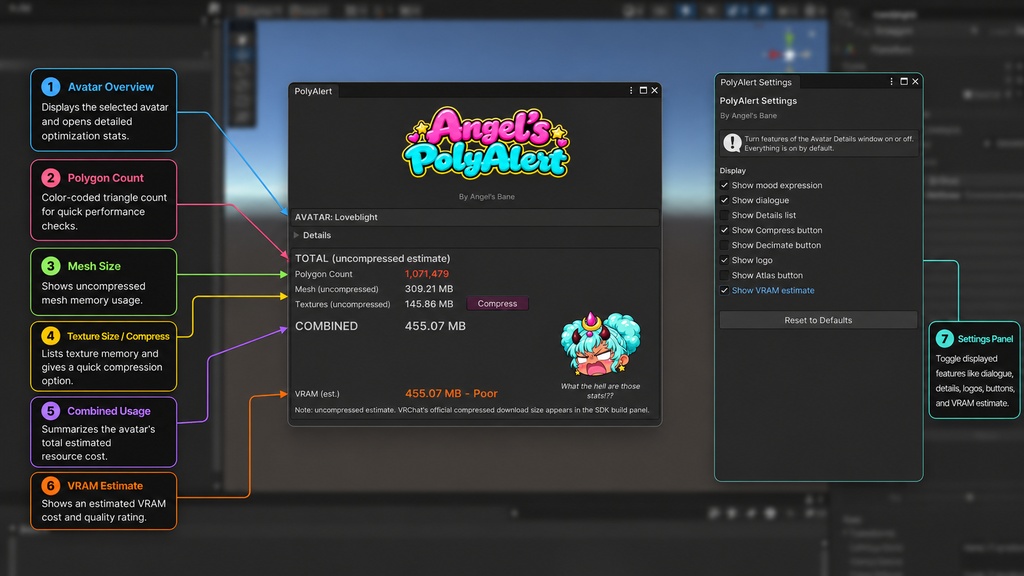
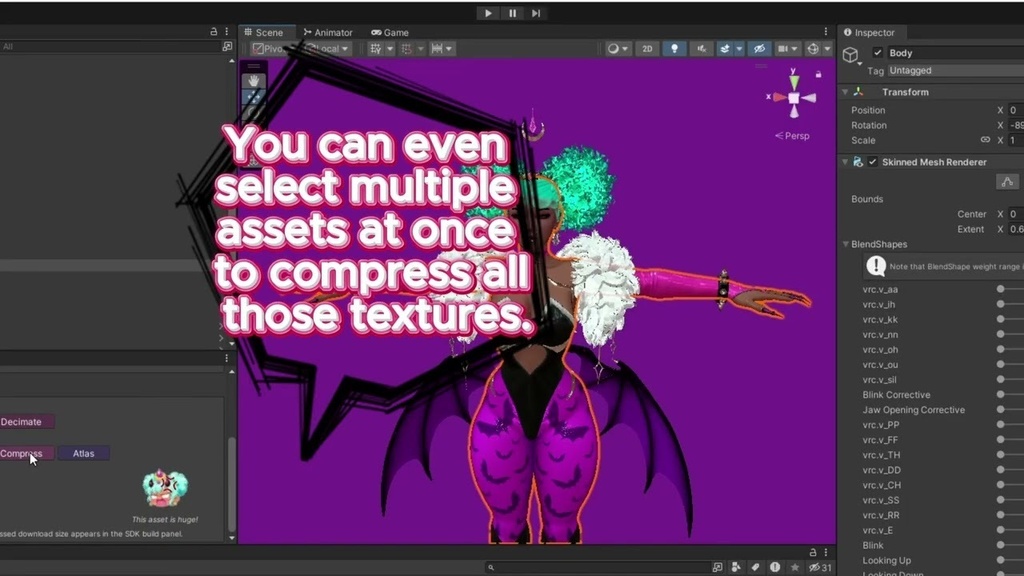
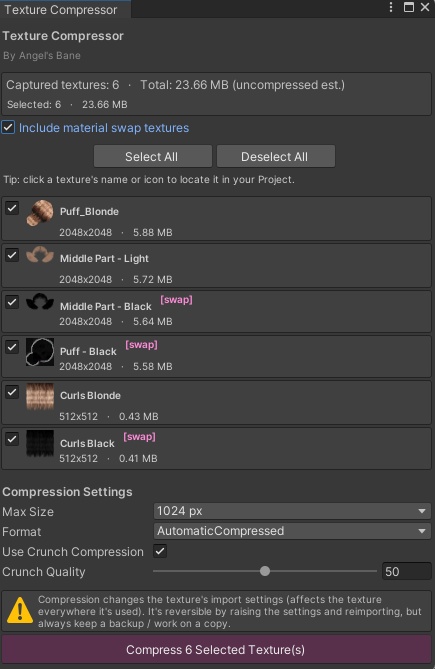
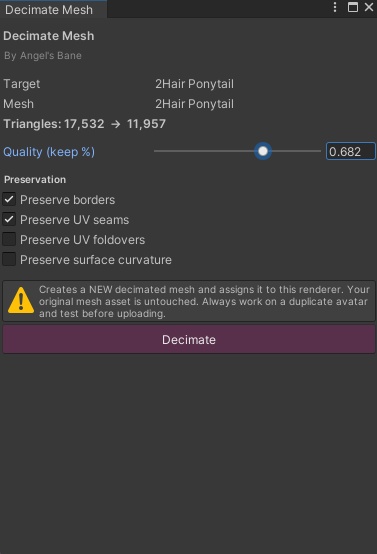
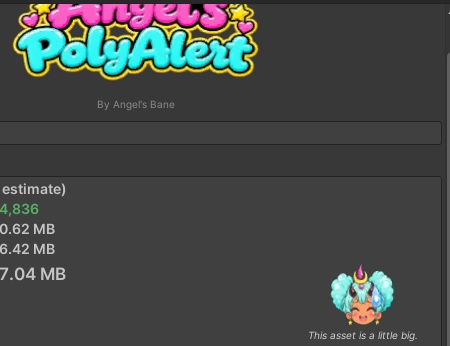


紹介動画 / Video: https://www.youtube.com/watch?v=dXMUhFDIDoo 【概要】 Unityに、アバターのポリゴン数や三角形の数を教えてくれる機能が標準でないのはなぜでしょう? ……それなら、作っちゃいましょう。 PolyAlert は、アバターを選択するだけでポリゴン数・メッシュサイズ・正確なテクスチャVRAMを表示し、そのまま同じウィンドウで軽量化まで行える Unity エディタ拡張です。 アバターのステータスをひと目で教えてくれて、重さに合わせてリアクションしてくれるマスコットも付いています。最適化を、すばやく、わかりやすく、ちょっとかわいく。 紹介動画:https://www.youtube.com/watch?v=dXMUhFDIDoo 【バージョンについて】 ・フル版(¥1,500):通常のアバター情報に加えて、より詳しいアバター/ワールド情報、テクスチャ一括圧縮(Texture Bulk Compression)、自動アトラス化(Auto Atlasing)、メッシュ削減(Mesh Decimation)、SDKエラーの検出まで利用できます。 ・Demo(無料):ポリゴン数、テクスチャとメッシュのMBサイズ、VRAMなどのアバター情報を確認できます。 【こんな方におすすめ】 ・アバターのポリゴン数やVRAMをすぐに確認したい方 ・テクスチャをまとめて圧縮して、アバターを軽くしたい方 ・PC向け・Quest向けの制限を意識しながら改変したい方 ・ワールド全体の重さもチェックしたい方 【できること・主な機能】 ■ アバター情報の表示 ・ポリゴン数(重さに応じて色分け表示) ・メッシュサイズとテクスチャサイズを別々に表示 ・コミュニティで信頼されている数値と一致するように計算された、正確なテクスチャVRAM ・合計値と、VRChat風のパフォーマンス表示 ・オブジェクトごとの内訳で、何がアバターを重くしているのかを特定 ・選択を切り替えると自動で更新。複数選択にも対応 ■ テクスチャ一括圧縮(Bulk Texture Compressor) ・アバターのすべてのテクスチャを1つのリストにまとめて表示 ・最大サイズ・フォーマット・Crunch設定を選んで、まとめて一括圧縮 ・マテリアル切り替えアニメーションの中に隠れているテクスチャも検出し、ビルドサイズを密かに増やしているものも見逃しません ■ メッシュ削減(Mesh Decimator) ・メッシュを1つ選んで「Decimate」を押すだけ ・品質スライダーで、削減前後の数を確認しながら三角形を減らせます ・境界・シーム・表面のディテールを保つオプション付き ・元のメッシュは変更されません。削減したコピーが新しく作られて割り当てられ、「Revert」ボタンでいつでも元に戻せます ■ テクスチャアトラス化(Texture Atlaser) ・複数のマテリアルを1つのアトラスにまとめて、マテリアル数とドローコールを削減 ・テクスチャの配置・UVの再マッピングを自動で行い、きれいなアトラスマテリアルを1つ作成 ・安全に結合できるマテリアルは自動で選択され、結合できないものははっきり表示されます ■ 役に立つマスコット ・アバターの数値に合わせて、マスコットの気分がリアルタイムに変化(12種類の表情) ・Missing Script、マテリアルの欠落、Viseme・メニュー・パラメーターがないアバター、Blueprint IDが消えてしまうわかりにくいアップロードエラーなど、よくある問題をわかりやすい言葉で教えてくれます ■ PC・Quest・ワールドに対応 ・アバターにはアバター向けの制限を、ワールドプロジェクトではワールド向けの合計値と制限を使用 ・PC向け、Questの制限内に収めたいとき、ワールド全体の最適化など、どの場合でも意味のある数値を表示します ■ 自分好みにカスタマイズ ・Settingsウィンドウで、マスコット・セリフ・詳細リスト・VRAM表示・各最適化ツールをそれぞれON/OFFできます ・かわいいフル機能の最適化ツールとしても、シンプルで静かなステータスウィンドウとしても使えます 【導入方法】 1. .unitypackage をプロジェクトにインポートします(ダブルクリック、またはProjectウィンドウにドラッグ&ドロップ)。 (メニュー:Tools > Angel > PolyAlert > Avatar Details / 設定:Tools > Angel > PolyAlert > Settings) 2. メニューに「Tools」>「Angel」>「PolyAlert」が表示されれば導入完了です。 【使い方】 1. メニューから「Tools」>「Angel」>「PolyAlert」>「Avatar Details」を開きます。 2. アバター、メッシュ、またはシーン内の任意のオブジェクトを選択します。 3. 数値を確認し、必要に応じて圧縮・メッシュ削減・アトラス化を行います。 4. 設定は「Tools」>「Angel」>「PolyAlert」>「Settings」から変更できます。 5. 作業は必ずアバターの複製で行い、コンソールを確認しながら進めてください。 【動作環境】 ・VRChat Avatar SDK を導入したUnityプロジェクト ・Unity と VRChat アバターセットアップの基本的な知識 【注意事項】 ・最適化ツールを使うときは、必ずアバターの複製で作業し、コンソールを確認してください。 ・絵文字・マスコットのイラストはすべてClip Studioで手描きし、Canvasで仕上げ・編集しています。 ・サンプル画像・動画内のアバター(「Morgan, The Night Stalking Succubus」)は本商品には含まれません。アバターのクレジット:https://payhip.com/b/J26Qe 【内容物】 ・フル版:PolyAlert FULL VERS.unitypackage(17MB) ・Demo:PolyAlert Demo.unitypackage(10MB) 【利用規約】 本商品(Angel's PolyAlert)をご購入・ダウンロードした時点で、以下の規約に同意したものとみなします。 ・本ツールおよびそのUnityパッケージの流出・共有・再配布・再アップロード・転売を禁止します。 ・ご自身で入手していない方へ、パッケージや同梱ファイルを渡すことを禁止します。 ・個人・商用のアバター制作に使用していただけます。 ・PolyAlert 本体やそのファイルを、配布するアバター・アセット・プロジェクト・パッケージに含めることはできません。 ・本ツールやそのコードを自作と偽ることを禁止します。 ・デジタル商品のため、返金はお受けできません。 ・今後のUnity・VRChat SDK・サードパーティ製パッケージのアップデートによって生じた問題について、制作者は責任を負いかねます。ただし、必要に応じて対応アップデートを行う場合があります。 【クレジット】 ・メッシュ削減機能には、Mattias Edlund 様の UnityMeshSimplifier(MIT License)を使用しています。 【連絡先】 不具合のご報告・ご質問は、BOOTHのメッセージ、または以下までお気軽にどうぞ。 ・サポート用Discord:https://discord.gg/cpbKJWSpGK ・Instagram:@angelstheatre(https://www.instagram.com/angelstheatre/) ・ウェブサイト:https://angelstheatre.com/ 【更新履歴】 v1.4 — 初回リリース ■ 分析 ・選択したアバターのポリゴン数・メッシュ数・マテリアル数を正確に表示 ・テクスチャVRAMを推定ではなくフォーマットごとに計算し、実際のアバターのコストと一致する数値を表示 ・PCとQuestのプラットフォームを判別し、それぞれに合った基準で表示 ・ワールドにも対応し、アバターだけでなくシーン内のオブジェクトも計測 ■ 最適化ツール ・マテリアル切り替えを検出できるテクスチャ一括圧縮(切り替え先のマテリアルも見逃しません) ・完全に元に戻せるメッシュ削減(再インポートなしで削減・復元が可能) ・テクスチャをまとめてマテリアル数を減らせるテクスチャアトラス化 ・エラー・アバター設定の検出:アップロード前にMissing Script、壊れたマテリアル、Descriptorの問題を表示 ・12種類の表情と、アバターの状態に応じたセリフを持つリアクションマスコット ■ カスタマイズ ・しきい値・表示オプション・ツールの動作を設定できるSettingsウィンドウ ―――――――――――――――――――― English Description 【Overview】 Can anyone explain why Unity doesn't have a built-in tool that reads your polygons and triangles to you? Yeah, we gotta fix that. That's what Angel's PolyAlert is for. Select your avatar and it instantly shows your polygon count, mesh size, and accurate texture VRAM — then gives you the tools to actually shrink it all down, right there in the same window. PolyAlert is built to make optimization quick, clear, and honestly a little cute — with a reactive mascot who breaks down your avatar's stats at a glance and reacts to how heavy things are getting. Preview video: https://www.youtube.com/watch?v=dXMUhFDIDoo 【Versions】 ・Full Version (¥1,500): Full access to more Avatar/World details beyond regular avatar information, Texture Bulk Compression, Auto Atlasing, Mesh Decimation, and Catching SDK errors. ・Demo (free): Avatar information, such as Polygons, MB size of textures and meshes, and VRAM. 【Recommended for】 ・Anyone who wants to check polygons and VRAM at a glance ・Creators who want to bulk-compress textures and slim down their avatar ・Anyone building for PC or squeezing under Quest limits ・World creators optimizing a whole scene 【Features】 ■ Stats ・Polygon count, color-coded by how heavy it is ・Mesh size and texture size, listed separately ・Accurate texture VRAM, calculated to line up with the numbers the community already trusts ・A combined total with a VRChat-style performance readout ・A per-object breakdown so you can find exactly what's weighing your avatar down ・Updates automatically as you select different objects, and supports selecting multiple things at once ■ Bulk Texture Compressor ・Captures every texture on your avatar in one list ・Pick what you want, set your max size, format, and crunch options, and mass-compress them all at once ・Detects textures hidden inside your material swap animations, so you catch the ones that quietly add to your build size
English (continued)
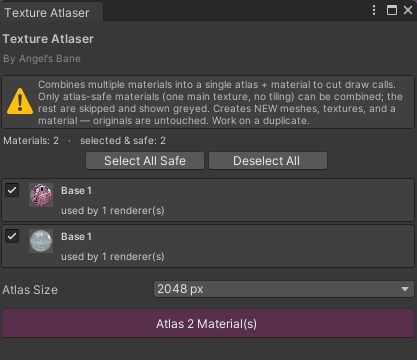
■ Mesh Decimator ・Select a single mesh and hit Decimate ・A clean quality slider lets you reduce triangles while previewing the before-and-after count, with preservation options for borders, seams, and surface detail ・Your original mesh is never touched — a new decimated copy is created and assigned for you, and a Revert button puts it right back ■ Texture Atlaser ・Combines multiple materials into a single atlas to cut down your material count and draw calls ・Packs your textures, remaps the UVs, and builds one clean atlas material — safe materials are selected automatically and anything it can't safely combine is clearly marked ■ A mascot that actually helps ・Reacts to your avatar's stats in real time, shifting her mood as things get heavier ・Flags common problems in plain language: missing scripts, missing materials, avatars with no visemes, menu, or parameters, and even that confusing upload error that clears your blueprint ID for no reason ■ PC, Quest, and Worlds ・Avatar-appropriate limits for avatars, and world-aware totals and limits when you're working on a world project ■ Make it yours ・Everything is toggleable in the Settings window — the mascot, her dialogue, the detail list, the VRAM readout, and each optimization tool — so you can run PolyAlert as a full cute optimizer or a lean, quiet stats window 【Installation】 1. Import the .unitypackage into the project (double-click it, or drag it into the Project window). (Menu: Tools > Angel > PolyAlert > Avatar Details / Settings: Tools > Angel > PolyAlert > Settings) 2. You'll now see Tools > Angel > PolyAlert in the menu bar. 【How to Use】 1. Open Tools > Angel > PolyAlert > Avatar Details. 2. Select your avatar, a mesh, or any object in your scene. 3. Read your stats, then compress, decimate, or atlas as needed. 4. Adjust anything you like under Tools > Angel > PolyAlert > Settings. 5. Always work on a duplicate of your avatar and watch the console. 【Requirements】 ・A Unity project with the VRChat Avatar SDK installed ・Basic knowledge of Unity and VRChat avatar setup 【Notes】 ・Always work on a duplicate of your avatar and watch the console when using the optimization tools. ・All emotes were hand-drawn with Clip Studio and polished/edited through Canvas. ・The avatar in the preview ("Morgan, The Night Stalking Succubus") is NOT included. Avatar credit: https://payhip.com/b/J26Qe 【Contents】 ・Full Version: PolyAlert FULL VERS.unitypackage (17MB) ・Demo: PolyAlert Demo.unitypackage (10MB) 【Terms of Service】 By purchasing or downloading Angel's PolyAlert, you agree to the following terms: ・DO NOT leak, share, redistribute, reupload, or resell this tool or its Unity package. ・Do not send the package or included files to anyone who has not obtained their own copy. ・You are allowed to use PolyAlert for personal and commercial avatar work. ・You may NOT include PolyAlert itself or its files inside an avatar, asset, project, or package that you distribute. ・Do not claim the tool or its code as your own. ・No refunds will be provided for digital purchases. ・I am not responsible for issues caused by future Unity, VRChat SDK, or third-party package updates, though compatibility updates may be provided when necessary. 【Credits】 ・Mesh decimation powered by UnityMeshSimplifier by Mattias Edlund (MIT License). 【Contact】 For bug reports or questions, send a BOOTH message or reach out here: ・Support Discord: https://discord.gg/cpbKJWSpGK ・Instagram: @angelstheatre (https://www.instagram.com/angelstheatre/) ・Website: https://angelstheatre.com/ 【Changelog】 v1.4 — Initial Release ■ Analysis ・Accurate polygon, mesh, and material counts for the selected avatar ・Texture VRAM readouts calculated per format rather than estimated, so the numbers match what the avatar actually costs ・Platform awareness for PC and Quest, with separate expectations for each ・World awareness, so scene objects are measured as well as avatars ■ Optimization tools ・Bulk texture compressor with material-swap detection, so swapped-in materials aren't missed ・Mesh decimator with full revert — reduce a mesh and put it back without reimporting ・Texture atlaser for combining textures and cutting material count ・Error and avatar-setup detection: missing scripts, broken materials, and descriptor problems surfaced before upload ・Reactive mascot with 12 moods and contextual dialogue that responds to the state of your avatar ■ Customization ・Full settings window for thresholds, display options, and tool behavior