

どこでもくす玉ギミック【ModularAvatar対応】
- ダウンロード商品¥ 500
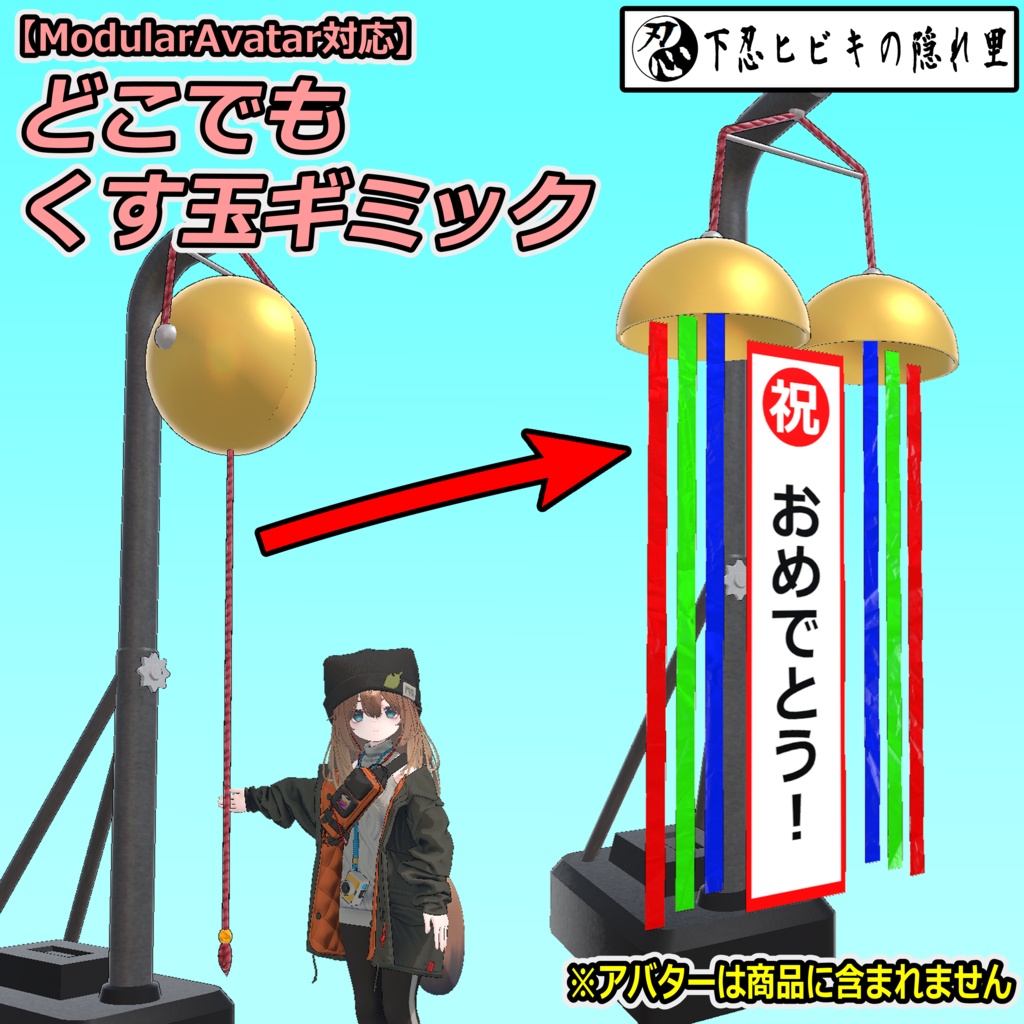
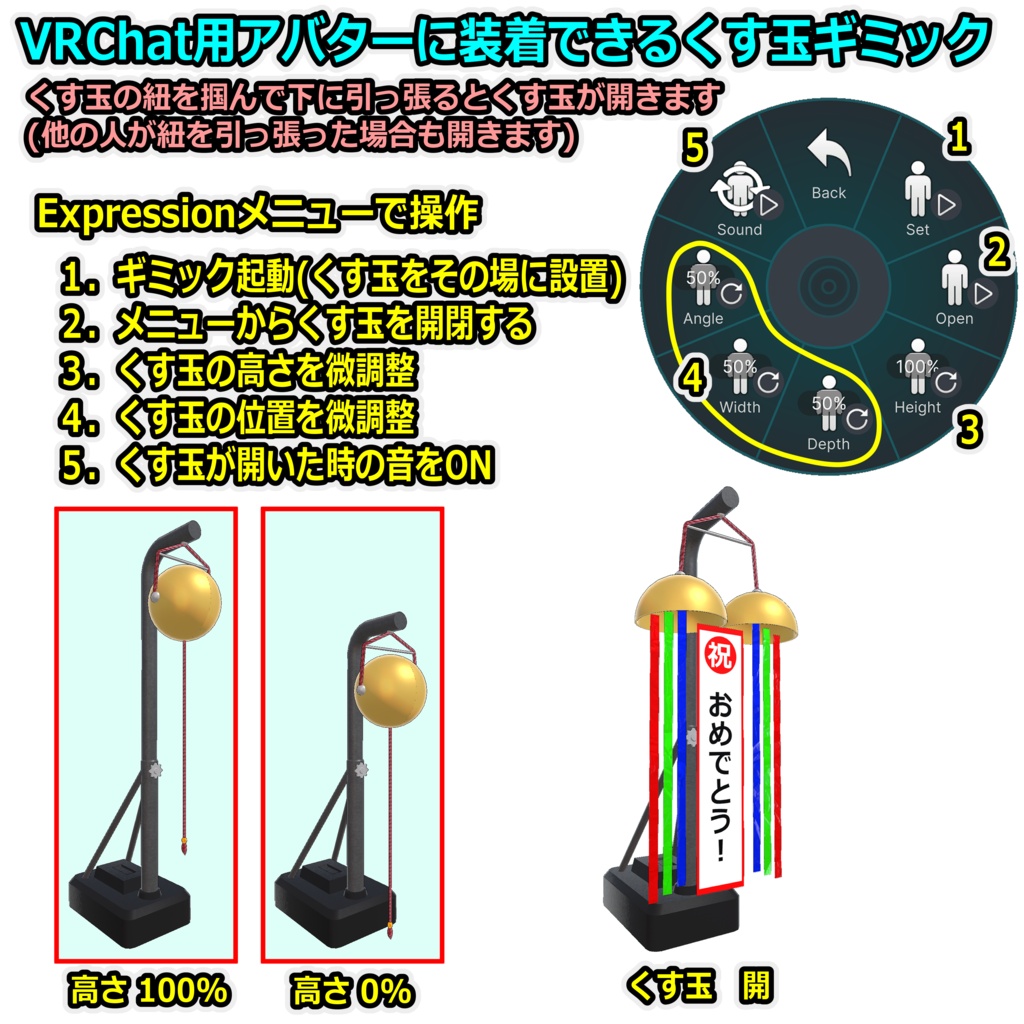
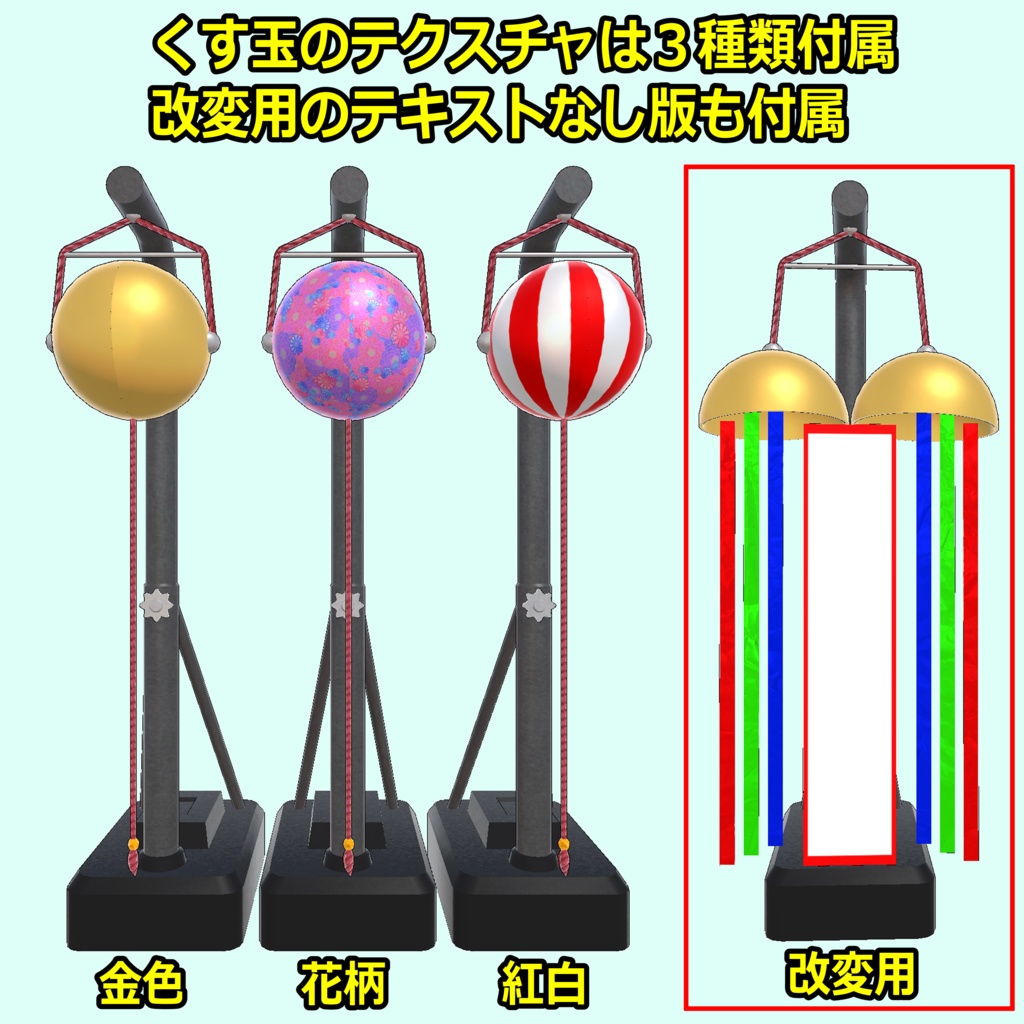
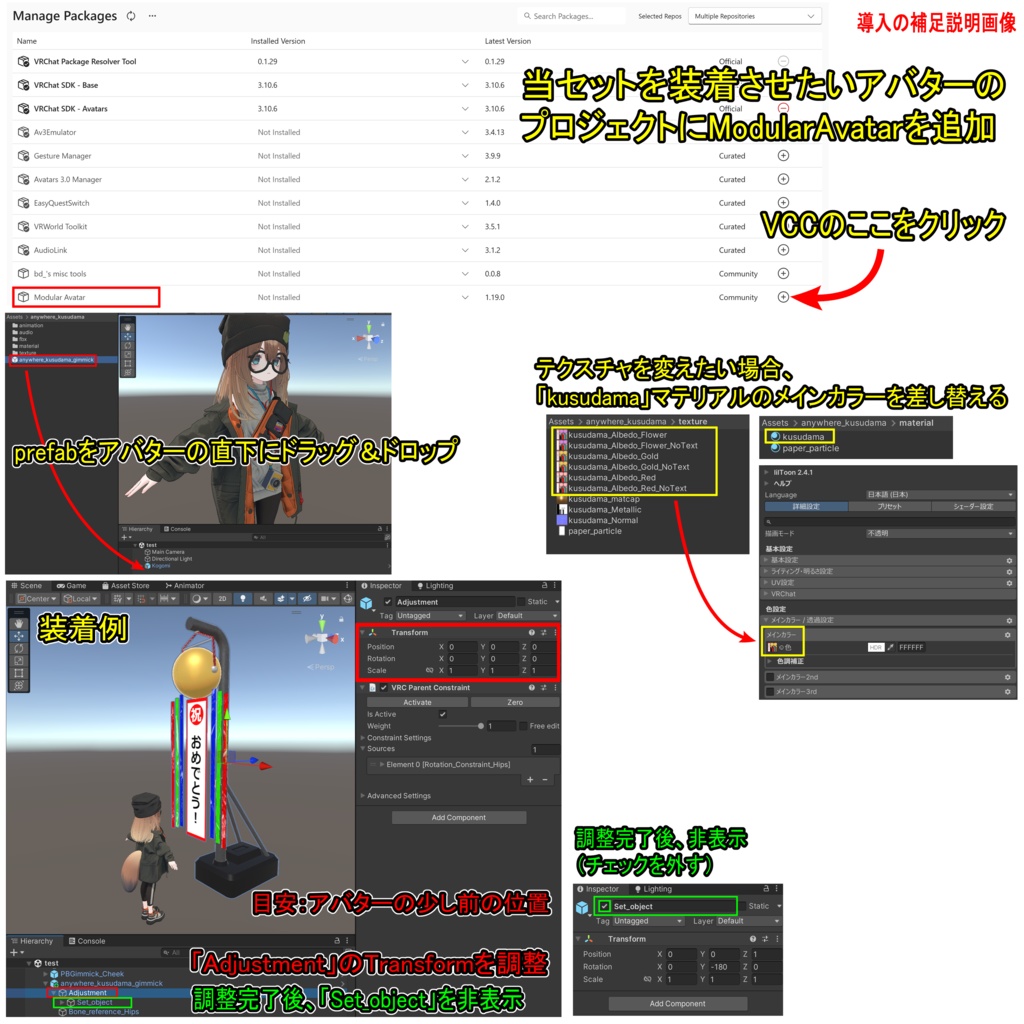


【商品名】 どこでもくす玉ギミック【ModularAvatar対応】 【商品説明】 VRChat用アバターに装着できるくす玉ギミックです。 VRChat内にてExpressionメニューでくす玉をその場に設置できます。くす玉の紐を掴んで下に引っ張るとくす玉が開きます(他の人が紐を引っ張った場合も開きます)。なお、Expressionメニューからくす玉を開閉する事もできます。 また、Expressionメニューでくす玉の高さや位置の微調整及びくす玉が開いた時の音をOFFにする事もできます。 くす玉のテクスチャは3種類付属します(金色、花柄、紅白)。 また、改変用のテキストなし版のテクスチャも付属します。 ※装着例のアバター「こごみ( https://booth.pm/ja/items/8779825 )」は商品に含まれません。 【VRChatへの導入方法】※詳しくは導入の補足説明画像を参照 1.ModularAvatarをVCCにダウンロード。 https://modular-avatar.nadena.dev/ja/ 2.当セットを装備させたいアバターのプロジェクトにModularAvatarを追加 3.シェーダー(liltoon)をインポート https://booth.pm/ja/items/3087170 4.本商品(anywhere_kusudama_1.0.unitypackage)をインポート 5.プロジェクト内(Assets/anywhere_kusudama)にあるanywhere_kusudama_gimmick.prefabをアバターの直下にドラッグ&ドロップ 6.テクスチャを変えたい場合、「kusudama」マテリアルのメインカラーを差し替える kusudama_Albedo_Gold:金色 kusudama_Albedo_Gold_NoText:金色(テキストなし版) kusudama_Albedo_Flower:花柄 kusudama_Albedo_Flower_NoText:花柄(テキストなし版) kusudama_Albedo_Red:紅白 kusudama_Albedo_Red_NoText:紅白(テキストなし版) 7.くす玉を設置した時の初期位置を調整 ・Hierarchy上のオブジェクト「Adjustment」のTransformを調整 ・調整完了後、Hierarchy上のオブジェクト「Set_object」を非表示にする 8.通常の手順でVRChatにアップロード(必ずPrivate 設定で) 【ポリゴン数】 くす玉:△8032 【内容物】 Unitypackage readme FBX テクスチャ(PNG) 導入の補足説明画像 【利用規約】 改変可 商用利用可 再配布不可 再販売不可 公序良俗に反する使用を禁止 【免責事項】 制作者は本データを利用したことにより発生した損害、損失、その他の不利益に対して一切の責任を負いません。 【クレジット】 使用した音素材:OtoLogic( https://otologic.jp ) 【Quest対応する方法】(紐を引っ張ってくす玉を開くことはできなくなります。また、垂れ幕などは揺れなくなります) ・マテリアル「kusudama」のシェーダーを「VRChat/Mobile/Toon Lit」に変更 ※全体的に見た目は大きく劣化します。 ・マテリアル「paper_particle」のシェーダーを「VRChat/Mobile/Particles/Additive」に変更 ・Hierarchy上のオブジェクト「Audio_Source」を削除 ※くす玉を開けた時の音が無くなります。 【更新履歴】 2026/11/27 リリース 【追記】 <よくある質問> ギミックが正常に機能しない場合 →VCC、VRChat SDK、Modular Avatarのバージョンを最新にしてから【VRChatへの導入方法】の5.からやり直してください。 ギミックを起動していないのに他の人からくす玉が見える場合 →【VRChatへの導入方法】に記載の通りHierarchy上のオブジェクト「Set_object」を非表示にしてからアップロードして下さい。 他のツールやギミックなどと干渉して当ギミックが正常に機能しない場合 →それらを削除してお使い下さい。 他の人から見るとくす玉の位置がずれている場合 →くす玉を設置し直して下さい。
English
[Product Name] Anywhere Kusudama Gimmick [Compatible with ModularAvatar] [Product Description] A Kusudama gimmick that can be attached to VRChat avatars. You can place a Kusudama anywhere in your current VRChat environment using the Expression menu. Pulling the string on the Kusudama causes it to open (it will also open if someone else pulls the string). You can also open or close the Kusudama directly via the Expression menu. Additionally, the Expression menu allows for fine tuning the height and position of the Kusudama, as well as muting the sound that plays when it opens. Three texture variations are included (Gold, Floral, and Red & White). A version of the textures without text—intended for customization—is also provided. *The "Kogomi" avatar ( https://booth.pm/ja/items/8779825 ) shown in the example images is not included with this product. [How to Install in VRChat] *Please refer to the supplementary installation 1. Download ModularAvatar to VCC. https://modular-avatar.nadena.dev/ja/ 2. Add ModularAvatar to the project containing the avatar you wish to equip with this set. 3. Import the shader (liltoon). https://booth.pm/ja/items/3087170 4. Import this product (anywhere_kusudama_1.0.unitypackage). 5. Drag and drop anywhere_kusudama_gimmick.prefab from your project (Assets/anywhere_kusudama) directly below the avatar. 6. To change the texture, replace the main color of the "kusudama" material kusudama_Albedo_Gold: Gold kusudama_Albedo_Gold_NoText: Gold (version without text) kusudama_Albedo_Flower: Floral pattern kusudama_Albedo_Flower_NoText: Floral pattern (version without text) kusudama_Albedo_Red: Red and white kusudama_Albedo_Red_NoText: Red and white (version without text) 7. Adjust the initial position for the kusudama placement ・Adjust the Transform of the "Adjustment" object in the Hierarchy. ・Once adjustments are complete, hide the "Set_object" object in the Hierarchy. 8. Upload to VRChat using the standard procedure (make sure to use the Private setting). [Polygon Count] Kusudama: △8032 [Contents] Unitypackage readme FBX Textures (PNG) Additional image for installation instructions [Terms of Use] Modifications permitted Commercial use permitted No redistribution No resale Prohibition of use that violates public order and morals [Disclaimer] The creator assumes no responsibility for any damages, losses, or other disadvantages arising from the use of this data. [Credits] Sound assets used: OtoLogic ( https://otologic.jp ) [How to make it Quest-compatible] (Note: This will disable the ability to open the kusudama by pulling the string, and banners will no longer sway.) ・Change the shader for the "kusudama" material to "VRChat/Mobile/Toon Lit." *Please note that the overall visual quality will be significantly reduced. ・Change the shader for the "paper_particle" material to "VRChat/Mobile/Particles/Additive." ・Delete the "Audio_Source" object from the Hierarchy. *Note: This will remove the sound that plays when the kusudama opens. [Update History] 2026/11/27 release [Additional Notes] <Frequently Asked Questions> If the gimmick isn't working properly → Update your VCC, VRChat SDK, and Modular Avatar to the latest versions, then start again from step 5 of the [How to install in VRChat]. If others can see the kusudama even though you haven't activated the gimmick → Please hide the "Set_object" object in the Hierarchy—as described in the [How to Install in VRChat] section—before uploading. If this gimmick is interfering with other tools or gimmicks and isn't functioning properly →Delete them before using. If the kusudama appears misaligned to others → Please reposition the kusudama.