

VRC ルームシステム (VRC Room System)
- Digital4,800 JPY
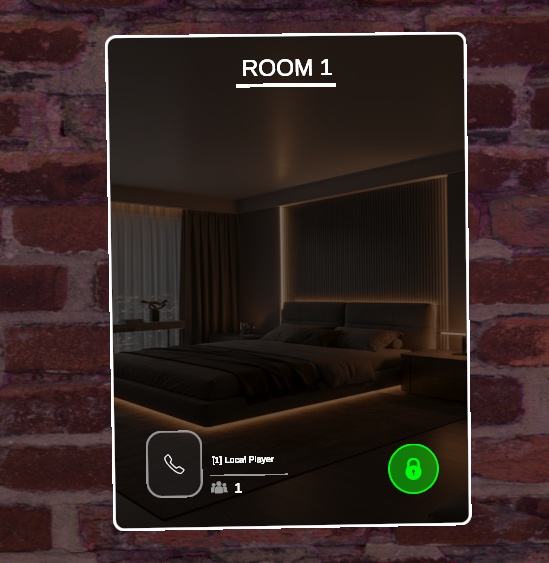
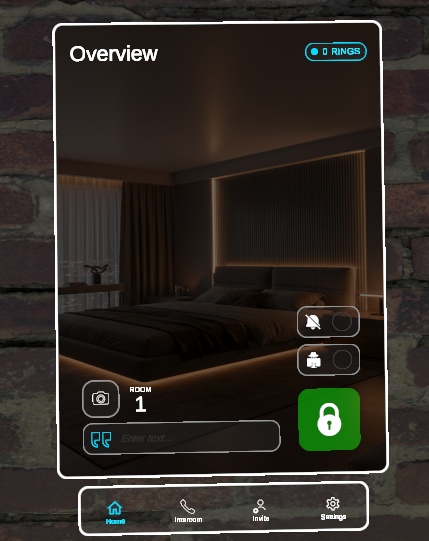
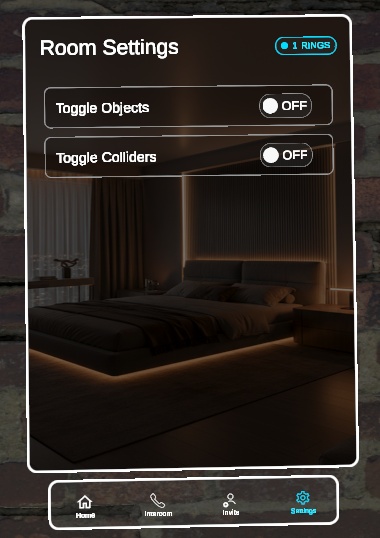
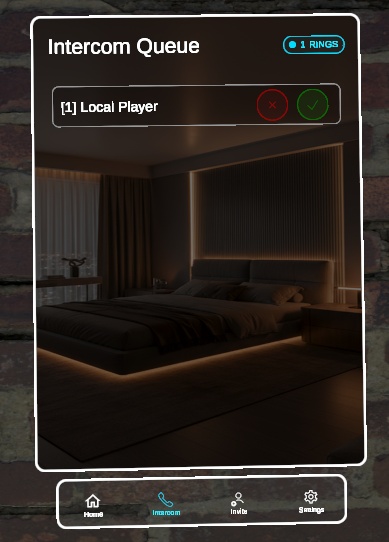
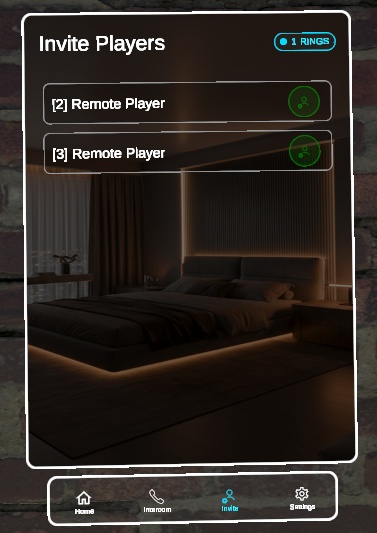


概要 (Overview) 🇯🇵 概要 あなたのワールドに、アパートのドア、VIPラウンジ、ホテルのような個室を追加できます。プレイヤーはドアから入室し、ドアに鍵をかけ、インターホンを鳴らして入れてもらい、部屋の中から設定を管理できます。 Room System は、VRChatワールド向けのプライベートルームプラットフォームです。プレイヤーはドアに近づいて部屋に入退室し、他のプレイヤーを招待し、インターホンを鳴らして入れてもらうよう頼み、今いる部屋の設定(施錠、匿名モード、取り込み中モード)を管理できます。各部屋には、ドア前のライブカメラ映像と、室内の自撮りカメラも用意されています。 🇬🇧 Overview Give your world apartment doors, VIP lounges, or hotel-style rooms. Players enter through a door, lock it behind them, ring an intercom to be let in, and manage their room's settings from inside. Room System is a private-room platform for VRChat worlds. Players walk up to a door and enter or leave a room, invite other players in, ring an intercom to ask to be let in, and manage settings (lock, anonymous mode, do-not-disturb) for the room they're in. Each room also gets its own live camera feed at the door and a selfie camera inside.
🚪 プライベートルーム (Private rooms)
🇯🇵 🚪 プライベートルーム - ドアからの入退室: 部屋のドアをインタラクトすると、プレイヤーがその部屋に入室または退室します。部屋を出るとプレイヤーはワールド全体の招待リストに戻るため、他のプレイヤーが別の部屋へ招待できます - 🔒 施錠/解錠: 施錠された部屋には、ドアから入ることができません。訪問者はインターホンを鳴らし、すでに室内にいる人に入れてもらう必要があります - 🕶️ 匿名モード: 部屋の入口と名簿の表示でプレイヤー名を隠し、代わりに ######## と表示します - 🔕 取り込み中モード(Do Not Disturb): 有効な間、届いたインターホンの呼び出しは即座に拒否され、部屋のキューには入りません - 📝 部屋の説明テキスト: 室内にいる人なら誰でも、部屋に短いラベル(例:「Movie Night」)を設定でき、部屋の入口UIに表示されます - 🎛️ 部屋ごとの設定パネル: 室内から、任意の数のワールドオブジェクトやコライダーをまとめてオン・オフできます(照明、装飾、プライバシー用の壁など)。ワールド内の任意のスクリプトのカスタムイベントを実行するカスタムボタンも追加でき、標準のトグルでカバーできないことにも対応できます。各部屋のボタン数はご自身で決められます - 📊 ライブステータスUI: ドアと室内に、施錠状態、匿名モードの状態、取り込み中モードの状態、部屋のテキスト、現在の人数と名簿が表示されます。状態が変わると全員に対して自動で更新されます ----------------------------------------------- 🇬🇧 🚪 Private rooms - Enter and leave through the door: interacting with a room's door adds or removes the player from that room. Leaving a room puts the player back on the world's invite list, so others can invite them into a different room - 🔒 Lock / Unlock: a locked room can't be entered through the door. Visitors have to ring the intercom and be let in by someone already inside - 🕶️ Anonymous mode: hides player names in the room's entry and roster display, showing ######## instead - 🔕 Do Not Disturb: while enabled, incoming intercom ring requests are rejected outright and never reach the room's queue - 📝 Room description text: anyone inside can set a short label for the room (e.g. "Movie Night"), shown on the room's entry UI - 🎛️ Per-room settings panel: toggle any number of world objects and colliders on or off together from inside the room (lights, decorations, privacy walls). You can also add custom buttons that fire a custom event on any script in your world, for anything the built-in toggles don't cover. You choose how many buttons each room has - 📊 Live status UI on the door and inside the room: lock state, anonymous state, do-not-disturb state, room text, and the current player count and roster. Everything updates automatically for everyone as it changes
🔔 インターホン (Intercom)
🇯🇵 🔔 インターホン - 施錠された部屋の外から呼び出し: 訪問者は待機キューに入り、室内の誰でも確認できます。一度にキューに入れる訪問者数は、ご自身で決められます - ✅ 承認または拒否: 承認すると訪問者はそのまま部屋に入り、拒否すると呼び出しリクエストが削除されます。拒否された訪問者には、誰に拒否されたかを示す通知が表示されます(オプションのNotification Systemを使用時) - ☎️ 同時に通話できるのは1件: 呼び出し中の訪問者を選ぶと、部屋のインターホン通話画面が開きます。承認または拒否するとそのスロットがクリアされ、室内の全員が部屋のメイン画面に戻ります - 📹 双方向のライブカメラ映像: 各部屋に専用のカメラと映像フィードが用意されます。室内向けの映像(部屋の中の様子)と、屋外向けの映像(ドアの前にいる人)が通話中に双方へ表示され、それぞれに小さな自分用ビューも表示されます - 🛠️ ワンクリックのカメラセットアップ: CrZVRC → Room System のEditorウィンドウにある「Generate Render Textures」ボタンで、設定済みのすべての部屋に専用のレンダーテクスチャが生成されるため、部屋同士でカメラ映像が共有されたり漏れたりすることはありません - 🔊 呼び出し音: 新しい呼び出しリクエストが届くたびに、室内の全員に再生されます ----------------------------------------------- 🇬🇧 🔔 Intercom - Ring from outside a locked room: visitors join a waiting queue that anyone inside the room can review. You choose how many visitors can queue at once - ✅ Accept or deny: accepting adds the visitor straight into the room, and denying removes their request. A denied visitor sees a notification naming who denied them (with the optional Notification System) - ☎️ One active call at a time: selecting a ringing visitor opens an intercom call view for the room. Accepting or denying clears the slot and returns everyone inside to the room's main view - 📹 Live camera feed both ways: each room gets its own dedicated cameras and video feeds, an inside-facing feed (what's happening in the room) and an outside-facing feed (who's at the door), shown to both sides during a call, plus a small self-view for each - 🛠️ One-click camera setup: the CrZVRC → Room System Editor window has a "Generate Render Textures" button that creates a dedicated set of render textures for every configured room, so rooms never share or leak each other's camera feed - 🔊 Ring sound: plays for everyone inside the room whenever a new ring request comes in
📨 招待システム (Invite system)
🇯🇵 📨 招待システム - 部屋に入っていない全員のワールド全体の名簿: インスタンスに参加したプレイヤーは自動的に追加され、退出したとき、またはいずれかの部屋に入った瞬間に削除されます - 名簿のプレイヤーを自分の部屋に直接招待: インターホンを鳴らす必要がなく、相手を外で待たせずに部屋に招き入れたいときに便利です ----------------------------------------------- 🇬🇧 📨 Invite system - World-wide roster of everyone not in a room: players are added automatically when they join the instance, and removed when they leave or the moment they enter any room - Invite a listed player directly into your room: no intercom ring needed, which is useful for bringing someone in without making them wait outside
📸 自撮りカメラ (Selfie camera)
🇯🇵 📸 自撮りカメラ - カウントダウン付きの自撮りができる、室内専用カメラです(初期値は4秒、変更可能)。カウントダウンとカメラ表示の間は、専用の効果音と背景の切り替えが行われます - 室内の全員に同期されるため、すべての視聴者に同じように再生されます ----------------------------------------------- 🇬🇧 📸 Selfie camera - A dedicated in-room camera for taking a countdown selfie (4 seconds by default, configurable), with its own sound effect and a background swap while the countdown and camera view are active - Synchronized for everyone in the room, so it plays out the same way for all viewer
🎨 簡単にカスタマイズできるテーマ (Easy-to-customize theming)
🇯🇵 🎨 簡単にカスタマイズできるテーマ 部屋のUIカラー(背景、および施錠時・解錠時それぞれのプライマリカラーとセカンダリカラー)とページタイトル(Room Overview、Intercom Queue、Intercom Feed、Invite Players、Room Settings)は、共有のテーマ設定で一度設定するだけで、すべての部屋で共通して使われます。そのため、システム全体を1か所からデザイン変更できます。 ----------------------------------------------- 🇬🇧 🎨 Easy-to-customize theming Room UI colors (background, plus primary and secondary colors for the locked and unlocked states) and page titles (Room Overview, Intercom Queue, Intercom Feed, Invite Players, Room Settings) are set once on a shared theme config and reused across every room, so you can restyle the whole system from one place.
🔗 連携 (Integrates With)
🇯🇵 🔗 連携 - 🔔 Notification System(任意): 誰かにインターホンの呼び出しを拒否されたとき(拒否した人の名前付き)や、自分がいる部屋にインターホンの呼び出しが届いたときに、画面上に小さな通知を表示できます。なくても問題なく動作し、リンクしない場合は画面上の通知が表示されないだけです https://crz3d.booth.pm/items/8767893 ----------------------------------------------- 🇬🇧 🔗 Integrates With - 🔔 Notification System (optional): show players a small on-screen notification when someone denies their intercom ring request (naming who denied them), and when there's an incoming intercom ring for a room they're in. Works fine without it, and only the on-screen notifications are missing if you don't link it https://crz3d.booth.pm/items/8767893
免責事項 (Disclaimer)
🇯🇵 免責事項 スクリーンショットに表示されている背景画像はデモンストレーション目的のみです。機能の項目で述べた通り、背景画像と色は完全にカスタマイズ可能で、Unity上であなたのワールドに合わせて変更できます。 このシステムにはデフォルトのドアモデルが含まれており、ご自身のカスタムドアに簡単に差し替えることができます(ドアモデル制作:Toni García Vilche氏 https://sketchfab.com/zul_gv)。 ----------------------------------------------- 🇬🇧 Disclaimer The background image shown in the screenshots is for demonstration purposes only. As stated in the features, the background image and colors are fully customizable and can be changed in Unity to match your world. The system includes a default door model that can be easily replaced with your own custom door (Door model by Toni García Vilche: https://sketchfab.com/zul_gv).
⚠️ 重要な購入に関する注意事項 (IMPORTANT PURCHASE WARNING)
🇯🇵 ⚠️ 重要な購入に関する注意事項 購入時にダウンロードされる .unitypackage には、アセット本体と CrZVRC License Manager の両方が含まれています。アセットはインポート後すぐにご利用いただけますが、ライセンスを認証するまでワールドをパブリッシュ(アップロード)することはできません。 Boothではライセンスキーが自動生成されないため、ライセンスを認証するには以下の手順を行っていただく必要があります。 🎫 公式Discordサーバーに参加し、サポートチケットを開いてください。 🧾 購入証明(Boothの購入履歴など)を提示してください。 🔑 確認が完了次第、あなた専用のライセンスキーを発行します。 キーを受け取った後は、Unity内のLicense Managerを使用してライセンスを認証してください。認証が完了すると、ワールドをパブリッシュできるようになります。License Managerの使用方法についての詳しい手順は、こちらをご覧ください: https://docs.crzvrc.com/docs/documentation/licence 🇬🇧 ⚠️ IMPORTANT PURCHASE WARNING Please note that the .unitypackage you download upon purchase includes both the asset itself and the CrZVRC License Manager. The asset is ready to use as soon as you import it, but you will not be able to publish your world until you validate your license. Because Booth does not automatically generate license keys, you must complete the following steps to validate your license: 🎫 Join our official Discord server and open a support ticket. 🧾 Provide your proof of purchase (such as your Booth receipt). 🔑 Once verified, you will be provided with your personal license key. After receiving your key, use the License Manager inside Unity to validate your license. Once validated, you will be able to publish your world. Detailed instructions on how to use the License Manager can be found here: https://docs.crzvrc.com/docs/documentation/licence
📚 ドキュメント&セットアップ (Documentation & Setup)
🇯🇵 📚 ドキュメント&セットアップ このアセットのセットアップおよび設定方法についての詳しい手順は、公式ドキュメントサイトに掲載されています。 https://docs.crzvrc.com ----------------------------------------------- 🇬🇧 📚 Documentation & Setup Detailed instructions for setting up and configuring this asset can be found on the official documentation website. https://docs.crzvrc.com
📜 利用規約&プライバシーポリシー (Terms of Service & Privacy Policy)
🇯🇵 📜 利用規約&プライバシーポリシー このアセットを購入・ダウンロードすることにより、当方の利用規約およびプライバシーポリシーに同意したものとみなされます。 両方の全文は以下のウェブサイトでご確認いただけます:https://docs.crzvrc.com/docs/documentation/licence ----------------------------------------------- 🇬🇧 📜 Terms of Service & Privacy Policy By purchasing and downloading this asset, you agree to our Terms of Service and Privacy Policy. You can read both full documents on the website: https://docs.crzvrc.com/docs/documentation/licence
💬 サポート&お問い合わせ (Support & Communication)
🇯🇵 💬 サポート&お問い合わせ 技術的なサポート、不具合報告、その他一般的なお問い合わせは、すべて公式Discordサーバーにて対応しております。 Discordサーバーはこちらから参加できます:https://discord.com/invite/3W7h3Bp3mH ----------------------------------------------- 🇬🇧 💬 Support & Communication All technical support, bug reports, and general communications are handled exclusively through our official Discord server. Join the Discord server here: https://discord.com/invite/3W7h3Bp3mH