

VRC バッグトスゲーム (VRC Bag Toss Game)
- Digital1,600 JPY
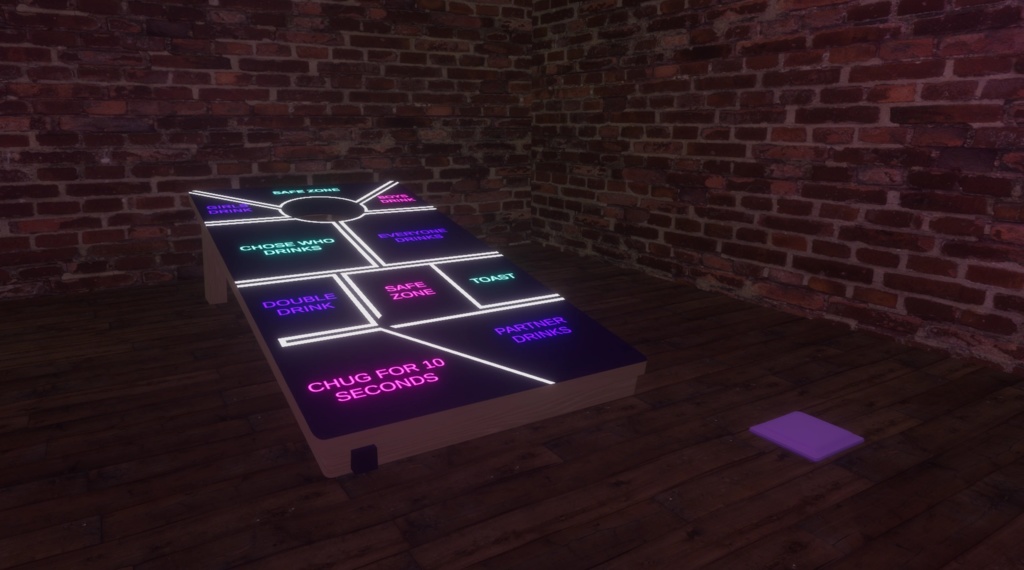


🇯🇵 概要 これは、プレイヤーがカスタムの文章が書かれたボードにバッグを投げる、VRChatワールド向けアセットです。真実か挑戦か(Truth or Dare)や、罰ゲーム形式のチャレンジなど、パーティーゲームを盛り上げるために作られています。 🎉 プレイヤーは順番にボードへバッグを投げます。バッグが着地して、ある文章の上で止まると、そのテキストが選ばれ、全プレイヤーに表示されます。プレイヤーがボードの穴にバッグを通すことに成功すると、代わりに特別なカスタム文章が表示されます(他のプレイヤーに罰ゲームやご褒美を与えるなど)。 🇬🇧 Overview This is a VRChat world asset where players throw a bag onto a board with custom sentences. It is designed to facilitate party games such as truth or dare or consequence-based challenges. 🎉 Players take turns throwing a bag onto the board. When the bag lands and comes to a stop on a sentence, that text is selected and displayed for all players to see. If a player successfully throws the bag through the hole in the board, a special custom sentence is displayed instead (such as assigning a penalty or reward to another player).
✨ 機能 (Features)
🇯🇵 ✨ 機能 - 📝 Pastebin連携: ボード上の文章は、PastebinのRawテキストリンクから読み込まれます。これにより、ワールドを再アップロードすることなく、いつでもゲームのお題を更新できます - 🕳️ ターゲットホールイベント: ボードの穴用の専用トリガーが用意されており、命中すると、あらかじめ設定したユニークな文章が表示されます - ⚙️ Unityでの設定: システムはUnity Inspector上で直接、簡単にセットアップ・設定できます - ⚡ 最適化されたパフォーマンス: 軽量で最適化されているため、ワールドへのパフォーマンスへの影響は最小限です ----------------------------------------------- 🇬🇧 ✨ Features - 📝 Pastebin Integration: The sentences on the board are loaded from a raw Pastebin text link. This allows world creators to update the game's prompts at any time without needing to re-upload the VRChat world. - 🕳️ Target Hole Event: Includes a dedicated trigger for the board's hole that displays a unique, pre-configured sentence when successfully hit. - ⚙️ Unity Configuration: The system is straightforward to set up and configure directly within the Unity Inspector. - ⚡ Optimized Performance: The asset is lightweight and optimized to ensure minimal performance impact in your world.
⚠️ 重要な購入に関する注意事項 (IMPORTANT PURCHASE WARNING)
🇯🇵 ⚠️ 重要な購入に関する注意事項 購入時にダウンロードされる .unitypackage には、アセット本体と CrZVRC License Manager の両方が含まれています。アセットはインポート後すぐにご利用いただけますが、ライセンスを認証するまでワールドをパブリッシュ(アップロード)することはできません。 Boothではライセンスキーが自動生成されないため、ライセンスを認証するには以下の手順を行っていただく必要があります。 🎫 公式Discordサーバーに参加し、サポートチケットを開いてください。 🧾 購入証明(Boothの購入履歴など)を提示してください。 🔑 確認が完了次第、あなた専用のライセンスキーを発行します。 キーを受け取った後は、Unity内のLicense Managerを使用してライセンスを認証してください。認証が完了すると、ワールドをパブリッシュできるようになります。License Managerの使用方法についての詳しい手順は、こちらをご覧ください: https://docs.crzvrc.com/docs/documentation/licence 🇬🇧 ⚠️ IMPORTANT PURCHASE WARNING Please note that the .unitypackage you download upon purchase includes both the asset itself and the CrZVRC License Manager. The asset is ready to use as soon as you import it, but you will not be able to publish your world until you validate your license. Because Booth does not automatically generate license keys, you must complete the following steps to validate your license: 🎫 Join our official Discord server and open a support ticket. 🧾 Provide your proof of purchase (such as your Booth receipt). 🔑 Once verified, you will be provided with your personal license key. After receiving your key, use the License Manager inside Unity to validate your license. Once validated, you will be able to publish your world. Detailed instructions on how to use the License Manager can be found here: https://docs.crzvrc.com/docs/documentation/licence
📚 ドキュメント&セットアップ (Documentation & Setup)
🇯🇵 📚 ドキュメント&セットアップ このアセットのセットアップおよび設定方法についての詳しい手順は、公式ドキュメントサイトに掲載されています。 https://docs.crzvrc.com ----------------------------------------------- 🇬🇧 📚 Documentation & Setup Detailed instructions for setting up and configuring this asset can be found on the official documentation website. https://docs.crzvrc.com
📜 利用規約&プライバシーポリシー (Terms of Service & Privacy Policy)
🇯🇵 📜 利用規約&プライバシーポリシー このアセットを購入・ダウンロードすることにより、当方の利用規約およびプライバシーポリシーに同意したものとみなされます。 両方の全文は以下のウェブサイトでご確認いただけます:https://docs.crzvrc.com/docs/documentation/licence ----------------------------------------------- 🇬🇧 📜 Terms of Service & Privacy Policy By purchasing and downloading this asset, you agree to our Terms of Service and Privacy Policy. You can read both full documents on the website: https://docs.crzvrc.com/docs/documentation/licence
💬 サポート&お問い合わせ (Support & Communication)
🇯🇵 💬 サポート&お問い合わせ 技術的なサポート、不具合報告、その他一般的なお問い合わせは、すべて公式Discordサーバーにて対応しております。 Discordサーバーはこちらから参加できます:https://discord.com/invite/3W7h3Bp3mH ----------------------------------------------- 🇬🇧 💬 Support & Communication All technical support, bug reports, and general communications are handled exclusively through our official Discord server. Join the Discord server here: https://discord.com/invite/3W7h3Bp3mH