

VRC 通知システム (VRC Notification System)
- Digital400 JPY
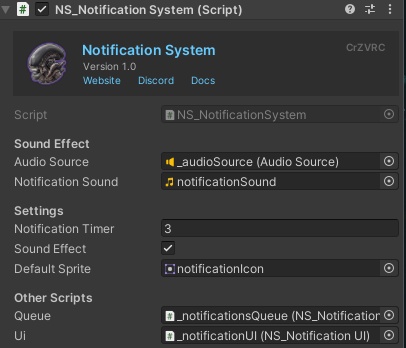


🇯🇵 概要 Notification System は、ゲーム内のプレイヤー向けアラートを管理し、キューに追加するための、開発者向けVRChatワールドアセットです。一元化されたコンポーネントとして機能し、他のUdonスクリプトが通知をトリガーしてプレイヤーにスムーズに表示するためのインターフェースを提供します。 ⚠️ このアセットは単体で機能するものではありませんのでご注意ください。他のUdonスクリプトからトリガーされることを前提とした、バックエンドシステムです。そのため、Udonプログラミングの経験があり、独自のシステムに信頼性の高い通知キューを組み込みたい方に特におすすめです。 🇬🇧 Overview The Notification System is a developer-focused VRChat world asset designed to manage and queue in-game player alerts. It acts as a centralized component, providing an interface for other Udon scripts to trigger and display notifications to the player seamlessly. ⚠️ Please note that this asset does not function as a standalone feature. It is a backend system designed to be triggered by other UdonScripts. Because of this, it is highly recommended for users who have experience with Udon programming and want to integrate a reliable notification queue into their own custom systems.
✨ 機能 (Features)
🇯🇵 ✨ 機能 - 📋 キュー管理: 複数のアラートを自動的にキューに入れ、通知が画面上で重ならず、順番に表示されるようにします - 🧩 開発者向けAPI: カスタムUdonスクリプトからプレイヤーにテキストアラートを送信するための、わかりやすいインターフェースとイベントトリガーを提供します - 🔊 カスタムオーディオアラート: 新しい通知がトリガーされるたびに効果音を再生する機能が標準で用意されています。デフォルトのオーディオクリップは、Unity Inspectorで簡単にご自身のサウンドへ置き換えられます - 🔗 モジュール式の統合: 既存のワールドロジックと連携するように設計されており、カスタムのインタラクションやイベントに対する視覚・音声の出力として機能します ----------------------------------------------- 🇬🇧 ✨ Features - 📋 Queue Management: Automatically queues multiple alerts to ensure notifications are displayed sequentially without overlapping on the screen. - 🧩 Developer API: Provides a straightforward interface and event triggers for your custom Udon scripts to send text alerts to the player. - 🔊 Custom Audio Alerts: Includes a built-in option to play a sound effect whenever a new notification is triggered. You can easily replace the default audio clip with your own custom sound in the Unity Inspector. - 🔗 Modular Integration: Designed to work alongside your existing world logic, acting as the visual and audio output for your custom interactions and events.
🤝 連携 (Integrates With)
🇯🇵 🤝 連携 - 🔐 Security System: プレイヤーがロールを取得または失った際に、ロール名と色を使って通知を表示します - 🚪 Room System: 誰かにインターホンの呼び出しを拒否されたとき(拒否した人の名前付き)や、自分がいる部屋にインターホンの呼び出しが届いたときに、通知を表示します どちらの連携も任意です。各アセットはNotification Systemがなくても問題なく動作し、Notification Systemもそれらがなくても問題なく動作します。 ----------------------------------------------- 🇬🇧 🤝 Integrates With - 🔐 Security System: shows a notification to a player when they receive or lose a role, using the role's name and color - 🚪 Room System: shows a notification when someone denies a player's intercom ring request (naming who denied them), and when there's an incoming intercom ring for a room they're in Both integrations are optional. Each asset works fine without the Notification System, and the Notification System works fine without them.
🥽 VR互換性に関する免責事項 (VR Compatibility Disclaimer)
🇯🇵 🥽 VR互換性に関する免責事項 私は現在VRヘッドセットを所有していないため、VR向けのUI処理はハードウェアでテストされていませんのでご了承ください。VRでUIに表示の問題、位置のずれ、不具合などが発生した場合は、修正いたしますのでお問い合わせください! ----------------------------------------------- 🇬🇧 🥽 VR Compatibility Disclaimer Please note that I do not currently own a VR headset, meaning the VR-specific UI handling has not been hardware-tested. If you experience any visual issues, incorrect positioning, or bugs with the UI while in VR, please contact me so I can fix them!
⚠️ 重要な購入に関する注意事項 (IMPORTANT PURCHASE WARNING)
🇯🇵 ⚠️ 重要な購入に関する注意事項 購入時にダウンロードされる .unitypackage には、アセット本体と CrZVRC License Manager の両方が含まれています。アセットはインポート後すぐにご利用いただけますが、ライセンスを認証するまでワールドをパブリッシュ(アップロード)することはできません。 Boothではライセンスキーが自動生成されないため、ライセンスを認証するには以下の手順を行っていただく必要があります。 🎫 公式Discordサーバーに参加し、サポートチケットを開いてください。 🧾 購入証明(Boothの購入履歴など)を提示してください。 🔑 確認が完了次第、あなた専用のライセンスキーを発行します。 キーを受け取った後は、Unity内のLicense Managerを使用してライセンスを認証してください。認証が完了すると、ワールドをパブリッシュできるようになります。License Managerの使用方法についての詳しい手順は、こちらをご覧ください: https://docs.crzvrc.com/docs/documentation/licence 🇬🇧 ⚠️ IMPORTANT PURCHASE WARNING Please note that the .unitypackage you download upon purchase includes both the asset itself and the CrZVRC License Manager. The asset is ready to use as soon as you import it, but you will not be able to publish your world until you validate your license. Because Booth does not automatically generate license keys, you must complete the following steps to validate your license: 🎫 Join our official Discord server and open a support ticket. 🧾 Provide your proof of purchase (such as your Booth receipt). 🔑 Once verified, you will be provided with your personal license key. After receiving your key, use the License Manager inside Unity to validate your license. Once validated, you will be able to publish your world. Detailed instructions on how to use the License Manager can be found here: https://docs.crzvrc.com/docs/documentation/licence
📚 ドキュメント&セットアップ (Documentation & Setup)
🇯🇵 📚 ドキュメント&セットアップ このアセットのセットアップおよび設定方法についての詳しい手順は、公式ドキュメントサイトに掲載されています。 https://docs.crzvrc.com ----------------------------------------------- 🇬🇧 📚 Documentation & Setup Detailed instructions for setting up and configuring this asset can be found on the official documentation website. https://docs.crzvrc.com
📜 利用規約&プライバシーポリシー (Terms of Service & Privacy Policy)
🇯🇵 📜 利用規約&プライバシーポリシー このアセットを購入・ダウンロードすることにより、当方の利用規約およびプライバシーポリシーに同意したものとみなされます。 両方の全文は以下のウェブサイトでご確認いただけます:https://docs.crzvrc.com/docs/documentation/licence ----------------------------------------------- 🇬🇧 📜 Terms of Service & Privacy Policy By purchasing and downloading this asset, you agree to our Terms of Service and Privacy Policy. You can read both full documents on the website: https://docs.crzvrc.com/docs/documentation/licence
💬 サポート&お問い合わせ (Support & Communication)
🇯🇵 💬 サポート&お問い合わせ 技術的なサポート、不具合報告、その他一般的なお問い合わせは、すべて公式Discordサーバーにて対応しております。 Discordサーバーはこちらから参加できます:https://discord.com/invite/3W7h3Bp3mH ----------------------------------------------- 🇬🇧 💬 Support & Communication All technical support, bug reports, and general communications are handled exclusively through our official Discord server. Join the Discord server here: https://discord.com/invite/3W7h3Bp3mH