

VRC バウンサーシステム ( VRC Bouncer System)
- Digital2,400 JPY
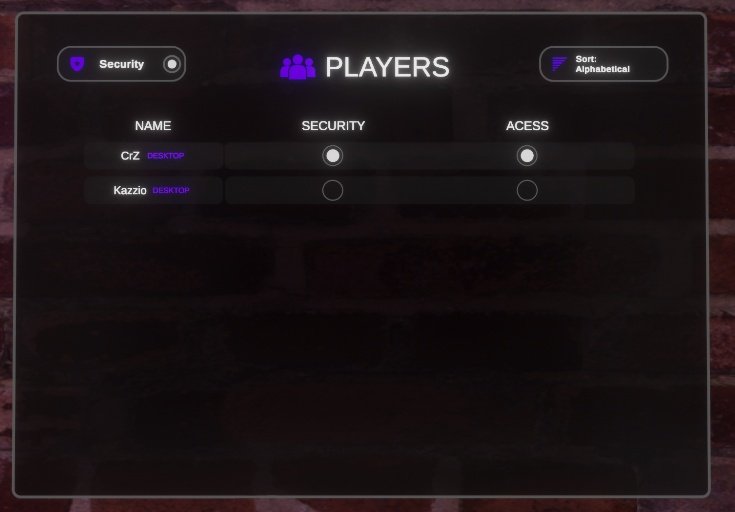


🇯🇵 VRChatワールド向けの、シンプルなリアルタイム入場管理システムです。すべてのプレイヤーは「認証済み」か「未認証」のどちらかで、信頼できるプレイヤーには「セキュリティ」権限を付与でき、ワールド内のパネルから他のプレイヤーの認証・認証解除をリアルタイムで行えます。キーパッドや複雑なロール設定はなく、ゲート1つと権限1つだけのシンプルな仕組みです。 🇬🇧 Bouncer System A simple, real-time access gate for your VRChat world. Every player is either verified or not, and trusted players can be given security privileges to verify or unverify others live, straight from an in-world panel. There are no keypads and no complicated role setup, just one gate and one privilege.
✨ 主な機能 (Features)
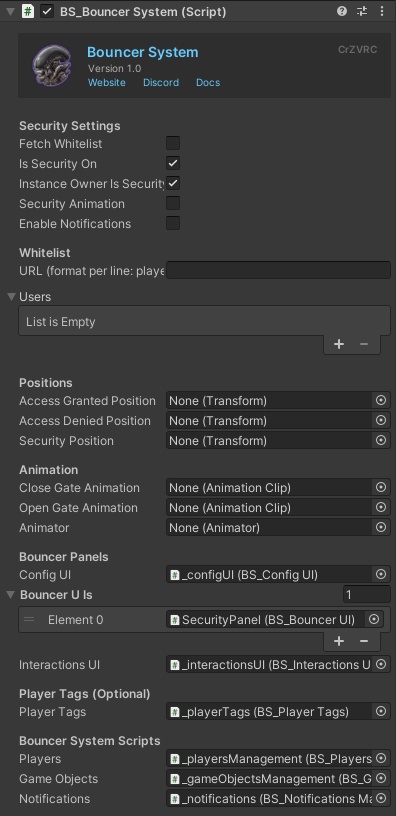
🇯🇵 - 🔐 認証/未認証ゲート:ワールド全体のゲートをオン/オフできます。オフの場合は全員が認証済みとして扱われます。 - 🛡️ セキュリティ権限:セキュリティプレイヤーは、誰でもリアルタイムで認証・認証解除でき、他のプレイヤーに一時的なセキュリティ権限を付与できます。 - 📋 ライブプレイヤーパネル:各プレイヤーが、名前、プラットフォーム(VR/デスクトップ)、認証インジケーター、セキュリティインジケーター付きのカードで表示されます。参加・退出・状態の変更に合わせて自動更新されます。 - 🔀 2つの並び替えモード:アルファベット順、または参加が新しい順。個人設定のため、自分の表示にのみ反映されます。 - 🖥️ パネルを無制限に追加:受付、バックステージ、スタッフルームなど、好きなだけパネルを追加できます。すべてのパネルは同期され、テーマも自動的に適用されます。 - 🎨 簡単なテーマ設定:5色の共通カラーですべてのパネルとプレイヤーカードのデザインを変更でき、Unityエディター上でライブプレビューも可能です。 - 👤 ホワイトリスト:Inspectorでプレイヤー名を追加するか、オンラインのURLからリストを取得できるため、ワールドを再アップロードせずにスタッフを更新できます。エントリーは「Security」(永続的なセキュリティ権限)または「Access」(参加時に認証済み)を選択できます。 - 👑 インスタンスオーナー設定:インスタンスを作成したプレイヤーに、自動的に永続的なセキュリティ権限を付与できます(任意)。 - 🚪 ゲートアニメーション:ローカルプレイヤーが認証された時、または認証を失った時に、開く/閉じるアニメーションを再生できます。 - 📍 テレポート位置:アクセス許可時、アクセス拒否時、セキュリティとして参加した時に、プレイヤーをテレポートさせることができます(任意)。 - 🧱 オブジェクト&コライダーの切り替え:プレイヤーの状態に応じてオブジェクトを表示/非表示にできます。VIPルームなどの保護エリアには認証済み用、スタッフ専用アイテムにはセキュリティ用のオブジェクトを使用します。 - 🧩 公開API:独自のUdonスクリプトから、セキュリティレベル、認証状態、ゲートの状態、並び替えモードを設定できる公開メソッドを用意しています。 ----------------------------------------------- 🇬🇧 Features - 🔐 Verified / Unverified gate: Turn the gate on or off for the whole instance. When it's off, everyone counts as verified. - 🛡️ Security privileges: Security players can verify or unverify anyone in real time and grant temporary security to others. - 📋 Live player panel: Every player appears as a card showing their name, platform (VR / Desktop), a verified indicator and a security indicator. It updates as players join, leave or change state. - 🔀 Two sort modes: Alphabetical, or newest-joined first. It's a personal preference and only changes what you see. - 🖥️ Unlimited panels: Add as many panels as you want (front desk, backstage, staff room). They all stay in sync, and the theme is applied to every one automatically. - 🎨 Easy theming: Five shared colors style every panel and player card, with a live preview in the Unity Editor. - 👤 Whitelist: Add players by name in the Inspector, or fetch the list from an online URL so you can update your staff without re-uploading your world. Entries can be Security (permanent security) or Access (verified on join). - 👑 Instance Owner shortcut: Optionally give the instance creator permanent security automatically. - 🚪 Gate animations: Play an open or close animation when the local player becomes verified or loses verification. - 📍 Teleport positions: Optionally teleport players when they're granted access, denied access, or join as security. - 🧱 Object & collider toggling: Show or hide objects based on state. Use verified objects for protected areas like a VIP room, and security objects for staff-only items. - 🧩 Public API: Public methods let your own Udon scripts set security levels, verification, the gate state and the sort mode.
🔗 連携 (Integrates With)
🇯🇵 - 🏷️ Player Tags(任意):プレイヤーの状態に応じて、頭上にタグを表示できます。セキュリティプレイヤーにはSecurity Tag、認証済みプレイヤーにはAccess Tagを選択でき、状態が変わった瞬間にタグが更新されます。表示されるタグは常に1つで、SecurityがAccessより優先されます。Player Tagsがインストールされていなくても、Bouncer Systemはまったく同じように動作し、エラーも発生しません。 - 🔔 Notification System(任意):プレイヤーが認証された時、認証を失った時、セキュリティ権限を受け取った時、失った時に、画面上に通知を表示できます。4つのイベントごとに、テキスト、色、アイコンをカスタマイズできます。Notification Systemがなくても追加の設定は不要で、エラーも発生しません。 ----------------------------------------------- 🇬🇧 Integrates With - 🏷️ Player Tags (optional): Show a floating tag above a player's head based on their state. Pick a Security Tag for security players and an Access Tag for verified players, and the tag updates the moment their state changes. A player only ever shows one tag, and Security takes priority over Access. Without Player Tags installed, the Bouncer System works exactly the same, with no errors. - 🔔 Notification System (optional): Show the local player an on-screen alert when they become verified, lose verification, receive security or lose security. You can customize the text, colors and icon for each of the four events. Without the Notification System, nothing else needs configuring and there are no errors.
⚠️ 重要な購入に関する注意事項 (IMPORTANT PURCHASE WARNING)
🇯🇵 ⚠️ 重要な購入に関する注意事項 購入時にダウンロードされる .unitypackage には、アセット本体と CrZVRC License Manager の両方が含まれています。アセットはインポート後すぐにご利用いただけますが、ライセンスを認証するまでワールドをパブリッシュ(アップロード)することはできません。 Boothではライセンスキーが自動生成されないため、ライセンスを認証するには以下の手順を行っていただく必要があります。 🎫 公式Discordサーバーに参加し、サポートチケットを開いてください。 🧾 購入証明(Boothの購入履歴など)を提示してください。 🔑 確認が完了次第、あなた専用のライセンスキーを発行します。 キーを受け取った後は、Unity内のLicense Managerを使用してライセンスを認証してください。認証が完了すると、ワールドをパブリッシュできるようになります。License Managerの使用方法についての詳しい手順は、こちらをご覧ください: https://docs.crzvrc.com/docs/documentation/licence 🇬🇧 ⚠️ IMPORTANT PURCHASE WARNING Please note that the .unitypackage you download upon purchase includes both the asset itself and the CrZVRC License Manager. The asset is ready to use as soon as you import it, but you will not be able to publish your world until you validate your license. Because Booth does not automatically generate license keys, you must complete the following steps to validate your license: 🎫 Join our official Discord server and open a support ticket. 🧾 Provide your proof of purchase (such as your Booth receipt). 🔑 Once verified, you will be provided with your personal license key. After receiving your key, use the License Manager inside Unity to validate your license. Once validated, you will be able to publish your world. Detailed instructions on how to use the License Manager can be found here: https://docs.crzvrc.com/docs/documentation/licence
📚 ドキュメント&セットアップ (Documentation & Setup)
🇯🇵 📚 ドキュメント&セットアップ このアセットのセットアップおよび設定方法についての詳しい手順は、公式ドキュメントサイトに掲載されています。 https://docs.crzvrc.com ----------------------------------------------- 🇬🇧 📚 Documentation & Setup Detailed instructions for setting up and configuring this asset can be found on the official documentation website. https://docs.crzvrc.com
📜 利用規約&プライバシーポリシー (Terms of Service & Privacy Policy)
🇯🇵 📜 利用規約&プライバシーポリシー このアセットを購入・ダウンロードすることにより、当方の利用規約およびプライバシーポリシーに同意したものとみなされます。 両方の全文は以下のウェブサイトでご確認いただけます:https://docs.crzvrc.com/docs/documentation/licence ----------------------------------------------- 🇬🇧 📜 Terms of Service & Privacy Policy By purchasing and downloading this asset, you agree to our Terms of Service and Privacy Policy. You can read both full documents on the website: https://docs.crzvrc.com/docs/documentation/licence
💬 サポート&お問い合わせ (Support & Communication)
🇯🇵 💬 サポート&お問い合わせ 技術的なサポート、不具合報告、その他一般的なお問い合わせは、すべて公式Discordサーバーにて対応しております。 Discordサーバーはこちらから参加できます:https://discord.com/invite/3W7h3Bp3mH ----------------------------------------------- 🇬🇧 💬 Support & Communication All technical support, bug reports, and general communications are handled exclusively through our official Discord server. Join the Discord server here: https://discord.com/invite/3W7h3Bp3mH