

【無料】FitCare v1.0.1 - 非破壊型着せ替えサポート&診断ツール
- FitCareDigital0 JPY
- 応援版(内容は無料版と同じです)Digital150 JPY
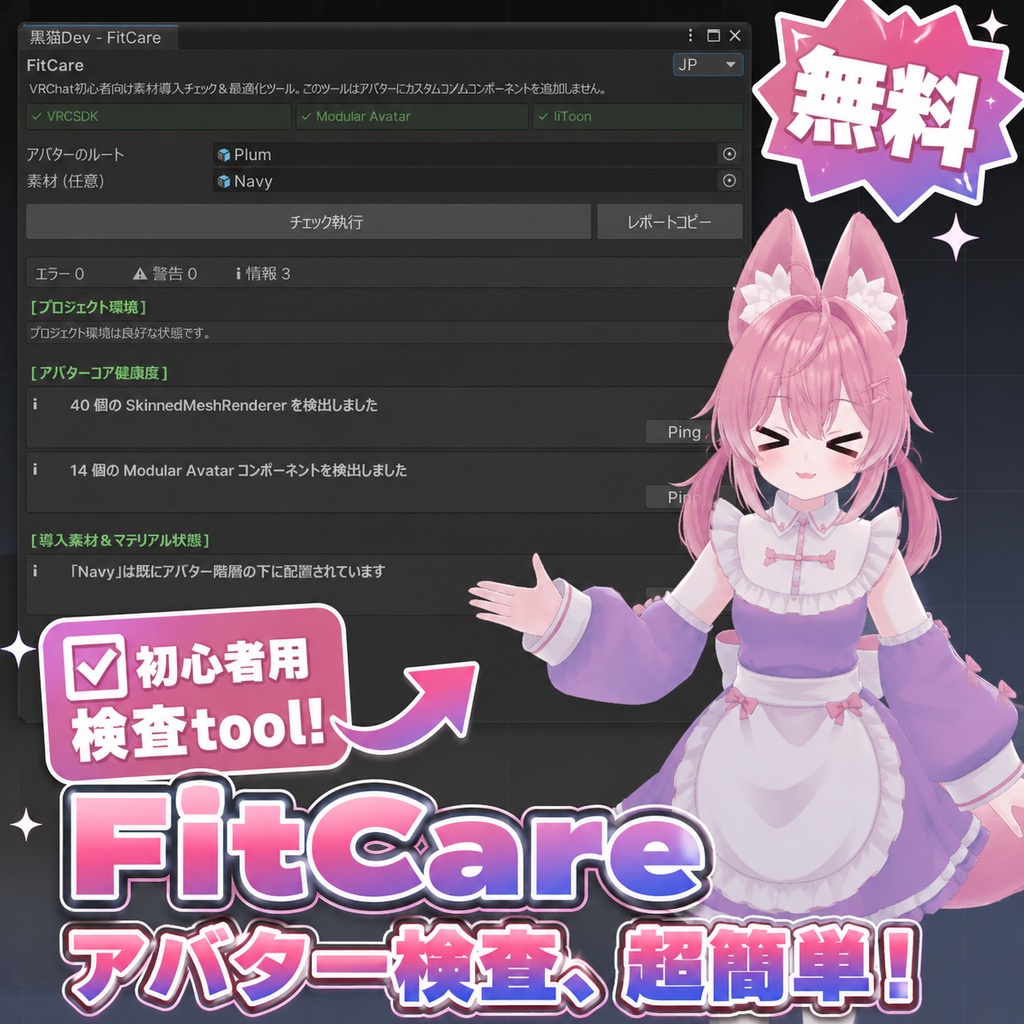

🇯🇵 日本語 【初心者向け】FitCare v1.0.1 VRChat アバター診断&ガイド付き修正ツール VRChat アバターの着せ替えや改変で起こりやすい問題を、アップロード前に確認する Unity Editor 拡張ツールです。 ・衣装スイッチや表情が動かない ・顔に赤い四角や不自然な色が出る ・衣装内に不要な Animator が残っている ・Missing Script が発生している ・テクスチャ使用量が多い FitCare は、検出した問題の原因候補と確認方法を表示します。 対応している項目では、確認ダイアログ付きの「推奨修正」も利用できます。 ━━━━━━━━━━━━━━━━━━ ▼ 主な機能 ━━━━━━━━━━━━━━━━━━ ・Missing Animation Path 検出 ・衣装内 Animator の確認 ・透明マテリアルの確認 ・Texture Memory の推定 ・Missing Script 検出 ・日本語/English/繁體中文 対応 ※診断結果は原因候補を示すもので、すべての問題を自動修復するものではありません。 ━━━━━━━━━━━━━━━━━━ ▼ 使い方 ━━━━━━━━━━━━━━━━━━ 1. パッケージを Unity にインポート 2. 「黒猫Dev > FitCare」を開く 3. Avatar Root を指定 4. 「Run Diagnostic」を実行 5. 結果を確認し、必要に応じて推奨修正または手動調整 ━━━━━━━━━━━━━━━━━━ ▼ 動作環境 ━━━━━━━━━━━━━━━━━━ ・Unity 2022.3.22f1 ・VRChat SDK3 Avatars ・Windows Unity Editor 関連ツール:Modular Avatar/lilToon ━━━━━━━━━━━━━━━━━━ ▼ 注意事項 ━━━━━━━━━━━━━━━━━━ 修正前に確認ダイアログを表示します。 一部の修正は Unity Undo に対応していますが、作業前にプロジェクトのバックアップをおすすめします。 Texture Memory は Avatar Performance Rank の参考項目のひとつです。Avatar の表示状態を保証するものではありません。 ━━━━━━━━━━━━━━━━━━ ▼ 利用規約 ━━━━━━━━━━━━━━━━━━ 個人利用・商用利用・改変可 ツール本体および改変版の再配布・転売は禁止 ━━━━━━━━━━━━━━━━━━ ▼ クレジット ━━━━━━━━━━━━━━━━━━ プラム -Plum-/あまとうさぎ(こまど)様 https://booth.pm/ja/items/7770415 ━━━━━━━━━━━━━━━━━━ ▼ 更新履歴 ━━━━━━━━━━━━━━━━━━ v1.0.1 ・修正前の確認ダイアログを追加 ・診断レポートの環境情報を改善 ・Missing Script の案内を改善 v1.0.0 ・初回リリース 🇺🇸 English 【Beginner-Friendly】FitCare v1.0.1 VRChat Avatar Diagnostic & Guided Fix Tool FitCare is a Unity Editor tool that checks common VRChat avatar and outfit problems before upload. ・Outfit toggles or expressions not working ・Red squares or strange colors on the face ・Unexpected Animator components inside outfits ・Missing Script components ・High texture memory usage FitCare shows possible causes and suggested steps. Supported items may also include a confirmation-based Recommended Fix. ━━━━━━━━━━━━━━━━━━ ▼ Features ━━━━━━━━━━━━━━━━━━ ・Missing Animation Path detection ・Outfit Animator check ・Transparent material check ・Estimated Texture Memory ・Missing Script detection ・Japanese/English/Traditional Chinese UI FitCare is a diagnostic tool and does not automatically repair every issue. ━━━━━━━━━━━━━━━━━━ ▼ How to Use ━━━━━━━━━━━━━━━━━━ 1. Import the package into Unity 2. Open “黒猫Dev > FitCare” 3. Assign the Avatar Root 4. Click “Run Diagnostic” 5. Review the results and apply a fix or follow the guide ━━━━━━━━━━━━━━━━━━ ▼ Tested Environment ━━━━━━━━━━━━━━━━━━ ・Unity 2022.3.22f1 ・VRChat SDK3 Avatars ・Windows Unity Editor Related tools: Modular Avatar/lilToon ━━━━━━━━━━━━━━━━━━ ▼ Notes ━━━━━━━━━━━━━━━━━━ FitCare displays a confirmation dialog before supported fixes. Some fixes support Unity Undo, but backing up your project before editing is recommended. Texture Memory is only one part of the Avatar Performance Rank and does not guarantee avatar visibility. ━━━━━━━━━━━━━━━━━━ ▼ License ━━━━━━━━━━━━━━━━━━ Personal use, commercial use, and modification are allowed. Redistribution or resale of the original or modified tool is prohibited. ━━━━━━━━━━━━━━━━━━ ▼ Credits ━━━━━━━━━━━━━━━━━━ Plum by Amatousagi https://booth.pm/ja/items/7770415 ━━━━━━━━━━━━━━━━━━ ▼ Update History ━━━━━━━━━━━━━━━━━━ v1.0.1 ・Added confirmation dialogs ・Improved report environment information ・Improved Missing Script guidance v1.0.0 ・Initial release 🇹🇼 繁體中文 【新手友善】FitCare v1.0.1 VRChat Avatar 健康檢查&引導式修正工具 FitCare 是一款 Unity Editor 工具,可在上傳前檢查常見的 Avatar 換裝問題。 ・衣服開關或表情沒有反應 ・臉上出現紅色方塊或異常色塊 ・衣服內殘留非預期的 Animator ・出現 Missing Script ・貼圖記憶體使用量偏高 FitCare 會顯示可能原因與檢查方式。 部分項目也提供附確認對話框的「建議修正」。 ━━━━━━━━━━━━━━━━━━ ▼ 核心功能 ━━━━━━━━━━━━━━━━━━ ・Missing Animation Path 檢查 ・衣服 Animator 檢查 ・透明材質檢查 ・Texture Memory 估算 ・Missing Script 檢查 ・繁體中文/日本語/English UI FitCare 是診斷與引導工具,不會自動修復所有問題。 ━━━━━━━━━━━━━━━━━━ ▼ 使用方式 ━━━━━━━━━━━━━━━━━━ 1. 將套件匯入 Unity 2. 開啟「黒猫Dev > FitCare」 3. 指定 Avatar Root 4. 點擊「Run Diagnostic」 5. 查看結果,使用建議修正或依指引手動調整 ━━━━━━━━━━━━━━━━━━ ▼ 測試環境 ━━━━━━━━━━━━━━━━━━ ・Unity 2022.3.22f1 ・VRChat SDK3 Avatars ・Windows Unity Editor 相關工具:Modular Avatar/lilToon ━━━━━━━━━━━━━━━━━━ ▼ 注意事項 ━━━━━━━━━━━━━━━━━━ 執行支援的修正前會顯示確認對話框。 部分修正支援 Unity Undo,但仍建議在修改前備份專案。 Texture Memory 只是 Avatar Performance Rank 的其中一項參考,無法保證 Avatar 一定會顯示。 ━━━━━━━━━━━━━━━━━━ ▼ 使用授權 ━━━━━━━━━━━━━━━━━━ 允許個人使用、商業使用與自行修改。 禁止工具本體或修改版本的二次散布與轉售。 ━━━━━━━━━━━━━━━━━━ ▼ Credits ━━━━━━━━━━━━━━━━━━ プラム -Plum-/あまとうさぎ(こまど)様 https://booth.pm/ja/items/7770415 ━━━━━━━━━━━━━━━━━━ ▼ 更新履歷 ━━━━━━━━━━━━━━━━━━ v1.0.1 ・新增修正前確認對話框 ・改善診斷報告環境資訊 ・改善 Missing Script 引導 v1.0.0 ・初次發布