
VModular 1.0.0
- VModularDigital0 JPY
- VModular PlusDigital1,100 JPY
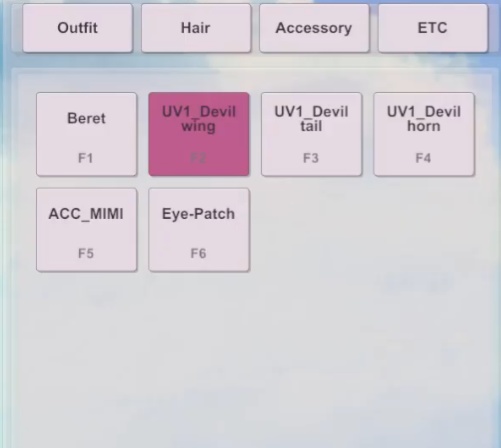
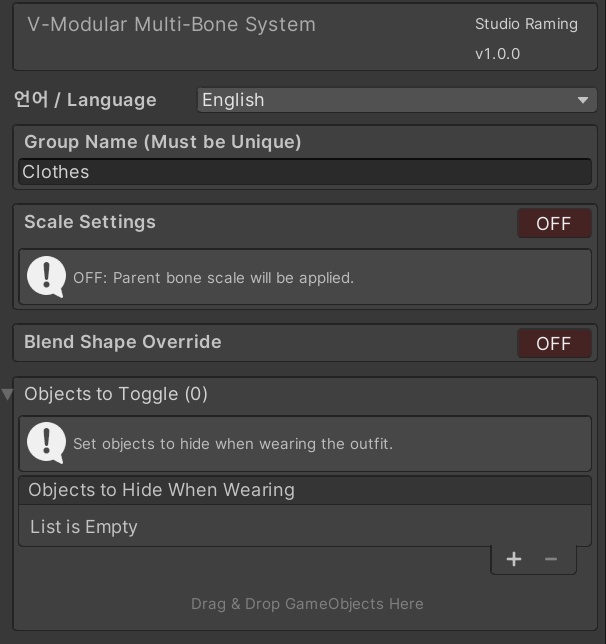


VModular / VModular Plus Set up avatar outfits, hair and accessories in Unity. ■ Who it is for A modular tool for attaching outfits and accessories to an avatar and preparing their equipped state for the target application. It uses the avatar's Animator and bone setup to work with outfits and single-bone accessories. ■ Core features • Outfits: connect parts using matching avatar bone names, with equip, remove and toggle actions. • Hair and accessories: attach a specified source bone to a target Humanoid bone. • Linked settings: handle configured blendshapes and objects to hide. Parts with unmatched bone names may be skipped with a warning. Check attachments and movement after setup. The tool does not automatically reshape clothes to fit a body or convert arbitrary skeletons. ■ Install and quick start 1. Keep a separate backup of your project and original avatar. 2. Import the supplied Unity package. 3. Open VModular > VModular Manager. 4. Follow the manager's usage guide and the videos below to configure outfits, hair and accessories. 5. Prepare the build according to the target application's custom-script support. ■ Prepare for your target application Use Non-script mode for environments such as VSF and MELIGO that do not support custom scripts. In this mode, build preparation creates a copy of the original, equips the copy and removes its scripts. For Warudo custom-script builds, follow the dedicated guide below. Refer to the compatibility information below for supported Unity versions. ■ Plus-only features Shortcut settings manager Configure object switching with Ctrl, Alt and Shift combinations and per-category Single / Toggle modes. Shortcuts depend on keyboard input reaching the running application. Wardrobe UI generator Generate switching UI from configured VModular targets and the shortcut manager. Open it from VModular > VModular UI Generator in Unity. This product was developed with the help of code-generation AI. ■ Choose your edition VModular provides the core outfit, hair and accessory setup tools. VModular Plus adds the shortcut settings manager and wardrobe UI generator. Check your selected download option.
한국어 · VModular / VModular Plus
VModular / VModular Plus Unity에서 아바타의 의상·헤어·액세서리를 구성하세요. ■ 이런 작업에 사용하세요 아바타에 의상과 액세서리를 연결하고, 사용할 앱에 맞춰 장착 상태를 준비하는 모듈러 도구입니다. 아바타의 Animator와 본 구성을 바탕으로 의상과 단일 본 액세서리를 다룹니다. ■ 주요 기능 • 의상 구성: 의상 파트와 아바타의 본 이름을 기준으로 연결하고 착용·해제·토글합니다. • 헤어·액세서리 부착: 지정한 부착 본을 대상 Humanoid 본에 연결합니다. • 함께 바꿀 항목 설정: 구성에 따라 블렌드셰이프와 숨길 오브젝트를 함께 처리합니다. 본 이름이 맞지 않는 파트는 경고 후 건너뛸 수 있습니다. 작업 후 연결 상태와 움직임을 확인해 주세요. 체형에 맞게 옷을 자동 변형하거나 임의의 골격을 자동 변환하는 도구는 아닙니다. ■ 설치와 빠른 시작 1. 프로젝트와 아바타 원본을 별도로 보관합니다. 2. 제공된 Unity 패키지를 Import합니다. 3. VModular > VModular Manager를 엽니다. 4. 매니저의 사용법과 아래 가이드 영상을 따라 의상·헤어·액세서리를 설정합니다. 5. 사용할 앱의 스크립트 지원 여부에 맞춰 빌드를 준비합니다. ■ 사용할 앱에 맞게 준비하세요 VSF·MELIGO처럼 커스텀 스크립트를 지원하지 않는 환경에서는 Non-script 모드로 작업해 주세요. 해당 모드의 빌드 준비는 원본을 복제하고 복제본에 장착한 뒤 스크립트를 제거합니다. Warudo용 커스텀 스크립트 빌드는 아래 전용 가이드를 참고해 주세요. 지원 Unity 버전은 아래 호환 안내를 확인해 주세요. ■ Plus 전용 기능 자체 단축키 설정 매니저 Ctrl·Alt·Shift 조합키와 카테고리별 Single / Toggle 모드로 오브젝트 전환을 구성합니다. 단축키는 해당 실행 환경에 키 입력이 전달되는 상태에서 사용합니다. 옷장 UI 제너레이터 설정한 VModular 대상과 단축키 매니저를 찾아 전환용 UI를 생성합니다. Unity 상단 VModular > VModular UI Generator에서 열 수 있습니다. 이 제품은 코드 생성 AI의 도움을 받아 제작되었습니다. ■ 에디션을 확인해 주세요 VModular는 기본 의상·헤어·액세서리 구성 도구입니다. VModular Plus에는 자체 단축키 설정 매니저와 옷장 UI 제너레이터가 추가됩니다. 선택한 다운로드 옵션을 확인해 주세요.
日本語 · VModular / VModular Plus
VModular / VModular Plus Unityでアバターの衣装・ヘア・アクセサリーを設定。 ■ こんな作業に アバターに衣装やアクセサリーを接続し、使用するアプリに合わせて装着状態を準備するモジュラーツールです。アバターのAnimatorとボーン構成を基準に、衣装や単一ボーンのアクセサリーを扱います。 ■ 主な機能 • 衣装:衣装パーツとアバターのボーン名を基準に接続し、装着・解除・トグル切り替えに対応。 • ヘア・アクセサリー:指定した装着元ボーンを、対象のHumanoidボーンに接続。 • 連動設定:設定済みのブレンドシェイプや非表示対象オブジェクトも処理。 ボーン名が一致しないパーツは、警告のうえスキップされる場合があります。設定後は装着状態と動作をご確認ください。体型に合わせた衣装の自動変形や、任意の骨格の自動変換を行うツールではありません。 ■ 導入とクイックスタート 1. プロジェクトと元のアバターを別途保存します。 2. 同梱のUnityパッケージをImportします。 3. VModular > VModular Managerを開きます。 4. マネージャー内の使い方と下の動画に沿って、衣装・ヘア・アクセサリーを設定します。 5. 使用するアプリのカスタムスクリプト対応に合わせて、ビルドを準備します。 ■ 使用するアプリに合わせて準備 VSF・MELIGOなど、カスタムスクリプトを使えない環境ではNon-scriptモードで作業してください。このモードのビルド準備では、元データを複製し、複製側に装着してからスクリプトを削除します。Warudo用カスタムスクリプトのビルドは、下の専用ガイドをご参照ください。 対応Unityバージョンは、下の互換性案内をご確認ください。 ■ Plus専用機能 ショートカット設定マネージャー Ctrl・Alt・Shiftの組み合わせと、カテゴリごとのSingle / Toggleモードでオブジェクトの切り替えを設定します。ショートカットは、実行環境にキー入力が届く状態で使用します。 ワードローブUIジェネレーター 設定したVModularの対象とショートカットマネージャーを検索して、切り替え用UIを生成します。Unity上部のVModular > VModular UI Generatorから開けます。 本製品は、コード生成AIの支援を受けて制作されています。 ■ エディションの確認 VModularは衣装・ヘア・アクセサリー設定の基本ツールです。VModular Plusにはショートカット設定マネージャーとワードローブUIジェネレーターが追加されます。選択したダウンロードオプションをご確認ください。
Guides · Compatibility · Terms
-Video Guide- https://youtu.be/IF9Fpz05BLE https://youtu.be/QSOS8teiHGI https://youtu.be/dZnDvIa7p60 https://youtu.be/oaR9kt4DZmQ Video order: General demo 1 / General demo 2 / Warudo custom-script build guide / Plus shortcut manager and UI generator guide Compatible Unity versions 21.3.14 ~ 21.3.44f 19.4.31f 23.2.17f It does not guarantee compatibility with other versions. It provides machine translation in three languages. - Terms and Conditions of Use - Permit commercial activities using the utility. Do not redistribute files containing the utility (Unity Project, Unity Package) Prohibiting resale of such utility Please share this utility removed when sharing projects such as commissions. Alternatively, other parties to which the file is provided must also have permission to purchase and use this utility.
추가 FAQ / Additional FAQ / 追加FAQ
자주 묻는 질문 · VModular / VModular Plus Q. VSeeFace나 MELIGO에서도 Plus 단축키와 옷장 UI를 그대로 사용할 수 있나요? A. 상품에서 안내하는 Plus 기능은 자체 단축키 설정 매니저와 옷장 UI 제너레이터입니다. 다만 VSF·MELIGO처럼 커스텀 스크립트를 사용할 수 없는 환경에서는 Non-script 모드로 작업해야 합니다. 단축키·UI의 사용 범위는 실행 앱과 내보내기 방식에 따라 달라지므로 해당 환경의 설정을 확인해 주세요. Q. 가이드 영상에 나온 도구나 버튼이 보이지 않아요. A. VModular와 VModular Plus 중 설치한 제품, 버전, 영상 링크와 해당 시간대를 함께 알려주세요. 툴 내부 사용법도 확인해 주세요. 찾는 도구나 버튼이 보이는 화면도 함께 보내주시면 확인에 도움이 됩니다. ━━━━━━━━━━━━━━━━━━━━ FAQ · VModular / VModular Plus Q. Can I use Plus hotkeys and the wardrobe UI unchanged in VSeeFace or MELIGO? A. Plus includes its own shortcut settings manager and wardrobe UI generator. However, environments that cannot use custom scripts, such as VSF and MELIGO, require Non-script mode. Hotkey and UI availability depends on the target app and export method. Please check the settings for your environment. Q. A tool or button shown in a guide video is missing. A. Please tell us whether you installed VModular or VModular Plus, the version, the video link and timestamp. Also check the usage guide inside the tool. A screenshot showing the tool or button you are looking for will also help us check. ━━━━━━━━━━━━━━━━━━━━ よくある質問 · VModular / VModular Plus Q. VSeeFaceやMELIGOでPlusのショートカットや衣装UIをそのまま使えますか? A. Plusには独自のショートカット設定マネージャーと衣装UIジェネレーターがあります。ただし、VSF・MELIGOなどカスタムスクリプトを使えない環境ではNon-scriptモードで作業する必要があります。ショートカットやUIの利用範囲は使用アプリと書き出し方法によって異なります。お使いの環境に合った設定をご確認ください。 Q. ガイド動画にあるツールやボタンが見当たりません。 A. 導入した製品がVModularかVModular Plusか、バージョン、動画リンク、該当時間をお知らせください。ツール内の使い方もご確認ください。お探しのツールやボタンが映っている画面もお送りいただけると、確認に役立ちます。
